

An ordinary gamepad can make a favorite game feel needlessly demanding when its buttons require more reach, force, or grip stability than your hands comfortably provide. The best adaptive controller is not a universal answer, it is a setup that places essential inputs where you can reliably use them, whether you play at a desk, from a wheelchair, or with a handheld device.
This guide separates dedicated accessibility hardware from ergonomic and highly configurable controllers that may suit particular mobility needs. We assessed platform support, button placement, mounting options, remapping, and expansion potential, while keeping clear audio in mind too. A compatible headset from our gaming IEM buying guide can make communication and sound cues easier to follow.
Quick answer
This guide compares 10 picks, with RAM Wheelchair Arm Mount for Xbox Adaptive Controller ranked first. HORI Split Pad Pro Ergonomic Nintendo Switch Controller holds the highest customer rating among them. Xbox Elite Wireless Controller Series 2 | Pro Gaming has the most customer reviews.

Pros
- Enables hands-free gaming for wheelchair users with precision positioning
- Works with major wheelchair brands plus universal mounting compatibility
- Modular design allows swapping between controller and other accessories like phone/tablet mounts
- Robust composite build quality designed for long-term reliability
- Simple installation with included hardware and tools
Cons
- Limited to 1.2-pound weight capacity, restricting use to lightweight controllers and accessories
- Single review available limits ability to assess long-term durability from user feedback
- Not water-resistant, requiring protection in wet environments
The RAM Wheelchair Arm Mount for Xbox Adaptive Controller addresses a genuine accessibility gap in gaming. This mount is specifically designed for wheelchair users who want to enjoy gaming without handheld controller strain or fatigue, making it an important mobility solution for inclusive gaming experiences.
The standout feature is the dual diamond-base design with double socket swivel arm that delivers precise 90-degree tilt adjustment. This means users can angle the adaptive controller exactly where it's needed for comfort and visibility, whether mounted higher for seated play or angled for different arm positions throughout the day.
Build quality stands out with high-strength composite construction that feels premium and durable. The universal mounting system works seamlessly with Invacare, Permobil, and Quickie wheelchairs, plus any other universal arm track mounting point, giving users genuine flexibility without worrying about compatibility issues.
The 1.2-pound weight capacity is adequate for the Xbox Adaptive Controller but limits use to lightweight accessories. Additionally, the lack of water resistance means users need to protect the mount in outdoor or wet environments, which could affect durability in some settings.
Overall, this is a well-engineered solution that meaningfully improves gaming accessibility for wheelchair users. The modular design that lets you swap accessories keeps the system flexible beyond gaming, making it a smart investment for anyone using an adaptive controller on a wheelchair.
Compatibility: Microsoft Xbox Adaptive Controller, Invacare, Permobil, Quickie wheelchairs, and universal wheelchair arm tracks
Design: Dual diamond-base adapters with 1.5-inch ball and double socket swivel arm, 90-degree tilt capability, modular 1.5-inch ball connection system
Materials: High-strength composite construction
Weight Capacity: 1.2 pounds maximum
Dimensions: Rectangular shape, 1.1 pounds item weight
Mounting Type: Wheelchair arm track mount
Included Accessories: Universal hardware pack, hex wrench for installation
Water Resistance: Not water resistant
Model: RAM-238-WCT-2-MS2

Pros
- Exceptional build quality with responsive, low-pressure actuation buttons
- Flexible layout options accommodate various mobility needs and preferences
- Works seamlessly with PS5 Access Controller out of the box
- Variety of button types helps gamers find the right fit for their abilities
- Thoughtfully designed with genuine accessibility needs in mind
Cons
- Variable trigger switches come in only one size, limiting options for users with fine motor skill limitations
- Premium pricing reflects specialized accessibility focus
- Requires experimentation to find optimal button mapping for individual needs
The Logitech G Adaptive Gaming Kit is a specialized accessory designed to unlock the full potential of Sony's Access Controller for PlayStation 5. This product is built for gamers with mobility differences, disabilities, or injuries who want customizable control options. It represents a meaningful step toward inclusive gaming by providing flexibility that standard controllers cannot offer.
The standout feature is the eight plug-and-play buttons and triggers that come in multiple sizes and pressure sensitivities. Users consistently report that the low-pressure actuation is responsive and reliable, allowing them to game with minimal physical strain. The hook-and-loop gaming board means you can arrange buttons however you need them, and the included PS5 label system makes gameplay seamless without guesswork.
Build quality is excellent, with users praising the durability and precision of the buttons and triggers. The kit includes large buttons, light-touch buttons, small buttons, and variable triggers in various combinations, giving most users options to match their specific needs. The one-year warranty provides additional assurance of Logitech's confidence in the product.
One limitation emerged from customer feedback: the variable trigger switches come in only one size, which leaves some gamers with fine motor skill limitations without adequate options. Additionally, this is a premium product, and the price reflects its specialized design rather than mass-market accessibility.
Overall, the Logitech G Adaptive Gaming Kit is a well-engineered solution for PS5 gamers seeking customizable accessibility. It delivers on its promise of enabling play for people with diverse abilities, backed by genuine five-star endorsements from gamers whose lives it has improved. Best for those committed to finding the right control setup for their unique needs.
Compatibility: Sony Access Controller for PS5
Interface: Standard jack connections, plug-and-play
Included Components: Hook-and-loop ties, 2 large buttons, 2 light-touch buttons, 2 small buttons, 2 variable triggers
Board System: Hook-and-loop gaming board for flexible layout
Labeling: PS5 stick-on label system included
Model Number: 943-001253
Weight: 1.24 kg
Dimensions: 5 x 5 x 5 inches
Warranty: 1 year limited hardware warranty
Ideal For: PS5 gamers with mobility challenges, arthritis, injuries, paralysis, or other disabilities seeking customizable controls. Best suited for those willing to invest in personalized setup for their specific needs.
Consider If: You own a PS5 Access Controller and need button or trigger options beyond standard configurations. You want flexibility to adjust your setup as your needs change or evolve.
May Not Be Ideal For: Users seeking a one-size-fits-all solution without setup experimentation. Those needing multiple sizes of variable triggers for racing or precision games with fine motor demands.

The Split Pad design replaces Joy-Cons with full-size grips that fill your palms, reducing the cramping common with smaller controllers. Ergonomic contouring supports natural wrist angles during handheld sessions, and 16 buttons provide standard layout without requiring finger gymnastics. Official Nintendo licensing ensures reliable functionality, while the portable form factor maintains comfort whether you are at home or traveling with your Switch.
Pros
- Full-size ergonomic grips reduce hand strain during handheld play
- Substantially larger sticks and buttons improve reach and accuracy
- Assignable rear triggers minimize thumb repositioning
- Durable build resists drift issues common in standard Joy-Cons
Cons
- No motion controls, HD rumble, or NFC support
- Functions only in handheld mode, not tabletop or docked
The HORI Split Pad Pro tackles a common Nintendo Switch accessibility barrier: the cramped, undersized Joy-Con design. Full-size ergonomic grips, substantially larger analog sticks, and a proper D-pad reduce hand strain during handheld sessions, making extended play more sustainable for players with larger hands or grip discomfort. Assignable rear triggers let you map frequently used inputs to back buttons, minimizing the need to reposition thumbs across the face. Turbo functionality automates repetitive button presses, useful for games with high-frequency input demands. The controller responds instantly with no detectable input lag, and user reports confirm long-term durability without the stick drift issues that plague standard Joy-Cons. The translucent black build feels solid despite its lightweight design, and it fits into the Switch dock while attached so you can transition between handheld and docked play without swapping controllers. The larger form factor distributes weight more evenly across your hands compared to the stock setup, reducing localized pressure points during long sessions.
This controller benefits Switch players who experience hand fatigue, cramping, or difficulty reaching buttons on standard Joy-Cons. The full-size ergonomic design and assignable rear triggers suit players with larger hands or those who need to reduce finger travel. Skip this if you rely on motion controls, HD rumble, or NFC functionality for your games, or if you frequently play in tabletop or docked mode where this controller cannot function.
Connectivity: Wireless via Nintendo Switch rails
Button Configuration: 16 buttons including analog sticks, D-pad, shoulder buttons, and assignable rear triggers
Weight: 8 ounces
Dimensions: 6.69 x 6.22 x 2.17 inches
Color: Translucent Black
Compatibility: Nintendo Switch, Nintendo Switch OLED Model
Power Source: Draws power from Switch handheld unit
Certification: Officially Licensed by Nintendo
Model Number: NSW-298U
Features: Assignable rear triggers, Turbo functionality, dock-compatible design

The TMR sticks deliver precise input with reduced physical effort, which matters when extended sessions cause hand fatigue. With 16 programmable buttons and trigger stops, you can customize controls to minimize awkward stretches or repeated motions. Wireless connectivity across PC and Xbox platforms means you can position yourself comfortably without cable constraints, and the ergonomic design supports natural hand positioning during long play.
Pros
- TMR Hall Effect sticks eliminate drift for reliable long-term use
- Four remappable back buttons reduce reach and hand strain
- Granular app control over stick curves, dead zones, and button mapping
- Dual trigger system adapts resistance to game type and comfort
Cons
- 1000Hz polling advantage limited to PC
- Charging dock required instead of replaceable batteries
For players managing hand fatigue or precision challenges, the GameSir G7 Pro removes a major source of frustration: stick drift. TMR joysticks with Hall Effect sensors ensure consistent, accurate input without the degradation that forces many gamers to replace controllers annually. This matters especially for adaptive gaming, where control reliability directly affects accessibility. The dual trigger system switches between Hall Effect and Micro switches, letting you match trigger resistance to your comfort and response needs. Four remappable back buttons reduce the need to reach across the face, and the GameSir Nexus app allows granular adjustments to stick curves and dead zones so you can tailor sensitivity to your grip and range of motion. The included magnetic faceplate with swappable D-pads and grip covers provides physical customization options. Build quality is solid with balanced weight distribution, and the 1000Hz polling rate on PC delivers low-latency response for reaction-dependent games. The charging dock keeps the controller ready without fumbling with batteries.
Connectivity: 2.4GHz wireless and wired USB connection
Compatibility: Xbox Series X, Xbox Series S, Xbox One, Windows PC
Polling Rate: 1000Hz on PC (wired and 2.4G), standard on consoles
Joysticks: TMR with Hall Effect sensors, multiple stick lengths included
Triggers: Dual mode with Hall Effect and Micro switches, user-switchable
Buttons: 16 total including 4 remappable buttons (R5/L5 mini bumpers, R4/L4 back buttons)
D-pad: Optical Micro switch with 3 interchangeable D-pad types
Battery: 1200mAh built-in, charging dock included
Weight: 1.93 kg package weight
Warranty: 1 year manufacturer warranty
Color: Black with Zenless Zone Zero Edition design collaboration
This controller suits Xbox and PC gamers seeking drift-free precision and extensive customization to match physical needs or play style. The remappable back buttons and adjustable sensitivity make it valuable for players who benefit from reduced hand movement or tailored input response. Skip this if you prefer hot-swappable AA batteries over dock charging, play primarily on console where the 1000Hz advantage is unavailable, or want the simplest possible setup without app-based tuning.

Pros
- Hall Effect technology eliminates stick drift issues that plague standard analog controllers
- Genuine cross-platform support covers the widest range of gaming devices on the market
- Premium build quality and responsive controls suitable for competitive play in demanding titles
- Customizable design with swappable magnetic parts offers personalization rarely seen in mobile controllers
- Strong customer ratings reflect reliable performance and durability in real-world use
Cons
- Price point sits at the premium end for mobile controllers, making it a significant investment compared to budget alternatives
- Battery life of 500mAh per side may require frequent charging during extended gaming marathons
- Learning curve for customizing magnetic components could be confusing for less tech-savvy users
The GameSir G8 Plus is a premium wireless gamepad engineered for players who refuse to compromise on control quality. Whether you are a competitive mobile gamer grinding through Genshin Impact and Call of Duty Mobile, a Nintendo Switch enthusiast tackling demanding titles, or a PC player seeking console-grade ergonomics, this controller delivers across all platforms with genuine universal compatibility.
The standout feature is undeniably the Hall Effect joysticks and triggers, which use magnetic sensing instead of mechanical potentiometers. This eliminates the stick drift that plagues standard controllers within months of use. Combined with the 6-axis gyroscope for motion control and dual vibration motors for haptic feedback, gameplay feels responsive and immersive. Performance in competitive titles is noticeably tighter than budget alternatives.
Build quality is exceptionally solid. The controller feels premium in hand, with console-sized buttons and sticks that provide authentic control during long sessions. The extendable phone mount accommodates most devices securely, and the customizable magnetic components let you swap colors and functionality. These design touches show GameSir prioritized both form and function.
Two practical limitations exist: the 500mAh battery capacity requires frequent charging during marathon sessions, and customizing the magnetic parts has a learning curve. The price also reflects premium positioning, making it a significant investment versus budget controllers. However, if durability and multi-platform performance matter to you, the investment pays dividends through longevity.
Verdict: The GameSir G8 Plus is the best choice for players who value precision, build quality, and cross-platform versatility. Its Hall Effect tech future-proofs against stick drift, while universal compatibility and customization options justify the premium price for serious gamers across mobile, Switch, and PC ecosystems.
Connectivity: Bluetooth for mobile and Switch, Wired USB for PC. Compatibility: Nintendo Switch, iOS, Android, tablets, PC. Controls: 14 buttons with Hall Effect analog sticks and triggers. Motion Sensing: 6-axis gyroscope. Feedback: Dual vibration motors. Battery: 500mAh per side, rechargeable via USB-C. Weight: 314g. Design: Extendable phone mount, customizable magnetic components, console-sized ergonomic layout. Color: Grey.
Best For: Competitive gamers playing across multiple platforms, casual players seeking durability and comfort, anyone tired of dealing with stick drift issues. Consider If You: Game on Switch and mobile devices, value precision controls in competitive titles, want a controller that lasts years without degradation. Skip If You: Only game on one platform and seek the absolute lowest price, prefer lightweight minimal controllers, game casually without performance demands. Budget Alternative: Opt for standard mobile controllers if you game casually on a single platform and prefer lower cost over features. Premium Upgrade: This is already a premium choice, representing excellent value for multi-platform serious gamers.
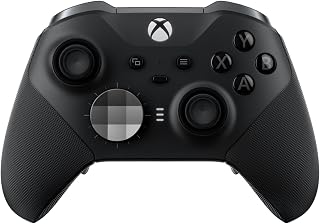
Adjustable thumbsticks let you swap between different heights and shapes to match your grip strength and range of motion. The 18 button configuration includes rear paddles that reduce the need to reach for face buttons, easing strain on fingers and wrists. Trigger locks shorten travel distance for faster, less forceful presses, and compatibility across Xbox and Windows ensures consistent comfort regardless of platform.
Pros
- Adjustable thumbstick tension adapts to grip strength and control preference
- Hair trigger locks reduce pull distance for faster response
- Six thumbstick toppers and two D-pads fit varied hand sizes
- Three onboard profiles with instant switching via Profile button
Cons
- Premium price reflects advanced feature set
- Customization depth requires time investment in Xbox Accessories app
Precision and adaptability define the Xbox Elite Series 2, making it a strong choice when physical comfort and control customization matter. Adjustable-tension thumbsticks let you dial in resistance that matches your grip strength and motor control, while shorter hair trigger locks reduce the pull distance required for shooting or accelerating. Six interchangeable thumbstick toppers and two D-pads provide physical options to suit hand size and preferred grip style. Four paddles can be remapped to consolidate frequently used actions, reducing the need to stretch fingers across the face buttons. The Xbox Accessories app unlocks detailed control over dead zones, button assignments, and stick sensitivity curves. Three onboard profiles switch instantly via a dedicated button, so you can maintain separate configurations for different game genres or accessibility needs. The wrap-around rubberized grip improves hold security during extended sessions, and the 40-hour battery minimizes charge interruptions. Connectivity through Xbox Wireless, Bluetooth, or USB-C ensures compatibility across Xbox consoles, Windows PCs, and cloud gaming platforms.
Connectivity: Xbox Wireless, Bluetooth, USB-C cable (included)
Compatibility: Xbox Series X/S, Xbox One, Windows PC, Xbox Cloud Gaming
Battery Life: Up to 40 hours rechargeable
Buttons: 18-button configuration
Included Accessories: 6 thumbstick toppers, 4 paddles, 2 D-pads, carrying case, charging dock, USB-C cable
Audio: 3.5mm headset jack
Customization: 3 programmable profiles, button remapping via Xbox Accessories app, adjustable dead zones, adjustable thumbstick tension
Weight: 16 ounces
Dimensions: 8 inches D x 8 inches W x 4 inches H
Color: Black
Warranty: Limited Warranty
Choose this if you need deep customization across thumbstick tension, trigger pull, and button layout to match your physical capabilities and play style. The adjustable components and robust profile system benefit players who require tailored sensitivity or reduced hand travel. Skip this if you're satisfied with standard controller ergonomics, play casually without needing granular tuning, or prioritize budget over premium materials and customization depth.

Pros
- Excellent for users with RSI, hand fatigue, or motor skill challenges, offering genuine comfort improvement
- Hall Effect joysticks provide durability and precision without drift concerns
- Flat layout enables full finger control without relying solely on thumbs
- Highly customizable with programmable buttons and 3 profiles for different game types
- Quality build and responsive controls exceed expectations for the price point
Cons
- Steep learning curve due to unconventional button layout, requiring adaptation for traditional gamers
- Not ideal for action-intensive games during initial adjustment period
- Smaller stick size takes getting used to compared to standard Xbox controllers
The 8BitDo Lite SE is an officially licensed Xbox controller designed specifically for accessibility and ergonomic comfort. Unlike traditional gamepads, it features a flat layout with buttons positioned across the face rather than relying on thumb sticks for primary control. This makes it perfect for players dealing with RSI, arthritis, motor skill challenges, or anyone who finds standard controller grips uncomfortable during extended play sessions.
The standout features include Hall Effect joysticks that eliminate drift concerns, programmable Super Buttons for instant function mapping, and a 3.5mm audio jack with microphone mute button for seamless communication. With 3 customizable profiles and full software support, you can tailor the controller to your specific gaming needs. Real-world testing shows significant comfort improvements for players with hand fatigue, allowing them to enjoy games they previously couldn't comfortably play.
Build quality is solid with responsive controls and a lightweight, compact design that sits flat on desks. The smaller joystick size takes brief adjustment but proves durable and precise. The wireless 2.4G connection works reliably across Xbox Series X/S, Xbox One, and Windows 10+ systems without noticeable lag.
The main drawback is the learning curve. The button layout is unconventional compared to standard controllers, causing muscle memory conflicts for experienced players initially. Action-heavy games may feel awkward during the first few hours. However, once accustomed to the layout, this becomes a non-issue for many users.
The 8BitDo Lite SE delivers genuine value for accessibility and comfort-focused gaming. If you've struggled with hand fatigue, RSI, or simply want a unique gaming experience, this controller is worth the investment. It's not a replacement for every gaming scenario, but for its intended purpose, it excels.
This controller is ideal for players with RSI, carpal tunnel, arthritis, or other hand-related conditions that make traditional controllers painful. The flat layout reduces repetitive thumb strain significantly.
It's also excellent for players with motor skill challenges or accessibility needs. Parents and caregivers have reported success introducing gaming to children with developmental conditions through this controller's intuitive design.
Creative professionals using it for non-gaming applications, like camera control in flight simulators or video editing software, appreciate the customizable layout and precise stick control.
Casual gamers or retro gaming enthusiasts who enjoy unique controller designs and don't mind a learning curve will find this refreshing compared to mainstream options.
Connectivity: 2.4G wireless for Xbox and Windows PC
Compatibility: Xbox Series X/S, Xbox One, Windows 10 and above
Joysticks: Hall Effect technology, highly sensitive with quick response
Buttons: Unified face layout with programmable Super Buttons and 3 profiles
Audio: 3.5mm audio jack with dedicated microphone mute button
Power: Battery powered with rechargeable capability
Dimensions: 4.09 x 6.46 x 7.76 inches, weighs 670g
Software: Full customization via 8BitDo Ultimate Software X

Pros
- Exceptional accessibility design that genuinely accommodates diverse mobility ranges
- Deep customization options with 30 profiles and programmable button inputs
- Seamless integration with existing DualSense controllers for enhanced gameplay
- Thoughtfully engineered adjustable components for long-term comfort
- Wireless connectivity with reliable battery power for untethered play
Cons
- No customer reviews available to validate real-world performance and durability
- Steep learning curve required to fully utilize all 30 profile configurations
The PlayStation Access Controller 5 is Sony's purpose-built solution for gamers with disabilities seeking a more comfortable and accessible gaming experience on PS5. This isn't a gimmick product, but rather a thoughtfully engineered controller that prioritizes customization and flexibility as its core strengths.
What sets this controller apart is its modular design philosophy. Swappable button and stick caps let you optimize physical ergonomics, while adjustable stick length means you're not locked into one position. The real power emerges in the software layer, where you can create and store up to 30 individual control profiles, instantly switching between them mid-game. Button mapping goes beyond simple remapping, allowing toggle commands, dual-input combinations, and selective disabling to prevent accidental presses.
The 360-degree orientation capability is genuinely innovative, letting you operate the controller from any angle without compromising functionality. Whether placed on a flat surface, wheelchair tray, or mounted via AMPS pattern hardware, this flexibility opens up play possibilities for users with varying mobility constraints. The ability to pair two Access controllers together, or combine them with standard DualSense controllers to unlock haptic feedback and adaptive triggers, adds valuable versatility.
Build quality appears solid based on the specifications, though the lack of user reviews means we cannot yet validate long-term durability or reliability. The 1-year manufacturer warranty provides baseline protection. The $87.99 price point reflects its specialized design and engineering, though cost may be a barrier for some players who need accessibility solutions.
The PlayStation Access Controller 5 represents a meaningful step forward in accessible gaming hardware. If you have mobility limitations and play on PS5, this controller deserves serious consideration as it offers customization depth and flexibility that standard controllers simply cannot match.
This controller was engineered specifically for players with disabilities, featuring multiple accommodation layers. The adjustable stick extension arm can be lengthened or shortened and locked at your preferred position, reducing strain during extended play sessions. Swappable stick caps and button caps let you find the shape and texture combination that works best for your hand and mobility range.
The 360-degree mounting capability means you're not constrained to traditional handheld positions. Place it on a flat surface, attach it to your wheelchair tray, or mount it via standard AMPS hardware, giving you complete control over your playing setup. The 30 programmable profiles let you optimize control layouts for different games or play styles, stored directly on the controller for instant access.
Button configuration options go deep, allowing you to toggle commands on or off, map two commands to a single button, or disable buttons entirely to prevent accidental inputs. This level of control transforms the controller from a peripheral into a true accessibility tool.
Connectivity: Wireless via USB-C, Battery powered
Buttons: 10 configurable buttons with custom mapping support
Profiles: Up to 30 profiles configurable from PS5 console settings, 3 profiles storable on controller
Compatibility: Sony PlayStation 5, works with DualSense and DualSense Edge controllers
Mounting: AMPS pattern standard for equipment attachment
Dimensions: 14.88 x 3.13 x 7.49 inches
Weight: 2.3 pounds
Warranty: 1 year manufacturer coverage
Manufacturer: Sony Interactive Entertainment

Pros
- Hall Effect technology virtually eliminates stick drift, a major pain point in competitive controllers
- Extensive customization options (weights, joystick heads, rings, D-pad styles) cater to individual preferences
- Low-latency PC mode with 1ms response time gives competitive edge in esports titles
- LCD screen puts advanced remapping and calibration features directly on the controller
- Includes Game Pass Ultimate trial month and charging dock as standard accessories
Cons
- Learning curve with 60+ customization options may overwhelm users seeking plug-and-play simplicity
- Some users may find the extensive feature set unnecessary for single-game use cases
The Nacon Revolution X Unlimited is a premium, officially licensed wireless controller engineered for competitive gamers on Xbox and PC. This isn't a mainstream controller. It's a tool built for players who demand precision, customization, and durability at tournament levels. If you play competitive shooters, fighting games, or racing titles, this controller is designed with your needs in mind.
The standout feature is Hall Effect magnetic technology on both joysticks and triggers. This eliminates the joystick drift problem that plagues standard controllers after months of use. Pair that with ultra-low latency (1ms wired, 2ms wireless), four vibration motors, and adjustable micro-switch triggers, and you get a controller built for snap reactions and pixel-perfect aim. The integrated LCD screen is a game-changer, letting you reprogram buttons, adjust trigger sensitivity, and calibrate the stick deadzones without touching a PC.
Build quality and customization set this controller apart from the competition. You get three joystick head styles (concave, convex, high-dome), three weight sets, two ring sizes, a 4-way and 6-way D-pad option, and over 60 total customization combinations. The 230g weight, braided 3-meter cable, and included charging dock signal a serious investment in durability and user experience. Battery life reaches 10 hours on a single charge, practical for long gaming sessions.
The main drawback is price. At $199.99, this controller costs roughly double a standard Xbox controller. The extensive customization menu, while powerful, can intimidate users who simply want to plug in and play. Some buyers may find the advanced features wasted if they play only one or two games.
Verdict: The Revolution X Unlimited is a premium controller that delivers on its competitive gaming promise. Hall Effect technology, low latency, and extensive customization justify the price for serious gamers. If you're casual or budget-conscious, a standard controller works fine. If you play competitively and value durability and precision, this is one of the best controllers available for Xbox and PC.
Connectivity: Wireless (2.4GHz RF transmitter included), Bluetooth (Android compatible), Wired (3-meter braided cable included)
Latency Performance: 1ms response time wired, 2ms wireless, with dedicated PC performance mode
Battery: Up to 10 hours per charge, rechargeable via included charging station
Customization: LCD screen for on-controller calibration, 6 mappable shortcut buttons, 60+ physical and software customization options
Compatibility: Xbox One, Xbox Series X/S, Windows PC, Windows 11, Android (Bluetooth), officially licensed for Xbox and PC
Build: Hall Effect magnetic joysticks and triggers, four vibration motors, weight 230g, dimensions 2.8in D x 6.4in W x 4.5in H
Included Accessories: Charging dock, 3-meter braided USB-A cable, 3 joystick head sets, 3 weight sets, 2 ring sizes, 4-way and 6-way D-pads, storage case, 1-month Game Pass Ultimate trial
Warranty: 1-year manufacturer warranty
Pros
- Adjustable joystick tension is a game-changer for finding your perfect stick feel and reducing fatigue
- Exceptional 3ms wired latency outperforms most mainstream controllers for fast-paced competitive gaming
- Versatile multi-platform support covers PC, Switch, Android, and more without Xbox or PlayStation limitations
- Robust customization through optional software provides button mapping, profiles, and screen personalization
- Hot-swappable rear paddle design allows easy reconfiguration without tools
Cons
- Lacks native support for Xbox and PlayStation platforms, limiting compatibility for console-focused gamers
- Premium price point sits at the high end of the controller market with additional costs for the charging dock
- Requires optional software installation to unlock full customization features, adding setup complexity
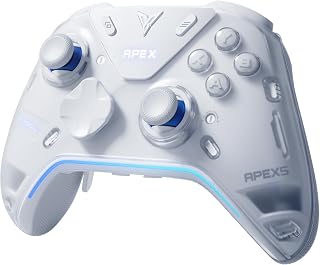
The FLYDIGI Apex 5 is a premium gaming controller designed for PC gamers, Nintendo Switch owners, and Android enthusiasts who demand precision and customization. With support across multiple platforms and three connection modes, it offers flexibility that mainstream controllers cannot match. This is a serious control option for competitive players and simulation fans.
The standout feature is the Forceflex Joystick 2.0 system, which lets you adjust stick tension from 30 to 100 gram-force to match your preference. Combined with the 3ms ultra-low latency in wired mode and 216MHz processor, the controller delivers responsive input with minimal ghosting or lag. The four-motor haptic feedback with adaptive triggers brings racing and shooter games to life with realistic vibration patterns that enhance immersion.
Build quality feels premium with an ergonomic design built for extended play sessions. The interactive AMOLED screen and customizable RGB light bar add visual flair, while six extra buttons including two hot-swappable rear paddles provide competitive gaming advantages. Most features work out of the box, though installing FLYDIGI's software unlocks deeper customization options and profile management.
The main drawbacks are the absence of Xbox and PlayStation support, which narrows its audience, and the premium price tag. The optional charging dock adds extra cost, and maximum customization requires software setup rather than being immediately accessible.
The Apex 5 is an excellent choice for PC and Switch gamers who value control precision and responsiveness. It excels in competitive titles and simulation games where every millisecond matters. If you need a controller that adapts to your playstyle rather than forcing you to adapt to it, this delivers exceptional value despite the higher cost.
Connectivity: Wired USB, Bluetooth 5.0, 2.4GHz wireless dongle
Latency: 3ms (wired), 5ms (wireless)
Processor: 216MHz
Joysticks: Forceflex 2.0 adjustable 30-100gf tension
Buttons: Standard layout plus 4 rear customizable buttons (2 hot-swappable, 2 fixed paddles), 2 micro bumpers
Haptics: 4-motor stereo vibration with adaptive triggers
Display: Interactive AMOLED screen with 150 FPS GIF animation support
RGB: Full-length light bar with customization
Charging: USB wired charging or exclusive dock (sold separately)
Compatibility: PC, Nintendo Switch, Android, Smart TV, Laptops (not Xbox or PlayStation)
Best For: PC gamers, Nintendo Switch owners, esports competitors, simulation enthusiasts, and Android gaming fans who prioritize low latency and customization.
Consider This If: You play competitive shooters, fighting games, or racing sims where response time matters. You also want stick tension adjustment to match your preferred sensitivity and playstyle.
Skip If: You primarily game on Xbox or PlayStation consoles, prefer budget-friendly options, or want zero-setup simplicity without software installation.
Value Assessment: The Apex 5 commands a premium price, but the adjustable joystick technology, ultra-low latency, and multi-platform support justify the cost for serious gamers. The optional charging dock and software customization add convenience but increase total investment.
How to Choose an Adaptive Controller
Start by identifying the actions that interrupt play, such as holding the controller, reaching shoulder buttons, moving an analog stick, or managing simultaneous commands. Then separate a controller that is simply more comfortable to hold from a true access setup that permits alternate button locations, external switches, or stable mounting. That distinction helps you choose features that address your real barrier rather than adding complexity you will not use.
Match the controller to your platform first
Begin with the console or screen you use most. The PlayStation Access Controller 5 is the dedicated PS5 accessibility option in this group, while the Logitech G Adaptive Gaming Kit Access Controller is an expansion kit for Sony Access hardware rather than a separate all-platform gamepad. For Xbox and Windows, the 8BitDo Lite SE 2.4G Wireless Controller for Xbox combines official compatibility with a unified face-button layout, lower-resistance buttons, sensitive Hall Effect sticks, and large programmable controls.
Do not assume every configurable gamepad meets accessibility needs. The Xbox Wireless Gaming Controller | Elite Series 2 and GameSir G7 Pro Wireless XBOX Controller,TMR provide remapping, refined sticks, and trigger options in conventional shapes, but their layouts still require a standard grip. For phones, tablets, and Switch, the GameSir G8 Plus Bluetooth Mobile Game Controller is a flexible choice when an extendable, console-style hold works for you. If your controller travels with a handheld library, our ROG Ally SSD guide can help you plan portable game storage.
Prioritize reach, activation force, and placement
Input placement and activation force often matter more than premium extras. The 8BitDo Lite SE places face buttons together in a unified, easy-reach arrangement and includes two oversized Super Buttons that you can map without software, which may reduce finger travel. Its highly sensitive Hall Effect joysticks can also make controlled directional movement easier for players who benefit from a lighter-touch layout.
For PS5 play, the Access Controller can sit at any 360-degree orientation, use swappable caps, and allow stick-length adjustment, giving you more ways to match the hardware to your movement. If consistent chair-side positioning is the priority, the RAM® Wheelchair Arm Mount for Xbox Adaptive attaches to compatible wheelchair arm tracks and provides a tilting arm for the Microsoft Xbox Adaptive Controller. It is a placement solution, not a controller that adds new inputs.
Look for profiles, external inputs, and stable mounting
An effective adaptive setup should evolve with different games instead of locking you into a single layout. The PlayStation Access Controller 5 keeps three controller profiles available from a larger library, supports external inputs, and can work alongside another Access unit or a DualSense controller. The Logitech G kit contributes eight plug-and-play buttons and triggers, a hook-and-loop board, and labels that can make a complex PS5 layout simpler to remember.
Before choosing an add-on, consider where it will sit, how its cable will run, and whether a table, tray, or mount will keep it from shifting during play. The RAM mount is especially relevant where stable wheelchair positioning is needed, while a tabletop arrangement can be easier to change between sessions. For a PC station that still incorporates keyboard inputs, our programmable number pad guide and customizable keycaps guide can help you organize the remaining controls.
Separate accessibility tools from performance customization
Some players do not need an access interface but benefit from controls that can be tailored to a preferred grip or game genre. The Xbox Wireless Gaming Controller | Elite Series 2 offers adjustable-tension thumbsticks, interchangeable parts, trigger locks, profile switching, and paddles, while the Nacon Revolution X Unlimited Precision adds Hall Effect controls, adjustable triggers, physical stick options, and six mappable shortcuts. These are capable personalization tools, but they do not deliver the low-force, alternate-placement foundation of purpose-built accessibility hardware.
Platform limits still decide the value of performance-focused models. The FLYDIGI Apex 5 PC Controller, Forceflex Joystick supports PC, Switch, TV, Android, and laptop use, but not Xbox or PlayStation, and its adjustable stick tension targets a conventional grip. The Hori Nintendo Switch Split Pad Pro (Black) adds larger controls for handheld Switch play and can remain attached when docked, making it a comfort upgrade for some users rather than a replacement for an adaptive system. For a broader desktop view, explore our glossy gaming monitor picks.
Final Thoughts
The right choice comes down to the inputs and position that feel natural for you. Choose the PlayStation Access Controller 5 when PS5 placement, profiles, and modular inputs are central, or the 8BitDo Lite SE 2.4G Wireless Controller for Xbox when you need an accessible Xbox and Windows layout with large programmable controls.
Frequently Asked Questions
What makes a controller adaptive?
An adaptive controller lets you move, remap, replace, or supplement essential inputs to fit your range of motion, strength, and preferred position. That can mean lower-effort buttons, oversized switches, external ports, a tabletop layout, or a mount. A controller with paddles and remapping can still be useful, but it is only adaptive in a practical sense if those changes solve your specific access barrier.
Which adaptive controller is right for PS5 in 2026?
The PlayStation Access Controller 5 is purpose-built for PS5 and supports orientation changes, profiles, configurable buttons, and expansion with additional controllers or external switches. Add the Logitech G Adaptive Gaming Kit Access Controller when you want more button shapes, trigger types, or a flexible board layout. Confirm that every desired command, including touchpad-related functions, is covered by your planned configuration.
Can I use an adaptive controller on Xbox and Windows?
Yes, but verify the controller’s stated platform support before building a setup around it. The 8BitDo Lite SE is officially licensed for Xbox Series X|S, Xbox One, and Windows, while the RAM® mount is designed around the Xbox Adaptive Controller ecosystem. For PC play, monitor visibility and desk space matter as well, so see our 34-inch ultrawide gaming monitor guide when planning a more spacious setup.
Do I need a wheelchair mount or a tabletop controller?
No. A mount makes sense when a fixed, repeatable position reduces the effort of holding or reaching for controls, whereas a flat surface may be better if you need to reposition components often. Measure arm-track compatibility, tray clearance, cable paths, and range of adjustment before selecting hardware. The Access Controller can use flat surfaces or an AMPS-compatible mount, giving PS5 players more placement flexibility.




Write Your Review
No reviews yet. Be the first to share your experience!