

There is a point where a standard widescreen monitor just stops being enough. You are toggling between windows, losing context, or squinting at a cramped timeline. A 34 inch ultrawide monitor solves that by giving you a 21:9 canvas that stretches your workflow or your game world without stacking a second screen. Whether you are a competitive gamer chasing high refresh rates or a creative professional who needs accurate color and room to multitask, there is a strong option in this category for you. If you are also weighing gaming monitors in a broader budget range, it helps to understand what separates a solid ultrawide from a great one before you commit.
We evaluated six of the most relevant 34 inch ultrawides on the market right now, covering WQHD resolution, refresh rates from 100Hz up to 240Hz, panel types, and connectivity. The result is a focused shortlist that covers different needs without padding the list.
Quick Comparison
| Model | Link | Rating | Screen Size | Resolution | Refresh Rate |
|---|---|---|---|---|---|
| 1 LG 34WR55QK-B 34-inch UltraWide Curved Monitor 3440x1440... | Check price | 4.6 of 5242 ratings | 34 inches | QHD Ultra Wide 1440p | 100 hertz |
| 2 Alienware 34" Curved Ultrawide Gaming Monitor 180Hz 1ms -...Highest rated | Check price | 4.6 of 5736 ratings | 34 inches | QHD Wide 1440p | 180 hertz |
| 3 SANSUI 34-inch Curved Ultrawide Gaming Monitor 3440x1440...Most reviewed | Check price | 4.4 of 54,740 ratings | 34 inches | QHD Ultra Wide 1440p | 200 hertz |
| 4 SANSUI 34" Curved 240Hz UltraWide Gaming Monitor...Fastest refresh | Check price | 4.5 of 53,688 ratings | 34 inches | QHD Ultra Wide 1440p | 240 hertz |
| 5 Samsung 34in Ultra-Wide Monitor 3440x1440 100Hz HDR10 Eye... | Check price | 4.4 of 51,087 ratings | 34 inches | QHD Wide 1440p | 100 hertz |
| 6 Dell 34 Curved USB-C Monitor S3425DW, 3440x1440 WQHD,... | Check price | 4.4 of 5609 ratings | 34 inches | 1440p | 120 hertz |
Ratings reflect the most recent data pull. Check each listing for current price and availability.
Quick answer
This guide compares 6 picks, with LG 34WR55QK-B 34-inch UltraWide Curved Monitor ranked first. Alienware 34" Curved Ultrawide Gaming Monitor 180Hz 1ms holds the highest customer rating among them. SANSUI 34-inch Curved Ultrawide Gaming Monitor has the most customer reviews. SANSUI 34" Curved 240Hz UltraWide Gaming Monitor leads this list on refresh rate.

Readers and multitaskers who want an ultrawide for work as much as play will like the Reader Mode feature alongside USB Type-C connectivity, which simplifies single-cable laptop hookups. The 100Hz refresh rate and HDR10 support handle everyday content comfortably, while the tilt and height adjustable stand helps dial in ergonomics for long desk sessions.
Pros
- USB Type-C plus HDMI and DisplayPort for flexible hookups
- Tilt and height adjustable stand included
- Curved WQHD panel with 99% color gamut
- Matte finish reduces glare
Cons
- 100Hz refresh rate is modest for this category
- 300 cd brightness is average, not standout
If you're shopping specifically for a 34 inch ultrawide to anchor a 2026 desk setup, the LG 34WR55QK-B covers the fundamentals without overcomplicating things. The 3440 x 1440 curved VA panel gives you the extra horizontal real estate that makes ultrawides worth choosing over a standard monitor, and the 100Hz refresh rate keeps everyday scrolling and window dragging smooth. HDR10 adds a bit more punch to supported content, while the matte finish cuts glare in bright rooms. What stands out for this category is the connectivity: HDMI, DisplayPort, and USB Type-C mean it can double as a laptop dock, a genuinely useful trait for anyone consolidating multiple devices onto one ultrawide screen. The tilt and height adjustable stand also means you're not stuck compensating with books or risers to get proper ergonomics. It's a well-rounded pick for buyers who want the ultrawide format without chasing high-end gaming specs.
Display Specs: 34-inch curved VA panel, 3440x1440 (WQHD) resolution, 21:9 aspect ratio, 100Hz refresh rate, 5ms response time, 3000:1 contrast ratio, 99% sRGB color gamut, HDR10 support, 300 cd/m2 brightness, 178-degree viewing angles
Connectivity: USB Type-C with 65W power delivery, 2x HDMI 2.0, DisplayPort 1.4, 2x USB 3.0 ports, 3.5mm audio jack
Physical: 31.9 inches wide, 22.4 inches tall, 10.2 inches deep, 15.2 pounds, curved black design with height and tilt adjustment
Additional Features: Reader Mode for blue light reduction, Picture-by-Picture mode, OnScreen Control software, FreeSync adaptive sync, matte screen finish, 1-year manufacturer warranty
Buy this if you want a well-rounded 34 inch ultrawide for office work, multitasking, or light home use, especially if USB-C docking matters to you. Skip it if you're specifically hunting this list for competitive gaming, since 100Hz and 5ms trail the faster panels in this roundup. Also skip it if you need a very wide color gamut for color-critical creative work, as specs here are solid but not standout in that area.

For competitive gamers who want ultrawide immersion without sacrificing speed, the 180Hz refresh rate paired with 1ms response time keeps fast-paced action fluid and free of ghosting. The 1500R curve wraps the 21:9 WQHD canvas tightly around your peripheral vision, while AMD FreeSync Premium support smooths out frame pacing during intense sessions, making it a strong pick for esports-focused setups.
Pros
- 180Hz refresh rate with 1ms response time
- AMD FreeSync Premium plus VESA AdaptiveSync support
- 1500R curve suited to the 34 inch ultrawide format
- Matte finish reduces glare
Cons
- 400 brightness is modest compared to higher-end alternatives
- 95% color gamut trails some competitors in this size class
If you're shopping for a 34 inch ultrawide specifically to game on, the AW3425DWM earns its spot through sheer responsiveness. A 180Hz refresh rate paired with 1ms response time keeps fast-paced titles fluid, while AMD FreeSync Premium and VESA AdaptiveSync work together to eliminate tearing across a wide range of frame rates. The 1500R curve wraps the 21:9 WQHD panel around your field of view, which matters more on a 34 inch screen than smaller formats since it keeps edges from feeling distant. A 3,000:1 contrast ratio gives dark scenes real depth rather than washed out gray, and the matte finish cuts glare in bright rooms. With 178 degree viewing angles, the image holds up even if you're not dead center. For anyone narrowing down best-in-class 34 inch ultrawides, this one leans hard into gaming performance without sacrificing the immersive curve that makes the format worth buying in the first place.
Display: 34-inch ultrawide curved LCD, 3440 x 1440 WQHD native resolution, 21:9 aspect ratio, 1500R curvature, matte finish
Performance: 180Hz refresh rate, 1ms gray-to-gray response time, 3,000:1 contrast ratio, 400 nits brightness, 178-degree viewing angle
Color: DCI-P3 95% color gamut, VESA DisplayHDR 400 certification, hardware blue light filter
Connectivity: DisplayPort, HDMI, 3x USB ports, Bluetooth
Adaptive Sync: AMD FreeSync Premium and VESA Adaptive Sync Technology
Dimensions: 31.71" depth x 9.13" width x 21.84" height, 21 lbs weight
Power: 85W consumption, 240V AC
Warranty: 3-year manufacturer warranty
Included: Monitor, stand with riser, power cable, HDMI cable, DisplayPort cable, quick setup guide, VESA cover
Buy this if competitive or fast-paced gaming is your main reason for wanting a 34 inch ultrawide and you value low latency over maximum brightness. It also suits anyone who prefers a matte, glare-resistant finish. Skip it if you need very high peak brightness for HDR-heavy content or work primarily in color-critical tasks where a wider color gamut spec would matter more.

Gamers chasing higher frame rates on a budget will find the 200Hz refresh rate a meaningful step up for shooters and racing titles, letting the UWQHD 3440x1440 resolution stay crisp during fast camera pans. The VA LED panel's 3000:1 contrast ratio adds punch to darker scenes, making this a solid mid-tier option for those prioritizing speed over extras.
Pros
- 200Hz refresh rate for smoother motion
- Wide color coverage with sRGB 131% and DCI-P3 96%
- HDR support plus anti-flicker and blue light reduction
- FreeSync compatibility for tear-free gaming
Cons
- 300 cd brightness is on the lower side
- VA panel technology may not suit users wanting the fastest pixel response
For buyers comparing 34 inch ultrawides on speed and image quality together, the SANSUI stands out with a 200Hz refresh rate, a step up from many monitors in this category, plus a VA panel tuned for contrast at 3000:1. The UWQHD 3440 x 1440 resolution across the 21:9 frame gives you the extra horizontal workspace and cinematic width that make 34 inch ultrawides appealing in the first place. HDR support and a wide color range, with sRGB 131% and DCI-P3 96%, push visuals further than baseline ultrawides. FreeSync keeps motion smooth, while AI blue light reduction and anti-flicker tech address eye comfort over long sessions, a real concern given how much screen real estate a 34 inch panel offers. Anti-glare coating and a matte finish add practical usability in mixed lighting. For this article's focus on top 34 inch ultrawide picks, this model earns consideration for combining faster refresh, wider color coverage, and comfort features in one package.
This monitor excels in competitive and immersive gaming scenarios. The 200Hz refresh rate ensures smooth motion in esports titles, while the 1ms response time eliminates ghosting during fast camera pans or quick reflexes. FreeSync adaptive sync removes screen tearing for seamless visuals across compatible AMD graphics cards.
The ultrawide 21:9 format provides significant competitive advantage in tactical shooters like Valorant or Rainbow Six Siege, offering extended peripheral vision without requiring head movement. The AI-powered sniper scope and crosshair features enhance visibility in challenging lighting conditions. VA technology's superior contrast makes spotting enemies at distance more practical than on standard IPS panels.
Content creators benefit enormously from the 3440x1440 ultrawide workspace. Video editors gain expanded timeline visibility, color graders appreciate the 130% sRGB and 96% DCI-P3 color gamut coverage for professional work, and photographers enjoy side-by-side reference while editing. The 178-degree wide viewing angle ensures consistent color representation across the massive canvas.
Picture-in-Picture and Picture-by-Picture modes allow simultaneous display of different sources, ideal for monitoring multiple applications. The curved design reduces the need for extreme head movement across the extended display area, reducing neck fatigue during long creative sessions.

Serious gamers wanting headroom for high-refresh esports titles should note the 240Hz rate, among the fastest in this class, which keeps fast motion at UWQHD 3440x1440 resolution looking sharp rather than blurred. Combined with a VA LED panel and 3000:1 contrast, it suits players who care more about frame-to-frame smoothness than any other single spec.
Pros
- 240Hz refresh rate, the fastest in this comparison
- 450 cd brightness supports HDR400 content
- 131% color gamut for vivid visuals
- Adaptive Sync and AI PQ enhancement included
Cons
- Requires a capable GPU to fully use the high refresh rate
- VA panel LED technology may show more motion blur than faster panel types
Among 34 inch ultrawides built for speed, this SANSUI model pushes further than most with a 240Hz refresh rate, making it a strong pick for anyone prioritizing motion clarity in this size category. The UWQHD 3440x1440 resolution fills out the 21:9 frame with the wide, immersive workspace that defines the format, and a 450 cd brightness rating is the highest of the group, useful for HDR400 content and brighter rooms. A 3000:1 contrast ratio keeps dark tones solid, while the 131% color gamut supports vivid, accurate visuals across games and media. Adaptive Sync smooths out frame rate fluctuations, and the AI PQ visual enhancement technology adjusts picture quality dynamically. The matte finish helps manage glare, and 178 degree viewing angles keep the image consistent whether you're centered or off to the side. For readers of this roundup specifically weighing top-tier performance in a 34 inch ultrawide, this model's refresh rate and brightness combination make it one of the more forward-looking options covered here.
Display: 34 inches, curved, 21:9 ultrawide aspect ratio, VA LED panel, matte finish, 3440x1440 native resolution
Performance: 240Hz refresh rate, 1ms MRPT response time, 3000:1 contrast ratio, 450 cd/m2 brightness, HDR400 support
Sync Technology: FreeSync adaptive sync, VRR support for Xbox, PS5, Switch via HDMI 2.1
Connectivity: 2x HDMI 2.1 (up to 240Hz at 2K), 2x DisplayPort 1.4 (up to 240Hz at 2K), 3.5mm audio jack
Ergonomics: Tilt adjustment from -5 degrees to +15 degrees, 178-degree wide viewing angle, 100x100mm VESA mount compatible, durable metal stand, Picture-by-Picture and Picture-in-Picture modes
Physical Dimensions: 31.77 inches wide, 7.48 inches deep, 17.91 inches tall
Warranty: 1-year manufacturer warranty, 30-day money-back guarantee, lifetime technical support
This suits gamers and enthusiasts who want the highest refresh rate in the lineup along with better brightness for HDR viewing. It also works for anyone who wants a 34 inch ultrawide that feels future-proof on specs. Skip it if 240Hz exceeds what your GPU can realistically drive, since you won't see the full benefit without hardware to match.

Office and creative users juggling multiple windows will benefit from the PIP and PBP modes, letting two input sources share the 21:9 WQHD screen at once. HDR10 and a borderless design add visual polish for media viewing, while AMD FreeSync at 100Hz keeps light gaming breaks tear-free without pulling focus from productivity work.
Pros
- PIP and PBP for viewing multiple sources at once
- TUV-certified Intelligent Eye Care
- Borderless design suits multi-monitor setups
- AMD FreeSync support
Cons
- 72% color gamut is narrower than other options here
- 100Hz refresh rate is on the lower end for this list
For this roundup of 34 inch ultrawides, the Samsung ViewFinity S50GC earns its spot as the productivity-focused option. It's built around the same 3440 x 1440 curved format as its rivals here, but Samsung leans into office-friendly extras: PIP and PBP let you view two input sources at once, useful if you're splitting a laptop feed and a desktop on a single screen. The borderless design also makes it a natural fit if you're eyeing a multi-monitor spread later. AMD FreeSync and a 100Hz refresh rate keep motion reasonably smooth, and TUV-certified Intelligent Eye Care is a genuine plus for anyone spending long hours in front of the screen. The tradeoff is a narrower 72% color gamut compared to others in this list, so it's better suited to document work, browsing, and coding than photo or video editing. For a 34 inch ultrawide bought mainly to get more desktop space and reduce eye strain, this is a sensible, no-frills choice.
Display Specifications: 34-inch ultrawide LCD, 3440x1440 native resolution, 21:9 aspect ratio, 100Hz refresh rate, 5ms response time, 3000:1 contrast ratio, 300cd/m2 brightness, 178-degree viewing angle, matte finish.
Color and Image Technology: 72% color gamut, HDR10 support, AMD FreeSync adaptive sync, TUV-certified Intelligent Eye Care with ambient light sensor, Eye Saver Mode, Flicker Free technology.
Connectivity: 1x DisplayPort 1.2, 2x HDMI 2.2, 1x 3.5mm headphone jack. Includes DisplayPort and HDMI cables.
Physical Dimensions: 32.1 inches wide, 18 inches tall, 8.7 inches deep. Weight: 10.8 pounds. Wall mount compatible.
Power and Warranty: 50 watts power consumption at 110 volts. 1-year manufacturer warranty. Model: LS34C502GANXZA.
Good for buyers prioritizing multitasking, multi-monitor setups, or long work sessions where eye comfort matters. The PIP/PBP functionality is a real advantage if you juggle multiple input sources. Skip this one if accurate color reproduction is a priority for your work, since the 72% color gamut lags behind other 34 inch ultrawides on this list, or if you want the fastest refresh rate available in this category.
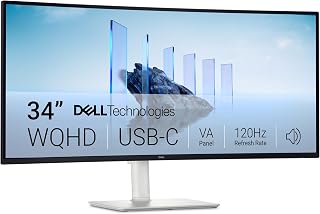
Anyone splitting time between productivity and casual gaming will appreciate the 120Hz refresh rate, which balances smooth scrolling with respectable motion clarity for less demanding titles. The VA panel's 3000:1 contrast ratio deepens blacks for detailed spreadsheet work or movie marathons, and FreeSync Premium keeps tearing at bay, rounding out a versatile all-purpose ultrawide choice.
Pros
- 120Hz refresh rate, faster than others in this list
- FreeSync Premium for smoother motion
- 99% color gamut suits creative work
- Eye Comfort feature for long sessions
Cons
- No USB-C or docking features mentioned in specs
- Standard 300 brightness, nothing exceptional
Among the 34 inch ultrawides in this guide, the Dell S3425DW stands out for buyers who want a bit more headroom in refresh rate without stepping outside the mainstream WQHD category. Its 120Hz refresh rate is faster than several other picks here, giving smoother motion for fast-scrolling content, casual gaming, or just a snappier feel during everyday use. FreeSync Premium pairs with that refresh rate to help reduce screen tearing on compatible systems. The VA panel delivers the expected 3440 x 1440 curved ultrawide view with a 3000:1 contrast ratio for deeper blacks, and a 99% color gamut puts it in solid company for anyone doing photo work or general creative tasks alongside office use. Dell's Eye Comfort feature is a nice inclusion for long sessions in front of the screen. The matte finish also helps in well-lit rooms. If your reason for wanting a 34 inch ultrawide is to get more speed than the typical 100Hz options while keeping WQHD resolution, this is the one in the lineup built for that.
Display: 34-inch curved VA panel, 3440x1440 WQHD resolution, 21:9 aspect ratio, 109 pixel pitch, 300 nits brightness, 3000:1 contrast ratio, 178-degree viewing angles
Color: 99% sRGB, 95% DCI-P3 coverage, 8-bit color depth, HDR ready
Performance: 120Hz refresh rate, 0.03ms response time, AMD FreeSync Premium
Connectivity: 1x USB-C with 65W power delivery and 10Gbps data, 2x HDMI 2.0, 4x USB-A 3.0, built-in speakers
Physical: Ash white color, matte screen finish, anti-glare coating, height and tilt adjustable, VESA mountable, desk mount included, 31.78" width x 16.2" height x 8.73" depth, 20.7 lbs
Features: ComfortView Plus (blue light reduction to 35%), energy efficient, 1-year advanced exchange warranty
Best for buyers who want the fastest refresh rate in this 34 inch ultrawide roundup for smoother everyday motion or light gaming, plus solid color accuracy for mixed creative and office use. Skip it if 120Hz isn't a priority for you and you'd rather focus on extras like PIP/PBP or built-in docking, since this listing doesn't call those out.
What to Look for in a 34 Inch Ultrawide Monitor
Refresh Rate and Response Time
If gaming is your priority, refresh rate is one of the most important specs on the sheet. The range across these six monitors runs from 100Hz on productivity-focused displays like the SAMSUNG 34″ ViewFinity S50GC Series Ultra-WQHD up to 240Hz on the SANSUI 34 Inch Curved Monitor 240Hz UWQHD, which is a meaningful jump for fast-paced titles. Response time works alongside refresh rate, and you want both to be low if motion blur is a concern.
For more casual use or productivity work, 100Hz is perfectly smooth. Competitive or immersive gaming benefits from the 180Hz of the Alienware 34 Curved Gaming Monitor – AW3425DWM or the 200Hz of the SANSUI 34-Inch Curved Gaming Monitor UWQHD 3440 x. Know your use case before prioritizing this spec over others.
Panel Type and Color Accuracy
VA panels dominate this category, and they bring deep contrast ratios that make dark scenes in games and movies look rich rather than washed out. The Dell 34 Monitor S3425DW, WQHD VA, 120Hz delivers a 3000:1 contrast ratio alongside 99% sRGB and 95% DCI-P3 coverage, making it one of the strongest performers for color-accurate work on this list.
The Alienware 34 Curved Gaming Monitor – AW3425DWM also impresses with DCI-P3 95% coverage and VESA DisplayHDR 400 certification. If your work involves photo editing, video production, or design, color gamut coverage should rank near the top of your criteria alongside panel type. You can browse the full monitors category if you want to explore other display types in parallel.
Connectivity and USB-C Support
Modern ultrawide monitors are often the hub of a desk setup, so port selection matters. Both the LG 34WR55QK-B 34-inch UltraWide WQHD (3440 x 1440) and the Dell 34 Monitor S3425DW, WQHD VA, 120Hz include USB-C with up to 65W power delivery, which means a single cable can connect your laptop, charge it, and carry the display signal simultaneously.
The SANSUI monitors lean into gaming connectivity with dual HDMI 2.1 and DisplayPort 1.4 inputs, supporting their higher refresh rates with headroom to spare. If you are setting up a dual-source workflow, look for Picture-by-Picture support, which is available on the LG and Samsung models. Pairing your monitor with a quality dual monitor arm can also make a real ergonomic difference, especially with heavier curved panels.
Eye Care and Long-Session Comfort
Ultrawide monitors invite longer sessions, so built-in eye care features are worth checking. The SAMSUNG 34″ ViewFinity S50GC Series Ultra-WQHD uses an ambient light sensor to auto-adjust brightness, and its Eye Saver Mode cuts blue light without forcing you into a color-degraded mode. Similarly, the Alienware 34 Curved Gaming Monitor – AW3425DWM offers a hardware-based low blue light solution that preserves color accuracy while reducing strain.
The Dell 34 Monitor S3425DW, WQHD VA, 120Hz carries a ComfortView Plus certification that reduces blue light emissions to 35% or below. If you spend long hours in front of your display, these are not marketing checkboxes; they genuinely reduce fatigue over time. Console users might also want to check out options highlighted in this guide to the best monitor for Xbox Series X for compatible setups.
Final Thoughts
The 34 inch ultrawide category has matured into a strong sweet spot for both gamers and professionals, with genuinely differentiated options at every tier. If gaming performance is your primary goal, the Alienware 34 Curved Gaming Monitor – AW3425DWM delivers a well-rounded package with its 180Hz refresh rate, HDR 400 certification, and solid color coverage. If you need a display that doubles as a productivity hub with premium connectivity and accurate color, the Dell 34 Monitor S3425DW, WQHD VA, 120Hz is the more versatile long-term investment.
Frequently Asked Questions
Is a 34 inch ultrawide monitor worth it for productivity?
For most people who work with multiple applications simultaneously, yes. The 21:9 aspect ratio at 3440×1440 resolution gives you noticeably more horizontal space than a standard 27-inch 16:9 monitor. You can comfortably run two documents, a browser, and a chat window side by side without compromising on legibility. In 2026, the resolution and refresh rate options available at this screen size make the value proposition stronger than ever.
What refresh rate should I look for in a 34 inch ultrawide gaming monitor?
It depends on what you play. For story-driven or strategy games, 100Hz to 120Hz is more than sufficient. For competitive shooters or action titles where every frame matters, 180Hz to 240Hz makes a visible difference in smoothness. The SANSUI 34 Inch Curved Monitor 240Hz UWQHD is one of the few 34-inch options delivering 240Hz at UWQHD resolution, which is notable for the category.
Can I use a 34 inch ultrawide monitor with a gaming console?
Yes, though console compatibility depends on the monitor’s HDMI version and whether it supports VRR for your specific console. The SANSUI models with HDMI 2.1 explicitly support VRR for Xbox, PlayStation, and Switch. The Alienware 34 Curved Gaming Monitor – AW3425DWM also includes a dedicated console mode. For a deeper dive into console-ready displays, this guide to the best monitor for Xbox Series X covers compatible options in detail.
Do 34 inch ultrawide monitors work well with a single GPU?
UWQHD at 3440×1440 is more demanding than 1080p or 1440p 16:9, so your GPU needs enough headroom to push frames at the monitor’s refresh rate. At 100Hz to 120Hz, a mid-range modern GPU handles most titles well. Pushing 200Hz or 240Hz consistently in demanding games requires a higher-end card. AMD FreeSync Premium, available on monitors like the Alienware and Dell options in this list, helps smooth out frame rate variance when you are not hitting the peak refresh rate.






Write Your Review
No reviews yet. Be the first to share your experience!