

You’re ready to upgrade your gaming setup, but you’re not interested in spending a mortgage payment on a monitor. The good news is that the sub-$500 gaming monitor market has matured dramatically, and you no longer have to sacrifice premium features like OLED panels, lightning-fast refresh rates, or adaptive sync technology to stay within budget.
This guide evaluates five exceptional gaming monitors that punch well above their price point. Whether you prioritize OLED’s infinite contrast, ultrawide immersion, or 4K clarity, we’ve identified displays that deliver serious performance without compromise. If you’re also upgrading your entire desk setup, check out our guide to the best monitor arm to pair with your new display.
Quick Comparison
| Model | Link | Rating | Screen Size | Resolution | Refresh Rate |
|---|---|---|---|---|---|
| 1 LG 27GX704A-B 27" QHD OLED Gaming Monitor 240Hz 0.03ms...Highest rated | Check price | 4.6 of 5494 ratings | 27 inches | QHD Wide 1440p | 240 hertz |
| 2 Dell 34 Curved USB-C Monitor S3425DW, 3440x1440 WQHD,...Most reviewed | Check price | 4.4 of 5609 ratings | 34 inches | 1440p | 120 hertz |
| 3 MSI MAG 272QP QD-OLED Gaming Monitor 27in 2560x1440 240Hz... | Check price | 4.3 of 5129 ratings | 26.5 inches | 2560 x 1440 (QHD) | 240 hertz |
| 4 LG 27GX700A-B 27" QHD OLED Gaming Monitor 280Hz 0.03ms... | Check price | 4.1 of 5170 ratings | 26.5 inches | QHD Wide 1440p | 280 hertz |
| 5 MSI MAG 321UPD E14 32-inch 4K 320Hz Gaming Monitor with...Fastest refresh | Check price | 4.0 of 55 ratings | 32 | 4K UHD 2160p | 320 hertz |
Ratings reflect the most recent data pull. Check each listing for current price and availability.
Quick answer
This guide compares 5 picks, with LG 27GX704A-B 27" QHD OLED Gaming Monitor 240Hz 0.03ms ranked first. Dell 34 Curved USB-C Monitor S3425DW, 3440x1440 WQHD has the most customer reviews. MSI MAG 321UPD E14 32-inch 4K 320Hz Gaming Monitor leads this list on refresh rate.

This 27-inch OLED combines a blistering 240Hz refresh rate with a 0.03ms response time, delivering the instant pixel response competitive gamers demand. The 1500000:1 contrast ratio produces perfect blacks and stunning HDR visuals, while HDMI 2.1 ensures full compatibility with next-gen consoles. G-Sync Compatible and FreeSync Premium Pro support means adaptive sync works seamlessly across both NVIDIA and AMD graphics cards.
Pros
- 0.03ms response time eliminates motion blur in competitive play
- Infinite contrast and true blacks transform atmospheric games
- 240Hz with dual adaptive sync support for smooth performance
- 98.5% DCI-P3 coverage delivers accurate, vibrant colors
Cons
- Glossy finish reflects ambient light and requires frequent cleaning
- Subpixel fringing on text inherent to OLED structure
The 240Hz refresh rate and 0.03ms response time create fluid, tear-free motion in fast shooters and competitive titles, while NVIDIA G-Sync and AMD FreeSync Premium Pro support ensures compatibility across hardware. What separates this from LCD alternatives is the 1,500,000:1 contrast ratio and true blacks that make dark scenes in horror games and atmospheric titles genuinely immersive. The 98.5% DCI-P3 coverage means colors pop without oversaturation, and DisplayHDR TrueBlack 400 with 1300 nit peaks handles bright highlights without washing out shadow detail. The QHD resolution strikes a smart balance for this budget, demanding less GPU horsepower than 4K while still looking sharp on a 27-inch screen. LG built in OLED-specific protections like automatic pixel care cycles to address burn-in concerns. Dual HDMI 2.1 ports future-proof the investment for console upgrades. The glossy finish amplifies color vibrancy but requires controlled lighting to avoid distracting reflections during gameplay.
Display: 27-inch glossy OLED, 2560x1440 QHD, 16:9 aspect ratio, 98.5% DCI-P3 color gamut, 1,500,000:1 contrast ratio
Performance: 240Hz refresh rate, 0.03ms response time, VESA ClearMR 13000 certification, VESA DisplayHDR TrueBlack 400
Brightness: 275 nits standard, 1300 nits peak (HDR)
Adaptive Sync: NVIDIA G-Sync Compatible, AMD FreeSync Premium Pro
Connectivity: 2x HDMI 2.1, 1x DisplayPort 1.4, 3x USB 3.2 ports, 3.5mm audio jack
Design: Adjustable stand (height, tilt, swivel, pivot), borderless design, 15.9 lbs, dimensions 23.8W x 21H x 8.7D inches
Features: Dynamic Action Sync, HDR10 support, three UL certifications (anti-glare, flicker-free, low blue light), automatic OLED pixel care
Warranty: 2-year parts and labor
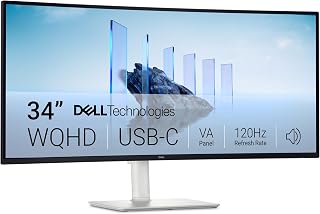
The 34-inch ultrawide delivers immersive gaming with its 21:9 aspect ratio, giving you a wider field of view in competitive and open-world titles. The 120Hz refresh rate keeps motion smooth without demanding extreme GPU power, while the 3000:1 contrast ratio ensures deep blacks and vibrant colors. FreeSync Premium eliminates screen tearing, making this an excellent choice for gamers seeking cinematic immersion and competitive responsiveness.
Pros
- Exceptional productivity boost with ultrawide 21:9 aspect ratio replacing multiple monitors
- Outstanding value for professionals with professional-grade color accuracy and USB-C hub functionality
- Excellent for content creators with fast response time, high refresh rate, and vivid color reproduction
- Comfortable for extended use with certified eye care features and reduced blue light emissions
- Streamlined connectivity with single cable solution and built-in speakers
Cons
- Limited port selection compared to more expensive Dell UltraSharp models, additional USB hub may be needed
- VESA mount design has recessed bracket area that may conflict with certain mounting solutions
- Display resolution is 1440p rather than 4K, so video playback clarity won't match ultra-premium monitors
The Dell S3425DW is a premium 34-inch ultrawide curved monitor designed for professionals who need expansive screen real estate without desktop clutter. This monitor combines productivity powerhouse features with creative work capabilities, making it ideal for software developers, content editors, financial analysts, and anyone managing complex multi-window workflows. The single USB-C connection is a game changer for laptop users, especially Mac users who increasingly rely on limited port availability.
What sets this monitor apart is the combination of productivity features with genuine creative potential. The 3440x1440 ultrawide resolution delivers the workspace of two traditional monitors without the bezels interrupting your view. The 120Hz refresh rate and 0.03ms response time ensure smooth scrolling and responsive interaction, while the 99% sRGB and 95% DCI-P3 color coverage make it a legitimate tool for photo editing, video color grading, and design work. Real users report that the wide screen eliminates the need for tab-switching anxiety and allows logic pro timelines and video editing tracks to be fully visible without constant panning.
The curved VA panel with 3000:1 contrast delivers genuinely impressive image depth and black levels. Colors appear vibrant and true-to-life without exaggeration, and the ComfortView Plus technology reduces blue light emissions by up to 65%, a significant advantage for the all-day worker. The monitor arrived well-packaged and setup was straightforward, with height and tilt adjustments allowing customization for different desk heights and viewing angles. Build quality feels solid and professional.
The main limitations are the modest port selection, which includes two HDMI, four USB-A ports, and one USB-C, so users with many peripherals may need an external hub. The VESA mount bracket sits recessed, which can interfere with certain third-party mounting arms. Additionally, while the 1440p resolution looks crisp for productivity and editing, video playback won't have 4K sharpness if that's a priority.
The Dell S3425DW represents exceptional value for professionals seeking a productivity monitor that doesn't compromise on image quality or creative capabilities. Whether you're coding, editing, designing, or managing spreadsheets, the ultrawide format and USB-C efficiency deliver tangible workflow improvements that justify the investment.
Display: 34-inch curved VA panel, 3440x1440 WQHD resolution, 21:9 aspect ratio, 109 pixel pitch, 300 nits brightness, 3000:1 contrast ratio, 178-degree viewing angles
Color: 99% sRGB, 95% DCI-P3 coverage, 8-bit color depth, HDR ready
Performance: 120Hz refresh rate, 0.03ms response time, AMD FreeSync Premium
Connectivity: 1x USB-C with 65W power delivery and 10Gbps data, 2x HDMI 2.0, 4x USB-A 3.0, built-in speakers
Physical: Ash white color, matte screen finish, anti-glare coating, height and tilt adjustable, VESA mountable, desk mount included, 31.78" width x 16.2" height x 8.73" depth, 20.7 lbs
Features: ComfortView Plus (blue light reduction to 35%), energy efficient, 1-year advanced exchange warranty
Video and Photo Editing: The 99% sRGB and 95% DCI-P3 color accuracy combined with the ultrawide format makes this ideal for color grading, timeline editing, and visual asset management. Reviewers report exceptional performance with Final Cut Pro and Logic Pro X.
Software Development: The 3440x1440 resolution provides ample horizontal space for side-by-side code editors, terminals, and documentation. Developers consistently praise the productivity boost compared to standard monitors.
Financial Services: Traders, analysts, and spreadsheet power users benefit from the expanded horizontal real estate for viewing multiple data streams and dashboards simultaneously.
MacBook and Laptop Users: The single USB-C solution is purpose-built for laptop connectivity, delivering power, video, and data through one cable, eliminating cable management nightmares.
All-Day Workers: The certified eye comfort features and blue light reduction make this suitable for professionals spending 8+ hours at their desk daily.

Pros
- Picture quality is extraordinary with perfect blacks, vibrant colors, and exceptional contrast that significantly outperforms LCD alternatives
- Ultra-responsive gameplay with 0.03ms response time and 240Hz refresh rate eliminates motion blur and input lag
- Excellent value proposition for a premium QD-OLED monitor at this price point compared to competitors
- Build quality feels solid with premium materials and thoughtful design including graphene heatsink for durability
- Simple setup with included DisplayPort 1.4a cable and comprehensive Gaming Intelligence software
Cons
- Potential for dead pixels or defects during shipping, with some users reporting early hardware failures
- Glossy screen surface may cause reflections in brightly lit environments despite high peak brightness
- OLED technology requires awareness of burn-in risks even with OLED Care 2.0, though active prevention is included
The MSI MAG 272QP QD-OLED X24 is a cutting-edge 27-inch gaming monitor engineered for competitive gamers, esports enthusiasts, and content creators who refuse to compromise on visual performance. This premium display combines Quantum Dot OLED technology with high refresh rate gaming specifications, delivering a complete package for serious players and professionals alike.
The standout feature is undoubtedly the Quantum Dot OLED panel itself. With 1.07 billion colors, 99% DCI-P3 gamut coverage, and a staggering 1,500,000:1 contrast ratio, colors appear more vibrant and blacks are genuinely black, not dark gray. The 0.03ms response time paired with 240Hz refresh rate achieves a VESA ClearMR 13000 rating, the industry's highest motion clarity benchmark. For gaming, this translates to razor-sharp motion, virtually zero ghosting, and incredibly smooth responsiveness that gives competitive players a genuine edge.
Build quality and design are premium throughout. The monitor features a passive graphene-coated heatsink for fanless operation and stability, a sturdy four-way adjustable stand with full tilt, pivot, swivel, and height adjustment, and VESA mounting compatibility. Display connectivity includes DisplayPort 1.4a and HDMI 2.1, ensuring full bandwidth support for PC, Mac, laptops, and next-generation gaming consoles at native resolution and refresh rates.
The only meaningful drawbacks are inherent to OLED technology itself. The glossy screen surface may cause reflections in very bright rooms, and OLED displays require awareness of potential burn-in risks with static content. MSI addresses this with AI-powered OLED Care 2.0 software that actively prevents burn-in without being obtrusive, running intelligently in the background. Some users have reported isolated defects during shipping, though this appears rare.
Verdict: The MSI MAG 272QP QD-OLED represents exceptional value for a premium QD-OLED gaming monitor. It delivers elite visual quality, gaming performance, and color accuracy that justifies the investment for anyone serious about competitive gaming or professional color work. Highly recommended for gamers upgrading from standard LCD monitors.
Display Specs: 26.5-inch QD-OLED panel, 2560x1440 (WQHD), 16:9 aspect ratio, 240Hz refresh rate, 0.03ms response time, 1,500,000:1 contrast ratio, 1370.4 nits peak brightness, glossy finish
Color & Image: 1.07 billion colors (10-bit), 99% DCI-P3 gamut, Delta E less than 2 color accuracy, 178-degree viewing angles, 1.07 billion colors, flicker-free, low blue light, anti-glare treatment, VESA ClearMR 13000 rating
Connectivity: 2x HDMI 2.1 ports, 1x DisplayPort 1.4a, 1x USB Type-C, 1x USB-A, supports G-Sync Compatible and FreeSync Premium Pro adaptive sync
Design & Stand: 4-way adjustable stand with height, tilt, pivot, and swivel, VESA 100mm mounting, includes graphene heatsink, 24 inches deep, 9.5 inches wide, 20.9 inches high, weighs 19.9 pounds
Software & Features: Gaming Intelligence software with OLED Care 2.0, Smart Crosshair, Console modes, Game Assistance, eye care technology, three-year manufacturer warranty
Who Should Buy: Competitive gamers seeking maximum visual performance and motion clarity will benefit most from this monitor's exceptional 0.03ms response time and 240Hz refresh rate. Content creators and photo editors who require color accuracy will appreciate the 99% DCI-P3 gamut and Delta E<2 performance. Console gamers with PS5 or Xbox Series X/S will enjoy HDMI 2.1 support at full resolution and refresh rates. Anyone upgrading from a standard LCD monitor will notice dramatic improvements in contrast, color, and response speed.
Who Should Consider Alternatives: Budget-conscious buyers seeking basic 144Hz gaming may find excellent alternatives at lower price points. Users in extremely bright environments may prefer an anti-reflective matte display. Those concerned about OLED burn-in with static content should research OLED Care 2.0 thoroughly or consider LCD alternatives, though the active prevention system is robust.
Setup Tips: Use the included DisplayPort 1.4a cable for optimal performance and bandwidth. The four-way adjustable stand allows customization for ergonomic comfort during extended gaming sessions. Enable OLED Care 2.0 in Gaming Intelligence software immediately after setup. Allow the monitor to warm up for optimal color performance. Ensure good ventilation around the monitor despite the passive cooling design.

The 280Hz OLED panel offers the fastest refresh rate in this lineup, giving competitive players every possible advantage in fast-paced shooters and esports titles. With 0.03ms response time and true G-Sync support, ghosting and input lag are virtually eliminated. The matte screen finish reduces glare in bright rooms, while 99.5% DCI-P3 coverage ensures accurate, vibrant colors for both gaming and content creation.
Pros
- 1500 nit peak brightness makes OLED viable in bright spaces
- 280Hz with 0.03ms response for competitive advantage
- 99.5% DCI-P3 and perfect blacks for HDR content
- Matte finish reduces reflections without sacrificing contrast
Cons
- Requires RTX 30 series or newer for full 280Hz capability
- QHD resolution trades pixel density for frame rate performance
The LG 27GX700A-B redefines what OLED can do in competitive gaming by solving brightness limitations that plagued earlier panels. Primary RGB Tandem OLED technology pushes peak output to 1500 nits, making HDR highlights visible even in bright rooms while maintaining perfect blacks through a 1,500,000:1 contrast ratio. The 280Hz refresh rate paired with 0.03ms response means zero motion blur in fast shooters and MOBAs, giving competitive players the millisecond advantages that matter in ranked play. Both NVIDIA G-Sync and AMD FreeSync Premium Pro eliminate tearing across hardware ecosystems. The 99.5% DCI-P3 gamut with DisplayHDR True Black 500 certification produces color accuracy that benefits content creation alongside gaming. LG's matte coating reduces glare compared to glossy alternatives, though it slightly softens the OLED punch. The borderless design maximizes screen real estate, and the fully adjustable stand adapts to any desk setup. DTS Headphone:X through the built-in jack adds spatial audio without external equipment. LG Switch app integration lets you save custom settings per game, streamlining the workflow between competitive titles and single-player experiences.
Display: 27-inch OLED, 2560x1440 QHD, 16:9 aspect ratio, 178-degree viewing angles, matte finish
Performance: 280Hz refresh rate, 0.03ms response time, 1,500,000:1 contrast ratio, 1500 nits peak brightness, 335 cd/m2 standard brightness
Color: 99.5% DCI-P3 gamut, DisplayHDR True Black 500, UL-verified Perfect Black and Perfect Color with 100% Color Fidelity
Connectivity: DisplayPort 1.4, 2x HDMI 2.1, 3x USB 3.0, 4-pole headphone jack
Sync Technology: G-Sync Compatible, FreeSync Premium Pro, Dynamic Action Sync
Build: Height, tilt, swivel, pivot adjustable stand, RGB backlighting, VESA compatible, wall mount capable
Included: DisplayPort cable, HDMI 2.1 cable, power cable
Warranty: 2-year manufacturer warranty
Esports players who need every frame and color-critical creators working in HDR will extract maximum value. Anyone gaming in bright environments previously incompatible with OLED will appreciate the 1500 nit brightness. Skip this if your GPU can't drive 280Hz at QHD on your preferred titles, you're wasting the panel's potential. Also skip if you demand 4K for single-player immersion, as the 2560x1440 resolution prioritizes frame rates over pixel density.

Pros
- Dual Mode technology lets you prioritize either crystal-clear 4K visuals or extreme refresh rates
- 0.5ms response time and 320Hz refresh rate give competitive FPS players a genuine edge
- Large 32-inch IPS panel with matte finish provides excellent color accuracy and reduced glare
- Console Mode optimization makes this monitor a versatile choice for both PC and console gamers
- Sturdy build quality with full ergonomic adjustments including height and tilt
Cons
- No user reviews available yet, so real-world reliability and quality control cannot be verified
- At 26.4 pounds, the monitor is heavier than typical models, requiring sturdy desk support
- Dual Mode functionality adds complexity that may confuse casual gamers unfamiliar with resolution switching
The MSI MAG 321UPD E14 is a cutting-edge 32-inch gaming monitor designed for players who refuse to compromise between visual quality and performance. This monitor targets competitive esports enthusiasts, content creators, and serious gamers who demand both stunning 4K visuals and lightning-fast responsiveness. With its innovative Dual Mode technology and robust feature set, it represents a significant step forward in premium gaming displays.
The standout feature is undoubtedly the Dual Mode system, which lets you toggle between UHD 144Hz and FHD 288Hz depending on your priorities. Paired with a 0.5ms response time and 320Hz refresh rate capability, this monitor delivers exceptional performance for fast-paced FPS games, MMORPGs, and flight sims. The IPS panel ensures superior color accuracy and contrast compared to TN panels, while Console Mode optimization provides seamless compatibility with PS5 and Xbox Series X|S, making this genuinely versatile hardware.
Build quality appears solid with a matte IPS panel that reduces glare during long gaming sessions. The height-adjustable arm with tilt support enables proper ergonomic positioning, while the included speakers provide adequate audio for gaming. The 10.31-inch depth and 26.4-pound weight indicate a well-constructed display designed for stability and durability. FreeSync Premium adaptive sync technology smooths gameplay across compatible systems.
One consideration is the lack of customer reviews, which means real-world reliability and potential issues cannot yet be verified. The complexity of Dual Mode switching may also require a learning curve for casual users. Additionally, the monitor's weight and size demand a sturdy desk setup with adequate space.
The MSI MAG 321UPD E14 is an excellent choice for players seeking a powerful 4K gaming monitor that doesn't sacrifice performance. Its Dual Mode flexibility, professional-grade color accuracy, and extreme refresh rate support make it a strong investment for serious gamers and creative professionals who demand both beauty and speed.
Display Specifications: 32-inch 4K IPS panel with 3840 x 2160 native resolution, 320Hz refresh rate, 0.5ms response time (GtG minimum), 16:9 aspect ratio, and matte screen finish for reduced glare.
Connectivity: Dual HDMI and DisplayPort connectivity for flexible device integration. Built-in speakers for audio output. VESA mounting support for wall installation.
Performance Features: Dual Mode technology offering UHD 144Hz and FHD 288Hz switching, Console Mode optimization for PS5 and Xbox Series X|S, AMD FreeSync Premium adaptive sync, and AI Navigator for enhanced gaming experience.
Physical Dimensions and Design: 28.11 inches wide, 10.31 inches deep, 22.2 inches tall. Weighs 26.4 pounds. Features height-adjustable arm with tilt adjustment for ergonomic positioning. Black color with professional gaming aesthetic.
Additional Details: 3-year warranty included. UPC: 824142451533. Manufactured by MSI. Single unit package.
Who Should Buy: This monitor is ideal for competitive esports gamers, content creators needing color accuracy, and console gamers wanting premium performance. PC gamers running high-end graphics cards will appreciate the flexibility to choose between maximum visual fidelity and extreme refresh rates.
Gaming Performance: The 0.5ms response time and 320Hz capability give FPS and fast-action game players a genuine competitive advantage. The Dual Mode system lets you run demanding AAA titles at 4K 144Hz while switching to 288Hz FHD for esports titles like CS2 or Valorant where frame rate matters most.
Professional Use: Creatives working in video editing, graphic design, or animation will benefit from the large 4K IPS panel with accurate color reproduction. The height-adjustable design supports extended working sessions, and Console Mode compatibility makes multi-platform workflow management simpler.
Space and Setup Considerations: Ensure your desk can accommodate a 32-inch monitor and support its 26.4-pound weight. The 10.31-inch depth requires adequate space behind your setup. Verify your GPU can handle 4K gaming to maximize the Dual Mode benefits.
Connectivity Note: Confirm your devices support HDMI 2.1 or DisplayPort to access the full 320Hz potential. Older console generations may not achieve maximum performance, though Console Mode provides optimization for current-generation systems.
Buying Guide
Panel Technology: OLED vs VA vs IPS
OLED panels deliver unmatched contrast with true blacks and near-instantaneous response times, making them ideal for competitive gaming and cinematic single-player experiences. The LG 27GX704A-B 27-inch Ultragear QHD (2650×1440) showcases this with its 1.5M:1 contrast ratio and 0.03ms response time, while the glossy finish enhances color vibrancy.
VA panels like the Dell 34 Monitor S3425DW, WQHD VA, 120Hz offer excellent contrast ratios (3000:1) and vivid colors at a lower price point, though with slightly slower response times. IPS panels provide the widest viewing angles and consistent color accuracy, making them versatile for both gaming and content creation. For pairing with high-end GPUs, explore our recommendations for the best monitor for RTX 5070 ti.
Refresh Rate and Response Time
A 240Hz refresh rate has become the sweet spot for competitive gaming, delivering fluid motion without requiring the GPU horsepower that 360Hz demands. Both the LG 27GX704A-B 27-inch Ultragear QHD (2650×1440) and msi MAG 272QP QD-OLED X24 27-Inch WQHD hit this mark with 0.03ms response times, eliminating motion blur and ghosting entirely.
Response time matters as much as refresh rate. While most modern displays advertise 1ms, OLED panels achieve 0.03ms, which translates to sharper tracking during fast-paced action. Even the 120Hz Dell 34 Monitor S3425DW, WQHD VA, 120Hz maintains a 0.03ms response time, making it punchy enough for casual and competitive play alike.
Resolution and Screen Size
QHD (2560 x 1440) on a 27-inch display provides the optimal pixel density for gaming, balancing visual clarity with frame rate performance. This resolution is easier to drive than 4K, letting mid-range GPUs maintain high refresh rates. The LG 27GX700A-B 27-inch Ultragear QHD (2560 x 1440) exemplifies this with a blistering 280Hz refresh rate at native resolution.
Ultrawide options like the Dell 34 Monitor S3425DW, WQHD VA, 120Hz expand your field of view for immersive sim racing and open-world exploration. Meanwhile, 4K monitors like the msi MAG 321UPD E14 32-inch 3840 x 2160 (UHD) offer Dual Mode switching between UHD at 144Hz and FHD at 288Hz, letting you prioritize clarity or speed depending on the game. If you’re running a specific GPU, our best 1440p monitor for RTX 5070 guide can help narrow your options.
HDR and Color Coverage
VESA DisplayHDR certification separates true HDR from basic tone mapping. The LG 27GX704A-B 27-inch Ultragear QHD (2650×1440) carries the True Black 400 certification with 1300 nits peak brightness, ensuring highlights pop while shadows retain detail. The LG 27GX700A-B 27-inch Ultragear QHD (2560 x 1440) pushes even further with True Black 500 and 1500 nits, making it LG’s brightest OLED gaming monitor.
Wide color gamut matters for both HDR and SDR content. Look for 99% DCI-P3 coverage or higher, which the msi MAG 272QP QD-OLED X24 27-Inch WQHD achieves thanks to Quantum Dot technology. Even non-OLED options like the Dell 34 Monitor S3425DW, WQHD VA, 120Hz deliver 95% DCI-P3 and 99% sRGB, ensuring accurate, vibrant visuals across gaming and productivity tasks.
Final Thoughts
The sub-$500 gaming monitor landscape delivers exceptional value in 2026, with OLED panels and high refresh rates no longer reserved for flagship displays. If you prioritize speed and contrast for competitive gaming, the msi MAG 272QP QD-OLED X24 offers Quantum Dot OLED brilliance at an aggressive price point. For immersive ultrawide gaming with excellent eye comfort, the Dell 34 Monitor S3425DW brings curved VA panel depth and USB-C convenience to your desk. Whichever you choose, you’re getting performance that would have cost twice as much just two years ago.
Frequently Asked Questions
Is OLED worth it for gaming monitors in 2026?
OLED delivers unmatched contrast, true blacks, and near-instantaneous response times that eliminate ghosting entirely. Modern OLED gaming monitors include burn-in protection features like pixel shifting and static content dimming, making them safe for varied use. The visual upgrade is particularly noticeable in dark scenes and HDR content, where OLED’s per-pixel lighting creates depth that LCD panels cannot match.
What refresh rate do I need for competitive gaming?
240Hz has become the competitive standard, offering smooth motion without the GPU demands of 360Hz. The difference between 144Hz and 240Hz is immediately noticeable in fast-paced shooters and MOBAs, where frame timing directly impacts your reaction window. If you play casually or prefer single-player games, 120Hz to 165Hz provides excellent fluidity at a lower cost.
Should I choose QHD or 4K for gaming?
QHD (2560 x 1440) offers the best balance for high-refresh gaming, as it’s easier to drive than 4K while still providing sharp visuals on 27-inch displays. You’ll maintain higher frame rates with mid-range GPUs, which matters more for competitive play. For context on matching monitors to specific graphics cards, our guide to the best 4K monitor for RTX 5080 breaks down resolution and performance tradeoffs. Choose 4K if you prioritize detail in single-player games and have a high-end GPU to support it.
Do I need G-Sync or FreeSync for smooth gameplay?
Adaptive sync technologies eliminate screen tearing and stuttering by synchronizing your monitor’s refresh rate with your GPU’s output. Most modern monitors support both NVIDIA G-SYNC Compatible and AMD FreeSync, so you’re covered regardless of your graphics card. The benefit is most noticeable when your frame rate fluctuates, making adaptive sync essential for demanding titles where you can’t maintain a locked refresh rate.






Write Your Review
No reviews yet. Be the first to share your experience!