

The Xbox Series X outputs up to 4K resolution at 120 frames per second, supports HDR10, and includes variable refresh rate technology to eliminate screen tearing. Your display needs to match these capabilities, or you’re leaving performance on the table. Whether you’re racing through Forza Horizon or building in Minecraft, the right monitor transforms how games look and feel.
This guide covers seven monitors across different price tiers and feature sets. We’ve included curved QHD panels for immersive single-player games, high-refresh-rate displays for competitive shooters, and a premium OLED option for those who want the absolute best image quality.
Quick Comparison
| Model | Link | Rating | Screen Size | Resolution | Refresh Rate |
|---|---|---|---|---|---|
| 1 Samsung 27 Odyssey G5 QHD 1440P 180Hz Gaming Monitor with...Highest rated | Check price | 4.7 of 5589 ratings | 27 inches | QHD 1440p | 180 |
| 2 Alienware 27 AW2725DM QHD 180Hz Gaming Monitor with G-SYNC | Check price | 4.6 of 5492 ratings | 27 inches | QHD Wide 1440p | n/a |
| 3 ASUS ROG XG27AQDMGR 27" 1440p 240Hz OLED Gaming Monitor... | Check price | 4.6 of 5146 ratings | 27 inches | QHD Wide 1440p | 240 hertz |
| 4 Acer Nitro 27in QHD Curved 180Hz Gaming Monitor with AMD... | Check price | 4.5 of 51,208 ratings | 27 inches | QHD Wide 1440p | 180 hertz |
| 5 Samsung 32" Odyssey G55C QHD 165Hz Curved Gaming Monitor,... | Check price | 4.4 of 52,087 ratings | 32 inches | QHD Wide 1440p | 165 hertz |
| 6 CRUA 32 inch 4K Curved Gaming Monitor 160Hz AMD FreeSync...Most reviewed | Check price | 4.3 of 54,300 ratings | 32 inches | 4K UHD 2160p | 160 hertz |
| 7 Acer Nitro XV272U 27" QHD 240Hz IPS Gaming Monitor with... | Check price | 4.2 of 5882 ratings | 27 inches | QHD Wide 1440p | 240 hertz |
Ratings reflect the most recent data pull. Check each listing for current price and availability.
Quick answer
This guide compares 7 picks, with Samsung 27 Odyssey G5 QHD 1440P 180Hz Gaming Monitor ranked first. CRUA 32 inch 4K Curved Gaming Monitor 160Hz AMD has the most customer reviews.
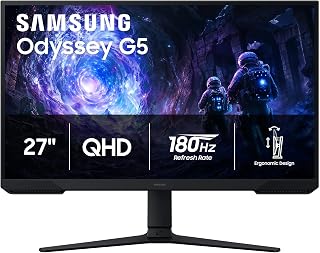
The 180Hz refresh rate pairs perfectly with the Series X's high frame rate modes in competitive shooters and racing games. The VA panel's 3000:1 contrast ratio delivers deep blacks that bring out shadow detail in darker titles, while the 1440p resolution hits the sweet spot between visual clarity and performance. The matte finish reduces glare during extended sessions, making this a versatile choice for both HDR and SDR content.
Pros
- 180Hz refresh rate and 1ms response time deliver competitive-level smoothness
- QHD resolution maximizes Xbox Series X visual fidelity without demanding 4K overhead
- High 3000:1 contrast ratio from VA panel enhances shadow and highlight separation
- Fully adjustable stand with tilt, pivot, and height for flexible console setups
Cons
- On-screen menu navigation less intuitive than premium alternatives
- No onboard speakers require separate audio solution
The Samsung Odyssey G5 brings competitive-grade responsiveness to Xbox Series X gaming with its 180Hz refresh rate and 1ms response time, a combination that ensures the console's performance modes translate into visibly smoother motion. QHD 1440p resolution takes full advantage of the Series X's capabilities, rendering 1.7 times more detail than standard 1080p and making textures, environments, and UI elements noticeably crisper. AMD FreeSync handles variable refresh rate duties, syncing frame output to eliminate tearing and stuttering across titles that support VRR on Xbox. The VA panel delivers strong contrast at 3000:1, which helps shadow detail and bright highlights feel distinct without washing out. HDR10 support enhances compatible games with richer color depth. The matte finish cuts glare during extended sessions, and the Black Equalizer feature brightens dark zones to reveal hidden details in atmospheric shooters or stealth games. Dual HDMI ports simplify switching between Xbox and other devices. The fully adjustable stand accommodates various viewing angles and desk configurations, a practical touch for console setups that vary more than PC rigs.
Display: 27-inch QHD VA panel, 2560 x 1440 resolution, 16:9 aspect ratio, 178-degree viewing angles
Performance: 180Hz refresh rate, 1ms response time (MPRT), 300 cd/m brightness, 3000:1 contrast ratio
Features: HDR10, AMD FreeSync, Black Equalizer, matte screen finish
Connectivity: 2x HDMI, 1x DisplayPort, 1x power connector
Design: Adjustable stand with tilt, pivot, and height settings, desk mount, flat panel shape
Dimensions: 24.34 inches wide, 9.22 inches deep, 20.5 inches tall, 10.1 pounds
Power: 35 watts consumption, 240 volts
Warranty: 1-year manufacturer coverage

The Fast IPS panel combines 180Hz refresh with G-SYNC compatibility to eliminate screen tearing when the Series X pushes variable frame rates. WQHD 1440p resolution maximizes visual fidelity without demanding the GPU overhead of 4K, letting the console maintain higher frame rates in performance modes. VESA mounting gives flexible setup options, and the 27-inch size keeps pixel density sharp for detailed textures in open-world titles.
Pros
- 180Hz and 1ms response time perfectly matched to Xbox Series X performance capabilities
- Fast IPS panel delivers competitive speed with accurate color and wide viewing angles
- 95% DCI-P3 coverage and DisplayHDR 400 enhance visual richness in HDR titles
- Matte finish reduces glare during long console gaming sessions
Cons
- Requires Xbox Series X performance modes to leverage full 180Hz potential
- Some users may notice pixel grid at 27-inch QHD versus denser resolutions
Alienware's AW2725DM pairs QHD resolution with a 180Hz refresh rate tuned precisely to what Xbox Series X can deliver in performance modes, making it a natural match for the console's capabilities. The fast IPS panel combines 1ms gray-to-gray response time with wide viewing angles and accurate color reproduction, ensuring competitive responsiveness without sacrificing visual quality. NVIDIA G-SYNC compatible support handles variable refresh rate syncing to eliminate screen tearing across Xbox's VRR-enabled library. The 1440p resolution hits the sweet spot between sharp detail and achievable frame rates, letting the Series X push higher refresh numbers in performance modes without the GPU strain of native 4K. DisplayHDR 400 certification and 95% DCI-P3 color coverage bring enhanced vibrancy to HDR-enabled Xbox titles, making scenes feel richer without overblown saturation. The matte finish resists glare during extended gaming marathons, and the monitor's design language complements gaming setups without excessive RGB gimmicks. Dual HDMI connectivity simplifies switching between Xbox and other devices. The 27-inch size balances screen real estate with pixel density, keeping UI elements and textures crisp at typical console viewing distances.
Display: 27-inch QHD (2560 x 1440) IPS panel, 16:9 aspect ratio, matte finish
Refresh Rate: 180Hz
Response Time: 1ms gray-to-gray
Color Gamut: 95% DCI-P3
HDR: DisplayHDR 400 certified
Sync Technology: NVIDIA G-SYNC
Additional Features: Console mode, hardware blue light filter, VESA mountable
Brand: Alienware (Dell)
Best for Xbox Series X owners who split time between competitive multiplayer and AAA single-player games, valuing both responsiveness and visual fidelity. The fast IPS panel suits players who appreciate accurate colors alongside low response times. Skip this if you prioritize native 4K resolution for cinematic games or media playback over high refresh gameplay. Also pass if you're on a strict budget, as the feature set targets mid-tier buyers willing to invest beyond entry-level displays.

The OLED panel's infinite contrast ratio and per-pixel lighting deliver stunning HDR performance that showcases the Series X's Auto HDR and native HDR titles. The 240Hz refresh rate future-proofs the display as more games target 120fps modes, while the glossy finish maximizes color saturation and punch. At 1440p, the resolution balances image quality with the console's performance capabilities, and the near-instant response time eliminates motion blur in competitive play.
Pros
- 240Hz and 0.03ms response time eliminate motion blur and input lag
- Perfect OLED blacks and 1,500,000:1 contrast reveal shadow detail
- OLED Care Pro proximity sensor reduces burn-in risk automatically
- 3-year warranty includes burn-in coverage for peace of mind
Cons
- Glossy finish shows fingerprints and requires careful handling
- Initial setup needs tweaking to reach optimal performance
Xbox Series X players chasing competitive advantage will find a worthy partner in the ASUS ROG XG27AQDMGR. The 240Hz refresh rate extracts every frame the console can deliver, while 0.03ms response time ensures controller inputs translate to screen action without perceptible delay. OLED technology produces perfect blacks and a 1,500,000:1 contrast ratio that brings out shadow detail in dark game scenes where LCD panels struggle. The 27-inch 1440p resolution strikes an ideal balance for Xbox gaming, sharper than 1080p yet more performant than 4K. VESA DisplayHDR 400 True Black certification and 99% DCI-P3 coverage deliver HDR that actually looks different from SDR, unlike many budget HDR implementations. The glossy finish produces vivid, punchy colors that make games pop. ASUS OLED Care Pro uses a proximity sensor to shift content when you step away, mitigating burn-in concerns during dashboard time or streaming apps. The aluminum stand feels premium and the thin bezels keep desk space manageable. A 3-year warranty with burn-in coverage backs the investment.
Display and Resolution: 27-inch 1440p QHD (2560 x 1440) TrueBlack Glossy OLED with 16:9 aspect ratio, 240Hz refresh rate, and 0.23mm pixel pitch.
Performance Metrics: 0.03ms gray-to-gray response time, 1,500,000:1 contrast ratio, 1300 nits peak brightness, 178-degree viewing angles.
Color and HDR: 99% DCI-P3 color gamut, true 10-bit color depth, Delta E less than 2, VESA DisplayHDR 400 True Black compliance.
Connectivity: 1x DisplayPort, 1x HDMI, 2x USB ports, 1x audio output. Includes DisplayPort cable and HDMI cable.
Physical Specifications: 23.8 inches wide, 7.4 inches deep, 19.7 inches high, 14.6 pounds. Wall-mount compatible.
Power and Protection: 26.8 watts typical power consumption, ASUS OLED Care Pro with proximity sensor, flicker-free technology, TÜV Low Blue Light certification, 3-year warranty with burn-in coverage.
Best for Xbox Series X owners who play competitive multiplayer titles and want response time measured in fractions of a millisecond, plus the visual upgrade OLED brings to single-player campaigns. The glossy screen rewards controlled lighting. Skip this if you primarily use your Xbox for streaming video or dashboard menus that risk static elements, or if your gaming space has significant ambient light that will create glossy screen reflections you cannot control.

Pros
- Outstanding image quality and color accuracy at this price point with zero ghosting or fading
- Perfect curvature and size combination creates an immersive viewing experience without the 1000R extremes
- Highly responsive and reliable performance with excellent customer satisfaction over extended use
- Flexible connectivity options and VESA mounting make it compatible with virtually any setup
- Premium gaming features like FreeSync Premium and fast response times deliver genuine competitive advantages
Cons
- Built-in 2-watt speakers are low quality and lack volume, requiring external audio solution for comfortable listening
- Included stand is stiff and fixed at low height with limited tilt adjustment, necessitating aftermarket mount for optimal ergonomics
- Occasional wake-up issues when using DisplayPort after Windows sleep mode, though workaround exists
The Acer Nitro EDA270U is a 27-inch curved gaming monitor designed for competitive gamers and creative professionals who refuse to compromise on performance or budget. With its 180Hz refresh rate, 1ms response time, and AMD FreeSync Premium technology, this monitor delivers the responsiveness needed for esports titles while maintaining the visual fidelity required for content creation and everyday computing.
The standout feature is its 1500R curve paired with the 2560x1440 QHD resolution. Users consistently praise the immersive feel of the curvature, which reduces eye strain during marathon gaming sessions while maintaining excellent color accuracy and contrast. The 100,000,000:1 contrast ratio and matte finish ensure punchy blacks and vibrant colors without glare, making it equally suitable for gaming, design work, and professional applications. Response time remains true to spec with virtually no ghosting or color fade reported.
Build quality is generally solid, though the included stand has notable limitations. The mounting bracket is fixed at a low height with minimal tilt adjustment, and users report the stand feels stiff and potentially fragile during repositioning. However, the VESA 75mm mounting compatibility means you can easily swap in an aftermarket arm or stand for full ergonomic control. The zero-frame design and compact dimensions make it a natural fit for multi-monitor setups.
Two minor drawbacks emerge from real-world use. The 2-watt built-in speakers produce tinny, low-volume audio that requires upgrading to external solutions for satisfactory sound. Additionally, some users experience wake-up delays when using DisplayPort after Windows sleep mode, though switching to HDMI resolves this at the cost of lower refresh rates. Both issues have straightforward workarounds.
Verdict: The Acer Nitro EDA270U punches well above its price point, delivering genuine gaming performance with professional-grade image quality. It excels for competitive gamers, streamers, and creators who value responsiveness and visual clarity. Plan for a third-party stand upgrade and external speakers for a complete setup, but the core monitor experience is excellent and backed by reliable long-term performance.
Display: 27-inch curved LCD with 1500R curvature, 2560 x 1440 (QHD), 16:9 aspect ratio, 0.233mm pixel pitch
Performance: 180Hz refresh rate, 1ms response time (VRB), 100,000,000:1 contrast ratio, 250 nit brightness, 170-degree viewing angle
Connectivity: 1x DisplayPort 1.2, 2x HDMI 2.0, 1x 3.5mm audio output, cables included
Features: AMD FreeSync Premium, matte finish, zero-frame design, built-in stereo speakers (2W each), tilt adjustment (-5 to +20 degrees), VESA 75x75mm mounting
Physical: 24.6 inches wide x 18.3 inches tall x 7.7 inches deep, 3.9kg, 3-year parts and labor warranty
Best For: Competitive gamers prioritizing smooth gameplay, esports enthusiasts, content creators, and anyone seeking a high-refresh gaming monitor without premium pricing. The 180Hz and 1ms response time combo excels in fast-paced titles like CS2, Valorant, and Apex Legends.
Consider If: You value immersive curved visuals, need excellent color accuracy for creative work, prefer QHD sharpness over 1080p, or run AMD graphics cards with FreeSync support. The 27-inch size strikes an ideal balance for both gaming and productivity.
Skip If: You need premium build quality in the stand (upgrade required here), demand exceptional built-in audio, require NVIDIA G-Sync compatibility, or prioritize ultra-high refresh rates above 180Hz. Budget an additional $50-150 for proper monitor arm and speakers.
Setup Tips: Invest in a VESA-compatible monitor arm or stand to unlock full ergonomic potential. If using DisplayPort exclusively, apply Windows display power plan tweaks to prevent wake-up issues. Test both DisplayPort and HDMI to determine which works best in your system.

The 1000R curved screen wraps around your field of view for immersive single-player adventures, while the 165Hz refresh rate ensures smooth motion in fast-paced Xbox exclusives. At 32 inches, the display offers plenty of screen real estate for spotting opponents in Halo or Forza, and the 1440p resolution matches the console's optimal output target. The glossy finish enhances color vibrancy in HDR games.
Pros
- 32-inch 1000R curve wraps Xbox visuals for immersive racing and exploration games
- QHD resolution balances sharp detail with Xbox Series X performance overhead
- 165Hz refresh and 1ms response handle fast action smoothly
- HDR10 support enhances contrast and color depth in compatible titles
Cons
- Plastic stand lacks tilt adjustment and premium feel
- Glossy finish requires controlled lighting to minimize reflections
Samsung's 32-inch Odyssey G55C wraps Xbox Series X visuals in an immersive curved field that pulls peripheral action into view without requiring head movement. The aggressive 1000R curve matches the natural curvature of human vision, making racing games, flight sims, and open-world exploration feel noticeably more enveloping than flat panels. QHD 1440p resolution renders 1.7 times the pixel count of 1080p, sharpening textures and UI clarity across Xbox's library while remaining easier to drive than 4K in demanding titles. The 165Hz refresh rate ensures smooth motion in performance modes, and the 1ms response time keeps fast camera pans clean. HDR10 brings deeper contrast and vibrant color to compatible Xbox games, making explosions, sunsets, and dark corridors pop with visual depth. The larger 32-inch canvas gives racing wheels, cockpit views, and strategy games breathing room that smaller displays can't match. Dual HDMI connectivity handles Xbox and additional devices without cable swapping. The glossy finish delivers vivid colors but performs best with controlled lighting to minimize reflections during daytime gaming sessions.
Display: 32-inch QHD (2560 x 1440), 16:9 aspect ratio, 1000R curvature, glossy finish, 178-degree viewing angle
Performance: 165Hz refresh rate, 1ms MPRT response time, 2500:1 contrast ratio, 300 cd/m2 brightness
Features: HDR10, AMD FreeSync adaptive sync, Eye Saver Mode (blue light reduction), flicker-free technology
Connectivity: 1x DisplayPort, 1x HDMI, 2x component outputs
Physical: 28" wide, 21.01" tall, 10.7" deep, 11.5 lbs. Includes DP cable, power cable, and stand. Wall mount compatible. 1-year manufacturer warranty.
Ideal for Xbox Series X players focused on immersive single-player experiences, racing games, or open-world titles where the curved screen and larger size enhance presence. The 32-inch real estate suits gamers sitting at typical console distances. Skip this if you play primarily competitive shooters where flat panels offer less geometric distortion, or if your room has bright windows that will reflect off the glossy finish. Also pass if desk space is tight or you need premium stand adjustability.

Pros
- Excellent value for a 32-inch 4K curved gaming monitor under $300
- 160Hz refresh rate provides smooth gameplay for competitive titles like FPS and MOBA games
- Wide color gamut (120% sRGB) handles creative work alongside gaming
- Fast 1ms response time minimizes input lag for esports performance
- Modern connectivity options support latest graphics cards and gaming consoles
Cons
- No customer reviews available yet, so real-world reliability cannot be verified
- VA panel technology may have narrower viewing angles compared to IPS alternatives
- Built-in speakers are convenience features rather than high-quality audio solutions
The CRUA 32-inch 4K curved gaming monitor targets a specific audience: competitive gamers who want immersive visuals without sacrificing refresh rates, plus content creators seeking color accuracy. This model attempts to bridge gaming and professional work with its 4K resolution, curved design, and strong specifications.
The standout features here are the 160Hz refresh rate paired with AMD FreeSync and the aggressive 1500R curve that wraps around your field of vision. For competitive FPS and MOBA players, the 1ms response time and 160Hz capability deliver the responsiveness needed to keep up with fast-paced action. The 120% sRGB color gamut and 3000:1 contrast ratio make it credible for photo editing and video work, though it's not a replacement for dedicated professional monitors.
Build quality appears solid with a matte finish screen to reduce glare and flexible mounting options (desk stand and wall mount ready with 75mm VESA). Connectivity is modern with HDMI 2.1 and DisplayPort 1.4, ensuring compatibility with latest gaming consoles and high-end graphics cards. Built-in speakers are a practical addition for reducing cable clutter, though they should not be expected to deliver audiophile-quality sound.
The main limitations are the VA panel technology, which typically offers narrower viewing angles than IPS panels, and the complete absence of customer reviews to validate real-world durability and performance claims. Early adopters should be prepared for a new brand with limited track record in the gaming monitor space.
Overall, this is a compelling option for gamers willing to accept a curved VA panel in exchange for high refresh rates, 4K visuals, and color accuracy at an aggressive price point. It succeeds as a hybrid gaming and creative monitor, provided you prioritize smoothness over professional color calibration and wide viewing angles.
Display: 32-inch 4K UHD (3840 x 2160) curved VA panel, 1500R curvature, 16:9 aspect ratio, matte finish
Performance: 160Hz refresh rate, 1ms response time, 320cd/m2 brightness, 3000:1 contrast ratio, 120% sRGB color gamut, 178-degree viewing angle
Connectivity: 2x HDMI 2.1 ports, DisplayPort 1.4, 2x component outputs, built-in speakers with audio jack
Physical: 28-inch width, 16.6-inch height, 1-inch depth, 7.19kg weight, 75mm x 75mm VESA wall mount compatible, desk mount included
Features: Blue light filter, RGB lighting, AMD FreeSync adaptive sync, supports gaming consoles and PC
Warranty: 1-year manufacturer warranty with 30-day free returns and exchanges

Pros
- Exceptional 240Hz performance at competitive price point
- QHD resolution balances visual clarity with frame rate capability
- Highly adjustable stand enables multi-monitor setups and comfortable positioning
- Excellent color accuracy and brightness on IPS display
- Backed by Acer's reputation for durability and quality
Cons
- IPS backlight bleed reported on some units, particularly at corners
- Factory brightness settings run darker than typical, requiring calibration
- Full 240Hz only available via DisplayPort, limited to 144Hz on HDMI
The Acer Nitro XV272U is a 27-inch gaming monitor built for competitive players who want high refresh rates without sacrificing visual quality. It targets gamers upgrading from 60Hz displays or budget 1080p monitors, as well as content creators who need both fast response times and accurate color representation.
The standout feature is its 240Hz refresh rate paired with QHD 1440p resolution, a sweet spot for high-performance gaming. AMD FreeSync Premium synchronizes your GPU's output with the display, eliminating stuttering and tearing. Users report buttery-smooth gameplay, especially noticeable when jumping from 60Hz or 144Hz setups. The 1ms response time keeps motion sharp and competitive, and the IPS panel's 99% color gamut ensures colors pop without the washed-out look of cheaper TN panels.
Build quality is solid with a fully adjustable stand offering height, tilt, swivel, and pivot adjustments. The display feels sturdy, and the compact bezel design allows seamless multi-monitor arrangements. Connectivity is comprehensive, including DisplayPort 1.4, dual HDMI 2.0, and audio out. Built-in speakers add convenience, though they're modest at 2 watts per channel.
The main drawback is IPS backlight bleed, a common weakness of the technology that shows up in some units, especially at the corners. Additionally, the factory brightness setting is quite dark, requiring manual adjustment for optimal viewing. Performance drops to 144Hz on HDMI, so DisplayPort is recommended for the full 240Hz experience.
The XV272U delivers excellent gaming performance and visual quality at an unbeatable price. It strikes the right balance between refresh rate, resolution, and features for budget-conscious gamers and creative professionals alike.
Display: 27-inch QHD IPS, 2560 x 1440 resolution, 16:9 aspect ratio, 0.233mm pixel pitch
Performance: 240Hz refresh rate (DisplayPort), 144Hz (HDMI), 1ms response time (0.5ms GtG), 1000:1 contrast ratio, 400 nits brightness
Connectivity: 1x DisplayPort 1.4, 2x HDMI 2.0, 1x audio out, dual 2W speakers
Design: Fully adjustable ergostand with tilt -5 to +15 degrees, 4.7-inch height adjustment, 360-degree swivel, plus/minus 90-degree pivot, 100x100mm VESA mounting
Power and Warranty: 26W power consumption, 3-year manufacturer warranty covering parts and labor
Best For: Competitive gamers playing fast-paced titles, esports enthusiasts, and creative professionals who need high refresh rates combined with accurate color and sharp 1440p resolution.
Not Ideal For: Budget gamers strictly limited to 1080p, ultra-casual users who don't benefit from high refresh rates, or those extremely sensitive to backlight bleed on IPS displays.
Setup Tips: Use DisplayPort for full 240Hz performance. Adjust brightness up from factory settings for optimal visibility. Mount via VESA or use the included stand, which supports multiple monitor arrangements. Test for backlight bleed immediately upon arrival, as some units report this issue.
Comparison Context: At this price, the XV272U competes well against entry-level 144Hz displays, offering superior refresh rate and resolution for similar cost. Higher-end gaming monitors add premium features like mini-LED backlighting or higher contrast, but the XV272U delivers solid value for the core gaming experience.
What to Look for in a Monitor for Xbox Series X
Resolution and Refresh Rate Balance
The Xbox Series X supports 4K at 120Hz, but many games run at 1440p (QHD) to maintain higher frame rates. A QHD monitor at 180Hz or 240Hz delivers smoother motion than a 4K display locked at 60Hz, especially in fast-paced multiplayer games. If you primarily play competitive shooters or racing games, prioritize refresh rate over resolution.
Native 4K displays shine in single-player adventures where visual fidelity matters more than response time. The best 4K monitors also work well for content creation and PC gaming when paired with a high-end graphics card. Consider how you split your gaming time between genres before committing to either resolution.
HDMI 2.1 and Variable Refresh Rate
HDMI 2.1 bandwidth allows the Xbox Series X to output 4K at 120Hz. Older HDMI 2.0 ports cap out at 4K 60Hz or 1440p 120Hz, limiting what the console can deliver. Check the monitor’s HDMI version before purchasing; this specification determines whether you can access the console’s full performance envelope.
Variable refresh rate technology synchronizes the monitor’s refresh with the console’s frame output, eliminating screen tearing and stuttering. AMD FreeSync and NVIDIA G-SYNC both work with Xbox Series X, though FreeSync is more common in console-focused displays. This feature matters most in games with fluctuating frame rates, smoothing out the experience during intensive scenes.
Panel Type and Response Time
IPS panels offer wide viewing angles and accurate colors, making them ideal for games with rich environments and detailed textures. VA panels provide deeper blacks and higher contrast ratios, which benefit HDR content and dark game scenes. OLED panels combine the best of both worlds with perfect blacks, instant response times, and vibrant colors, though they carry a premium price tag and require burn-in protection features.
Response time measures how quickly pixels change color, typically rated in gray-to-gray transitions. A 1ms response time prevents motion blur in fast-paced games, while anything above 5ms may show ghosting during rapid camera movements. Most modern gaming monitors include overdrive settings to reduce response time, though aggressive overdrive can introduce inverse ghosting artifacts. Similar considerations apply when selecting QHD displays for PC gaming, where response time directly impacts competitive performance.
Screen Curvature and Size
Curved monitors wrap around your peripheral vision, creating a more immersive experience in single-player games and racing simulators. The 1000R or 1500R curvature rating indicates how tightly the screen curves, lower numbers mean more aggressive curves. This design works best at 27 inches or larger, where the curve has enough surface area to make a noticeable difference.
Flat panels maintain consistent image quality across the entire screen and work better for multi-monitor setups or shared viewing. If you plan to mount your monitor with an adjustable arm, consider how the curvature affects positioning options. Screen size should match your viewing distance; 27 inches suits most desk setups, while 32 inches works for couch gaming or farther viewing positions.
Final Thoughts
Your choice depends on which Xbox Series X features matter most to you. The ASUS ROG XG27AQDMGR 27 Inch 1440p 240Hz Glossy delivers premium OLED image quality with the fastest response time in this lineup, while the CRUA 32″ 4K UHD 160Hz Curved Gaming Monitor combines native 4K resolution with an immersive curved panel at a competitive price point. Check the monitors category for additional options across different specifications and use cases.
Frequently Asked Questions
Does Xbox Series X support 1440p at 120Hz?
Yes, the Xbox Series X outputs 1440p at 120Hz through HDMI 2.1. Many games run at this resolution to maintain higher frame rates, especially in performance mode. This makes QHD monitors an excellent match for the console, balancing visual quality with smooth motion.
Is a curved monitor better for Xbox gaming?
Curved monitors enhance immersion in racing games, flight simulators, and open-world adventures by wrapping the image around your peripheral vision. They work best at 27 inches or larger with a 1000R to 1500R curvature. Flat panels maintain consistent image quality and suit competitive multiplayer games where precision matters more than immersion.
What refresh rate should I get for Xbox Series X in 2026?
The Xbox Series X supports up to 120Hz, so a 144Hz or higher monitor ensures you capture every frame the console outputs. Higher refresh rates like 180Hz or 240Hz provide headroom for future console updates and smoother motion in supported games. Many displays similar to those featured in our guide on the best monitors for RTX 5070 work equally well with Xbox Series X thanks to shared HDMI 2.1 and VRR support.
Do I need HDR for Xbox Series X?
HDR10 support enhances compatible games with brighter highlights, deeper shadows, and wider color range. The difference is most noticeable in games designed with HDR in mind, like Forza Horizon 5 or Halo Infinite. Look for DisplayHDR 400 certification at minimum, though DisplayHDR 600 or higher delivers more dramatic results in well-lit rooms.






Write Your Review
No reviews yet. Be the first to share your experience!