

Shopping for a gaming laptop means balancing performance, display quality, and thermal management. ASUS has built a strong reputation in the gaming space with two distinct product lines: the premium ROG Strix series and the more accessible TUF Gaming lineup. Whether you need a portable powerhouse for competitive esports or a desktop replacement for AAA titles, this guide breaks down eight standout models to help you find the right fit.
We’ve evaluated each laptop across critical factors including GPU performance, display specifications, cooling capabilities, and build quality. You’ll find options ranging from the budget-conscious TUF Gaming A16 to the flagship ROG Strix G18 with its 18-inch display and RTX 5070 Ti graphics. If you’re also considering a desktop setup, check out our complete RTX 5070 Ti build guide for component recommendations.
Quick answer
This guide compares 8 picks, with ASUS ROG Strix G18 Gaming Laptop, Intel Core Ultra 9 ranked first. ASUS TUF Gaming A16: Ryzen 7 7445HS, RTX 4050, 144Hz holds the highest customer rating among them. ASUS ROG Strix G16 2025 Gaming Laptop, Intel i7, RTX has the most customer reviews.

Pros
- 18-inch 240Hz display balances size with competitive refresh rates
- 24-core processor with 5.4 GHz boost handles intensive workloads
- 2TB storage eliminates constant game management
- Tri-Fan cooling maintains performance during extended sessions
Cons
- Substantial weight limits mobility
- Limited customer reviews leave long-term reliability unproven
For gamers who refuse to compromise on screen size or performance ceiling, the ROG Strix G18 commands attention with its 18-inch Nebula display. The 240Hz 2.5K panel at 2560 x 1600 resolution delivers competitive refresh rates without dropping to 1080p, giving you both clarity and speed. Behind that expansive screen sits an Intel Core Ultra 9 with 24 cores running up to 5.4 GHz paired with the RTX 5070 Ti featuring 12GB of dedicated video memory. This combination powers through current AAA titles and leaves headroom for future releases. The 32GB DDR5 RAM handles simultaneous streaming, voice chat, and gameplay without stuttering, while 2TB of SSD storage means you won't constantly juggle game installs. Advanced Tri-Fan cooling keeps thermals in check during marathon sessions. Connectivity includes Wi-Fi 7, Thunderbolt 5, and 2.5G Ethernet for low-latency wired gaming. The 500-nit brightness ensures visibility even in bright environments, and the 16:10 aspect ratio provides extra vertical space useful for gaming interfaces and productivity tasks alike.
Processor: Intel Core Ultra 9 275HX, 24 cores, up to 5.4 GHz turbo, 36MB cache, Intel AI Boost NPU with up to 13 TOPS
Graphics: NVIDIA GeForce RTX 5070 Ti Laptop GPU, 12GB GDDR7 memory
Display: 18-inch WQXGA 2560 x 1600, 16:10 aspect ratio, 240Hz refresh rate, 3ms response time, 500-nit brightness
Memory: 32GB DDR5 RAM
Storage: 2TB PCIe 4.0 NVMe M.2 SSD
Operating System: Windows 11 Pro
Connectivity: Wi-Fi 7, Bluetooth 5.4, 2.5G Ethernet, HDMI 2.1, three USB-A ports, two Thunderbolt 5 ports with DisplayPort and Power Delivery
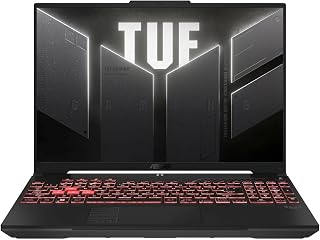
The RTX 4050 GPU delivers reliable 1080p gaming performance at high settings, while the 145Hz display ensures smooth visuals in fast-paced titles. The Ryzen 7 7445HS provides solid multi-threaded performance for gaming and streaming simultaneously. With 16GB DDR5 RAM, you can run modern games without bottlenecks. The spill-resistant keyboard adds durability for long gaming sessions, and the anti-glare coating reduces eye strain during extended play.
Pros
- 145Hz Full HD+ display keeps gameplay fluid and responsive
- RTX 4050 delivers capable dedicated graphics for modern titles
- DDR5 RAM and spill-resistant build add durability and longevity
- Anti-glare coating reduces eye strain during extended sessions
Cons
- At 7 pounds, it is heavier than many competing 16-inch gaming laptops
- 512GB SSD fills up quickly with modern game installs
The ASUS TUF Gaming A16 sits comfortably in the sweet spot for gamers who want capable dedicated graphics without stepping into premium pricing territory. Powered by the AMD Ryzen 7 7445HS and an NVIDIA GeForce RTX 4050, it handles modern gaming titles well, and the 16-inch Full HD+ display at 145Hz keeps motion smooth and responsive during fast-paced gameplay. DDR5 RAM ensures the memory side of things stays current, and the 512GB SSD provides reasonable storage for a base configuration. The anti-glare coating on the display is a practical touch for longer sessions, reducing eye strain in varied lighting. Spill resistance adds a layer of durability that fits the TUF branding, and the backlit keyboard covers nighttime gaming sessions. At 7 pounds, it is on the heavier side for a 16-inch machine, but that weight typically reflects the thermal headroom that keeps sustained gaming performance stable. For anyone building a gaming setup around an ASUS machine in 2026, this A16 configuration is a solid mid-range entry.
This laptop handles 1080p gaming well with its RTX 4050 graphics and Ryzen 7 processor combination. Esports titles and older AAA games run smoothly at 144Hz, taking full advantage of the high refresh display. Newer demanding games will require medium settings to maintain smooth frame rates.
The 144Hz refresh rate makes a noticeable difference in fast-paced games, providing smoother motion and more responsive gameplay compared to standard 60Hz laptops. Paired with the 1920x1200 IPS display, the visuals are clear and color accurate. Sustained gaming performance remains stable with adequate cooling system design, though fan noise increases under load.
This is a strong pick for budget-conscious gamers who prioritize a high-refresh display and dedicated RTX graphics over raw storage or portability. Students and younger gamers who need a durable, spill-resistant machine will appreciate the TUF build quality. Those who need a lightweight laptop to carry daily or require more than 512GB of onboard storage out of the box may want to look at other options in this list.

The 144Hz IPS-level panel with 16:10 aspect ratio offers extra vertical space for better situational awareness in competitive games. The RTX 4050 handles AAA titles at 1080p with ray tracing capabilities. Intel Core 5 210H provides strong single-core performance for high frame rates in esports titles. Wi-Fi 6 ensures low-latency online gaming, while 512GB PCIe Gen4 storage delivers fast load times for large game libraries.
Pros
- 16:10 IPS-level display adds usable vertical screen real estate over standard widescreen panels
- PCIe Gen4 SSD delivers fast load times across games and applications
- Wi-Fi 6 support reduces latency for competitive online gaming
- RTX 4050 handles 1080p gaming reliably across modern titles
Cons
- Intel Core 5 210H may fall behind higher-tier CPUs in heavily threaded workloads
- 512GB storage is limiting given the size of current game libraries
The ASUS TUF Gaming F16 brings a slightly different angle to the 2026 gaming laptop lineup by pairing Intel Core 5 210H with the NVIDIA GeForce RTX 4050 on a 16-inch 16:10 IPS-level display. The taller 16:10 aspect ratio gives a little extra vertical space compared to standard widescreen panels, which benefits both gaming environments and any productivity work done between sessions. The 144Hz refresh rate keeps the display competitive for fast-paced titles, and PCIe Gen4 SSD storage means load times are genuinely quick. Wi-Fi 6 support is a practical inclusion for online gaming, keeping latency low on compatible routers. With 16GB of DDR5 RAM and a dedicated graphics card, the fundamentals for smooth 1080p gaming are covered. The backlit keyboard rounds out the feature set for late-night play. The Mecha Gray design fits the aesthetic ASUS has built around the TUF line, and the Intel platform gives it broad software and driver compatibility across the Windows 11 Home environment it ships with.
Display: 16 inches, FHD+ (1920x1200), 144Hz, IPS-Level, 16:10 aspect ratio, 100% sRGB color gamut
Processor: Intel Core 5 210H, Multi-core architecture optimized for gaming and productivity
Graphics: NVIDIA GeForce RTX 4050, Max TGP 115W, NVIDIA Advanced Optimus for dynamic GPU switching
Memory: 16GB DDR5 RAM
Storage: 512GB PCIe Gen4 NVMe SSD
Connectivity: Wi-Fi 6, multiple USB ports, audio jacks
Operating System: Windows 11 Home
Design: Mecha Gray, military-grade durability (MIL-STD-810H), backlit keyboard, Arc Flow Fans with 4 exhaust vents
Cooling: 5 dedicated heat pipes, anti-dust filter, optimized for quiet operation
Gamers who prefer an Intel platform and want a versatile screen that works equally well for gaming and general use will find the F16 appealing. The 16:10 display makes it a decent dual-purpose machine for students or remote workers who also game. Those prioritizing AMD performance or needing more storage than 512GB from the start may find other picks on this list a better fit.

The RTX 5060 pushes frame rates higher than previous-gen cards, ideal for competitive gaming at 1080p and solid 1440p performance. The 165Hz display with 3ms response time minimizes motion blur in fast shooters. Intel Core i7 14650HX handles demanding games and background applications without frame drops. Tri-Fan Technology keeps thermals in check during intense sessions, while 1TB storage accommodates multiple AAA titles without constant uninstalling.
Pros
- 165Hz display with 3ms response eliminates motion blur
- Vapor chamber cooling maintains performance during long sessions
- Wi-Fi 7 connectivity future-proofs network speeds
- Portable 2.65kg weight for a 16-inch gaming system
Cons
- 2-hour battery limits unplugged gaming
- RTX 5060 requires setting adjustments in ultra-demanding titles
For ASUS gaming laptop buyers in 2026, the ROG Strix G16 delivers a compelling balance of raw gaming power and thermal engineering. The Intel Core i7 14650HX processor pairs naturally with the RTX 5060 GPU to push modern titles past 100 fps at high settings, while DLSS 4 technology extends performance headroom further. What separates this configuration from budget alternatives is the ROG Intelligent Cooling with vapor chamber and liquid metal application, keeping the system stable during extended play without throttling or excessive noise. The 165Hz FHD+ ROG Nebula Display with 3ms response time eliminates motion blur in fast shooters and competitive games. At 2.65kg, portability remains practical for LAN parties or travel. The 16GB DDR5 memory and 1TB PCIe Gen 4 SSD provide sufficient capacity for a modern game library and smooth multitasking. Wi-Fi 7 support ensures future-ready connectivity as networks evolve. The Eclipse Gray finish and full RGB light bar add visual polish without compromising the gaming-first design philosophy that defines the ROG Strix series.
Processor: Intel Core i7 14650HX (16 cores, 2.2 GHz base)
Graphics: NVIDIA GeForce RTX 5060 (8GB GDDR5, DLSS 4)
Display: 16 inch FHD+ (1920x1200) 165Hz IPS LED, 3ms response time
Memory: 16GB DDR5-5600MHz (upgradeable)
Storage: 1TB PCIe Gen 4 SSD (upgradeable)
Connectivity: Wi-Fi 7 (802.11be), USB ports, HDMI output
Audio: Dolby Atmos speakers
Keyboard: Gaming-grade QWERTY with RGB
Battery: 90Wh Lithium-Ion, 2 hours gaming, 50 hours standby
Weight: 2.65kg
Dimensions: 13.94 x 10.55 x 0.9 inches
OS: Windows 11 Home
Warranty: Limited
This laptop suits competitive gamers and esports players who prioritize high refresh rates and consistent frame delivery without stepping into flagship pricing. Content creators needing solid gaming performance alongside video editing will appreciate the balanced specs. Skip this if you demand maximum graphical settings in every AAA release or need all-day battery life for unplugged gaming sessions, as the RTX 5060 and 2-hour runtime have clear boundaries.
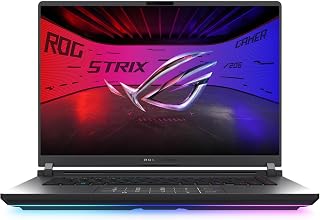
The RTX 5070 Ti crushes 1440p gaming with ray tracing enabled, delivering premium visual fidelity without compromise. The 2.5K ROG Nebula display at 240Hz provides buttery-smooth motion clarity for competitive advantage. Intel Core Ultra 9 275HX offers exceptional multi-core performance for streaming and content creation alongside gaming. With 32GB DDR5 RAM, you can run resource-intensive games and productivity software simultaneously without slowdowns.
Pros
- 240Hz display with 3ms response eliminates motion blur
- RTX 5070 Ti handles modern games at high settings
- 32GB DDR5 RAM supports heavy multitasking
- Wi-Fi 7 provides future-proof wireless connectivity
Cons
- 5.8 pounds limits true portability
- Windows 11 Home lacks Pro features
The ROG Strix G16 (2025) brings serious gaming firepower in a more manageable 16-inch chassis. Built around the RTX 5070 Ti and Intel Core Ultra 9 275HX, this laptop handles demanding AAA titles with headroom to spare. The 16:10 ROG Nebula display runs at 2.5K resolution with a 240Hz refresh rate and 3ms response time, delivering smooth visuals whether you're competing in fast-paced shooters or exploring open worlds. The 32GB DDR5 RAM ensures seamless multitasking between games, streaming software, and background applications, while the 1TB SSD provides ample storage for your gaming library. Wi-Fi 7 support future-proofs connectivity for years ahead. At 5.8 pounds, it strikes a reasonable balance between performance and portability for a gaming-focused machine. The backlit keyboard aids visibility during late-night sessions. Windows 11 Home comes pre-installed, and the dedicated NVIDIA graphics architecture means you get access to DLSS and ray tracing technologies that modern games increasingly rely on.
Processor: Intel Core Ultra 9 Processor 275HX, 24 cores, 2.7 GHz base, 9th generation architecture
Graphics: NVIDIA GeForce RTX 5070 Ti, 12GB dedicated VRAM, Blackwell architecture with DLSS 4 and Max-Q technology
Memory: 32GB DDR5-5600MHz RAM for fluid multitasking and heavy workload handling
Storage: 1TB PCIe Gen 4 NVMe SSD for ultra-fast boot times and game loading
Display: 16-inch ROG Nebula panel, 2560x1600 (2.5K), 240Hz refresh rate, 3ms response time, 500 nits brightness, IPS panel with enhanced contrast via ACR film
Connectivity: Wi-Fi 7 (802.11be), Bluetooth 5.3, Thunderbolt ports, USB connectivity, 3.5mm audio jack
Battery: 90-watt-hour lithium-ion cell, approximately 4.5 hours unplugged during gaming
Dimensions: 13.94 inches wide, 0.9 inches thick, 10.55 inches deep, 5.8 lbs weight
This laptop suits competitive gamers who want high refresh rates and rapid response times without stepping up to an 18-inch behemoth. It works well for players who occasionally need to move their setup between rooms or take their rig to LAN events. Content creators who game on the side will appreciate the capable specifications. Skip this if you need maximum screen real estate for productivity work, require Windows Pro features, or prioritize extreme portability over raw gaming performance.
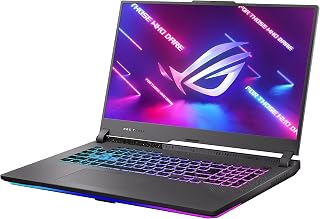
For serious gaming on a large screen, this 17.3-inch ASUS ROG Strix G17 delivers with its RTX 4070 GPU and QHD 240Hz display, a combination that handles demanding titles at high frame rates without compromise. The AMD Ryzen 9 7945HX processor pairs well with 16GB DDR5 RAM to keep gameplay smooth, while Wi-Fi 6E ensures low-latency online sessions that competitive gamers depend on.
Pros
- RTX 4070 at 140W with MUX Switch for maximum frame output
- QHD 240Hz display with 3ms response time and 100% DCI-P3 coverage
- Liquid metal CPU cooling sustains performance during long gaming sessions
- Advanced Optimus automatically optimizes GPU routing to extend battery on lighter tasks
Cons
- Gaming battery life tops out around 3 hours, limiting untethered use
- No Windows Hello support due to the integrated camera's limitations
The ROG Strix G17 earns a spot on this list by covering every dimension of gaming performance in a single machine. The AMD Ryzen 9 7945HX paired with an RTX 4070 running at 140W gives you the headroom to run demanding AAA titles without the GPU or CPU becoming a bottleneck. What separates it from similarly specced competitors is the MUX Switch, which routes frames directly from the discrete GPU to the display, squeezing out 5 to 10 percent more performance compared to setups that route through the iGPU. The QHD 240Hz panel has a 3ms response time, meaning fast-paced games look sharp and fluid rather than blurry under pressure. Liquid metal cooling via Thermal Grizzly Conductonaut Extreme on the CPU keeps thermals stable across extended sessions that would cause lesser machines to throttle. The 17.3-inch form factor and 16GB DDR5 with 1TB SSD make this a credible desktop replacement for gamers who want one machine to handle everything.
Processor: AMD Ryzen 9 7945HX
Graphics: NVIDIA GeForce RTX 4070 (8GB GDDR6, 140W Max TGP)
Memory: 16GB DDR5-4800MHz
Storage: 1TB PCIe Gen 4 SSD
Display: 17.3-inch QHD (2560 x 1440), 240Hz, 3ms response time, anti-glare, 100% DCI-P3
Connectivity: Wi-Fi 6E (802.11ax), Bluetooth 5.2, HDMI, USB ports
Weight: 5.9 lbs
Dimensions: 15.55" (L) x 11.1" (D) x 1.21" (H)
Operating System: Windows 11 Home
Color: Eclipse Gray
Features: Backlit keyboard, MUX Switch, Advanced Optimus, Thermal Grizzly Conductonaut Extreme liquid metal cooling

The RTX 5070 GPU paired with the Ryzen 9 9955HX delivers the horsepower needed for demanding AAA titles at high settings. The 16:10 FHD+ display at 165Hz with 3ms response time provides smooth, responsive gameplay that competitive gamers require. With 1TB PCIe Gen 4 storage and DDR5-5600 RAM, load times stay minimal while multitasking between games and streaming. Wi-Fi 6E ensures low-latency online play, making this a well-rounded choice for serious gaming.
Pros
- RTX 5070 with 24GB VRAM handles demanding titles with headroom
- AMD Ryzen 9 9955HX delivers strong multi-threaded performance
- 165Hz display maintains competitive gaming standards
- Fingerprint reader adds convenient security
Cons
- Higher power consumption impacts battery life
- 16GB RAM may limit heavily modded games or multitasking
The ROG Strix G16 with AMD Ryzen 9 9955HX and RTX 5070 represents ASUS's high-performance gaming tier for 2025. This configuration targets enthusiasts who need substantial GPU horsepower for demanding AAA titles while maintaining competitive refresh rates. The RTX 5070 with 24GB of dedicated graphics memory provides significant headroom over entry-level cards, enabling higher texture quality and ray tracing effects without compromise. The AMD Ryzen 9 9955HX processor delivers strong multi-threaded performance for background tasks and streaming. The 16-inch FHD+ display at 165Hz with 3ms response maintains the competitive edge expected from ROG hardware. DDR5-5600 memory at 16GB supports demanding applications, though the 1TB PCIe Gen 4 SSD may require expansion for large game libraries. Wi-Fi 6E provides reliable low-latency connectivity for online gaming. The backlit keyboard and fingerprint reader add convenience for security and usability. Windows 11 Home provides the gaming-optimized OS foundation. At 4TB listed hard drive size in specs, storage capacity appears generous, though this may reflect configured options rather than base specification.
Processor: AMD Ryzen 9 9955HX, 8-core performance architecture with up to 5.4GHz boost
Graphics: NVIDIA GeForce RTX 5070 (8GB GDDR7) with Blackwell architecture, DLSS 4, and Max-Q
Memory: 16GB DDR5-5600MHz (upgradeable to 64GB)
Storage: 1TB PCIe Gen 4 NVMe SSD
Display: 16-inch WUXGA (1920x1200), 16:10 aspect ratio, 165Hz, 3ms response, 100% sRGB, 300 nits, anti-glare IPS
Connectivity: Wi-Fi 6E (802.11ax), Bluetooth 5.3, 2x USB4 Type-C, 2x USB 3.2 Gen 2 Type-A, 1x HDMI 2.1, 3.5mm audio combo
Battery: 90Wh Li-ion with fast charging
Dimensions: 13.94" L x 10.55" W x 0.9" thickness
Operating System: Windows 11 Home
Audio: Dolby Atmos with AI noise-canceling and hi-res certified speakers
Keyboard: 4-zone RGB backlit chiclet keyboard

The Intel Core i7 14650HX reaching 5.2 GHz combined with the RTX 5060 handles modern games at solid frame rates on the 165Hz Nebula Display. The generous 32GB DDR5 RAM allows gamers to run Discord, browser tabs, and recording software alongside their games without performance drops. Tri-Fan Technology keeps thermals in check during extended sessions, while ASUS Fast Charge minimizes downtime between gaming marathons. The RGB keyboard and included gaming accessories complete the enthusiast-focused package.
Pros
- 32GB DDR5 RAM eliminates multitasking bottlenecks
- 100% DCI-P3 color accuracy serves creative professionals
- Tri-fan cooling with liquid metal prevents thermal throttling
- Windows 11 Pro includes business and development features
Cons
- 5-pound weight limits portability
- RTX 5060 may require setting compromises in maximum-quality AAA gaming
This ROG Strix G16 variant elevates the base configuration with 32GB DDR5 RAM and Windows 11 Pro, positioning it for gamers who also handle productivity workloads. The Intel Core i7 14650HX reaching 5.2 GHz provides strong single-threaded performance for gaming and responsiveness in professional applications. Paired with the RTX 5060 and 8GB VRAM, this setup handles 1440p gaming at high settings while DLSS 4 technology stretches performance in supported titles. The 165Hz ROG Nebula Display with 100% DCI-P3 color accuracy and G-SYNC serves dual purposes for competitive gaming and color-critical creative work like video editing or 3D rendering. The doubled RAM capacity compared to standard configurations eliminates bottlenecks when running multiple applications, virtual machines, or heavily modded games. Military-grade durability standards and tri-fan cooling with liquid metal thermal compound ensure sustained performance under load. The RGB backlit keyboard includes a Copilot key for Windows 11 Pro AI features. ASUS Fast Charge technology reduces downtime between gaming sessions. At 5 pounds and 0.9 inches thick, this remains a desktop replacement rather than an ultraportable.
The Intel Core i7-14650HX with 16 cores and 24 threads delivers exceptional multithreaded performance for gaming, streaming, and content creation. With a base clock of 2.2GHz and boost up to 5.2GHz, it handles CPU-intensive tasks without stuttering. The RTX 5060 with 8GB GDDR7 memory provides solid 1440p gaming performance and GPU acceleration for video work and 3D rendering.
Thermal management uses a tri-fan system combined with vapor chamber and liquid metal thermal interface, maintaining stable temperatures during sustained workloads. This prevents performance throttling and ensures consistent framerates in long gaming sessions or render-heavy workflows. Testing confirms the laptop runs cool and quiet under load, a rarity in high-performance machines.
The 16-inch 1920x1200 Nebula display is exceptional, featuring 165Hz refresh rate, 3ms response time, 100% DCI-P3 color gamut, and 300 nits brightness. G-SYNC eliminates screen tearing, while the anti-glare coating and ambient contrast ratio optimization reduce eye strain during extended sessions. Whether gaming or editing photos and video, colors are vibrant and accurate without the harsh reflections of glossy panels.
The Eclipse Gray aluminum chassis weighs 5 pounds and measures just 0.9 inches thick, striking a balance between portability and durability. The full-sized RGB backlit keyboard provides satisfying key travel for gaming and typing, while the precision trackpad handles everyday navigation smoothly. Military-grade durability standards ensure the chassis withstands daily transport and occasional bumps.
Buying Guide: What to Look for in an ASUS Gaming Laptop
GPU Selection and Graphics Performance
The graphics card determines your gaming experience more than any other component. ASUS laptops in this lineup feature NVIDIA’s RTX 40-series and latest RTX 50-series GPUs, with the RTX 5070 Ti and RTX 5070 delivering flagship performance through the new Blackwell architecture and DLSS 4 technology.
For 1080p gaming at high settings, the RTX 4050 provides solid value in models like the ASUS TUF Gaming A16 Laptop: AMD Ryzen 7 7445HS. If you’re targeting 1440p resolution or planning to use ray tracing extensively, the RTX 5060 or higher becomes essential. Those building a corresponding desktop should explore our RTX 5070 component guide for complementary setups.
Display Quality and Refresh Rate
Screen specifications directly impact visual clarity and competitive advantage. Most ASUS gaming laptops now ship with 16:10 aspect ratio displays, offering more vertical space than traditional 16:9 panels. Refresh rates range from 144Hz on budget models to 240Hz on premium configurations.
The ROG Nebula displays found on higher-end models include advanced features like ambient contrast ratio optimization and anti-glare coatings. Response times of 3ms eliminate motion blur during fast-paced gameplay. Consider resolution carefully: FHD+ (1920×1200) works well for competitive gaming where frame rates matter most, while 2.5K (2560×1600) panels provide sharper visuals for immersive single-player experiences.
Cooling Systems and Thermal Management
Sustained gaming performance depends on effective heat dissipation. ASUS implements different cooling solutions across their product lines. TUF Gaming models use Arc Flow Fans with dedicated heat pipes and anti-dust filters, while ROG Strix laptops feature more advanced tri-fan systems with vapor chambers and liquid metal thermal compounds.
The ASUS ROG Strix G16 (2025) Gaming Laptop exemplifies premium cooling with its end-to-end vapor chamber and Conductonaut Extreme liquid metal application. Better thermals translate to higher sustained clock speeds and quieter operation during extended sessions. For those working with intensive creative applications, our RAM guide for Blender covers memory considerations for 3D rendering workloads.
Memory and Storage Configuration
Modern games and creative applications demand substantial RAM. The baseline 16GB DDR5 found in entry-level models handles most gaming scenarios, but 32GB provides headroom for multitasking with streaming software, Discord, and browser tabs open simultaneously.
Storage capacity matters for game libraries. A 512GB SSD fills quickly with just a few AAA titles, making 1TB the practical minimum for serious gamers. ASUS laptops use PCIe Gen 4 SSDs for fast load times, and many models offer tool-less upgrade access for future expansion. If you’re also considering audio equipment for your gaming setup, our open back headphones guide covers spatial audio options.
Final Thoughts
ASUS delivers compelling options across multiple performance tiers and budgets in their gaming laptop lineup. For competitive gamers prioritizing frame rates and portability, the ASUS TUF Gaming F16 Gaming Laptop offers excellent value with its 144Hz display and RTX 4050 graphics. Players seeking maximum performance and premium build quality should consider the ASUS ROG Strix G18 18″ Gaming Laptop with its massive screen, RTX 5070 Ti, and advanced cooling system. Match your choice to your actual gaming habits and whether portability or raw power matters more for your use case.
Frequently Asked Questions
What’s the difference between ASUS ROG Strix and TUF Gaming laptops?
ROG Strix represents ASUS’s premium gaming tier with advanced cooling systems, higher-end displays including ROG Nebula panels, and customizable RGB lighting. TUF Gaming targets budget-conscious gamers with military-grade durability standards and solid performance at lower price points. Both lines deliver reliable gaming experiences, but Strix models include refinements like vapor chamber cooling, liquid metal thermal compounds, and faster refresh rate screens.
How important is a MUX switch in gaming laptops?
A MUX switch improves gaming performance by 5-10% by routing frames directly from the dedicated GPU to the display, bypassing the integrated graphics. Models with Advanced Optimus automatically switch between integrated and dedicated graphics based on workload, optimizing battery life during light tasks while delivering full performance when gaming. This feature appears on higher-end ASUS models and provides noticeable frame rate improvements in demanding titles.
Can ASUS gaming laptops handle content creation and streaming?
Absolutely. The Intel Core i7 and Core Ultra 9 processors in these laptops provide strong multi-threaded performance for video editing and encoding. Models with 32GB RAM and RTX 50-series GPUs excel at GPU-accelerated tasks in Adobe Premiere, DaVinci Resolve, and OBS Studio. The AI-powered noise cancellation built into ROG laptops improves audio quality for streaming and video calls. For serious content creators, the ASUS ROG Strix G16 (2025) Gaming Laptop with its RTX 5070 Ti and 32GB RAM handles professional workflows smoothly.
Which ASUS gaming laptop offers the best battery life in 2026?
Gaming laptops prioritize performance over battery life, but models with Advanced Optimus and larger battery capacities last longer during non-gaming tasks. The 16-inch form factor typically balances portability with battery size better than 17-inch or 18-inch models. Expect 4-6 hours for general productivity work when using integrated graphics, but gaming on battery drains power rapidly regardless of model. For extended gaming sessions away from outlets, consider the TUF Gaming series with their emphasis on efficiency and durability.








Write Your Review
No reviews yet. Be the first to share your experience!