

Your Xbox Series X came with a fast internal SSD, but modern AAA games routinely consume 100GB or more. After installing a handful of titles, you’re already managing storage instead of playing games. An external SSD solves this problem by giving you room to store your entire library while maintaining quick access to your favorites.
This guide covers 10 verified external storage solutions for Xbox Series X, from officially licensed expansion cards to high-capacity portable SSDs. Whether you need native-speed storage for Series X|S titles or a budget-friendly option for backward-compatible games, you’ll find the right match here.
Quick answer
This guide compares 10 picks, with SanDisk 1TB Optimus GX C50 Xbox Series X|S Storage ranked first. Samsung T7 1TB Portable SSD: 1,050MB/s External Storage has the most customer reviews.

Pros
- Native Xbox Velocity Architecture support ensures zero performance degradation
- Eliminates tedious game management and deletion decisions
- Quick Resume works flawlessly, allowing instant switching between suspended games
- Compact design takes minimal space behind your console
- Exceptional value with included Game Pass and Discord subscriptions
Cons
- Proprietary Xbox expansion slot design limits use to Xbox Series X|S only
- 1TB may feel limiting for players with 50+ game libraries
The SanDisk Optimus GX C50 solves a critical problem for Xbox Series X|S owners: game library management. With modern AAA titles consuming 100-200GB each, your console's internal storage fills up fast. This officially licensed expansion card plugs directly into the dedicated expansion slot and provides instant, seamless access to your entire game collection.
What truly sets this card apart is its performance. Unlike external USB drives that force you to transfer games before playing, the Optimus GX C50 leverages Xbox Velocity Architecture to deliver NVMe speeds that match your console's internal SSD. Games launch instantly, load times remain snappy, and Quick Resume works flawlessly across your suspended titles. You're playing your full library at native speeds, not making compromises.
The build quality is solid. At just 27 grams and measuring 2.18 inches long, the card sits unobtrusively behind your console. The plug-and-play design requires zero technical setup, just insert and start playing. SanDisk backs the card with a 5-year limited warranty, reflecting confidence in long-term reliability.
The main drawbacks are the premium price and storage ceiling. At $239.99, it costs significantly more than standard external drives, though the performance justification is real. The 1TB capacity works well for most players but may feel restrictive if you maintain 60+ games. Additionally, the proprietary expansion slot locks you into Xbox Series X|S compatibility.
The SanDisk Optimus GX C50 is the best expansion solution available for Xbox Series X|S players who value convenience and performance. If you're tired of choosing which games to delete, this card delivers genuine peace of mind with industry-leading speed and seamless integration.
Storage Capacity: 1TB (expandable ecosystem up to 2TB)
Interface: NVMe with PCI Express x4
Connector: Xbox Series X|S Expansion Slot
Form Factor: 2.18" L x 0.3" W x 1.24" Thickness
Weight: 27.22g
Color: Black
Model: SDCEOGN-1T00-GNAGX
Warranty: 5-Year Limited
Key Features: Plug and Play installation, Quick Resume compatibility, Xbox Velocity Architecture optimization, official Xbox Series X|S licensing, game capacity for approximately 50 additional titles
Who Should Buy This: Xbox Series X|S owners with game libraries exceeding available storage, players who value instant load times and Quick Resume functionality, and those willing to invest in premium expansion performance.
Who Might Look Elsewhere: Budget-conscious buyers seeking basic external storage will find cheaper USB alternatives, though performance will suffer. Players using primarily cloud gaming or Game Pass streaming may need less expansion capacity.
Capacity Planning: The 1TB model stores approximately 50 AAA titles or 100+ indie games. Consider your gaming habits: casual players may find 1TB sufficient, while competitive multiplayer enthusiasts maintaining 60+ titles might eventually need expansion to 2TB.
Value Considerations: Factor in the included 1-month Xbox Game Pass Ultimate trial and Discord Nitro subscription when comparing total cost. These bonuses offset roughly 30-40 dollars of the purchase price, improving overall value proposition.

The T7 delivers read speeds up to 1,050MB/s over USB 3.2 Gen 2, cutting load times for backward-compatible Xbox titles stored externally. Its shock-resistant build protects your library during LAN parties or travel, while thermal control prevents throttling during marathon sessions. The 1TB capacity holds roughly 15 to 20 games, striking a practical balance for players who rotate through a core collection without constantly managing storage.
Pros
- Fast USB 3.2 Gen 2 speeds for quick game transfers and loading older titles
- Extremely compact and lightweight for portability between locations
- Durable aluminum build with shock resistance and drop protection
- Hardware encryption secures your game library and save data
Cons
- Cannot run Xbox Series X optimized games
- Runs warm during extended gaming sessions
The Samsung T7 1TB offers Xbox Series X players a compact external storage solution that balances speed with portability. Its USB 3.2 Gen 2 interface delivers read speeds up to 1,050MB/s and write speeds up to 1,000MB/s, making it suitable for storing and running backward-compatible Xbox One titles directly from the drive. The aluminum unibody construction and shock-resistant design provide durability for a console accessory that may travel between rooms or homes. At just 2.08 ounces and credit-card sized, it barely adds bulk to your gaming setup. The included USB-C cables ensure immediate plug-and-play compatibility with the Series X's USB ports. Hardware-based 256-bit AES encryption protects your game library and save data. The drive remains functional during extended gaming sessions thanks to built-in thermal control, though it can run warm under continuous load. While it cannot run Series X optimized titles (those require the expansion card), it excels at offloading your older Xbox library to free up the internal SSD for current-gen games.
This drive suits Xbox Series X owners who need extra space for their backward-compatible Xbox One game collection and want a portable option they can move between consoles or take to a friend's house. It works well if you regularly rotate between older and newer titles. Skip it if you primarily play Series X optimized games that demand the internal SSD or expansion card, or if you need a permanent stationary storage solution where a larger external HDD would offer better value per gigabyte.

The T7's 2TB capacity stores 30 to 40 backward-compatible Xbox games, ideal for players with extensive libraries who prefer external storage over constant downloads. USB 3.2 connectivity ensures read speeds up to 1,050MB/s, noticeably improving load times compared to mechanical drives. The portable 2.5-inch design keeps your collection mobile, whether you're switching between rooms or visiting friends' setups.
Pros
- 2TB capacity stores extensive Xbox One game collections
- USB 3.2 speeds enable faster transfers than standard external HDDs
- Compact 2.5-inch portable design despite higher capacity
- Immediate plug-and-play after Xbox formatting
Cons
- Incompatible with Xbox Series X optimized game playback
- Higher cost per gigabyte than traditional external hard drives
The Samsung T7 2TB provides Xbox Series X owners with double the capacity for managing a substantial backward-compatible game library. With USB 3.2 connectivity delivering 1,050MB/s reads and 1,000MB/s writes, it handles Xbox One game storage and playback smoothly while freeing your console's internal SSD exclusively for Series X optimized titles. The 2TB capacity accommodates dozens of last-gen games, reducing the need to constantly delete and redownload titles as you switch between your catalog. The 2.5-inch form factor keeps the footprint small despite the increased storage, fitting neatly beside or behind your console. Like its 1TB sibling, it offers portable design for gamers who split time between multiple Xbox consoles or bring their library to friends' houses. The drive connects via standard USB-C and works immediately once formatted for Xbox storage. While it cannot run native Series X games due to API requirements, it serves as an effective archive for older titles that would otherwise consume your premium internal storage.
Storage Capacity: 2TB
Interface: USB 3.2 Gen.2 (10Gbps)
Form Factor: 2.5 inches, portable
Sequential Read Speed: Up to 1,050MB/sec
Sequential Write Speed: Up to 1,000MB/sec
Weight: 58g (0.128 lbs)
Color: Grey
Enclosure Material: Metal
Security: Hardware-level password protection
Compatibility: Desktop, PS5, Xbox Series X/S, and modern Windows/Mac systems
Model Number: MU-PC2T0T
Best for Xbox Series X players with extensive backward-compatible collections who want high-capacity external storage without sacrificing too much speed. Ideal if you own 50 plus Xbox One games and want most readily accessible without constant management. Skip it if you mainly play a handful of current-gen titles, if your budget favors maximum capacity over speed (where HDDs offer better value), or if you rarely revisit older games in your library.
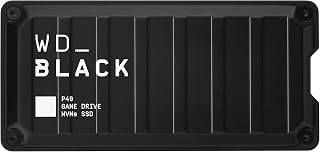
The P40 hits 2,000MB/s read speeds via USB 3.2, making it one of the fastest options for loading Xbox One and older games from external storage. RGB lighting syncs with your setup's aesthetic, and the compact 2.5-inch form factor tucks neatly beside your console. At 1TB, it accommodates a solid rotation of backward-compatible titles while leaving room for DLC and updates.
Pros
- Outstanding portability and durability with compact 2.5-inch form factor and drop-resistant build
- Works seamlessly across multiple gaming platforms without complicated setup or reformatting
- RGB lighting adds aesthetic appeal and can be fully customized on Windows systems
- Consistently praised by users for reliable performance with Steam libraries and game archiving
- Includes quality cables and clear documentation for immediate out-of-box functionality
Cons
- Real-world read speeds typically peak around 900MB/s, significantly lower than the 2,000MB/s advertised maximum
- RGB dashboard customization only available on Windows, limiting control for Mac and console users
- Premium pricing compared to standard external SSDs with similar actual performance in real-world use
The WD_BLACK P40 is a premium external SSD designed for serious gamers who need reliable, fast storage expansion across multiple gaming platforms. Whether you're expanding PS5 storage, backing up your Xbox Series X library, or carrying your Steam collection on a laptop, this drive promises high-speed performance in a durable, portable package.
The standout feature is cross-platform compatibility. The P40 works with PlayStation 5, PS4 Pro, Xbox Series X/S, Xbox One, PC, and Mac out of the box, making it a versatile solution for multi-console households. The RGB lighting customization via the WD_BLACK Dashboard adds gaming flair on Windows, and users consistently praise the drive for reliable performance with large game libraries without complications or reformatting headaches.
Build quality impresses with a shock-resistant structure rated for 2-meter drops and a compact 2.5-inch form factor that fits easily in a bag or pocket. The included dual cables (USB-C to USB-A and USB-C to USB-C) ensure connectivity with virtually any modern gaming device. However, real-world testing shows read speeds typically peak around 900MB/s, roughly half of the advertised 2,000MB/s maximum, which is still sufficient for smooth game loading but represents a notable gap between marketing claims and actual performance.
The main drawback is price. At this capacity and performance tier, you're paying a premium for the WD_BLACK brand and gaming-focused features like RGB lighting and cross-platform certification. Alternative external SSDs offer similar real-world speeds at lower costs, though they may lack the same reliability reputation and multi-platform guarantee.
Verdict: The WD_BLACK P40 delivers solid, dependable external SSD performance for gamers who value compatibility across multiple consoles and platforms. It excels as a storage solution for PS5 and Xbox Series X game archiving, and its durability makes it ideal for portable use. While real-world speeds fall short of marketing claims and the price is steep, the combination of reliability, cross-platform support, and build quality makes it a worthwhile investment for serious gamers who prioritize dependability over raw speed specs.
Storage and Performance: 1TB capacity, up to 2,000MB/s read speed (real-world: approx. 900MB/s), 1,950MB/s media speed, USB 3.2 Gen2x2 interface
Design and Durability: 2.5-inch form factor, compact portable design, shock-resistant structure rated for 2-meter drops, polycarbonate enclosure, weighs 2.72 ounces
Dimensions and Connectivity: 4.21 inches L x 2 inches W x 0.51 inches thick, USB Type-C connectivity, includes USB-C to USB-A and USB-C to USB-C cables
Compatibility: PlayStation 5, PS4 Pro, Xbox Series X/S, Xbox One, PC, Mac, and compatible with any device supporting USB 3.2
Features and Warranty: Customizable RGB lighting via WD_BLACK Dashboard (Windows only), 5-year limited warranty, includes quick start guide and protective carrying case
Ideal For: Gamers with PS5 or Xbox Series X/S who need expanded storage for game archiving, PC and laptop users building portable gaming libraries, multi-console households requiring a single cross-platform storage solution, and users who value build durability and brand reliability
Consider Alternatives If: You need the absolute fastest external SSD speeds and don't want to settle for real-world performance below advertised specs, you prefer budget-friendly options over premium branding, or you primarily game on a single platform and don't need multi-console compatibility
Best Use Cases: Archiving PS5 games for later playback, capturing and storing Xbox Series X gameplay footage, carrying a complete Steam library between computers, backing up console game progress, and storing large AAA titles for quick access across multiple devices

Pros
- Exceptional transfer speeds of 1050MB/s make file operations nearly instantaneous
- Tough, portable design with drop resistance up to 2 meters suits mobile professionals
- Included 2-in-1 cable eliminates need for adapters across different devices
- Advanced thermal management keeps drive cool during intensive operations
- Strong 4.5-star rating from 253 verified users reflects real customer satisfaction
Cons
- Premium pricing puts it above budget-friendly alternatives, though justified by performance
- USB 2.0 listing in specs may confuse buyers despite actual USB 3.0 capability
- Gaming console compatibility list is outdated, including older generation systems
The Lexar ES3 is a premium portable SSD designed for users who demand both speed and durability from their external storage. Whether you're a content creator managing large video files, a gamer backing up extensive libraries, or a business professional requiring fast data transfers, this 2TB drive delivers exceptional performance that justifies its position in the market.
The standout feature is undoubtedly the blazing 1050MB/s read speed, which translates to transferring a 50GB file in roughly 50 seconds. Combined with 1000MB/s write speeds, this drive is nearly 10 times faster than traditional hard drives, making it a genuine productivity enhancer rather than just a storage device. The built-in graphite heat dissipation system ensures the drive remains cool even during sustained high-speed operations, which is crucial for maintaining consistent performance during intensive workflows.
Build quality is impressive for a portable drive. The sleek design houses dual-layer graphite sheets for thermal management, while the 2-meter drop resistance provides real-world durability for professionals who work on the go. The included 2-in-1 USB-C and USB-A cable is a smart touch that eliminates adapter hunting, enabling seamless compatibility with laptops, desktops, tablets, smartphones, and gaming systems. The dust and water-resistant features add layers of protection without compromising portability.
The main consideration is the price point, which sits at a premium compared to slower external drives. For creative professionals, gamers, and anyone regularly transferring large files, the speed advantage pays dividends. However, budget-conscious users may want to explore alternatives. Additionally, the specifications list shows some confusing legacy references that don't reflect the drive's actual modern capabilities.
The Lexar ES3 2TB is an excellent choice for performance-focused users who value speed, reliability, and universal compatibility. With a strong 4.5-star rating, 3-year warranty, and proven real-world performance, it's a solid investment for anyone needing fast, portable external storage that won't let you down.
Content creators and video editors benefit most from the ES3's speed when working with large 4K or 8K files, significantly reducing render times and transfer waits. The portability and durability make it perfect for on-location shoots where reliable backup is critical.
Gamers gain substantial advantages with faster game library transfers between consoles or PCs, plus quick backup capabilities for extensive game collections. The drop resistance provides peace of mind during travel to gaming events or friends' houses.
Remote professionals and business users appreciate the rapid file synchronization and backup capabilities, enabling faster workflows and reduced downtime. The universal device compatibility ensures seamless integration with corporate equipment and personal devices.
Photography professionals benefit from quick offload of high-resolution images and RAW files from cameras, plus fast backup to ensure no photos are lost. The durable construction withstands studio and field environments equally well.
Storage and Interface: 2TB capacity with USB-C and USB-A connectivity for maximum device compatibility.
Performance: Up to 1050MB/s read speed and 1000MB/s write speed, delivering 9.5x faster transfers than traditional hard drives.
Durability Features: Drop-resistant up to 2 meters, dust-resistant, water-resistant construction with built-in dual-layer graphite sheets for heat dissipation.
Compatibility: Works with PC, Mac, tablets, smartphones, and gaming consoles with plug-and-play setup. Includes 2-in-1 USB-C and USB-A cable.
Warranty: 3-year limited warranty covering manufacturing defects. Model: LES3XXX002T-RNSAU with 1 unit included.

Pros
- Genuinely portable at 0.5 inches thick and lightweight, ideal for travel
- Consistent 125MB/s read speeds handle large file transfers efficiently
- Quiet operation makes it suitable for office or studio environments
- Plug-and-play compatibility works with most computers and gaming consoles
- Solid build quality with aluminum enclosure and heat dissipation strips
Cons
- No reviews available yet to verify real-world reliability and longevity
- 5400 RPM mechanical drive may be slower than some newer external SSDs
- Limited to USB 3.0, which is not the fastest standard for high-speed workflows
The UnionSine HDD2510 is a 1TB portable external hard drive built for anyone who needs dependable backup storage or additional file capacity without sacrificing portability. It's ideal for students, professionals, content creators, and casual users who regularly transfer files between devices.
The standout feature is its ultra-slim 0.5-inch profile combined with respectable USB 3.0 transfer speeds of up to 125MB/s. The JMicron 578 controller keeps the drive quiet during operation, and the aluminum enclosure with heat-dissipating strips helps maintain stable performance during extended use.
Build quality appears solid with its rounded, ergonomic shell design and non-slip striped surface. The drive is designed to fit comfortably in a pocket or bag, and the included USB 3.0 cable means no extra purchases are needed out of the box.
The main limitation is that this is a mechanical hard drive rather than an SSD, so transfer speeds, while adequate, won't match newer solid-state alternatives. Additionally, with no customer reviews currently available, real-world reliability data is limited.
Overall, the UnionSine HDD2510 delivers practical, straightforward external storage for users prioritizing portability and affordability over cutting-edge speed. The three-year warranty and plug-and-play design make it a low-risk choice for everyday backup needs.
Storage Capacity: 1TB
Interface: USB 3.0 and USB 2.0
Form Factor: 2.5-inch portable external hard drive
Dimensions: 4.56 inches L x 3.15 inches W x 0.5 inches thickness
Read Speed: Up to 125MB/s
Write Speed: Up to 103MB/s
Rotational Speed: 5400 RPM
Color: Black
Controller: JMicron 578
Enclosure Material: Aluminum with heat dissipation strips
Compatibility: Windows, Mac, Xbox 360, Xbox One, and most USB-compatible devices
Warranty: 3-year manufacturer warranty
Package Contents: 1x Portable Hard Drive, 1x USB 3.0 Cable, 1x User Manual, Gift packaging

Pros
- Exceptional speed performance and consistent transfer rates even with hub connections
- Extremely portable form factor that actually fits in a pocket
- Works seamlessly across multiple platforms and gaming consoles
- Premium build quality with durable metal enclosure
- No power adapter required for convenient on-the-go use
Cons
- Not compatible with iPhone 14 and older models despite broad iPhone support claims
- Some users report intermittent disconnection issues after a month of regular use
- Performance limited to USB 3.0 speeds on older systems without USB 3.2 Gen 2 support
The Lexar ES3 is a portable external SSD designed for anyone who needs fast, secure storage on the move. Whether you're a content creator backing up large media files, a gamer storing game libraries, or a professional managing work files, this 1TB drive offers the speed and portability to keep up with demanding workflows.
The standout feature is its impressive 1050MB/s read speed, which translates to real-world file transfer efficiency. Users consistently report reliable performance, with one reviewer noting they transferred over 50,000 photos and videos from an iPhone with zero issues. The drive maintains consistent speeds even when routed through USB hubs, making it practical for setups with limited USB 3.2 ports.
Build quality is a highlight. At just 42 grams and 10.5mm thick, the ES3 feels premium with its durable metal casing. The compact form factor genuinely fits in a pocket, and the included USB-C cable eliminates the need for external power. Security-conscious users will appreciate the 256-bit AES encryption built in.
The main concern is reliability longevity. While most reviewers report flawless performance, a small number experienced disconnection issues after extended use. Additionally, the drive's compatibility claims are somewhat misleading - it supports iPhone 17 series but not iPhone 14 or older, limiting its appeal to users with older Apple devices.
For the price and performance, the Lexar ES3 is a solid choice for portable high-speed storage. Best suited for creative professionals, gamers, and power users who prioritize speed and portability and own compatible devices.
The Lexar ES3 works with a wide range of devices, but compatibility is not universal. It fully supports iPhone 17 series, all Android smartphones, Windows and Mac laptops, gaming consoles (PlayStation 5, Xbox Series X, and PS4), and digital cameras. However, it is not compatible with iPhone 14 and earlier iPhone models, which is an important consideration for Apple users.
For maximum performance, ensure your device supports USB 3.2 Gen 2. Older systems with only USB 3.0 or 3.1 will still function but at reduced speeds (200-250 MB/s as reported by users). When using USB 2.0 connections or older hubs, expect significantly slower transfer rates.
Storage and Performance: 1TB capacity with 1050MB/s read speed and 1000MB/s write speed. Connectivity: USB 3.2 Gen 2, USB-C connector. Interface: External SSD with NAND Flash memory.
Physical Specifications: Dimensions: 3.96 inches L x 1.97 inches W x 0.41 inches thick. Weight: 45 grams. Color: Silver. Includes USB-C cable in the box.
Security and Warranty: Features 256-bit AES encryption (Lexar DataShield). Covered by a 3-year limited warranty from Lexar.
Model Information: Model LES3XXX001T-RNSAU, ASIN B0DYDHLN81. Manufactured by Lexar Co., LTD. Best Sellers Rank: #7 in External Solid State Drives.

Pros
- Perfect solution for storing Xbox Series X|S games as a buffer before playing on internal SSD
- Fast enough to transfer games from external drive quicker than re-downloading
- Fully compatible across multiple Xbox generations, maximizing long-term value
- Tested refurbished unit ensures reliability without the new product price tag
- Compact 3.5-inch form factor fits easily near your console setup
Cons
- Xbox Series X|S games cannot play directly from external drive and must be copied to internal SSD first
- Mechanical hard drive is louder and slower than modern NVMe alternatives, though fan-less design helps
- Renewed product means no original manufacturer warranty, only 2-year reseller warranty
The Avolusion PRO-Z 4TB is a refurbished external hard drive designed specifically for Xbox Series X|S owners who need extra game storage without the cost of a new drive. This is an ideal solution for collectors and players who maintain large digital libraries, offering straightforward plug-and-play functionality that requires no technical expertise.
The drive's standout feature is its pre-formatted compatibility with Xbox consoles across multiple generations. While Xbox Series X|S games must be copied to the internal SSD to play (rather than playing directly from USB), the transfer process is significantly faster than re-downloading games from the internet. The enterprise-grade 7200RPM drive delivers 100-160 MB/s speeds, making game transfers quick and efficient.
Build quality is solid for a refurbished unit. The plastic and PVC enclosure houses a tested, zero-defect internal drive that has passed rigorous factory quality checks. The fan-less design keeps operation quiet, and the compact 8" x 5" x 1.6" dimensions fit easily beside most entertainment setups. Power delivery is handled via included adapter and USB connection.
The main limitation is the Xbox Series X|S hardware restriction: these next-gen games must run from the internal SSD, so this drive functions as storage and buffer rather than as active gaming storage. Xbox One games can play directly from the drive, making backward compatibility more flexible. Additionally, as a refurbished unit, it carries a 2-year reseller warranty rather than the manufacturer's original coverage.
This drive is the right choice for budget-conscious gamers seeking reliable external storage and faster alternatives to re-downloading. It delivers dependable performance at a fraction of new drive costs, making it particularly valuable for Xbox One libraries and as expansion for Series X|S game storage management.
Full compatibility spans Xbox Series X, Series S, Xbox One X, Xbox One S, and original Xbox models. The pre-formatted file system eliminates setup steps. Transfer speeds of 100-160 MB/s mean a 100GB game copies in roughly 10-15 minutes, versus hours to re-download at typical internet speeds.
The 7200RPM enterprise drive is designed for 24/7 operation, providing reliability for extended gaming sessions. As a refurbished unit tested to 100% health with zero bad sectors, it meets the same performance standards as new drives at lower cost.

Pros
- Outstanding storage capacity at competitive price point for the gaming market
- Pre-formatted and compatibility verified across all Xbox One and Series generations
- Fast enough for practical gaming workflows without noticeable lag
- Refurbished with rigorous quality testing ensures reliable performance
- Simple external installation requires no console opening or technical expertise
Cons
- Refurbished unit means buying second-hand hardware with inherent risk of early failure
- Customer service from manufacturer (GoHardDrive) has been unresponsive for warranty claims
- Limited to storing backward-compatible or Game Pass titles; new AAA games still need internal SSD
The Avolusion HDDGear Pro X is a 10TB external storage expansion designed specifically for Xbox Series X|S and previous generation Xbox One consoles. This device targets serious gamers who maintain large game libraries and want to avoid repeated downloads when switching between titles.
The drive's standout feature is its massive capacity paired with pre-formatting for Xbox consoles, meaning you plug it in and immediately start storing games. Real-world performance is solid, with users reporting the ability to maintain 60+ installed titles simultaneously. The 7200RPM enterprise-grade mechanics and 100-130 MB/s transfer speeds make moving games from external storage back to your console SSD reasonably fast, though not instantaneous. Build quality feels premium with a robust plastic enclosure that houses the refurbished internal drive.
One important limitation exists: new AAA titles optimized for Xbox Series X|S must launch from the internal SSD. Older titles and backward-compatible games can run directly from this drive. This means the external storage functions as a library extension and backup copy source rather than a complete solution for all games.
The main drawback is that this is a refurbished product, which carries inherent risk. While testing shows 100% health and zero bad sectors, some buyers have experienced failures. A more significant concern is manufacturer support, with reported issues obtaining warranty service from GoHardDrive.
For budget-conscious gamers comfortable with refurbished hardware and willing to manage their game library strategically, the HDDGear Pro X offers excellent value. The 2-year warranty and strong community feedback from proven users offset some risk, making this a solid choice for Xbox enthusiasts who need reliable expanded storage.
Storage and Performance: 10TB capacity, 7200RPM spindle speed, 128MB cache, 100-130 MB/s transfer rate, 5 Gbps USB 3.0 interface
Compatibility: Xbox Series X, Xbox Series S, Xbox One X, Xbox One S, Xbox One, and PC systems. Pre-formatted for Xbox file system.
Physical Specifications: 3.5-inch form factor, 7.25 inches long, 4.75 inches wide, 1.25 inches thick. Plastic and PVC enclosure. Black color. Weight approximately 2-3 lbs.
Connectivity and Power: USB 3.0 cable included. Universal power adapter (100V-240V, 50-60Hz) with 12V 2.0A output. No additional power cables needed beyond the included adapter.
Warranty and Build: 2-year manufacturer warranty. Refurbished enterprise hard drive with zero bad sectors verified through factory quality testing.
Who Should Buy This: Xbox Series X|S owners with large game libraries, players who frequently switch between titles, users on a budget who want maximum storage capacity, and gamers comfortable purchasing refurbished hardware.
Who Should Reconsider: Players who want to run only brand-new AAA titles from external storage (limited support for new-gen optimized games), users who require 24/7 manufacturer support availability, or buyers who prefer brand-new warranty coverage without refurbished status.
Key Buying Tips: This drive excels at storing backward-compatible games and Game Pass titles. Pair it with the official Xbox Series X|S expansion card if you need to run current-generation AAA titles. Verify your Xbox model compatibility before purchase. Consider purchasing from Amazon for easier returns and support interaction. The 2-year warranty provides reasonable protection, though document your purchase date immediately.
Competitive Positioning: This is significantly cheaper than official Xbox expansion solutions while offering more capacity, though with different functionality. It competes favorably with generic external drives while offering Xbox-specific optimization and proven gaming community validation.

Pros
- Exceptional speed performance rivals internal SSDs, making it 3.6x faster than older USB 3.2 Gen 1 drives
- Universal compatibility spans gaming consoles, computers, and mobile devices with Chrome OS support
- Rugged design with graphene enclosure and drop resistance makes it dependable for travel and field work
- Lightweight form factor at 83g fits easily in bags or pockets without added bulk
Cons
- Read speed specifications vary between marketing claims and technical specs, which can create confusion
- Limited real-world user reviews may make it harder to assess long-term reliability compared to competitors
The TEAMGROUP T-Force M200 4TB is a high-performance portable SSD designed for gamers, content creators, and professionals who demand speed and reliability. It delivers genuine value for PS5 and Xbox owners who need expanded storage without sacrificing performance.
The standout feature is its USB 3.2 Gen 2x2 interface delivering 1800MB/s read speeds, making it one of the fastest portable SSDs available. In real-world use, this translates to rapid game installations, seamless 4K video file transfers, and minimal loading times. The 2-meter drop resistance and graphene cooling technology ensure the drive maintains performance during intensive workflows.
Build quality is impressive with its military-inspired design, dual metallic structure, and featherweight 83g body. The included protective case and USB-C cable add immediate usability, while the tactical hanging hole provides convenient portability for mobile users.
The main drawback is the premium price point, which may deter budget-conscious buyers despite the performance justification. Additionally, some specification discrepancies between marketing materials and technical documentation could raise questions about accuracy.
Overall, the T-Force M200 is an excellent choice for anyone prioritizing speed, durability, and cross-platform compatibility. The 5-year warranty and professional support back this investment for serious users who won't compromise on performance.
Storage Capacity: 4TB
Interface: USB 3.2 Gen 2x2 Type-C
Read Speed: 1800MB/s
Write Speed: 1500MB/s
Weight: 83g
Form Factor: 2.5 inch portable
Enclosure Material: Graphene with dual metallic structure
Drop Resistance: 2 meters
Warranty: 5-year limited warranty
Included Accessories: Protective carrying case, USB-C cable
Compatibility: Windows 10+, macOS 10.11+, Linux 2.6+, PlayStation 4+, PlayStation 5, Xbox, Chrome OS
Best For: Console gamers expanding PS5 or Xbox storage, content creators handling large media files, travelers needing portable high-speed backup, and professionals requiring cross-platform compatibility.
Consider This Drive If: You prioritize speed over budget, need console compatibility, want proven durability for travel, and value the peace of mind from a 5-year warranty.
Skip This Drive If: You only need basic external storage for casual backups, have a strict budget under $250, or primarily use older devices with USB 3.0 or 3.1 connections.
Competitive Positioning: The T-Force M200 sits in the premium portable SSD category, offering faster speeds and military-grade durability compared to standard external drives, with superior console integration versus many competitors.
Buying Guide: What to Consider Before You Buy
Expansion Card vs. External SSD
Xbox Series X|S games require the console’s internal SSD speed to run properly. The only external storage that matches this performance is an officially licensed expansion card like the Sandisk 1TB Optimus GX C50 Storage Expansion Card. These cards plug directly into the dedicated slot on the back of your console and function identically to the internal drive.
Standard external SSDs connected via USB cannot run Xbox Series X|S games directly. However, they work perfectly for storing Series X|S titles when you’re not actively playing them, and they run backward-compatible Xbox One games at full speed. Transferring a Series X game from external storage back to the internal drive takes minutes, which beats re-downloading a 150GB file every time you want to switch games.
Transfer Speed and Interface Type
USB 3.2 Gen 2 drives deliver read speeds up to 1,050MB/s, which means moving a 100GB game takes roughly two minutes. The Samsung T7 Portable SSD 1TB Titan Gray and Lexar 2TB ES3 External SSD, 1050MB/s Read, USB-C both hit this benchmark consistently. For even faster transfers, USB 3.2 Gen 2×2 drives like the TEAMGROUP T-Force M200 Portable SSD 4TB USB3.2 push speeds to 1,800MB/s.
Your console’s USB ports support these speeds, but your cable matters. Always use the cable included with your drive or a certified high-speed replacement. A cheap cable can bottleneck a fast drive down to USB 2.0 speeds, turning a two-minute transfer into a twenty-minute wait.
Capacity Planning
Game sizes vary wildly. Call of Duty titles often exceed 200GB, while indie games sit comfortably under 10GB. A 1TB drive holds roughly 10 to 15 AAA games or 50+ smaller titles. If you play a wide variety of genres or switch between Game Pass offerings frequently, consider 2TB or larger.
The Avolusion PRO-Z Series 4TB USB 3.0 External and Avolusion HDDGear Pro X 10TB USB 3.0 External offer massive storage at lower cost per gigabyte, though these are traditional hard drives with slower transfer speeds. They work well for archiving games you revisit occasionally but not for active rotation.
Durability and Portability
SSDs have no moving parts, which makes them naturally shock-resistant. Most portable SSDs, including the Western Digital 1TB P40 Game Drive SSD, survive drops from two meters without data loss. If you move your console between rooms or take it to a friend’s house, this durability matters.
Heat management also affects longevity. Drives with built-in cooling features like the graphene sheets in the Lexar ES3 1TB Portable SSD Silver maintain consistent performance during extended gaming sessions. This is especially relevant if you’re working from home and your console runs most of the day.
Final Thoughts
If you want to play Xbox Series X|S games directly from external storage without transfers, the Sandisk 1TB Optimus GX C50 Storage Expansion Card is your only option that matches internal SSD performance. For a more budget-friendly approach that handles backward-compatible games beautifully and stores Series X titles for quick transfers, the Samsung T7 Portable SSD 1TB Titan Gray delivers excellent speed and reliability across multiple use cases.
Frequently Asked Questions
Can I play Xbox Series X games directly from an external SSD?
No, Xbox Series X|S optimized games must run from the internal SSD or an official expansion card. External USB SSDs can store these games and transfer them back to internal storage when you want to play, which is faster than re-downloading. Xbox One games run perfectly from external USB storage.
How long does it take to transfer a 100GB game from external SSD to internal storage?
With a USB 3.2 Gen 2 SSD capable of 1,000MB/s read speeds, a 100GB transfer typically completes in two to three minutes. Slower USB 3.0 drives may take five to ten minutes. Your console performs these transfers in the background, so you can browse the dashboard or adjust settings while waiting.
Do external SSDs work with both Xbox Series X and Series S?
Yes, all external storage devices compatible with Xbox Series X work identically with Xbox Series S in 2026. Both consoles use the same USB ports and storage protocols. The main difference is that Series S has a smaller internal SSD, making external storage even more valuable for that console. If you’re also shopping for devices to support freelance work or computer science studies, many of these drives work across platforms.
Will an external SSD improve load times for Xbox One games?
Yes, running Xbox One games from an external SSD connected via USB 3.0 or faster will significantly reduce load times compared to the original Xbox One’s internal hard drive. While not as dramatic as Series X native performance, you’ll see noticeable improvements in game launches and level transitions.





Write Your Review
No reviews yet. Be the first to share your experience!