

Building a showcase PC means more than just raw performance. You want panoramic glass panels that display every component like an aquarium displays its inhabitants, earning these designs the nickname “fish tank PC cases.” Whether you’re planning a high-end RTX 5090 build or a more balanced system, the right case delivers both stunning visuals and the cooling capacity to keep modern hardware running quietly.
This guide focuses on mid-tower cases with wraparound tempered glass, dual-chamber layouts, and generous radiator support. We’ve evaluated cases that balance aesthetic impact with practical features like easy cable management, back-connect compatibility, and airflow optimization.
Quick Comparison
| Model | Link | Rating | Case Type | Motherboard Compatability | Cooling Method |
|---|---|---|---|---|---|
| 1 NZXT H9 Flow Mid-Tower ATX PC Case with Dual-Chamber...Highest rated | Check price | 4.7 of 5508 ratings | Mid Tower | ATX | Air |
| 2 NZXT H9 Flow RGB+ White Dual-Chamber ATX Case with 7... | Check price | 4.7 of 5349 ratings | Mid Tower | ASUS BTF and MSI Project Zero | Air |
| 3 NZXT H9 Flow RGB+ Dual-Chamber ATX Mid-Tower PC Case with... | Check price | 4.7 of 5350 ratings | Mid Tower | ATX | Air |
| 4 CORSAIR AIR 5400 LX RGB Mid-Tower Case with... | Check price | 4.7 of 5138 ratings | Mid Tower | ATX | Air |
| 5 CORSAIR 3500X RS ARGB White Mid-Tower PC Case, Tempered... | Check price | 4.6 of 5563 ratings | Mid Tower | Mini ITX, Extended ATX | Air |
| 6 CORSAIR 3500X RS ARGB Mid-Tower PC Case with...Most reviewed | Check price | 4.6 of 5591 ratings | Mid Tower | Mini ITX, Extended ATX | Air |
| 7 NZXT H9 Flow RGB White Mid-Tower ATX Case with... | Check price | 4.6 of 5226 ratings | Mid Tower | ATX | Air |
| 8 NZXT H9 Flow RGB Mid-Tower ATX Case with Dual-Chamber... | Check price | 4.6 of 5227 ratings | Mid Tower | ATX | Air |
Ratings reflect the most recent data pull. Check each listing for current price and availability.
Quick answer
This guide compares 8 picks, with NZXT H9 Flow Mid-Tower ATX PC Case with Dual-Chamber ranked first. CORSAIR 3500X RS ARGB Mid-Tower PC Case has the most customer reviews.
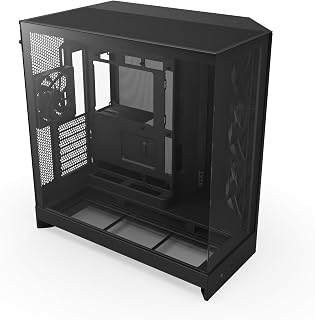
The dual-chamber layout routes all cable clutter to a separate compartment, leaving the main viewing area unobstructed for a clean, gallery-style presentation. Ten internal bays provide flexible storage expansion without sacrificing the open aesthetic panoramic builds demand. Bottom-mount PSU positioning keeps the power supply hidden below the shroud, ensuring components remain the focal point when viewers admire your build from any angle.
Pros
- Dual-chamber design isolates showcase components from cable clutter
- Four pre-installed fans deliver strong thermal performance immediately
- Wraparound tempered glass creates three-dimensional viewing experience
- Supports 420mm radiators for dramatic custom loop visibility
Cons
- Nearly 20-inch depth and 19-inch width demand dedicated space
- Pre-installed fans may need upgrading for premium sound profiles
Dual-chamber construction in the H9 Flow creates a natural panoramic advantage by physically isolating your displayed components from power supplies and storage drives that would otherwise break visual flow. Four pre-installed fans (three F140Q front-right, one F120Q rear) establish immediate airflow across visible hardware, keeping showcase GPUs like the RTX 5090 within safe temperatures where single-chamber panoramic cases struggle. The separation means cables routing to your PSU never cross the main viewing chamber, maintaining clean sightlines through wraparound tempered glass panels that wrap around both sides and front. Support for up to 10 total fans and 420mm radiators on top or front positions means you can install dramatic custom loops or oversized air coolers as visual focal points without thermal compromise. Precision-aligned motherboard mounting eliminates installation frustration that ruins the building experience for documented projects. The generous 19.29-inch width and 20.08-inch depth provide working room for elaborate custom cooling while built-in Velcro straps and cable tie-down points keep hidden routing organized behind the motherboard tray. Panoramic tempered glass extends viewing angles beyond typical single-panel cases, transforming the entire build into a three-dimensional display rather than a flat showcase.
Best for gamers and enthusiasts planning high-performance panoramic builds with current-generation flagship GPUs and elaborate cooling setups intended as permanent display pieces. The dual-chamber thermal advantage justifies footprint when powerful hardware needs sustained cooling under constant viewing. Skip if available desk space measures under 20 inches in any dimension, or if your build prioritizes portability over permanent showcase presentation.
Pros
- Exceptional thermals thanks to optimized airflow design and pre-installed fan configuration
- Spacious interior with excellent cable management channels and built-in Velcro straps
- Comprehensive RGB ecosystem with Control Hub pre-installed for instant visual customization
- Premium build quality with stainless steel and tempered glass construction
- Straightforward assembly process with clear instructions and ample working space
Cons
- Requires additional PCIe power cables for RGB Control Hub if not already available in your PSU
- Large footprint may not fit in compact desk setups or smaller build spaces
- Premium pricing reflects flagship positioning, placing it above budget-conscious alternatives
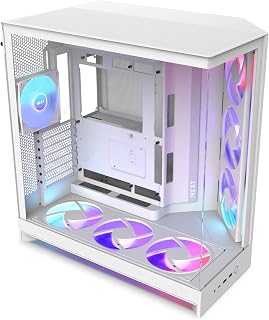
The NZXT H9 Flow RGB+ is a flagship dual-chamber mid-tower case engineered for builders who refuse to compromise on cooling, aesthetics, or build quality. It targets high-performance gaming enthusiasts, content creators, and PC modders who want a case that handles demanding components while serving as a visual centerpiece.
What truly sets this case apart is the dual-chamber architecture that isolates your power supply and drives from core components, dramatically improving thermals and keeping cables out of sight. The seven pre-installed RGB fans, including six 140mm units and one 120mm rear exhaust, arrive factory-synced and ready to work through NZXT CAM. Real-world performance data from reviewers consistently shows excellent temperature management even under heavy loads, with support for up to 420mm radiators and next-generation graphics cards ensuring future-proof expandability.
Build quality is immediately apparent with the seamless wraparound tempered glass, premium stainless steel frame, and thoughtful details like the power button relocated to the front to prevent accidental presses from pets or clutter. The interior is genuinely spacious, with wide cable channels, built-in Velcro straps, and intuitive routing paths that make first-time builders feel confident and experienced builders appreciate the efficiency gains.
One practical consideration: the RGB Control Hub requires a dedicated PCIe power connector, so verify your power supply has an extra 6-pin cable available before building. The case's substantial 13.4 kg weight and dimensions reflect its premium positioning and may challenge users with compact desk spaces.
Verdict: The NZXT H9 Flow RGB+ justifies its flagship status through superior thermals, exceptional build quality, and thoughtful design that makes complex builds feel effortless. For anyone building a high-end system where performance and presentation matter equally, this case delivers on every front.
Case Type: Mid-Tower ATX
Motherboard Support: ATX (including ASUS BTF and MSI Project Zero)
Dimensions: 20.08 inches D x 19.29 inches W x 12.6 inches H
Weight: 13.4 kg (29.5 lbs)
Material: Stainless Steel and Tempered Glass
Fan Configuration: Supports up to 10 fans total (9x 140mm across top, front-right, and bottom, plus 1x 120mm rear)
Pre-Installed Fans: 2x F420 RGB Core 140mm fans, 1x F120 RGB Core 120mm rear fan
Radiator Support: Up to 420mm on top and front-right
Storage Bays: 6 internal bays supporting 3.5-inch hard drives
USB Ports: 2x USB 3.0
RGB System: 3-pin DC RGB fans with NZXT Control Hub included
Power Supply Mount: Rear mounted
Model Number: CM-H92FW-P1
Warranty: 2 years manufacturer
Color: White
Who Should Buy This: The H9 Flow RGB+ is ideal for enthusiasts building high-end gaming systems, 4K content creators, and modders who value cooling performance and visual presentation equally. If you're planning a build with a flagship graphics card, high-end CPU cooler, or multiple storage drives, this case provides the space and thermal capacity to handle it all.
Who Might Want to Look Elsewhere: If your budget is under $150 or you have space constraints on your desk, consider more compact or budget-friendly alternatives. This case prioritizes performance and features over affordability and portability.
Key Compatibility Notes: The case requires a power supply with at least one available PCIe 6-pin connector to power the RGB Control Hub. If you plan to use a next-generation motherboard like ASUS BTF, the H9 Flow RGB+ is specifically optimized for these rear-connecting designs. All standard ATX motherboards work perfectly as well.
Setup Tips: Plan your cable routing before installation by reviewing the included documentation. The dual-chamber design means your power cables stay hidden in the rear chamber, so take advantage of this separation. If adding extra fans beyond the pre-installed seven, prioritize intake fans in the front-right chamber for optimal thermal balance.

Dual-chamber construction isolates the PSU and cables in a rear-mounted compartment, so the main chamber stays visually clean and component-focused. The integrated control hub simplifies RGB coordination across fans and strips, creating synchronized lighting effects that enhance the display. Two USB 3.0 ports on the front panel keep connectivity accessible without disrupting the clean lines that make panoramic cases stand out.
Pros
- Seven pre-installed RGB fans create immediate visual impact
- Dual-chamber design hides cables and PSU from glass view
- Wraparound tempered glass showcases from multiple angles
- Supports 420mm radiators for extreme cooling visibility
Cons
- RGB hub may require additional PSU PCIe connectors
- 19-inch width demands generous desk clearance
The H9 Flow RGB+ arrives with seven pre-installed RGB fans and an integrated control hub, creating an immediately stunning panoramic display without purchasing separate lighting components. Dual-chamber construction isolates your showcase components in the main glass-wrapped compartment while hiding power supplies and drives in a separate rear chamber, ensuring clean sightlines from wraparound tempered glass panels. This architectural separation serves dual purposes: eliminating cable clutter from view and establishing dedicated thermal zones that prevent hot PSU exhaust from contaminating GPU intake air. Perforated steel panels with angled front fans create aggressive airflow that keeps visible hardware cool during extended showcase sessions under lights or camera. Support for 420mm radiators and nine total fan positions means thermal headroom scales alongside ambition. Rear-connect motherboard compatibility transforms the interior into a completely cable-free exhibition space for compatible ASUS, MSI, or Gigabyte boards. Extra-wide cable channels behind the motherboard tray, built-in Velcro straps, and multiple tie-down points simplify routing even for complex RGB setups. The seamless black finish with customizable lighting elevates the case itself into centerpiece territory, while intuitive layout makes assembly approachable even for first-time builders documenting their process.
The dual-chamber design is the case's cooling foundation, segregating hot components like the CPU and GPU from power supply heat. This separation, combined with 7 pre-installed RGB fans and support for up to a 420mm top radiator plus additional front and bottom radiators, creates a multi-layer cooling strategy that adapts to any thermal challenge.
Reviewers consistently report that even under sustained high loads, internal temperatures remain impressively low. The perforated front panels and angled 140mm fans optimize air intake without creating turbulence, while the 120mm rear exhaust efficiently expels hot air. The case supports configurations ranging from simple air cooling to complex liquid cooling setups with multiple radiators and pump blocks.
The H9 Flow RGB+ accommodates full-size ATX motherboards, E-ATX variants, and modern graphics cards up to the flagship tier, including recent RTX 5090 class cards. Internal dimensions provide generous working space, making component installation straightforward and stress-free. Six internal drive bays support both 3.5-inch and 2.5-inch storage configurations.
Rear-connect motherboard compatibility with ASUS BTF and MSI Project Zero unlocks cable-free internals for those seeking ultimate minimalism. The included RGB control hub powers case lighting independently, though it does require a dedicated PCIe power connector from your power supply.

The triple-chamber design segregates PSU, storage, and main components into dedicated zones, creating a museum-quality presentation where cables never intrude on the visual experience. ATX motherboard support balances compatibility with mainstream builds while the panoramic glass panels provide maximum visibility. Built-in RGB fans create dynamic lighting effects right out of the box, eliminating the need for separate LED installations in attention-grabbing showcase builds.
Pros
- Triple-chamber design isolates thermal zones for superior cooling efficiency
- Tempered glass on three sides creates wraparound panoramic viewing
- Front chamber fits 360mm radiator with complete CPU cooling isolation
- Reverse motherboard option and anti-sag brackets for custom layouts
Cons
- 18.5-inch depth requires significant desk or cabinet clearance
- Multi-panel glass exterior demands frequent cleaning for maintained aesthetics
When your build demands both thermal excellence and all-angles visibility, the CORSAIR AIR 5400 LX delivers through its triple-chamber architecture wrapped in tempered glass on three sides. This panoramic design transforms high-performance hardware into a living display piece while solving the heat management challenges that plague showcase builds. The front chamber isolates a 360mm radiator and CPU cooling away from other components, while the central chamber uses top and bottom airflow ducts to accelerate cooling without screaming fan noise. Three reverse-rotor RGB fans integrate with iCUE LINK for coordinated lighting across your entire setup. The reverse motherboard mounting option flips conventional layouts for fresh visual angles. Anti-sag brackets protect heavy graphics cards, and intelligent cable routing keeps the view clean from every side. At 13.92 kg with 18.5-inch depth, this case commits to substantial desk real estate, but the wraparound glass justifies the footprint by turning your components into sculpture. Regular glass cleaning becomes part of ownership, and the premium positioning reflects its specialized thermal engineering rather than basic enclosure duties.
Form Factor: ATX Mid-Tower
Motherboard Support: ATX
Radiator Support: 360mm in dedicated front chamber
Drive Bays: 5 internal bays for multiple storage configurations
Ports: 2x USB 3.0 headers
PSU Mount: Bottom mount with isolated chamber
Fans Included: 3x Pre-installed Reverse-Rotor RGB fans
Materials: Tempered glass, acrylic, plastic
Dimensions: 18.5 inches (D) x 13.39 inches (W) x 18.39 inches (H)
Weight: 13.92 kg
Warranty: 2-year manufacturer warranty
Model: CC-9011320-WW

The white finish provides a neutral backdrop that makes RGB lighting pop and components stand out, perfect for builds designed to attract attention. Tempered glass construction offers crystal-clear visibility across multiple panels, ensuring every angle reveals your carefully selected hardware. Extended ATX compatibility accommodates enthusiast-grade motherboards, so showcase builds can pack high-performance components without compromising the panoramic viewing experience.
Pros
- Wraparound tempered glass provides panoramic component visibility
- Mini-ITX through Extended ATX compatibility covers virtually all builds
- Supports up to 10x 120mm fans for extensive cooling expansion
- Three RS120-R ARGB fans included with removable panels for easy access
Cons
- Only three fans pre-installed, additional purchases needed for maximum cooling
- Cable management space requires planning with larger components
For builders who want panoramic glass aesthetics without specialized thermal chambers or premium pricing, the CORSAIR 3500X RS delivers wraparound tempered glass that turns standard builds into eye-catching displays. The glass coverage provides clear sightlines to your components from multiple angles, making RGB lighting and quality hardware the visual focus rather than case structure itself. Support for Mini-ITX through Extended ATX motherboards means virtually any configuration fits inside, while the 10x 120mm fan capacity lets you scale cooling as your build evolves. Three RS120-R ARGB fans arrive pre-installed and coordinate through standard ARGB headers, providing immediate cooling and lighting without requiring proprietary controllers. Bottom-mounted power supply placement keeps cables below the main viewing area, maintaining clean glass-framed presentation. Removable front and side panels simplify both initial assembly and future upgrades or maintenance. At 9.02 kg, the frame balances durability with manageable handling during transport or repositioning. The white finish adds brightness to the panoramic effect, enhancing lighting rather than absorbing it. Cable management space is functional but requires some planning with larger PSUs or extensive storage arrays.
Case Type: Mid-Tower
Motherboard Compatibility: Mini-ITX, Micro-ATX, ATX, Extended-ATX (EATX)
Material: Tempered Glass (front and side panels), Steel frame
Color: White
Fan Support: Up to 10x 120mm fans (front, top, rear, side mounting points)
Pre-Installed Fans: 3x RS120-R ARGB 120mm fans
Power Supply: Bottom-mount, supports standard ATX PSU
Cooling Method: Air cooling
Weight: 9.02 kg (approximately 19.8 lbs)
RGB Control: Motherboard control via 5V ARGB header
Buy this if you want wraparound glass presentation for your first high-end build or upgrade from a basic enclosure, value motherboard compatibility from Mini-ITX to EATX, and plan to add fans gradually as budget allows. Skip it if you need maximum pre-installed cooling out of the box, prefer cases that hide components rather than showcase them, or work in compact spaces where mid-tower dimensions become problematic.
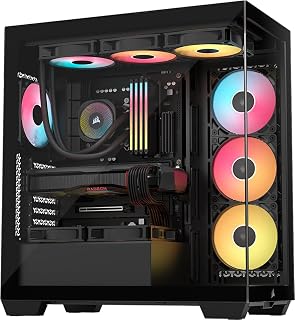
The tempered glass panorama wraps three sides of your build, giving viewers an unobstructed look at every component from nearly any angle. Extended ATX support means high-end boards with sprawling VRM heatsinks fit without compromise, while bottom-mount PSU placement keeps cables out of sight. Built-in RGB lighting accentuates the showcase effect, and integrated dust filters protect components without blocking the view.
Pros
- Wraparound tempered glass maximizes component visibility
- Three pre-installed ARGB fans include lighting out of box
- Exceptional cable management creates pristine interior presentation
- Supports reverse-connection motherboards for cable-free aesthetics
Cons
- Nearly 20-inch depth requires dedicated space
- No dedicated 3.5-inch hard drive bays
When your build demands maximum visibility from every angle, the CORSAIR 3500X RS delivers wraparound tempered glass that transforms components into a display piece. Three pre-installed RS120-R ARGB fans provide illuminated airflow straight out of the box, creating dynamic visual effects that sync with motherboard RGB ecosystems. The true strength for panoramic showcase builds lies in exceptional cable management infrastructure: extensive routing channels and rear storage compartments eliminate visible clutter, ensuring nothing distracts from your carefully selected hardware. Support spans Mini-ITX through EATX motherboards, accommodating radiators up to 360mm and oversized graphics cards without compromising the clean sightlines that make panoramic cases worthwhile. The included GPU anti-sag arm keeps expensive cards level and photogenic during their constant display. Magnetic dust filters on front, side, and top surfaces maintain pristine glass clarity with minimal effort, while tool-free panel removal makes periodic cleaning straightforward. Compatibility with reverse-connection motherboards from ASUS BTF, MSI Project Zero, and Gigabyte Project Stealth unlocks completely cable-free internal aesthetics for builders pursuing the ultimate clean look.
This case supports a broad range of motherboard form factors, from Mini-ITX compact builds to Extended ATX high-end platforms. Cooling capacity is impressive with support for up to 10x 120mm fans across side, roof, and PSU mounting points, allowing flexible thermal configurations. The case accommodates radiators up to 360mm, making it suitable for both air and all-in-one liquid cooling solutions.
The CORSAIR 3500X is compatible with the latest reverse-connection motherboards including ASUS BTF, MSI Project Zero, and Gigabyte Project Stealth, enabling cable-free interior builds for an exceptionally clean aesthetic. Storage flexibility includes multiple drive mounting options, though traditional 3.5-inch hard drive bays are limited. Front connectivity includes two USB 3.0 ports plus standard audio connectors for convenient access.
Model: CORSAIR 3500X RS-R ARGB (CC-9011322-WW). Case type: Mid-tower. Supported motherboards: Mini-ITX to Extended ATX. Dimensions: 18.11W x 19.92D x 9.45H inches, weighing 9.02 kg. Material: Tempered glass front and side panels with metal chassis. Power supply: Bottom-mounted. Includes 3x RS120-R ARGB fans with simple +5V motherboard header control.
Cooling capacity: 10x 120mm fan mounting points, supports radiators up to 360mm. Connectivity: 2x USB 3.0 ports. Features include removable glass panels, magnetic dust filters, GPU anti-sag stabilization arm, double-shot cable grommets, and rear cable storage. Warranty: 2-year manufacturer coverage. Best Sellers Rank: #13 in Computer Cases.

Pros
- Exceptional airflow design with perforated panels and intelligent fan positioning keeps components cool under load
- Dual-chamber layout dramatically simplifies cable management and improves overall system aesthetics
- Outstanding radiator and GPU clearance accommodates even the most demanding hardware configurations
- Premium build quality with seamless tempered glass paneling provides a showcase-worthy appearance
- Back-connect motherboard compatibility enables truly cable-free builds for minimalist aesthetics
Cons
- Premium pricing positions it above budget-friendly alternatives, making it better suited for high-performance builds
- Requires careful planning to fully utilize all 10 fan slots and dual 420mm radiator support
- Large size demands adequate desk or floor space, not ideal for compact setups
The NZXT H9 Flow RGB is a flagship mid-tower case designed for serious PC enthusiasts and gamers who demand both aesthetic appeal and thermal performance. Its dual-chamber architecture separates your main components from the power supply and storage drives, creating a sophisticated build platform that prioritizes cooling efficiency alongside visual impact.
The standout feature is undoubtedly the intelligent thermal design. Perforated steel panels combined with angled front-right fans create optimized airflow patterns that keep high-performance components cool during intensive gaming or workloads. Support for up to nine 140mm fans across multiple mounting points, plus a 120mm rear fan, gives you complete flexibility to customize your cooling strategy. The ability to mount dual 420mm radiators on the top and front means serious liquid cooling enthusiasts won't hit limitations.
Build quality and aesthetics are equally impressive. The seamless wraparound tempered glass paneling lets you showcase your components from virtually every angle. The white finish maintains a clean, premium appearance that works with any desk setup. The generous internal dimensions accommodate even high-end graphics cards without compatibility concerns, while well-designed cable management with built-in Velcro straps and tie-down points keeps routing effortless.
One consideration is that this case caters to enthusiasts rather than casual builders. The dual-chamber design and extensive fan support require thoughtful planning to maximize benefits. Additionally, its size demands adequate space, making it impractical for extremely compact desk setups.
Overall, the H9 Flow RGB represents excellent value for builders prioritizing thermal performance and visual presentation. Whether you're planning a watercooled showcase build or a high-end air-cooled gaming system, this case delivers the flexibility, cooling capacity, and premium aesthetics to match ambitious hardware configurations.
The dual-chamber design is the foundation of this case's cooling excellence. By separating the main chamber from PSU and storage areas, hot air generated by graphics cards and processors doesn't recirculate through the power supply, extending its lifespan while maintaining optimal system temperatures.
Perforated front and side panels maximize intake airflow to critical components. The angled front-right fan unit accelerates air toward the graphics card, which typically generates the most heat in modern gaming builds. Combined with rear exhaust and top-mounted fans, the airflow architecture creates efficient front-to-back and bottom-to-top circulation patterns.
Support for massive radiators makes this case exceptional for liquid cooling. The 420mm top mounting accommodates AIO coolers or custom loops, while front-right 420mm capability provides alternatives depending on your motherboard and RAM configuration. This dual-radiator capacity means even extreme overclockers can maintain safe temperatures.
The wraparound tempered glass is a visual triumph. The seamless paneling creates an almost three-dimensional showcase effect for your components, RGB fans, and cable routing. In white, the case maintains an elegant, modern aesthetic that pairs well with contemporary gaming setups.
Cable management has been engineered thoughtfully. Extra-wide channels behind the motherboard tray accommodate thick cables and multiple connections without forcing compromises. Built-in Velcro straps and numerous tie-down points let you organize cables neatly and reposition them if needed. For builders using rear-connect motherboards like ASUS BTF or MSI Project Zero, the cable-free aesthetic becomes truly achievable.
The case bottom houses the power supply with ample separation from main components, reducing cable clutter in the visible chamber and improving overall organization. This compartmentalization makes even complex builds feel clean and organized.

Pros
- Exceptional dual-chamber layout eliminates cable clutter from the main viewing area
- Impressive nine-fan capacity supports advanced cooling configurations for overclocking and sustained high performance
- Generous compatibility with 420mm radiators and high-end GPUs makes it future-proof for premium components
- Panoramic tempered glass on multiple sides creates a premium showcase for RGB lighting and custom builds
- Back-connect motherboard support enables a cable-free aesthetic that sets it apart from competitors
Cons
- Requires additional fan purchases to reach maximum cooling potential, adding to total system cost
- Dual-chamber design may require longer cable runs in the PSU chamber, increasing installation complexity for first-time builders
The NZXT H9 Flow RGB is a mid-tower ATX case purpose-built for gaming enthusiasts and performance-focused builders who refuse to compromise on thermals or aesthetics. Its dual-chamber architecture separates the power supply and storage drives from the main component area, creating a clean viewing experience while dramatically improving cable management and airflow efficiency.
What truly sets this case apart is its exceptional compatibility and expansion capacity. Supporting up to nine 140mm fans across multiple mounting points, plus a 120mm rear fan, it offers unmatched cooling potential for demanding builds. The dual 420mm radiator compatibility on top and front makes it ideal for custom water-cooling loops, while ample clearance accommodates even the most premium graphics cards without restriction.
Build quality is excellent, with robust alloy steel construction, seamless wraparound tempered glass paneling, and a thoughtful cable management system featuring extra-wide channels, integrated Velcro straps, and multiple tie-down points. The pre-installed RGB fans and back-connect motherboard support for ASUS BTF and MSI Project Zero add significant value, enabling builders to achieve a virtually cable-free look inside the case.
The main considerations are its $139.99 price tag and the fact that maximizing its potential requires purchasing additional fans beyond what ships in the box. Installation also demands more precision than budget cases, particularly when routing cables through the PSU chamber. Despite these minor drawbacks, the H9 Flow RGB delivers outstanding performance and visual appeal.
Verdict: The NZXT H9 Flow RGB is a top-tier choice for serious gamers and PC enthusiasts who value thermal performance, component showcase, and cable aesthetics. Its innovative dual-chamber design, exceptional fan capacity, and premium build quality make it worth the investment for high-end builds.
Case Type: Mid-Tower ATX
Motherboard Compatibility: ATX
Material: Alloy Steel, Tempered Glass
Color: Black
Power Supply Mount: Bottom Mount
Weight: 12.6 kg
Pre-Installed Fans: One F420 RGB Core (front-right), One F120Q CV 3-pin DC (rear)
Maximum Fan Support: Nine 140mm fans (top, front-right, bottom) plus one 120mm rear fan
Radiator Compatibility: Up to 420mm top and front
Special Features: Dual-chamber design, panoramic tempered glass, back-connect motherboard ready (ASUS BTF, MSI Project Zero compatible)
Buying Guide for Fish Tank PC Cases
Glass Panel Design and Viewing Angles
True fish tank cases feature wraparound tempered glass that extends beyond a single side panel. The NZXT H9 Flow series and CORSAIR 3500X models both offer seamless panoramic views that showcase your build from multiple angles. Look for cases with minimal bezels and clean glass-to-frame transitions.
Removable panels matter more than you might expect. Cases with tool-free glass removal make building and upgrades significantly easier, especially when you’re routing cables or installing large radiators. The CORSAIR designs excel here with easily detachable front and side panels.
Dual-Chamber Architecture and Thermal Management
Dual-chamber designs separate your main components from the PSU and storage drives, creating distinct thermal zones. This architecture improves cooling efficiency by preventing PSU heat from affecting your GPU and CPU. If you’re building around powerful modern graphics cards, this separation becomes critical.
The NZXT H9 Flow models provide perforated steel panels with angled front-right fan mounting, directing airflow precisely where it’s needed. For extreme builds, the CORSAIR AIR 5400 LX takes this further with a triple-chamber design that includes a dedicated 360mm radiator compartment, isolating CPU cooling heat entirely.
Radiator Support and Fan Capacity
Modern fish tank cases need serious radiator capacity. Most quality options support 420mm radiators at both the top and front positions, giving you flexibility for custom water cooling configurations. The H9 Flow series accommodates 420mm radiators while maintaining clearance for full-size GPUs.
Fan capacity matters equally. Cases supporting ten or more fans let you build positive pressure systems that reduce dust while maximizing airflow. When evaluating cases for your next GPU upgrade, confirm that radiator and fan placements won’t interfere with your graphics card length or motherboard I/O.
Cable Management and Back-Connect Compatibility
With expansive glass showcasing your build, cable management transforms from a nice-to-have into a requirement. Look for cases with extra-wide cable channels, built-in Velcro straps, and multiple tie-down points. The H9 Flow models provide particularly generous routing space behind the motherboard tray.
Back-connect compatibility represents the future of clean builds. Cases supporting rear-connecting motherboards like ASUS BTF and MSI Project Zero eliminate visible cables entirely. Even if you’re not using a back-connect motherboard today, choosing a compatible case protects your investment when you eventually upgrade your complete system.
Final Thoughts
Fish tank PC cases deliver the perfect blend of showcase aesthetics and genuine performance capability, letting you build systems that look as impressive as they run. For builders prioritizing cooling efficiency with panoramic views, the NZXT H9 Flow RGB+ offers dual-chamber design, 420mm radiator support, and integrated RGB fans that create a cohesive lighting ecosystem right out of the box. If you need extreme cooling separation or plan a custom water loop around high-wattage components, the CORSAIR AIR 5400 LX RGB Triple-Chamber Panoramic provides dedicated thermal zones that isolate CPU, GPU, and PSU heat for maximum performance under sustained loads.
Frequently Asked Questions
Do fish tank PC cases have worse airflow than traditional designs?
Modern panoramic cases actually deliver excellent airflow through strategic engineering. Perforated metal panels, angled fan mounting, and dual-chamber designs create efficient thermal pathways without compromising the glass aesthetic. Cases like the H9 Flow series use scientifically positioned intake and exhaust points that match or exceed traditional mesh-front cases in cooling performance.
Can I fit a 420mm radiator and a long GPU in the same case?
Yes, but you need to verify specific clearances for your chosen case. The NZXT H9 Flow models accommodate 420mm radiators at the top and front-right positions while maintaining space for modern high-end graphics cards. Always check the manufacturer’s GPU clearance specifications against your card’s actual length, accounting for radiator thickness when front-mounted.
Are back-connect motherboards worth considering in 2026?
Back-connect motherboards represent a significant step forward for clean builds, routing all cables behind the motherboard tray for an unobstructed view through your glass panels. While selection remains limited compared to traditional layouts, ASUS BTF and MSI Project Zero boards offer excellent options across multiple price points. If you’re investing in a premium fish tank case, choosing one with back-connect compatibility protects your investment for future motherboard upgrades.
How many fans do I actually need for a panoramic glass case?
For most builds, six to eight fans provide optimal cooling without excessive noise. Configure three to four intake fans at the front or bottom, two to three exhaust fans at the top, and one rear exhaust. This creates positive pressure that reduces dust accumulation while maintaining strong airflow across all components. Cases supporting ten-fan configurations give you room to expand if you add more heat-generating hardware later.
Common questions
What are the best panoramic PC cases you can buy right now?
The CORSAIR 3500X RS ARGB Panoramic Mid-Tower stands out as a top panoramic PC case pick, available in black or white with full tempered glass visibility, ARGB lighting, and support for motherboards from Mini-ITX to EATX including reverse-connector boards like ASUS BTF and MSI Project Zero. It fits radiators up to 360mm and offers 10 internal bays, making it a strong choice for builders who want a showpiece build without sacrificing expansion room.
What are the best dual chamber PC cases for a clean build?
The NZXT H9 Flow is one of the best dual chamber PC cases for keeping thermals and aesthetics in balance. Its dual-chamber design physically separates the PSU and cables from the main components, improving both airflow and visual cleanliness. The standard H9 Flow supports ATX and E-ATX boards, while the RGB+ variant adds lighting and rear PSU mounting with support for ASUS BTF and MSI Project Zero motherboards. Check each listing for the live price.





Write Your Review
No reviews yet. Be the first to share your experience!