

Exploring Teyvat’s vast open world requires hardware that can handle Genshin Impact’s demanding graphics without stuttering during elemental reactions or crowded city scenes. Whether you’re grinding domains, exploring Sumeru’s dense forests, or battling weekly bosses, frame drops and thermal throttling can ruin the experience.
This guide evaluates nine gaming laptops specifically for Genshin Impact performance. We’ve prioritized GPUs capable of sustained 60+ FPS at high settings, displays with refresh rates that eliminate screen tearing, and cooling systems that maintain performance during extended farming sessions. If you’re also building a desktop setup, check out our complete RTX 5070 build guide for maximum performance.
Quick answer
This guide compares 9 picks, with ASUS TUF Gaming A16: Ryzen 7 16GB DDR5, RTX 4050, 145Hz ranked first. ASUS TUF Gaming A16: Ryzen 7 7445HS, RTX 4050, 144Hz holds the highest customer rating among them. ASUS ROG Strix G16 Gaming Laptop 165Hz RTX 4060 Core has the most customer reviews.

Pros
- Excellent value at $1142 with mid-range gaming specs that handle 1080p gaming smoothly
- 145Hz display provides noticeable smoothness in fast-paced games and everyday use
- Fast DDR5 RAM and SSD combo delivers quick boot times and responsive performance
- Sturdy TUF build quality and well-designed cooling system for extended gaming sessions
- Wi-Fi 6E and multiple ports (HDMI, DisplayPort) support modern connectivity needs
Cons
- Battery life is limited to 30-45 minutes under normal use, requiring frequent charging for portable work
- Thermal performance and fan noise ramp up significantly during intense gaming sessions
- 1080p resolution on a 16-inch screen may feel less sharp compared to higher resolution alternatives
The ASUS TUF Gaming A16 is a no-nonsense gaming laptop designed for players and creators who want capable performance at a reasonable price. With its AMD Ryzen 7 7445HS processor and NVIDIA RTX 4050 graphics, this machine targets gamers playing competitive and AAA titles at 1080p resolution. The 16-inch form factor strikes a balance between immersion and portability.
Performance is where this laptop shines. The 8-core Ryzen 7 processor handles multitasking and streaming effortlessly, while the RTX 4050 delivers smooth 1080p gaming in most modern titles. The 145Hz display is the standout feature, making everything from scrolling to gaming feel noticeably more responsive than standard 60Hz panels. Pairing this with 16GB DDR5 RAM and a 512GB SSD creates a system that feels snappy and future-ready for demanding applications.
Build quality reflects the TUF branding with a rugged, durable chassis designed to withstand travel and daily use. The backlit keyboard and numeric keypad are practical additions for both gaming and productivity work. Cooling performance is adequate for sustained gaming, though reviewers note the fans become audible under load. Thermal management keeps the system stable, though thermals run warmer than some competing models.
The main tradeoff is battery life. On normal settings with the bright display enabled, expect 30-45 minutes of unplugged use before needing to recharge. This makes it a laptop that works best when you have consistent access to power, limiting true portability for all-day mobile work.
Overall, the ASUS TUF Gaming A16 delivers exceptional value for the price. It's the right choice for budget-conscious gamers, esports players, and creators who prioritize performance over portability and are willing to stay plugged in. With a high refresh rate display, solid gaming performance, and reliable engineering, it's a smart investment for 1080p gaming at this price point.
Processor: AMD Ryzen 7 7445HS (8-core, up to 5.1GHz)
Graphics: NVIDIA GeForce RTX 4050 (6GB VRAM)
Memory: 16GB DDR5 RAM
Storage: 512GB SSD
Display: 16-inch LED, 1920x1080, 145Hz refresh rate
Connectivity: Wi-Fi 6E (802.11ax), HDMI, DisplayPort, 4 total ports
Battery: 51Wh lithium-ion
Operating System: Windows 11 Home
Dimensions: 19 inches L x 12 inches W x 0.33 inches Thickness
Weight: 8 pounds
Keyboard: Backlit with numeric keypad
Best For: Gamers seeking 1080p performance, esports competitors, content creators on a budget, and anyone prioritizing high refresh rate display responsiveness over portability.
Consider This If: You need all-day unplugged performance or plan to use this primarily as a thin-and-light portable device. Battery life is a significant limitation for road warriors.
Skip This If: You want 1440p or 4K resolution gaming, require excellent battery life for mobile work, or need a laptop that stays cool and quiet under sustained load.
Value Comparison: At under $1200, this laptop punches above its price point with solid gaming performance and a premium 145Hz display. You're getting desktop-class gaming specs in a portable package without flagship pricing.
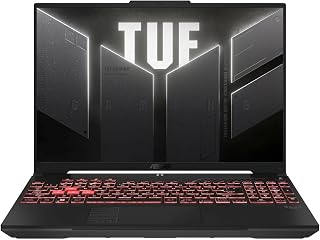
The RTX 4050 delivers smooth 60fps gameplay at high settings in Teyvat, while the 145Hz display ensures fluid combat animations during elemental reactions. The 16GB DDR5 RAM handles open-world asset streaming without stutters when exploring Sumeru or Fontaine. The 16-inch Full HD+ screen provides excellent visibility for spotting enemies and collectibles across the map.
Pros
- RTX 4050 GPU runs Genshin at maximum settings with consistent 60fps
- 145Hz display provides smooth experience beyond game's frame cap
- 16:10 aspect ratio improves vertical visibility for platforming sections
- Spill-resistant keyboard adds durability for extended gaming sessions
Cons
- 7-pound weight limits portability compared to lighter alternatives
- Full HD+ resolution may feel modest on a 16-inch display
The ASUS TUF Gaming A16 delivers the GPU muscle Genshin Impact needs for high-settings gameplay at the game's 60fps cap. The NVIDIA GeForce RTX 4050 handles maximum graphics with anti-aliasing enabled, letting players appreciate the detailed character models and environmental effects HoYoverse designed. The AMD Ryzen 7 7445HS processor complements this with strong single-thread performance that keeps frame pacing consistent during busy combat scenarios with multiple elemental reactions. The 16-inch Full HD+ display at 145Hz provides headroom beyond Genshin's frame cap, ensuring buttery-smooth navigation through menus and exploration. The 16:10 aspect ratio adds vertical space for better visibility during platforming sections in areas like Dragonspine. The 16GB DDR5 RAM handles the game plus background applications like streaming software or capture tools for content creators. ASUS TUF build quality includes spill-resistant keyboard design, practical for long gaming sessions with beverages nearby. The backlit keyboard aids visibility during evening play. At 7 pounds, portability is limited but acceptable for a performance-focused 16-inch machine.
This laptop handles 1080p gaming well with its RTX 4050 graphics and Ryzen 7 processor combination. Esports titles and older AAA games run smoothly at 144Hz, taking full advantage of the high refresh display. Newer demanding games will require medium settings to maintain smooth frame rates.
The 144Hz refresh rate makes a noticeable difference in fast-paced games, providing smoother motion and more responsive gameplay compared to standard 60Hz laptops. Paired with the 1920x1200 IPS display, the visuals are clear and color accurate. Sustained gaming performance remains stable with adequate cooling system design, though fan noise increases under load.
This laptop targets dedicated Genshin players who want maximum graphics quality and smooth performance across all content, plus aspiring content creators who need headroom for recording or streaming gameplay. The RTX 4050 ensures future-proofing as HoYoverse adds more graphically intensive regions. Skip this if portability is a priority, as the 7-pound weight makes frequent travel impractical. Budget-conscious players satisfied with medium settings should also consider lighter options with integrated graphics instead.

With the RTX 4050 and 144Hz IPS display, this laptop maintains consistent frame rates during intense boss fights and spiral abyss runs. The 16:10 aspect ratio offers extra vertical space, making it easier to spot aerial enemies and navigate cliffsides. Wi-Fi 6 ensures low-latency co-op sessions, critical for timing dodges and coordinated team attacks.
Pros
- RTX 4050 GPU handles high graphics settings with stable performance
- 144Hz IPS display with 16:10 ratio enhances visual smoothness and vertical view
- PCIe Gen4 SSD ensures fast game loading and region transitions
- Wi-Fi 6 provides stable connectivity for co-op gameplay
Cons
- 16GB RAM may limit heavy multitasking with streaming or recording software
- 512GB storage fills quickly with multiple large games installed
The ASUS TUF Gaming F16 strikes a balance between performance and modern display technology for Genshin Impact enthusiasts. The Intel Core 5 210H processor handles the game's physics calculations and world simulation efficiently, while the NVIDIA GeForce RTX 4050 GPU pushes high graphics settings at stable frame rates. The 144Hz refresh rate on the 16-inch IPS-level display exceeds Genshin's 60fps limit but ensures silky-smooth UI interactions and camera panning across Teyvat's landscapes. The 16:10 aspect ratio provides extra vertical screen space, useful for spotting collectibles and navigating verticality in regions like Sumeru's rainforest. The 16GB DDR5 RAM supports simultaneous game operation and browser tabs for interactive maps or wiki references. The 512GB PCIe Gen4 SSD loads into the game quickly and provides fast travel times between regions. Wi-Fi 6 connectivity ensures reliable performance in co-op domains and events. The backlit keyboard remains functional during evening gaming sessions. ASUS TUF construction focuses on durability without excessive bulk. Windows 11 Home provides native support for the game client and common peripheral software.
Display: 16 inches, FHD+ (1920x1200), 144Hz, IPS-Level, 16:10 aspect ratio, 100% sRGB color gamut
Processor: Intel Core 5 210H, Multi-core architecture optimized for gaming and productivity
Graphics: NVIDIA GeForce RTX 4050, Max TGP 115W, NVIDIA Advanced Optimus for dynamic GPU switching
Memory: 16GB DDR5 RAM
Storage: 512GB PCIe Gen4 NVMe SSD
Connectivity: Wi-Fi 6, multiple USB ports, audio jacks
Operating System: Windows 11 Home
Design: Mecha Gray, military-grade durability (MIL-STD-810H), backlit keyboard, Arc Flow Fans with 4 exhaust vents
Cooling: 5 dedicated heat pipes, anti-dust filter, optimized for quiet operation
This laptop serves players who want reliable high-settings performance without the bulk or expense of premium gaming rigs, particularly those who value a modern display with extra vertical space for exploration. It suits players who split time between Genshin and other demanding titles. Skip this if you primarily play at medium settings and prioritize maximum portability, as lighter machines with integrated graphics suffice for that use case. Competitive gamers focused exclusively on Genshin's endgame may also want higher-end GPUs for streaming overhead.

The RTX 5060 GPU effortlessly maxes out graphics settings while maintaining 60fps in the most demanding regions like Chenyu Vale. The 180Hz WUXGA display provides buttery-smooth visuals for quick character swaps and reaction timing. The 32GB DDR5 RAM future-proofs your setup for upcoming regions and ensures zero frame drops during particle-heavy elemental bursts.
Pros
- 32GB DDR5 handles game plus streaming simultaneously
- 180Hz display makes combat and dodging feel responsive
- AI-enhanced RTX 5060 boosts frame gen and upscaling
- 1TB SSD fits growing game updates and recordings
Cons
- 16-inch size less portable than smaller alternatives
- Wi-Fi 6 instead of newer Wi-Fi 7 standard
The Acer Nitro V 16S brings AI-enhanced performance to Genshin Impact without breaking the bank. The RTX 5060 GPU with 572 AI TOPS accelerates frame generation and upscaling, keeping Teyvat's lush landscapes and particle effects running smoothly at high settings. The AMD Ryzen 7 260 processor handles the game's CPU demands during crowded co-op domains or exploration in Fontaine's underwater zones. The 180Hz WUXGA IPS display delivers exceptionally smooth visuals during combat, making elemental reactions and dodge timing easier to read. The 16:10 aspect ratio provides extra vertical room for UI elements and spotting gliding paths. With 32GB DDR5, multitasking between the game, streaming software, and Discord happens without stuttering. The 1TB Gen 4 SSD accommodates Genshin's large install and fast-growing update files. Wi-Fi 6 ensures stable online play during events and artifact farming runs. The backlit keyboard and numeric keypad make inventory management easier during late-night sessions. At 16 inches, the display gives you plenty of screen real estate to appreciate character designs and environmental details.
Processor: AMD Ryzen 7 260 with up to 38 AI TOPS
Graphics: NVIDIA GeForce RTX 5060 Laptop GPU with 572 AI TOPS, Blackwell architecture, 4th-gen RT Cores, 5th-gen Tensor Cores
Display: 16 inch WUXGA (1920 x 1200) IPS, 180Hz refresh rate, 100% sRGB color coverage
Memory: 32GB DDR5 5600MHz (2 DDR5 slots, maximum 32GB)
Storage: 1TB PCIe Gen 4 SSD (2 M.2 slots, 1 available)
Operating System: Windows 11 Home
Keyboard: Backlit with numeric keypad
Connectivity: Wi-Fi 6
Color: Black
Best for Genshin players who multitask with streaming or Discord while gaming, thanks to the generous 32GB RAM. The 180Hz display and AI-accelerated RTX 5060 handle the game beautifully at high settings. Pass if you prefer 15-inch portability or need the absolute longest battery life for travel. The 16-inch size and gaming-focused build make this better suited for home or dorm use.

The RTX 4060 handles maximum graphics with raytracing effects, making Fontaine's water reflections and Sumeru's forests visually stunning. The 165Hz display captures every animation frame during fast combat sequences. The 1TB SSD provides ample space for the game plus future updates without storage concerns, while the i7-13650HX maintains stable performance during extended gaming sessions.
Pros
- 165Hz display makes combat timing precise
- Liquid metal and Tri-Fan cooling stay stable
- MUX Switch maximizes frames when plugged in
- 1TB SSD handles game size and future updates
Cons
- RTX 4060 requires setting compromises at 1440p
- 16GB RAM may limit heavy multitasking workloads
For Genshin Impact players focused on competitive Spiral Abyss times and smooth exploration, the ROG Strix G16 balances performance with practicality. The RTX 4060 GPU keeps frame rates high across Teyvat's diverse regions, from Mondstadt's forests to Fontaine's aquatic depths. The 165Hz FHD panel ensures character swaps and elemental bursts register instantly, which matters when executing rotation combos or dodging boss attacks. The 13th Gen Intel i7-13650HX handles CPU-intensive scenes like co-op domains or crowded Liyue Harbor without frame drops. Liquid metal thermal compound and Tri-Fan cooling maintain stable performance during extended artifact farming or event grinds. The MUX Switch lets you disable integrated graphics for maximum frame rates when plugged in, then switch back for battery conservation during lighter tasks. DDR5 memory and PCIe Gen4 SSD minimize load screens between regions and domains. At 5.5 pounds, it's manageable for LAN parties or playing at a friend's setup. The 1TB SSD accommodates the game's install size plus room for other titles and recordings. Wi-Fi 6E delivers reliable connectivity for daily commissions and weekly bosses.
Processor: Intel Core i7-13650HX (13th Gen HX series)
Graphics: NVIDIA GeForce RTX 4060 (8GB GDDR6, 140W Max TGP)
Memory: 16GB DDR5-4800MHz
Storage: 1TB PCIe Gen4 SSD
Display: 16-inch FHD (1920x1200), 165Hz, 100% sRGB, Pantone validated, matte finish
Cooling: Liquid metal on CPU, Tri-Fan system, thermal management with MUX Switch
Connectivity: Wi-Fi 6E (802.11ax), Bluetooth 5.2, 4x USB ports, HDMI output
Battery: Supports advanced power optimization via Optimus
Weight: 5.5 lbs
Dimensions: 13.94 x 10.39 x 0.89 inches
Operating System: Windows 11 Home
Color: Eclipse Gray
Ideal for players who prioritize high refresh rate gameplay and thermal stability over maximum graphical settings. The 165Hz screen and solid cooling suit competitive Spiral Abyss runs and long exploration sessions. Skip if you need to max out visual settings at higher resolutions or require extensive battery life for travel. The RTX 4060 handles 1080p beautifully but struggles at 1440p.

The latest RTX 5060 delivers exceptional performance for high-refresh gaming, easily hitting 100+ fps at high settings. The 165Hz/3ms display eliminates motion blur during rapid character switches and dodges. Wi-Fi 7 support ensures the lowest possible latency in multiplayer domains, while the Tri-Fan Technology keeps thermals in check during marathon farming sessions.
Pros
- RTX 5060 with DLSS 4 maintains 100+ fps in Teyvat
- 165Hz display with 3ms response for fluid combat
- Vapor chamber cooling stays quiet during marathon play
- 1TB SSD fits game updates and other titles comfortably
Cons
- 2-hour battery limits portable play sessions
- RTX 5060 fixed, no higher GPU option available
Genshin Impact demands consistent frame rates and visual clarity to fully appreciate its detailed open world and fast combat, and the ROG Strix G16 2025 delivers exactly that. The RTX 5060 with DLSS 4 support pushes frame rates well above 100 fps at high settings, keeping exploration and combat fluid. The 165Hz ROG Nebula Display with 3ms response ensures character swaps and elemental reactions feel instant, which matters during Spiral Abyss runs or co-op boss fights. The 16:10 aspect ratio offers extra vertical space, useful for navigating menus and spotting enemies on cliffs. ROG Intelligent Cooling with vapor chamber and liquid metal keeps the laptop quiet during long farming sessions in Sumeru or Fontaine. The 1TB Gen 4 SSD handles the game's growing install size comfortably, while 16GB DDR5 ensures smooth performance even with background apps. At 2.65kg, it's portable enough for playing at a friend's house. Wi-Fi 7 means low-latency co-op without worrying about connection drops. The full RGB light bar and esports keyboard add flair without compromising function.
Processor: Intel Core i7 14650HX (16 cores, 2.2 GHz base)
Graphics: NVIDIA GeForce RTX 5060 (8GB GDDR5, DLSS 4)
Display: 16 inch FHD+ (1920x1200) 165Hz IPS LED, 3ms response time
Memory: 16GB DDR5-5600MHz (upgradeable)
Storage: 1TB PCIe Gen 4 SSD (upgradeable)
Connectivity: Wi-Fi 7 (802.11be), USB ports, HDMI output
Audio: Dolby Atmos speakers
Keyboard: Gaming-grade QWERTY with RGB
Battery: 90Wh Lithium-Ion, 2 hours gaming, 50 hours standby
Weight: 2.65kg
Dimensions: 13.94 x 10.55 x 0.9 inches
OS: Windows 11 Home
Warranty: Limited
Perfect for Genshin players who want high frame rates and visual quality without tweaking settings constantly. The 165Hz display and RTX 5060 handle the game's demanding environments beautifully. Skip this if you rarely game away from a desk and would prefer a desktop setup, or if battery life during travel matters more than performance. The 2-hour unplugged runtime won't sustain long sessions without AC power.
Pros
- Excellent value for price point, especially for students and entry-level gamers
- Sturdy, durable construction with military-grade testing ensures longevity and reliability
- Efficient cooling system runs quietly without thermal throttling during normal use
- Fast SSD and DDR5 RAM combo provides snappy system responsiveness for multitasking
- 144Hz display significantly reduces motion blur and tearing in competitive games
Cons
- Base 8GB RAM and 512GB storage are limiting for intensive streaming or heavy creative workloads, requiring upgrades
- RTX 4050 struggles with demanding AAA titles at high settings, better suited for esports and light gaming
- Some users report occasional thermal issues when gaming and multitasking simultaneously, though quiet operation is maintained
The ASUS TUF Gaming F16 is a 16-inch gaming laptop designed for students, content creators, and casual gamers seeking a reliable machine without premium pricing. It pairs an Intel Core 5 210H processor with an NVIDIA RTX 4050 GPU to handle everyday computing, programming, light gaming, and creative projects.
The standout feature is the 16-inch FHD+ 144Hz IPS display, which delivers smooth visuals with excellent color accuracy (100% sRGB). Combined with Adaptive-Sync technology to eliminate tearing and stuttering, gameplay feels responsive and polished. The RTX 4050 with 6GB VRAM handles esports titles and indie games well, though demanding AAA games require settings adjustments. Real-world testing confirms the 8GB DDR5 RAM and 512GB PCIe Gen4 SSD deliver fast app launches and responsive multitasking for everyday workflows.
Build quality is exceptional for the price point. The military-grade MIL-STD-810H certification means the chassis withstands drops, vibration, and temperature extremes. The subtle embossed TUF logo and sleek Mecha Gray finish maintain a professional appearance suitable for classrooms and offices. At just 0.88 inches thick, it remains portable despite the 16-inch screen.
The advanced cooling system with Arc Flow Fans, 4 exhaust vents, 5 heat pipes, and anti-dust filter keeps temperatures controlled while remaining surprisingly quiet. However, some users report thermal issues when gaming and streaming simultaneously, so demanding workloads benefit from external cooling pads. The 56Wh battery provides adequate runtime for portable use, though gaming sessions will drain it quickly.
The ASUS TUF Gaming F16 is a smart choice for budget-conscious buyers who prioritize durability, display quality, and everyday performance. It excels as a study laptop and handles light gaming without complaint. Upgrade the RAM to 16GB and storage to 1TB before purchase if streaming or heavy multitasking is planned. This laptop represents genuine bang for the buck in the mid-range gaming segment.
Display: 16-inch FHD+ (1920x1200) 144Hz IPS-Level, 100% sRGB, Adaptive-Sync
Processor: Intel Core 5 210H (8-core, 4.8 GHz)
Graphics: NVIDIA GeForce RTX 4050 (6GB DDR5 SDRAM, 115W Max TGP), NVIDIA Advanced Optimus
Memory: 8GB DDR5 RAM
Storage: 512GB PCIe Gen4 SSD
Connectivity: Wi-Fi 6 (802.11ax), Bluetooth, 3 USB ports, 1 Thunderbolt port, 1 HDMI port, Ethernet compatible
Audio: Dolby Atmos, Hi-Res audio
Battery: 56Wh Lithium Ion
OS: Windows 11 Home
Dimensions: 13.94in x 9.88in x 0.88in
Design: Mecha Gray, Backlit Keyboard, Military-Grade Durability (MIL-STD-810H)
Gaming Performance: The RTX 4050 delivers solid performance for esports titles (CS2, Valorant, Apex Legends) at maximum settings. Light indie games and older AAA titles run smoothly at high settings. Modern AAA games require medium settings to maintain 60+ fps at 1080p. The 144Hz display maximizes the advantage of higher frame rates in competitive games.
Productivity & Multitasking: The Core 5 210H and 8GB DDR5 handle programming, web browsing, and document editing without lag. Video editing and 3D rendering benefit from more RAM, but light creative work functions smoothly. DDR5 and Gen4 SSD provide fast system responsiveness.
Streaming & Content Creation: Base 8GB RAM is insufficient for simultaneous gaming and streaming. Users report insufficient memory errors when attempting dual workloads. Upgrade to 16GB RAM before purchasing if streaming is planned.
Cooling Performance: Arc Flow fans maintain quiet operation during normal use. Gaming sessions produce minimal noise. Some thermal stress noted during heavy multitasking, but sustained performance remains stable with proper ventilation.

Pros
- Strong 1080p gaming performance at an affordable mid-range price
- 144Hz refresh rate display enhances smoothness in fast-paced games
- Lightweight design at 3 pounds makes it genuinely portable
- Reliable 8-hour battery life for unplugged work and light tasks
- Biometric security and built-in webcam add convenience
Cons
- RTX 4050 may struggle with demanding AAA titles at max settings and higher resolutions
- 512GB storage fills quickly with large modern game files, limiting game library size
- No touchscreen limits versatility for content creators who prefer touch input
The Lenovo LOQ 15.6" is a straightforward gaming laptop built for players who want capable 1080p performance without breaking the bank. It pairs an AMD Ryzen 5 7235HS processor with an RTX 4050 graphics card and 16GB of RAM, creating a system that handles modern games smoothly at Full HD resolution. This laptop suits casual to moderate gamers, content creators on a budget, and anyone needing reliable multitasking performance.
Where the LOQ shines is its balanced spec sheet and the 144Hz display that keeps action smooth and responsive. The RTX 4050 delivers respectable frame rates in popular titles like Valorant, CS2, and Fortnite at high settings, while ray tracing adds visual polish to supported games. The 16GB memory and fast SSD make the system feel snappy for everyday tasks and switching between applications, avoiding the sluggishness common in budget laptops.
The Luna Grey design is clean and professional, and at 3 pounds with a 0.94-inch profile, the LOQ genuinely travels well compared to bulkier gaming machines. The anti-glare, IPS panel with 350 nits brightness keeps visuals clear during gaming sessions. Build quality appears solid, though the thin bezels and lightweight construction suggest it prioritizes portability over premium feel.
The main trade-off is storage capacity. The 512GB SSD holds roughly three or four large modern games before you'll need to manage space actively. Demanding AAA titles at maximum settings will also show the limits of the RTX 4050, though 1080p medium to high settings remain comfortably playable. Battery life around 8 hours supports productivity work without a charger, though gaming draws it down faster.
The Lenovo LOQ delivers honest 1080p gaming performance at a fair price for the category. It won't handle competitive esports at 240+ fps or max-setting AAA gaming, but it offers genuine value for players seeking reliable mid-range gaming without premium costs.
Processor: AMD Ryzen 5 7235HS with 6 cores
Memory: 16GB RAM
Graphics: NVIDIA GeForce RTX 4050 with 8GB GDDR4 SDRAM
Storage: 512GB SSD
Display: 15.6" Full HD (1920x1080) IPS anti-glare, 144Hz, 350 nits
Operating System: Windows 11 Home
Weight: 3 pounds
Dimensions: 14.17" L x 10.19" W x 0.94" H
Battery: Lithium Ion, 3 cells, up to 8 hours standby
Camera: 720p HD webcam
Security: Fingerprint recognition
Connectivity: HDMI video output
Warranty: Limited warranty

The Radeon RX Vega 8 integrated graphics runs Genshin at medium to high settings with playable frame rates, making this a budget-conscious entry point. The 24GB DDR5 RAM compensates for the integrated GPU by ensuring smooth background processes and quick loading times. The 16-inch display provides adequate screen real estate for comfortable extended play sessions without breaking the bank.
Pros
- 24GB DDR5 RAM enables smooth multitasking with game clients and browsers
- Lightweight 1.75kg build offers genuine portability for 16-inch screen size
- Dual-fan cooling maintains stable performance during extended sessions
- 100% color gamut IPS display renders Genshin's art style accurately
Cons
- Integrated Radeon RX Vega 8 limits graphics settings to medium at best
- 1920x1200 resolution misses sharper detail available on higher-res panels
Genshin Impact's open world demands balanced hardware, and this KAIGERR laptop meets that requirement for players prioritizing smooth exploration over maximum visual fidelity. The AMD Ryzen 7 H255 processor with 8 cores handles the game's CPU-intensive tasks like rendering NPCs and environmental effects without bottlenecking, while 24GB of DDR5 RAM ensures seamless switching between the game and browser-based guides or Discord. The integrated Radeon RX Vega 8 graphics run Genshin at medium settings with playable frame rates, making it viable for daily commissions and domain farming. The 16-inch IPS display with 100% color gamut reproduction brings Teyvat's landscapes to life with accurate color representation, though the 1920x1200 resolution keeps performance manageable. Dual-fan cooling prevents thermal throttling during extended Spiral Abyss runs, and the backlit keyboard helps during late-night farming sessions. At 1.75kg, it's portable enough for gaming away from your desk. WiFi 6 connectivity ensures stable co-op gameplay. Battery life reaches 8 hours with lighter use, sufficient for travel between gaming sessions.
Processor: AMD Ryzen 7 H255, 8-core/16-thread, up to 4.9GHz, 16MB L3 Cache
Memory: 24GB DDR5 SDRAM, dual-channel, upgradeable to 64GB
Storage: 512GB M.2 2280 NVMe SSD, upgradeable to 4TB
Graphics: Integrated AMD Radeon RX Vega 8
Display: 16-inch IPS LCD, 1920x1200 native resolution, 100% color gamut
Battery: Lithium-ion, 38 watt-hours, up to 8 hours battery life
Connectivity: WiFi 6 (802.11ax), Bluetooth, HDMI, USB ports
Weight: 1.75kg, Dimensions: 14.52" L x 9.19" W x 0.74" Th
Operating System: Windows 11
Keyboard: Backlit, numeric keypad included
This laptop suits casual Genshin players who value portability and multitasking over cutting-edge graphics, plus students who need a machine for coursework alongside gaming. The 24GB RAM handles streaming guides while playing, and the lightweight build fits backpack carry. Skip this if you demand maximum graphics settings or plan to stream gameplay, as the Vega 8 GPU lacks the horsepower for high settings at smooth frame rates or encoding overhead. Competitive players chasing 60fps in Spiral Abyss should also look elsewhere.
Buying Guide: What Makes a Great Genshin Impact Laptop
GPU Performance and VRAM Requirements
Genshin Impact scales beautifully with GPU power, and the difference between medium and maximum settings is substantial. An RTX 4050 represents the entry point for comfortable high-setting gameplay at 1080p, delivering 60-80 FPS in most scenarios with occasional drops during particle-heavy combat.
The RTX 4060 pushes into 90+ FPS territory with headroom for future updates, while the new RTX 5060 with its Blackwell architecture offers improved ray tracing performance if you want to enable Genshin’s experimental lighting features. The integrated Radeon RX Vega 8 found in budget options handles medium settings at 30-45 FPS, suitable for casual exploration but limiting during Spiral Abyss runs.
Display Quality and Refresh Rate
Genshin Impact caps at 60 FPS on mobile but runs uncapped on PC, making higher refresh rate displays valuable for competitive Spiral Abyss clears. A 144Hz panel eliminates screen tearing during fast camera movements and makes dash-canceling animations feel more responsive.
The 165Hz and 180Hz options provide diminishing returns unless you’re consistently hitting 100+ FPS, but they future-proof your investment. Color accuracy matters for Genshin’s vibrant art style: look for 100% sRGB coverage to experience Fontaine’s underwater scenes and Inazuma’s purple skies as HoYoverse intended. For extended gaming sessions, consider pairing your laptop with quality open-back headphones for immersive audio.
Cooling Systems and Thermal Management
Genshin Impact pushes sustained GPU and CPU load during co-op domains and boss fights. Laptops with inadequate cooling throttle performance after 20-30 minutes, dropping from 70 FPS to 40 FPS as temperatures climb.
ASUS TUF models feature Arc Flow Fans with anti-dust filters and five heat pipes, maintaining consistent performance during marathon sessions. The ROG Strix series adds vapor chamber cooling and Conductonaut liquid metal on the CPU for even lower temperatures. Dual-fan systems like the one in the KAIGERR laptop provide adequate cooling for medium settings but may struggle with maximum graphics in warm environments. If you’re setting up a complete gaming station, explore our laptops category for more options.
Memory and Storage Configuration
Genshin Impact currently requires around 70GB of storage with all language packs and regions installed, but updates arrive every six weeks. A 512GB SSD provides comfortable headroom for the game plus a few other titles, while 1TB eliminates storage anxiety entirely.
DDR5 memory at 4800MHz or higher reduces asset loading times when teleporting between regions. The 16GB standard handles Genshin smoothly even with background applications like Discord running, though content creators streaming gameplay should consider 24GB or 32GB configurations. PCIe Gen4 SSDs cut initial load times by 30-40% compared to Gen3 drives. Serious content creators might also benefit from checking our RAM recommendations for creative workloads if you’re editing gameplay videos alongside gaming.
Final Thoughts
Choosing the right gaming laptop for Genshin Impact depends on your performance expectations and budget. For players who want reliable high-setting performance with excellent thermals, the ASUS TUF Gaming F16 delivers consistent 60+ FPS gameplay with military-grade durability. If you need cutting-edge performance with the latest NVIDIA Blackwell architecture and future-proof specs, the Acer Nitro V 16S AI Gaming Laptop with its RTX 5060 and AI-powered features handles maximum settings effortlessly while offering headroom for upcoming Genshin updates. Both options provide the thermal management and display quality needed for extended exploration across Teyvat without compromise. Don’t forget to optimize your setup with a quality mechanical keyboard for precise combat input.
Frequently Asked Questions
Can an RTX 4050 laptop run Genshin Impact at maximum settings?
An RTX 4050 handles Genshin Impact at high settings with 60-75 FPS at 1080p, but maximum settings with all effects enabled may dip to 50-60 FPS during intensive scenes like Spiral Abyss Floor 12 with multiple elemental reactions. You’ll get the smoothest experience keeping shadows and effects at high rather than maximum, which still looks excellent while maintaining consistent frame rates.
How much RAM does Genshin Impact actually need in 2026?
Genshin Impact uses 6-8GB of RAM during typical gameplay, meaning 16GB provides comfortable headroom for background applications like web browsers and Discord. If you stream your gameplay or run video capture software simultaneously, 24GB or 32GB prevents any potential stuttering during resource-intensive moments.
Does screen refresh rate matter for Genshin Impact gameplay?
While Genshin caps at 60 FPS on mobile, the PC version runs uncapped, making 144Hz displays worthwhile if your GPU pushes 80+ FPS. The difference is most noticeable during rapid camera movements in combat and while exploring, where higher refresh rates create smoother motion and reduce input lag for animation canceling and dodge timing.
Which laptop cooling system works best for long Genshin Impact sessions?
Laptops with tri-fan systems and vapor chamber cooling maintain the most consistent performance during extended play. The ASUS ROG Strix models with Conductonaut liquid metal stay 10-15°C cooler than standard thermal paste solutions, preventing the thermal throttling that causes frame drops after 30-40 minutes of continuous gameplay in demanding regions like Sumeru’s rainforest.








Write Your Review
No reviews yet. Be the first to share your experience!