

Running Blender, SolidWorks, or Autodesk Maya on an underpowered machine turns every viewport rotation into a frustration. If you’re working with complex meshes, high-poly models, or multi-layer rendering projects, you need a laptop that can keep pace with your creativity without thermal throttling or running out of memory mid-render.
This guide evaluates eight laptops purpose-built for 3D modeling, ranging from entry-level creator machines to full workstation powerhouses. Whether you’re a freelance designer, an engineering professional, or a student building your portfolio, you’ll find a configuration that matches your workflow and budget. For related hardware considerations, check out our guide on the best RAM for Blender.
Quick answer
This guide compares 8 picks, with NIMO 15.6 AI Creator Laptop - AMD Ryzen 5 6600H, 16GB ranked first. ASUS ROG Strix G16 2025 Gaming Laptop, Intel i7, RTX holds the highest customer rating among them.

This configuration pairs the R5-6600H's six-core architecture with integrated Radeon 660M graphics for budget-conscious modelers working on smaller projects. The 16GB RAM allows you to run modeling software alongside reference materials and documentation. With 512GB storage, you can maintain active projects locally while archiving completed work to external drives, making this suitable for freelancers or students building their portfolios.
Pros
- Ryzen 5 6600H handles basic modeling and sculpting tasks
- 16GB DDR5 supports educational scene complexity
- Radeon 660M accelerates viewport shading without discrete GPU cost
- Numeric keypad streamlines precision modeling input
Cons
- Integrated graphics lack VRAM for complex scenes
- 512GB storage fills quickly with texture libraries
The NIMO 15.6 with its Ryzen 5 6600H and Radeon 660M integrated graphics serves beginners learning 3D fundamentals in Blender or SketchUp without the expense of dedicated GPU hardware. The six-core processor handles low-to-moderate polygon modeling and basic sculpting workflows, while the 16GB DDR5 RAM supports typical scene files for educational projects and hobbyist work. The Radeon 660M provides hardware acceleration for viewport shading and simple render previews, though it lacks the VRAM and compute power for production rendering or complex particle systems. The 512GB SSD offers enough storage for learning projects and tutorial assets. The 15.6-inch FHD IPS display gives adequate screen real estate for toolbars and viewports, and the numeric keypad speeds up numerical input during precision modeling. At 3.8 pounds, it remains portable for students carrying it between classes or libraries. The backlit keyboard aids late-night modeling sessions. For those exploring 3D as a skill or hobby, this delivers functional performance. Anyone pursuing professional work with high-res textures, subdivision surfaces beyond a few million polygons, or GPU rendering will quickly outgrow this configuration.
Processor: AMD Ryzen 5 6600H, 6 cores, 12 threads, up to 4.5GHz
Graphics: AMD Radeon 660M integrated (RDNA 2 architecture)
Memory: 16GB DDR5, dual SO-DIMM slots, upgradeable to 64GB
Storage: 512GB PCIe SSD, M.2 2280 slot, upgradeable to 4TB
Display: 15.6 inch, 1920x1080 (Full HD), 60Hz, IPS LCD, glossy finish
Battery: 53.58Wh, supports 100W USB-C Power Delivery
Ports: 2 USB-C, 3 USB-A, HDMI 2.0, Micro SD card reader, 3.5mm audio jack
Connectivity: Wi-Fi 802.11a/b/g/n/ac, Bluetooth 5.2
Security: Fingerprint reader, Windows 11
Dimensions: 14.07 x 8.98 x 0.76 inches
Weight: 3.8 pounds
Warranty: 2-year manufacturer warranty with US-based support

The RTX PRO 1000 Blackwell GPU with 8GB VRAM handles complex polygon meshes and real-time viewport rendering smoothly in software like Blender and Maya. The Ultra 7 265H processor provides the multi-threaded performance needed for faster simulation calculations and modifier stack operations. With 1TB storage, you have room for large project files and texture libraries without constant external drive management.
Pros
- NVIDIA RTX PRO 1000 Blackwell GPU accelerates viewport shading
- 64GB RAM handles complex scenes and multitasking
- ISV certifications for major 3D applications
- Supports three external 4K displays via Thunderbolt 4
Cons
- WUXGA resolution may feel limiting on 16-inch screen
- 8GB VRAM constrains extremely high-detail work
When 3D modeling work spans from initial concept through final rendering, the HP ZBook X G1i balances portability with serious graphics horsepower. The NVIDIA RTX PRO 1000 Blackwell GPU with 8GB GDDR7 memory accelerates viewport performance in Maya, Blender, and 3ds Max, delivering smooth real-time shading and responsive manipulation of detailed meshes. The Intel Core Ultra 7 265H processor with 16 cores running up to 5.3GHz handles modifier stacks, simulation baking, and scene preparation efficiently. With 64GB DDR5 RAM, you can work with high-polygon assets, layered materials, and reference imagery simultaneously without triggering memory swaps that stall creative momentum. ISV certifications for AutoCAD, SolidWorks, Revit, and ANSYS confirm driver stability for professional pipelines. The 16-inch WUXGA display at 300 nits with anti-glare coating provides adequate workspace and brightness for studio environments, while dual Thunderbolt 4 and HDMI outputs support up to three external 4K monitors for expanded timeline and node editor layouts. At 4.5 pounds, this workstation remains practical for designers who split time between studio desks and client presentations.
Processor and Memory: Intel Core Ultra 7 265H (up to 5.3GHz, 16 cores, 16 threads, 24MB L3 cache), 64GB DDR5 RAM
Graphics: NVIDIA RTX PRO 1000 Blackwell with 8GB GDDR7 dedicated memory
Storage: 1TB PCIe NVMe M.2 SSD
Display: 16-inch WUXGA (1920x1200) IPS LCD, 300-nit brightness, anti-glare coating
Connectivity: 2x Thunderbolt 4, 2x USB-A 3.2 Gen 1, HDMI 2.1, Ethernet (RJ-45), SD card reader, 3.5mm combo jack, Wi-Fi 7, Bluetooth 5.4
Battery: 83Wh Lithium-Ion (6 cells)
Dimensions and Weight: 14.15in L x 9.88in W x 0.9in Th, 4.5 pounds
Operating System: Windows 11 Pro, Pre-installed
Security: Fingerprint reader, IR privacy-shutter webcam, HP Wolf Pro Security (1 year included)
Warranty: Three-year coverage from HP
Ideal for 3D artists and technical designers who need GPU-accelerated modeling and preview rendering in a chassis under 5 pounds. The RTX PRO 1000 Blackwell GPU serves users working with moderately complex scenes who value certified drivers and viewport fluidity over maximum render throughput. Pass if you primarily render final frames on local hardware rather than farm out to render nodes, as the 8GB VRAM limits headroom for extremely dense scenes or high-resolution texture sets.

The RTX ADA 3500 with 12GB VRAM accelerates ray tracing previews and handles dense geometry without viewport lag in professional applications. Combined with 128GB RAM, you can work on large assemblies and run multiple design iterations simultaneously without system slowdowns. The 17.3-inch display gives you more canvas space for viewport layouts and toolbars, reducing the need for constant panel switching during modeling sessions.
Pros
- RTX 3500 Ada with 12GB VRAM handles complex scenes
- 128GB RAM eliminates memory constraints for large projects
- 2TB SSD stores extensive asset libraries locally
- 17.3-inch screen provides modeling canvas space
Cons
- FHD resolution spreads thin across 17.3-inch diagonal
- 4.99kg weight limits true portability
The Dell Precision 7780 attacks 3D modeling bottlenecks with uncompromising hardware: a 24-core Intel Core i9-13950HX paired with an NVIDIA RTX 3500 Ada GPU carrying 12GB dedicated VRAM. This configuration targets professionals building architectural visualizations, product renders, or engineering simulations where geometry complexity and shader detail push typical workstations into slideshow territory. The 128GB RAM capacity means you can load entire asset libraries, work with 8K texture maps, and run multiple modeling applications simultaneously without worrying about memory pressure forcing you to close reference files or background processes. The 2TB NVMe SSD provides room for project files, render caches, and texture libraries without constant external drive shuffling. The 17.3-inch screen gives you canvas space for detailed mesh work, though the FHD resolution distributes fewer pixels across that larger diagonal compared to higher-density panels. Dual Thunderbolt 4, multiple USB ports, HDMI, and Ethernet ensure you can drive external displays, connect to render farms, and integrate with studio infrastructure without adapter chains. At 4.99kg, this is a desktop replacement that occasionally travels rather than a daily commuter machine.
Processor: Intel Core i9-13950HX, 24 cores (8 performance + 16 efficiency), 1.6GHz base to 5.5GHz boost, 36MB cache
Memory: 128GB RAM
Storage: 2TB NVMe SSD (M.2 2280, PCIe interface)
Graphics: NVIDIA RTX 3500 Ada Generation with 12GB GDDR6 VRAM
Display: 17.3-inch FHD (1920 x 1080) LED, anti-glare coating, non-touch
Ports: 2x Thunderbolt 4 USB-C, 2x USB 3.2 Type-C Gen 2, 2x USB 3.2 Type-A, 1x HDMI 2.1, 1x RJ-45 Gigabit Ethernet, 1x headphone jack, 1x wedge lock slot
Connectivity: Intel Wi-Fi 6E AX211 (802.11ax), Bluetooth 5.3, Gigabit Ethernet
Audio: 2x 2W HD speakers, universal headphone jack
Camera: Front-facing video camera
Operating System: Windows 11 Professional with AI Copilot
Dimensions: 10.44 inches L x 15.67 inches W x 1.13 inches thick
Weight: 4.99kg (11 lbs)
Power: 240W power adapter, 11.25V
Warranty: Dell ProSupport on-site repairs through March 2031
Color: Grey
Built for 3D generalists and technical artists handling production-scale assets where viewport frame rates and render preview speed directly impact delivery schedules. The RTX 3500 Ada with 12GB VRAM suits users working with detailed environments, complex lighting setups, or GPU rendering engines. Avoid this if you prioritize mobility over raw performance, or if your modeling work stays in wireframe and basic shading modes where a lighter machine with less powerful graphics would suffice.

The RTX 1000 Ada with 6GB dedicated memory accelerates viewport performance and supports GPU-accelerated rendering engines, critical for iterative design work. Paired with 64GB DDR5, this workstation handles complex assemblies with high polygon counts and multiple texture sets loaded simultaneously. The i7-13850HX provides strong single-threaded performance for modifier calculations and mesh operations that characterize professional 3D modeling workflows.
Pros
- RTX 1000 Ada with certified drivers ensures professional app stability
- 64GB DDR5 CAMM memory handles massive assemblies and simulations
- 20-thread i7-13850HX accelerates parametric and Boolean operations
- Four 4K monitor support enables multi-viewport technical workflows
Cons
- FHD+ resolution lower than 4K alternatives at this tier
- Premium workstation positioning limits budget accessibility
The Dell Precision 7680 represents workstation-class 3D modeling capability with its RTX 1000 Ada GPU, 13th-gen i7-13850HX vPro processor, and 64GB DDR5 CAMM memory. The RTX 1000 Ada delivers 6GB VRAM and certified drivers for professional applications like CATIA, SolidWorks, Revit, and Maya, ensuring viewport stability and render accuracy that gaming GPUs cannot guarantee. The 20-thread i7-13850HX powers through Boolean operations, parametric updates, and simulation preprocessing without lag, while the massive 64GB RAM handles architectural assemblies, product design with hundreds of components, and complex rigging without memory pressure. The CAMM memory standard provides higher bandwidth than traditional SODIMMs, benefiting data-intensive operations like mesh sculpting and texture baking. The anti-glare 16-inch FHD+ display maintains color consistency for material previewing, and support for four external 4K monitors enables multi-viewport workflows essential for technical modeling. MIL-STD-810H durability testing and comprehensive connectivity including Thunderbolt 4 suit engineering environments. The 1TB NVMe SSD handles project files and asset libraries. Windows 11 Pro includes enterprise management and security. The FHD+ resolution may feel limiting compared to 4K alternatives for ultra-detailed work, and the premium positioning reflects professional-grade components rather than consumer value.
Processor: Intel Core i7-13850HX vPro
GPU: NVIDIA RTX 1000 Ada 6GB
RAM: 64GB DDR5 CAMM 5200MHz
Storage: 1TB PCIe NVMe M.2 SSD
Display: 16 inches FHD+ (1920 x 1200) Anti-Glare 45% NTSC
Operating System: Windows 11 Pro 64-bit with AI Copilot
Connectivity: 2x Thunderbolt 4, USB-C, 2x USB-A, HDMI, Ethernet, Audio combo jack
Wireless: Wi-Fi 6E, Bluetooth 5.2
Webcam: 1080p FHD RGB
Keyboard: Backlit
Special Features: Anti-Glare Coating, CAMM Memory, HD Audio, MIL-STD-810H Durability Testing
External Monitors: Supports 4 external monitors at 4K (3840x2160) at 60Hz
Warranty: ProSupport until January 2029
Professional CAD engineers, product designers, architects, and technical modelers working with certified applications and complex assemblies who require ISV-certified GPU drivers, ECC-capable memory support, and enterprise reliability. Hobbyists, students, and artists focused on organic sculpting or game asset creation can find better value in gaming laptops with higher VRAM.

ASUS ROG Strix G16 2025 Gaming Laptop, Intel i7
The RTX 5060 GPU delivers the real-time rendering power needed for viewport navigation in complex 3D scenes, while the 165Hz display ensures smooth interaction when rotating and manipulating models. The i7-14650HX provides sufficient multi-threaded performance for modeling tasks, and 16GB DDR5 handles moderate project files. The 1TB SSD offers adequate space for software libraries and asset collections without constant file management.
Pros
- RTX 5060 with 8GB VRAM accelerates modeling and viewport rendering
- 14-core i7-14650HX handles multi-threaded simulation and physics
- Vapor chamber cooling sustains performance during long renders
- 165Hz display provides fluid viewport manipulation
Cons
- 16GB RAM limits scene complexity and multi-app workflows
- 2-hour battery restricts mobile modeling sessions
The ASUS ROG Strix G16 brings RTX 5060 graphics and a 14-core Intel i7-14650HX processor to 3D modeling workflows that demand both GPU acceleration and strong CPU threading. The 8GB VRAM handles mid-complexity scenes in Blender, Maya, and 3ds Max without choking, while the 165Hz ROG Nebula Display offers smooth viewport navigation and real-time preview playback. The vapor chamber cooling with liquid metal keeps thermals stable during extended render sessions, preventing the thermal throttling that kills productivity on thinner machines. The 16GB DDR5 and 1TB Gen 4 SSD configuration provides adequate headroom for asset-heavy projects, though not the massive capacity serious studios require. The Tri-Fan Technology maintains acoustic comfort during CPU-intensive physics simulations and modifier stack operations. At 2.65kg, it remains portable enough for freelancers moving between client sites. The Eclipse Gray build feels durable for daily studio use, and Wi-Fi 7 ensures fast asset transfers over network storage. The fixed RTX 5060 places a ceiling on scene complexity, and the modest battery runtime means this stays tethered during active work.
Processor: Intel Core i7 14650HX (16 cores, 2.2 GHz base)
Graphics: NVIDIA GeForce RTX 5060 (8GB GDDR5, DLSS 4)
Display: 16 inch FHD+ (1920x1200) 165Hz IPS LED, 3ms response time
Memory: 16GB DDR5-5600MHz (upgradeable)
Storage: 1TB PCIe Gen 4 SSD (upgradeable)
Connectivity: Wi-Fi 7 (802.11be), USB ports, HDMI output
Audio: Dolby Atmos speakers
Keyboard: Gaming-grade QWERTY with RGB
Battery: 90Wh Lithium-Ion, 2 hours gaming, 50 hours standby
Weight: 2.65kg
Dimensions: 13.94 x 10.55 x 0.9 inches
OS: Windows 11 Home
Warranty: Limited
Freelance 3D artists, small studio modelers, and students working with moderate poly counts who need portable GPU acceleration will find this capable. Professionals rendering massive assemblies, architectural visualizations with complex lighting, or production animation requiring RTX 5080 or higher should look at true workstation hardware with expandable RAM and ECC memory instead.

The i9-13950HX provides exceptional CPU performance for geometry calculation and simulation tasks that dominate professional modeling workflows. With 32GB DDR5 RAM, this machine handles larger assemblies and multi-application workflows without slowdowns. Windows 11 Pro adds management features valued in studio environments, while the 16-inch FHD+ display provides workspace for toolbars and viewport layouts essential to 3D artists.
Pros
- 24-core i9-13950HX handles complex geometry and simulations
- ISV certifications ensure software compatibility
- 16:10 display adds vertical workspace for modeling interfaces
- MIL-STD 810H durability for mobile workstation use
Cons
- Integrated graphics limit real-time rendering capabilities
- 5.9 pounds makes frequent travel less convenient
For 3D modeling workflows that demand reliability without a discrete GPU, the Dell Precision 7680 delivers workstation-grade fundamentals in a 16-inch chassis. The 24-core Intel Core i9-13950HX running at turbo speeds up to 5.5GHz handles CPU-bound operations like geometry processing, boolean operations, and scene compilation with authority, while 32GB of DDR5 CAMM memory keeps complex assemblies fluid during viewport manipulation. The 1TB PCIe SSD provides fast project loading and autosave responsiveness. ISV certifications validate compatibility with professional CAD and modeling software, reducing the risk of driver conflicts or stability issues that disrupt production work. The 16:10 aspect ratio on the FHD+ display gives you additional vertical workspace for toolbars and properties panels without sacrificing modeling canvas area. MIL-STD 810H testing ensures the build can handle transportation between office and client sites. Dual Thunderbolt 4 ports support external GPU enclosures if you later need to offload rendering tasks, while the integrated Intel UHD Graphics handles UI acceleration and basic visualization duties competently for parametric modeling and technical design work.
Best for engineers and technical designers working primarily with parametric CAD, architectural modeling, or mechanical design where CPU performance drives productivity more than GPU rendering speed. The integrated graphics configuration suits professionals who rely on certified drivers and stable performance over raw visualization power. Skip this if your workflow centers on real-time rendering, texture-heavy environments, or GPU-accelerated viewport shading where a discrete graphics card becomes essential rather than optional.
Processor: Intel Core i9-13950HX vPro (24 Cores, 32 Threads, 36 MB Cache, up to 5.5GHz)
Memory: 32GB DDR5 CAMM 5600MHz
Storage: 1TB PCIe NVMe M.2 SSD
Display: 16-inch FHD+ (1920 x 1200) anti-glare, 250 nits, 45% NTSC, wide-viewing angle
Graphics: Integrated Intel UHD Graphics
Networking: Wi-Fi 6E, Bluetooth 5.0, Gigabit Ethernet
Operating System: Windows 11 Pro 64-bit
Battery: 6-cell, 83 Wh
Ports: 2x Thunderbolt 4 USB 3.2 Gen 2 Type-C, 2x USB 3.2 Type-A, HDMI, 3.5mm audio jack, Ethernet
Camera: 1080p FHD with privacy shutter
Dimensions: 14.02 x 10.18 x 1.03 inches
Weight: 5.9 lbs
Keyboard: English, backlit, numeric keypad
Durability: MIL-STD 810H certified

Pros
- Dedicated NVIDIA Quadro graphics outperforms integrated chips for professional applications
- 32GB RAM and 512GB SSD provide excellent multitasking and storage capacity
- Lightweight at 6 pounds with compact 15.6-inch form factor makes it portable for on-site work
- Windows 11 Pro and numeric keypad suit enterprise and design workflows
- Thunderbolt 4 and multiple ports support external monitors, docking stations, and peripherals
Cons
- Renewed condition may include cosmetic wear or signs of previous use
- 1080p resolution on 15.6 inches is adequate but not sharp for detailed design work compared to higher-resolution alternatives
- No user reviews available to validate real-world reliability or long-term performance
The Dell Precision 3561 is a professional workstation laptop designed for engineers, architects, CAD designers, and video editors who need reliable performance in a portable 15.6-inch package. This renewed unit strikes a balance between power and portability, making it suitable for professionals working on-site, in studios, or between office and client locations.
Performance is solid thanks to the 8-core Intel Core i7-11800H processor clocked at 2.3GHz and capable of 4.6GHz turbo boost. Paired with 32GB of RAM and a 512GB SSD, this laptop handles multitasking, rendering tasks, and data-heavy workflows with ease. The dedicated NVIDIA Quadro T1200 graphics card is a standout feature, providing meaningful acceleration for CAD applications, 3D modeling, and video encoding compared to integrated graphics.
The design is functional and business-oriented. At 6 pounds and measuring 19 inches long by 14 inches wide, it's reasonably portable for a workstation. The 1920x1080 FHD display with LED technology provides clear visuals for productivity, though creative professionals working with detailed imagery may prefer higher-resolution screens. The numeric keypad is a practical addition for data entry and spreadsheet work, and Windows 11 Pro ensures compatibility with enterprise software and security features.
Connectivity is comprehensive with 4 USB ports, Thunderbolt 4, HDMI, Wi-Fi, and Bluetooth, allowing seamless integration with external displays, docking stations, and peripherals. As a renewed product, this laptop may show cosmetic signs of previous use, and the lack of user reviews means real-world durability data is limited. However, the limited warranty provides some consumer protection.
The Dell Precision 3561 is recommended for budget-conscious professionals seeking a capable workstation at a reduced price point. It excels for CAD, design, and content creation workflows that don't demand ultra-high-resolution displays. Consider this machine if you prioritize processing power and graphics performance over display resolution and pristine cosmetics.
Processor: Intel Core i7-11800H (11th Gen, 8 cores, 2.3GHz base, 4.6GHz turbo)
Memory: 32GB RAM
Storage: 512GB SSD
Graphics: NVIDIA Quadro T1200 (4GB GDDR6)
Display: 15.6 inches, 1920x1080 FHD, non-touch LED
Operating System: Windows 11 Pro
Connectivity: Wi-Fi, Bluetooth, 4x USB, Thunderbolt 4, HDMI, Ethernet
Ports: 7 total ports including USB, HDMI, Thunderbolt 4
Weight: 6 pounds
Dimensions: 19L x 14W x 3 inches (thickness)
Special Features: Numeric keypad, dedicated graphics, Windows 11 Pro
Warranty: Limited
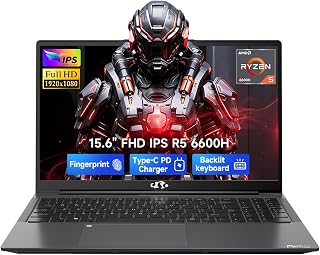
The AMD R5-6600H offers six cores for handling background rendering while you continue modeling, and the integrated Radeon 660M manages basic viewport performance for less demanding projects. At 16GB RAM, this configuration supports entry-level modeling software and moderate polygon counts. The 512GB SSD provides room for essential software installs, though asset libraries may require external storage for larger production work.
Pros
- 6-core Ryzen 5 6600H handles viewport multitasking and modifier previews smoothly
- Dual RAM slots and M.2 expansion let you scale to 64GB and 4TB as projects grow
- Full port selection including dual USB-C, three USB-A, HDMI, and SD card reader
- DDR5 memory and PCIe 4.0 SSD provide bandwidth for texture streaming and fast file access
Cons
- Integrated Radeon 660M struggles with GPU rendering and heavy simulation workloads
- 1920x1080 resolution limits screen real estate for complex node graphs and timelines
The NIMO 15.6 AI Creator Laptop brings a 6-core Ryzen 5 6600H to 3D modeling workflows at a budget tier where most machines still ship with underpowered dual-core chips. The 12-thread architecture gives you real parallel processing capacity for viewport navigation, modifier previews, and background rendering tasks that would crawl on weaker hardware. DDR5 memory at 16GB keeps scene complexity manageable for learning and freelance work, while the PCIe 4.0 SSD speeds up project file loading and texture streaming. The integrated Radeon 660M handles basic GPU acceleration for realtime shading and viewport effects in Blender, SketchUp, and Fusion 360, though heavy ray tracing and simulation work will expose its limits quickly. Port selection is genuinely useful with dual USB-C, three USB-A, HDMI for external monitors, and an SD card reader for asset ingestion. Dual SO-DIMM slots and M.2 2280 compatibility mean you can scale to 64GB RAM and expand storage as project demands grow, which matters when budgets are tight and workload complexity increases over time.
This laptop fits students, hobbyists, and freelancers tackling architectural visualization, product design prototypes, or character modeling for portfolios. If you're learning Maya or working in mid-poly environments where viewport performance matters more than final render speed, the six cores and upgrade path deliver real value. Skip it if your workflow depends on GPU rendering engines like Octane or Redshift, or if you routinely handle dense simulations and high-res sculpting that demand discrete graphics and 32GB RAM minimum out of the box.
Buying Guide: What to Look for in a 3D Modeling Laptop
GPU Architecture and VRAM Capacity
Your graphics card determines how smoothly you can manipulate complex scenes and how fast your renders complete. Professional GPUs like the NVIDIA RTX Ada series (RTX 1000, RTX 3500) and RTX PRO Blackwell cards offer ISV-certified drivers for applications like AutoCAD, ANSYS, and Revit, ensuring stable performance during critical production work.
VRAM matters more than raw compute power when working with high-resolution textures and detailed geometry. The Dell Precision 7780 Mobile Workstation 17.3″ FHD with its 12GB RTX 3500 Ada handles dense assemblies and large-scale architectural models, while the HP ZBook X G1i Laptop, NVIDIA RTX PRO 1000 balances 8GB GDDR7 with Blackwell efficiency for animation and product design. Consumer gaming GPUs like the RTX 5060 in the ASUS ROG Strix G16 (2025) Gaming Laptop deliver strong performance for hobbyists and students but lack the certified drivers that professional studios require.
System Memory Configuration
RAM directly impacts how many applications and browser tabs you can keep open while modeling, and how large your assemblies can grow before the system starts swapping to disk. DDR5 has become the standard for 2026 workstations, offering bandwidth improvements that benefit real-time viewport rendering and simulation workflows.
For professional work, 32GB represents the practical minimum. The Dell Precision 7680 Laptop, 16″ FHD ships with 32GB DDR5 CAMM memory, a newer standard that reduces physical height and allows for faster speeds than traditional SO-DIMM modules. Power users handling animation, fluid simulation, or large CAD assemblies should consider 64GB configurations like those in the Dell Precision 7680 Laptop or the HP ZBook X G1i. If you’re building a desktop setup for similar workloads, explore our RTX 5070 Ti build guide.
Display Quality and Color Accuracy
You need a screen that represents your work accurately, especially when preparing models for client presentations or final rendering. Resolution matters less than panel quality: an FHD+ (1920×1200) IPS display with good color coverage often outperforms a higher-resolution TN panel with poor viewing angles.
The 16:10 aspect ratio in the Dell Precision 7680 series and HP ZBook X G1i provides extra vertical space for toolbars and timelines without sacrificing workspace. Anti-glare coatings reduce reflections in bright offices or near windows. If you frequently present work or collaborate with remote teams, prioritize systems with webcam quality and multiple external monitor support. Most workstations in this roundup can drive three or four 4K displays simultaneously via Thunderbolt 4 and HDMI ports.
Processor Architecture for Multi-threaded Workloads
CPU performance determines how quickly your system compiles shaders, bakes lighting, and processes physics simulations. Modern hybrid architectures like Intel’s 13th and 14th Gen chips split cores into Performance and Efficient types, letting you run background tasks without stealing resources from your active viewport.
The i9-13950HX in the Dell Precision 7780 Mobile Workstation 17.3″ FHD and Dell Precision 7680 Laptop, 16″ FHD brings 24 cores (8 P-cores, 16 E-cores) for sustained multi-threaded rendering. AMD’s Ryzen 5 6600H in the NIMO 15.6 AI Creator Laptop offers solid everyday performance for students and freelancers working with moderate polygon counts. For sustained all-day work, thermal design matters as much as raw clock speed. Look for systems with vapor chamber cooling and user-selectable thermal profiles that let you prioritize silence during modeling and performance during final render passes.
Final Thoughts
Choosing the right laptop for 3D modeling depends on the complexity of your projects and the software you rely on most. If you need ISV-certified stability for professional CAD and engineering work, the Dell Precision 7780 Mobile Workstation delivers workstation-class GPU power and expandability that justifies the investment. For creators and students focused on animation, visualization, or freelance product design, the Dell Precision 7680 balances professional features with a more accessible configuration while maintaining the performance headroom you need for complex scenes.
Frequently Asked Questions
How much RAM do I actually need for 3D modeling in 2026?
32GB represents the professional baseline for 2026, allowing you to work comfortably with moderately complex scenes while keeping reference materials and communication tools open. 64GB becomes necessary when handling large assemblies, high-resolution texture maps, or running simulations alongside your modeling application. Entry-level systems with 16GB can handle learning projects and hobbyist work, but you’ll encounter memory pressure sooner as project complexity increases.
Should I choose a professional GPU or a gaming GPU for modeling work?
Professional GPUs like the RTX Ada and RTX PRO series include ISV-certified drivers that provide stability and optimized performance in applications like SolidWorks, Revit, and CATIA. Gaming GPUs offer better value for raw compute power and work well for rendering and visualization in Blender, Cinema 4D, and similar tools. If your workflow includes precision CAD, engineering simulation, or professional animation pipelines that depend on certified hardware, invest in workstation graphics. For architectural visualization, freelance product rendering, or student work, gaming GPUs deliver strong performance without the certification premium.
Can these laptops handle real-time rendering engines?
Real-time engines like Unreal Engine, Unity, and Twinmotion benefit heavily from GPU performance and VRAM capacity. Systems with RTX 3500, RTX 1000 Ada, or RTX 5060 GPUs can drive real-time workflows smoothly at 1080p, though you may need to adjust quality settings for complex scenes with heavy lighting or particle effects. The RTX Ada architecture includes dedicated ray-tracing cores that accelerate Lumen and path-traced lighting in Unreal Engine 5. For related system builds supporting similar workflows, review our guide on RTX 5070 component selection.
What about battery life during mobile work sessions?
Active 3D modeling drains batteries quickly due to sustained CPU and GPU load. Expect two to four hours of real modeling work on battery, depending on scene complexity and power settings. The Dell Precision and HP ZBook systems include user-selectable thermal profiles that can extend battery life by limiting turbo frequencies when plugged into lower-wattage USB-C chargers. For serious work sessions, plan to stay near power or carry the included high-wattage adapter. Lighter tasks like reviewing models, annotating designs, or attending video calls stretch battery life considerably compared to active rendering or simulation work.
Common questions
What are the best laptops for Blender?
The Dell Precision 7780 with RTX ADA 3500 12GB and 128GB RAM handles Blender's viewport and rendering demands best among these workstations. The RTX ADA 3500 accelerates Cycles GPU rendering and viewport shading, while the high RAM capacity supports complex scenes with detailed geometry and textures. For tighter budgets, the Precision 7680 with RTX 1000 Ada 6GB works for moderate projects but will render slower on heavy scenes.
What are the best laptops for animation?
The Dell Precision 7780 with its i9-13950HX, 128GB RAM, and RTX ADA 3500 12GB is the strongest choice for animation workflows. The high core count handles timeline scrubbing and physics simulations, the large RAM capacity manages layered compositions and rigged characters, and the dedicated GPU accelerates both viewport playback and final rendering. The 17.3-inch display provides more workspace for timelines and preview windows compared to smaller screens.








Write Your Review
No reviews yet. Be the first to share your experience!