

You’re juggling case studies, video calls, spreadsheets, and late-night research sessions. The laptop you carry every day needs to keep up without weighing down your bag or draining its battery before your afternoon lecture. Finding the right machine is less about specs on paper and more about how a laptop actually fits into your workflow.
This guide covers nine of the best laptops for business students available right now, ranging from compact everyday workhorses to large-screen productivity powerhouses. Whether you need Windows 11 Pro for remote desktop access or a lightweight build for commuting between campus and the library, there is an option here for you. If you’re also setting up a home workspace, browse our Home Office category for complementary gear.
Quick answer
This guide compares 9 picks, with Lenovo V15 AMD Ryzen 5 7520U 16GB DDR5 512GB SSD ranked first. HP OmniBook 3 16" 2K Touchscreen Laptop, AMD Ryzen 3 holds the highest customer rating among them. 15.6" AI Laptop 12GB RAM 256GB SSD Windows 11 Office has the most customer reviews.

The 16GB DDR5 RAM ensures smooth performance when running multiple business applications simultaneously, from financial modeling software to video conferencing tools. The 512GB SSD provides ample space for course materials, case studies, and project files without external storage. Windows 11 Pro includes enterprise-grade security features and remote desktop capabilities valuable for business school group collaboration.
Pros
- MIL-SPEC durability and spill-resistant keyboard withstand student life
- Numeric keypad essential for finance and accounting coursework
- Dual 4K display support enables serious multitasking for projects
- Windows 11 Pro matches corporate internship environments
Cons
- 3.6 lb weight heavier than ultraportable alternatives
- Integrated graphics unsuitable for design or media coursework
Business programs demand reliability and professional capabilities, and the Lenovo V15 delivers both through military-grade construction and business-focused features. The MIL-SPEC 810H certification means this laptop withstands the physical demands of student life: daily commutes, crowded lecture halls, and constant movement between campus locations. The spill-resistant keyboard protects against the inevitable coffee accidents during all-nighters. Business students benefit immediately from the full-size numeric keypad, essential for finance coursework, accounting assignments, and data entry projects. The AMD Ryzen 5 7520U processor with 16GB DDR5 RAM handles business applications smoothly, from statistical software to presentation tools, while the 512GB NVMe SSD stores semesters of coursework with fast access. Windows 11 Pro provides the same environment students will encounter in corporate internships and future careers. The 15.6-inch FHD anti-glare display with TUV-certified low blue light technology reduces eye strain during extended study sessions. Dual 4K display support at 60Hz enables serious multitasking when working from a dorm or apartment, running financial models on one screen while researching on another. The privacy shutter protects during video calls. Gigabit Ethernet ensures stable connections for online exams and presentations when Wi-Fi becomes unreliable.
Processor: AMD Ryzen 5 7520U with Radeon 610M integrated graphics
Memory: 16GB DDR5 RAM
Storage: 512GB PCIe NVMe M.2 SSD
Display: 15.6-inch FHD (1920x1080) anti-glare LCD with TUV Low Blue Light certification
Operating System: Windows 11 Pro 64-bit with Microsoft Copilot
Connectivity: Wi-Fi 6E, Bluetooth 5, USB-C 3.2 Gen 1 with DisplayPort 1.2, two USB-A 3.2 Gen 1, HDMI 1.4b, Gigabit Ethernet
Security: BitLocker encryption, Remote Desktop, privacy webcam shutter
Keyboard: Full-size with dedicated numeric keypad, spill-resistant
Durability: Military-grade MIL-SPEC 810H tested
Weight: 3.6 pounds
Dimensions: 14.14 inches L x 9.28 inches W x 0.78 inches Th
Color: Gray
Warranty: One-year limited warranty from Lenovo
Business students in accounting, finance, or data-focused programs benefit from the numeric keypad and robust multitasking capabilities. Students pursuing internships appreciate Windows 11 Pro and professional build quality. Those who study in libraries and dorms value the anti-glare display and low blue light technology. Skip this if portability is your top priority beyond the 3.6 lb weight, you need touchscreen functionality for interactive coursework, or you require graphics capability for design or media projects.
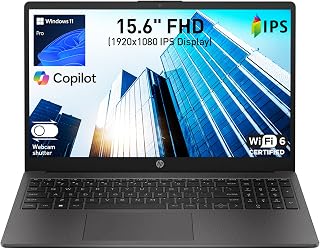
Windows 11 Pro includes enterprise-grade security features and domain join capabilities valuable for students learning business IT infrastructure. The dedicated numeric keypad accelerates data entry for accounting and finance coursework. With 16GB RAM, the system manages multiple browser tabs, business intelligence tools, and office applications concurrently. The AMD quad-core processor provides adequate performance for typical business school workloads including presentations and spreadsheet analysis.
Pros
- Lightweight 3.4 lb design travels easily across campus
- 16GB RAM handles multitasking between coursework and research
- Windows 11 Pro provides professional business environment
- AI noise reduction improves remote collaboration quality
Cons
- Modest battery may require midday charging during intensive use
- Integrated graphics limit creative and technical applications
Business students need a laptop that travels easily between classes, handles research and assignments efficiently, and stays within a student budget. The HP 255 G10 addresses these needs with a lightweight 3.4 lb build and slim 0.73-inch profile that slips into backpacks without adding bulk. The 16GB DDR4 RAM handles the simultaneous demands of academic life: multiple research tabs, streaming lecture videos, running spreadsheet models, and joining virtual study groups. Windows 11 Pro brings security and management features typically reserved for corporate environments, giving students professional-grade tools. The 512GB SSD provides ample storage for coursework, presentations, and project files while delivering fast boot times between classes. The Full HD IPS display with 85% screen-to-body ratio offers clear visibility for reading articles and creating presentations, while dual-array microphones with AI noise reduction ensure you sound professional during group projects and online classes. Wi-Fi 6 keeps pace with crowded campus networks, and comprehensive ports including USB-C, dual USB-A, and HDMI mean you can connect to classroom projectors and external monitors without carrying adapters. The wide dynamic range camera performs reliably in dorm rooms and libraries alike.
Display: 15.6-inch Full HD IPS, 1920x1080 resolution, 60Hz refresh rate, anti-glare coating, 85% screen-to-body ratio
Processor: AMD Ryzen 3 7330U, 4-core, 8-thread, 8MB L3 cache, up to 4.3GHz max boost, 2.3GHz base
Memory: 16GB DDR4 SODIMM, 3200MHz, 2 slots available
Storage: 512GB SSD
Graphics: AMD Radeon integrated graphics
Ports: 1x USB Type-C 5Gbps, 2x USB Type-A 5Gbps, 1x HDMI 1.4b, 1x combo headphone/microphone
Connectivity: Wi-Fi 6, Bluetooth 5.3
Camera: Wide dynamic range HD with dual-array noise-canceling microphones
Battery: 3-cell, 41Wh Li-ion polymer
Weight: 3.4 lbs
Dimensions: 14.17"L x 9.29"W x 0.73"Th
Operating System: Windows 11 Pro with AI Copilot
Business students taking core coursework in accounting, finance, management, and marketing will find this laptop handles spreadsheets, video conferences, research papers, and presentation software comfortably. Students who frequently move between campus locations benefit from the genuinely portable design. Skip this if you need touchscreen functionality for note-taking, plan to run resource-intensive design or engineering software, or require all-day battery life without access to charging between classes.

The expansive 17.3-inch FHD display makes financial modeling and data visualization more comfortable during long study sessions, reducing eye strain with its anti-glare coating. The 512GB SSD offers sufficient space for business software suites and project files. Windows 11 Home provides native compatibility with Microsoft Office applications central to business coursework. The Ryzen 3 30 handles everyday productivity tasks like document editing and video conferencing reliably.
Pros
- 17.3-inch FHD display with excellent brightness for detailed spreadsheet work
- 14+ hour battery eliminates outlet hunting across campus
- 512GB SSD stores extensive coursework and project files
- Comprehensive ports including dual USB-C with DisplayPort for presentations
Cons
- No keyboard backlighting for late-night study
- Ryzen 3 processor limits intensive multitasking capability
Business students juggling spreadsheets, presentations, and research papers need screen real estate, and this HP OmniBook 3 delivers with its expansive 17.3-inch FHD IPS display. The 1920x1080 resolution and 300-nit brightness make financial models readable and slide decks crisp, while the anti-glare coating handles library fluorescents and coffee shop windows without strain. The AMD Ryzen 3 processor with 8GB LPDDR5 RAM powers through Excel, PowerPoint, and simultaneous browser tabs without lag, and the 512GB SSD stores semesters worth of coursework with room to spare. What separates this from typical student laptops is the 14-hour battery life, eliminating the scramble for outlets between lectures. At 4.4 pounds with a slim 0.65-inch profile, it fits in backpacks despite the large screen. Connectivity covers every campus need with dual USB-C ports supporting DisplayPort for presentations, dual USB-A for peripherals, HDMI 2.1 for external monitors, and Wi-Fi 6 for fast campus networks. The FHD webcam with AI noise reduction handles group project video calls cleanly. Windows 11 Home runs accounting software and collaboration tools without friction. The textured matte finish survives daily transport.
Display: 17.3-inch FHD IPS, 1920x1080, 300 nits, 62.5% sRGB, anti-glare, 178-degree viewing angles
Processor: AMD Ryzen 3 30, 4 cores, 8 threads, up to 4.1 GHz boost, 4MB L3 cache
Memory: 8GB LPDDR5-5500 MT/s onboard
Storage: 512GB PCIe NVMe M.2 SSD
Graphics: AMD Radeon 610M integrated
Connectivity: Wi-Fi 6 (802.11ax), Bluetooth 5.4, 2x USB-A 5Gbps, 2x USB-C 10Gbps (USB-PD 3.1, DisplayPort 1.4), 1x HDMI 2.1, 1x 3.5mm audio jack
Camera: 1080p FHD with HDR auto-switch, dual array microphones
Battery: Up to 14 hours 15 minutes, 45W USB-C GaN fast charger (0-50% in 45 minutes)
Weight: 4.4 pounds
Dimensions: 15.65" x 10.09" x 0.65"
Operating System: Windows 11 Home with Copilot Key
Sustainability: EPEAT Silver Climate+ registered, ENERGY STAR certified

The included Office 365 subscription provides access to Word, Excel, and PowerPoint for assignments, financial reports, and presentations. The numeric keypad accelerates data entry for accounting coursework and spreadsheet-heavy projects. At a lightweight design with 12GB RAM, it balances portability for campus use with enough memory for running business analytics software alongside web research.
Pros
- Numeric keypad accelerates accounting and financial data entry
- 12GB RAM supports typical business application multitasking
- Office 365 included eliminates separate subscription expense
- 256GB SSD handles standard coursework storage needs
Cons
- Integrated graphics limit creative and visualization software
- Basic specifications may struggle with intensive business simulation tools
Business coursework demands reliable computing for spreadsheets, presentations, and written assignments, and this 15.6-inch laptop addresses those fundamentals without unnecessary complexity. The Intel processor with UHD Graphics 600 handles Word documents, Excel financial models, and PowerPoint decks competently, while 12GB RAM keeps multiple applications responsive during group project collaboration. The 256GB SSD provides adequate space for a semester's coursework, though heavy media users may need external storage. Windows 11 Home includes the tools business students actually use, and the bundled Office 365 subscription eliminates separate software costs. The 15.6-inch display hits the sweet spot between portability and usability, offering enough screen space for split-screen document editing without the bulk of 17-inch models. The numeric keypad is genuinely useful for accounting coursework and financial analysis, a feature many compact laptops omit. The lightweight build makes cross-campus transport manageable, and the memory card slot expands storage when project files pile up. For students focused on case studies, research papers, and basic business analytics rather than creative production or gaming, this configuration covers essential needs. The integrated Intel graphics handle video conferencing and presentation delivery but nothing more demanding.
Display: 15.6-inch FHD IPS LCD, 1920x1080 resolution, 300 nits brightness, narrow-bezel design
Processor: Intel Celeron J4105, quad-core, 2.5 GHz max speed with Intel UHD Graphics 600
Memory: 12GB DDR4 RAM supports smooth multitasking
Storage: 256GB M.2 SSD with expansion up to 2TB, microSD card slot up to 1TB
Connectivity: USB 3.2, USB Type-C, Mini HDMI, 3.5mm audio jack, Wi-Fi 5 (802.11ac), Bluetooth 4.2
Battery: 7000mAh capacity for all-day use
Design: 14 inches L x 9 inches W x 0.8 inches thick, light gray color, 180-degree lay-flat hinge
Software: Windows 11 Home, Office 365 included, AI productivity features
Support: 1-year warranty, 24/7 customer support
Best for business students prioritizing basic productivity over advanced features, needing a numeric keypad for accounting work, and wanting Office 365 included upfront. Suits budget-conscious undergraduates handling standard coursework without intensive software demands. Skip if you need high-resolution displays for detailed visual work, plan video editing or gaming, require premium build quality, or expect all-day battery performance. Also not ideal for students running resource-intensive business simulation software or advanced analytics tools beyond basic Excel.

Pros
- Excellent portability at 3.33 lbs with professional business black finish suitable for corporate environments
- Fast storage and responsive performance for document editing, browsing, and standard business applications
- Strong security suite including TPM 2.0, camera privacy shutter, and Kensington slot for data protection
- Reliable video conferencing capabilities with HD camera, dual mics, and quality stereo speakers
- Military-grade durability testing ensures long-term reliability for business users and road warriors
Cons
- Intel N100 processor limits performance for demanding software like video editing or intensive multitasking
- 256GB storage may require external drives for users managing large media files or data-heavy projects
- Non-backlit keyboard and basic TN display with 45% color accuracy suit office work but not creative professionals
The Lenovo V15 G6 is a purpose-built business laptop designed for professionals, remote workers, and students who prioritize reliability and portability over raw computing power. This 15.6-inch machine brings professional-grade durability to the budget segment, making it ideal for corporate environments, hybrid workplaces, and anyone needing dependable productivity computing without premium pricing.
Performance centers on the Intel N100 quad-core processor paired with 8GB DDR5 RAM and a fast 256GB PCIe 4.0 SSD. This combination delivers snappy boot times, smooth application launches, and capable multitasking for everyday business tasks like email, document editing, web browsing, and video conferencing on Zoom or Microsoft Teams. The integrated Intel UHD Graphics handles video playback and light multimedia without issues, though demanding applications like video editing or 3D work would struggle with this entry-level processor.
Design and build quality are standout aspects for the price. The laptop weighs just 3.33 lbs and measures 0.78 inches thick, making it genuinely portable between office and home. The professional business black finish with textured PC-ABS construction feels durable, and the 87% screen-to-body ratio maximizes the 15.6-inch FHD display. The anti-glare coating reduces eye strain during long work days, and the military-grade MIL-STD-810H testing certification signals real durability for demanding business environments.
Security and connectivity impress for this price category. TPM 2.0 provides firmware-level security, the camera includes a privacy shutter to prevent unauthorized access, and the Kensington Nano Security Slot protects against theft. WiFi 6 and Gigabit Ethernet ensure reliable connectivity, while dual USB Type-C ports with USB Power Delivery support fast charging and external displays. The HD 720p camera and dual-array microphones deliver clear video calls, though the non-backlit keyboard and basic TN display represent the main compromises at this price point.
The V15 G6 succeeds as a workhorse business laptop for professionals and students who value reliability, security, and portability over premium performance or creative capabilities. If you need a dependable machine for everyday productivity, video conferencing, and travel, this delivers exceptional value. However, creative professionals or anyone running resource-intensive software should consider upgrading to a more powerful processor and larger SSD storage.
Processor and Memory: Intel N100 quad-core processor up to 3.4GHz, 8GB DDR5-4800 SODIMM RAM, Intel UHD Graphics integrated, 6MB Intel Smart Cache.
Storage and Display: 256GB PCIe 4.0x4 NVMe M.2 SSD, 15.6-inch FHD (1920 x 1080) anti-glare TN display, 250 nits brightness, 87% screen-to-body ratio.
Connectivity: WiFi 6 (802.11ax 2x2), Bluetooth 5.2, Gigabit Ethernet (100/1000M RJ-45), 2x USB Type-C 5Gbps with USB PD 30-65W and DisplayPort 1.2, 2x USB Type-A 5Gbps, 1x HDMI 1.4b, headphone/mic combo jack.
Security and Audio: TPM 2.0 firmware, camera privacy shutter, Kensington Nano Security Slot, HD 720p camera with privacy shutter, dual-array microphones, stereo speakers (1.5W x2) with HD Audio.
Physical: 14.14 inches W x 9.28 inches D x 0.78 inches H, weighs 3.33 lbs, business black finish, full-size non-backlit keyboard. Includes 65W USB-C power adapter and Windows 11 Home.
Who Should Buy: Business professionals seeking reliable everyday computing, remote workers needing portable video conferencing capability, students on a budget, small business owners requiring durable machines, and anyone valuing security features and military-grade durability over premium performance.
Storage Consideration: 256GB SSD provides adequate storage for typical business work including documents, email, and applications. Users managing large media libraries or storing significant amounts of data should plan for external storage devices or cloud backup solutions.
Performance Expectations: The Intel N100 processor excels for standard business tasks but reaches its limits with demanding software like video editing, 3D rendering, or large spreadsheet calculations. If your work involves these tasks, consider a laptop with a more powerful processor.
Display Limitations: The TN-panel display has standard viewing angles and 45% color accuracy, making it suitable for office work but not ideal for photo or video editing. The anti-glare coating effectively reduces eye strain during long working sessions.
Upgrade Options: While the RAM tops out at 32GB and storage can handle up to 2TB expansion, plan for the specifications as configured. This laptop prioritizes portability and reliability over upgrade flexibility compared to larger business machines.

The 16-inch 2K touchscreen paired with 300 nits brightness makes reviewing spreadsheets and presentations comfortable during long study sessions. The AMD Ryzen 3 processor with 8 threads handles multitasking between research tabs, document editing, and video calls without slowdown. Two USB-C ports with Power Delivery support fast charging and connecting to external displays for group project work.
Pros
- 16-inch 2K touchscreen provides workspace for complex coursework
- 14+ hour battery eliminates charging anxiety during long campus days
- Fast charging recovers 50% capacity in under an hour
- AI noise reduction improves remote collaboration and interviews
Cons
- 256GB storage fills quickly with course materials and applications
- No backlit keyboard for late-night study sessions
Business students juggling coursework, part-time jobs, and extracurriculars need screen space and battery endurance. The HP OmniBook 3 delivers both with a 16-inch 2K touchscreen that displays spreadsheets, financial models, and research documents with clarity. The 1920x1200 resolution provides vertical space for reading case studies and articles without constant scrolling. Touch capability speeds up navigation during presentations and group work. The AMD Ryzen 3 7320U processor keeps pace with typical business student workloads including document editing, web research, streaming educational content, and video conferencing. What sets this laptop apart for students is genuine all-day battery life exceeding 14 hours, eliminating anxiety about finding outlets between morning lectures and evening study sessions. Fast charging recovers 50% capacity in under an hour during lunch breaks. At 3.6 pounds with a 0.6-inch profile, it remains portable despite the large screen. Advanced AI noise reduction ensures you sound clear during remote group projects and interviews. Connectivity covers academic needs with dual USB-C ports supporting Power Delivery, two USB-A ports for legacy devices, and HDMI for classroom projectors. The matte finish resists fingerprints and the textured base provides grip.
Display: 16-inch 2K IPS touchscreen, 1920x1200 resolution, 300 nits brightness, anti-glare coating, 62.5% sRGB color gamut
Processor: AMD Ryzen 3 7320U, 4 cores, 8 threads, up to 4.1 GHz
Memory: 8GB LPDDR5-5500 MT/s RAM (onboard)
Storage: 256GB PCIe NVMe M.2 SSD
Graphics: AMD Radeon 610M dedicated graphics
Battery: Up to 14 hours 15 minutes, 45W USB Type-C GaN power adapter with 0-50% fast charge in 45 minutes
Connectivity: Wi-Fi 6 (802.11ax), Bluetooth 5.4, 2x USB Type-A 5Gbps, 2x USB Type-C 10Gbps with Power Delivery 3.1 and DisplayPort 1.4, 1x HDMI 2.1, 3.5mm audio jack
Camera: 1080p FHD with HDR auto-switch and dual array microphones
Audio: Dual speakers
Keyboard: Matte paint finish
Dimensions: 14.12 x 9.91 x 0.6 inches
Weight: 3.6 pounds
Operating System: Windows 11 Home
Color: Mica Silver
Certifications: EPEAT Silver Climate+, ENERGY STAR Certified
Business students who spend long days on campus benefit from the extended battery and large workspace. Students focused on finance, economics, or analytics appreciate the screen real estate for spreadsheets and data visualization. The touchscreen suits interactive learning and presentations. Skip this if you need more than 256GB storage for large project files, plan to run multiple demanding applications simultaneously beyond the 8GB RAM capacity, or require a backlit keyboard for studying in dim environments.
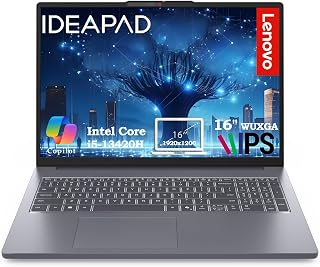
The 16-inch display provides ample screen real estate for working with spreadsheets and presentations simultaneously, while the i5-13420H processor handles multitasking between business applications without lag. With 512GB of storage, students can keep course materials, projects, and data files locally accessible. The 16GB RAM ensures smooth performance when running virtual machines or data analysis tools often required in business programs.
Pros
- Excellent value for mid-range business computing with strong CPU and RAM specs
- Extra vertical screen real estate improves productivity for document-heavy work
- Full-size keyboard with numeric keypad streamlines data entry tasks
- Privacy shutter and anti-glare coating prioritize security and eye comfort
- Lightweight and portable despite the large 16-inch screen
Cons
- Integrated graphics limit heavy video editing and gaming capabilities
- HD 720p webcam is adequate but not exceptional for professional video calls
- No dedicated GPU means demanding creative applications may feel slower
The Lenovo IdeaPad Slim 3 16 is a business-focused laptop designed for professionals, accountants, remote workers, and students who need reliable multitasking performance without premium pricing. With its Intel Core i5-13420H processor and 16GB DDR5 RAM, this laptop handles everyday productivity tasks, video conferencing, and concurrent applications effortlessly.
The 16-inch WUXGA display with anti-glare coating and 300 nits brightness is a standout feature, offering 11% more vertical space than standard 1080p screens. This extra screen real estate translates to better visibility for spreadsheets, financial data, and document work. The full-size keyboard with numeric keypad appeals specifically to accountants and data-entry professionals who need speed and accuracy.
Performance is solid for its class. The 512GB PCIe SSD provides fast boot times and responsive file access, while the DDR5 RAM enables smooth multitasking across productivity software, Zoom calls, and browser-heavy workflows. The privacy shutter on the HD webcam is a practical security feature for professionals managing sensitive information and client communications.
Drawbacks include integrated graphics that won't satisfy creative professionals or gamers, and a basic HD 720p webcam that works but doesn't match high-end laptop standards. The laptop prioritizes productivity and value over premium features or performance headroom.
Overall, this is a solid choice for business users and remote workers who need dependable performance, a large display, and thoughtful design at an accessible price point. Its lightweight construction and comprehensive port selection make it genuinely portable for frequent travel.
Processor: Intel Core i5-13420H (8 cores, 12 threads, up to 4.6GHz)
Memory: 16GB DDR5 RAM
Storage: 512GB PCIe SSD
Display: 16-inch WUXGA (1920x1200) IPS anti-glare, 300 nits brightness
Graphics: Integrated Intel graphics
Operating System: Windows 11 Home
Webcam: HD 720p with privacy shutter
Connectivity: WiFi 6 (802.11ax), Bluetooth 5.2, 2x USB-A, 1x USB-C (Power Delivery + DisplayPort), HDMI 1.4, SD card reader, 3.5mm headphone jack
Design: Luna Grey finish, 3.70 lbs, full-size keyboard with numeric keypad
Special Features: Anti-glare coating, HD audio, memory card slot, numeric keypad, Copilot AI integration
Ideal For: Business professionals, accountants, remote workers, freelancers, and students who prioritize productivity and value. This laptop excels for those managing spreadsheets, financial data, document editing, and video conferencing.
Best Use Cases: Multitasking office work, video meetings with screen sharing, web-based applications, content viewing, travel and remote work, educational computing, and small business operations.
Not Recommended For: Professional video editors, 3D designers, gamers, or anyone requiring dedicated graphics performance. This laptop's integrated GPU handles casual gaming and light creative work but cannot support demanding creative applications or high-end gaming.
Budget Consideration: This laptop strikes a balance between performance and affordability, making it ideal for cost-conscious buyers who need genuine multitasking capability without paying for gaming or workstation-class specs they won't use.

Lifetime Microsoft Office 2024 eliminates recurring subscription costs for essential productivity software needed throughout a business degree. The quad-core Intel processor and 16GB RAM handle demanding tasks like data analysis and presentation creation efficiently. At 14 inches, the compact form factor fits easily into backpacks for commuting between classes, libraries, and internships.
Pros
- Lifetime Office 2024 included eliminates subscription costs
- 16GB RAM handles simultaneous business applications smoothly
- 628GB total storage separates current and archived coursework
- Light 3.24-pound weight suits frequent campus movement
Cons
- 1366x768 resolution below modern FHD standard
- Intel N150 processor limits heavy multitasking capability
Business students on tight budgets face a challenge: they need Microsoft Office, enough RAM for multitasking, and storage for coursework, but buying these separately adds up fast. This HP 14-inch solves that equation by bundling lifetime Office 2024, 16GB RAM, and 628GB total storage in one package. The Intel N150 quad-core processor runs at 3.6 GHz turbo and handles case study analysis, financial modeling in Excel, and presentation creation without stuttering. The 16GB DDR4 RAM is the real differentiator here, letting you run Zoom, multiple browser tabs, Word, and Excel simultaneously, which is standard operating procedure for group projects and online classes. The 128GB internal UFS storage plus 500GB external drive separates active coursework from archived materials efficiently. At 3.24 pounds and 0.71 inches thin, it slips into backpacks for cross-campus sprints between lectures. The 9-hour battery covers a full academic day, and the anti-glare 14-inch HD display works fine indoors though the 1366x768 resolution shows its budget roots. Windows 11 Pro adds remote desktop and BitLocker encryption for securing sensitive academic work. Wi-Fi 6 keeps campus network connections fast and stable.
Processor: Intel Core N150 Quad-Core, up to 3.6 GHz with 6MB L3 cache
Memory: 16GB DDR4 RAM for smooth multitasking
Storage: 128GB UFS internal plus 500GB external portable drive
Display: 14-inch diagonal HD (1366 x 768), micro-edge anti-glare, 250 nits, 60Hz refresh rate
Graphics: Intel Integrated Graphics
Operating System: Windows 11 Pro with built-in security and Copilot AI
Connectivity: Wi-Fi 6 (802.11ax), Bluetooth 5.4, Ports include USB-C 5Gbps, 2x USB-A 5Gbps, HDMI 1.4b, headphone combo jack
Battery: 3-cell 41Wh lithium-ion, up to 9 hours battery life with fast charging
Camera: 720p HD front-facing camera with temporal noise reduction and dual-array microphones
Dimensions: 12.76 x 8.86 x 0.71 inches
Weight: 3.24 lbs
Color: Sky Blue
Ideal for business students prioritizing value, needing Office immediately, and juggling multiple applications during group collaboration or research. Works well for commuter students and online learners on fixed budgets who need practical productivity over premium features. Skip this if you need full HD resolution for detailed visual work, plan intensive gaming, or require touchscreen capability. Also not for users expecting premium build quality or cutting-edge processor performance beyond everyday academic tasks.

Pros
- Large 17.3-inch display provides comfortable workspace for spreadsheets, presentations, and video conferencing
- Windows 11 Pro includes enhanced security features like BitLocker and remote desktop support
- Fast-charging capability enables quick top-ups between meetings or work sessions
- Multiple connectivity ports including USB-C, HDMI, and dual USB-A support external displays and accessories
- Lightweight and portable design at 4.98 pounds makes it suitable for frequent travel
Cons
- Intel Core i3-N305 processor is entry-level, limiting performance for demanding applications like video editing or 3D rendering
- No dedicated graphics card means gaming and graphics-intensive tasks will perform noticeably slower
- Limited to 250 nits display brightness, which may cause visibility issues in very bright environments
The HP 17-inch FHD laptop is designed for business professionals, students, and researchers who need a balance between screen real estate and portability. Its 17.3-inch display provides ample workspace for multitasking, while the compact footprint keeps it travel-friendly. Windows 11 Pro ensures business-grade security and productivity features suitable for professional environments.
Performance centers on the Intel Core i3-N305 processor with 8 cores running up to 3.8GHz, paired with 16GB DDR4 RAM and a 512GB PCIe NVMe SSD. This configuration handles everyday business applications, video conferencing, spreadsheet work, and online learning smoothly. The dedicated Copilot key offers one-touch access to AI assistance for document summarization and content generation, enhancing workflow efficiency.
The 17.3-inch Full HD IPS display features an anti-glare coating and 178-degree viewing angles, making it ideal for presentations and collaborative work. The micro-edge bezel design maximizes screen space while maintaining a refined appearance. Fast connectivity through Wi-Fi 6 and Bluetooth 5.4 ensures reliable performance for remote work and virtual meetings, supported by an integrated HD camera.
Design and portability shine with a full-size keyboard including numeric keypad, plus HP Fast Charge technology delivering 50% battery in 45 minutes. Connectivity options include USB-C, two USB-A ports, HDMI, and a headphone/microphone combo jack, providing flexibility for external monitors and accessories. The laptop weighs under 5 pounds, making it practical for daily commuting and travel.
The primary limitation is the entry-level processor, which cannot match the performance of higher-tier Core i5 or i7 options for resource-intensive tasks. Integrated graphics mean gaming and video editing are possible but not ideal. For business users, students, and casual computing needs, this HP offers solid value with its large display, fast charging, and professional operating system.
Processor: Intel Core i3-N305, 8-core, up to 3.8GHz
Memory: 16GB DDR4 RAM
Storage: 512GB PCIe NVMe SSD
Display: 17.3-inch Full HD (1920 x 1080) IPS anti-glare, 250 nits brightness
Graphics: Intel integrated graphics
Connectivity: Wi-Fi 6 (802.11ax), Bluetooth 5.4, 1x USB-C, 2x USB-A, 1x HDMI 1.4b, 1x headphone/microphone combo jack
Operating System: Windows 11 Pro
Keyboard: Full-size with numeric keypad
Battery: Supports HP Fast Charge (50% in 45 minutes)
Weight: 4.98 pounds
Dimensions: 14.12 x 9.24 x 0.75 inches
Warranty: Limited warranty
Business Professionals: This laptop excels for office work, video conferencing, and collaborative tasks. Windows 11 Pro offers enterprise security features, while the large display suits spreadsheet and presentation work. The numeric keypad benefits accounting and data entry roles.
Students and Researchers: The 17-inch screen provides comfortable viewing for extended study sessions. Fast charging and portable design support campus life. The Copilot AI key assists with research, writing, and content organization for academic projects.
Remote Workers: Fast Wi-Fi 6 connectivity, integrated HD camera, and HP Fast Charge make it ideal for remote work setups. The large screen reduces eye strain during long video meetings, while multiple ports support multi-monitor configurations.
Not Ideal For: Gamers, video editors, and creative professionals should consider systems with dedicated graphics and faster processors. Those requiring intense computing power or specializing in graphics-intensive work will find limitations with the entry-level Core i3 processor.
Buying Guide: What to Look for in a Business Student Laptop
Processor and RAM for Multitasking
Business students routinely run multiple applications at once: a browser with a dozen tabs, a spreadsheet, a PDF, and a video call all at the same time. A processor with at least four cores and 16GB of RAM keeps everything running smoothly without noticeable slowdowns.
Options like the Lenovo Business Laptop, 16GB RAM, 512GB SSD with an Intel Core i5-13420H or the Lenovo Laptop Computer V15, AMD Ryzen 5 7520U with DDR5 memory deliver that kind of headroom. If your budget is tighter, the HP 255 G10 Business Laptop, AMD Quad-core CPU still handles everyday business tasks efficiently.
Display Size and Quality
Screen real estate matters when you’re reading long reports or building financial models. A Full HD IPS panel reduces eye strain during long study sessions, and anti-glare coatings make a real difference when you’re working near windows.
If you prefer a larger canvas, the HP OmniBook 3 17.3 inch Laptop PC, FHD Display and the HP 17 Inch FHD Laptop Computer for Business both offer expansive 17-inch screens with wide viewing angles. The HP OmniBook 3 16 inch Laptop PC, 2K Touchscreen adds a touch layer and a sharper 2K resolution, which is useful for annotating slides or reviewing design work.
Battery Life and Portability
A laptop that dies between classes is a liability, not an asset. Look for machines that offer at least eight hours of real-world battery life, and prioritize models with fast-charge support so a short break between sessions actually helps.
The HP OmniBook 3 17.3 inch Laptop PC, FHD Display and the HP OmniBook 3 16 inch Laptop PC, 2K Touchscreen both advertise up to 14 hours and 15 minutes of battery life with HP Fast Charge. The Lenovo 15.6″ V15 G6 Business Laptop, 2026 Edition weighs just 3.33 lbs, making it one of the easier options to carry across campus. For more laptop-focused resources, visit the Laptops category.
Security and Business-Ready Features
Business programs often require secure remote access, encrypted drives, and professional collaboration tools. Windows 11 Pro with BitLocker encryption and Remote Desktop support is a meaningful upgrade over the Home edition for students who intern or work remotely.
Both the Lenovo Laptop Computer V15, AMD Ryzen 5 7520U and the HP 255 G10 Business Laptop, AMD Quad-core CPU ship with Windows 11 Pro. The Lenovo 15.6″ V15 G6 Business Laptop, 2026 Edition adds MIL-STD-810H durability certification and a firmware TPM 2.0 chip, useful if your school’s IT department requires enterprise-grade device management. Pair any of these with a quality peripheral setup. Our guide to the best silent mechanical keyboards is a good starting point for building a quiet study station.
Final Thoughts
For most business students, the sweet spot sits between raw power and everyday convenience. If you need a well-rounded machine with professional security features and a spacious display, the Lenovo Business Laptop, 16GB RAM, 512GB SSD is a strong all-around pick with its eight-core Intel processor and privacy-shutter webcam. Students on a tighter budget who still want a reliable, lightweight daily driver will find the Lenovo 15.6″ V15 G6 Business Laptop, 2026 Edition delivers military-grade durability and fast Wi-Fi 6 connectivity at a more accessible point. Either way, the right laptop is the one that keeps you focused when deadlines pile up.
Frequently Asked Questions
What specs should a business student laptop have in 2026?
At minimum, aim for a quad-core processor, 16GB of RAM, and a 512GB SSD. These specifications handle productivity software, video conferencing, and browser-heavy research without slowdowns. An IPS Full HD display and Wi-Fi 6 connectivity round out a solid setup for 2026.
Is Windows 11 Pro worth it for a business student?
Yes, especially if you plan to intern or work remotely during your studies. Windows 11 Pro includes BitLocker encryption, Remote Desktop, and advanced management features that the Home edition lacks. Many employers and IT departments also require Pro-grade security on devices that access corporate networks.
Should I prioritize a large screen or portability for business school?
It depends on how much you commute. If you move between classrooms and coffee shops daily, a 15-inch laptop under 3.5 lbs, like the Lenovo 15.6″ V15 G6 Business Laptop, 2026 Edition, balances screen space and portability well. If you primarily work at a desk and need more room for spreadsheets or financial models, a 17-inch option such as the HP OmniBook 3 17.3 inch Laptop PC, FHD Display is worth the extra weight. You can also explore our Electronics category for monitors and accessories that extend a smaller laptop’s workspace.
Do business students need a touchscreen laptop?
A touchscreen is not essential, but it adds real convenience for annotating presentations, navigating reports, and casual tablet-style use during lectures. The HP OmniBook 3 16 inch Laptop PC, 2K Touchscreen is a solid choice if you want that flexibility without sacrificing keyboard-focused productivity. For most students, though, a non-touch model with a high-quality display will serve just as well.
Common questions
What are the best laptops for accounting students?
Look for models with at least 16GB RAM and 512GB SSD storage, like the Lenovo IdeaPad Slim 3 16 with its Core i5-13420H processor. These specs handle accounting software like Excel, QuickBooks, and tax preparation tools smoothly while providing enough storage for multiple semesters of coursework. A comfortable keyboard and battery life over 8 hours matter for long study sessions and remote work.
What are the best laptops for finance students?
Prioritize 16GB RAM minimum and quad-core processors to run financial modeling software, Bloomberg Terminal, and multiple browser tabs for market research simultaneously. The Lenovo IdeaPad Slim 3 16 with 16GB RAM and Core i5-13420H delivers the performance finance students need. Its larger 16-inch display provides more screen space for spreadsheets and financial dashboards, improving productivity during analysis work.








Write Your Review
No reviews yet. Be the first to share your experience!