

Graphic designers need laptops that can keep pace with demanding workflows. Whether you’re working in Adobe Creative Suite, rendering 3D models, or managing multiple high-resolution files, the right machine makes the difference between smooth creativity and frustrating lag.
This guide covers eight laptops built for design work, from portable options for freelancers to workstation-class machines for studio professionals. We’ve focused on the specs that matter most: GPU performance, display quality, RAM capacity, and build reliability.
Quick answer
This guide compares 8 picks, with NIMO 15.6 AI Creator Laptop - AMD Ryzen 5 6600H, 16GB ranked first. Apple MacBook Neo 13 inch A18 Pro AI Laptop, 16HR holds the highest customer rating among them.
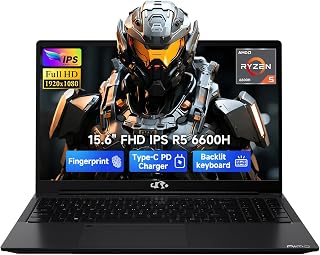
The AMD Radeon 660M integrated graphics handles everyday design work in programs like Illustrator and Photoshop without requiring a discrete GPU. The 15.6-inch FHD IPS display provides accurate color representation for vector work and layout tasks. With 16GB RAM and a 6-core processor, this machine manages multiple Adobe applications simultaneously while keeping your workspace responsive during typical graphic design workflows.
Pros
- Ryzen 5 6600H and 16GB DDR5 handle Creative Cloud apps smoothly
- Radeon 660M accelerates graphics tasks without dedicated GPU heat
- Dual USB-C with 100W PD supports external monitors and fast charging
- Portable at 3.8 pounds while maintaining 15.6-inch workspace
Cons
- FHD resolution limits detail work on complex illustrations
- Glossy screen creates reflections in bright studio environments
Graphic design work on a budget often means choosing between performance and portability, but the NIMO 15.6 splits that difference intelligently. The Ryzen 5 6600H processor paired with 16GB DDR5 RAM handles Adobe Creative Cloud applications competently for logo design, social media graphics, and web layouts. The integrated Radeon 660M graphics accelerate filter rendering and layer compositing in Photoshop better than entry-level Intel alternatives, while the PCIe 4.0 SSD keeps project files loading quickly. The 15.6-inch FHD IPS display provides adequate color accuracy for digital-first workflows where print precision is not critical. At 3.8 pounds, this machine balances screen real estate with enough portability for freelancers working between client meetings and home studios. The dual USB-C ports with 100W Power Delivery support external monitors and fast charging, essential when deadlines compress. The backlit keyboard and fingerprint reader add professional polish. However, the 1920x1080 resolution constrains detailed illustration work, and the 60Hz refresh rate lacks the fluidity professional animators expect. For designers creating brand identity systems, marketing collateral, and digital content rather than complex 3D renders or high-end photography retouching, this laptop delivers reliable daily performance.
Processor: AMD Ryzen 5 6600H, 6 cores, 12 threads, up to 4.5GHz
Graphics: AMD Radeon 660M integrated (RDNA 2 architecture)
Memory: 16GB DDR5, dual SO-DIMM slots, upgradeable to 64GB
Storage: 512GB PCIe SSD, M.2 2280 slot, upgradeable to 4TB
Display: 15.6 inch, 1920x1080 (Full HD), 60Hz, IPS LCD, glossy finish
Battery: 53.58Wh, supports 100W USB-C Power Delivery
Ports: 2 USB-C, 3 USB-A, HDMI 2.0, Micro SD card reader, 3.5mm audio jack
Connectivity: Wi-Fi 802.11a/b/g/n/ac, Bluetooth 5.2
Security: Fingerprint reader, Windows 11
Dimensions: 14.07 x 8.98 x 0.76 inches
Weight: 3.8 pounds
Warranty: 2-year manufacturer warranty with US-based support

The 17.3 inch IPS FHD screen provides ample workspace for viewing full design layouts without constant zooming. While the Intel N95 limits performance to lighter programs like Canva or basic vector work, the 16GB RAM allows reasonable multitasking. The large display reduces scrolling and makes client presentations easier during on-site meetings or remote collaboration.
Pros
- Large 17.3-inch IPS display provides real workspace for layouts and multitasking
- 16GB RAM and fast SSD handle multiple design files and browser tabs
- HDMI, USB-C, and microSD cover essential peripherals and external displays
- 180-degree hinge simplifies client reviews and collaborative work
Cons
- Intel N95 and integrated graphics struggle with rendering and GPU-heavy apps
- Five-hour battery requires frequent charging during extended design sessions
Graphic design on a tight budget means making smart compromises, and the MALLRACE AX17 tackles the basics without pretending to be a workstation. The 17.3-inch Full HD IPS panel gives you genuinely usable screen space for layout work, photo editing, and managing multiple design assets at once. That minimal-bezel design maximizes the canvas without inflating the footprint. The Intel N95 processor and 16GB RAM handle vector editing in lightweight apps, mockup creation, and web design workflows smoothly enough for freelancers and students building portfolios. The 256GB SSD keeps project files moving at 2.14GB/s, which matters when you're juggling layered documents. Connectivity covers the essentials: HDMI for client presentations, USB-C and 3.2 ports for external drives and tablets, plus a microSD slot for camera imports. The 180-degree hinge makes it easier to share concepts during in-person reviews. Limitations are real. This is not the machine for 3D rendering, complex motion graphics, or professional color grading. The integrated Intel UHD graphics and entry-level processor cap your ambitions at lighter design tasks. Battery life sits around five hours, so plan for power access during longer sessions. Windows 11 Pro is included, and the one-year warranty provides basic coverage.
Display: 17.3-inch IPS LCD, 1920x1080 Full HD resolution, 16:9 aspect ratio, 4mm ultra-narrow bezel
Processor: Intel 12th Gen Alder Lake N95, 4 cores, 3.4GHz turbo frequency
Graphics: Intel UHD Graphics, up to 1.2GHz
Memory: 16GB DDR4 SDRAM
Storage: 256GB M.2 SSD Serial ATA-600
Operating System: Windows 11 Pro
Camera: Front-facing HD webcam
Battery: 6000mAh lithium-ion, 54.72Wh capacity
Ports: 3x USB 3.2, 1x USB Type-C, 1x HDMI, 1x 3.5mm audio jack, microSD card reader, DC power jack
Connectivity: WiFi and Bluetooth
Dimensions: 14.07"L x 9"W x 0.66"Th
Weight: 1.6kg
Color: Gray Silver
Special Features: Numeric keypad, 180-degree hinge
Warranty: 1 year with 24/7 customer service
This laptop suits design students, hobbyists, and early-career creatives working primarily in 2D applications like Canva, Figma, Affinity Designer, or basic Photoshop tasks. It works for social media graphics, web mockups, and print layouts that don't demand color accuracy or GPU acceleration. Skip it if you're doing video editing, 3D modeling, motion design, or professional retouching where rendering speed and color precision matter. Also pass if you need all-day battery life away from outlets.

Apple MacBook Neo 13 inch A18 Pro AI Laptop
The A18 Pro chip accelerates machine learning features in design applications, while the Liquid Retina Display delivers accurate color reproduction for print and digital work. The unified memory architecture speeds up filters and effects in image editing software. Apple Intelligence integration streamlines repetitive tasks, though the 256GB storage may require external drives for large asset libraries.
Pros
- A18 Pro chip handles vector and raster editing smoothly
- Accurate Liquid Retina display with 500 nits brightness
- Exceptional portability at 2.7 pounds and 0.5 inches thin
- 16-hour battery supports untethered studio work
Cons
- 8GB RAM limits multitasking with large design files
- 256GB storage constrains asset library capacity
For graphic designers working primarily with vector illustrations, UI/UX mockups, and web graphics, the MacBook Neo delivers impressive capability in an ultraportable package. The A18 Pro chip with 16-core Neural Engine accelerates common design tasks like layer rendering and filter application, while the 13-inch Liquid Retina display at 2408-by-1506 resolution with 500 nits brightness reproduces color accurately enough for client presentations and web-focused work. Apple Intelligence features streamline workflow by refining copy and summarizing feedback. The recycled aluminum build weighs just 2.7 pounds at 0.5 inches thin, making this genuinely portable between studio and client meetings. Dual speakers with Spatial Audio and the 1080p FaceTime camera handle remote collaboration professionally. Battery endurance reaches 16 hours for video and 11 hours during active work, supporting full studio days untethered. The limitations become apparent with only 8GB unified memory and 256GB storage, which constrains handling of large photoshop files or extensive asset libraries. Single external 4K display support and two USB-C ports may require adapters for multi-monitor setups or peripheral devices.
Display: 13-inch Liquid Retina LED-backlit, 2408x1506 resolution at 219 PPI, 500 nits brightness, supports 1 billion colors
Processor: Apple A18 Pro chip with 6-core CPU (2 performance + 4 efficiency cores), 5-core GPU, 16-core Neural Engine, 60GB/s memory bandwidth
Memory and Storage: 8GB unified memory, 256GB SSD storage
Battery: 36.5-watt-hour lithium-ion battery, up to 16 hours video streaming, up to 11 hours wireless web
Ports: One USB 3 Type-C (10Gb/s), one USB 2 Type-C (480Mb/s), 3.5mm headphone jack
Camera and Audio: 1080p FaceTime HD camera, dual-speaker system with Spatial Audio, dual-mic array with Voice Isolation and Wide Spectrum modes
Design: 0.50 inch height, 11.71 inch width, 8.12 inch depth, 2.7 pounds weight, recycled aluminum enclosure
Operating System: macOS with Apple Intelligence capabilities
Best suited for freelance designers focused on web, UI/UX, and branding work who prioritize portability and Apple ecosystem integration. Students in graphic design programs will appreciate the balance of capability and mobility. Skip this if your work involves heavy 3D rendering, extensive video editing, or managing massive asset libraries that demand more RAM and storage capacity.

The NVIDIA RTX 1000 Ada with 6GB dedicated memory accelerates rendering in 3D design software and handles GPU-intensive effects in programs like After Effects. With 64GB DDR5 RAM, you can work on complex multi-layered files and run demanding design applications without slowdowns. The i7-13850HX processor and 16-inch screen give you the processing power and canvas size professional graphic design projects demand.
Pros
- RTX 1000 Ada accelerates 3D rendering and motion graphics
- 64GB DDR5 CAMM handles multiple Creative Cloud apps simultaneously
- Four external 4K monitor support for multi-display workflows
- ISV certifications ensure professional software compatibility
Cons
- FHD+ resolution modest for detail-intensive photography retouching
- Premium workstation pricing limits accessibility
Professional graphic design studios handling complex 3D packaging visualization, architectural rendering, or motion graphics need workstation-class GPU acceleration, and the Precision 7680 delivers exactly that. The NVIDIA RTX 1000 Ada with 6GB dedicated memory accelerates ray tracing in Cinema 4D, speeds up After Effects compositions, and enables real-time viewport performance in Blender that integrated graphics cannot match. The Core i7-13850HX processor powers through batch rendering and multi-layered Photoshop files without throttling, while 64GB DDR5 CAMM memory ensures smooth operation when juggling multiple Adobe applications simultaneously. The 16-inch display with anti-glare coating reduces eye strain during extended color correction sessions. Four external 4K monitor support transforms this into a command center for agencies managing complex brand campaigns across print and digital channels. ISV certifications guarantee compatibility with professional creative software, and MIL-STD-810H durability testing means this machine withstands the demands of busy production environments. Thunderbolt 4 and comprehensive connectivity simplify peripheral integration. The FHD+ resolution feels modest given the premium positioning, and designers focused on high-resolution photography work may want higher pixel density. The investment reflects professional-grade engineering rather than consumer pricing.
Processor: Intel Core i7-13850HX vPro
GPU: NVIDIA RTX 1000 Ada 6GB
RAM: 64GB DDR5 CAMM 5200MHz
Storage: 1TB PCIe NVMe M.2 SSD
Display: 16 inches FHD+ (1920 x 1200) Anti-Glare 45% NTSC
Operating System: Windows 11 Pro 64-bit with AI Copilot
Connectivity: 2x Thunderbolt 4, USB-C, 2x USB-A, HDMI, Ethernet, Audio combo jack
Wireless: Wi-Fi 6E, Bluetooth 5.2
Webcam: 1080p FHD RGB
Keyboard: Backlit
Special Features: Anti-Glare Coating, CAMM Memory, HD Audio, MIL-STD-810H Durability Testing
External Monitors: Supports 4 external monitors at 4K (3840x2160) at 60Hz
Warranty: ProSupport until January 2029
Designed for creative directors, 3D artists, motion graphics designers, and design studios requiring GPU-accelerated workflows in Cinema 4D, After Effects, and Blender. Agencies handling complex brand systems across multiple deliverables will value the multi-monitor capability and processing headroom. Skip this if your work stays within 2D illustration and vector graphics where integrated graphics suffice, or if budget constraints make the professional workstation premium unjustifiable for your project complexity.

The RTX 5060 delivers GPU acceleration for rendering and effects in Photoshop, Illustrator, and After Effects. The 16:10 FHD+ display at 165Hz provides extra vertical space for toolbars while maintaining smooth navigation through complex compositions. With 1TB storage and tri-fan cooling, it handles intensive design workflows without thermal throttling during batch rendering.
Pros
- RTX 5060 accelerates GPU rendering and AI features
- 16-inch 165Hz display with 16:10 aspect improves workflow
- Vapor chamber cooling sustains performance during rendering
- 1TB SSD and 16GB DDR5 handle high-resolution assets
Cons
- Two-hour battery requires constant power access
- Gaming aesthetic may appear unprofessional to clients
Motion graphics designers, 3D artists, and video editors working with demanding creative applications will find genuine capability in the ROG Strix G16. The RTX 5060 with 8GB dedicated VRAM accelerates GPU-intensive tasks like real-time rendering previews, effects processing, and AI-powered features in Adobe Creative Suite. DLSS 4 technology speeds up viewport navigation in Cinema 4D and Blender. The Intel Core i7 14650HX processor handles complex multi-layered compositions and parallel exports without choking. The 16-inch FHD+ display at 165Hz with 16:10 aspect ratio provides vertical workspace advantage for timelines and layer panels, with the high refresh rate making scrubbing through footage genuinely smooth. ROG Intelligent Cooling with vapor chamber and liquid metal maintains performance during sustained rendering sessions that push hardware limits. The 16GB DDR5 memory and 1TB Gen 4 SSD support working with high-resolution assets and textures. Wi-Fi 7 accelerates cloud backup and asset transfers. At 2.65kg, this remains portable between studio locations. The RGB lighting and gaming aesthetic may feel unprofessional in client-facing environments. Battery life extends only two hours unplugged, requiring constant power access. The 8GB GPU memory limits headroom for ultra-high-resolution work.
Processor: Intel Core i7 14650HX (16 cores, 2.2 GHz base)
Graphics: NVIDIA GeForce RTX 5060 (8GB GDDR5, DLSS 4)
Display: 16 inch FHD+ (1920x1200) 165Hz IPS LED, 3ms response time
Memory: 16GB DDR5-5600MHz (upgradeable)
Storage: 1TB PCIe Gen 4 SSD (upgradeable)
Connectivity: Wi-Fi 7 (802.11be), USB ports, HDMI output
Audio: Dolby Atmos speakers
Keyboard: Gaming-grade QWERTY with RGB
Battery: 90Wh Lithium-Ion, 2 hours gaming, 50 hours standby
Weight: 2.65kg
Dimensions: 13.94 x 10.55 x 0.9 inches
OS: Windows 11 Home
Warranty: Limited
Best for motion designers, 3D artists, and video editors who need genuine GPU acceleration for rendering and effects work without workstation pricing. Freelancers working from home studios will appreciate the performance-to-cost ratio. Skip this if your work involves primarily print design, vector illustration, or if you need professional color accuracy certification for commercial print production workflows.

The i9-13950HX and 32GB DDR5 RAM power through 3D modeling, video editing, and multi-layered Photoshop files without lag. The 16 inch FHD+ display balances screen real estate with portability for studio and client work. This workstation-grade machine handles professional workflows including CAD rendering, motion graphics, and high-resolution print file preparation.
Pros
- Core i9-13950HX with 24 cores handles intensive multitasking
- 16:10 display provides extra vertical space for design work
- Dual Thunderbolt 4 enables multiple high-resolution external displays
- ISV certifications optimize professional design software performance
Cons
- Integrated graphics limit GPU-accelerated 3D and motion work
- 5.9 pounds reduces portability for mobile design work
When graphic design projects expand into data visualization, interactive prototyping, and web development alongside traditional layout work, raw processing power becomes essential. The Precision 7680 with Core i9-13950HX delivers 24 cores that tear through batch image processing, compile design system documentation, and render complex SVG animations without the lag that frustrates creative workflows. The 32GB DDR5 CAMM memory keeps Figma, Illustrator, and browser-based prototyping tools running simultaneously, while the 1TB SSD provides ample space for design asset libraries and project archives. The 16-inch 16:10 display offers more vertical workspace than standard widescreen laptops, valuable when working with tall website mockups or print layouts. Anti-glare coating and ComfortView Plus blue light reduction support all-day comfort during intensive deadline pushes. ISV certifications mean professional design software runs optimally, and MIL-STD 810H durability withstands the demands of agency environments. Dual Thunderbolt 4 ports connect high-resolution external displays for expanded workspace. The integrated Intel UHD graphics handle vector illustration and layout work efficiently, though GPU-accelerated 3D rendering and motion graphics exceed its capabilities. The 5.9-pound weight reflects the professional workstation construction rather than ultraportable priorities.
Ideal for senior designers and creative technologists working across brand systems, web design, and digital products where processing power matters more than dedicated GPU acceleration. Design teams building design systems, managing large asset libraries, and prototyping interactive experiences will appreciate the multitasking capability. Skip this if your primary work involves GPU-intensive 3D rendering or motion graphics requiring dedicated graphics cards, or if portability trumps processing power in your daily workflow.
Processor: Intel Core i9-13950HX vPro (24 Cores, 32 Threads, 36 MB Cache, up to 5.5GHz)
Memory: 32GB DDR5 CAMM 5600MHz
Storage: 1TB PCIe NVMe M.2 SSD
Display: 16-inch FHD+ (1920 x 1200) anti-glare, 250 nits, 45% NTSC, wide-viewing angle
Graphics: Integrated Intel UHD Graphics
Networking: Wi-Fi 6E, Bluetooth 5.0, Gigabit Ethernet
Operating System: Windows 11 Pro 64-bit
Battery: 6-cell, 83 Wh
Ports: 2x Thunderbolt 4 USB 3.2 Gen 2 Type-C, 2x USB 3.2 Type-A, HDMI, 3.5mm audio jack, Ethernet
Camera: 1080p FHD with privacy shutter
Dimensions: 14.02 x 10.18 x 1.03 inches
Weight: 5.9 lbs
Keyboard: English, backlit, numeric keypad
Durability: MIL-STD 810H certified

This budget-friendly option works for light design tasks like social media graphics or simple layout work. The Intel UHD Graphics handles basic Adobe applications, while the 512 GB SSD provides adequate storage for project files. The anti-glare coating reduces eye strain during extended sessions, and the numeric keypad speeds up precision adjustments in design software.
Pros
- Ergonomic keyboard with numeric keypad for comfortable typing
- ComfortView software reduces eye strain during long sessions
- 15.6-inch matte FHD display at 120Hz feels responsive
- Professional appearance suitable for client-facing work
Cons
- Integrated graphics cannot handle design software
- Fan noise disrupts concentration under load
The Dell DC15250 addresses the administrative and presentation side of design work rather than intensive creative production. For graphic designers managing client communications, drafting proposals, or handling studio operations, this laptop provides a comfortable work environment with its ergonomic lifted-hinge keyboard and separate numeric keypad for efficient data entry. The 15.6-inch FHD matte display with 120Hz refresh reduces eye strain during extended sessions, complemented by ComfortView blue light reduction software that matters during late-night deadline pushes. The Intel Core i5-1334U and 512GB SSD handle design brief documentation, email, project management software, and video conferencing without hesitation. The FHD camera maintains professional presentation quality during client calls. At 3.6 pounds with a 0.75-inch profile, this remains genuinely portable for a 15-inch machine. The platinum silver finish projects professionalism in studio environments. However, integrated Intel UHD Graphics means this cannot run Adobe Creative Suite applications with any real fluency for actual design work. The limited USB connectivity requires adapters for tablets and external drives. Fan noise under sustained load disrupts focused creative thinking.
Processor: Intel Core i5-1334U with Integrated Intel UHD Graphics
Display: 15.6-inch FHD LED (1920x1080, 120Hz, matte anti-glare coating)
Memory and Storage: 512GB SSD with solid state hard disk interface
Operating System: Windows 11 Home
Connectivity: Wi-Fi 6 (802.11ax), Bluetooth 5.3, 3 USB ports, HDMI output, SD card reader
Camera: Built-in FHD front camera
Design: Clamshell form factor, platinum silver finish, 0.75-inch thickness, 3.6 pounds
Keyboard: Backlit keyboard with separate numeric keypad and ergonomic lifted hinges
Warranty: 1-year onsite service with remote support included
Best for design studio managers, project coordinators, or creative directors who spend more time on client relations and administration than hands-on design execution. Also suitable as a secondary machine for designers who already own dedicated workstations. Skip this entirely if you need to run Photoshop, Illustrator, InDesign, or any actual design software with acceptable performance.

The 3K touchscreen offers color accuracy and resolution for detailed illustration work, while 24 GB RAM supports simultaneous operation of multiple Creative Cloud applications. The Intel Core Ultra 7 processor handles AI-enhanced features in modern design tools. Touch input enables intuitive pen work when paired with a stylus for digital illustration and retouching tasks.
Pros
- Outstanding battery endurance keeps you productive all day and into the next without charging anxiety
- 3K OLED display delivers exceptional color accuracy and contrast ideal for photo and video editing
- Intel Core Ultra 7 balances performance with efficiency for gaming, creative work, and productivity
- Fast SSD and ample RAM handle demanding applications and large file transfers smoothly
- Smart thermal management maintains comfort with automatic fan and temperature optimization
Cons
- Limited upgrade options due to onboard RAM and SSD, so configuration matters at purchase
- Intel integrated graphics, while capable, may not satisfy hardcore gamers requiring dedicated GPUs
The HP OmniBook X 14 is a next-generation AI laptop built for professionals, creators, and power users who need reliability without compromise. This Copilot+ PC brings artificial intelligence to everyday computing, making it perfect for remote workers, business travelers, and anyone seeking premium productivity on the go.
The standout feature is undoubtedly the 3K OLED touchscreen, which delivers stunning visual clarity with 1100 nits HDR brightness and 100% DCI-P3 color coverage. Paired with the Intel Core Ultra 7 Processor 356H, the OmniBook X handles demanding tasks like video editing, photo processing, and complex spreadsheets with ease. The up to 27.5-hour battery life is genuinely impressive, offering nearly two full workdays of unplugged productivity, while the 30-minute fast charge gets you to 50% battery in a pinch.
Build quality reflects HP's premium positioning, with an aluminum chassis in Glacier Silver and Corning Gorilla Glass 3 protection on the display. The included HP 5MP IR camera with HDR auto-switch ensures sharp video calls, while Poly Studio dual speakers deliver clear audio for collaboration. Smart Sense AI automatically optimizes performance based on your activity, keeping the laptop cool and quiet during everyday tasks.
The main drawbacks center on price and configuration permanence. The $1549.99 cost excludes budget shoppers, and the onboard RAM means you cannot upgrade memory after purchase. Additionally, integrated Intel graphics, while competent for productivity and casual gaming, will not satisfy users needing dedicated GPU performance for intensive 3D work or high-end gaming.
The HP OmniBook X 14 is a refined, intelligently designed laptop that justifies its premium price for professionals who value battery life, display quality, and AI-powered productivity. If you work remotely, travel frequently, or create content, this machine delivers the combination of power and endurance that makes it worth the investment.
Display: 14-inch 3K OLED touchscreen (2880 x 1800), 120 Hz, 0.2 ms response time, 1100 nits HDR, 100% DCI-P3, Corning Gorilla Glass 3, edge-to-edge design
Processor and Graphics: Intel Core Ultra 7 Processor 356H (up to 4.7 GHz, 18 MB L3 cache, 16 cores, 16 threads), Intel integrated graphics, up to 27.5 hours battery life
Memory and Storage: 24 GB LPDDR5x-8533 MT/s RAM (onboard), 1 TB PCIe Gen 4 NVMe M.2 SSD
Connectivity and Audio: 2 USB Type-A 10Gbps, 1 HDMI 2.1, 2 Thunderbolt 4 with USB Type-C 40Gbps (USB Power Delivery 3.1, DisplayPort 2.1), 3.5mm headphone/microphone combo, Poly Studio dual speakers with AI audio
Camera and Security: HP 5MP IR camera with HDR auto-switch and 16:10 aspect ratio
Operating System: Windows 11 Home with Copilot+ PC features and dedicated Copilot key
Design and Sustainability: Sandblasted anodized aluminum finish in Glacier Silver, 14-inch form factor, EPEAT Gold Climate+ registered, Energy Star certified
What to Look for When Choosing a Laptop for Graphic Design
Display Quality and Color Accuracy
Your screen is your canvas. A high-resolution display with accurate color reproduction ensures your designs look as intended across different devices and in print. Look for panels with FHD or higher resolution, IPS technology for wide viewing angles, and good color gamut coverage.
The right peripherals can enhance your workflow, but the display is where you’ll spend most of your time. Models like the Dell Precision 7680 offer professional-grade screens, while the HP OmniBook X delivers a stunning 3K OLED touchscreen that brings exceptional contrast and color depth to your design work.
GPU Performance for Rendering
Graphics processing power determines how smoothly you can work with effects, filters, and rendering tasks. Integrated graphics handle basic design work, but dedicated GPUs accelerate complex operations significantly.
The Dell Precision 7680 with NVIDIA RTX 1000 Ada delivers professional-grade performance for intensive 3D rendering and visualization. For gaming laptops that double as creative machines, the ASUS ROG Strix G16 packs an RTX 5060 that handles both gameplay and design software with ease. If your budget is tighter, the NIMO 15.6 AI Creator Laptop offers capable Radeon 660M integrated graphics that manage everyday design tasks without the power draw of discrete GPUs.
RAM and Storage Capacity
Design files consume massive amounts of memory. Working with multiple layered Photoshop files, Illustrator documents, and preview renders simultaneously requires substantial RAM to prevent slowdowns.
For serious design work, 16GB is the minimum, but 32GB or more provides comfortable headroom. The Dell Precision models offer 32GB to 64GB of DDR5 memory, ensuring smooth multitasking even with resource-intensive applications. Fast SSD storage is equally crucial for quick file access and project loading. Similar to how 3D artists need powerful RAM for rendering, graphic designers benefit from ample memory for handling complex layered compositions.
Portability vs. Power
Consider where you’ll work most often. Studio-based designers can prioritize raw performance with larger workstation laptops, while freelancers who meet clients on-site need portable machines that don’t compromise too heavily on capability.
The Apple 2026 MacBook Neo balances portability with the A18 Pro chip’s performance, offering up to 16 hours of battery life for all-day mobility. The HP OmniBook X similarly emphasizes portability without sacrificing power, delivering nearly 27 hours of battery life. For stationary setups where you need maximum power, the 16-inch Dell Precision 7680 with i9 processor provides workstation-class performance that rivals desktop systems.
Final Thoughts
Choosing the right laptop for graphic design depends on your specific workflow and budget. For professionals handling complex 3D rendering and engineering visualization, the Dell Precision 7680 Laptop delivers workstation-grade power with ISV certifications and enterprise reliability. Freelance designers who prioritize portability without sacrificing capability will appreciate the HP OmniBook X 14 inch Next Gen AI PC with its stunning OLED touchscreen and exceptional battery life. Match your machine to your creative demands, and you’ll have a tool that enhances rather than limits your design process.
Frequently Asked Questions
How much RAM do I really need for graphic design work?
For professional graphic design in 2026, 16GB is the practical minimum for running Adobe Creative Cloud applications smoothly. If you regularly work with large files, 3D rendering, or run multiple design applications simultaneously, 32GB provides comfortable headroom. The Dell Precision series offers configurations up to 64GB for users handling extremely complex projects or high-resolution video editing alongside design work.
Can I use a gaming laptop for graphic design?
Absolutely. Gaming laptops like the ASUS ROG Strix G16 feature powerful GPUs and high-refresh displays that serve design work exceptionally well. The main tradeoff is battery life and weight compared to ultraportable models. Gaming laptops excel at GPU-accelerated tasks like rendering and effects processing, making them excellent dual-purpose machines for designers who also enjoy gaming.
Is a dedicated GPU necessary for graphic design?
It depends on your workflow. Basic graphic design tasks like logo creation, layout work, and photo editing run fine on modern integrated graphics like Intel Iris or AMD Radeon 660M. However, if you work with 3D rendering, motion graphics, video editing, or complex filter operations in Photoshop, a dedicated GPU like the NVIDIA RTX series significantly accelerates these tasks and improves your overall productivity.
What display features matter most for design work?
Resolution, color accuracy, and screen technology are the critical factors. Look for at least FHD (1920×1080) resolution, though many designers prefer higher resolutions for detailed work. IPS or OLED panels provide better color accuracy and viewing angles than standard TN panels. Color gamut coverage (sRGB, Adobe RGB, or DCI-P3) indicates how many colors the display can reproduce accurately. If you’re comparing components for a desktop setup, consider building a dedicated workstation for the ultimate design environment.
Common questions
What are the best laptops for graphic design students?
Look for laptops with at least 16GB RAM, a dedicated GPU or strong integrated graphics, and accurate color displays. The HP OmniBook X with 24GB RAM and a 3K touchscreen offers excellent multitasking for design software, while the Apple MacBook Neo 13-inch with its Liquid Retina Display delivers outstanding color accuracy for student budgets. Prioritize models with SSDs for fast file handling and enough storage for large project files.
What are the best gaming laptops for graphic design?
Gaming laptops with RTX 5070 or higher GPUs excel at both design work and rendering thanks to their powerful dedicated graphics cards and typically 16GB or more RAM. They handle GPU-accelerated tasks in Photoshop, Illustrator, and 3D software smoothly. The strong cooling systems and high-refresh displays common in gaming laptops benefit intensive design workflows, though verify color accuracy since gaming panels sometimes prioritize speed over color reproduction.








Write Your Review
No reviews yet. Be the first to share your experience!