

Photo editing demands a lot from a laptop. You need a display that renders colors accurately, a processor that handles large RAW files without stuttering, and enough memory to keep Lightroom, Photoshop, or Capture One running smoothly alongside a browser and a few dozen open tabs. Whether you’re a hobbyist building a home studio or a working photographer editing on location, the wrong machine will slow you down in ways that matter.
This guide covers five laptops we evaluated specifically for photo editing workflows in 2026. The lineup spans a range of screen sizes, chip architectures, and use cases, with picks from Apple and HP. If you’re also researching broader laptop options across categories, that resource is worth a look alongside this one.
Quick answer
This guide compares 5 picks, with Apple MacBook Air 13-inch M5 Chip 16GB RAM 512GB SSD ranked first. Apple MacBook Neo 13-inch A18 Pro Laptop, 256GB SSD has the most customer reviews.

The M5 chip handles batch processing and complex filter application efficiently, while 16GB unified memory enables smooth multitasking between editing software and browser-based reference images. The 13.6-inch Liquid Retina Display delivers excellent color accuracy for precise adjustments. With 512GB storage, photographers can maintain working libraries locally without constant external drive dependence.
Pros
- Liquid Retina display with 1 billion colors and True Tone for accurate editing
- 10-core M5 chip with Neural Engine handles RAW processing efficiently
- 18-hour battery life supports extended editing sessions
- Lightweight 2.71-pound build ideal for location work
Cons
- 512GB storage fills quickly with large photo libraries
- Only two Thunderbolt 4 ports may require hub for multiple peripherals
Photo editors working with RAW files and layered compositions need both processing power and color accuracy, which is exactly what the M5-powered MacBook Air delivers. The 10-core CPU handles batch exports and filter applications without lag, while the Neural Engine accelerates AI-powered editing tools found in modern photo software. The 13.6-inch Liquid Retina display supports 1 billion colors with True Tone technology and reaches 500 nits brightness, providing the accurate color representation essential for editing work. At 2.71 pounds in a slim aluminum body, it travels easily between shoots and studio work. The 16GB unified memory keeps large photo libraries responsive, and the 512GB SSD offers fast read/write speeds for transferring batches of high-resolution images. Battery life extending to 18 hours during video playback means you can edit through long sessions without interruption. Two Thunderbolt 4 ports support external storage and can drive up to two external monitors, letting you expand your workspace when precision demands a larger canvas. Wi-Fi 7 ensures rapid cloud uploads and syncing with photo storage services.
Processor and Performance: Apple M5 chip with 10-core CPU (4 super cores, 6 efficiency cores), 10-core GPU, 16-core Neural Engine, and hardware-accelerated ray tracing. 153GB/s memory bandwidth for exceptional speed.
Memory and Storage: 16GB unified memory and 512GB SSD storage support fast app launches and smooth multitasking across demanding applications.
Display: 13.6-inch Liquid Retina LED-backlit display with 2880-by-1864 resolution at 224 pixels per inch, 500 nits brightness, and support for 1 billion colors with P3 wide color gamut.
Battery: Up to 18 hours of video streaming or 15 hours of wireless web browsing with 66.5Wh lithium-polymer battery. 40W Dynamic Power Adapter with 60W Max, USB-C to MagSafe 3 cable.
Connectivity: Wi-Fi 7 (802.11be), Bluetooth 6, Thread networking. Two Thunderbolt 4 ports support up to 40Gb/s speeds with charging, DisplayPort, and USB 4 capabilities.
Camera and Audio: 12MP Center Stage camera with Desk View, 1080p HD video. Six-speaker system with force-cancelling woofers, spatial audio, Dolby Atmos support, and three-mic array with Voice Isolation.
Physical Dimensions: 0.45 inch height, 13.40 inches width, 9.35 inches depth, weighing 3.3 pounds. Available in Sky Blue, Silver, Starlight, and Midnight colors.
Ideal for photographers who edit on location, travel frequently, or split time between multiple workspaces and need reliable color accuracy in a lightweight package. The unified memory and M5 chip handle professional editing applications smoothly. Skip this if you primarily edit high-volume video alongside photos, work exclusively with massive multi-layered files requiring more than 512GB local storage, or need extensive port variety without adapters for legacy peripherals and card readers.

The A18 Pro chip delivers the processing power needed for demanding photo editing workflows, while the Liquid Retina Display ensures accurate color representation when adjusting exposure and tone. At 2.71 pounds, this ultraportable design lets photographers edit on location without fatigue. The 1080p FaceTime HD camera is useful for virtual client reviews.
Pros
- Lightweight at 2.7 pounds with 16-hour battery for location work
- A18 Pro chip handles RAW processing and multilayer editing smoothly
- Liquid Retina Display provides accurate color reproduction
- Seamless integration with iPhone capture workflows
Cons
- 256GB storage fills quickly with RAW photo libraries
- Only two USB-C ports may require hub for multiple peripherals
Photo editing demands color accuracy, processing power, and portability, and the MacBook Neo delivers on all three fronts. The Liquid Retina Display reproduces images with accurate color representation, while the A18 Pro chip's 5-core GPU and 16-core Neural Engine accelerate editing tasks in both native and third-party photo applications. The lightweight 2.7-pound aluminum body makes location shooting practical, and the genuine 16-hour battery life means you can edit an entire shoot without hunting for outlets. Apple Intelligence provides useful image organization and search capabilities while maintaining privacy. The unified memory architecture allows smooth processing of RAW files and multilayer edits. The 1080p FaceTime camera captures reference shots when needed. For photographers working within Apple's ecosystem, this laptop integrates seamlessly with iPhone capture workflows. The compact 13-inch form factor fits easily in camera bags alongside gear. Two USB-C ports handle external storage and display connections, though you may need a hub for simultaneous peripheral use.
Processor: Apple A18 Pro with 6-core CPU (2 performance + 4 efficiency), 5-core GPU, 16-core Neural Engine, 60GB/s memory bandwidth
Display: 13-inch Liquid Retina with 2408x1506 resolution, 500 nits brightness, 1 billion color support, IPS technology
Memory & Storage: 8GB unified memory, 256GB SSD storage
Battery: 36.5-watt-hour lithium-ion, up to 16 hours video streaming, up to 11 hours wireless web browsing
Camera & Audio: 1080p FaceTime HD camera, dual-mic array with directional beamforming, dual-speaker sound system with Spatial Audio support
Ports: Two USB-C ports (one USB 3, one USB 2), 3.5mm headphone jack, supports one external 4K display at 60Hz
Design: 8.12 x 11.71 x 0.5 inches, 2.7 pounds, recycled aluminum enclosure, available in Silver, Blush, Citrus, and Indigo
Operating System: macOS with Apple Intelligence and seamless iPhone integration
Perfect for photographers who prioritize portability and work primarily with JPEG files or moderate RAW catalogs. Ideal if you already own an iPhone and want seamless file transfer. Skip this if you regularly process hundreds of high-resolution RAW images simultaneously, maintain massive photo libraries locally, or need extensive port connectivity for multiple external drives and accessories without dongles.

The 17.3-inch FHD display with 300 nits brightness and 62.5% sRGB coverage provides ample screen real estate for detailed editing work. The 512GB SSD offers sufficient storage for raw photo libraries, while the AMD Radeon 610M Graphics handles rendering filters and adjustments smoothly. The large format reduces scrolling and allows side-by-side image comparisons.
Pros
- 17.3-inch IPS display with 300 nits brightness shows clear image detail
- 14-hour battery supports extended photo organization sessions
- Lightweight 4.4 pounds despite large screen size
- Comprehensive ports for card readers and external displays
Cons
- AMD Ryzen 3 processor slower for intensive batch processing
- No keyboard backlighting for editing in dim conditions
Hobbyist photographers and family archivists will appreciate how this OmniBook 3 balances screen size with accessibility. The 17.3-inch FHD IPS display offers 300 nits brightness and 1920x1080 resolution, delivering clear image detail for sorting vacation photos, light retouching, and organizing family archives. Wide 178-degree viewing angles make it practical for showing photos to others during editing. The AMD Ryzen 3 processor with 8GB RAM handles moderate photo editing in consumer applications smoothly, though intensive batch processing takes longer than higher-tier systems. The 512GB SSD provides reasonable storage for personal photo collections. What sets this laptop apart is the exceptional 14-hour battery life, allowing extended editing sessions without power anxiety. At 4.4 pounds with a slim 0.65-inch profile, it remains portable despite the large screen. The FHD camera with HDR and AI noise reduction captures reference shots and handles video calls with family. Comprehensive connectivity including dual USB-C, dual USB-A, and HDMI 2.1 accommodates card readers and external displays. The matte finish resists fingerprints during frequent handling.
Display: 17.3-inch FHD IPS, 1920x1080, 300 nits, 62.5% sRGB, anti-glare, 178-degree viewing angles
Processor: AMD Ryzen 3 30, 4 cores, 8 threads, up to 4.1 GHz boost, 4MB L3 cache
Memory: 8GB LPDDR5-5500 MT/s onboard
Storage: 512GB PCIe NVMe M.2 SSD
Graphics: AMD Radeon 610M integrated
Connectivity: Wi-Fi 6 (802.11ax), Bluetooth 5.4, 2x USB-A 5Gbps, 2x USB-C 10Gbps (USB-PD 3.1, DisplayPort 1.4), 1x HDMI 2.1, 1x 3.5mm audio jack
Camera: 1080p FHD with HDR auto-switch, dual array microphones
Battery: Up to 14 hours 15 minutes, 45W USB-C GaN fast charger (0-50% in 45 minutes)
Weight: 4.4 pounds
Dimensions: 15.65" x 10.09" x 0.65"
Operating System: Windows 11 Home with Copilot Key
Sustainability: EPEAT Silver Climate+ registered, ENERGY STAR certified

The AMD Ryzen 5 CPU paired with 16GB RAM ensures responsive performance when applying filters or working with high-resolution images. The 17.3-inch FHD display provides substantial workspace for detailed retouching and layer management. Long battery life supports extended editing sessions away from power outlets, while the 512GB SSD accommodates sizable photo collections.
Pros
- 17.3-inch anti-glare display provides ample workspace for editing panels
- 16GB RAM handles photo catalogs and editing software smoothly
- Numeric keypad accelerates rating and tagging workflow
- 12-hour battery supports extended editing sessions
Cons
- No touchscreen for intuitive brush and adjustment work
- 720p camera quality falls short for video content creation
Large-scale photo editing benefits from screen real estate, and this HP 17 delivers a 17.3-inch FHD anti-glare display that reduces eye strain during marathon culling and editing sessions. The spacious workspace lets you view full-resolution images alongside editing panels without constant scrolling. The AMD Ryzen 5 7430U processor handles photo cataloging, batch processing, and simultaneous application use without slowdowns. With 16GB RAM and a 512GB SSD, the system manages photo libraries and editing software responsively. The numeric keypad accelerates workflow for photographers who use keyboard shortcuts extensively for rating, tagging, and adjusting settings. Anti-glare coating proves valuable when working near windows or in varied lighting conditions. The 12-hour battery supports extended editing sessions away from your desk. While the 720p camera won't impress for content creation, it handles client video calls adequately. The solid build and spill-resistant keyboard add practical durability for working photographers. Windows 11 compatibility ensures broad software support across Adobe Creative Cloud, Capture One, and other professional editing tools.
Display: 17.3 inch FHD LED anti-glare, 1600x900 native resolution, supports up to 1920x1080
Processor: AMD Ryzen 5 7430U (6-core, 4.3 GHz max, 13th generation)
Memory and Storage: 16GB RAM, 512GB SSD
Graphics: Integrated AMD graphics
Battery Life: Up to 12 hours with HP Fast Charge
Connectivity: Wi-Fi 802.11ac, Bluetooth, 3 USB ports, HDMI video output
Design: 15.78 inches L x 10.15 inches W x 0.81 inches thick, silver finish
Keyboard: Full-size with numeric keypad, spill-resistant
Operating System: Windows 11 with Office 365 for Web
Camera: 720p Wide Vision with digital microphones
Best suited for studio photographers and editors who prioritize screen size over portability and work primarily at a desk or consistent location. Excellent if you process large batches of images and use keyboard shortcuts extensively. Not ideal for travel photographers who need lightweight gear, anyone requiring touchscreen workflow, or those who need high-end color accuracy for print production.
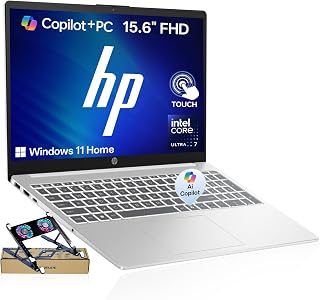
Pros
- Powerful AI acceleration built into processor improves everyday task performance and responsiveness
- Large 15.6-inch touchscreen display with IPS technology provides excellent color accuracy and viewing angles
- Fast DDR5 memory and SSD storage eliminate lag during multitasking and application switching
- Lightweight at 5.4 pounds with slim 0.73-inch profile makes it highly portable for travel
- Backlit keyboard and touchscreen interface enhance usability in various lighting conditions
Cons
- 60Hz display refresh rate is standard, not ideal for gaming or high-refresh-rate content creation
- 512GB storage may require external drives for users working with large media files or extensive libraries
- Shared graphics memory relies on system RAM, limiting performance in demanding 3D applications
The HP 15.6 AI Laptop is a well-balanced mid-range machine designed for productivity-focused users. Whether you're a student attending online classes, a remote worker managing multiple projects, or a developer running lightweight development environments, this laptop delivers consistent performance at a competitive price point. The 2026 edition features Intel's latest AI acceleration technology integrated directly into the processor, bringing smart computing capabilities to everyday tasks.
Performance is where this laptop shines. The 16-core Intel Core Ultra 7 155H processor reaches up to 4.8 GHz and handles multitasking smoothly thanks to 16GB of DDR5 RAM. The 512GB PCIe M.2 SSD ensures fast boot times and quick application launches. Real-world usage shows responsive performance across productivity software, web browsing with multiple tabs, and video conferencing. The integrated Intel Arc Graphics handles casual content creation and everyday streaming without breaking a sweat, though demanding 3D gaming and professional rendering work would push its limits.
Design and usability stand out as key strengths. At 5.4 pounds and just 0.73 inches thick, this laptop is genuinely portable. The 15.6-inch FHD touchscreen with IPS display delivers sharp visuals and accurate colors from wide viewing angles. The backlit keyboard and numeric keypad add practical touches for users who type extensively, while the touchscreen interface provides an intuitive alternative for navigation. Battery life comfortably handles a full workday, and the collection of ports, including Thunderbolt 4 and HDMI, keeps you connected to external displays and peripherals.
A few drawbacks merit mention. The 60Hz display refresh rate is standard but won't satisfy gamers or motion-heavy creative professionals. The 512GB storage, while adequate for most users, may feel tight if you work with large video files or maintain extensive software libraries. Shared graphics memory means the dedicated GPU shares system RAM, which can impact performance in demanding 3D applications, though this rarely affects typical productivity work.
Final verdict: The HP 15.6 AI Laptop is a smart purchase for users seeking a reliable, portable machine that balances performance and affordability. The combination of AI acceleration, solid RAM and storage specs, and touchscreen convenience makes it particularly appealing for students and remote workers. If you don't need gaming performance or plan extensive creative work, this laptop delivers excellent value and day-to-day usability.
Processor: Intel Core Ultra 7 155H (16-core, up to 4.8 GHz)
Memory: 16GB DDR5 SODIMM RAM (2 slots, supports up to 32GB)
Storage: 512GB PCIe M.2 SSD
Display: 15.6-inch FHD (1920x1080) IPS LCD touchscreen, 60Hz refresh rate
Graphics: Intel Arc Graphics (integrated, shared memory)
Connectivity: Thunderbolt 4 with DisplayPort 2.1, USB-A, USB-C, HDMI, Wi-Fi, Bluetooth
Keyboard: Backlit with numeric keypad
Camera: Front-facing webcam
Operating System: Windows 11 Home
Weight: 5.4 pounds
Dimensions: 14.17 inches L x 9.29 inches W x 0.73 inches thick
Warranty: 1-year manufacturer coverage, plus 1-year coverage on upgraded components
Best For: Students, remote workers, developers, content creators on a budget, and anyone needing reliable portable computing with touchscreen convenience.
Consider Alternatives If: You need high-refresh-rate gaming performance, require substantial storage for video production, or want discrete graphics for professional 3D work.
Upgradeability: The laptop features 2 RAM slots allowing future expansion up to 32GB, and the SSD can be replaced or supplemented with additional storage. Our engineers can handle these upgrades with warranty coverage included.
Real-World Performance Expectations: Expect smooth performance for web browsing, office productivity, video conferencing, light photo editing, and coding. Video streaming and casual gaming work well, though demanding applications like 4K video rendering or AAA games at high settings will struggle.
Why This Price Point: The combination of latest-gen AI-accelerated processor, ample DDR5 RAM, touchscreen display, and Windows 11 represents strong value. You're paying for practical upgrades over older budget laptops, not for gaming prowess or professional-grade hardware.
What to Look for in a Photo Editing Laptop
Display Quality and Color Accuracy
The display is the single most important component for photo editing. You want a panel that supports a wide color gamut, ideally covering 100% sRGB at a minimum, with P3 coverage a meaningful step up for professional work. Brightness, contrast ratio, and anti-glare treatment all affect how faithfully you can assess an image in different lighting environments.
Both the Apple 2026 MacBook Air 13-inch Laptop with M5 and the Apple 2026 MacBook Neo 13-inch Laptop with A18 Pro ship with Liquid Retina displays supporting one billion colors, which puts them ahead of most Windows laptops at comparable price points. The HP 17-inch options offer Full HD IPS panels with wide viewing angles, which work well for casual editing and reviewing large batches of images.
Processor and Unified Memory
Raw processing speed determines how fast edits apply, how quickly exports complete, and whether AI-powered tools like Denoise or Sky Replacement feel responsive or sluggish. Apple’s M5 chip in the MacBook Air uses a unified memory architecture that shares fast memory between the CPU and GPU, which gives it a notable edge for image-heavy workloads. The A18 Pro in the MacBook Neo delivers strong everyday performance at a more accessible entry point.
On the Windows side, the HP 15.6 Touchscreen Ultra 7 155H 2026 Edition AI runs a 16-core Intel Core Ultra 7 155H with integrated AI acceleration, reaching speeds up to 4.8 GHz. That chip handles sustained workloads well and is paired with 16GB of DDR5 RAM, making it a capable choice for photographers who work primarily in Windows-based editing suites. If you’re curious how processor choices affect creative builds more broadly, the guides on best RAM for Blender and building around an RTX 5070 offer useful context on memory and GPU pairing decisions.
Storage Speed and Capacity
Photo libraries grow fast. A 512GB NVMe SSD is the practical floor for most photographers, and every laptop on this list meets that baseline. Fast storage matters not just for capacity but for how quickly your editing software loads catalog previews and writes exported files. PCIe NVMe drives, like those in the HP OmniBook 3 and the MacBook Air, make a noticeable difference compared to older SATA-based SSDs.
If your library exceeds what fits onboard, look for USB-C or Thunderbolt ports that support fast external drives. The MacBook Air with M5 includes two Thunderbolt 4 ports, which is particularly useful for connecting fast external storage while keeping your workspace tidy.
Screen Size and Portability
Larger screens reduce eye strain and give you more room to work across panels in your editing software. The HP OmniBook 3 17.3 inch Laptop PC, FHD Display and the HP 17 inch Business Laptop Computer, 2026 Edition both offer 17.3-inch Full HD displays, which are well-suited for extended editing sessions at a desk. If portability is a priority, the 13.6-inch MacBook Air with M5 weighs very little and fits comfortably in a camera bag without sacrificing display quality.
Battery life is another factor worth considering if you edit on location or away from a power outlet. The MacBook Air with M5 delivers up to 18 hours on a charge, and the MacBook Neo claims up to 16 hours, both of which are class-leading figures. The HP laptops offer solid all-day battery life as well, with HP Fast Charge keeping downtime short when you do need to plug in. Photographers who build out full desktop editing rigs might also find value in the home office category for complementary accessories and peripherals.
Final Thoughts
For most photographers, the Apple 2026 MacBook Air 13-inch Laptop with M5 stands out as the strongest all-around pick, combining a color-accurate Liquid Retina display, exceptional battery life, and the performance headroom that the M5 chip provides for demanding editing sessions. If you need a larger canvas and prefer Windows, the HP 15.6 Touchscreen Ultra 7 155H 2026 Edition AI delivers a capable AI-accelerated processor with a responsive touchscreen and fast DDR5 memory, making it a compelling option for photographers already invested in the Windows ecosystem.
Frequently Asked Questions
What specs matter most in a laptop for photo editing?
Display color accuracy, processor speed, and RAM are the three pillars. A panel that covers a wide color gamut ensures your edits translate correctly when printed or shared. A fast CPU, whether Apple Silicon or Intel Core Ultra, keeps your editing software responsive during heavy workloads. At least 16GB of RAM prevents bottlenecks when working with large RAW files or running multiple applications simultaneously.
Is a MacBook or a Windows laptop better for photo editing in 2026?
Both platforms are fully capable of professional photo editing in 2026. Apple Silicon Macs have earned strong praise for their efficiency and display quality, and macOS integrates tightly with popular creative applications. Windows laptops offer more hardware variety and often more connectivity options, which suits photographers who rely on a broader set of peripherals and external drives. The right choice comes down to your preferred software, existing ecosystem, and whether portability or screen size matters more to your workflow. You can browse more electronics options to compare the broader landscape of creative computing devices.
How much RAM do I need for photo editing?
For most photographers, 16GB is the practical sweet spot in 2026. It handles large RAW files, multi-layer edits, and background exports without significant slowdown. If you work extensively with high-resolution medium format files, composite editing, or run AI-powered tools alongside your main editing suite, more RAM will make a noticeable difference. The MacBook Air with M5 ships with 16GB of unified memory, which performs efficiently relative to traditional DDR5 configurations of the same capacity.
Do I need a dedicated GPU for photo editing?
For photo editing specifically, a dedicated GPU is not a strict requirement the way it is for video editing or 3D rendering. Integrated graphics in modern chips, including Apple’s M5 GPU and the AMD Radeon 610M in the HP OmniBook 3, handle the GPU-accelerated features in Lightroom and Photoshop without issue. If you plan to expand into video work or 3D compositing, a more powerful discrete GPU becomes worth considering. Photographers curious about GPU-intensive desktop builds can explore guides like the best PC build for RTX 5070 ti to understand where dedicated graphics genuinely move the needle.
Common questions
What are the best laptops for Photoshop?
The Apple MacBook Air 13-inch with M5 chip is excellent for Photoshop, with 16GB unified memory and a 13.6-inch Liquid Retina display that handles layers and editing smoothly. For Windows users, look for laptops with at least 16GB RAM and a recent AMD Ryzen or Intel processor. The M5's unified memory architecture accelerates Photoshop's AI features and brush rendering, while the Liquid Retina display provides accurate color for precise editing work.
What are the best laptops for Lightroom?
The MacBook Air with M5 chip and 16GB memory excels at Lightroom catalog management and batch processing, with its unified memory architecture speeding up export and preview generation. For budget-conscious buyers, the HP 17 inch Business Laptop with AMD Ryzen 5 and 16GB RAM offers solid performance for Lightroom workflows at a lower price point. The larger 17.3-inch FHD display on the HP also provides more workspace for editing panels and image previews.
What are the best gaming laptops for photo editing?
Gaming laptops with discrete GPUs like the RTX 5060 or higher accelerate photo editing tasks through GPU-accelerated filters and AI features in Photoshop and Lightroom. Look for models with at least 16GB RAM and a high-refresh display, though color accuracy may require calibration since gaming panels prioritize speed over sRGB coverage. The dedicated graphics card speeds up tasks like content-aware fill, neural filters, and video editing if you expand beyond photos.








Write Your Review
No reviews yet. Be the first to share your experience!