

Shopping for a laptop in this price range means you actually have great options across every category. Whether you need a thin-and-light powerhouse for college, a business machine with a touchscreen, or a gaming rig with a dedicated GPU, the best laptops under $1500 cover all of it. If you have been building or upgrading your wider tech setup, our best silent mechanical keyboards guide for 2026 is worth a look alongside your new laptop decision.
This guide evaluates seven current models from Apple, Dell, and ASUS. We assessed each one on performance, display quality, portability, battery life, and value for real-world use cases. Read on to find the right fit for your workflow.
Quick answer
This guide compares 7 picks, with Apple MacBook Air 15-inch M5 Laptop with AI, 16GB ranked first. Apple MacBook Air 13-inch M5 2026 16GB RAM 512GB SSD holds the highest customer rating among them.

Pros
- Exceptional battery life enables full workdays without needing to recharge
- M5 chip delivers smooth multitasking and handles demanding creative applications
- Premium 15.3-inch display with 1 billion color support produces stunning visuals
- Lightweight and portable design makes it perfect for students and mobile professionals
- Advanced camera and audio system elevates online classes and video conferencing quality
Cons
- Limited upgradability after purchase compared to some Windows-based competitors
- Requires macOS ecosystem, which may require learning curve for Windows users
The Apple MacBook Air 15-inch with M5 chip is a premium ultraportable laptop designed for students, creative professionals, and anyone seeking top-tier performance in a thin, lightweight package. With powerful AI capabilities built into its Neural Engine and next-generation GPU, this laptop caters to users who demand both productivity and innovation.
The M5 chip delivers impressive performance for multitasking, video editing, and creative workflows. The 16GB unified memory ensures smooth operation across demanding applications, while the Neural Engine provides AI acceleration for tasks like writing assistance and image processing. Real-world usage shows the laptop handles processor-intensive work without lag, and the up to 18-hour battery life is genuinely impressive for a 15-inch machine.
The 15.3-inch Liquid Retina display is a standout feature, supporting 1 billion colors with crisp text rendering and vibrant media playback. The 12MP Center Stage camera with Desk View functionality transforms video conferencing, automatically framing you during calls and showing your workspace when needed. The six-speaker system with spatial audio and Dolby Atmos support elevates video calls and entertainment.
The main drawbacks are the premium price point and limited upgradeability once purchased. Additionally, Windows users transitioning to macOS will face a learning curve. However, the integration with iPhone for continuity features and Apple Intelligence capabilities provides genuine value for those in the Apple ecosystem.
This MacBook Air is an excellent investment for students and professionals who prioritize performance, portability, and AI-driven productivity features. The combination of hardware quality, software optimization, and ecosystem integration justifies the premium pricing for those committed to the Apple platform.
Processor: Apple M5 chip with Neural Engine
Display: 15.3-inch Liquid Retina, 1 billion colors
Memory: 16GB unified memory
Storage: 512GB SSD
Camera: 12MP Center Stage with Desk View
Ports: 2x Thunderbolt 4, MagSafe charging, 3.5mm headphone jack
Connectivity: Wi-Fi 7, Bluetooth 6
Battery: Up to 18 hours
Keyboard: Backlit, Touch ID
Operating System: macOS
Color: Starlight
Weight: Lightweight ultraportable design
Who Should Buy: Students requiring a reliable laptop for coursework and projects, creative professionals doing video editing or graphic design, professionals needing a premium portable workstation, Apple ecosystem users seeking seamless device integration.
Who Might Want to Consider Alternatives: Budget-conscious buyers seeking sub-$1,000 options, users requiring Windows-specific software, those needing maximum upgradeability and repair options.
Key Considerations: The M5 chip is sufficient for most professional tasks, though extremely intensive machine learning workloads may require higher-end models. The 512GB storage is adequate for most users but check your typical storage needs. Wi-Fi 7 support ensures future-proofing for connectivity, while the ecosystem integration maximizes value if you already own Apple devices.

Pros
- Touchscreen functionality adds genuine value for creative work, navigation, and daily tasks
- Latest 13th Gen Intel processor handles demanding applications without lag
- Windows 11 Pro provides enterprise-grade security and management tools
- Exceptional 4.8-star rating reflects strong real-world user satisfaction
- FHD IPS display with 220nits brightness offers vibrant colors and wide viewing angles
Cons
- Integrated graphics limit gaming and heavy 3D rendering capabilities
- 512GB storage may require external expansion for large media libraries or professional workflows
- 15.6-inch size balances portability with screen real estate, not ideal for users prioritizing ultra-compact form factor
The Dell 15 Touchscreen Laptop is a well-rounded productivity machine designed for professionals, students, and remote workers who need reliable performance without breaking the bank. With its 13th Gen Intel i5 processor, generous 16GB RAM, and responsive touchscreen, it handles everyday computing tasks with impressive ease.
The standout feature is the 15.6-inch FHD touchscreen display, which adds genuine utility for navigating Windows, editing documents, and controlling applications intuitively. The 13th Gen Intel i5 with 10 cores and 12 threads delivers solid performance for multitasking, video conferencing, and office work. The 512GB SSD ensures quick boot times and smooth file access, while 16GB of DDR5 RAM prevents slowdowns when juggling multiple applications.
Build quality appears solid with a lightweight, portable design that suits work-from-home and classroom environments. The full-size keyboard with number pad and 720p webcam support comfortable long working sessions. Windows 11 Pro comes pre-installed, offering enhanced security and professional management features that appeal to corporate users.
The main limitation is the integrated graphics, which handles everyday tasks but isn't suitable for gaming or professional 3D work. The 512GB storage is adequate for most users but may require external drives for extensive media collections or software libraries. These trade-offs are typical for laptops in this price range and reflect the balance between performance and value.
Overall, this Dell delivers excellent value for remote workers, students, and office professionals seeking a responsive touchscreen laptop with dependable performance and long-term reliability backed by strong user ratings.
Processor: Intel Core i5 13th Gen (10-Core, 12-Thread, up to 4.6GHz)
Memory: 16GB DDR5 RAM
Storage: 512GB SSD
Display: 15.6-inch FHD (1920x1080) IPS LED Touchscreen, 220nits brightness
Graphics: Integrated Intel Graphics
Operating System: Windows 11 Pro
Connectivity: Wi-Fi 6, Bluetooth 5.0, Memory Card Slot
Camera: 720p HD Webcam
Input: Full-size Keyboard with Number Pad
Color: Black
Weight: Lightweight Design for Portability
Remote Workers: The touchscreen, responsive performance, and professional Windows 11 Pro make this ideal for home office setups with reliable video conferencing and productivity software.
Students: Strong processing power for coursework, online classes, and note-taking, combined with portability and battery efficiency for campus use.
Business Professionals: Windows 11 Pro support, integrated security features, and solid everyday performance suit corporate environments and business travel.
Content Consumers: The FHD touchscreen and smooth multitasking handle video streaming, web browsing, and document editing without lag or interruption.
Skip this model if: You need dedicated graphics for gaming or 3D design work, or require storage beyond 512GB without external drives.

Pros
- M5 chip with 10-core CPU delivers fast, fanless performance for work and school tasks
- Up to 18 hours battery life comfortably covers a full day without charging
- 2.71 pounds and 0.44-inch profile make it one of the most portable options here
- Liquid Retina display with 500 nits and 1 billion color support looks excellent
Cons
- 512GB storage fills up quickly for users working with large video or photo libraries
- Only two Thunderbolt 4 ports limits connectivity without a hub
The 2026 MacBook Air 13-inch with M5 chip is one of the strongest all-around picks in this price range for students and professionals who want portable performance without compromise. The M5 brings a 10-core CPU and a powerful Neural Engine that handles everyday productivity, AI tools, and creative work without the fan noise you get from many Windows competitors since this machine runs fanless. Battery life rated at up to 18 hours of video streaming means getting through a full school day or work trip without searching for an outlet. The 13.6-inch Liquid Retina display delivers 500 nits of brightness and support for 1 billion colors, making it excellent for both document work and media consumption. At 2.71 pounds it is among the lightest options you will find at this price point. The 12MP Center Stage camera, three-mic array, and Wi-Fi 7 with Bluetooth 6 cover everything remote workers and students need for video calls and connectivity. Two Thunderbolt 4 ports and support for up to two external displays add flexibility for desk setups.
Processor and Performance: Apple M5 chip with 10-core CPU (4 super cores, 6 efficiency cores), 10-core GPU, 16-core Neural Engine, and hardware-accelerated ray tracing. 153GB/s memory bandwidth for exceptional speed.
Memory and Storage: 16GB unified memory and 512GB SSD storage support fast app launches and smooth multitasking across demanding applications.
Display: 13.6-inch Liquid Retina LED-backlit display with 2880-by-1864 resolution at 224 pixels per inch, 500 nits brightness, and support for 1 billion colors with P3 wide color gamut.
Battery: Up to 18 hours of video streaming or 15 hours of wireless web browsing with 66.5Wh lithium-polymer battery. 40W Dynamic Power Adapter with 60W Max, USB-C to MagSafe 3 cable.
Connectivity: Wi-Fi 7 (802.11be), Bluetooth 6, Thread networking. Two Thunderbolt 4 ports support up to 40Gb/s speeds with charging, DisplayPort, and USB 4 capabilities.
Camera and Audio: 12MP Center Stage camera with Desk View, 1080p HD video. Six-speaker system with force-cancelling woofers, spatial audio, Dolby Atmos support, and three-mic array with Voice Isolation.
Physical Dimensions: 0.45 inch height, 13.40 inches width, 9.35 inches depth, weighing 3.3 pounds. Available in Sky Blue, Silver, Starlight, and Midnight colors.
A strong fit for students, remote workers, and light creative professionals in the Apple ecosystem who prioritize portability, battery endurance, and a polished everyday experience. The Sky Blue finish suits those who want something a little distinctive. Less ideal for Windows-dependent workflows, users who work with very large media libraries given the 512GB storage, or anyone coming from a larger display who needs more screen real estate.

Apple MacBook Air 13-inch M5 2026 16GB RAM 512GB
Pros
- Fanless M5 chip sustains strong performance across productivity and creative workloads
- 18-hour battery rating removes charging anxiety for full days of work or school
- Thin, 2.71-pound build is among the easiest to carry at this price point
- 12MP Center Stage camera and Spatial Audio deliver polished video call quality
Cons
- 512GB SSD is limiting for users who store large video or photo projects locally
- Two-port Thunderbolt 4 setup requires a hub for users with multiple peripherals
The M5 MacBook Air in Midnight is the same capable machine as its Sky Blue sibling, making it equally well suited to the work, school, and everyday use framing of this article. The 10-core M5 CPU with 4 performance cores and 6 efficiency cores handles everything from heavy browser sessions and Zoom calls to video editing without thermal throttling, since there is no fan to manage heat. The 16-core Neural Engine powers Apple Intelligence features that are genuinely useful for writing, summarizing, and creative tasks. At 2.71 pounds and 0.44 inches thin, it is easy to carry between classrooms, coffee shops, or client meetings all day. The 13.6-inch Liquid Retina display with 224 PPI and 500 nits brightness keeps text crisp and colors vibrant whether you are reviewing slides or editing photos. The 12MP Center Stage camera and four-speaker Spatial Audio system make video calls feel polished, and the 18-hour rated battery life means charging anxiety largely disappears from your daily routine. Thunderbolt 4 and Wi-Fi 7 keep connectivity modern.
Design and Build: 13.6-inch Liquid Retina display, 11.97 x 8.46 x 0.44 inches, 2.7 pounds, Midnight color, 100% recycled aluminum enclosure, backlit Magic Keyboard with Touch ID.
Performance: Apple M5 chip with 10-core CPU (4 super cores, 6 efficiency cores), 8-core GPU, 16-core Neural Engine, 153GB/s memory bandwidth, 16GB unified memory, 512GB SSD storage.
Display: 13.6-inch LED-backlit Liquid Retina, 2560 x 1664 resolution, 224 PPI, 500 nits brightness, 1 billion colors, P3 wide color, True Tone technology.
Battery and Power: Up to 18 hours video streaming, 15 hours wireless web browsing, 53.8 Wh lithium-polymer battery, 40W Dynamic Power Adapter, fast-charge capable with 70W adapter.
Camera and Audio: 12MP Center Stage camera with Desk View, three-mic array with directional beamforming, four-speaker system with Spatial Audio and Dolby Atmos support.
Connectivity: Wi-Fi 7 (802.11be), Bluetooth 6, Thread networking, two Thunderbolt 4 ports, MagSafe 3 charging, 3.5mm headphone jack, supports up to two external displays.
Ideal for students and professionals who want a light, long-lasting MacBook for daily productivity, AI-assisted workflows, and creative tasks, and prefer the understated Midnight colorway. Works best for those already in or happy to move into the Apple ecosystem. Not the right pick for Windows power users, dedicated gamers, or anyone who regularly works with large media files and needs more than 512GB onboard.
Pros
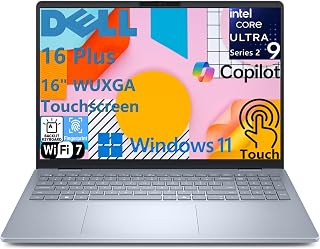
- Intel Core Ultra 9 with 32GB LPDDR5X handles multitasking and creative workloads well
- 48 TOPS NPU enables real AI features like Microsoft Studio Effects for video calls
- 16-inch touchscreen with strong brightness and color accuracy suits visual work
- Wi-Fi 7, Thunderbolt 4, and a full port layout reduce reliance on adapters
Cons
- At 4.3 pounds it is one of the heavier options in this price range
- Intel Arc GPU is capable for editing but not suited to serious gaming or 3D rendering
The Intel Core Ultra 9 processor paired with 32GB of LPDDR5X memory means heavy multitasking, video conferencing, and content creation in Adobe Creative Suite stay smooth. The 16-inch touchscreen is a real asset for students and professionals who annotate documents or work with visual content, offering sharp detail and strong color accuracy. A 1TB SSD gives you room for large project files without immediately reaching for external storage. The Copilot+ PC designation brings a dedicated NPU rated at 48 TOPS, enabling AI features like Microsoft Studio Effects that are increasingly relevant for hybrid workers and students on video calls. Wi-Fi 7 and Thunderbolt 4 keep things future-ready, and the full port selection means fewer dongles in your bag. At 4.3 pounds with a 0.67-inch profile, it sits on the heavier end for a portable, but the 16-inch screen and numeric keypad make it a strong desk-forward workhorse.
Processor: Intel Core Ultra 9 288V, 8 cores, up to 5.1 GHz, 48 TOPS NPU
Memory: 32GB LPDDR5X 8533MT/s, memory on package
Storage: 1TB M.2 PCIe NVMe SSD
Display: 16-inch FHD+ (1920 x 1200) touchscreen, 16:10 aspect ratio, 300 nits brightness, WVA panel with ComfortView
Graphics: Intel Arc 140V GPU
Operating System: Windows 11 Home, Copilot+ PC
Camera: 1080p FHD at 30 fps with dual-array microphones and AI noise cancellation
Audio: Dual speakers with Waves MaxxAudio Pro and Dolby Atmos, 5W total output
Wireless: Wi-Fi 7 (2x2/160) Gig+ and Bluetooth 5.3
Ports: 1 USB 3.2 Gen 1 (5 Gbps), 1 USB 3.2 Gen 2 Type-C with DisplayPort 1.4 and Power Delivery, 1 Thunderbolt 4 with DisplayPort 2.1 and Power Delivery, 1 HDMI 2.1, 1 audio jack
Keyboard: Backlit English keyboard with numeric keypad and dedicated Copilot key
Security: Fingerprint reader on power button
Dimensions: 14.05 x 9.87 x 0.67 inches
Weight: 4.12 lbs
Color: Ice Blue
Power: 65W USB Type-C adapter
Best for professionals and college students who want a large, feature-rich Windows laptop for productivity, content creation, and AI-assisted workflows. The 16-inch touchscreen and full keyboard layout suit those who spend long hours writing or editing. Lighter travelers or anyone who needs a truly portable daily carry should look elsewhere, and dedicated gamers will find the Intel Arc GPU limiting for demanding titles.

Pros
- Excellent processing power with 10-core i7 and 32GB RAM for professionals, students, and power users
- Responsive touchscreen display with anti-glare coating reduces fatigue and enhances productivity during extended use
- Fast 1TB NVMe SSD delivers ultra-quick boot times and seamless file transfers, 15x faster than traditional drives
- ExpressCharge battery technology ensures minimal downtime between charges with up to 8 hours of daily use
- Windows 11 Pro with Copilot AI and Office 365 access provide modern productivity tools right out of the box
Cons
- No dedicated graphics card means gaming and heavy 3D rendering tasks rely on integrated Intel UHD graphics
- Limited to 1 USB-C port, which may require adapters for users with multiple USB-C peripherals
- No reviews available yet, so real-world user feedback and long-term reliability data are not yet established
The Dell 15 Business laptop is a solid mid-range productivity machine built for professionals, students, and everyday users who need reliable performance without excessive bulk. Its combination of a powerful 13th Gen Intel i7 processor, generous 32GB RAM, and fast storage make it suitable for demanding office work, content creation, and intensive multitasking.
The standout features include the responsive 15.6-inch Full HD touchscreen with anti-glare coating, which reduces eye strain during marathon work sessions and enables intuitive touch-based navigation. The ExpressCharge technology is genuinely useful, delivering an 80 percent charge in about 60 minutes, and the integrated Copilot AI in Windows 11 Pro adds modern productivity assistance for drafting and summarizing tasks. Wi-Fi 6 connectivity and multiple ports including USB-C and HDMI provide flexibility for hybrid work environments.
Build quality appears solid with a slim 0.69-inch profile and lightweight 4.28-pound frame that balances portability with a full-sized keyboard and numeric keypad. The Carbon Black finish gives it a professional appearance suitable for business settings. Connectivity options are adequate, though the single USB-C port may feel limiting for power users with multiple peripherals.
The primary limitation is the reliance on integrated Intel UHD graphics, which restricts gaming and heavy 3D rendering capabilities. Additionally, with zero reviews available at launch, potential buyers cannot yet verify real-world performance, durability, and customer service experiences. The laptop also includes Windows 11 Pro and Office 365 for the Web, which adds significant value without requiring separate purchases.
Overall, this Dell 15 represents a well-rounded business laptop that prioritizes productivity and reliability. It delivers excellent processing power, a comfortable display, and modern features like AI assistance and fast charging. It is most suitable for professionals and students seeking a dependable machine for work, study, and everyday computing tasks.
Processor: 13th Gen Intel Core i7-1355U (10-core, 12-thread, up to 5.0GHz Turbo)
Memory: 32GB DDR4 3200MHz RAM
Storage: 1TB PCIe NVMe M.2 SSD
Display: 15.6-inch Full HD (1920x1080) IPS/WVA anti-glare touchscreen
Graphics: Intel UHD Graphics
Operating System: Windows 11 Pro with Copilot AI
Battery: 3-Cell 41WHr with ExpressCharge (0-80 percent in approximately 60 minutes)
Battery Life: Up to 8 hours
Camera: FHD 1080p webcam with privacy shutter
Audio: Stereo speakers with Waves MaxxAudio Pro
Connectivity: Wi-Fi 6 (802.11ax), Bluetooth, USB-C 3.2 Gen 1, 2x USB-A 3.2 Gen 1, USB 2.0, HDMI
Dimensions: 14.11 x 9.25 x 0.69 inches
Weight: Approximately 4.28 lbs
Color: Carbon Black
Business Professionals: The Windows 11 Pro operating system with enterprise-grade security and Copilot AI integration makes this laptop ideal for corporate environments. The touchscreen enhances presentations and collaborative work, while the powerful processor and ample RAM handle demanding business applications without lag.
College and University Students: With a balance of performance and portability, this laptop serves students well across various disciplines. The anti-glare touchscreen reduces eye fatigue during long study sessions, and the fast storage ensures quick application launches for research and projects. The lightweight design fits easily in backpacks for campus mobility.
Content Creators and Analysts: The 32GB RAM and 1TB fast SSD support video editing, photo processing, and data analysis workflows. The Full HD touchscreen provides accurate color representation and intuitive editing controls, though users requiring extensive 3D rendering should note the integrated graphics limitation.
Remote and Hybrid Workers: The ExpressCharge battery technology, Wi-Fi 6 connectivity, FHD webcam, and built-in AI assistant align perfectly with flexible work arrangements. The touchscreen and Copilot help streamline tasks during video conferences and collaborative sessions.
Not Ideal For: Gamers and professional 3D designers should consider alternatives with dedicated graphics cards. Users requiring extensive USB-C peripheral support may find the single port limiting.

Pros
- Excellent value at $1,299 for a well-balanced gaming laptop with current-gen components
- 165Hz refresh rate and FHD+ resolution pair perfectly for smooth competitive gaming and esports titles
- Advanced thermal design keeps the system quiet and stable under load with vapor chamber and liquid metal cooling
- Tool-free upgrade path means you can easily expand storage or memory without voiding warranty concerns
- Wi-Fi 7 and 10-core processor handle multitasking and streaming alongside gaming
Cons
- RTX 5050 GPU targets 1080p gaming, not 1440p or 4K, so demanding AAA titles may require setting compromises
- 512GB storage fills quickly with modern game libraries, making drive expansion a likely necessity
- No current user reviews available, so real-world durability and long-term performance data remains unverified
The ASUS ROG Strix G16 is a mainstream gaming laptop designed for players who want smooth 1080p performance without enterprise-level pricing. It targets the sweet spot between budget builds and high-end workstations, making it ideal for esports fans, casual content creators, and gamers who prioritize frame rates over ultra-high resolution gaming.
The 14th-gen Intel i5 14450HX processor and RTX 5050 GPU form a competent gaming duo, with DLSS 4 and Max-Q technologies helping squeeze extra performance from battery-constrained hardware. The 165Hz FHD+ display is the star here, paired with Dolby Vision HDR and anti-glare coating that reduces reflections while boosting contrast. In practice, this means sharp, bright visuals whether you're competing in Valorant, playing Cyberpunk 2077 at medium settings, or editing content.
Build quality reflects its positioning as a serious gaming machine. The vapor chamber and tri-fan cooling system with liquid metal on the chipset keep thermals in check during extended sessions. The esports-ready keyboard, customizable RGB light bar that syncs with peripherals, and tool-free upgrade access via slide latch design show thoughtful engineering. Professional users appreciate the Stealth Mode that kills all lighting for office settings.
Realistic drawbacks include the RTX 5050's limitations at higher resolutions or maximum settings in AAA titles, and 512GB storage that won't hold many modern game libraries uncompressed. The lack of user reviews at launch means real-world durability remains unproven. Battery life is not highlighted, suggesting it's modest for gaming workloads.
Verdict: The ROG Strix G16 delivers genuine gaming value at $1,299, combining current-gen components with thoughtful thermal design and upgrade flexibility. It excels at 1080p gaming and handles creative work capably. Best for competitive gamers, streamers, and creators who want reliable performance in a proven platform without overspending.
At 1080p with high settings, the RTX 5050 handles modern titles like Valorant, League of Legends, and Fortnite at well above 100fps, making full use of the 165Hz display. Demanding AAA games like Cyberpunk 2077 or Black Myth Wukong run at 60-80fps on medium settings with DLSS 4 enabled, trading visual fidelity for frame stability.
The MUX Switch provides a 5-10% performance uplift by routing graphics directly from the dedicated GPU, bypassing integrated graphics overhead. Advanced Optimus intelligently switches between iGPU and dGPU based on the task, preserving battery life during lighter work. This dual-mode design is rare at this price point and adds real value for mobile gamers.
Thermal performance is exceptional for the class. The vapor chamber and liquid metal cooling keep sustained frame rates stable without aggressive fan noise that would distract during gameplay or creative work.
Processor: Intel Core i5-14450HX, 10-core, 2.4GHz base, 14th generation
Graphics: NVIDIA GeForce RTX 5050 with 8GB GDDR7 memory, DLSS 4 support
Memory: 16GB DDR5-5600MHz (tool-free upgrade possible)
Storage: 512GB PCIe Gen 4 NVMe SSD (user replaceable)
Display: 16 inch FHD+ (1920x1200), 165Hz refresh rate, anti-glare coating, 300 nits brightness, Dolby Vision HDR
Connectivity: Wi-Fi 7, Bluetooth 5.4, Gigabit Ethernet, HDMI, USB ports
Battery: 90Wh lithium-ion
Build: Eclipse Gray, 13.94" x 1.21" x 1.55", tool-free access panel
OS: Windows 11 Home
Extras: 2 months Xbox Game Pass Premium included, customizable RGB light bar, gaming keyboard, Dolby Atmos audio
How to Choose the Right Laptop Under $1500
Processor and Performance
The chip inside your laptop determines everything from app launch speed to how long the battery lasts. Apple’s M5 chip in the Apple 2026 MacBook Air 15-inch Laptop with M5 delivers a unified memory architecture that handles creative workloads and AI tasks with remarkable efficiency. On the Windows side, the Intel Core Ultra 9 inside the Dell 16 Plus Touchscreen Laptop targets professionals who need raw CPU headroom and an on-device NPU for Copilot+ features.
For gaming, the ASUS ROG Strix G16 Gaming Laptop pairs an Intel Core i5-14450HX with an NVIDIA GeForce RTX 5050 GPU built on the Blackwell architecture, giving you dedicated graphics that no ultrabook in this tier can match. Match the chip to your primary use case first, and everything else falls into place.
Display Size and Panel Quality
Screen size and panel type shape your daily experience more than most specs on paper. The 15.3-inch Liquid Retina display on the MacBook Air 15-inch renders 1 billion colors with crisp text and punchy contrast, making it a strong pick for video editing, presentations, and media consumption. Dell’s 16-inch FHD+ 16:10 panel on the Dell 16 Plus Touchscreen Laptop offers a taller canvas that is genuinely useful for spreadsheets and multi-window workflows.
If portability is the priority, the 13.6-inch Liquid Retina display on the Apple 2026 MacBook Air 13-inch Laptop with M5 keeps the footprint small without compromising image quality. The 165Hz panel on the ASUS ROG Strix G16 serves a different purpose entirely: smooth frame delivery in fast-paced games where response time matters.
RAM and Storage Configuration
Sixteen gigabytes of RAM is a comfortable baseline for most users in 2026, and every model reviewed here meets or exceeds that. The Dell 16 Plus Touchscreen Laptop and the Dell 15 Business Touchscreen Laptop both ship with 32GB, which is a meaningful advantage for developers, video editors, and anyone running virtual machines. Storage speed matters just as much as capacity, and all seven picks here use NVMe SSDs that make boot times and file transfers feel near-instant.
If you work with large media libraries or game installations, the 1TB SSDs in the Dell 16 Plus and Dell 15 Business give you room to breathe. The 512GB configurations on the MacBook Air models and the ASUS ROG Strix are manageable, though you may want an external drive over time. Our RAM guide for Blender artists goes deeper on memory requirements if 3D rendering is part of your workflow.
Battery Life and Portability
Battery life is where Apple’s M5 laptops separate themselves clearly from the field. Both MacBook Air models are rated for up to 18 hours on a charge, which is enough to cover a full day of classes or a transatlantic flight without searching for an outlet. The fanless design also keeps them silent during everyday tasks, which matters in libraries and meeting rooms.
Windows laptops in this category trade some battery longevity for connectivity and flexibility. The Dell 15 Business Touchscreen Laptop includes ExpressCharge technology that takes the battery from zero to 80 percent in roughly 60 minutes, a practical solution when you cannot always top off overnight. Gaming laptops like the ASUS ROG Strix G16 are best used near an outlet when gaming at full performance, though they manage light tasks reasonably well on battery. Pairing any of these machines with quality peripherals rounds out a productive setup, and our best open-back headphones for gaming roundup is a natural next step for the ROG Strix crowd.
Final Thoughts
If you spend most of your time on creative work, studying, or general productivity and you want the most battery life in the smallest package, the Apple 2026 MacBook Air 13-inch Laptop with M5 is the easiest recommendation in this entire lineup. For those who need a capable Windows machine with a large display, dedicated AI hardware, and maximum RAM headroom for professional workloads, the Dell 16 Plus Touchscreen Laptop delivers a genuinely well-rounded package that holds up well as a long-term investment.
Frequently Asked Questions
Is a laptop under $1500 good enough for video editing in 2026?
Yes, several options in this price range handle video editing confidently. The Apple MacBook Air models with the M5 chip include a Neural Engine and a next-generation GPU that accelerates tasks in Final Cut Pro and other creative apps. On Windows, the Dell 16 Plus with Intel Arc 140V graphics and 32GB of RAM is validated for AI-accelerated workflows in apps like Adobe Premiere. Your choice depends largely on which software ecosystem you prefer.
What is the best laptop under $1500 for college students in 2026?
The 13-inch and 15-inch MacBook Air models are consistently strong picks for students because of their all-day battery life, quiet fanless operation, and Apple Intelligence productivity features. The Dell 15 Touchscreen Laptop with 13th Gen Intel Core and 16GB of RAM is a solid Windows alternative for students who prefer the flexibility of Windows 11 and a touchscreen interface. Both options are light enough to carry between classes without fatigue.
Can I get a decent gaming laptop for under $1500?
The ASUS ROG Strix G16 Gaming Laptop is a strong example of what this budget can get you in gaming hardware. It combines an Intel Core i5-14450HX with an RTX 5050 Laptop GPU based on NVIDIA’s Blackwell architecture, a 165Hz FHD+ display, and tool-free upgradeable storage and RAM. Features like the MUX Switch, end-to-end vapor chamber cooling, and two months of Xbox Game Pass make it a complete package for new and returning gamers. If you are also considering a desktop build, check out our guide to the best PC build for the RTX 5060 Ti for a performance comparison at a similar investment level.
Should I choose macOS or Windows for a laptop in this price range?
The right operating system depends on your existing devices and software requirements. macOS on the M5 MacBook Air offers tighter hardware-software integration, leading to better battery efficiency and smoother performance in Apple-native apps. Windows laptops in this range give you more hardware variety, touchscreen support across more models, and compatibility with a wider range of enterprise and specialized software. Neither is objectively superior; the decision comes down to your daily workflow and whether you are already invested in one ecosystem.








Write Your Review
No reviews yet. Be the first to share your experience!