

You’re planning a new build and need a case that balances performance, aesthetics, and value. The reality is that premium features like pre-installed ARGB fans, tempered glass panels, and support for 360mm radiators no longer require a premium budget. This guide reviews five standout cases that deliver exceptional cooling, modern connectivity, and eye-catching designs while staying well within financial reach.
We’ve evaluated each option based on airflow capacity, build quality, hardware compatibility, and included features. Whether you’re assembling your first gaming rig or upgrading to a new platform, these cases prove that thoughtful design beats expensive materials every time.
Quick Comparison
| Model | Link | Rating | Case Type | Motherboard Compatability | Cooling Method |
|---|---|---|---|---|---|
| 1 Lian Li V100 ATX Mid-Tower PC Case with 4 ARGB Fans and...Highest rated | Check price | 4.8 of 5597 ratings | Mid Tower | ATX | Air |
| 2 CORSAIR 4000D RS ARGB Modular Mid-Tower Case, Exceptional...Most reviewed | Check price | 4.7 of 51,925 ratings | Mid Tower | ATX | Air |
| 3 CORSAIR 3500X RS ARGB Mid-Tower PC Case with... | Check price | 4.6 of 5591 ratings | Mid Tower | Mini ITX, Extended ATX | Air |
| 4 MUSETEX K2 ATX Mid Tower PC Case, 7 Pre-Installed ARGB... | Check price | 4.6 of 51,203 ratings | Mid Tower | ATX, Micro-ATX, Mini-ITX | Air, Water |
| 5 HYXN H3 ATX Mid-Tower PC Case with 6 ARGB Fans and 360mm... | Check price | 4.1 of 5116 ratings | Mid Tower | ATX, Micro ATX, Mini ITX | Air, Water |
Ratings reflect the most recent data pull. Check each listing for current price and availability.
Quick answer
This guide compares 5 picks, with Lian Li V100 ATX Mid-Tower PC Case with 4 ARGB Fans ranked first. CORSAIR 4000D RS ARGB Modular Mid-Tower Case has the most customer reviews.

The V100-ATX delivers solid fundamentals for budget-conscious builders with its ATX motherboard support and four internal bays, giving you room to grow storage as your needs expand. The included dust filters and bottom-mounted PSU design keep components clean and accessible during upgrades. Built-in RGB lighting adds visual flair without requiring extra purchases, making this a complete package for first-time builders stretching their budget.
Pros
- Four ARGB fans and LED strip included
- Supports 420mm GPUs and 360mm radiators
- Tempered glass and stainless steel feel premium
- Tool-less panels and spacious cable routing
Cons
- Minimal sound dampening with open glass design
- Requires regular cleaning to keep glass clear
This mid-tower arrives with four pre-installed ARGB fans and an integrated LED strip, so you skip the extra expense of buying cooling separately. The panoramic tempered glass showcases your components beautifully, while support for up to nine 120mm fans and 360mm radiators ensures thermals stay in check. GPU clearance extends to 420mm and CPU cooler height to 178mm, covering virtually any modern hardware. The stainless steel and tempered glass construction feels far more expensive than the price suggests. Tool-less side panels make upgrades quick, and the angled PSU shroud keeps cable clutter hidden. Cable routing options behind the motherboard tray deliver clean results without fuss. Hydraulic bearing fans run quietly while moving enough air for gaming or productivity work. This case works equally well for first builds and experienced setups, with an intuitive layout that removes guesswork. The main tradeoff is minimal sound dampening due to the open glass design, and keeping dust off those panels requires regular cleaning.
Form Factor: Mid-Tower ATX
Motherboard Support: ATX, Micro-ATX, Mini-ITX
GPU Clearance: Up to 420mm
CPU Cooler Height: Up to 178mm
Radiator Support: Top radiator up to 360mm
Fan Configuration: Supports up to nine 120mm fans
Pre-Installed Fans: 4x 120mm PWM ARGB fans
Fan Speed: 1800 RPM max
Airflow: 61.47-60.4 CFM
Air Pressure: 2.54-2.17 mm-H2O
Noise Level: 26.5-30.8 dBA
Bearing Type: Hydraulic
Lighting: Integrated 26-LED ARGB strip with full spectrum color control and daisy-chain connectivity
Materials: Tempered Glass, Stainless Steel, Plastic
Internal Bays: 4
Dust Filters: Yes
Weight: 8200g
Warranty: 1 Year

This case stands out with three pre-installed RS fans and InfiniRail mounting compatibility, addressing airflow and modern cable management standards right out of the box. Seven expansion slots provide flexibility for multi-GPU setups or capture cards that many mid-range builds require. The rear-mounted PSU and support for ASUS BTF, MSI Zero, and Gigabyte Stealth systems make this future-proof for cleaner cable routing.
Pros
- InfiniRail supports dual 360mm radiators
- FRAME Modular System for tray and I/O customization
- Exceptional cable management with removable side panel
- Alloy steel and aluminum construction feels premium
Cons
- Large footprint requires significant desk space
- Pre-installed fans may need directional adjustment
The CORSAIR 4000D RS ARGB pushes past typical budget limitations with features usually reserved for premium builds. Three pre-installed RS ARGB fans and a 3D Y-Pattern front panel deliver strong cooling from the start, with users reporting GPU temperatures as low as 29 degrees Celsius under load. The InfiniRail mounting system gives you nearly unlimited flexibility for fan and radiator placement, supporting dual 360mm radiators or complex multi-fan configurations. Cable management stands out with rear routing, integrated shrouds, and a removable internal side panel that lets you choose between clean aesthetics or extra airflow. Alloy steel and aluminum construction feels robust without unnecessary weight, and the toolless design for panels and side removal simplifies upgrades. This case handles high-end gaming, streaming, or content creation builds with room to spare. The main challenge is size, as this case requires significant desk or tower space, and pre-installed fans may need directional adjustment to optimize airflow if you're new to building.
Case Design: Mid-tower ATX modular system with removable panels and customizable frame components
Motherboard Support: ATX, mATX, ITX
Cooling Capacity: Dual 360mm radiators, up to 10 total fans (120mm or 140mm)
Expansion Slots: 7 total slots for expansion cards and GPUs
Storage Bays: 3 internal bays with SSD mounting on motherboard tray rear and HDD mounting on case floor
Power Supply: Rear-mounted, supports up to 1600W
Pre-Installed Fans: 3x CORSAIR RS ARGB PWM with 8 LEDs each, daisy-chainable 4-pin connectors
USB Ports: 3x USB 3.0 ports
Material: Alloy steel and aluminum construction
Dimensions: 19.17" D x 9.41" W x 19.13" H
Weight: 22.7 pounds
Warranty: 2-year manufacturer coverage
It suits serious gamers, content creators, and enthusiasts who value adaptability and have the desk space for a larger case. Skip it if you need a compact footprint, prefer a simpler plug-and-play setup without directional fan checks, or are upgrading from legacy builds with incompatible magnetic fan systems.
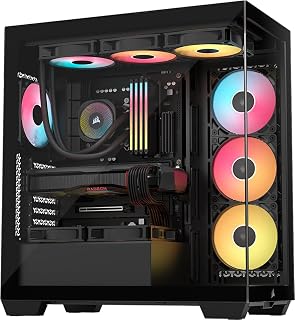
The panoramic design with Extended ATX support makes this ideal for builders wanting maximum motherboard compatibility and showcase potential. Two USB 3.0 ports on the front panel provide convenient peripheral access, while the included RGB fans and dust filters eliminate the need for immediate aftermarket purchases. Bottom PSU mounting keeps the center of gravity low for stability on desk setups.
Pros
- Wraparound tempered glass showcases components
- Supports Mini-ITX to EATX motherboards
- GPU anti-sag arm and magnetic dust filters included
- Exceptional cable routing with rear storage area
Cons
- Nearly 20 inches deep requires significant space
- No dedicated 3.5-inch hard drive bays
Wraparound glass panels showcase your components from nearly every angle, perfect for a gaming desk or visible workstation setup. Three pre-installed RS120-R ARGB fans deliver solid airflow while integrated lighting syncs easily with motherboard controls. Motherboard compatibility spans Mini-ITX to EATX, giving you flexibility whether you're building compact or going full-size. The case handles large graphics cards, tower coolers, and radiators up to 360mm without issue, supporting both air and liquid cooling strategies. Cable routing is exceptional, with multiple holes and rear storage that keeps wiring invisible from the front while staying organized behind the scenes. A GPU anti-sag stabilization arm protects expensive cards, and magnetic dust filters on the front, side, and top maintain cleanliness without choking airflow. Build quality impresses with genuinely premium glass and removable panels that simplify maintenance. The challenge is physical size at nearly 20 inches deep, requiring dedicated space, and the lack of 3.5-inch hard drive bays limits storage-heavy builds.
This case supports a broad range of motherboard form factors, from Mini-ITX compact builds to Extended ATX high-end platforms. Cooling capacity is impressive with support for up to 10x 120mm fans across side, roof, and PSU mounting points, allowing flexible thermal configurations. The case accommodates radiators up to 360mm, making it suitable for both air and all-in-one liquid cooling solutions.
The CORSAIR 3500X is compatible with the latest reverse-connection motherboards including ASUS BTF, MSI Project Zero, and Gigabyte Project Stealth, enabling cable-free interior builds for an exceptionally clean aesthetic. Storage flexibility includes multiple drive mounting options, though traditional 3.5-inch hard drive bays are limited. Front connectivity includes two USB 3.0 ports plus standard audio connectors for convenient access.
Model: CORSAIR 3500X RS-R ARGB (CC-9011322-WW). Case type: Mid-tower. Supported motherboards: Mini-ITX to Extended ATX. Dimensions: 18.11W x 19.92D x 9.45H inches, weighing 9.02 kg. Material: Tempered glass front and side panels with metal chassis. Power supply: Bottom-mounted. Includes 3x RS120-R ARGB fans with simple +5V motherboard header control.
Cooling capacity: 10x 120mm fan mounting points, supports radiators up to 360mm. Connectivity: 2x USB 3.0 ports. Features include removable glass panels, magnetic dust filters, GPU anti-sag stabilization arm, double-shot cable grommets, and rear cable storage. Warranty: 2-year manufacturer coverage. Best Sellers Rank: #13 in Computer Cases.

Seven pre-installed PWM ARGB fans deliver exceptional cooling capacity for high-performance builds without requiring separate fan purchases. The Type-C front port and dual tempered glass panels address both modern connectivity needs and aesthetics that budget builders increasingly expect. Support for ATX, Micro-ATX, and Mini-ITX motherboards plus dual cooling methods (air and water) provides maximum build flexibility.
Pros
- Seven PWM ARGB fans included, no additional cooling purchases needed
- 270-degree dual tempered glass for maximum component visibility
- Front USB Type-C plus dual USB 3.0 ports
- Supports 360mm radiators and graphics cards up to 400mm
Cons
- Fans generate noticeable noise at higher speeds
- Limited hard drive capacity for extensive storage needs
Seven PWM ARGB fans arrive pre-installed, eliminating the usual expense and hassle of building out your own thermal solution. That alone justifies serious consideration in this budget bracket. The dual tempered glass panels wrap 270 degrees around the frame, offering dramatically better component visibility than typical single-window designs. Modern connectivity includes front-mounted USB Type-C alongside two USB 3.0 ports, a rare feature at this tier. The case accommodates ATX, Micro-ATX, and Mini-ITX boards, handles graphics cards up to 400mm long, and fits 360mm radiators for those planning liquid cooling upgrades. Internal layout includes practical cable management zones and dust filtration to keep components clean. RGB lighting syncs through motherboard software for unified aesthetics. The metal frame with tempered glass construction feels sturdy, and MUSETEX backs it with a 10-year warranty. For builders prioritizing airflow, expandability, and showcase potential without exceeding a hundred dollars, this case checks the critical boxes.
Case Dimensions: 16.73 inches (D) x 8.35 inches (W) x 18.5 inches (H), weighing 15 pounds
Motherboard Support: ATX, Micro-ATX, Mini-ITX
Cooling: 7 pre-installed 120x120x25mm PWM ARGB fans (600-1300 RPM, 24.72 CFM max airflow, 20.8dB noise level). Expandable to 10 total fans.
Component Compatibility: GPU up to 400mm (15.7 inches), CPU cooler up to 165mm (6.5 inches), top-mounted liquid cooler up to 360mm (14.2 inches), PSU up to 140-180mm with or without hard drive cage
Front Panel I/O: 1x USB Type-C, 2x USB 3.0, microphone and audio jacks, power and restart buttons
Storage: 8 internal bays supporting 3.5-inch hard drives
Materials: Metal frame, plastic accents, tempered glass front and side panels
Additional Features: Dust filters, RGB lighting with motherboard control, bottom-mounted power supply
Warranty: 10-year manufacturer warranty
This case suits gamers assembling mid-range to high-performance rigs who want abundant cooling and dramatic lighting effects straight from the box. Content creators showcasing their builds will appreciate the extensive glass coverage. Enthusiasts planning future GPU or cooling upgrades benefit from the generous clearances. Skip this if you need multiple hard drive bays for storage arrays, prefer quieter operation over maximum airflow, or want standalone RGB controllers instead of motherboard-dependent lighting. Compact builds may find better options in smaller form factors.

Pros
- Six RGB fans included and pre-installed save money and setup time compared to buying separately
- Dual-chamber layout with anchor points creates professional-looking builds with minimal cable visibility
- Tempered glass design makes this case ideal for showcasing high-end components and custom builds
- Large GPU and PSU clearance accommodates current-generation graphics cards and power supplies
- Front Type-C 3.2 port offers modern connectivity for USB-C peripherals and fast external storage
Cons
- No user reviews available yet, so real-world performance and longevity feedback is limited
- Compact dimensions may require careful planning when installing large tower-style CPU coolers
- Pre-installed ARGB fans require RGB controller or compatible motherboard for full lighting control
The HYXN H3 is a mid-tower PC case designed for gamers and builders who want a professional-looking system without breaking the bank. It's ideal for anyone building a gaming PC, streaming setup, or content creation workstation and willing to invest in visible aesthetics alongside performance.
This case shines with its dual-chamber design that separates the motherboard and GPU area from the power supply and storage drives. The result is dramatically improved cable management and airflow, with six pre-installed Infinity Mirror PWM ARGB fans handling cooling right out of the box. The 360mm radiator support opens the door to liquid cooling if you want to push performance further.
The fully transparent tempered glass front and side panels are the star of the design, letting you showcase every component and RGB fan inside. Build quality is solid with metal and plastic construction combined with tempered glass, giving it a premium feel at its price point. The compact mid-tower footprint feels well-proportioned, supporting everything from Mini-ITX budget builds to full ATX gaming systems with GPUs up to 400mm long.
The main limitation is that this case has no user reviews yet, so long-term durability and real-world thermal performance remain unproven in consumer hands. Additionally, setting up the RGB fans requires either a compatible motherboard header or an external RGB controller, which isn't always included.
If you're building a gaming or streaming PC and want a stylish case with capable cooling and clean cable management included, the HYXN H3 delivers solid value. The tempered glass design and pre-installed fans make it excellent for showcasing your build, while the dual-chamber layout keeps everything organized and professional-looking.
Dimensions: 16.5 inches (D) x 11.2 inches (W) x 17.3 inches (H)
Weight: 15 pounds
Case Type: Mid-Tower
Material: Metal, Plastic, Tempered Glass
Motherboard Support: ATX, Micro ATX, Mini ITX
GPU Support: Up to 400mm (15.75 inches) length
PSU Support: Up to 200mm (7.87 inches) length
Storage Bays: 1x HDD bay, 2x SSD bays
Cooling Support: 360mm, 280mm, 240mm, and 120mm radiators
Pre-Installed Fans: 6x Infinity Mirror PWM ARGB (5x120mm reverse, 1x120mm forward)
Front I/O: 1x USB Type-C 3.2, 1x USB 3.0, 1x USB 2.0, Microphone and Audio jacks, Restart and Power buttons
What to Consider When Choosing a Budget PC Case
Airflow Configuration and Fan Support
Your case’s cooling capacity directly impacts component longevity and performance. Look for designs with multiple intake and exhaust positions, preferably with pre-installed fans that eliminate immediate additional costs. The best configurations balance positive pressure to reduce dust buildup while maintaining strong exhaust flow.
Cases with six or seven pre-installed PWM fans offer exceptional value since quality aftermarket fans typically cost between fifteen and twenty-five dollars each. Verify that fan mounts support standard 120mm and 140mm sizes, and check whether the case can accommodate front or top-mounted radiators if you plan to upgrade to liquid cooling later. Similar considerations apply when selecting cases for high-end graphics cards like the RTX 5090, where thermal management becomes critical.
Hardware Compatibility and Clearances
Budget cases must still accommodate modern hardware without compromise. Verify GPU length clearance, especially if you’re considering cards longer than 320mm. CPU cooler height restrictions matter for tower coolers, with 165mm being a comfortable minimum for most air cooling solutions.
Pay attention to power supply clearance when hard drive cages are installed versus removed. Many cases support ATX, Micro-ATX, and Mini-ITX motherboards, but verify back-connect or reversed motherboard compatibility if you’re planning a cleaner cable routing approach. For builders pairing budget cases with modern Z890 motherboards, ensure the case supports the latest connector standards.
Front Panel Connectivity
Modern I/O panels should include at least one USB Type-C port alongside traditional USB 3.0 connections. This matters for fast file transfers and future-proofing your build as more peripherals adopt USB-C. Audio and microphone jacks remain standard, but their placement and quality vary.
Some cases position the I/O panel at an angle for easier cable access, while others keep it flush with the front. Consider your desk setup and whether you’ll access these ports frequently. A dedicated restart button proves surprisingly useful during troubleshooting or when your system freezes.
Build Quality and Cable Management
Steel construction with adequate thickness prevents flexing and ensures durability. Tempered glass panels should have sturdy hinges or secure mounting mechanisms rather than flimsy clips. Tool-less side panel removal saves time during builds and maintenance.
Internal cable management features include rubber grommets, dedicated PSU shrouds, and sufficient space behind the motherboard tray. Dual-chamber designs physically separate the power supply and drives from the main hardware compartment, dramatically simplifying cable routing and improving aesthetics. When planning a complete system with budget-friendly motherboard options, good cable management becomes even more valuable for maintaining clean airflow paths.
Final Thoughts
These five cases demonstrate that budget constraints don’t require sacrificing features or aesthetics in 2026. If you prioritize maximum pre-installed cooling and panoramic views, the MUSETEX ATX PC Case 7 PWM ARGB Fans Pre-Installed delivers exceptional value with its seven-fan configuration and dual tempered glass design. For builders seeking modular flexibility and premium airflow engineering, the CORSAIR 4000D RS ARGB Frame Modular Mid-Tower ATX offers the innovative FRAME system with InfiniRail mounting. Whichever direction you choose, modern budget cases provide the foundation for builds that look and perform far beyond their cost.
Frequently Asked Questions
Can budget PC cases handle high-end graphics cards?
Absolutely. Most cases in this range support GPUs between 380mm and 420mm in length, which accommodates virtually all consumer graphics cards including flagship models. Verify the specific clearance measurement for your chosen case and compare it against your GPU dimensions. Some cases gain additional clearance by removing the front hard drive cage, extending support up to 180mm power supplies and longer graphics cards simultaneously. If you’re building around powerful cards like the RTX 5080, confirm both length and width clearances.
Do pre-installed ARGB fans require additional controllers?
Most cases with pre-installed ARGB fans include daisy-chain connectors that link directly to your motherboard’s 5V ARGB header. This eliminates the need for separate controllers and allows you to customize lighting effects through motherboard software like ASUS Aura Sync, MSI Mystic Light, or Gigabyte RGB Fusion. Fans typically connect via standard 4-pin PWM headers for speed control, with separate 3-pin ARGB cables for lighting synchronization.
What is the advantage of dual-chamber case designs?
Dual-chamber layouts physically separate your power supply, storage drives, and cable routing from the main hardware compartment. This isolation improves airflow around critical components like your CPU and GPU while hiding messy cables behind a barrier panel. The result is cleaner aesthetics through tempered glass panels and potentially lower temperatures since PSU heat doesn’t mix with GPU exhaust. These designs also simplify the building process by providing dedicated spaces for different components.
How important is radiator support in a budget case?
Radiator compatibility future-proofs your build even if you start with air cooling. Cases supporting 240mm to 360mm radiators in the front or top positions give you the option to upgrade to an all-in-one liquid cooler later without replacing the entire chassis. In 2026, many budget cases include this flexibility as standard, making it a valuable feature to prioritize during selection. Builders working with high-performance DDR5 memory kits and modern processors often appreciate having liquid cooling options available.





Write Your Review
No reviews yet. Be the first to share your experience!