

Your first PC build is exciting, but choosing a case can feel overwhelming fast. You’re staring at dozens of options with different sizes, airflow ratings, and lighting setups, and it’s hard to know what actually matters for a beginner. The good news is that the right case makes the entire process smoother, from routing cables to fitting your cooler without a fight. If you’re also planning the rest of your components, our complete component guide for RTX 5070 builds is a great companion read.
This guide covers ten of the best PC cases for beginners available right now. We evaluated each one for build accessibility, airflow quality, included fans, and compatibility with common hardware. Whether you want a clean, minimal look or an RGB-lit showcase build, there’s something here for you.
Quick Comparison
Ratings reflect the most recent data pull. Check each listing for current price and availability.
Quick answer
This guide compares 10 picks, with MONTECH TG3 Black Mid-Tower PC Case, Pre-Installed RGB ranked first. Lian Li V100 ATX Mid-Tower PC Case with 4 ARGB Fans holds the highest customer rating among them. Cooler Master Q300L Micro-ATX Mini-Tower PC Case has the most customer reviews.
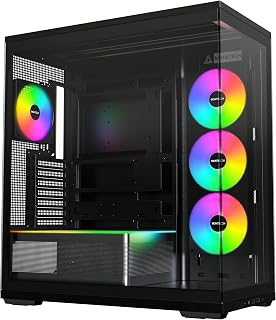
The back-connect design simplifies cable routing for anyone building their first PC by hiding cables behind the motherboard tray rather than forcing you to wrestle them through tight channels. Four pre-installed fans eliminate the guesswork of airflow planning, and the ATX mid-tower format provides enough space to work comfortably without being intimidating. The built-in RGB lighting adds visual appeal without requiring extra purchases or complex wiring.
Pros
- Pre-installed ARGB fans mean no separate cooling purchase needed out of the box
- Spacious interior supports ATX, Micro-ATX, and Mini-ITX motherboards
- Single-frame fan design reduces cable clutter, easier for first-time builders
- Back-connect motherboard compatibility adds long-term upgrade flexibility
Cons
- No 3.5-inch drive bays, so all storage must be SSD-based
- Large footprint at over 20 inches deep may not suit compact desk setups
Starting your first build can feel overwhelming, and the MONTECH TG3 removes a lot of that friction. It ships with a pre-installed ARGB unibody fan system, including a GF360 U side intake and a GF120 U rear exhaust, so you are not sourcing cooling hardware separately on day one. The single-frame fan design keeps cables tidy without requiring any special routing skills, which is a genuine help when you are learning the process. The interior is spacious enough to accommodate ATX, Micro-ATX, and Mini-ITX motherboards, and the ventilated panels work with the internal airflow pathways to keep thermals in check for gaming and everyday use. The tempered glass side panel lets you see your work, and the sturdy black finish looks clean on a desk. Back-connect motherboard support, including ASUS BTF, MSI Project Zero, and GIGABYTE Project STEALTH, also makes this case a solid long-term foundation if you upgrade later. One gap to know upfront: there are no 3.5-inch drive bays, so plan your storage around SSDs.
Case Type: Mid-Tower ATX
Motherboard Support: ATX, Micro-ATX, Mini-ITX
Back-Connect Compatible: ASUS BTF, MSI Project Zero, GIGABYTE Project STEALTH
Pre-Installed Fans: 1x GF360 U REV side intake, 1x GF120 U rear exhaust
Maximum Fan Support: Up to 9 fans
Dimensions: 20.83"D x 18.31"W x 9.41"H
Color: Black
Special Features: Built-in fans, RGB lighting, cable management, tempered glass panel
Warranty: 1 year
Model Number: TG3B
First-time builders who want a case that arrives ready to cool and look good without extra purchases will appreciate the TG3. The spacious interior and clear layout make component installation approachable for beginners. Skip it if you are migrating older hardware that relies on 3.5-inch hard drives, or if your desk space is limited since the 20.83-inch depth is a real-world consideration before you buy.

The built-in dust filters protect your components from accumulation without requiring you to remember maintenance schedules, which is ideal when you're still learning system care basics. Pre-installed fans and straightforward ATX compatibility mean fewer decisions during your first build. Four internal bays give you room to add storage as you expand your setup, and the bottom-mount PSU design keeps heavy components low for stability.
Pros
- Four pre-installed ARGB fans and an LED strip included, no extras needed
- Tool-less side panels simplify access for first-time builders
- Wide component clearance supports GPUs up to 420mm and 360mm radiators
- Panoramic tempered glass makes internal cable routing visible and easier to manage
Cons
- Large glass panels offer minimal sound dampening compared to insulated alternatives
- Open showcase design requires regular cleaning to maintain appearance
For a first build, the Lian Li V100 hits a balance that is hard to argue with: it comes with four pre-installed ARGB fans and an integrated LED strip, so your system looks finished the moment you power it on without hunting for extra parts. The panoramic tempered glass design gives beginners a clear view inside, which is genuinely useful when routing cables and seating components for the first time. Tool-less side panels make accessing the interior straightforward, reducing the chance of stripping screws or fumbling with a case you have never opened before. The V100 supports GPUs up to 420mm, CPU coolers up to 178mm, and 360mm radiators, so it accommodates virtually any beginner-friendly component combination. Storage flexibility is solid with four internal bays. The PWM fans use hydraulic bearings for quiet operation, which matters when the PC is sitting on your desk. Construction combines tempered glass, stainless steel, and plastic, and the result feels more substantial than the price suggests. The main thing beginners should know is that the open glass design provides minimal sound dampening and will show dust buildup, so occasional cleaning is part of ownership.
Form Factor: Mid-Tower ATX
Motherboard Support: ATX, Micro-ATX, Mini-ITX
GPU Clearance: Up to 420mm
CPU Cooler Height: Up to 178mm
Radiator Support: Top radiator up to 360mm
Fan Configuration: Supports up to nine 120mm fans
Pre-Installed Fans: 4x 120mm PWM ARGB fans
Fan Speed: 1800 RPM max
Airflow: 61.47-60.4 CFM
Air Pressure: 2.54-2.17 mm-H2O
Noise Level: 26.5-30.8 dBA
Bearing Type: Hydraulic
Lighting: Integrated 26-LED ARGB strip with full spectrum color control and daisy-chain connectivity
Materials: Tempered Glass, Stainless Steel, Plastic
Internal Bays: 4
Dust Filters: Yes
Weight: 8200g
Warranty: 1 Year
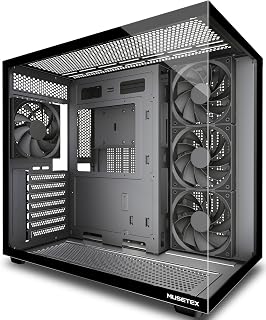
Four non-LED fans provide effective cooling without the distraction of RGB configuration, letting you focus on assembly basics rather than lighting software. The 270-degree tempered glass gives excellent visibility to verify component installation and troubleshoot connections. Type-C support ensures compatibility with current devices and motherboards. Support for ATX, Micro-ATX, and Mini-ITX boards means you won't outgrow the case if you upgrade your motherboard later.
Pros
- 270-degree glass visibility aids assembly verification
- Four pre-installed fans establish effective airflow immediately
- Dual-chamber layout isolates PSU heat automatically
- Magnetic dust filters reduce maintenance needs
Cons
- Substantial 13.1-pound weight and 16.73-inch depth require desk space
- Some units missing Micro-ATX standoff holes
New builders often struggle with component visibility during assembly, constantly opening panels to verify connections and clearances. The MUSETEX Y6 addresses this through its expansive dual tempered glass configuration that provides a 270-degree viewing angle, letting you monitor your work from multiple positions without repeatedly removing panels. Four 120mm fans arrive pre-installed in an effective front intake and rear exhaust arrangement, establishing proper airflow without requiring you to understand positive and negative pressure. The dual-chamber design physically separates the power supply into its own compartment with independent ventilation, simplifying thermal planning by keeping PSU heat away from your CPU and GPU. Generous clearances handle graphics cards up to 410mm and CPU coolers up to 160mm, preventing the compatibility issues that trip up first builds. The internal layout includes ample space for cable routing, and the package includes Velcro ties plus three screw types to cover different mounting scenarios. Magnetic dust filters on top and bottom intake areas protect components while maintaining airflow. Support for 360mm radiators and up to nine total fans creates an upgrade path if you later want enhanced cooling.
Case Type: Mid Tower ATX
Motherboard Support: ATX, Micro-ATX, Mini-ITX
Cooling Capacity: CPU cooler up to 160mm, GPU up to 410mm, Radiator up to 360mm, PSU up to 230mm
Pre-Installed Fans: 4x 120mm (3 reverse on side, 1 forward on rear, non-LED)
I/O Ports: 1x USB 3.0, 1x USB 2.0, 1x Type-C, Audio, Microphone
Materials: Metal, Plastic, Tempered Glass
Dimensions: 16.73"D x 10.83"W x 15.67"H
Weight: 13.1 lbs
Color: Black Matte
Warranty: 10 Years
Perfect for beginners who value being able to see their entire build without disassembly and want fan placement already determined. The separated PSU chamber simplifies thermal management by isolating heat sources. Best if you have adequate desk space for the 16.73-inch depth and 13.1-pound weight. Skip if you're building on a small desk or need Micro-ATX standoff compatibility without potential workarounds, as quality control issues have affected some units.

The InfiniRail mounting system lets you adjust component positions without fixed screw holes, reducing the frustration of alignment mistakes common in first builds. Three pre-installed RS fans provide immediate cooling without research into fan placement or direction. Compatibility with back-to-front cable designs from major motherboard brands means cleaner cable management with less effort. Seven expansion slots leave room for future upgrades as your needs evolve.
Pros
- Three pre-installed RGB fans deliver solid airflow and aesthetics from day one
- InfiniRail system allows flexible fan and radiator placement as your build evolves
- Thorough cable management with rear routing, shrouds, and rear SSD mounting
- Supports dual 360mm radiators and back-connect motherboard platforms for future upgrades
Cons
- Large physical size requires planning for desk or tower space before purchasing
- Pre-installed fan orientation must be verified manually, easy to overlook for first-time builders
The CORSAIR 4000D RS ARGB is a capable mid-tower, but its strongest qualities are better appreciated once you have a build or two under your belt. That said, for a beginner who wants to buy once and grow into a case over time, it offers real value. Three pre-installed RGB fans handle cooling from the start, and the InfiniRail mounting system means you can reposition fans and radiators without being locked into a fixed layout as you learn what works. The 3D Y-Pattern front panel supports strong airflow, and reported GPU temperatures as low as 29 degrees Celsius under load suggest the thermal design is genuinely effective. The FRAME Modular System lets you swap the motherboard tray or front I/O panel, making it unusually adaptable for future upgrades. Cable management is thorough, with rear routing channels, integrated shrouds, and rear SSD mounting options that help keep a first build looking clean. Build materials are alloy steel and aluminum, and the toolless panel removal makes getting inside easier. The main beginner-specific caution is fan orientation: the pre-installed fans require directional verification, which is easy to overlook on a first build and can hurt airflow if missed.
Case Design: Mid-tower ATX modular system with removable panels and customizable frame components
Motherboard Support: ATX, mATX, ITX
Cooling Capacity: Dual 360mm radiators, up to 10 total fans (120mm or 140mm)
Expansion Slots: 7 total slots for expansion cards and GPUs
Storage Bays: 3 internal bays with SSD mounting on motherboard tray rear and HDD mounting on case floor
Power Supply: Rear-mounted, supports up to 1600W
Pre-Installed Fans: 3x CORSAIR RS ARGB PWM with 8 LEDs each, daisy-chainable 4-pin connectors
USB Ports: 3x USB 3.0 ports
Material: Alloy steel and aluminum construction
Dimensions: 19.17" D x 9.41" W x 19.13" H
Weight: 22.7 pounds
Warranty: 2-year manufacturer coverage
Beginners who plan to invest in a high-end system over time and want a case that grows with them will find the 4000D RS ARGB a worthwhile choice. It suits anyone comfortable doing a bit of research before building. Skip it if you need a straightforward, no-decisions-required setup, or if desk or floor space is tight since this is a genuinely large enclosure.

The compact mid-tower footprint fits on most desks without sacrificing ATX motherboard support, important when you're uncertain about space requirements. The Flow design prioritizes airflow through mesh panels, reducing the risk of thermal issues that beginners might not immediately notice. Seven expansion slots provide upgrade flexibility, and the 120mm fan standard makes finding replacement or additional cooling straightforward if you decide to expand later.
Pros
- Smooth interior edges prevent assembly injuries
- Wide cable channels with multiple anchor points simplify routing
- Perforated PSU shroud automatically improves GPU cooling
- Compact size fits standard desk spaces
Cons
- Mesh design makes rear cables visible
- Single 3.5-inch drive bay by default
Building your first PC becomes significantly less intimidating when the case actively helps rather than hinders. The NZXT H5 Flow accomplishes this through thoughtful internal engineering that prioritizes beginner-friendly assembly. Smooth edges throughout the interior prevent the cuts and scrapes that often plague first builds, while wide cable routing channels and multiple anchor points make wire management straightforward rather than frustrating. The spacious layout gives your hands room to work without constantly colliding with other components. Two 120mm fans come pre-installed to establish basic airflow immediately, and the ultra-fine mesh panels across the front, top, and side create natural ventilation paths without requiring advanced planning. The perforated PSU shroud directs cool air to your graphics card from below, addressing GPU thermals automatically. Support for ATX and Micro-ATX motherboards means you're not locked into a single board size as you learn what you need. The compact footprint fits typical desk spaces without dominating your workspace. The case handles 360mm front radiators and 240mm top radiators if you later want to explore liquid cooling, but air cooling works perfectly for initial builds.
Case Type: Compact ATX Mid-Tower
Motherboard Support: ATX, Micro-ATX, Mini-ITX, E-ATX compatible
Dimensions: 16.93in W x 18.31in H x 8.86in D
Weight: 8 kg
Material: Metal with tempered glass panel
Cooling Support: Front 360mm radiator, top 240mm radiator
Pre-installed Fans: Two 120mm Quiet Airflow fans (front intake, rear exhaust)
Fan Size Support: 120mm standard
Power Supply: Bottom mount
Internal Bays: 4 total
Drive Support: One 3.5-inch bay, two 2.5-inch bays
I/O Ports: Two USB 2.0, two USB 3.0
Expansion Slots: 7 total
Cable Management: Wide channels, hooks, and straps included
Warranty: 2-year manufacturer warranty
Ideal for absolute beginners who need a forgiving case with clear internal organization and minimal sharp edges during assembly. The straightforward layout and pre-installed fans eliminate early complexity. Also suits builders working with limited desk space who still want full ATX compatibility. Skip if you require more than one 3.5-inch drive bay without modifications, or if you need the cleanest possible exterior cable management, since the mesh panels make rear cables partially visible.

Seven pre-installed PWM ARGB fans eliminate the intimidating task of planning and installing your own cooling setup while providing synchronized lighting out of the box. The Type-C front panel keeps your case current with modern devices and motherboards. Full-view dual tempered glass panels let you see your completed build and verify all connections are seated properly. Support for both air and water cooling means the case can grow with your skills.
Pros
- Seven PWM ARGB fans eliminate cooling setup decisions
- 270-degree glass panels aid visibility during first build
- Front USB Type-C plus dual USB 3.0 for modern connectivity
- 10-year warranty coverage for long-term confidence
Cons
- Fan noise increases at higher speeds
- RGB requires motherboard software support
First-time builders face a common dilemma: choosing between adequate cooling and manageable complexity. The MUSETEX K2 solves this by arriving with seven PWM ARGB fans already installed and configured, eliminating the guesswork around airflow setup. The dual tempered glass panels spanning 270 degrees let you see exactly what you're building, which helps beginners verify component placement and cable routing without opening the case repeatedly. The front panel includes modern USB Type-C alongside dual USB 3.0 ports, so you won't need adapters for newer peripherals. Internal space accommodates graphics cards up to 400mm and CPU coolers up to 165mm, giving you room to grow without hitting clearance problems on your first build. The partitioned layout clearly separates cable management areas from component zones, making organization intuitive even if you've never routed cables before. Dust filters on intake points reduce maintenance anxiety. The RGB fans sync with motherboard software, so lighting control doesn't require learning a separate ecosystem. A 10-year warranty provides peace of mind that matters when you're investing in your first custom PC.
Case Dimensions: 16.73 inches (D) x 8.35 inches (W) x 18.5 inches (H), weighing 15 pounds
Motherboard Support: ATX, Micro-ATX, Mini-ITX
Cooling: 7 pre-installed 120x120x25mm PWM ARGB fans (600-1300 RPM, 24.72 CFM max airflow, 20.8dB noise level). Expandable to 10 total fans.
Component Compatibility: GPU up to 400mm (15.7 inches), CPU cooler up to 165mm (6.5 inches), top-mounted liquid cooler up to 360mm (14.2 inches), PSU up to 140-180mm with or without hard drive cage
Front Panel I/O: 1x USB Type-C, 2x USB 3.0, microphone and audio jacks, power and restart buttons
Storage: 8 internal bays supporting 3.5-inch hard drives
Materials: Metal frame, plastic accents, tempered glass front and side panels
Additional Features: Dust filters, RGB lighting with motherboard control, bottom-mounted power supply
Warranty: 10-year manufacturer warranty
Best for first-time builders who want a visually impressive case that handles cooling automatically and provides clear sightlines during assembly. The pre-installed fan setup removes early decisions about airflow direction and placement. Skip this if you need extensive 3.5-inch drive storage or prefer silent operation, since the seven fans can generate noticeable noise under load. Also pass if your motherboard lacks RGB headers, as the lighting system requires that connection for control.

The micro-ATX format requires less space and fewer components to fill, reducing both cost and complexity for a first build. The transparent panel provides visual confirmation that all connections are secure without requiring disassembly. Four expansion slots offer enough room for essential components like a graphics card without overwhelming you with empty spaces. Two USB 3.0 ports on the front panel provide convenient device connectivity.
Pros
- Exceptional component compatibility for a mini-tower, fitting full-size PSUs and large coolers
- Modular I/O positioning eliminates cable routing hassles regardless of your motherboard layout
- Superior airflow design with perforated panels on all sides keeps temperatures low
- Clean, modern aesthetic with high-quality transparent panel and unique dust filter design
- Affordable price point makes small form factor building accessible
Cons
- Limited to three pre-installed fans with room for only a 240mm radiator, potentially constraining extreme cooling setups
- No reviews available yet, so real-world user feedback on long-term reliability is unavailable
- Compact design may feel tight during initial component installation and future upgrades
The Cooler Master Q300L is a well-engineered micro-ATX mini-tower that brings serious functionality to a compact footprint. It's designed for PC builders and enthusiasts who need a small form factor case without sacrificing compatibility or cooling performance, making it perfect for office builds, streaming setups, or space-constrained gaming rigs.
What truly sets the Q300L apart is its component flexibility. The case supports 360mm graphics cards, 240mm AIO coolers, and full-size ATX power supplies, a combination rarely found in cases this size. The perforated design on all sides, combined with support for up to five fans, creates an open thermal environment that keeps components cool even during sustained gaming or rendering workloads. The modular I/O panel, adjustable to six different positions across both the front and back of the chassis, solves cable management headaches before they start.
The build quality feels solid with its alloy steel and plastic construction, and the edge-to-edge transparent panel lets you display your build cleanly. The magnetic dust filters aren't just functional, they feature a distinctive pattern that adds personality to the chassis. The cube design is practical and modern, avoiding the aggressive gaming aesthetics that don't suit every environment.
The main limitations are the compact interior space, which requires careful planning during installation, and the three pre-installed fans, though the case supports additional cooling if needed. Since there are no user reviews yet, long-term durability feedback isn't available, though Cooler Master's reputation and included warranty should provide confidence.
The Q300L delivers excellent value for small form factor builders. If you need a case that combines modularity, cooling capability, and component compatibility without breaking the budget, this case deserves serious consideration. It's particularly strong for anyone building their first compact system or upgrading from a bulky tower.
Physical Dimensions: 15.39 inches deep, 9.06 inches wide, 15 inches tall. Weight: 480 grams.
Motherboard Support: Micro-ATX and Mini-ITX. Total expansion slots: 4. Internal bays: 1 (3.5-inch hard disk form factor). USB 3.0 ports: 2.
Component Compatibility: CPU coolers up to 159mm height, graphics cards up to 360mm length, power supplies up to 160mm length and 500 watts maximum output.
Cooling: 240mm liquid cooler and 5 fans supported. Three fans included by default. Fully ventilated with perforated design on all sides and magnetic dust filters.
Materials and Build: Alloy steel and plastic enclosure. Dark gray color. Model MCB-Q300L-KANN-S00. Includes 2-year warranty. PSU mounting type: bottom mount.
Who Should Buy This Case: The Q300L suits builders who prioritize modularity, compact size, and component support. It works for gaming PCs, creative workstations, office systems, and streaming setups where space is limited but cooling and upgrade potential matter.
Who Should Look Elsewhere: If you need extreme liquid cooling configurations with multiple radiators, or if you require a case with extensive storage bays, consider larger form factors. The compact interior isn't ideal for builders uncomfortable with detailed installation work.
Setup Tips: Plan your cable routing before installation using the modular I/O positioning. Start with the I/O panel location that best matches your motherboard layout. Install larger components first, then work toward smaller peripherals. The transparent panel shows cable management, so take time with routing.
Long-term Use: The magnetic dust filters are user-friendly for maintenance. Clean them regularly to maintain the open airflow design. The modular interior makes future upgrades straightforward once your initial build is complete.

Pros
- Pre-installed cooling system eliminates need for immediate fan purchases
- Dual tempered glass panels provide exceptional visibility from multiple angles
- Modern I/O connectivity with USB 3.0 and Type-C for next-gen devices
- Exceptional component compatibility supports multiple motherboard formats and large coolers
- Solid build quality at this price point backed by strong user ratings
Cons
- Large motherboard support limits how compact cable management can be
- Tempered glass panels require careful handling during installation and transport
- Factory fan configuration is optimized for air cooling rather than custom liquid loops
The KEDIERS K4 MAX is a mid-tower ATX case designed for gamers and PC enthusiasts who prioritize both cooling performance and visual appeal. It caters to builders at any skill level who want a case that comes ready to perform without extensive additional purchases.
The standout feature is the combination of five pre-installed fans and dual tempered glass panels that showcase your components from 270 degrees. The panoramic design creates a premium visual experience while the factory-installed cooling system handles thermals effectively for both air and liquid cooling builds. USB 3.0 and Type-C ports on the front I/O panel bring modern connectivity to older or basic motherboards.
Build quality is solid throughout, with sturdy metal framing, diamond-cut glass edges, and thoughtful details like bottom-mounted power supply placement. The case supports impressive expansion options including 420mm radiators, up to 11 total fans, and graphics cards extending to 460mm. Component mounting feels secure and the layout provides adequate space for cable management in most scenarios.
The main limitation is that the pre-configured fan setup works best for air-cooled or moderately tuned liquid systems. Enthusiasts planning extreme cooling setups may want to replace some fans. Additionally, the dual glass panels, while visually impressive, add weight and require careful handling during installation.
Overall, the K4 MAX delivers excellent value for mid-range gaming and workstation builds. The combination of pre-installed cooling, modern aesthetics, and strong component compatibility makes it a smart choice for anyone wanting style without sacrificing thermal performance.
Motherboard Support: ATX, Micro-ATX, Mini-ITX
Cooling: 5 pre-installed fans (3x 120mm intake, 2x 120mm exhaust), supports up to 11x 120mm fans, 420mm or 360mm radiators supported
Component Clearance: GPU up to 460mm, CPU cooler up to 175mm, PSU up to 200mm
I/O Connectivity: 1x USB Type-C, 1x USB 3.0, HD Audio jack, Power and Restart buttons
Build Material: Metal frame with dual tempered glass panels (front and side)
Power Supply: Bottom-mounted, ATX format
Expansion: 7 PCIe slots, support for HDD and SSD trays
Weight: 7.17 kg
Color: Black
Who Should Buy: The K4 MAX is ideal for gaming PC builders, content creators, and enthusiasts who want a balanced case offering strong cooling, modern aesthetics, and reliable compatibility without premium pricing.
Who Should Skip: Builders seeking extremely compact form factors should consider smaller cases. Those building highly specialized custom liquid cooling loops may prefer cases designed specifically for that purpose.
Setup Considerations: The case arrives with all fans pre-installed and ready to connect to motherboard headers. Plan your cable routing before installing the power supply, as the bottom-mounted placement requires careful management. The tempered glass panels install easily but benefit from a soft cloth during initial setup.
Upgrade Path: After initial use, you can customize cooling by replacing individual fans or adding additional radiators without major modifications. The seven PCIe slots provide ample room for future expansion cards.

The Type-C front panel keeps your build relevant as more devices adopt the standard connector, avoiding immediate obsolescence. Seven expansion slots and support for both air and water cooling provide a clear upgrade path as your skills develop. ATX compatibility with Micro-ATX and Mini-ITX support means flexibility in motherboard choice without researching case compatibility. The 120mm fan standard simplifies adding or replacing cooling components.
Pros
- Mesh front panel provides strong airflow for beginners who might not optimize fan curves
- Fits all common motherboard sizes so you won't buy the wrong format
- Tool-free magnetic dust filters simplify cleaning and maintenance
- USB-C port keeps the case relevant as peripherals evolve
Cons
- Ships with only one fan, requiring additional purchases for proper cooling
- No user reviews to confirm ease of assembly for first-timers
First-time builders need a case that won't fight them at every step, and the DARKROCK EC2 delivers exactly that. Its ATX mid-tower form factor accommodates standard motherboard sizes (ATX, Micro-ATX, Mini-ITX), meaning you won't accidentally buy incompatible parts. The mesh front panel keeps temperatures manageable without requiring you to understand advanced cooling theory. Seven expansion slots provide room to grow, whether that's a bigger GPU down the line or additional cards. The tempered glass side panel lets you see your work, which is reassuring when you're not sure if everything's plugged in correctly. USB-C support means the case won't feel dated in a year. Magnetic dust filters on top and bottom snap on and off without tools, making maintenance straightforward. The bottom-mounted power supply design is beginner-friendly because it separates heavy components and simplifies cable routing. Three internal bays handle storage needs for most starter builds. While it ships with just one fan, the support for eight total fans and a 360mm radiator means you can upgrade cooling as your confidence grows.
Cooling capability is where this case truly excels. The mesh front panel allows unrestricted airflow, paired with support for up to eight 120mm fans and one 360mm radiator. This configuration is suitable for high-end gaming rigs and overclocked systems that generate significant heat.
The bottom-mounted PSU placement helps separate heat sources, improving overall thermal efficiency. Magnetic dust filters prevent clogging, maintaining consistent airflow performance over time without frequent maintenance.
This case accommodates ATX, Micro-ATX, and Mini-ITX motherboards, offering flexibility for various build sizes. It supports graphics cards up to 340mm in length and power supplies up to 200mm, making it compatible with modern high-end GPUs including 50-series cards.
With seven expansion slots and three internal bays, you have room for multiple storage devices and expansion cards. The bottom PSU mount maximizes internal space and improves cable routing compared to front-mounted alternatives.

Pros
- Eight PWM ARGB fans included and pre-installed
- Dual-chamber design simplifies cable management for beginners
- Supports graphics cards up to 455mm and radiators up to 420mm
- Accepts extended ATX down to mini-ITX motherboards
Cons
- Functional metal and plastic construction lacks premium feel
- RGB fan wiring documentation is incomplete
First-time builders face a common dilemma: buying a case with no fans means hunting down compatible models and figuring out installation, while premium cases with good cooling stretch the budget. The HYXN H2 solves this by arriving with eight PWM ARGB fans already mounted, six 140mm and two 120mm units that deliver robust airflow without additional purchases. The dual-chamber layout keeps the power supply and drives separate from the motherboard area, simplifying cable management and making it easier to understand where components belong. It accepts extended ATX through mini-ITX boards and fits graphics cards up to 455mm, giving beginners room to grow without worrying about clearance issues. Radiator support reaches 420mm if water cooling becomes interesting later. The metal, plastic, and tempered glass construction keeps costs reasonable, though build quality feels functional rather than refined. Documentation for RGB fan wiring is sparse, requiring cross-reference with motherboard manuals. For a first build where thermal performance and interior space matter more than premium materials, the H2 removes several decision points and leaves budget for better core components.
Case Dimensions: 500 x 285 x 485mm (19.7 x 11.2 x 19.1 inches), Weight: 11 pounds
Motherboard Support: E-ATX, ATX, Micro-ATX, Mini-ITX
Cooling Capacity: Supports 420mm, 360mm, 280mm, 240mm, 120mm radiators; accommodates 8 fans total
GPU Clearance: Up to 455mm (17.91 inches)
PSU Clearance: Up to 220mm (8.66 inches)
Storage Bays: 2x HDD, 3x SSD compatible
Front Panel I/O: 1x USB Type-C 3.2, 1x USB 3.0, 1x USB 2.0, 3.5mm audio and microphone jacks
Material: Metal, plastic, tempered glass
Color: Black with RGB lighting
Best for first-time builders assembling gaming or general-purpose systems who want abundant cooling and generous clearances without buying fans separately. The dual-chamber design and pre-installed fans reduce complexity during assembly. Skip this if you want premium materials, refined fit and finish, or clear RGB wiring instructions out of the box. Also not ideal if you're building in a compact space, since this mid-tower footprint is larger than entry-level cases.
What to Look for When Buying Your First PC Case
Airflow and Cooling Support
Airflow is the single most important factor in keeping your components healthy long-term. Cases like the NZXT H5 Flow – Compact ATX Mid-Tower PC Case use ultra-fine mesh panels on the front, top, and sides to maximize intake while filtering dust. A case with good airflow saves you from thermal throttling and noisy fans down the road.
Look for cases that support at least a 240mm or 360mm radiator in front if you think you might upgrade to liquid cooling later. The CORSAIR 4000D RS ARGB Frame Modular Mid-Tower ATX and the KEDIERS PC CASE ATX 5 Fans Pre-Installed both offer 360mm and 420mm radiator support, giving you room to grow.
Pre-Installed Fans and Included Hardware
Buying fans separately adds cost and complexity to a first build. Cases that come pre-loaded with fans let you boot up without any extra shopping. The MUSETEX ATX PC Case 7 PWM ARGB Fans Pre-Installed ships with seven ARGB PWM fans straight out of the box, which is exceptional value for a beginner who wants a ready-to-run cooling setup.
Even simpler options like the MUSETEX Y6 PC Case, Pre-Installed 4 Non-LED Fans include four 120mm fans to handle basic thermal management. If RGB lighting isn’t a priority, non-LED fans still move air effectively and keep your build quiet. For builds centered around a powerful GPU, check out our RTX 5070 Ti build guide to match your case with the right components.
Cable Management
Messy cables restrict airflow and make troubleshooting a nightmare. As a beginner, you want a case with wide cable routing channels, built-in Velcro straps, and a rear compartment deep enough to hide the excess. The H2 (2026) HYXN ATX PC Case features a dual-chamber design with an extra-large rear compartment and integrated Velcro straps, making tidy cable runs much more achievable on a first attempt.
Back-connect motherboard support is another cable management upgrade worth noting. Cases like the MONTECH TG3 High Airflow ATX Mid-Tower PC Case and the Lian Li V100-ATX Mid-Tower PC Case-Black-V100RX are compatible with ASUS BTF, MSI Project Zero, and similar back-connect platforms, which push nearly all cables to the rear panel for an ultra-clean look. Our RX 9070 build guide covers how these platforms pair with modern GPUs.
Size and Motherboard Compatibility
Most cases in this roundup support ATX, Micro-ATX, and Mini-ITX motherboards, which covers the vast majority of beginner builds. However, if you’re working with a compact Micro-ATX board and want a smaller footprint, the Cooler Master Q300L V1 Micro-ATX PC Case is purpose-built for that form factor with a modular I/O panel that can be repositioned on multiple sides.
Always cross-check GPU clearance before buying. The DARKROCK EC2 ATX Mid Tower Gaming Computer PC supports GPUs up to 340mm, while the HYXN H2 extends that to 455mm, accommodating even the largest current-generation cards. If you’re planning an AMD-based build, our RX 9060 XT component guide breaks down what clearance you’ll need.
Final Thoughts
Any of these cases will serve a first-time builder well, but two stand out for different reasons. If you want a hassle-free, airflow-focused build with clean aesthetics, the NZXT H5 Flow – Compact ATX Mid-Tower PC Case is hard to beat for its mesh design and straightforward interior layout. If you want maximum RGB impact and fan coverage straight out of the box, the MUSETEX ATX PC Case 7 PWM ARGB Fans Pre-Installed delivers serious visual flair alongside solid thermal performance, all without needing to buy a single extra fan.
Frequently Asked Questions
What size PC case should a beginner buy?
A mid-tower ATX case is the best starting point for most beginners in 2026. It offers enough internal space to work comfortably, supports the widest range of motherboards and cooling options, and is forgiving when you’re routing cables for the first time. Compact cases can be trickier to build in and limit your upgrade path.
Do I need a PC case with pre-installed fans?
It’s not strictly required, but pre-installed fans simplify a first build considerably. You skip the step of sourcing compatible fans, figuring out headers, and managing extra cables. Cases like the MUSETEX Y6 and the Lian Li V100 both ship with multiple fans ready to go, so you can focus on the rest of the build. You can always swap or add fans later once you’re more comfortable.
Is tempered glass worth it for a beginner PC build?
Tempered glass side panels are a nice touch if you want to see your components, but they do require more careful handling during assembly. Most cases in this list include at least one tempered glass panel, and many feature 270-degree panoramic glass designs. Just be mindful when removing and reinstalling the panel so you don’t scratch or crack it.
What PC case features matter most for cooling in 2026?
Mesh front and top panels, multiple pre-installed fans, and support for large radiators are the most important cooling features to look for. A dual-chamber design, like the one in the HYXN H2, also helps by separating the PSU and drives from the main components, improving overall airflow paths. If you’re pairing your case with a high-performance GPU, our RTX 5060 Ti build guide explains how to balance cooling with the rest of your component choices.





Write Your Review
No reviews yet. Be the first to share your experience!