

Building a new PC is exciting until you realize how much case choice actually matters. The case sets the tone for airflow, cable management, upgrade potential, and the overall look of your rig. Whether you are assembling a high-end gaming machine or a clean, minimal workstation, a well-designed enclosure makes every step of the build easier and every hour of use more reliable.
This guide covers six of the strongest options available right now for builders who want quality without overspending. If you are also thinking about which GPU to pair with your new case, check out our roundup of the best PC cases for RTX 5080 builds for pairing ideas that work well together.
Quick Comparison
| Model | Link | Rating | Case Type | Motherboard Compatability | Cooling Method |
|---|---|---|---|---|---|
| 1 ASUS TUF Gaming GT501 E-ATX Full Tower Case with Tempered...Highest rated | Check price | 4.8 of 51,620 ratings | Mid Tower | Extended ATX | Air, Water |
| 2 Fractal Design North Walnut Wood Gaming Case - ATX Mid...Most reviewed | Check price | 4.7 of 53,551 ratings | Mid Tower | ATX | Air |
| 3 Fractal Design North Charcoal Black Mid Tower PC Case... | Check price | 4.7 of 53,551 ratings | Mid Tower | ATX | Air |
| 4 CORSAIR AIR 5400 RS ARGB Triple-Chamber Mid-Tower PC Case... | Check price | 4.6 of 5264 ratings | Mid Tower | ATX | Air |
| 5 Cooler Master HAF II 500 ATX Case: High-Airflow Mid-Tower... | Check price | 4.8 of 528 ratings | Mid Tower | ATX, E-ATX | Air |
| 6 HYTE Y70 Dual Chamber ATX Gaming PC Case, 10-Fan Cooling,...Unavailable | Check price | 4.7 of 5967 ratings | Mid Tower | ATX, mATX, ITX | Air, Water |
Ratings reflect the most recent data pull. Check each listing for current price and availability.
Quick answer
This guide compares 6 picks, with ASUS TUF Gaming GT501 E-ATX Full Tower Case ranked first. Fractal Design North Walnut Wood Gaming Case - ATX Mid has the most customer reviews.

Builders who want room to grow will appreciate the Extended ATX support and nine expansion slots, which accommodate large enthusiast motherboards and multiple GPUs or add-in cards without compromise. The bottom-mounted PSU keeps cable runs tidy, and compatibility with both air and water cooling means the build can scale from a basic fan setup to a full custom loop as needs evolve.
Pros
- Supports 360mm radiators front and top with no modification needed
- Nine expansion slots and spacious interior simplify future upgrades
- 4mm smoked tempered glass and steel chassis feel genuinely premium
- Carrying handles rated to 65 lbs add practical utility for a case this size
Cons
- At 21.73 inches deep and 26.2 pounds, it demands significant permanent desk or floor space
- Full-tower footprint is excessive for builders running compact or mid-range hardware
The interior is genuinely spacious, which simplifies GPU installation, cable routing, and future upgrades without the cramped maneuvering that plagues smaller cases. Cooling headroom is exceptional: support for 360mm radiators on both the front and top, plus seven additional fan mounting positions beyond the pre-installed units, means this case can handle aggressive custom liquid loops or dense air-cooling setups without modification. The 4mm smoked tempered glass side panel and steel-reinforced chassis give it a premium feel that holds up over time. Aura Sync RGB on the included fans adds visual flair that pairs well with compatible ASUS motherboards. Nine expansion slots and a bottom-mounted PSU keep the layout flexible for multi-GPU or high-card-count configurations. The trade-off is raw size: at nearly 22 inches deep and over 26 pounds, this lives on a desk permanently.
Form Factor: Mid-tower with EATX support
Motherboard Compatibility: Extended ATX, ATX, and micro-ATX
Dimensions: 21.73"D x 9.88"W x 21.46"H
Weight: 26.2 lbs
Case Material: ABS Plastic, SGCC Steel, Tempered Glass, Zinc Alloy Steel
Fan Configuration: Pre-installed: 3x 120mm RGB front fans, 1x 140mm rear fan; up to 7 total mounting points
Radiator Support: Top/front 360mm, rear 140mm
Expansion Slots: 9 total (1 vertical GPU, 7 traditional)
Drive Bays: 6 internal bays for 3.5-inch drives
Front Ports: 1x USB 3.0, 2x USB 2.0
PSU Mounting: Bottom-mount, supports standard ATX power supplies
Features: 4mm smoked tempered glass, Aura Sync RGB lighting, ergonomic carry handles, magnetic dust filters
Warranty: 2 years
Color: Grey
Also a strong pick for anyone running a large GPU that needs serious thermal clearance. Skip it if desk or floor space is tight, if you attend LAN events, or if you prefer a compact footprint over interior volume.

Mesh side panels set this ATX mid-tower apart for builders who want passive airflow working around the clock, not just through a single front intake. The two included 140mm Aspect PWM fans pair well with that open mesh to keep thermals in check, and the front USB-C port alongside two USB 3.0 connections covers the connectivity most builders need without relying on adapters.
Pros
- Real walnut wood front panel sets it apart visually from typical mid-tower cases
- Mesh side panels and open front intake provide strong passive and active airflow
- Supports GPUs up to 355mm and 360mm front radiators for high-end builds
- Two 140mm Aspect PWM fans included, covering basic airflow out of the box
Cons
- Wood panels require periodic cleaning to stay looking their best
For a budget-conscious builder who still wants something worth looking at, that matters. Underneath the aesthetics, the thermal engineering holds up: full mesh side panels, an open front intake, and integrated top ventilation work together to keep airflow moving efficiently. The two included 140mm Aspect PWM fans mean you are not starting from zero on day one. GPU support stretches to 355mm, and front radiator support reaches 360mm, so there is room to grow into a more serious cooling setup later. Seven bridgeless expansion slots give you flexibility for water cooling loops or extra fans. ATX, mATX, and ITX motherboards all fit, and tool-free panel removal keeps the building process straightforward. For builders who want a mid-tower that performs well and does not look like every other case on the market, the North earns its place on this list.
Form Factor: Mid-tower ATX case
Motherboard Support: ATX, mATX, ITX
GPU Compatibility: Up to 355mm, or 300mm with 360mm front radiator
Expansion Slots: 7 bridgeless slots
Drive Mounts: 2 combined 3.5"/2.5" mounts, 2 dedicated 2.5" mounts
Front Panel: Real sustainably-sourced walnut or oak wood
Ventilation: Mesh front, full mesh side panels, integrated top mesh
Included Fans: 2x 140mm Aspect PWM fans
Ports: 1x USB 2.0, 2x USB 3.0, USB Type-C
Dimensions: 17.6" D x 8.46" W x 18.46" H
Weight: 9.5 kg
Warranty: 2 years
Premium Aesthetic: The North stands out through its use of real wood paneling and metal accents rather than plastic or brushed aluminum. Each case features sustainably-sourced walnut or oak panels on the front, creating a warm, natural look that complements modern living spaces. The wood is complemented by sleek brass or steel details that add contemporary sophistication.
Build Quality: Fractal Design's engineering is evident in both the materials selected and the overall construction. The metal enclosure is robust and well-finished. The integration of natural materials with precision-engineered mesh ventilation demonstrates thoughtful design that balances form with function. Tool-free panel removal with integrated tabs shows attention to user experience.
Customization: The case accepts ATX, mATX, and ITX motherboards, giving flexibility for different build sizes. Seven bridgeless expansion slots accommodate water cooling setups, additional fans, and radiators. The generous interior layout prevents component conflicts while maintaining accessibility for upgrades and maintenance.
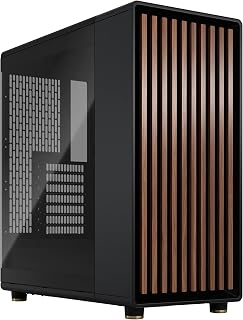
The genuine walnut wood front panel makes this mid-tower one of the few cases that fits naturally in a living room or home office without screaming gaming rig. Two 140mm PWM fans are included out of the box for solid baseline airflow, a tempered glass side panel shows off the build, and a front-panel USB-C port reflects the modern connector standard most builders now expect.
Pros
- Genuine walnut wood front panel and brass accents set it apart from every other case in this price range
- Open-front mesh ventilation supports strong airflow while keeping the look clean
- Supports 360mm front radiators and GPUs up to 355mm
- Tool-free panel removal and integrated dust filters make maintenance straightforward
Cons
- Natural wood front requires occasional maintenance to preserve its appearance over time
- Two included 140mm fans may be insufficient for high-TDP component pairings without supplemental cooling
The genuine walnut wood front panel, brass accents, and tempered glass side panel produce a result that reads more like furniture than PC hardware. That design focus does not come at the expense of function: the open-front mesh ventilation supports strong airflow, and the case fits graphics cards up to 355mm alongside full ATX motherboards. Two 140mm Aspect PWM fans are included from the factory, and the layout accommodates a 360mm front radiator for builders who want to push cooling further. Seven expansion slots keep upgrade paths open. Build quality backs up the premium look, with solid metal construction, a scratch-resistant tempered glass panel, and tool-free panel removal that makes building and iterating straightforward. Dust filters are integrated throughout.
This case supports a wide range of modern motherboards: ATX, mATX, and ITX form factors all fit comfortably. Graphics cards up to 355mm work without modification, though this reduces to 300mm if you're planning a 360mm front-mounted radiator, which is important to verify before purchasing.
Storage flexibility is solid with two combined 3.5-inch/2.5-inch drive mounts and two dedicated 2.5-inch slots. This gives you options for traditional drives, SSDs, or a hybrid setup. The seven bridgeless expansion slots support modern networking and expansion cards without limitations.

Pros
- Revolutionary chamber separation delivers measurably better CPU and GPU cooling than traditional cases
- Pre-installed RGB fans with high-performance reverse-rotor design eliminate the need for immediate upgrades
- Wraparound glass design and RGB lighting create a visually striking build that stands out
- Bottom-mounted PSU design with dedicated intake keeps power supplies cool and organized
- Quiet operation due to optimized airflow ducts that increase cooling without noise penalties
Cons
- Large dimensions (18.5in D x 13.39in W x 18.39in H) require significant desk or cabinet space
- Limited to 2 USB 3.0 front ports, which may feel restrictive for users with multiple peripherals
The CORSAIR AIR 5400 RS ARGB is a mid-tower case engineered for serious PC builders who demand exceptional cooling performance without sacrificing visual appeal. This case is built for enthusiasts running powerful CPU coolers, high-end GPUs, and custom water loops who want their hardware to perform at peak efficiency. The target audience includes gamers, content creators, and overclockers who are willing to invest in a premium chassis.
The standout innovation is the triple-chamber architecture that physically separates CPU cooling, GPU airflow, and power management into dedicated zones. The front chamber houses a 360mm radiator, the central chamber handles GPU and motherboard cooling with optimized vertical airflow, and the rear chamber contains the PSU and storage. This separation prevents heat cross-contamination and allows each zone to operate at maximum efficiency. The three reverse-rotor RGB fans arrive pre-installed and work seamlessly together, delivering impressive cooling performance while staying remarkably quiet thanks to the intelligent airflow duct system.
Build quality is robust with tempered glass on multiple sides providing a stunning panoramic view of your components. The acrylic and plastic construction feels durable, and the design shows thoughtful engineering in cable management and component positioning. The reverse motherboard support option adds flexibility for custom builds, while the anti-sag features protect expensive GPUs from sagging over time.
The main drawbacks are the premium price point, substantial physical footprint, and somewhat limited USB connectivity at just two USB 3.0 ports. The case also requires adequate desk or cabinet space due to its dimensions. These are minor tradeoffs for the cooling performance and aesthetic quality delivered.
The CORSAIR AIR 5400 RS ARGB excels for builders who prioritize thermals and visual impact over budget considerations. The triple-chamber design genuinely improves cooling outcomes, the included fans are capable performers, and the panoramic glass design makes any build look impressive. If you're planning a high-end gaming or workstation PC and want cooling performance to match your hardware investment, this case delivers exceptional value.
Chassis Specifications: Case Type: Mid Tower | Motherboard Support: ATX | Dimensions: 18.5in (D) x 13.39in (W) x 18.39in (H) | Weight: 13.92 kg | Material: Tempered Glass, Acrylic, Plastic
Cooling and Airflow: Cooling Method: Air | Radiator Capacity: 360mm front-mounted | Pre-installed Fans: 3x Reverse-Rotor RGB | Airflow Ducts: Top and bottom arrays with velocity acceleration channels | Dust Filters: Included
Storage and Power: Internal Bays: 4 | Power Supply: Bottom-mount compatible with standard PSUs | PSU Chamber: Dedicated isolated chamber with independent intake and exhaust
Connectivity: USB 3.0 Ports: 2 | RGB Lighting: Integrated with pre-installed fans
Compatibility: Supports ATX motherboards, standard PSUs, and common storage drives | Reverse motherboard support option available | Warranty: 2-year manufacturer coverage
Ideal For: Gaming enthusiasts building high-end rigs, content creators with demanding workloads, overclockers seeking optimal thermals, and builders who value both performance and aesthetics. The case works best with modern CPU coolers and high-performance GPUs that benefit from isolated cooling chambers.
Best Match: Users planning builds with components worth $2000 or more will appreciate the premium build quality and cooling advantages. Builders who currently run into thermal throttling or noise issues will see tangible performance gains from the chamber separation.
Consider Alternatives If: You're on a tight budget, have limited physical space, or prefer maximum connectivity options. Traditional mid-tower cases with single chambers cost significantly less, though they sacrifice the cooling efficiency gains this design provides.

Thermal performance is the headline here, with a dual 220mm plus 180mm fan configuration pushing serious airflow through an ATX and E-ATX compatible interior. For a builder prioritizing temperatures over aesthetics, that fan setup moves significantly more air than standard 120mm arrays, and three USB 3.0 ports on the front panel keep fast peripheral transfers convenient without reaching around to the back.
Pros
- Dual 220mm plus 180mm pre-installed fans deliver exceptional out-of-box airflow
- Dedicated GPU airflow design targets thermals where it matters most in gaming builds
- Supports graphics cards up to 430mm and E-ATX motherboards
- Split-level cable management keeps cables out of the primary airflow path
Cons
- The included fan hub has reported connectivity issues with some motherboards
- SATA drive mounting options are limited relative to the case's large interior volume
The Mighty40 cooling system ships pre-installed with two 220mm front intake fans and a 180mm rear exhaust, a combination that moves serious air volume right out of the box. The 80-liter interior accommodates graphics cards up to 430mm and supports E-ATX motherboards, so even the most demanding hardware configurations fit comfortably. A dedicated GPU airflow design routes air specifically across the hottest component in most gaming builds, and the split-level cable management keeps that airflow path clear rather than congested with bundled cables. The MasterRails system and Dual-Mode GPU Holder add flexibility for varied card weights and dual-GPU configurations. Eight expansion slots round out the expansion options. Real-world results back up the engineering: users report flagship GPU thermals staying well controlled under load.
Form Factor: Mid-Tower ATX
Motherboard Support: ATX, E-ATX (up to 310mm wide), CEB-compatible
Dimensions: 21.93 inches deep, 21.57 inches wide, 10.32 inches high
Volume: Approximately 80 liters
Cooling System: 2x Mighty40 F220 (220x40mm front intake), 1x Mighty40 V180 (180x40mm rear exhaust)
Expansion: 8 total slots, MasterRail supports 3x 120/140mm or 2x 160/180mm fans at front/top
GPU Support: Up to 430mm graphics cards, dual-GPU support up to 72mm thick each
CPU Cooler Clearance: 221mm (Intel), 220mm (AMD)
Storage Compatibility: Supports 3.5-inch and 2.5-inch drives, accommodates PSUs up to 210mm (certain orientations)
I/O Ports: 3x USB 3.0
Fan Hub: 6x PWM, 6x ARGB
Materials: Metal and plastic construction
Weight: 21.3 pounds
Warranty: 2-year manufacturer coverage
Model: H500G2-KGNN-S00
The right pick for performance-first builders pairing high-TDP GPUs and CPUs who want strong out-of-box airflow without buying extra fans. Also works well for content creation rigs that run sustained loads. Skip it if desk space is limited, if you need extensive SATA drive bays, or if the included fan hub's potential motherboard compatibility issues would be a hassle to work around.

Pros
- Dual-chamber design hides cables while showcasing components
- 4-slot vertical GPU mount with PCIe 4.0 riser included
- Cold floor cooling section for direct GPU airflow
- 10-fan capacity supports extensive radiator configurations
Cons
- 18.5-inch depth requires substantial desk or cabinet space
- Maximizing cooling potential requires purchasing additional fans
The dual-chamber ATX layout separates showcase components from cable clutter, ensuring your build looks clean from the panoramic glass panels. Support for ATX, mATX, and ITX motherboards gives flexibility across build scales, while the 4-slot vertical GPU mount with included PCIe 4.0 riser cable lets you display high-end graphics cards without signal degradation. The cold floor cooling section accommodates triple 120mm or dual 140mm fans underneath the GPU, directly addressing heat from power-hungry cards. With capacity for 10 fans total and radiators up to 360mm, thermal headroom matches what enthusiasts building in this price range demand. At 18.5 inches deep, the footprint supports full-length PSUs up to 224mm and ample room for custom loops or air tower coolers.
The Y70 excels in thermal flexibility with support for up to 10 fans across multiple zones. The cold floor cooling area accommodates trio 120mm or dual 140mm fans directing fresh air directly at your GPU. Side and top mounting positions support 360mm radiators at 125mm and 68mm thickness respectively, offering maximum radiator cooling capacity in a mid-tower footprint.
With 180mm of clearance to the side glass, air and water cooling enthusiasts can implement sophisticated configurations. The strategic fan placement and dual-chamber design allow thermal separation between GPU and system cooling loops. This modular approach lets you tailor airflow to your specific build needs and cooling ambitions.
Motherboard Support: ATX, mATX, ITX
Dimensions: 18.5 inch depth, 12.5 inch width, 18.5 inch height
Weight: 24.3 pounds
Materials: Metal chassis, tempered glass panels
Fan Capacity: 10 maximum
GPU Mounting: 4-slot vertical with PCIe 4.0 riser included
Storage: 3 internal bays for 3.5-inch HDD and 2.5-inch SSD
Front I/O: 2x USB 3.0 ports, power button
Power Supply: Bottom mount, supports up to 224mm length ATX PSU
Colors: Snow White, White/Black, Red/Black, Black
Warranty: 3-year manufacturer protection
What to Look for in a PC Case
Airflow and Cooling Capacity
Airflow is the single most important factor in keeping your components running at their best. A case with mesh panels and generous fan mounting options gives your CPU and GPU room to breathe, especially under sustained workloads or extended gaming sessions.
Look for cases that support at least one 360mm radiator if you plan to go custom liquid cooling. The Cooler Master HAF II 500 ATX PC Case ships with two 220mm front intake fans and one 180mm rear exhaust fan, which is a serious head start for thermal performance right out of the box.
Motherboard and GPU Compatibility
Not every case fits every build. Confirm that your chosen enclosure supports your motherboard form factor, whether that is E-ATX, ATX, mATX, or ITX, before you commit. GPU clearance is equally important, particularly if you are running a long triple-slot card.
The Hyte Y70 Modern Aesthetic Gaming PC Case supports massive four-slot vertical GPU mounting with an included PCIe 4.0 riser cable, making it a strong choice if your graphics card is as much a showpiece as it is a workhorse. If you are planning a high-performance GPU-focused system, our guide on the best PC cases for RTX 5090 builds goes deeper on clearance requirements.
Cable Management and Interior Layout
A cluttered interior restricts airflow and makes future upgrades a frustrating experience. Cases with dedicated cable routing channels, Velcro straps, and rear chamber space let you keep things tidy without spending extra time on cable runs.
The CORSAIR AIR 5400 RS ARGB Triple-Chamber Panoramic takes this a step further with a fully isolated PSU and storage chamber, so your power supply cables never cross paths with your main components. For builders who want a clean look without the extra effort, that kind of separation is genuinely useful.
Aesthetics and Build Quality
A great case should look as good as it performs. Tempered glass panels, premium finishes, and thoughtful design details all contribute to a build you will actually want to show off. The materials used on the exterior say a lot about what to expect from the interior tolerances, too.
The Fractal Design North Charcoal Black Tempered Glass stands apart by using genuine walnut or oak front panels, bringing a warmth and natural texture that no painted plastic or brushed aluminum can replicate. If your setup lives in a living room or shared space, that kind of design consideration matters. Pairing a beautiful case with the right components is worth exploring further in our complete component guide for RTX 5070 builds.
Final Thoughts
There is genuinely strong competition in this category right now, and no single case suits every builder. If airflow and raw cooling performance are your priority, the Cooler Master HAF II 500 ATX PC Case delivers oversized fans and low-resistance ventilation that keep temperatures in check without compromise. If you want a case that turns heads and feels equally at home on a desk or in a living room, the Fractal Design North Charcoal Black Tempered Glass brings natural materials and refined details that genuinely stand out from the crowd.
Frequently Asked Questions
What size case should I buy for a standard gaming build?
For most gaming builds in 2026, a mid-tower ATX case is the right call. It accommodates standard ATX motherboards, supports dual or triple-slot GPUs, and leaves enough room for multiple cooling solutions. Full-tower cases like the ASUS TUF Gaming GT501 E-ATX Full-Tower PC Case are worth considering only if you plan to run an E-ATX board or an especially elaborate custom loop.
Do I need a case with a tempered glass panel?
Tempered glass panels are purely a visual choice, but they are common at this price range for good reason. If you are investing in quality components or RGB lighting, a glass side panel lets you appreciate the build without opening the case. The tradeoff is that solid mesh panels typically offer better passive airflow, so weigh aesthetics against thermal priorities.
How many fans does a good PC case need?
Most mid-range builds run well with three to five fans, typically two or three intakes at the front and one or two exhausts at the rear and top. Several cases reviewed here include fans in the box, which saves money and ensures compatibility from day one. If you plan to scale up, check our guide on the best PC cases for RTX 5070 builds for fan configuration recommendations matched to specific GPU setups.
Are dual-chamber or triple-chamber PC cases worth it in 2026?
Multi-chamber designs have moved from novelty to practical advantage. By isolating the PSU and sometimes the CPU cooler from the main component bay, these cases reduce heat recycling and keep your GPU and motherboard in cooler air. The CORSAIR AIR 5400 RS ARGB Triple-Chamber Panoramic is a strong example of how effective this layout can be at a reasonable price point. For most high-performance builds, the thermal and organizational benefits are real and measurable.





Write Your Review
No reviews yet. Be the first to share your experience!