

You’ve got your components picked out, your budget is tight, and the last thing you want is to blow it on a chassis. The good news is that the budget PC case market in 2026 is genuinely strong. Whether you’re putting together a compact Micro-ATX gaming rig or a versatile mid-tower workstation, there are solid options that won’t compromise on airflow, build quality, or looks. This guide is for first-time builders and upgrades alike who want a capable enclosure without overspending. If you’re also weighing which GPU to pair with your build, check out our roundup of best PC cases for RTX 5070 builds for some inspiration.
Quick Comparison
| Model | Link | Rating | Case Type | Motherboard Compatability | Cooling Method |
|---|---|---|---|---|---|
| 1 MOROVOL MATX V3 Gaming PC Case with 270° Tempered Glass,...Highest rated | Check price | 4.4 of 5258 ratings | Desktop | Micro-ATX, Mini-ITX | Air |
| 2 Zalman Cubix-G Micro-ATX Mini Tower Case with RGB Fans... | Check price | 4.4 of 562 ratings | Mini-Tower | Micro ATX | Air |
| 3 Zalman T6 ATX Mid Tower Case - Mesh Design, USB 3.0,...Most reviewed | Check price | 4.3 of 5935 ratings | Mid Tower | ATX, Micro-ATX, Mini-ITX | Air |
| 4 Thermaltake Versa H21 ATX Mid Tower PC Case - Tool-Free... | Check price | 4.2 of 5803 ratings | Mid Tower | ATX | Air |
| 5 Okinos Aqua UNO Micro ATX Case - Compact Gaming Build...Unavailable | Check price | 4.6 of 550 ratings | Mini-Tower | Micro ATX | Air |
Ratings reflect the most recent data pull. Check each listing for current price and availability.
Quick answer
This guide compares 5 picks, with MOROVOL MATX V3 Gaming PC Case with 270° Tempered ranked first. Zalman T6 ATX Mid Tower Case - Mesh Design, USB 3.0 has the most customer reviews.

Pros
- Outstanding thermals and airflow for the price, handling high-end CPUs and GPUs without thermal issues
- Incredibly easy to build in with smart mounting points and accessible cable routing holes
- Striking panoramic glass design showcases your components like cases costing twice as much
- Lightweight construction makes repositioning simple for desk-bound or living room setups
- Pre-installed fans eliminate the need for immediate upgrades, though room for customization exists
Cons
- Limited cable management space if you keep the internal drive tray installed, requiring creative routing or tray removal
- Rear panel removal is permanent once taken out for GPU upgrades, so plan your layout carefully
- Materials and build quality have a budget feel compared to premium cases, though durability remains solid for the price
The MOROVOL MATX V3 is a compact micro-ATX gaming case designed for builders who refuse to compromise on aesthetics or performance just because they're working with a modest budget. It's the ideal choice for backup rigs, living room gaming PCs, or entry-level builds where you want a case that looks sophisticated without the premium price tag.
The standout feature is its sweeping 270-degree panoramic tempered glass panel that wraps around three sides of the chassis, creating a captivating "fish tank" effect that showcases your components from almost every angle. Real-world builders consistently praise the intuitive layout and generous mounting points that make assembly a breeze, even for first-timers. The three pre-installed fans deliver surprisingly solid thermals, successfully cooling everything from mid-range Ryzen processors to powerful graphics cards like the RTX 4070 and beyond.
Build quality reflects its budget positioning with materials that feel slightly less premium than cases costing significantly more. However, the case is remarkably sturdy and surprisingly light, making it easy to move between rooms or reposition on your desk. The black steel chassis paired with the tempered glass creates a sophisticated appearance that punches well above its price point and fits seamlessly into modern living spaces.
Minor drawbacks include tight cable management space if the drive tray remains installed, and permanently affixed rear panels that cannot be reattached once removed for GPU clearance. Planning your layout beforehand eliminates these issues entirely. Fans run quietly and daisy-chain effortlessly to a single motherboard header, simplifying setup considerably.
The MOROVOL MATX V3 represents exceptional value for anyone building a capable gaming PC on a strict budget. It earns strong recommendations as one of the few sub-fifty dollar cases that actually delivers on looks, performance, and build quality without compromising on any front.
Physical Dimensions: 15 inches deep x 8.3 inches wide x 15.75 inches high. Weight capacity: 4.88 kg with comfortable desk placement footprint.
Motherboard Support: Micro-ATX and Mini-ITX compatible with support for standard mATX boards and smaller form factors. Power supply mounts at rear with 3.5-inch hard disk bays for mass storage connectivity.
Cooling and Connectivity: Three pre-installed 120mm fans with daisy-chain capability to single motherboard header. Four USB 2.0 ports and one USB 3.0 front-panel port for external device connectivity. Four total expansion slots for additional components.
Materials and Construction: Tempered glass front and side panels provide 270-degree visibility. All-black steel frame with aggressive gaming-oriented aesthetic. Enclosure material ensures durability while maintaining lightweight profile for portability.
Who Should Buy This Case: The MOROVOL MATX V3 is perfect for budget-conscious gamers, first-time builders, backup rig enthusiasts, and anyone seeking a living room gaming PC that prioritizes aesthetics. It's ideal if you want a showcase case without premium pricing, or if you're building with micro-ATX components on a tight budget.
What to Know Before Purchasing: This case works best when you plan your cable routing before assembly, especially if keeping the drive tray installed. The rear panels are permanent once removed, so consider your GPU size and cooling needs upfront. The case pairs excellently with mid-range components like Ryzen 5000 series CPUs and modern mid-tier graphics cards.
Upgrade Considerations: While the included fans perform adequately, many builders upgrade to RGB variants like ThermalRight models for enhanced aesthetics. The daisy-chain design makes fan upgrades straightforward. Consider your intended use case, monitor placement, and desk space to determine if the compact form factor suits your setup.

Pros
- Preinstalled RGB fans eliminate the need for additional purchases and setup complexity
- Compact footprint perfect for desks and cramped spaces without sacrificing compatibility
- Tempered glass panels and panda colorway create an attractive modern aesthetic
- Strong GPU clearance of 280mm accommodates high-end graphics cards in a mini form factor
- USB Type-C connectivity provides future-proofed connectivity options
Cons
- RGB lighting uses fixed 3-pin DC connection, limiting software customization compared to addressable RGB systems
- Limited CPU cooler height of 155mm may restrict cooling options for high-end processors
- Compact design requires careful cable management due to limited internal space
The Zalman Cubix-G is a micro-ATX mini tower case designed for budget-conscious gamers and system builders who prioritize space efficiency without sacrificing modern aesthetics. This case targets users building compact gaming rigs for smaller desks or creative professionals who need a capable machine without a full-tower footprint.
The standout feature is the inclusion of three preinstalled FRGB fans with fixed RGB lighting, delivering immediate visual appeal and reliable airflow performance right out of the box. GPU compatibility extends to 280mm cards, making it capable of handling current-generation mid to high-end graphics processors. The case supports standard ATX power supplies up to 140mm and CPU coolers up to 155mm, covering most mainstream hardware configurations.
Build quality centers on metal construction with panoramic tempered glass panels that showcase your components. The panda color scheme (black and white) offers a distinctive aesthetic compared to typical all-black cases. Modern I/O includes USB Type-C and dual USB 3.0 ports on the front panel, plus practical storage flexibility with support for three 2.5-inch drives and one 3.5-inch drive. Bottom-mounted PSU design improves cable management and airflow efficiency.
The main limitation is the 155mm CPU cooler height restriction, which may not accommodate larger aftermarket coolers. The 3-pin DC RGB connection uses fixed lighting rather than addressable RGB, meaning you cannot customize lighting effects through software. Given the compact internal layout, cable management demands more attention than larger cases.
Overall, the Zalman Cubix-G delivers solid value for builders seeking an attractive, space-saving case with quality components included. It excels for budget gaming builds and compact system requirements, though users planning high-end cooling upgrades or extensive RGB customization should consider alternatives.
Physical Dimensions: 11.42 inches deep x 7.87 inches wide x 15.63 inches high. Weight: 7.1 pounds.
Motherboard Support: Micro-ATX only. Expansion slots: 4 total.
Power Supply: Bottom-mounted, supports ATX PSUs up to 140mm.
Cooling: Supports CPU coolers up to 155mm height. Includes 3x 120mm FRGB fans with 3-pin DC connection.
GPU Clearance: Up to 280mm in length.
Storage: Up to 3x 2.5-inch hard drives and 1x 3.5-inch hard drive (configurable as 2x 2.5-inch plus 1 combo bay).
I/O Ports: 1x USB 2.0, 2x USB 3.0, 1x USB Type-C. Construction: Metal enclosure with tempered glass panels. Warranty: 1-year manufacturer coverage.
Who Should Buy This: Budget gamers building compact systems, creators needing small footprint workstations, and anyone prioritizing desk space without sacrificing modern features and RGB aesthetics.
Who Should Look Elsewhere: Users planning multiple large radiators or AIO coolers, builders using standard ATX motherboards, or those requiring extensive RGB customization through software control.
Build Compatibility Check: Verify your graphics card measures 280mm or less in length, your CPU cooler fits within 155mm height, and your power supply dimensions fit the 140mm mounting space. Micro-ATX boards are mandatory for this case.
Setup Tips: Plan cable routing before installation due to compact space. Consider sleeved cables for cleaner aesthetics with the glass panels. Ensure sufficient space around the case for rear fan exhaust airflow. The preinstalled fans are ready to use, but you can add additional fans if airflow proves inadequate for your specific components.
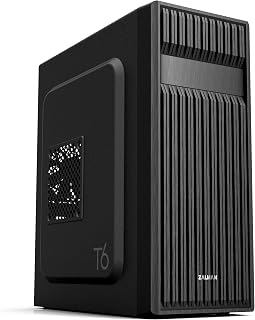
For builders working within a tight budget, this mid tower delivers broad compatibility by supporting ATX, Micro-ATX, and Mini-ITX motherboards, so it fits whatever platform you already own or plan to build around. The pre-installed 120mm fan keeps airflow moving without any extra spend, and the patterned mesh front aids passive ventilation. Seven expansion slots leave plenty of room for a GPU and additional cards as the build grows.
Pros
- Excellent motherboard compatibility across three form factors
- Pre-installed cooling fan eliminates immediate upgrade costs
- Sturdy steel construction with corrosion-resistant powder coating
- Multiple drive bays provide ample storage expansion options
- Affordable price point for feature-rich mid-tower case
Cons
- Limited cooling out of the box with only one pre-installed fan
- Not compatible with ATX motherboards featuring side-facing SATA ports
- No reviews available to verify real-world performance and durability
The Zalman T6 is a mid-tower PC case designed for builders seeking affordability and versatility. It accommodates ATX, Micro-ATX, and Mini-ITX motherboards, making it ideal for gaming rigs, workstations, and office builds across various budget ranges.
The case shines with its optimized cooling design. The distinctive hairline pattern mesh front and side panels promote excellent airflow, while the pre-installed 120mm rear fan gets you started immediately. The internal layout supports up to four total fans, allowing you to scale cooling performance as your needs evolve.
Build quality is solid for the price point. The powder-coated steel chassis delivers durability and corrosion resistance, while the acrylic side panel provides visibility of your components. With four internal drive bays and an external 5.25-inch bay, storage expansion is straightforward. The front I/O panel includes one USB 3.0 port and two USB 2.0 ports for device connectivity.
The main limitation is compatibility with certain ATX motherboards that feature side-facing SATA ports, so verify your motherboard layout before purchasing. Additionally, the single pre-installed fan means you may want to add extra fans for optimal cooling, which increases total cost.
The Zalman T6 delivers exceptional value for budget-conscious builders. It combines practical design, adequate cooling foundation, and genuine flexibility for around fifty dollars, making it a smart entry point for new builders or compact workstation upgrades.
Motherboard Support: ATX, Micro-ATX, Mini-ITX
Cooling: Air cooled with pre-installed 120mm rear fan, supports up to 4 fans total
Storage Bays: 4 internal bays (2x 2.5-inch, 2x 3.5/2.5-inch), 1 external 5.25-inch bay
Connectivity: 1x USB 3.0, 2x USB 2.0, 1x audio in/out
Expansion Slots: 7 total slots
Dimensions: 14.84-inch depth x 7.87-inch width x 16.92-inch height
Weight: 8 pounds
Materials: Alloy steel, metal, plastic with acrylic side panel
Warranty: 1 year manufacturer warranty

Pros
- Excellent value at under $50 with genuine mid-tower capacity and expandability
- Outstanding airflow design keeps systems cool and dust-free with cleanable mesh filters
- Simple tool-free assembly speeds up first-time builds and component upgrades
- Solid build quality with SECC steel construction and sturdy elevated feet for stability
Cons
- Single pre-installed fan may require additional purchases for optimal cooling in high-performance builds
- Modest I/O options with only one USB 3.0 port limits connectivity for external devices
The Thermaltake Versa H21 is an ATX mid-tower case designed for PC builders who want reliable performance without premium pricing. Its target audience includes entry-level gamers, budget-conscious enthusiasts, and anyone building a productivity workstation who values straightforward assembly and effective cooling over cutting-edge features.
The standout feature is its mesh-heavy ventilation design. The perforated front and top panels combined with elevated feet create a natural convection path that keeps components cool and minimizes dust accumulation. The tool-free installation system with pre-mounted holes dramatically simplifies first builds. Front-panel USB 3.0 and HD audio provide convenient access for peripherals and headsets, a practical touch often overlooked in cases at this price.
Build quality is respectable for the price range. The SECC steel chassis feels solid, and the case supports high-end components including graphics cards up to 315mm and tower coolers up to 155mm. Cable management paths are thoughtfully included, and the support for liquid cooling adds versatility for users considering custom loops later.
The main limitation is that only a single 120mm rear fan comes installed. While the airflow design is efficient, users with high-performance hardware may need to invest in additional fans, adding to the total cost. Additionally, the I/O connectivity is basic with just one USB 3.0 and one USB 2.0 port, which may feel limiting for users with many external devices.
Verdict: The Versa H21 delivers genuine value as an entry-point case with proven reliability. Its excellent airflow characteristics and tool-free design make it ideal for first-time builders, while the expandability ensures it won't feel cramped as systems evolve. Highly recommended for the price point.
Form Factor: ATX Mid Tower
Motherboard Support: ATX, Micro ATX, Mini ITX
Dimensions: 16.9in (H) x 8.2in (W) x 18.9in (D)
Weight: 9.3 lbs
Material: SECC Steel with Mesh Panels
Cooling Capacity: Front (2x 120mm fans), Rear (1x 120mm fan), Radiator support (1x 120mm rear)
GPU Clearance: Up to 315mm
CPU Cooler Height: Up to 155mm
Storage Bays: 3x 5.25in, 3x 3.5in or 2.5in, 3x 2.5in
I/O Ports: 1x USB 3.0, 1x USB 2.0, 1x HD Audio
Expansion Slots: 7 total
Pre-installed Fans: 1x 120mm rear fan
Warranty: 3 years
Who Should Buy: First-time PC builders seeking a no-frills case with strong thermal performance, budget builders wanting value over aesthetics, and gamers building mid-range systems. The tool-free installation makes it beginner-friendly, while the expandability appeals to users who may upgrade later.
Who Should Skip: Users prioritizing RGB lighting and tempered glass panels, enthusiasts planning extreme cooling solutions, or anyone needing extensive front-panel I/O with multiple USB ports. High-end minimalist builders may find the design too utilitarian.
Setup Tips: Consider adding 1-2 front intake fans for optimal cooling in hot environments. Use the pre-routed cable management paths to keep the build clean. Test fitment of your GPU and cooler against the clearance specs before purchasing components.

The Aqua UNO delivers clean aesthetics without sacrificing airflow, thanks to three pre-installed 120mm ARGB fans that keep components cool in a compact footprint. Its quick-release panoramic tempered glass panels make system access effortless for upgrades or maintenance. The 309mm GPU clearance accommodates most mid-range graphics cards, while the Type-C 5Gbps front port ensures modern connectivity for budget-conscious builders who want a polished build.
Pros
- Exceptional value for the price with pre-installed fans and quality tempered glass
- Compact footprint (12.4x8.2x15.5 inches) fits tight desk spaces without sacrificing usability
- Intuitive build layout with dedicated cable paths simplifies first-time and experienced builds
- Flexible RGB control options: built-in hub or motherboard header compatibility
- Removable dust filters on multiple panels reduce maintenance and keep hardware protected
Cons
- Air cooling only design limits options for high-end enthusiasts wanting liquid coolers
- Compact design requires careful GPU installation due to bracket screw placement
- No additional fan mounting space above PSU shroud restricts future cooling upgrades
The Okinos Aqua UNO is a well-engineered Micro ATX case purpose-built for air-cooled gaming builds. It targets budget-conscious PC builders and first-time enthusiasts who prioritize simplicity, cleanliness, and style without the complexity of liquid cooling systems.
The case delivers real value through three pre-installed 120mm ARGB fans with a built-in RGB controller, eliminating separate purchases. It accommodates GPUs up to 309mm and air coolers to 165mm, covering most mainstream components. The tool-free quick-release tempered glass panels and intuitive cable routing with dedicated paths make assembly straightforward and component upgrades painless for future maintenance.
Build quality punches above its price point. The tempered glass panels feel solid and protective, while full-coverage dust filters on the top, side, and bottom keep components cleaner longer. Cable management space with 32mm front and 24mm rear clearance, plus included Velcro straps, supports organized, clean interior layouts that look as good as they perform.
The compact design does present some real-world assembly friction. The GPU installation process requires removing the bracket screw to access component screws, which some builders found counterintuitive. Additionally, the air-cooling-only design and limited fan mounting options mean this case won't accommodate radiators or serve as a platform for future cooling upgrades.
The Aqua UNO stands out as one of the best budget Micro ATX cases available. If you're building a compact, air-cooled system and value straightforward assembly with good cable management, this case delivers practical performance and style for the investment.
Form Factor: Micro ATX Mini-Tower
Dimensions: 12.4 inches (D) x 8.2 inches (W) x 15.5 inches (H)
Weight: 3.8 kg
Material: Tempered Glass with metal chassis
Cooling Compatibility: Air coolers up to 165mm height, no radiator support
GPU Clearance: Maximum 309mm length
Internal Bays: 2 bays for 3.5-inch drives
Pre-Installed Fans: 3x120mm ARGB fans
Connectivity: 1x USB Type-C 5Gbps, 1x USB 3.0, RGB LED control button
Dust Filters: Removable filters on top, side, and bottom panels
Cable Management: 32mm front clearance, 24mm rear clearance, included Velcro straps
Warranty: 1 Year Manufacturer
Buying Guide: What to Look for in a Budget PC Case
Airflow and Cooling Support
Airflow is arguably the most important factor in a PC case at any price point. A case with a mesh front panel or pre-installed fans moves air efficiently across your components, keeping thermals in check during long sessions. The best PC cases for RTX 5080 builds prioritize this, and budget cases should too.
Several options on this list, including the Okinos Aqua UNO Micro ATX Case and the MOROVOL MATX PC Case,270° Panoramic Tempered Glass, come with three 120mm fans already installed. That means you’re getting usable airflow right out of the box with no extra spend required.
Form Factor and Motherboard Compatibility
Before anything else, confirm that the case supports your motherboard’s form factor. Micro-ATX and Mini-ITX builds tend to be more compact and easier to fit on a desk, while full ATX mid-towers give you more expansion room. The Zalman T6 ATX Mid Tower Computer PC Case supports ATX, mATX, and Mini-ITX boards, which gives it serious versatility for a budget enclosure.
If you’re building something more compact, the Zalman CUBIX-G Micro-ATX MATX Compact Mini Tower is a space-saving option that still delivers on essentials like storage bays and front I/O connectivity.
GPU Clearance
Modern graphics cards keep getting longer, so GPU clearance matters even in budget builds. The Okinos Aqua UNO Micro ATX Case supports GPUs up to 309mm, which covers most mainstream cards. The Zalman CUBIX-G accommodates GPUs up to 280mm, which works for a wide range of mid-range options.
If you’re pairing your build with something more powerful, it’s worth cross-referencing your GPU’s length against the case specs before ordering. Our guide to the best PC cases for RTX 5090 builds goes deeper on clearance considerations for high-end cards.
Cable Management and Build Experience
A clean build isn’t just about looks. Good cable routing keeps airflow unobstructed and makes future upgrades much easier. The Okinos Aqua UNO stands out here with 32mm front clearance, 24mm rear clearance, and included Velcro straps for cable organization, which is a thoughtful touch at this price range.
The Thermaltake Versa H21 SPCC ATX Mid Tower Computer also supports advanced cable management alongside liquid cooling provisions, making it a capable foundation if your plans evolve down the road. For more complete build guidance, see our PC build guide for the RTX 5070 Ti.
Final Thoughts
The budget case market has come a long way, and you don’t have to sacrifice much to get a solid enclosure. For builders who want a visually striking compact build with strong out-of-the-box airflow, the Okinos Aqua UNO Micro ATX Case is a compelling choice with its quick-release tempered glass and pre-installed ARGB fans. If you need a more traditional mid-tower with broad compatibility and proven durability, the Thermaltake Versa H21 SPCC ATX Mid Tower Computer is a well-rated option that has earned its reputation across hundreds of builds.
Frequently Asked Questions
Are budget PC cases good enough for gaming builds?
Absolutely. Budget cases in 2026 offer solid airflow, tempered glass panels, and pre-installed fans that were premium features just a few years ago. As long as you verify GPU clearance and motherboard compatibility, a well-chosen budget case will serve a gaming build reliably. The MOROVOL and Okinos options on this list are both strong examples.
What motherboard sizes fit in these cases?
It depends on the specific case. Several options here, like the Zalman T6, support full ATX, mATX, and Mini-ITX motherboards. Others, like the Okinos Aqua UNO and MOROVOL, are designed specifically for Micro-ATX boards. Always check the case’s supported form factors before purchasing to avoid compatibility issues.
Do these cases support liquid cooling?
Some do and some don’t. The Thermaltake Versa H21 includes provisions for liquid cooling, making it a flexible long-term option. The Okinos Aqua UNO, by contrast, is designed exclusively for air cooling builds and does not support radiator installation. If liquid cooling is part of your plan now or later, check the specs carefully before committing. You can also browse our full PC cases category for options with radiator support across a range of budgets.
How important is front I/O on a budget case?
More important than people realize. A front USB Type-C port, for example, saves you from routing cables around the back every time you connect a device. The Okinos Aqua UNO includes a USB Type-C 5Gbps port and USB 3.0, which is genuinely useful for daily use. Even the more traditional Zalman T6 includes USB 3.0 and dual USB 2.0 ports, so you have options at every end of the budget range.





Write Your Review
No reviews yet. Be the first to share your experience!