

Building a PC is exciting until you realize your new case shipped without a single fan and you’re staring at a pile of loose components. A case that comes with quality fans pre-installed cuts down on guesswork, extra purchases, and cable chaos from the start. Whether you’re assembling a budget gaming rig, a content creation workstation, or a high-end showcase build, the right case sets the tone for airflow, aesthetics, and long-term reliability. If you’re planning a serious build around a next-gen GPU, our best PC build for RTX 5070 ti pairs well with the cases reviewed here.
We evaluated ten of the most popular PC cases with fans available right now, weighing airflow performance, fan quality, build compatibility, and overall value. This list covers mid-tower and full-tower options, ARGB showpieces and no-frills workhorse cases, so every type of builder will find something useful here.
Quick Comparison
Ratings reflect the most recent data pull. Check each listing for current price and availability.
Quick answer
This guide compares 10 picks, with Lian Li V100 ATX Mid-Tower PC Case with 4 ARGB Fans ranked first. CORSAIR RS120 ARGB 120mm PWM Triple Pack Fans - Quiet has the most customer reviews.

Builders who want airflow and aesthetics without extra purchases will appreciate this ATX mid-tower. It arrives with fans already built in alongside RGB lighting and a dust filter, covering three common upgrade targets in a single box. Supporting four internal bays gives growing builds room to expand storage, and the bottom-mount PSU keeps cable runs clean and heat management predictable for a well-rounded 2026 build.
Pros
- Four ARGB fans and an LED strip included, no extra cooling purchases needed at build time
- Supports up to nine 120mm fans and 360mm radiators for serious thermal scaling
- Accommodates GPUs up to 420mm and CPU coolers up to 178mm
- Tool-less side panels and rear cable routing make for clean, accessible builds
Cons
- Large glass panels provide little sound dampening compared to insulated alternatives
- Open panoramic design requires frequent dusting to maintain appearance
The Lian Li V100 arrives ready to cool from day one, with four pre-installed ARGB fans and an integrated LED strip already in place. That out-of-the-box fan setup is a genuine advantage in a roundup focused on cases that come with fans included. Beyond the bundled cooling, the chassis supports up to nine 120mm fans and 360mm radiators, so there is room to scale if your build demands more airflow down the line. GPU clearance reaches 420mm and CPU cooler height tops out at 178mm, covering virtually any modern component pairing. The PWM fans use hydraulic bearings, which keeps noise levels reasonable during everyday workloads. Tempered glass panels on the panoramic design give full visibility into the build, and the stainless steel and plastic construction holds up well. Tool-less side panels simplify access, and rear cable routing with a dedicated PSU compartment keeps the interior tidy. For a mid-tower that ships with fans already installed and leaves room to expand cooling capacity significantly, the V100 is a well-rounded pick for this list.
Form Factor: Mid-Tower ATX
Motherboard Support: ATX, Micro-ATX, Mini-ITX
GPU Clearance: Up to 420mm
CPU Cooler Height: Up to 178mm
Radiator Support: Top radiator up to 360mm
Fan Configuration: Supports up to nine 120mm fans
Pre-Installed Fans: 4x 120mm PWM ARGB fans
Fan Speed: 1800 RPM max
Airflow: 61.47-60.4 CFM
Air Pressure: 2.54-2.17 mm-H2O
Noise Level: 26.5-30.8 dBA
Bearing Type: Hydraulic
Lighting: Integrated 26-LED ARGB strip with full spectrum color control and daisy-chain connectivity
Materials: Tempered Glass, Stainless Steel, Plastic
Internal Bays: 4
Dust Filters: Yes
Weight: 8200g
Warranty: 1 Year

Noise-conscious builders looking to fill multiple fan headers will appreciate this five-pack running at just 25.6 dB, one of the quieter measurements in this roundup. The 4-pin PWM connector gives motherboards precise speed control, and S-FDB bearing construction supports longevity. At up to 1550 RPM the fans move meaningful air without generating the hum that plagues louder alternatives, making them a strong pick for a quiet 2026 workstation or bedroom build.
Pros
- Exceptional value with five quality fans in one package
- S-FDB bearing technology delivers quiet operation with minimal vibration
- Automatic PWM temperature control optimizes cooling efficiency
- ARGB lighting integrates seamlessly with modern case builds
- Strong airflow performance relative to noise output
Cons
- ARGB synchronization requires compatible motherboard header
- Maximum 1550RPM may not match premium single-fan coolers in extreme overclocking
- Plastic construction feels less premium than higher-end alternatives
The Thermalright TL-C12C-S 5-pack is designed for PC builders and enthusiasts seeking reliable case cooling without breaking the bank. Each 120mm fan features a 4-pin PWM connector that lets your motherboard automatically adjust speed based on system temperature, making these fans equally at home in budget builds, gaming rigs, or quiet workstations.
Performance-wise, these fans deliver 66.17 CFM of airflow while maintaining whisper-quiet operation under 25.6dB, thanks to the S-FDB bearing technology that Thermalright engineered to minimize vibration and blade shaking. The 1550RPM maximum speed provides solid cooling capacity for standard cases and radiator configurations, balancing airflow with noise levels that won't distract during gaming or work sessions.
The ARGB LED system adds visual polish to modern builds, offering 17 lighting modes that sync with compatible motherboard headers. The frosted LED blade design diffuses light effectively, creating a softer glow that complements RGB-coordinated components and cases without looking harsh or garish.
The main limitation is that extreme overclockers might find 1550RPM slightly conservative compared to aftermarket coolers pushing higher speeds. Additionally, the plastic construction and rubber dampeners, while functional, lack the premium feel of specialty coolers costing significantly more per unit.
Verdict: These are excellent workhorse fans that deliver reliable, quiet cooling at an unbeatable per-unit price. The 5-pack format makes them perfect for filling multiple case spots or replacing stock fans across multiple systems. Recommended for mainstream users and value-conscious builders.
Physical Dimensions: 120 x 120 x 25mm per unit, 5 units included
Electrical Specs: 12V DC, 2.4W power consumption, 4-pin PWM connector, 0.20A current draw, 55cm cable length
Performance: Maximum 1550RPM (plus or minus 10%), 66.17 CFM airflow, 1.53mm H2O air pressure, noise level 25.6dB or less
Build Quality: Plastic frame with rubber dampeners, S-FDB bearing system, ARGB LED with 17 modes, frosted blade design for light diffusion
Compatibility: Any desktop PC with 4-pin PWM motherboard header or ARGB controller, suitable for case mounting and CPU cooler/radiator applications
Who Should Buy: Budget-conscious builders, system integrators managing multiple PCs, anyone replacing aging stock fans, and gamers seeking quiet case airflow without premium pricing.
Best Use Cases: Mid-tower and full-tower cases requiring intake or exhaust fans, pairing with all-in-one liquid coolers or air coolers, RGB-synchronized gaming builds, workstations prioritizing quiet operation.
Setup Considerations: Verify your motherboard has available 4-pin PWM headers or a compatible ARGB hub. The 55cm cables reach most standard motherboard connectors in typical cases. Mount fans as case intakes for positive pressure or exhausts for negative pressure depending on your cooling strategy.
Maintenance: S-FDB bearings require minimal maintenance but benefit from occasional dust filter cleaning. Quality bearing design means these fans should remain quiet and reliable for years under normal operation.
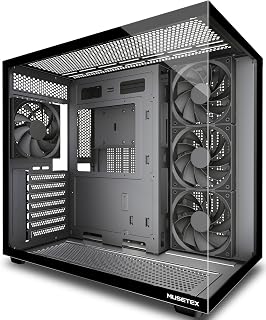
For builders who prioritize clean, practical airflow over RGB flair, the four pre-installed non-LED fans deliver immediate cooling without any lighting clutter. The 270-degree full-view tempered glass wraps the build in visibility while the dust filter keeps intake air clean over time. Hybrid air and water cooling support, a front-panel Type-C port, and broad motherboard compatibility make this a sensible all-rounder for a no-nonsense 2026 mid-tower setup.
Pros
- Four 120mm fans pre-installed, covering front intake and rear exhaust from day one
- Supports up to nine fans total and 360mm radiators for serious cooling flexibility
- Dual-chamber layout isolates PSU airflow from the main cooling zone
- Magnetic dust filters top and bottom help preserve long-term fan performance
Cons
- Large footprint at 16.73 inches deep and 13-plus pounds demands dedicated, sturdy placement
- Some Micro-ATX builds have encountered missing motherboard standoff holes, pointing to occasional quality control gaps
When the article title calls out cases with fans, the MUSETEX Y6 earns its spot immediately: it ships with four 120mm fans already mounted, covering three front intake positions and one rear exhaust without any extra shopping required. That ready-to-run airflow setup is backed by serious headroom for upgrades, with support for up to nine total fans and radiators as large as 360mm, so both air-cooled and liquid-cooled builds are covered. The dual-chamber design tucks the PSU into its own ventilated zone, keeping the main compartment focused on CPU and GPU thermals. Clearance numbers are generous across the board: graphics cards up to 410mm, CPU coolers up to 160mm. Magnetic dust filters on the top and bottom panels protect the fan array from debris buildup over time. The 270-degree tempered glass wraps around two sides, so all that airflow hardware is on full display. Velcro ties and three screw varieties are included, which smooths out cable management around the fan wiring.
Case Type: Mid Tower ATX
Motherboard Support: ATX, Micro-ATX, Mini-ITX
Cooling Capacity: CPU cooler up to 160mm, GPU up to 410mm, Radiator up to 360mm, PSU up to 230mm
Pre-Installed Fans: 4x 120mm (3 reverse on side, 1 forward on rear, non-LED)
I/O Ports: 1x USB 3.0, 1x USB 2.0, 1x Type-C, Audio, Microphone
Materials: Metal, Plastic, Tempered Glass
Dimensions: 16.73"D x 10.83"W x 15.67"H
Weight: 13.1 lbs
Color: Black Matte
Warranty: 10 Years
Builders who want a fan-equipped case straight out of the box will appreciate skipping the separate fan purchase. It suits mid to high-end ATX, Micro-ATX, and Mini-ITX builds where both air and liquid cooling options matter. Skip it if desk space is tight, since the case runs deep at 16.73 inches and weighs over 13 pounds. First-time builders should also note that Micro-ATX motherboard standoff placement has shown inconsistencies in some units.

High-end and workstation builders who need room for Extended ATX motherboards and expansive component arrays will find this full-tower a natural fit. Six pre-installed PWM fans running at 140mm provide substantial baseline airflow across a large chassis, and eight expansion slots accommodate multi-GPU or heavy PCIe card configurations. The iShift 90-degree PSU mount is a thoughtful touch that improves cable routing and air circulation in a build of this scale.
Pros
- Six 140mm PWM fans included, expandable to 12 total via multi-directional vent design
- Built-in dual temperature display shows CPU and GPU readings without extra software
- iShift 90-degree PSU mount improves cable management over standard layouts
- Ten internal bays and eight expansion slots suit complex, high-component-count builds
Cons
- 29-pound weight and full-tower footprint require dedicated, permanent placement
- E-ATX sizing is overkill for standard ATX or smaller motherboard builds
The Antec Flux Pro brings six pre-installed PWM fans to a full-tower E-ATX chassis, and that combination sets it apart from most entries on this list. Where mid-towers cap out at smaller fan totals, the Flux Pro's multi-directional vent design accommodates up to 12 fans simultaneously, giving builders a clear path to a heavily cooled system without sourcing hardware from multiple vendors. The six included fans are 140mm units split between Tranquil and P12R PWM models, offering a balance of airflow and acoustics from the start. The 90-degree iShift PSU mount is a practical engineering choice that improves cable routing and keeps the interior cleaner than a standard bottom mount would. A built-in dual temperature display surfaces CPU and GPU readings without requiring additional software or a separate monitor widget. Ten internal bays support extensive storage arrays, and eight expansion slots open the door to multi-GPU or high-expansion-card configurations. At 21.45 inches tall with a full E-ATX footprint, this case is built for workstation-class or enthusiast builds where thermal headroom matters most.
This case excels in thermal management with support for up to 12 fans across multiple configurations. The 6 pre-installed Tranquil and P12R PWM fans provide excellent baseline cooling and can be daisy-chained for synchronized operation.
The dual radiator support (420mm front plus 360mm top) enables advanced liquid cooling loops for high-end CPUs and GPUs. Multi-directional venting ensures hot air escapes efficiently while cool air is drawn in strategically, maximizing cooling effectiveness across all system components.
The Flux Pro is built for E-ATX workstation builders, serious enthusiasts running multi-GPU setups, and anyone who wants a fan-ready full tower with room to expand cooling to 12 fans total. The built-in temperature display is a bonus for performance-focused builders. Skip it if desk or floor space is limited, as the full-tower footprint and 29-pound weight demand a dedicated, permanent spot.

Anyone assembling a budget-friendly PC case setup who needs to populate multiple fan mounts without breaking the bank will find this three-pack practical. Each 120mm fan draws just 1.2 watts, so adding all three barely nudges your PSU load. The 3-pin connector is universally compatible across older and newer boards, making this a low-friction way to push steady airflow through any mid-tower chassis.
Pros
- Exceptionally quiet for the price, maintaining comfortable noise levels even at full speed
- Excellent value as a 3-pack bundle covering multiple case intake or exhaust positions
- High-quality hydraulic bearings ensure longevity and minimal bearing noise
- Low power consumption at 1.2 watts per fan keeps energy bills minimal
- Simple 3-pin connector works with standard motherboard headers
Cons
- Limited real-world reviews available to validate long-term reliability claims
- 47.8 CFM airflow is moderate, better suited for silent operation than extreme cooling demands
- Budget construction materials may not match premium fan aesthetics in high-end builds
The DARKROCK 3-Pack 120mm fans are designed for PC builders and enthusiasts who want reliable case cooling without excessive noise. This bundle provides three matched fans ideal for setting up intake and exhaust configurations in mid-tower and full-tower cases. The 1200 RPM specification and 47.8 CFM airflow make these fans suitable for moderate cooling needs in systems with mainstream components.
The standout feature is the noise control engineering. At just 32.1 dBA maximum, these fans remain nearly silent even under load thanks to four soft silicone cushion mounts that absorb vibration and high-quality hydraulic bearings that eliminate grinding sounds. The nine-blade design helps distribute air more gradually, further reducing turbulence noise. For office environments or bedroom setups, this noise performance is genuinely impressive for the price point.
Build quality reflects the budget positioning. The PBT plastic material provides good heat resistance and durability, while the hydraulic bearing system is a genuine upgrade over sleeve bearings found in cheaper fans. Each fan is rated for 30,000 hours of operation, translating to years of reliable service under normal usage patterns. The simple 3-pin motherboard connector integrates seamlessly with any standard PC.
The main limitation is moderate airflow capacity. These fans excel at silent operation rather than aggressive cooling, making them better for quiet systems or secondary exhaust positions than for high-performance gaming rigs with power-hungry GPUs. Buyers seeking maximum cooling performance should look toward higher-CFM alternatives.
Overall, the DARKROCK 3-Pack represents excellent value for anyone building a quiet, efficient PC or replacing aging case fans. The noise control is genuinely effective, the bundle pricing is attractive, and the engineering quality suggests these fans will last. Recommended for silent builds, office computers, and mainstream gaming setups where cooling performance requirements are moderate.
Dimensions: 120mm x 120mm x 25.4mm (4.72" x 4.72" x 0.98")
Electrical: 3-pin connector, 12V DC, 1.2W per fan
Performance: Maximum 1200 RPM, 47.8 CFM airflow, 32.1 dB noise level
Bearing Type: Hydraulic design rated for 30,000-hour lifespan
Material: PBT plastic construction, 9-blade design
Included: 3 fans per pack, standard mounting hardware
Warranty: 5-year after-sales service

Builders integrating a radiator into their loop will value the daisy-chain connection on these 120mm fans, which significantly cuts cable clutter when mounting multiple units to a single rad. The magnetic dome bearing is engineered for longevity under continuous operation, and the ARGB lighting at 5V ties neatly into addressable headers on modern boards. At 2 watts per fan the power draw stays minimal even when the full triple pack runs simultaneously.
Pros
- Exceptional quiet performance without sacrificing cooling efficiency or airflow capacity
- Daisy-chaining eliminates cable clutter and simplifies RGB control setup
- Strong static pressure rating makes these versatile for radiators and case mounting
- Vibrant, customizable RGB lighting enhances PC aesthetics with broad software compatibility
- Durable construction with 5-year warranty backs long-term reliability
Cons
- Daisy-chain cable management can be confusing during initial installation despite being simpler long-term
- Requires compatible ARGB motherboard header for full RGB functionality and customization
- RGB features may be unnecessary for users prioritizing performance over aesthetics
The CORSAIR RS120 ARGB triple pack targets PC builders and enthusiasts who value both performance and aesthetics without breaking the bank. This set provides immediate cooling coverage for mid-range and high-performance builds, making it ideal for new systems or upgrades from aging fan solutions.
Performance-wise, these fans punch above their price point. The 72.8 CFM airflow combined with 2.8mm-H2O static pressure handles radiator duty effectively while remaining whisper-quiet at 36dB. Users report excellent thermal management even during intensive gaming and heavy workloads, with the magnetic dome bearings contributing meaningfully to the silent operation.
Design quality reflects CORSAIR's reputation for refinement. The AirGuide technology with anti-vortex vanes concentrates airflow precisely, while the eight LEDs per fan deliver bright, evenly distributed RGB lighting. The daisy-chain connector system, though initially confusing to install, ultimately keeps your case looking clean and organized once cables are properly routed.
The main drawback involves the installation learning curve, particularly understanding which cable connects where in the daisy-chain sequence. Additionally, full RGB customization requires a compatible motherboard header, limiting functionality on older systems. Some users may find the RGB features unnecessary if cooling performance is the sole priority.
Overall, the RS120 ARGB triple pack represents exceptional value for builders seeking quiet, reliable cooling with visual flair. The combination of strong thermal performance, low noise levels, flexible mounting options, and simplified cable management makes these fans a smart investment for most modern PC builds.
Cooling Specifications: Maximum speed 2,100 RPM, airflow capacity 72.8 CFM, static pressure 2.8mm-H2O, noise level 36dB, bearing type magnetic dome
Connectivity: 4-pin PWM power connector, 5V ARGB daisy-chain header, compatible with standard motherboard RGB control
Physical: 120mm size, copper material construction, weight 1.2 pounds for triple pack, model CO-9050181-WW
Package Contents: Three fans with mounting hardware, daisy-chain ARGB cables, 5-year manufacturer warranty included
Best For: PC builders upgrading case fans, custom liquid cooling loop builders, enthusiasts prioritizing quiet operation without performance compromise, builds inside tempered glass cases where RGB visibility matters
Consider These Fans If: You need reliable performance with minimal noise, you want hassle-free RGB without a separate controller, you appreciate cable management simplicity, your motherboard supports 5V ARGB headers, you're building or expanding a mid-range to high-performance system
Compatibility Check: Verify your motherboard has 4-pin PWM and 5V ARGB headers. Standard ATX, micro-ATX, and mini-ITX boards typically support these connectors. Most modern RGB software from CORSAIR, ASUS, MSI, and others recognizes these fans without additional drivers
Installation Tip: Take time during setup to label daisy-chain connectors before connecting them, preventing confusion and potential connection errors that could prevent RGB functionality

Seven pre-installed PWM ARGB fans is a standout spec for anyone who wants a show-ready, well-cooled build straight out of the box. The dual tempered glass panels let that lighting breathe visually, while hybrid air and water cooling support means the case grows with your thermal ambitions. The front-panel Type-C port and compatibility with ATX, Micro-ATX, and Mini-ITX boards keep it flexible for a wide range of 2026 system configurations.
Pros
- Seven PWM ARGB fans pre-installed, among the highest counts in this mid-tower class
- 270-degree dual tempered glass provides exceptional component visibility
- USB Type-C front port alongside dual USB 3.0 covers modern connectivity needs
- Supports 360mm radiators and GPUs up to 400mm for high-performance builds
Cons
- RGB customization requires motherboard header support, no standalone controller included
- Fan noise increases noticeably at higher speed settings
Seven pre-installed PWM ARGB fans is one of the highest out-of-the-box fan counts you will find in a mid-tower, which makes the MUSETEX K2 a natural fit for a roundup built around cases that come with fans included. All seven fans are controllable through motherboard software, and they support 360mm radiator configurations if you want to pair that airflow with a liquid cooler later. The 270-degree dual tempered glass panels wrap around more of the chassis than a single side panel does, putting every fan and component on full display. GPU clearance reaches 400mm and CPU cooler height goes to 165mm, so current high-end hardware fits without compromise. Front I/O includes USB Type-C alongside dual USB 3.0 ports, a combination that many similarly priced cases still skip. Eight internal bays handle storage needs for most builds, and dust filters across the case help maintain airflow quality over time. The metal frame with plastic accents and tempered glass feels solid, and the partitioned interior gives dedicated space for cable routing. A 10-year warranty adds long-term confidence.
Case Dimensions: 16.73 inches (D) x 8.35 inches (W) x 18.5 inches (H), weighing 15 pounds
Motherboard Support: ATX, Micro-ATX, Mini-ITX
Cooling: 7 pre-installed 120x120x25mm PWM ARGB fans (600-1300 RPM, 24.72 CFM max airflow, 20.8dB noise level). Expandable to 10 total fans.
Component Compatibility: GPU up to 400mm (15.7 inches), CPU cooler up to 165mm (6.5 inches), top-mounted liquid cooler up to 360mm (14.2 inches), PSU up to 140-180mm with or without hard drive cage
Front Panel I/O: 1x USB Type-C, 2x USB 3.0, microphone and audio jacks, power and restart buttons
Storage: 8 internal bays supporting 3.5-inch hard drives
Materials: Metal frame, plastic accents, tempered glass front and side panels
Additional Features: Dust filters, RGB lighting with motherboard control, bottom-mounted power supply
Warranty: 10-year manufacturer warranty
The K2 is a strong pick for gamers and enthusiasts who want maximum fan coverage from the moment the build is complete, without sourcing fans separately. The Type-C front port appeals to anyone with modern peripherals. Skip it if your motherboard lacks RGB headers for fan control, since the ARGB system depends on motherboard software, or if you run many hard drives, as bay count is limited.

Compact build enthusiasts who do not want to sacrifice cooling will find this Micro-ATX mini-tower compelling. The three included 120mm ARGB fans handle baseline airflow immediately, and radiator support up to 280mm means a liquid cooler upgrade is on the table when thermals demand it. Front and side tempered glass panels showcase the interior, and the three-year warranty adds long-term confidence to a smaller-footprint 2026 case choice.
Pros
- Stunning dual tempered glass design that looks premium at its price point
- Excellent airflow and thermal performance in a micro-ATX form factor
- Generous internal space for cable management and component flexibility
- Three ARGB fans included save buyers money and look great out of the box
- Supports both air and liquid cooling with multiple radiator mounting options
Cons
- No built-in RGB controller, requires compatible motherboard header or separate purchase
- Micro-ATX motherboards may require cable routing planning before installation
- Compact design can limit motherboard selection to slimmer micro-ATX options for optimal aesthetics
The Thermaltake View 170 TG ARGB is a micro-ATX case designed for builders seeking compact form factor without compromising on visual appeal or performance. This case is perfect for desk builds, space-constrained setups, and enthusiasts who want a showcase PC that doesn't consume a room.
The standout feature is the dual tempered glass design on the front and left side, providing visibility into your build from multiple angles. The three included 120mm ARGB fans are a significant value add, operating quietly at 22.3 dBA while supporting control through ASUS, Gigabyte, MSI, and ASRock motherboard software. Builders report exceptional airflow and successful installation of 240mm and 280mm liquid coolers, making it viable for both air and water cooling enthusiasts.
Build quality feels solid throughout, with metal construction and precision-engineered internal layouts. Cable management is surprisingly spacious for the compact exterior, with multiple routing paths that allow for clean builds. The 340mm GPU clearance accommodates modern graphics cards, and the flexible mounting options support up to seven 120mm fans total if needed.
The main consideration is RGB control, which requires a compatible motherboard header since no controller is built into the case. Additionally, optimal aesthetics are achieved with slimmer micro-ATX boards, though full-sized micro-ATX boards do fit. Some builders recommend pre-routing cables before motherboard installation due to the compact nature.
At this price point, the View 170 TG ARGB delivers exceptional value for space-conscious builders who prioritize aesthetics, thermal performance, and build quality. The included fans, dual glass panels, and flexible cooling support make it a standout choice in the micro-ATX market.
Case Type: Micro-ATX Mini Tower
Dimensions: 438 x 212 x 377.5mm (17.24 x 8.35 x 14.86 inches)
Weight: 6.35kg / 14 lbs
Motherboard Support: Micro-ATX (up to 9.6x9.6 inches) and Mini-ITX (up to 6.7x6.7 inches)
Cooling: Includes 3x 120mm ARGB Lite Fans (1000 RPM, 22.3 dBA)
Radiator Support: Top mount up to 280mm/240mm, rear mount 120mm
Fan Expansion: Up to 7x 120mm fans total
Storage: 1x 3.5 inch HDD bay, 2x 2.5 inch SSD bays
GPU Clearance: Up to 340mm length
CPU Cooler Clearance: Up to 160mm height
PSU Clearance: Up to 180mm length
Power Supply: Standard PS2 mounting (bottom mounted)
Expansion Slots: 4 total
I/O Ports: 2x USB 3.0, 1x HD Audio
Warranty: 3-year manufacturer warranty

Pros
- Excellent out-of-the-box value with 7 quality fans included, eliminating immediate upgrade costs
- Roomy interior layout with zero installation obstacles makes first-time builds manageable
- Premium build quality with dual tempered glass panels and solid cable management design
- Powerful cooling options support both high-end air coolers (up to 170mm) and dual 360mm radiators
- Modern connectivity includes USB 3.0, USB 2.0, and Type-C 3.0 ports on the front panel
Cons
- Multiple daisy-chained fans require careful cable routing, and first-time builders may find the setup confusing
- Front USB 3.0 port stability issues reported by some users with capture cards and external drives
- Larger footprint (16.5 x 11.2 x 17.3 inches) may not fit compact desk setups or smaller spaces
The HYXN H1 is a mid-tower ATX case designed for gamers and PC enthusiasts who want a premium look without premium pricing. Its dual-chamber design with panoramic 270-degree tempered glass creates an impressive visual showcase for high-end components, while the spacious interior accommodates everything from budget builds to custom water-cooled systems.
What truly sets the H1 apart is its aggressive cooling foundation. Seven pre-installed ARGB PWM fans arrive ready to go, eliminating the need to purchase additional cooling hardware immediately. The case supports up to two 360mm radiators simultaneously, plus air coolers up to 170mm tall, making it exceptionally versatile for different thermal strategies. The vertical airflow design channels cool air from bottom and side intakes through top and rear exhausts, creating efficient cooling performance that extends component lifespan.
Build quality stands out across the board. The dual tempered glass panels are thick and scratch-resistant, the cable management is thoughtfully laid out with multiple routing options, and the overall construction feels premium for the price point. The inclusion of Type-C 3.0 connectivity on the front panel is a modern touch that many competitors still overlook. Dust filters on top and bottom keep the system running clean without constant maintenance.
The main drawback involves the daisy-chained fan wiring, which can overwhelm inexperienced builders despite HYXN's claim of simplified installation. Additionally, some users report intermittent USB 3.0 port issues when connecting certain peripherals, though this appears to be an edge case rather than a widespread problem. The case's generous dimensions also mean it requires substantial desk space.
The HYXN H1 delivers exceptional cooling capability, striking aesthetics, and solid build quality at a competitive price. It is the ideal choice for enthusiasts building custom systems who prioritize airflow and aesthetics without compromising on features or flexibility.
Physical Dimensions: 16.5 inches deep x 11.2 inches wide x 17.3 inches tall. Item weight: 11 pounds. Material composition includes metal frame, plastic components, and dual tempered glass panels.
Motherboard Compatibility: Supports ATX, Micro-ATX, and Mini-ITX motherboards. GPU compatibility extends to cards up to 400mm (15.75 inches) in length. Power supply mounting accommodates units up to 200mm (7.87 inches).
Cooling Support: Supports liquid radiators in 360mm, 280mm, 240mm, and 120mm sizes. Accommodates up to two 360mm radiators simultaneously. Maximum CPU air cooler height: 170mm. Pre-installed fans: 3x120mm reverse blade fans at bottom, 3x120mm reverse blade fans on side, 1x120mm forward blade fan at rear. All fans feature ARGB LED with PWM control.
Storage and Connectivity: Internal capacity includes 1x HDD mount and 2-3x SSD mounts. Seven expansion slots for additional cards. Front panel ports: 1x Type-C 3.0, 1x USB 3.0, 1x USB 2.0, plus microphone and audio jacks.
Ideal For: Gamers planning RGB-heavy custom builds, enthusiasts considering water cooling upgrades, first-time builders with sufficient budget who want minimal additional purchases, and anyone prioritizing cooling performance with aesthetic appeal.
Consider Alternatives If: You need a compact mini-ITX case for small form factor builds, prefer cases without pre-installed fans to choose your own brands, or require a budget option without RGB lighting and excessive cooling capacity.
Pro Tip: Although the case includes 7 fans, many experienced builders recommend purchasing a dedicated fan hub controller to simplify cable management and RGB synchronization across all fans, rather than relying solely on motherboard headers and daisy-chain wiring.

Pros
- Exceptional value at $39.99 with four ARGB fans included
- Outstanding cooling potential with support for six fans plus multiple radiator options
- Flexible motherboard compatibility accommodates virtually any modern build
- Panoramic tempered glass and mesh front panel create an attractive gaming aesthetic
- Generous internal bay configuration supports 2x 3.5-inch or 1x 2.5-inch plus 1x 3.5-inch drives
Cons
- Limited cable management documentation for first-time builders despite straightforward design
- White finish may require more frequent cleaning to maintain pristine appearance
- Stock ARGB fans may require LED controller purchasing if motherboard lacks RGB headers
The GAMDIAS AURA GC2 Elite is a mid-tower ATX case designed for budget-conscious gamers and PC builders seeking a stylish chassis with proven cooling capabilities. It delivers exceptional value for enthusiasts building their first gaming rig or upgrading an existing system, offering premium features typically found in cases costing significantly more.
The standout feature is the complete ARGB fan setup included in the box. Four preinstalled 120mm ARGB fans provide immediate RGB visual appeal and solid baseline cooling performance. The expansive tempered glass side panel and mesh front design work together to showcase these fans while promoting excellent airflow, and the case supports expansion up to six total fans plus 360mm AIO coolers for serious cooling requirements. Real-world performance shows reliable thermals for standard gaming loads and moderate overclocking.
Build quality reflects its price point with ABS plastic, metal, and tempered glass construction that feels sturdy without premium touches. The tool-free tempered glass installation is genuinely convenient, and the mesh front panel resists dust accumulation better than solid designs. The case measures 17.71 inches tall with ample internal space supporting ATX, Micro-ATX, and Mini-ITX motherboards, making it versatile for different upgrade paths.
The main drawback is the white finish requires regular cleaning to maintain its aesthetic appeal, and first-time builders should verify motherboard RGB header compatibility before installation. Cable management space exists but documentation could be clearer for newcomers. Despite these minor concerns, the case delivers on its promise of affordable RGB aesthetics and expandable cooling potential.
Verdict: The GAMDIAS AURA GC2 Elite offers compelling value and proven performance for budget-minded gamers. With four ARGB fans included and support for extensive cooling upgrades, it provides a solid foundation for entry-level and mid-range gaming builds. Recommended for builders prioritizing cooling capability, RGB style, and long-term expandability over premium materials.
Dimensions and Weight: 17.71 inches height x 7.67 inches width x 15.55 inches depth. Weight: 4900 grams (10.8 lbs).
Motherboard Support: ATX, Micro-ATX, Mini-ITX. Expansion slots: 7 PCI-e slots for full motherboard compatibility and graphics card flexibility.
Cooling Capacity: Supports up to 6x 120mm fans, 360mm AIO coolers or radiators, 340mm GPUs, and 160mm CPU air coolers. Pre-installed with 4x 120mm ARGB fans.
Storage: 6 total internal bays supporting 2x 3.5-inch drives or 1x 2.5-inch plus 1x 3.5-inch HDD configuration. 2x 2.5-inch SSD trays.
Connectivity: 1x USB 3.0 port, 2x USB 2.0 ports, 1x HD Audio connector, 1x LED control connector. Dust filter included.
Materials: ABS plastic, metal frame, tempered glass, and mesh front panel. ARGB fans feature red, green, or blue lighting options.
Who Should Buy This Case: First-time PC builders seeking an affordable, stylish mid-tower with reliable cooling. Gamers upgrading from budget cases who want RGB aesthetics without premium pricing. Content creators building modest workstations who value expandability and cable management space.
Who Should Skip It: Builders requiring compact form factors (consider Mini-ITX specific cases instead). Users prioritizing premium build materials or high-end cable management features. Those in very hot environments who need maximum cooling capacity beyond this case's standard configuration.
Compatibility Checklist: Verify your motherboard fits ATX, Micro-ATX, or Mini-ITX socket. Confirm your GPU length does not exceed 340mm. Check CPU cooler height does not exceed 160mm. Verify motherboard has RGB headers or plan to purchase a standalone LED controller for included fans.
Installation Tips: Install motherboard standoffs before mounting the motherboard. Route cables behind the integrated rear panel for clean appearance. Pre-install the I/O shield before mounting motherboard to avoid gaps. Test ARGB fan connectivity before fully assembling to confirm proper lighting functionality.
PC Case Buying Guide: What to Look for in 2026
Number and Quality of Pre-Installed Fans
The fan count matters, but fan quality matters more. A case with three high-static-pressure PWM fans will outperform one with five generic 3-pin spinners. Look for hydraulic or fluid dynamic bearings, which run quieter and last longer than sleeve bearings.
Cases like the MUSETEX ATX PC Case 7 PWM ARGB Fans Pre-Installed and the H1 HYXN ATX PC Case – Pre-Installed with 7 PWM pack seven PWM ARGB fans right out of the box, which is genuinely impressive at their price points. PWM control means your motherboard can ramp fan speeds up or down automatically based on temperature, keeping things quiet during light workloads.
Airflow Design and Thermal Layout
How air moves through your case is just as important as how many fans you have. Look for a front intake plus rear and top exhaust configuration, which creates a clean pressure gradient that pushes hot air out efficiently. Mesh front panels and perforated side vents accelerate this process noticeably.
The Antec Flux Pro Full-Tower E-ATX PC Case takes a multi-directional approach with six pre-installed PWM fans and support for up to twelve total. Its reverse fans on the PSU shroud create positive pressure in the lower chamber, which helps keep dust out while improving component longevity. If you’re building around a power-hungry GPU like the RX 9070, check out our best PC build for RX 9070 for complementary component recommendations.
Radiator and Cooling Compatibility
If you plan to add liquid cooling now or later, confirm the case supports the radiator size you need before you buy. A 360mm AIO requires top or front mounting clearance, and not every mid-tower can accommodate one in both positions simultaneously.
The Lian Li V100-ATX Mid-Tower PC Case-Black-V100RX supports a top radiator up to 360mm alongside GPUs up to 420mm, making it one of the more versatile options here. The H1 HYXN ATX PC Case – Pre-Installed with 7 PWM goes even further, allowing two 360mm radiators to be mounted simultaneously for extreme cooling configurations. Builders planning a high-performance liquid-cooled rig around the RTX 5060 Ti can find matching build ideas in our best PC build for RTX 5060 ti.
Motherboard and GPU Compatibility
Always cross-reference the case’s supported motherboard form factors before committing. Most mid-towers on this list support ATX, Micro-ATX, and Mini-ITX, but the Antec Flux Pro Full-Tower E-ATX PC Case extends that to E-ATX, making it the right call for enthusiast-class boards.
GPU clearance is equally critical, especially with modern triple-fan cards pushing 330mm or more in length. The Lian Li V100-ATX Mid-Tower PC Case-Black-V100RX clears GPUs up to 420mm, while most other cases on this list handle up to 400mm, which covers the vast majority of current graphics cards comfortably. For a compact build, the Thermaltake View 170 TG ARGB Black Micro-ATX Case is the Micro-ATX specialist here, supporting GPUs up to 340mm with a surprisingly open interior.
Final Thoughts
For most builders, the Lian Li V100-ATX Mid-Tower PC Case-Black-V100RX is the strongest all-around choice, delivering four PWM ARGB fans, broad hardware compatibility, and a clean tool-less design in a single well-rounded package. If you want maximum fan count and dual-chamber cooling for demanding workloads, the MUSETEX ATX PC Case 7 PWM ARGB Fans Pre-Installed offers exceptional value with seven pre-installed PWM fans and a panoramic tempered glass showcase that rivals cases costing significantly more.
Frequently Asked Questions
How many fans should a PC case have for good airflow?
A minimum of three fans, typically two intakes at the front and one exhaust at the rear, provides solid airflow for most builds. Adding a top exhaust fan improves heat removal significantly in systems with high-TDP CPUs or GPUs. Cases like the MUSETEX Y6 PC Case, Pre-Installed 4 Non-LED Fans and the MUSETEX ATX PC Case 7 PWM ARGB Fans Pre-Installed already ship with optimized multi-fan configurations ready to go.
Are PWM fans better than 3-pin fans in a PC case?
Yes, for most builds. PWM (4-pin) fans allow your motherboard to precisely control fan speed based on temperature, which means quieter operation during low-demand tasks and full cooling power when you need it. Standard 3-pin fans, like the DARKROCK 3-Pack 120mm Black Computer Case Fans, run at a fixed or voltage-adjusted speed and work fine for basic builds where noise is less of a concern.
Can I add more fans to a case that already has pre-installed fans?
Absolutely. Most cases include additional mounting points beyond the pre-installed positions. The Antec Flux Pro Full-Tower E-ATX PC Case supports up to twelve fans total despite shipping with six, giving you room to expand as your build grows. Fans like the Thermalright 5 Pack TL-C12C-S CPU Fan 120mm ARGB or the CORSAIR RS120 ARGB 120mm PWM Fans are popular upgrade choices that daisy-chain cleanly with existing setups.
What is the best PC case with fans for a first-time builder in 2026?
For a first build in 2026, look for a case with tool-less side panels, clear cable management routing, and at least three pre-installed fans to avoid early upgrade expenses. The Lian Li V100-ATX Mid-Tower PC Case-Black-V100RX checks every one of those boxes with its tool-less mounting system and four daisy-chained ARGB fans included. If you want a walkthrough of what else goes into a complete first build, our best PC build for RTX 5070 covers the full component picture from scratch.





Write Your Review
No reviews yet. Be the first to share your experience!