

You plug in a USB-C device and reach for the front panel, only to find a pair of outdated USB-A ports. It’s a frustrating reminder that not all cases keep pace with modern peripherals. Whether you’re connecting a fast external SSD, charging a smartphone at full speed, or linking up a VR headset, a front-panel USB-C port is no longer a luxury, it’s a practical necessity.
This guide is for builders who want performance and connectivity in one package. We’ve rounded up ten of the best PC cases with USB-C ports, covering everything from budget-friendly mid-towers to feature-rich full-tower options. If you’re also thinking about which GPU to pair with your new case, our guides on the best PC cases for RTX 5090 builds and the best PC cases for RTX 5080 builds are worth a look.
Quick Comparison
Ratings reflect the most recent data pull. Check each listing for current price and availability.
Quick answer
This guide compares 10 picks, with Lian Li V100 ATX Mid-Tower PC Case with 4 ARGB Fans ranked first. Fractal Design North Charcoal Black Mid Tower PC Case has the most customer reviews.

This mid-tower delivers front-panel USB-C alongside four internal bays for storage expansion, making it practical for users who need modern connectivity without sacrificing drive capacity. The built-in RGB lighting and dust filters add visual appeal and maintenance convenience. Its ATX support and bottom-mounted PSU design provide a stable foundation for mainstream builds requiring Type-C ports.
Pros
- Four ARGB fans and LED strip included
- Panoramic tempered glass showcases internals
- Supports 360mm radiators and 420mm GPUs
- Tool-less panels simplify component access
Cons
- Minimal sound dampening from open design
- Glass surfaces require regular cleaning
The Lian Li V100 brings USB-C connectivity to a panoramic showcase design that highlights modern components through expansive tempered glass. Pre-installed ARGB fans and an integrated LED strip deliver both cooling and visual impact without additional purchases. The case handles ATX and Micro-ATX motherboards with room for GPUs up to 420mm, CPU coolers up to 178mm, and 360mm radiators, providing compatibility with current high-performance hardware. Nine total fan positions and support for extensive water cooling make thermal management flexible. The combination of stainless steel, tempered glass, and plastic construction feels premium while maintaining accessible pricing. Tool-less side panels simplify internal access for upgrades and maintenance. Cable management routing and a spacious PSU compartment help achieve clean builds. The angled PSU shroud contributes to the polished aesthetic. PWM fans with hydraulic bearings balance cooling performance with reasonable noise levels during operation. The open showcase design prioritizes visual appeal over sound dampening, making component display the central focus rather than acoustic isolation.
Form Factor: Mid-Tower ATX
Motherboard Support: ATX, Micro-ATX, Mini-ITX
GPU Clearance: Up to 420mm
CPU Cooler Height: Up to 178mm
Radiator Support: Top radiator up to 360mm
Fan Configuration: Supports up to nine 120mm fans
Pre-Installed Fans: 4x 120mm PWM ARGB fans
Fan Speed: 1800 RPM max
Airflow: 61.47-60.4 CFM
Air Pressure: 2.54-2.17 mm-H2O
Noise Level: 26.5-30.8 dBA
Bearing Type: Hydraulic
Lighting: Integrated 26-LED ARGB strip with full spectrum color control and daisy-chain connectivity
Materials: Tempered Glass, Stainless Steel, Plastic
Internal Bays: 4
Dust Filters: Yes
Weight: 8200g
Warranty: 1 Year

Pros
- Beautiful and functional design that serves both gaming and professional workspaces
- Excellent thermals with pre-installed fans and multiple cooling options for liquid or air setups
- User-friendly interior with smooth edges, magnetic closures, and intuitive component access
- Strong build quality and robust materials that feel premium at the price point
- Flexible storage and component compatibility with ample room for upgrades
Cons
- Does not support vertical GPU mounting, limiting aesthetic options for some builders
- Installing a 240mm water cooler on the side may restrict GPUs wider than 280mm
- Walnut wood finish requires occasional cleaning to maintain appearance
The Okinos Cypress 7 is a mid-tower ATX case that merges aesthetic appeal with serious performance credentials. Wrapped in genuine walnut wood, it's designed for builders who want their PC to complement their workspace, whether that's a gaming den or a professional studio. This case proves you don't have to choose between beauty and function.
Performance-wise, the Cypress 7 impresses out of the box with four pre-installed 120mm PWM fans generating 200 CFM of airflow. The case supports 360mm radiators on top plus multiple cooling configurations, making it equally at home in a high-end water-cooled build or a traditional air-cooled setup. Component compatibility is generous: GPUs up to 415mm fit in front, 280mm to 360mm radiators work depending on placement, and the case accommodates up to 5 SSDs for users building modern storage-heavy systems.
Build quality feels solid and refined. The magnetic tempered glass side panel hinges smoothly for easy cleaning, edges are smooth and snag-free, and cable management is straightforward thanks to ample internal space. The inclusion of a Type-C 3.2 Gen 2 port on the front adds modern convenience for fast data transfer to external drives. Every detail, from the power button to included cable straps, reinforces a premium feel.
There are minor limitations worth noting: the case doesn't support vertical GPU mounting, which rules out that particular aesthetic. A 240mm side-mounted AIO cooler could conflict with wider graphics cards. The walnut wood finish, while beautiful, requires occasional dusting to maintain its appearance.
The Cypress 7 delivers excellent value for users building gaming rigs, content creation workstations, or any build that benefits from strong thermals and flexible component compatibility. If you want a case that looks as good as it performs, this is worth serious consideration.
Form Factor: Mid Tower ATX
Motherboard Support: ATX
Dimensions: 18.74 inches (D) x 8.66 inches (W) x 19.13 inches (H)
Weight: 6.45 kg
Cooling: 4x 120mm pre-installed PWM fans, 360mm radiator support on top, 280mm side mount capability
Storage Bays: Up to 5 SSDs, 3.5 inch HDD compatible
Expansion Slots: 7 total
Front Ports: 1x USB Type-C 3.2 Gen 2 (10Gbps), 2x USB 3.0, audio jack, power switch, reset button
Material: Genuine Walnut Wood exterior, tempered glass side panel, magnetic closure
Power Supply: Bottom mounted
Warranty: 1 year manufacturer
Best For: Gaming enthusiasts, content creators, and builders who prioritize both aesthetics and thermal performance. Ideal for those building high-end ATX systems with discrete GPUs and interested in water cooling.
Consider This Case If: You want a case that looks premium in a living room or desk setup, need robust airflow for components generating significant heat, plan to install custom cooling solutions, or appreciate thoughtful design details like magnetic panels and cable management.
Cooling Considerations: The front position works best for intake fans and radiators, while the rear supports exhaust fans. The side can accommodate up to 280mm radiators but will limit GPU width if used. Plan your cooling strategy before purchase if incorporating a custom loop.
GPU Compatibility: Front-mounted GPUs can be up to 415mm, rear position up to 390mm. This case does not support vertical GPU orientation. Ensure your card dimensions fit horizontally within these constraints.
Value Assessment: At its price point, the Cypress 7 offers exceptional build quality, attractive design, solid thermal performance, and generous component compatibility. The pre-installed fans and included cable management straps add practical value, reducing the need for immediate upgrades.
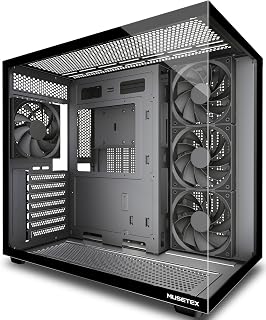
Four non-LED fans come pre-installed, providing immediate airflow without RGB distraction, while the Type-C port serves current devices. The 270-degree tempered glass offers panoramic component visibility. Support for three motherboard sizes and both air and water cooling makes this adaptable for builders prioritizing USB-C access and understated aesthetics with strong thermal performance.
Pros
- Type-C I/O with four pre-installed cooling fans
- Dual-chamber design isolates PSU heat
- 270-degree glass for multi-angle component viewing
- Supports 410mm GPUs and 360mm radiators
Cons
- Substantial 13.1-pound weight and deep footprint
- Potential Micro-ATX standoff hole inconsistencies
The MUSETEX Y6 pairs Type-C connectivity with a dual-chamber architecture that separates PSU heat from your main components. Four 120mm fans arrive pre-installed in an optimized three-intake, one-exhaust configuration, eliminating guesswork for first-time builders seeking immediate cooling performance. The 270-degree tempered glass panels showcase hardware from front and side angles while the black matte finish provides a neutral backdrop. ATX, Micro-ATX, and Mini-ITX motherboards fit without modification and the case clears graphics cards to 410mm alongside CPU coolers to 160mm. Radiator support extends to 360mm and the design accommodates nine total fans for custom cooling loops. Magnetic dust filters on top and bottom reduce maintenance intervals. Cable management benefits from Velcro ties and the tooling package includes three screw types for various mounting scenarios. The dual-chamber layout keeps PSU exhaust isolated from CPU and GPU ventilation zones. At 13.1 pounds with 16.73-inch depth, the case demands substantial desk space. Some Micro-ATX standoff holes may be missing due to quality control variance.
Case Type: Mid Tower ATX
Motherboard Support: ATX, Micro-ATX, Mini-ITX
Cooling Capacity: CPU cooler up to 160mm, GPU up to 410mm, Radiator up to 360mm, PSU up to 230mm
Pre-Installed Fans: 4x 120mm (3 reverse on side, 1 forward on rear, non-LED)
I/O Ports: 1x USB 3.0, 1x USB 2.0, 1x Type-C, Audio, Microphone
Materials: Metal, Plastic, Tempered Glass
Dimensions: 16.73"D x 10.83"W x 15.67"H
Weight: 13.1 lbs
Color: Black Matte
Warranty: 10 Years
Ideal for builders who want Type-C plus expansive glass showcasing in a pre-cooled package. The four included fans and dual-chamber ventilation suit mid-range to high-end gaming builds without additional fan purchases. Skip this if desk space is limited, you need guaranteed Micro-ATX standoff alignment, or you prefer compact cases that don't require dedicated real estate for placement and viewing angles.

Three ARGB PWM fans included with the panoramic glass design deliver immediate cooling and visual impact alongside USB-C functionality. The 120mm fan size and seven expansion slots accommodate standard components. ATX support with bottom PSU mounting creates a conventional layout for builders seeking Type-C connectivity with pre-configured lighting and adequate airflow in a mid-tower form factor.
Pros
- Type-C on compact ATX case with 360mm radiator support
- Three pre-configured ARGB fans with intelligent blade design
- Wood-grain I/O interface adds premium detail
- Three-stage dust filtration across intake zones
Cons
- Compact layout demands careful PSU and drive planning
- 14.5-pound weight despite space-saving dimensions
The MONTECH XR brings Type-C to a compact mid-tower layout with three pre-installed ARGB fans optimized for immediate airflow. Two reverse-blade side fans and one standard rear exhaust arrive configured to move air efficiently through the dual tempered glass enclosure. Despite compact dimensions, the case clears 360mm radiators at the top and accommodates modern 40-series graphics cards without length restrictions. ATX motherboard support and seven expansion slots provide full-size build flexibility in a space-conscious footprint. The wood-grain I/O interface adds tactile distinction to the front panel Type-C port. Three-stage dust filtration covers top, bottom, and side intakes to maintain component cleanliness. Nine total fan mounts allow thermal scaling as component demands increase. Cable routing works within the layout constraints and standard 3.5-inch drive support is present. At 14.5 pounds, the case carries noticeable weight despite its mid-tower classification. Large power supplies and multi-drive configurations require careful planning within the compact interior. The three included ARGB fans reduce initial cooling costs while the panoramic glass panels showcase builds from multiple viewing angles.
Case and Dimensions
Case Type: Mid Tower
Dimensions: 17.1 inches deep x 9 inches wide x 17.7 inches high
Weight: 14.5 pounds
Material: Tempered Glass (dual panels)
Motherboard Support: ATX, Micro-ATX, Mini-ATX
Cooling and Fans
Pre-installed Fans: 3 (2 reverse-blade side fans, 1 rear fan)
Fan Size: 120mm
Maximum Fan Speed: 1500 RPM
Total Fan Support: Up to 9 fans
Radiator Support: 360mm at top
GPU Clearance: Up to 420mm
Connectivity and Ports
USB 3.0 Ports: 2
USB 2.0 Ports: 2
USB-C: Yes
Total Expansion Slots: 7
Internal Bays: 3 (3.5 inch)
Power Supply: Bottom mount (750W maximum)
Additional Features
Dust Filters: Top, bottom, and side panels (magnetic)
Fan Lighting: Multi-color ARGB
I/O Interface: Mature wood-grain design
Warranty: 1 year
Suited for builders who need Type-C in a space-efficient chassis that still handles high-end GPUs and 360mm radiators. The three ARGB fans and compact ATX support work well for gaming setups where desk space is at a premium but component performance cannot be compromised. Avoid this if you run oversized PSUs, need abundant drive bays, or prefer tool-free installation over efficient spatial planning.
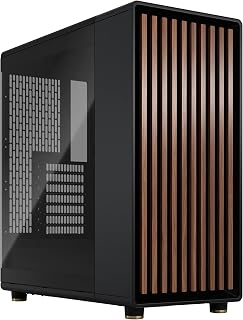
Genuine walnut wood front panels distinguish this option aesthetically while Type-C USB handles modern device connections. Two included 140mm Aspect PWM fans provide larger-diameter cooling than typical 120mm options. The tempered glass side panel and ATX support create a premium presentation for builders wanting USB-C functionality wrapped in natural materials with strong airflow from larger fans.
Pros
- Type-C USB on a genuine walnut or oak chassis
- Open mesh front provides unobstructed airflow
- Tool-free panels and intuitive cable routing
- Supports 360mm radiators and full ATX builds
Cons
- Wood requires light maintenance over time
- Two fans may need supplementing for high-end builds
The Fractal Design North delivers Type-C connectivity in a package that prioritizes natural materials and open ventilation. Two 140mm PWM fans come pre-installed to leverage the front mesh design, which routes airflow through the genuine walnut panels without obstruction. The tempered glass side panel and brass accents create a refined appearance while the full ATX support and seven expansion slots provide room for modern GPU configurations up to 355mm. Cable routing benefits from designated management zones and tool-free panel access simplifies maintenance. The case accommodates 360mm front radiators for liquid cooling expansion, giving builders flexibility as thermal demands increase. Interior space handles tall coolers and multiple storage drives without cramping the layout. Metal construction throughout ensures durability and the integrated panel tabs demonstrate functional design choices. The wood front requires occasional care to maintain its finish and the two included fans may need supplementation in high-performance builds. At this price tier, you're investing in premium materials and Scandinavian design sensibilities alongside the modern USB connectivity.
This case supports a wide range of modern motherboards: ATX, mATX, and ITX form factors all fit comfortably. Graphics cards up to 355mm work without modification, though this reduces to 300mm if you're planning a 360mm front-mounted radiator, which is important to verify before purchasing.
Storage flexibility is solid with two combined 3.5-inch/2.5-inch drive mounts and two dedicated 2.5-inch slots. This gives you options for traditional drives, SSDs, or a hybrid setup. The seven bridgeless expansion slots support modern networking and expansion cards without limitations.

The compact footprint supports both ATX and Micro-ATX boards while providing seven expansion slots, giving builders USB-C connectivity without oversized dimensions. Its 120mm fan compatibility and airflow-focused design suit moderate cooling needs. The bottom PSU mount keeps cable management clean, making this a sensible choice for space-conscious setups needing modern front-panel ports.
Pros
- Perforated PSU shroud enables bottom GPU cooling
- Supports 360mm front and 240mm top radiators
- Multiple cable management anchor points included
- Compact footprint conserves desk space
Cons
- Mesh design exposes rear cable routing
- Single 3.5-inch drive bay by default
The NZXT H5 Flow combines compact dimensions with USB connectivity and aggressive airflow design for builders needing space efficiency without thermal compromise. The perforated PSU shroud enables bottom intake cooling directly beneath GPUs, while ultra-fine mesh panels across front, top, and side surfaces prioritize unrestricted air movement. Two pre-installed 120mm Quiet Airflow fans provide baseline cooling immediately. The case supports 360mm front radiators and 240mm top radiators for liquid cooling expansion while maintaining ATX and Micro-ATX motherboard compatibility. Seven expansion slots accommodate modern GPU configurations. Internal layout features smooth edges, multiple cable management anchor points, and wide routing channels that simplify organization during assembly. Metal construction maintains structural integrity without excessive weight. Tempered glass side panel showcases components while preserving durability. The compact footprint conserves desk space compared to larger mid-towers. Thoughtful engineering makes the interior accessible for first-time builders and experienced enthusiasts alike. The mesh panel design exposes rear cable routing from certain angles, requiring careful management for clean aesthetics. Standard configuration includes one 3.5-inch drive bay, though adapters can expand storage capacity if needed.
Case Type: Compact ATX Mid-Tower
Motherboard Support: ATX, Micro-ATX, Mini-ITX, E-ATX compatible
Dimensions: 16.93in W x 18.31in H x 8.86in D
Weight: 8 kg
Material: Metal with tempered glass panel
Cooling Support: Front 360mm radiator, top 240mm radiator
Pre-installed Fans: Two 120mm Quiet Airflow fans (front intake, rear exhaust)
Fan Size Support: 120mm standard
Power Supply: Bottom mount
Internal Bays: 4 total
Drive Support: One 3.5-inch bay, two 2.5-inch bays
I/O Ports: Two USB 2.0, two USB 3.0
Expansion Slots: 7 total
Cable Management: Wide channels, hooks, and straps included
Warranty: 2-year manufacturer warranty
Best for builders prioritizing cooling efficiency and USB connectivity in compact desktop footprints. First-time builders assembling smaller ATX systems and enthusiasts with limited desk space will appreciate the accessible interior and airflow design. Skip this if you need extensive built-in drive bays or prefer fully enclosed cable routing that hides management from all viewing angles.

Seven pre-installed PWM ARGB fans eliminate the need for separate cooling purchases while the Type-C port handles modern peripheral connections. Dual tempered glass panels showcase internal components from multiple angles. Support for ATX, Micro-ATX, and Mini-ITX boards plus dual cooling methods makes this versatile for various builds requiring USB-C and strong airflow out of the box.
Pros
- Seven PWM ARGB fans pre-installed
- Front USB Type-C with dual USB 3.0
- 270-degree dual tempered glass panels
- 10-year warranty included
Cons
- Fan noise increases at higher speeds
- Limited hard drive bay quantity
The MUSETEX K2 delivers front-panel USB-C alongside impressive pre-installed cooling for builders prioritizing modern connectivity and thermal performance. Seven PWM ARGB fans come factory-installed, eliminating the need to source additional cooling hardware before building. The 270-degree dual tempered glass design provides broader component visibility than single-panel alternatives, making this suitable for showcasing custom builds. Motherboard software integration allows RGB customization through existing ecosystem tools. The case accommodates GPUs up to 400mm, CPU coolers up to 165mm, and 360mm radiators, supporting current high-performance components. ATX, Micro-ATX, and Mini-ITX motherboard compatibility adds flexibility across build sizes. Front-mounted USB Type-C joins dual USB 3.0 ports for contemporary device connectivity that standard mid-towers sometimes omit. Metal frame construction with tempered glass panels feels solid during assembly. Internal partitioning creates dedicated cable management space for cleaner routing. Dust filters help maintain interior cleanliness over time. The included 10-year warranty provides long-term coverage. Fan noise increases at higher speeds under load, and hard drive bay count may limit extensive storage configurations for some users.
Case Dimensions: 16.73 inches (D) x 8.35 inches (W) x 18.5 inches (H), weighing 15 pounds
Motherboard Support: ATX, Micro-ATX, Mini-ITX
Cooling: 7 pre-installed 120x120x25mm PWM ARGB fans (600-1300 RPM, 24.72 CFM max airflow, 20.8dB noise level). Expandable to 10 total fans.
Component Compatibility: GPU up to 400mm (15.7 inches), CPU cooler up to 165mm (6.5 inches), top-mounted liquid cooler up to 360mm (14.2 inches), PSU up to 140-180mm with or without hard drive cage
Front Panel I/O: 1x USB Type-C, 2x USB 3.0, microphone and audio jacks, power and restart buttons
Storage: 8 internal bays supporting 3.5-inch hard drives
Materials: Metal frame, plastic accents, tempered glass front and side panels
Additional Features: Dust filters, RGB lighting with motherboard control, bottom-mounted power supply
Warranty: 10-year manufacturer warranty
Ideal for gamers and enthusiasts building systems with modern peripherals requiring USB-C connectivity. Content creators needing component visibility and builders wanting comprehensive pre-installed cooling without additional purchases will benefit. Skip this if you prioritize silent operation at all speeds or need numerous hard drive bays for mass storage setups.

Pros
- Exceptional radiator mounting flexibility supports even the most demanding liquid cooling loops
- Pre-installed ARGB fans with PWM control sync with most motherboards and RGB ecosystems
- Dual chamber design keeps power supply heat separate from component cooling
- Generous interior space simplifies cable management and component installation
- Seamless glass design creates a modern, clean appearance from multiple viewing angles
Cons
- Full-tower size requires significant desk space and may not fit in compact setups
- Top-mounted power supply design may limit some custom cooling configurations
- Requires separate RGB controller or motherboard support to fully utilize ARGB fan features
The Antec C8 ARGB is a premium full-tower E-ATX case designed for serious builders and enthusiasts who demand both performance and aesthetics. It targets gaming rigs, workstations, and high-end content creation builds where component visibility and advanced cooling solutions matter.
The standout feature is its exceptional radiator support, accommodating 360mm units on the top, bottom, and side simultaneously. This flexibility is rare and invaluable for custom water-cooling setups. The three pre-installed ARGB PWM fans arrive ready to run, reducing setup complexity and costs compared to purchasing fans separately.
Build quality is solid with steel frame construction, tempered glass panels featuring seamless edges, and thoughtful design touches like the interchangeable fan brackets. The dual chamber design physically separates the power supply from components, improving thermal efficiency and cable organization. Cable management feels intuitive despite the spacious interior.
The main drawbacks center on practicality: this case demands significant desk real estate, and the top-mounted PSU configuration may limit certain cooling configurations. Additionally, getting the most from the ARGB fans requires a compatible motherboard or separate RGB controller, adding potential complexity for some users.
The Antec C8 ARGB delivers excellent value for enthusiasts building performance systems. Its combination of generous space, innovative cooling support, and pre-installed lighting makes it a compelling choice for anyone serious about their build and willing to invest in a premium case.
Case Type: Full Tower
Motherboard Support: Extended ATX
Material: Steel, Plastic, Glass
Color: Black
Pre-Installed Fans: 2x 160mm Tranquil Reverse ARGB PWM, 1x 140mm Tranquil ARGB PWM
Maximum Radiator Support: 360mm on top, bottom, and side
Power Supply Mount: Top Mount
Bottom Fan Mounts: Interchangeable 120mm/140mm brackets
Panel Type: Seamless Edge Tempered Glass (front and side)
Who Should Buy This Case? Choose the Antec C8 ARGB if you're building a high-end gaming system, workstation, or custom water-cooled PC where performance cooling and component visibility are priorities. It's ideal for enthusiasts who want room for expansion and quality aesthetics without compromise.
Who Should Skip It? If space is limited, portability matters, or you prefer a more compact form factor, consider mid-tower alternatives. Also skip this if you need a bottom-mounted PSU configuration, as the top-mount design is fixed.
Getting the Most From It: Pair the C8 with a compatible RGB motherboard to sync the pre-installed ARGB fans with your system lighting. Plan your cable routing before installation to take advantage of the dual chamber design. If water-cooling, use the radiator mounting flexibility to position units optimally for your specific components and setup preferences.

Pros
- Excellent thermal performance with independently configurable cooling zones and large radiator support
- Premium front-panel connectivity including modern USB 3.2 Type-C port for external devices
- Flexible GPU mounting options give builders control over aesthetics and prevents sagging
- Tool-free panel design makes system maintenance and upgrades quick and hassle-free
- Spacious mid-tower form factor supports ATX motherboards and high-end component combinations
Cons
- Tempered glass panels require regular cleaning to maintain the showcase effect
- Dual-chamber design may reduce usable space compared to single-chamber cases of similar size
The ASUS TUF Gaming GT502 is a premium mid-tower case designed for gamers and PC enthusiasts who prioritize both cooling performance and system aesthetics. It targets builders who plan to use high-end components like large graphics cards and multiple radiators, and who value a clean, organized interior layout.
The standout feature is the dual-chamber design, which physically separates your CPU cooling zone from your GPU area. This allows independent airflow optimization for each component, significantly improving thermal performance without creating a cable management nightmare. The case supports 360mm and 280mm radiators, handles graphics cards up to 400mm, and includes both vertical and horizontal GPU mounting to accommodate virtually any modern high-end component configuration.
Build quality is solid throughout. The tempered glass panels are thick and tinted for a sophisticated appearance, and the tool-free side panel design makes accessing your internals painless. The front panel includes modern connectivity with a USB 3.2 Gen 2 Type-C port plus dual USB 3.0 ports, giving you fast data transfer speeds for external drives and peripherals. The integrated RGB button lets you customize lighting to match your setup without additional software.
The main drawbacks are the premium price relative to basic mid-towers, the ongoing maintenance required for tempered glass to remain clear, and the fact that the dual-chamber design slightly reduces internal volume compared to traditional mid-towers. Additionally, very large tower coolers may have clearance issues in the main chamber.
Overall, the GT502 is an excellent choice for enthusiasts building high-performance systems who want superior cooling, clean aesthetics, and modern I/O in a well-engineered chassis. The dual-chamber approach genuinely improves thermal management, and the construction quality justifies the investment.
The dual-chamber design is key to understanding this case's thermal capabilities. The main chamber houses your CPU cooler and front intake fans, while the rear chamber contains the power supply and rear exhaust. This separation prevents hot exhaust air from the GPU from recycling back to your CPU cooler, a common problem in traditional cases.
For optimal performance, configure your front intake fans in the main chamber and mount your radiator intake at the front. The case supports either push or pull configurations and can accommodate dual radiators. Mount your graphics card vertically if possible to improve airflow around the card, or use the horizontal mounting if you prefer traditional aesthetics.
Users report consistently cooler GPU and CPU temperatures compared to standard cases, with temperature drops of 3-8 degrees Celsius depending on component configuration and ambient conditions. The 7 expansion slots provide flexibility for multiple fans and radiators to create balanced intake and exhaust flow.

Type-C readiness pairs with support for ATX, Micro-ATX, and Mini-ITX boards plus both air and water cooling methods, offering flexibility for various build configurations. Seven expansion slots and 120mm fan compatibility handle standard components. The mid-tower format with bottom PSU mount provides a straightforward foundation for users prioritizing USB-C access across different motherboard sizes and cooling approaches.
Pros
- Excellent airflow design with mesh front and support for extensive fan/radiator configurations
- Modern connectivity with USB-C port and 1x USB 3.0 for current and future devices
- Attractive tempered glass panel lets you display your hardware investment
- Tool-free magnetic dust filters make maintenance quick and straightforward
- Affordable price point for a feature-rich mid-tower case
Cons
- No reviews available yet, so real-world user feedback and durability data are limited
- Limited cable management documentation may require extra planning for cleaner builds
- Only one pre-installed fan, requiring additional fan purchases for optimal cooling performance
The DARKROCK EC2 is a mid-tower ATX case designed for gamers and PC enthusiasts who want a balance of performance, aesthetics, and value. It's ideal for builders planning high-end gaming rigs, content creation workstations, or systems with enthusiast-grade cooling solutions.
The mesh front panel is the standout feature, providing exceptional airflow that keeps components cool during demanding gaming sessions or CPU/GPU-intensive workloads. The case supports up to eight 120mm fans and one 360mm radiator, giving you flexibility to build custom cooling loops or multi-fan configurations. The tempered glass side panel not only looks sharp but also lets you display your hardware investment and RGB lighting if you've got it.
Build quality appears solid with metal, plastic, and tempered glass construction. The magnetic dust filters on top and bottom are thoughtful additions that prevent dust ingestion without requiring tools. USB-C readiness is a welcome modern touch, though the single pre-installed fan means you'll likely need to invest in additional cooling for optimal performance.
The main limitation is the lack of user reviews, so real-world durability and long-term reliability remain unproven. Additionally, the case ships with only one fan, so budget-conscious builders should factor in the cost of additional cooling units. Cable management documentation could be more detailed for those seeking pristine builds.
Overall, the DARKROCK EC2 offers strong value for gamers and builders seeking a modern mid-tower with excellent airflow, future-ready connectivity, and the flexibility to accommodate high-end components and custom cooling solutions.
Cooling capability is where this case truly excels. The mesh front panel allows unrestricted airflow, paired with support for up to eight 120mm fans and one 360mm radiator. This configuration is suitable for high-end gaming rigs and overclocked systems that generate significant heat.
The bottom-mounted PSU placement helps separate heat sources, improving overall thermal efficiency. Magnetic dust filters prevent clogging, maintaining consistent airflow performance over time without frequent maintenance.
This case accommodates ATX, Micro-ATX, and Mini-ITX motherboards, offering flexibility for various build sizes. It supports graphics cards up to 340mm in length and power supplies up to 200mm, making it compatible with modern high-end GPUs including 50-series cards.
With seven expansion slots and three internal bays, you have room for multiple storage devices and expansion cards. The bottom PSU mount maximizes internal space and improves cable routing compared to front-mounted alternatives.
Buying Guide: What to Look for in a PC Case with USB-C
USB-C Generation and Transfer Speed
Not all USB-C ports are created equal. A USB-C 3.2 Gen 2 port, like the one on the Okinos Genuine Walnut Wood PC Case, delivers up to 10Gbps, fast enough for rapid file transfers and device charging. A basic USB-C 3.0 port will feel noticeably slower when moving large files.
Check whether the case you’re considering specifies the USB-C generation. For future-proofing your build, aim for at least USB 3.2 Gen 1 (5Gbps), and prefer Gen 2 (10Gbps) if your motherboard’s header supports it.
Airflow and Cooling Capacity
A USB-C port means nothing if your components are throttling from heat. Cases like the NZXT H5 Flow use ultra-fine mesh on the top, front, and side panels to maximize airflow, while the MUSETEX Y6 employs a dual-chamber design with an independent ventilation channel for the PSU.
Look for cases that support at least a 360mm radiator if you plan to run liquid cooling. The MONTECH XR Panoramic and the Antec C8 ARGB both accommodate 360mm radiators, giving you flexibility as your build evolves. If you need guidance on pairing your cooler with a high-end GPU, check out our RTX 5070 Ti build guide.
Motherboard and Hardware Compatibility
Most cases on this list support ATX, Micro-ATX, and Mini-ITX motherboards, but the details matter. The Lian Li V100-ATX also supports back-connect ATX motherboards, which is a bonus for clean cable routing. GPU clearance varies significantly: the Lian Li V100-ATX allows up to 420mm, while the DARKROCK EC2 tops out at 340mm.
Always cross-reference your GPU length, CPU cooler height, and PSU length against the case specs before committing. The ASUS TUF Gaming GT502 goes further by offering both vertical and horizontal GPU mounting, giving you display options that most mid-towers skip.
Aesthetics and Build Quality
Tempered glass panels are standard across this list, but the finish and framing vary widely. The Fractal Design North Charcoal Black Tempered Glass stands out with its sustainably sourced walnut front panel, bringing a warm, natural look rarely seen in PC cases. The Okinos Genuine Walnut Wood PC Case takes a similar approach, fusing genuine wood accents with high-performance internals.
If lighting is a priority, the MUSETEX ATX PC Case 7 PWM ARGB Fans Pre-Installed ships with seven pre-installed ARGB fans and 270-degree panoramic glass, hard to beat for visual impact at its tier. For builders who prefer a cleaner look, the NZXT H5 Flow keeps things minimal without sacrificing build quality.
Final Thoughts
There’s a strong option here for every kind of builder. If you want a show-stopping aesthetic with excellent airflow and a full USB-C 3.2 Gen 2 port, the Okinos Genuine Walnut Wood PC Case delivers a unique combination of natural materials and modern connectivity that few cases can match. For those who need maximum expansion room and multi-radiator support in a full-tower form factor, the Antec C8 ARGB Full-Tower E-ATX PC Case covers every angle with its dual-chamber design and simultaneous 360mm radiator support on three sides.
Frequently Asked Questions
Do all PC cases come with a USB-C front panel port?
No, USB-C front panel ports are still a selective feature rather than a universal standard. Many budget cases from a few years ago shipped without them entirely. As of 2026, most mid-range and premium cases include at least one USB-C port, but always verify the I/O spec before purchasing.
What USB-C speed should I look for in a PC case?
For everyday use, USB 3.2 Gen 1 (5Gbps) is adequate for charging and peripheral connectivity. If you regularly transfer large files or connect high-speed external drives, look for USB 3.2 Gen 2 (10Gbps), which is what the Okinos Genuine Walnut Wood PC Case provides. Your motherboard will need a matching internal header to take full advantage of the speed.
Can I add a USB-C port to a case that doesn’t have one?
In most situations, no; the USB-C port is integrated into the front I/O panel and cannot be added as an afterthought. Some cases offer optional front panel upgrades, but this is rare. If USB-C connectivity is important to your workflow, it’s far more practical to choose a case that already includes it, like any of the options in this guide.
Does a USB-C front panel port require a special motherboard header?
Yes, the front-panel USB-C cable connects to an internal USB 3.2 Gen 1 or Gen 2 header on your motherboard. Most modern motherboards include this header, but older boards may not. Before finalizing your build in 2026, check your motherboard’s specification sheet to confirm header availability. If you need help planning a full component setup, our RX 9070 build guide walks through a complete component checklist.





Write Your Review
No reviews yet. Be the first to share your experience!