

Your laptop may have a fast internal SSD, yet project folders, photo libraries, raw footage, and game captures can consume its free space quickly. A high-bandwidth enclosure lets you repurpose an NVMe drive as compact external storage, but a familiar USB-C connector alone does not guarantee the speed or sustained performance your workflow needs.
This guide to the best thunderbolt ssd enclosure options is for creators, frequent travelers, and power users who want portable storage without unnecessary compromises. We compare interface tiers, drive fit, heat management, and daily usability, plus how an enclosure fits into a larger setup with a Thunderbolt 5 dock for demanding workflows.
Quick answer
This guide compares 10 picks, with Yottamaster M.2 NVMe SSD Enclosure 40Gbps Thunderbolt 4 ranked first. MOKiN 40Gbps M.2 NVMe SSD Enclosure, Thunderbolt 3/4 has the most customer reviews.

Yottamaster’s enclosure is well matched to a portable NVMe setup built around current Thunderbolt-equipped computers: its Thunderbolt 4 interface and stated 40 Gbps data-transfer rate provide the bandwidth expected from this category. Compatibility with desktops, laptops, and tablets helps readers carry a single M.2 drive between workstations, travel gear, and larger-screen editing stations.
Pros
- 40Gbps Thunderbolt 4 and USB4 architecture
- Tool-free installation stated under 30 seconds
- Active cooling fan and LED indicators
- Supports M.2 2230 to 2280 SSDs up to 8TB
Cons
- Full speed needs a compatible host and 40Gbps cable
- Transfer results vary by SSD, files, and system configuration
A portable NVMe enclosure earns its place beside a Thunderbolt-equipped laptop by making fast storage straightforward to build, cool, and carry. The Yottamaster pairs Thunderbolt 4 and USB4 connectivity with a 40Gbps architecture, designed to convert an M.2 NVMe SSD into external storage. Product information reports sustained transfer speeds of 2,800 to 3,200 MB/s, making it relevant for large file transfers, 4K video work, and data-heavy professional tasks when used with compatible hardware. Its ASM2464PD controller is intended to manage thermal and power stability under demanding loads, while the transparent aluminum and crystal case exposes the active cooling fan and LED indicators. Installation is tool-free and stated to take less than 30 seconds, a practical advantage for a portable enclosure that may need a drive fitted or replaced away from a desk. It accommodates M.2 2230 through 2280 SSDs, with support stated up to 8TB. To reach its full 40Gbps potential, the host must provide Thunderbolt 4 or USB4 and the cable must be rated for 40Gbps. Older USB-C or standard USB connections will not reach those speeds.
Hardware Interface: Thunderbolt 4
Connectivity: Thunderbolt 4, USB4, USB-C
Data Transfer Rate: 40 Gbps
Compatible Platforms: Windows, macOS (via USB-C)
Compatible Devices: Desktop, Laptop, Tablet
Supported M.2 Sizes: 2230, 2242, 2260, 2280
Maximum Capacity: 8TB
Controller Chip: ASM2464PD
Case Material: Aluminum and Crystal (transparent)
Cooling: Active cooling fan
Installation: Tool-free, 3-step process
Weight: 3.84 ounces
Included: Enclosure and 2-in-1 cable
Warranty: 1 Year
Buy this Yottamaster if you have a Thunderbolt 4 or USB4 computer and want a portable M.2 NVMe enclosure with tool-free installation, active cooling, and room for SSDs from 2230 to 2280. It fits editors and other users transferring large files who can pair it with a 40Gbps-rated cable. Skip it if your system relies on older USB-C or standard USB, because it will not achieve the enclosure's fastest connection speed, or if the visible transparent case and fan are not features you want.

ACASIS’s enclosure is particularly appropriate for portable NVMe storage that may handle sustained transfers, since it combines a 40 Gbps Thunderbolt interface with an integrated cooling fan. It supports M.2 drives in the 22 mm form factor and lists up to 8 TB capacity, giving compatible M1 Pro, M1 Max, and iPad Pro users room for large media libraries.
Pros
- 40Gbps USB4 and Thunderbolt connectivity
- Built-in cooling fan
- Supports M.2 2230, 2242, 2260, and 2280 drives
- Compatible with USB4, Thunderbolt 4, and Thunderbolt 3
Cons
- Fan requires manual activation with a physical switch
- Cooling management is not automatic
Long transfers can make an NVMe enclosure's cooling strategy as important as its port specification. The ACASIS TBU405 Pro addresses that portable-storage concern with an aluminum chassis, a 40Gbps connection through USB4 and Thunderbolt, and a built-in cooling fan. Product information lists read and write results of 2,805 MB/s and 2,734 MB/s on compatible systems, placing it beyond typical USB-C external-drive performance for large 4K or 8K media, backups, and other data-intensive work. The enclosure supports M.2 2280, 2260, 2242, and 2230 drives, so builders have options beyond one SSD length. At 4.65 by 2.24 by 0.7 inches, it remains compact for a laptop bag, yet it accepts storage capacities up to 8TB. Connectivity extends to USB4, Thunderbolt 4, and Thunderbolt 3, with backward compatibility listed for USB 3.2, 3.1, and 3.0. It is compatible with M1 Pro and M1 Max Macs, iPad Pro, Windows, and Linux systems. The fan is manually enabled with a physical switch, so users must remember to activate it when their workload calls for active cooling.
Connectivity: USB4, Thunderbolt 4, Thunderbolt 3, USB 3.2, USB 3.1, USB 3.0, USB 2.0
Controller Chip: Intel JHL7440 certified
Data Transfer Rate: 40Gbps (verified up to 2805/2734 MB/s)
Supported M.2 Sizes: 2280, 2260, 2242, 2230
Maximum Capacity: 8TB
Material: Aluminum enclosure with precision heat dissipation
Cooling: Active cooling fan with manual activation switch
Dimensions: 4.65 inches L x 2.24 inches W x 0.7 inches H
Compatible Platforms: M1/M2/M3 MacBook Pro/Max, iPad Pro, Windows 10/11, Linux
Warranty: 2 years
Buy the ACASIS if your portable NVMe setup handles long transfers, sustained backups, or 4K and 8K media and you want active cooling available in a compact aluminum enclosure. It makes particular sense for compatible USB4 or Thunderbolt users who need support for several M.2 lengths and use Macs, iPad Pro, Windows, or Linux devices. Skip it if you prefer cooling that turns on automatically, because this model uses a manual fan switch, or if your work does not benefit from its higher-speed connectivity.

Pros
- Very fast USB4 performance with claimed read speeds up to 3.8GB/s.
- Tool-free M.2 2280 installation makes drive swaps quick and convenient.
- Integrated cable reduces clutter and lowers the chance of forgetting a cable.
- Aluminum construction supports heat dissipation and adds protection against scratches and impacts.
- Broad compatibility with USB-C, Thunderbolt 4, USB 3.2, computers, tablets, consoles, and mobile devices.
Cons
- The enclosure requires a separately purchased M.2 NVMe 2280 SSD.
- Maximum speeds depend on the installed SSD, host port, cable connection, and system performance.
- Its 4.41 by 2.63 by 0.71 inch size and aluminum body may be less pocket-friendly than smaller enclosures.
The ZIKE Z666 is a portable USB4 40Gbps enclosure designed for one M.2 NVMe 2280 SSD with an M-Key interface. It suits creators, IT professionals, gamers, and anyone who wants to repurpose an internal drive as fast external storage.
Performance is the main attraction, with claimed read speeds up to 3.8GB/s and write speeds up to 3.1GB/s. ZIKE estimates a 10GB transfer can take about 3 seconds, while compatible systems can move a 1TB file in roughly 5 minutes.
Tool-free installation makes setup straightforward: open the cover, insert the SSD, and connect using the integrated USB4 cable. Compatibility includes USB-C computers and tablets, Android devices, PS5, Xbox, Thunderbolt 4, USB 3.2 Gen 1, and USB 3.2 Gen 2 ports.
The aerospace-grade aluminum body is built to help dissipate SSD heat during sustained workloads, while the impact-resistant housing helps shield the drive from everyday scratches and bumps. The enclosure is relatively substantial, so it may not be ideal for users seeking the smallest possible travel accessory.
Overall, the ZIKE Z666 is a capable high-speed enclosure for users who already own or plan to install an M.2 NVMe 2280 SSD. Its strong transfer potential, tool-free design, integrated cable, and two-year warranty make it a practical choice when speed and convenience matter.

For Mac mini owners seeking an exceptionally fast external NVMe configuration, UGREEN’s model pairs a Mac mini-specific design with an 80 Gbps USB-C connection, the highest stated transfer rate here. Its single-drive support keeps the setup focused and compact. The supplied specifications identify USB-C rather than Thunderbolt, so it is best treated as a Mac mini alternative, not a confirmed Thunderbolt option.
Pros
- Up to 7000MB/s performance
- 80Gbps Thunderbolt-based design
- Dual-sided aluminum cooling fins
- Supports NVMe drives up to 8TB
Cons
- Does not support pre-installed SSD heatsinks
- Only holds one NVMe SSD
For a portable NVMe setup that needs Thunderbolt-class throughput rather than basic external-drive convenience, UGREEN's 80Gbps enclosure is built around sustained high-speed work. Its Intel JHL9480 Thunderbolt controller and JMicron JMS583 bridge controller are specified to reach up to 7000MB/s, with the existing information citing 6GB file transfers in a second. That makes it a strong fit for moving large project folders, maintaining fast backups, cloning boot drives, or working with 4K video files. The enclosure also addresses a common portable NVMe concern: heat during longer transfers. Dual-sided aluminum fins are designed to increase heat dissipation by 91%, while its airflow design reduces surface temperature by 10%, supporting performance without fan noise. The silver aluminum body weighs 232g, so it remains practical to carry alongside a Mac mini-based setup. It supports one M.2 NVMe SSD in 2230, 2242, 2260, or 2280 sizes, with capacity support up to 8TB. Mac, Windows, Linux, and Android compatibility gives it flexibility beyond its Mac mini-focused design. Remember that compatible NVMe drives must not have a pre-installed heatsink.
Supported NVMe Sizes: This enclosure accepts M.2 NVMe drives in 2230, 2242, 2260, and 2280 form factors. Capacity support goes up to 8TB with most modern drives. Note that thicker SSDs with factory thermal pads may require removing the pad and replacing it with a thinner one to fit properly.
Operating Systems: Works across Mac (M1-M5 Pro/Max), Windows, Linux, and Android devices via USB-C connectivity. For maximum speed, use with Thunderbolt 3, 4, or 5 ports. USB 4 and USB 3.2 ports work but at reduced speeds compared to Thunderbolt.
Incompatible Drives: Do not use SATA SSDs (NGFF form factor), mSATA drives, or NVMe drives with non-removable heatsinks. Pre-installed thermal solutions typically prevent proper seating in the enclosure cavity.
Hardware: USB Type-C connector, USB-C to USB-C cable included. Data Transfer Rate: Up to 80 gigabits per second (7000MB/s under optimal conditions). Controller Chipset: Intel JHL9480 Thunderbolt controller + JMicron JMS583 NVMe bridge controller.
Physical: Aluminum construction, silver color, 232g weight. Dimensions and cooling: Dual-sided aluminum biomimetic fins with advanced 3D heat dissipation design. Warranty: 1 year manufacturer coverage. Model Number: 95583 (UGREEN).

Pros
- Fast USB-C connectivity with up to 10Gbps bandwidth
- Durable, lightweight aluminum enclosure with passive heat dissipation
- Tool-free installation supports 2.5-inch SATA SSDs and HDDs up to 9.5mm thick
- Broad compatibility with Windows, Mac, and compatible Thunderbolt ports
- Includes USB-C and USB cables for flexible connection options
Cons
- Actual speeds depend on the host port, cable, operating system, and installed drive
- SATA drives are limited to their own maximum interface speed, up to 6Gbps
- Supports one 2.5-inch drive only, so it is not suitable for M.2 or 3.5-inch storage
The Cable Matters USB-C enclosure is designed for anyone who wants to reuse or access a 2.5-inch SATA SSD or HDD externally. It suits backup tasks, laptop storage expansion, drive upgrades, and troubleshooting without requiring an internal installation.
Its USB-C interface supports data transfer rates up to 10Gbps when paired with compatible hardware, while the SATA connection supports speeds up to 6Gbps. UASP, TRIM, and S.M.A.R.T. support can also improve responsiveness and drive monitoring on compatible systems.
The tool-free construction makes drive installation and replacement straightforward, and the aluminum housing provides a sturdy layer of protection while helping dissipate heat. Its lightweight design and included USB-C and USB cables make it practical for desktop or mobile use.
Performance is dependent on the installed drive, host port, cable, and operating system, so a SATA SSD cannot exceed its own interface limits. This enclosure also supports only one 2.5-inch SATA drive and is not designed for M.2 or 3.5-inch disks.
Overall, this is a well-rounded enclosure for users who need a compact and durable way to access a 2.5-inch SATA drive. Its fast USB-C connection, tool-free setup, and broad computer compatibility make it especially useful for backups, storage upgrades, and drive diagnostics.
Pros
- Up to 40Gbps performance with compatible Thunderbolt 3/4 or USB4 hardware
- Aluminum construction helps protect the SSD and manage operating heat
- Includes both USB-C and USB-A cables for broad device compatibility
- Tool-free installation makes cloning and changing NVMe drives straightforward
- Supports several M.2 drive sizes and major desktop and mobile operating systems
Cons
- Maximum 40Gbps speeds depend on the host port, cable, SSD, and workload
- The enclosure can become noticeably warm during sustained transfers
- Supports NVMe SSDs only, so SATA M.2 drives are not compatible
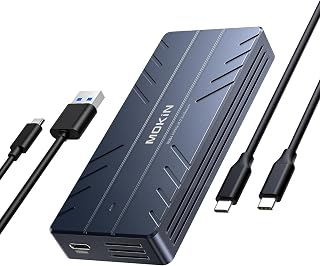
The MOKiN 40Gbps M.2 NVMe SSD enclosure turns a compatible internal NVMe drive into portable external storage. It is designed for users who need quick backups, drive cloning, extra Mac or PC storage, or a convenient way to access an SSD outside a computer.
Its ASM2464PD controller, UASP support, and Thunderbolt 3/4 and USB4 compatibility provide the bandwidth needed for demanding file transfers. In real-world use, reviewers found it easy to set up for cloning and general storage, while the included USB-C and USB-A cables make it practical with newer and older systems.
The aluminum housing gives the enclosure a sturdy, travel-friendly feel and helps move heat away from the drive. Its compact design fits easily in a bag, and the tool-free snap-in installation allows compatible 2242, 2260, and 2280 NVMe drives to be installed or changed quickly.
There are a few limitations to consider. The enclosure may become warm during long transfers, and peak speeds require a compatible Thunderbolt or USB4 host, cable, and SSD. It also accepts NVMe drives only, not SATA M.2 models.
Overall, the MOKiN enclosure is a capable option for users who want fast, portable NVMe storage without a complicated installation process. Its broad connectivity, included cables, cooling-focused aluminum design, and support for drive monitoring make it especially useful for backups, upgrades, cloning, and mobile workflows.

Pros
- Very high USB4 performance potential with peak speeds above 6000MB/s
- Broad compatibility across modern computers, tablets, and Thunderbolt devices
- Supports multiple NVMe PCIe generations and both 2280 and 2242 drive sizes
- Aluminum construction with passive heat dissipation and no fan noise
- Bus-powered setup includes the required USB4 cable
Cons
- DIY configurations require a compatible NVMe M.2 SSD, which may need to be purchased separately
- Actual transfer speeds depend on the installed SSD, host device, cable, and workload
- PCIe Gen 5 SSD selection requires attention to sustained power consumption and host power limits
The OWC Express 1M2 is a high-speed USB4 enclosure for NVMe M.2 SSDs, designed for users who want portable storage with near-internal-drive responsiveness. It suits photographers, video editors, professionals, and DIY builders who value upgradeability over a fixed-capacity drive.
Its standout capability is a peak real-world speed of over 6000MB/s when paired with a suitable SSD and USB4-capable host. Support for PCIe Gen 3.0, Gen 4.0, and selected Gen 5.0 drives gives buyers flexibility, while compatibility with Macs, PCs, iPad Pros, Chromebooks, and Surface devices broadens its usefulness.
The aluminum enclosure combines a durable exterior with a patented heat-dissipating design intended to keep the installed SSD cool without a noisy fan. It is bus-powered through the included USB4 cable, so the setup stays compact and convenient for mobile work.
There are a few important limitations. A DIY version requires a separate compatible NVMe M.2 SSD, and real-world performance varies with the drive, host, cable, and workload. Gen 5 SSDs also need careful selection because some computers, docks, and hubs have limited bus power.
Overall, the Express 1M2 is a compelling premium enclosure for users who need fast external storage and the ability to upgrade later. It is best for buyers prepared to match the enclosure with a capable NVMe drive and USB4-equipped system.

Pros
- Active fan cooling is useful for longer, high-speed file transfers.
- High 40Gbps bandwidth supports demanding storage and media workflows.
- Supports common M.2 NVMe sizes and capacities up to 8TB.
- Portable metal construction works well for mobile professionals and cross-platform users.
Cons
- The SSD is not included, so a compatible M.2 NVMe drive must be purchased separately.
- Actual transfer speeds depend on the installed SSD, host port, cable, and system configuration.
- The built-in fan may be less appealing to users who prefer a completely silent enclosure.
The Rosewill RNE-01 is an external enclosure for M.2 NVMe SSDs, designed for users who need portable, high-speed storage. Its USB-C connection and broad system compatibility make it suitable for Mac, Windows, laptops, desktops, and compatible tablets.
With a 40Gbps interface, the enclosure is rated for read and write speeds up to 3187MB/s when paired with suitable hardware. The built-in fan and vented design help manage heat during demanding transfers, with the manufacturer specifying support for up to four hours of full-speed operation.
Compatibility is a major strength, since the RNE-01 supports M.2 NVMe drives from 2230 through 2280 sizes and capacities up to 8TB. It also works with USB4, Thunderbolt 3 and 4, USB 3.2, and USB 2.0 connections, although performance will vary by port and SSD.
The enclosure combines a compact metal body with a transparent back plate that exposes the internal components. At 6.4 ounces, it is easy to carry in a bag, while the integrated cooling hardware adds practical value for frequent large-file transfers and mobile workflows.
Buyers should remember that this is an enclosure only, and the SSD must be installed separately. Overall, the Rosewill RNE-01 is a practical choice for users who prioritize high transfer speeds, active cooling, broad compatibility, and support for large-capacity NVMe storage.

Pros
- Exceptional speed: reaches 3600MB/s with Thunderbolt 4, making it one of the fastest portable NVMe solutions available
- Passive cooling design is a major plus, eliminating the need for a fan and ensuring silent, maintenance-free operation
- Excellent form factor compatibility handles 2230 through 2280 drives, adapting to your specific storage needs
- Premium aluminum construction feels durable and looks professional for both desktop and mobile workflows
- Comprehensive backward compatibility works with multiple interface standards across Mac, Windows, and Linux systems
Cons
- Requires Thunderbolt 4 cables and devices to achieve maximum 3600MB/s speed, limiting peak performance on older systems
- Some thicker SSDs may need replacement thermal pads to fit properly, adding an extra setup step for certain drives
- No reviews available yet, so real-world user feedback on long-term reliability and thermals is limited
The UGREEN 40Gbps M.2 NVMe enclosure is a premium external storage solution designed for creative professionals, software developers, and anyone who needs fast, portable backup or working drives. It combines cutting-edge Thunderbolt 4 support with intelligent passive cooling to deliver a silent, reliable companion for 4K video editing, large game transfers, and data-intensive workflows.
Performance is the headline feature here. With the ASM2464PD chip and Thunderbolt 4 support, this enclosure reaches 3600MB/s, making file transfers nearly instantaneous. The downside is that peak speeds require Thunderbolt 4 cables and compatible devices; older USB connections will throttle performance significantly. That said, backward compatibility with USB 3.2, 3.1, and 3.0 ensures the enclosure works across your entire tech ecosystem.
Build quality stands out with its premium aluminum construction and innovative double-sided fin cooling system. The passive design eliminates fan noise and maintenance headaches, delivering exceptional heat dissipation without moving parts. At just 232 grams, it fits easily into a laptop bag. The included USB-C cable, cooling pads, and disassembly kit show attention to user experience, though some SSDs may require thermal pad replacement due to thickness variations.
Compatibility is genuinely flexible, supporting NVMe form factors from 2230 to 2280 and working seamlessly across Windows, macOS, Linux, and Android. The 8TB capacity ceiling gives you serious storage flexibility. The main caveat is that this enclosure doesn't support SATA or mSATA drives, only modern NVMe M.2 SSDs.
For anyone seeking a silent, fast external NVMe drive, the UGREEN 40Gbps enclosure is a solid choice. Just verify your system supports Thunderbolt 4 if speed is your priority, and budget for thermal pads if your specific SSD runs thick. Highly recommended for professionals who value performance and portability.
Connectivity and Performance: USB Type-C interface, 40Gbps data transfer rate (3600MB/s with Thunderbolt 4), compatible with USB4, Thunderbolt 3/4, USB 3.2, USB 3.1, USB 3.0, USB 2.0.
Compatibility: Windows, macOS, Linux, Android. Supports M.2 NVMe drives in 2230, 2242, 2260, 2280 form factors. Maximum capacity: 8TB. Not compatible with SATA NGFF or mSATA drives.
Physical Specifications: Dimensions: 4.8 inches (L) x 2.6 inches (W) x 1.06 inches (H). Weight: 232g. Material: Premium aluminum with double-sided fin heat dissipation. Color: Silver.
Included Accessories: 40Gbps USB-C to USB-C cable, cooling pads, disassembly kit, user manual. Warranty: 1 year. Model: 55316.
Ideal For: Video editors working with 4K and 8K footage, game developers moving large projects between machines, photographers managing massive RAW files, software engineers syncing code repositories, and anyone requiring fast, silent external storage without compromise.
Consider This If: You have a Thunderbolt 4 equipped Mac or Windows machine, you frequently transfer files larger than 50GB, you need passive cooling without fan noise, you value portability without sacrificing speed, or you're upgrading from older USB 3.0 external drives.
Pass If: Your computer only has USB 2.0 ports (performance will be severely limited), you need to store SATA SSDs in an enclosure, you prefer the fastest possible speeds on a budget (this is premium pricing), or you're looking for a drive that includes the SSD (this enclosure only, SSD sold separately).

OWC’s enclosure fits portable Thunderbolt NVMe workflows because its Thunderbolt connection and PCIe x4 drive interface target the high-bandwidth link readers want for moving project files between systems. Its portable design and compatibility with desktops, laptops, and tablets make it a practical choice for creators, business users, and gamers needing one compact external drive across devices.
Pros
- Thunderbolt 4 portable NVMe enclosure
- Specified 3,151 MB/s transfer rate
- Silent passive aluminum heat dissipation
- USB-C cable and screwdriver included
Cons
- SSD changes require disassembly and screws
- Cannot use SSDs with attached heatspreaders
Portable NVMe storage is most useful when the enclosure can move large projects quickly without making a laptop bag noisier, and the OWC Express 1M2 is positioned for that role. This Thunderbolt 4 enclosure accepts a DIY NVMe installation and turns an NVMe drive into portable storage for business, gaming, and multimedia work. Its specified data transfer rate is 3,151 MB/s, while product information also cites sustained speeds around 3GB/s on Apple Silicon Macs. That performance suits file-heavy creative work, including video and photo projects, rather than ordinary low-speed USB transfers. The aluminum chassis uses patented passive heat dissipation, so it avoids a fan while drawing heat away from the SSD. A USB-C cable and screwdriver are included for assembling the drive. Compatibility covers Mac, Windows, and PlayStation 5, and it can be used with desktops, laptops, and tablets. The tradeoff for its enclosed metal design is a more involved SSD swap: replacing the drive means opening the enclosure and unscrewing the drive assembly. SSDs with attached heatspreaders also cannot be used.
Interface and Speed: PCIe 4x NVMe, Thunderbolt 4 / USB4 / USB-C connectivity with up to 3836MB/s real-world performance and 3151MB/s rated speeds.
Compatibility: Works with Mac (Apple Silicon and Intel), Windows PCs, and PlayStation 5. Supports NVMe M.2 2280, 2242, and 2230 form factors (bare drives only, no heatspreaders).
Physical Design: Aluminum metal enclosure, 5.1 inches long by 0.9 inches wide by 2.7 inches thick, weighing 280g. Bus-powered with no external power required. Includes 40Gb/s USB-C cable and screwdriver.
Warranty and Support: 2-year limited warranty on enclosure, 3-year warranty on the complete solution. Backed by OWC's professional support team.
Buy the Express 1M2 if you want a portable Thunderbolt NVMe enclosure for Mac or Windows creative work, large multimedia files, gaming, or a PlayStation 5, and you value silent passive cooling over a fan. It is especially relevant for users who expect to keep one compatible SSD installed for extended use. Skip it if tool-free drive changes are a priority, if your chosen NVMe drive already has a heatspreader, or if you need to swap drives often.
How to Choose a Thunderbolt SSD Enclosure
Match the bandwidth to your computer and workload
A 40Gbps enclosure is the practical starting point for most Thunderbolt 3, Thunderbolt 4, and USB4 laptops. Its real transfer rate depends on the computer, cable, SSD, file type, and available power, but it can make large media transfers, active project folders, and local backups feel far more responsive than ordinary 10Gbps storage.
The OWC Express 1M2 40Gb/s Portable NVMe SSD is rated for up to 3836MB/s, while the Zike USB4 40Gbps M.2 NVMe SSD Enclosure,3811 lists read performance near 3.8GB/s. If you own an 80Gbps-capable host and move especially large files, the OWC Express 1M2 80G USB4 80Gb/s Portable NVMe M.2 and UGREEN 80Gbps M.2 NVMe SSD Enclosure for Mac offer substantially higher headroom. Otherwise, a well-cooled 40Gbps model is usually the smarter match.
Confirm your SSD type, physical size, and power demands
These enclosures are generally for PCIe NVMe M.2 drives, not SATA M.2, mSATA, or 2.5-inch SATA drives. Check both the key type and the drive length before buying. Many options here accept common 2230, 2242, 2260, and 2280 NVMe sizes, which gives you flexibility when reusing a drive from an older laptop or building a new portable library.
The Yottamaster M.2 NVMe SSD Enclosure 40Gbps and UGREEN 40Gbps M.2 NVMe Enclosure support those popular M.2 lengths, while the latter lists capacity support up to 8TB. The Cable Matters Aluminum 10Gbps USB C Hard Drive is a different category: it is a sensible choice for a 2.5-inch SATA SSD or HDD, but it cannot deliver NVMe Thunderbolt-class speed. If your travel kit also uses a dock, confirm laptop power separately with our guide to the best USB-C chargers for laptops.
Prioritize cooling for long transfers and creative work
Heat is the overlooked factor in portable NVMe storage. A drive can begin a large copy quickly, then reduce its pace as heat builds. This matters most when you edit directly from the enclosure, export video, ingest camera media, or transfer hundreds of gigabytes at a time. A metal housing and correctly placed thermal pad help move heat away from the SSD.
For active cooling, the ACASIS 40Gbps M.2 NVMe SSD Enclosure with Cooling uses a built-in fan, and the Rosewill 40Gbps M.2 NVMe SSD Enclosure combines a fan with venting for extended workloads. For silent operation, the OWC models use a heat-dissipating body, while the UGREEN 40Gbps M.2 NVMe Enclosure uses a double-sided fin design. A raised workstation can also make cable routing easier, so consider these laptop stands for a cleaner desk setup when arranging your workspace.
Consider installation, cables, and everyday portability
An enclosure should be easy to live with after the initial setup. Tool-free access is useful if you rotate drives, while an included cable reduces the risk of pairing a high-speed enclosure with an older cable that limits throughput. Look for a compact case that protects the drive without leaving it awkwardly exposed in a backpack or camera bag.
The Zike USB4 40Gbps M.2 NVMe SSD Enclosure,3811 has an integrated USB4 cable, which is convenient for mobile use. The OWC Express 1M2 40Gb/s Portable NVMe SSD includes a 40Gbps cable and screwdriver, while the MOKiN 40Gbps M.2 NVMe SSD Enclosure includes both USB-C and USB-A cable options for broader device access. The Yottamaster M.2 NVMe SSD Enclosure 40Gbps adds a transparent, tool-free cover, making drive installation and activity monitoring straightforward.
Final Thoughts
For a compact, high-speed enclosure that balances broad compatibility with a refined passive cooling approach, the OWC Express 1M2 40Gb/s Portable NVMe SSD is a strong everyday choice. If your large transfers benefit from active heat control, the Rosewill 40Gbps M.2 NVMe SSD Enclosure is the more suitable fit for sustained portable performance.
Frequently Asked Questions
Are Thunderbolt SSD enclosures faster than ordinary USB-C enclosures?
Usually, yes, but USB-C describes the connector shape rather than the data standard. A 40Gbps Thunderbolt or USB4 enclosure has far more bandwidth available than a 10Gbps USB enclosure when paired with a compatible host and NVMe drive. Actual results still depend on the computer port, cable, thermal design, SSD model, and the kind of files you move.
Can I use any M.2 SSD in a Thunderbolt enclosure?
No. Most models in this guide require an NVMe PCIe M.2 SSD, so a SATA NGFF M.2 drive will not work even when it looks physically similar. Confirm the drive’s key type, length, capacity support, and thickness before installation. SSDs with oversized factory heatsinks may not fit inside slim enclosures, though a lower-profile thermal solution can sometimes help.
Do I need an 80Gbps Thunderbolt enclosure in 2026?
Choose an 80Gbps model when your computer supports that interface and your work regularly involves very large, fast SSD transfers. It is particularly appealing for high-resolution video work, large project libraries, and workflows where external storage needs to approach internal-drive responsiveness. For many current laptops, a quality 40Gbps enclosure remains an excellent fit and avoids paying for bandwidth the host cannot use.
Is a Thunderbolt SSD enclosure good for backups and gaming?
Yes, it is a flexible option for local backups, game libraries, media archives, and active creative projects. Keep one copy of irreplaceable files elsewhere, since an enclosure is still a single drive rather than a complete backup strategy. If you also transfer archives to network storage, a dependable home connection matters, so review the best routers for a large house and the best Ethernet cables for gaming and wired connections for broader setup guidance.





Write Your Review
No reviews yet. Be the first to share your experience!