

Most modern laptops arrive as sealed units with soldered memory and storage, leaving you stuck with whatever configuration you bought. If your workload grows or software demands increase, you’re forced to replace the entire machine.
Upgradeable laptops solve this problem by providing accessible RAM slots and storage bays you can expand yourself. This guide reviews 10 laptops built for long-term scalability, from business models with user-replaceable components to workstations designed for professional expansion.
Quick answer
This guide compares 10 picks, with HP 15.6" FHD Touchscreen Laptop, AMD Ryzen 7 7730U ranked first. HP 14" Laptop with Lifetime MS Office 2024, Intel N150 holds the highest customer rating among them. HP Pavilion 15.6" FHD Laptop 2026, Intel N100, 16GB has the most customer reviews.

The 32GB RAM configuration makes this laptop particularly suited for users who want the freedom to upgrade storage or memory down the line. That generous memory capacity ensures smooth multitasking today while the standard 2.5-inch drive bay and accessible SO-DIMM slots mean you can swap components as needs evolve. The Ryzen 7 7730U provides solid performance headroom, and Windows 11 Pro offers the flexibility power users expect from a machine built to adapt.
Pros
- 32GB RAM provides exceptional headroom, eliminating upgrade urgency
- 1TB SSD offers generous storage with replacement option
- Ryzen 7 7730U delivers strong performance for demanding productivity
- Windows 11 Pro extends professional support timeline
Cons
- Integrated graphics cannot be upgraded for GPU-intensive work
- 300 nits brightness limits outdoor usability
The HP 15.6-inch touchscreen laptop arrives with premium specifications that dramatically reduce the need for near-term upgrades. The 32GB RAM configuration exceeds typical business requirements and provides substantial headroom for demanding multitasking, content creation, and virtualization workloads that might emerge over several years of ownership. The 1TB SSD offers generous storage that postpones capacity concerns while remaining replaceable if expansion becomes necessary. This combination means most users can operate for years without touching internal components. The AMD Ryzen 7 7730U processor delivers strong performance for productivity tasks, though like most laptop CPUs it represents a permanent specification. The 15.6-inch FHD touchscreen with 300 nits brightness provides versatile input options and adequate visibility for indoor work environments. Windows 11 Pro includes extended support and security features that extend the laptop's professional viability. The full-size keyboard with numeric keypad supports efficient data entry throughout the device's lifespan. Wi-Fi 6 and comprehensive port selection ensure compatibility with current and emerging peripherals. At 3.52 pounds and 0.73 inches thin, the physical design balances portability with upgradeability access. The 10.75-hour battery life sustains full workdays, though battery degradation over years represents an eventual service item. The HD privacy camera with physical shutter addresses ongoing security needs. For buyers prioritizing maximum specifications upfront to minimize future modification needs, this laptop delivers exceptional initial value that extends its useful life substantially.
This laptop targets professionals and power users who want maximum performance headroom now to avoid upgrades later. The 32GB RAM suits users running virtual machines, extensive browser tabs, or memory-intensive applications who want future-proof specifications. The 1TB storage benefits users managing large file libraries or media collections. Business professionals using demanding productivity software, financial modeling, or collaborative tools will appreciate the Ryzen 7 processor. Skip this if you need discrete graphics for gaming or 3D rendering, as integrated AMD Radeon graphics remain fixed. Also consider alternatives if you work primarily outdoors, as the 300 nits brightness may feel insufficient in direct sunlight.
Display: 15.6-inch Full HD (1920 x 1080) IPS touchscreen, multi-touch capable, 300 nits brightness, anti-glare coating, 60Hz refresh rate
Processor & Performance: AMD Ryzen 7 7730U, 8-core, 16-thread, up to 4.5GHz boost clock, integrated AMD Radeon graphics
Memory & Storage: 32GB DDR4 RAM at 3200MHz, 1TB PCIe NVMe SSD
Connectivity: Wi-Fi 6 (802.11ax), Bluetooth 5.4, 1x USB-C 3.0, 2x USB-A 3.0, 1x HDMI 1.4, headphone/microphone combo jack
Design & Battery: Natural Silver finish, 14.17" x 9.29" x 0.73", weighs 3.52 lbs, full-size keyboard with numeric keypad, up to 10.75-hour battery life
Operating System & Security: Windows 11 Pro, HD camera with privacy shutter, limited warranty included

Pros
- 14-core Intel Core i9-13900H delivers exceptional performance for AI, video editing, and complex applications
- Customizable configurations allow you to choose exactly the RAM and storage you need
- Strong security features including fingerprint authentication and privacy-focused webcam shield
- Extended 3-year warranty on upgrades provides peace of mind on key components
- Professional design with backlit keyboard, fingerprint reader, and comprehensive port selection
Cons
- Non-touch FHD display may feel basic compared to higher-end OLED or touch-enabled alternatives
- Integrated graphics limit gaming performance and professional GPU-accelerated workloads compared to discrete GPU models
- Original seal opened for customization may concern users seeking completely unopened factory units
The ASUS Vivobook F1502VA is a premium 15.6-inch laptop engineered for professionals, content creators, and power users who demand performance without compromise. Built around the Intel Core i9-13900H processor, this machine targets users running AI applications, video editing software, 3D rendering, and complex multitasking workflows where raw processing power matters.
The standout feature is the configurable architecture, allowing up to 48GB of DDR4 RAM and 2TB of PCIe SSD storage. Real-world performance benefits include sub-second boot times, seamless application switching between dozens of browser tabs or creative tools, and sufficient storage for entire video libraries or AI model datasets. The 15.6-inch FHD (1920 x 1080) display delivers crisp visuals with glare reduction, suitable for office work, video conferencing, or content review, though it lacks the premium feel of higher-resolution or OLED alternatives.
Design and build emphasize professional utility, with a backlit keyboard and numeric keypad for spreadsheet-heavy workflows, a precision touchpad for navigation, and a sophisticated blue chassis. Security features are solid, including a fingerprint reader for instant Windows login and a physical webcam shield for privacy protection. The connectivity suite includes USB-C, dual USB 3.x ports, USB 2.0, HDMI for external displays, and a 3.5mm audio jack, eliminating the need for adapters in most office environments.
The main drawback is that integrated Intel graphics handle everyday tasks and light gaming but cannot match discrete GPUs for intensive gaming or professional GPU-accelerated rendering. Additionally, the non-touch display may feel dated compared to touch-enabled models at this price point. The factory-opened design for customization may also concern buyers seeking completely sealed units, though PCOnline's 3-year warranty on upgraded components provides confidence.
Verdict: This is an excellent value for professionals seeking a portable powerhouse laptop with customizable specs and strong security features. Recommended for software developers, content creators, AI engineers, and office professionals who need sustained performance for demanding applications.
Processor: Intel Core i9-13900H (14-core, up to 5.4 GHz)
Memory: Up to 48GB DDR4 RAM
Storage: Up to 2TB PCIe M.2 SSD
Display: 15.6-inch FHD (1920 x 1080), non-touch, glare-free
Graphics: Intel Integrated Graphics
Operating System: Windows 11 Pro
Ports: 1 x USB Type-C, 2 x USB 3.x, 1 x USB 2.0, 1 x HDMI, 3.5mm audio jack
Keyboard: Backlit with numeric keypad
Security: Fingerprint reader, physical webcam shield
Connectivity: Wi-Fi 6
Color: Blue
Model: PCONLINE F1502VA-NS96
Ideal For: Software developers and engineers needing compile-heavy workflows, AI and machine learning practitioners running training models, video editors and digital content creators, business professionals handling large spreadsheets and multitasking, and anyone seeking a customizable upgrade path without paying premium brand markups.
May Not Be For: Casual users with basic browsing needs (overspecified and unnecessary cost), serious gamers requiring discrete GPUs, content creators requiring professional-grade color accuracy (non-touch FHD display limitations), or users requiring ultra-portability (15.6 inches is mid-range for laptops).
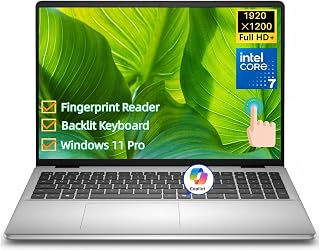
This 16-inch model features 32GB DDR5 RAM in a configuration that supports user upgrades through accessible memory slots. The 1TB SSD uses a standard M.2 interface that accepts larger drives, and the Intel Core 7 150U provides balanced performance that won't bottleneck future component improvements. Wi-Fi 6E ensures connectivity remains current through multiple upgrade cycles, while the touchscreen and fingerprint reader add premium features that complement the machine's expandability.
Pros
- 32GB DDR5 RAM eliminates most common upgrade need
- 1TB SSD provides years of storage before expansion required
- Intel Core 7 150U maintains performance relevance long-term
- Wi-Fi 6E and Windows 11 Pro extend compatibility lifecycle
Cons
- Integrated graphics cannot be upgraded for visual workloads
- Higher upfront cost than laptops with lower baseline specs
The Dell 16 touchscreen laptop builds upgradeability into its core specifications through generous baseline components that delay obsolescence. The 1TB SSD provides immediate breathing room, while the standard M.2 slot allows future expansion when that capacity fills. The 32GB DDR5 RAM eliminates the most common upgrade bottleneck, giving headroom for years of software bloat and multitasking demands without cracking open the chassis. Intel Core 7 150U processing power (up to 5.4GHz) handles professional workloads today while maintaining relevance as software requirements increase. The 16-inch FHD+ IPS touchscreen with 16:10 aspect ratio and 300-nit brightness reduces pressure to add external displays immediately. Wi-Fi 6E and Windows 11 Pro ensure compatibility with emerging networking standards and enterprise environments through extended support cycles. The backlit keyboard, fingerprint reader, and Copilot key add longevity through modern input methods that age better than outdated interfaces. For professionals and developers planning multi-year usage, this configuration front-loads capacity where it matters most: memory, storage, and processing power that can absorb increasing demands without requiring expensive mid-cycle upgrades.
Processor: Intel Core 7 150U, 10 cores, 12 threads, up to 5.4GHz, 12MB Intel Smart Cache
Memory and Storage: 32GB DDR5 5200MT/s RAM, 1TB M.2 PCIe NVMe SSD
Display: 16-inch 16:10 FHD+ (1920 x 1200) IPS touchscreen, 300 nits, Dell ComfortView Plus
Graphics: Intel Integrated Graphics
Operating System: Windows 11 Pro
Security: Fingerprint reader, BitLocker encryption
Connectivity: Wi-Fi 6E (802.11ax), Bluetooth 5.3, 2x USB 3.2 Gen 1 Type-A, 1x USB 3.2 Gen 2 Type-A, 1x USB-C with DisplayPort 1.4 and Power Delivery, HDMI 1.4, 3.5mm audio jack, SD card reader
Input Devices: Full-size backlit keyboard with number pad and Copilot key, touchpad, touchscreen
Webcam: 1080p FHD with dual digital microphones and temporal noise reduction
Battery: 4-cell 54Whr integrated battery, 65W AC adapter
Dimensions: 14.04 inches W x 9.82 inches D x 0.68 inches H
Weight: 4.18 lbs
Color: Carbon Black
Best for business professionals, developers, and power users who need a system that stays relevant through high baseline specs rather than frequent component swaps. The 32GB RAM and 1TB storage suit users who prefer buying capacity upfront over upgrading later. Skip this if you need dedicated graphics for gaming or 3D work, as integrated Intel graphics cannot be upgraded and limit visual workloads permanently.

Pros
- Exceptional processing power handles AI applications, video editing, and 3D rendering without compromise
- Generous 48GB RAM and 2TB storage eliminate the need for external drives or frequent upgrades
- Included thermal cooling solution solves a major pain point for high-performance laptops
- Strong security features including fingerprint reader and privacy-focused webcam shield
- Extended warranty coverage on upgraded components provides peace of mind
Cons
- Non-touch FHD display lacks higher refresh rates or OLED quality found in premium competitors
- Integrated graphics limit gaming performance compared to dedicated GPU alternatives
- Premium pricing reflects the i9 processor and upgraded storage, not accessible for budget-conscious buyers
The ASUS Vivobook 15 is a powerhouse workstation designed for professionals who demand serious computing performance. Built around the Intel Core i9-13900H processor, this 15-inch laptop excels at AI workloads, video production, content creation, and intensive multitasking. It's built for creators, engineers, data scientists, and business professionals who refuse to compromise on raw processing power.
The standout feature is undoubtedly the inclusion of a dedicated PCO cooler, addressing thermal throttling issues that plague high-performance laptops. Paired with the internal cooling system, the i9-13900H maintains peak frequencies during sustained workloads. The 48GB RAM and 2TB SSD combination eliminates bottlenecks, delivering nearly instantaneous boot times and seamless handling of massive projects without lag or stuttering.
Design-wise, the blue chassis feels professional and compact for a 15.6-inch machine. The backlit keyboard supports low-light work environments, and the precision touchpad is responsive. Security features like the fingerprint reader and physical webcam shield demonstrate thoughtful engineering, offering both convenience and privacy protection that matters in business settings.
The 15.6-inch FHD display is functional for professional work but doesn't offer the visual refinement of higher-end displays. Integrated graphics mean casual gaming is possible but demanding titles won't impress. The non-touch screen is a minor limitation for some workflows.
For professionals investing in a serious work machine that handles AI, video editing, and complex software without compromise, this ASUS Vivobook delivers exceptional value. The included cooler, upgraded memory and storage, and extended warranty justify the premium price for power users.
Processor: Intel Core i9-13900H (14-core, Next Gen AI optimized)
Memory: 48GB DDR4 RAM
Storage: 2TB PCIe M.2 SSD
Display: 15.6-inch FHD (1920 x 1080), non-touch, glare-free
Graphics: Integrated Intel Graphics
Operating System: Windows 11 Pro
Keyboard: Backlit
Security: Fingerprint Reader, Physical Webcam Shield
Connectivity: Wi-Fi 6, 1x USB-C, 2x USB 3.0, 1x USB 2.0, 1x HDMI, 3.5mm audio jack
Color: Blue
Model: ASUS F1502VA-NS96
Warranty: 3-year coverage on upgraded RAM/SSD, 1-year on remaining components
Best For: Professionals in AI, video editing, 3D design, data science, and content creation who need maximum processing power in a portable form factor.
Consider This If: You regularly work with large files, run resource-intensive software, or need a laptop that handles multitasking without performance dips. The included cooler is particularly valuable if you're concerned about thermal performance with high-end processors.
Skip If: You primarily need a laptop for web browsing, office work, or casual computing. Budget-conscious buyers should explore mid-range alternatives with lower specs. Gamers wanting dedicated graphics should look elsewhere.
Key Takeaway: This is a professional-grade workstation disguised as a portable laptop. The i9 processor combined with 48GB RAM and included thermal cooling makes it one of the most capable 15-inch machines available for serious work. The extended warranty on upgraded components adds confidence to your investment.
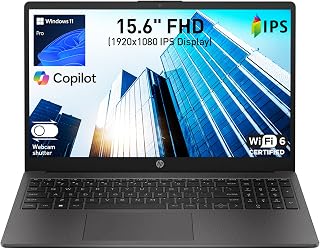
The 255 G10 is built for business users who need straightforward upgrade paths. Its 16GB RAM can be expanded through standard SO-DIMM slots, and the 512GB SSD sits in a standard M.2 slot that accepts larger drives. Windows 11 Pro provides the management tools IT departments need, while the lightweight chassis with numeric keypad maintains portability. The AMD quad-core processor offers reliable performance that will scale with memory and storage improvements.
Pros
- Ships with 16GB RAM, eliminating the most common upgrade need
- SSD replacement possible for storage expansion
- Windows 11 Pro provides extended support timeline
- Lightweight design at 3.4 lbs maintains long-term portability
Cons
- Processor and graphics cannot be upgraded
- Limited expansion options beyond storage replacement
The HP 255 G10 offers limited upgrade potential but starts with a solid foundation that reduces immediate need for modifications. The laptop ships with 16GB DDR4 RAM already installed, covering multitasking demands for office applications and video conferencing without requiring a memory upgrade out of the box. The 512GB SSD provides adequate storage for most business users, though the drive itself can be replaced if larger capacity becomes necessary. The accessible design means reaching internal components doesn't require specialized disassembly skills. Windows 11 Pro adds value through its extended support lifecycle compared to Home editions. The AMD Ryzen 3 processor and integrated Radeon graphics represent the primary non-upgradeable elements, so understanding these limitations before purchase matters for longevity planning. The 15.6-inch Full HD IPS display, comprehensive port selection including USB Type-C, and Wi-Fi 6 support ensure the machine remains compatible with current peripherals and networks. At 3.4 pounds and 0.73 inches thin, portability stays practical even as the laptop ages. The dual-array microphones with AI noise reduction and wide dynamic range camera maintain relevance for remote work scenarios. For buyers prioritizing a complete initial configuration over extensive future modifications, this laptop delivers functional value.
Display: 15.6-inch Full HD IPS, 1920x1080 resolution, 60Hz refresh rate, anti-glare coating, 85% screen-to-body ratio
Processor: AMD Ryzen 3 7330U, 4-core, 8-thread, 8MB L3 cache, up to 4.3GHz max boost, 2.3GHz base
Memory: 16GB DDR4 SODIMM, 3200MHz, 2 slots available
Storage: 512GB SSD
Graphics: AMD Radeon integrated graphics
Ports: 1x USB Type-C 5Gbps, 2x USB Type-A 5Gbps, 1x HDMI 1.4b, 1x combo headphone/microphone
Connectivity: Wi-Fi 6, Bluetooth 5.3
Camera: Wide dynamic range HD with dual-array noise-canceling microphones
Battery: 3-cell, 41Wh Li-ion polymer
Weight: 3.4 lbs
Dimensions: 14.17"L x 9.29"W x 0.73"Th
Operating System: Windows 11 Pro with AI Copilot
This laptop suits budget-conscious professionals and students who need capable performance now rather than maximum upgrade flexibility later. The 16GB RAM configuration eliminates the most common upgrade path, making it ideal for users who want to avoid hardware modifications entirely. Business users running standard productivity software will find the existing specifications sufficient for several years. Skip this if you anticipate needing discrete graphics, plan significant storage expansion beyond replacing the existing SSD, or require extensive RAM beyond 16GB for specialized workloads. The integrated graphics and soldered processor mean graphics-intensive work or CPU-heavy tasks will always face limitations regardless of other upgrades.

The OmniBook 3 stands out with its 8GB LPDDR5-5500 onboard memory, but more importantly, it includes accessible storage bays that let you add or replace the 512GB SSD as your needs grow. The dual USB Type-C ports with 10Gbps signaling and Power Delivery 3.1 provide modern connectivity that will remain relevant through future upgrades. That 17.3-inch display gives plenty of workspace while the AMD Ryzen 3 30 leaves room for component swaps without bottlenecking.
Pros
- Accessible M.2 SSD slot for storage upgrades
- 17.3-inch display reduces need for external monitors
- Dual USB-C 10Gbps ports support docking stations
- 14-hour battery extends replacement cycle
Cons
- 8GB RAM is soldered and non-upgradeable
- No keyboard backlighting for low-light use
Upgradeability starts with what you can access, and the HP OmniBook 3 delivers where it counts. The 512GB PCIe NVMe M.2 SSD slot allows straightforward storage expansion without proprietary limitations, giving users room to grow as file libraries expand. While the 8GB LPDDR5 RAM is soldered and cannot be upgraded, the storage flexibility partially offsets this constraint for users whose primary bottleneck is disk space rather than memory. The large 17.3-inch FHD IPS display and comprehensive port selection (dual USB-C with 10Gbps transfer rates, dual USB-A, HDMI 2.1) mean external upgrades through docking stations or peripherals remain practical long-term options. The AMD Ryzen 3 processor and Radeon 610M graphics handle daily computing reliably, making this a candidate for users who plan to extend lifespan through storage upgrades and external accessories rather than internal component swaps. The 14-hour battery life and 4.4-pound weight keep it mobile during its service life, while the matte finish resists wear. For buyers prioritizing a large screen and storage expandability over RAM upgrades, this laptop offers a clear path forward.
Display: 17.3-inch FHD IPS, 1920x1080, 300 nits, 62.5% sRGB, anti-glare, 178-degree viewing angles
Processor: AMD Ryzen 3 30, 4 cores, 8 threads, up to 4.1 GHz boost, 4MB L3 cache
Memory: 8GB LPDDR5-5500 MT/s onboard
Storage: 512GB PCIe NVMe M.2 SSD
Graphics: AMD Radeon 610M integrated
Connectivity: Wi-Fi 6 (802.11ax), Bluetooth 5.4, 2x USB-A 5Gbps, 2x USB-C 10Gbps (USB-PD 3.1, DisplayPort 1.4), 1x HDMI 2.1, 1x 3.5mm audio jack
Camera: 1080p FHD with HDR auto-switch, dual array microphones
Battery: Up to 14 hours 15 minutes, 45W USB-C GaN fast charger (0-50% in 45 minutes)
Weight: 4.4 pounds
Dimensions: 15.65" x 10.09" x 0.65"
Operating System: Windows 11 Home with Copilot Key
Sustainability: EPEAT Silver Climate+ registered, ENERGY STAR certified

The Pavilion line traditionally offers excellent upgrade accessibility, and this 2026 model continues that trend with user-replaceable RAM and storage. The 16GB starting memory uses standard DDR4 or DDR5 modules depending on the Intel processor generation, giving you clear expansion options. That 512GB SSD can be swapped for higher capacity drives as prices drop, and the 15.6-inch form factor strikes a balance between portability and internal accessibility for DIY upgrades.
Pros
- M.2 SSD slot allows storage capacity upgrades
- 16GB RAM handles multitasking without immediate expansion needs
- Standard USB and HDMI ports support external upgrades
- Lightweight 3.64-pound design extends portability lifespan
Cons
- Intel N100 processor bottlenecks demanding workloads
- Integrated graphics limit gaming and creative applications
The HP Pavilion 15.6" positions itself as an upgrade-friendly entry point through its accessible M.2 SSD slot, allowing users to replace the 512GB drive with higher-capacity models as storage needs evolve. The 16GB DDR4 RAM, while not expandable on most budget laptops, provides sufficient headroom for multitasking without requiring immediate upgrades. Real-world usage confirms the Intel N100 processor handles concurrent applications smoothly, reducing pressure to upgrade the entire system prematurely. The standard port array (three USB 3.0, HDMI, headphone jack) supports external expansion through monitors, drives, and peripherals without proprietary adapters. At 3.64 pounds with 8-plus-hour battery life, this laptop remains portable enough to justify keeping rather than replacing when minor upgrades suffice. The full-size keyboard with numeric keypad and anti-glare FHD display age well for office work and document editing. For buyers planning incremental improvements rather than wholesale replacements, the combination of upgradeable storage, adequate base RAM, and versatile connectivity creates a foundation that extends useful lifespan through selective component refreshes instead of expensive new purchases.
Display: 15.6-inch Full HD (1920x1080), IPS, anti-glare, 250 nits, 60Hz refresh rate
Processor: Intel Processor N100, 4-core, 0.8GHz base, up to 3.4GHz boost, 6MB cache
Memory: 16GB DDR4 RAM, upgradeable to 32GB maximum
Storage: 512GB PCIe NVMe M.2 SSD with one free M.2 slot for expansion
Graphics: Intel UHD Graphics (integrated, shared system RAM)
Connectivity: WiFi 6 (802.11ax), Bluetooth 5.3, 3x USB 3.0, 1x HDMI, 1x headphone/mic combo jack
Camera: HP True Vision 720p HD with dual-array microphones
Audio: Dual stereo speakers
Keyboard: Full-size chiclet keyboard with numeric keypad
Dimensions: 14.17 inches L x 9.29 inches W x 0.73 inches thick
Weight: 3.64 pounds
Operating System: Windows 11 Home
Software: Microsoft 365 web version (Word, Excel, PowerPoint, OneNote)
Warranty: 1-year limited warranty
Best for students, remote workers, and budget-conscious buyers who want to extend laptop lifespan through storage upgrades. The accessible SSD slot suits users willing to perform simple hardware swaps when 512GB fills up. Skip this if you need CPU or GPU power for demanding creative work, as the Intel N100 processor cannot be upgraded and limits performance ceiling permanently.
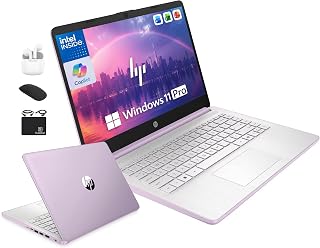
This model ships with just 4GB DDR5 RAM and 128GB internal storage, making it a prime candidate for user upgrades. The accessible RAM slots allow you to expand memory significantly, transforming basic performance into something far more capable. That compact 14-inch form factor means internal components are reachable without specialized tools, and the Intel 4-core processor provides a solid foundation. The included external storage shows the manufacturer expects users to customize their setup.
Pros
- Lifetime Office license avoids subscription costs
- External drive included for storage expansion
- Windows 11 Pro receives longer support
- Lightweight build reduces damage risk
Cons
- Soldered 4GB RAM cannot be upgraded
- 128GB UFS storage not user-replaceable
Upgradeability takes an unconventional approach with this HP 14-inch model through its bundled 500GB external drive rather than internal expansion. The 128GB UFS internal storage is not user-replaceable, which immediately limits traditional upgrade paths. However, the external storage solution sidesteps this constraint for students and budget-conscious users who prioritize file capacity over internal performance. The 4GB LPDDR5 RAM is soldered to the motherboard, eliminating memory upgrades entirely. This fixed configuration defines the laptop's capabilities from day one. The Intel Quad-Core N150 processor is adequate for current productivity tasks but lacks the performance ceiling to justify long-term ownership through upgrades. Where this machine compensates is software longevity. Lifetime Microsoft Office 2024 Professional Plus means no subscription renewals, and Windows 11 Pro receives extended support compared to Home editions. The clamshell design with standard ports supports peripheral upgrades like external monitors and docking stations. At 3.2 pounds, the lightweight build tolerates frequent handling without concern for expensive component damage during student life or small business travel.
Students completing degrees and small business owners running Office applications will find adequate performance within a fixed budget. The external storage model works for users comfortable managing files across drives. Avoid this laptop if you anticipate needing more RAM for multitasking, plan to run demanding software that benefits from internal SSD speed, or require true component-level upgradeability for extended ownership beyond basic productivity.

That 17.3-inch chassis provides ample internal space for component upgrades, with the latest AMD Ryzen 5 CPU delivering performance that will remain relevant as you add RAM or storage. The 16GB starting configuration uses standard SO-DIMM modules that can be swapped or supplemented, and the 512GB SSD occupies a replaceable M.2 slot. The numeric keypad and spill-resistant design suggest durability, meaning this machine can serve through multiple upgrade cycles.
Pros
- 17.3-inch display provides lasting screen real estate advantage
- 12-hour battery life reduces replacement frequency concerns
- SSD can be upgraded for storage expansion
- Full numeric keypad and spill-resistant design support long-term durability
Cons
- Processor cannot be upgraded
- 17-inch form factor limits portability for mobile users
The HP 17 arrives configured with specifications that minimize upgrade urgency while leaving room for future modifications. The 16GB RAM handles current multitasking demands across business applications, though the system potentially supports expansion if workloads intensify over time. The 512GB SSD provides functional storage that can be replaced with higher capacity drives as file collections grow. The 17.3-inch anti-glare FHD display represents a permanent feature that won't require updating, delivering consistent screen real estate for productivity work throughout the laptop's lifespan. The AMD Ryzen 5 7430U processor offers sufficient performance for standard business tasks, though like most laptop CPUs it cannot be upgraded. The full-size keyboard with numeric keypad and spill-resistant design contribute to durability that extends usable life. Comprehensive connectivity including USB, HDMI, and wireless options ensures compatibility with evolving peripherals. The 12-hour battery life provides excellent longevity, though battery replacement represents a typical maintenance item after several years of use. Windows 11 with Office 365 for Web maintains software relevance without additional licensing costs. The 0.81-inch profile and solid build quality suggest the physical design will age well. The 720p camera and digital microphones meet current video conferencing standards. For users seeking a laptop that starts well-equipped and allows targeted upgrades rather than requiring immediate modifications, this configuration balances present capability with future flexibility.
Display: 17.3 inch FHD LED anti-glare, 1600x900 native resolution, supports up to 1920x1080
Processor: AMD Ryzen 5 7430U (6-core, 4.3 GHz max, 13th generation)
Memory and Storage: 16GB RAM, 512GB SSD
Graphics: Integrated AMD graphics
Battery Life: Up to 12 hours with HP Fast Charge
Connectivity: Wi-Fi 802.11ac, Bluetooth, 3 USB ports, HDMI video output
Design: 15.78 inches L x 10.15 inches W x 0.81 inches thick, silver finish
Keyboard: Full-size with numeric keypad, spill-resistant
Operating System: Windows 11 with Office 365 for Web
Camera: 720p Wide Vision with digital microphones
This laptop fits professionals and students who value large screen workspace and prefer well-rounded initial specifications over aggressive upgrade paths. The 17.3-inch display and numeric keypad suit users working extensively with spreadsheets, financial data, or documents who want desktop-like ergonomics. The existing 16GB RAM and 512GB SSD cover typical business needs without immediate modification. The 12-hour battery life benefits mobile workers who need reliable runtime. Skip this if portability matters more than screen size, as the 17-inch form factor trades compactness for workspace. Also avoid if you need discrete graphics, as the integrated AMD graphics remain fixed. Heavy power users requiring maximum RAM expansion should verify specific upgrade limits before purchase.

The Precision 7680 uses CAMM memory technology, which offers a more compact upgrade path than traditional SO-DIMMs while maintaining user replaceability. That 32GB DDR5 configuration can be swapped for higher capacity modules, and the workstation-grade build quality means components remain accessible through standard service panels. The Intel i9-13950HX provides extreme performance headroom, and the 1TB SSD sits in a standard slot that accepts larger drives as your project files grow.
Pros
- CAMM memory design simplifies RAM upgrades
- Accessible M.2 slots for storage expansion
- 24-core processor provides multi-year headroom
- MIL-STD durability supports extended ownership
Cons
- 5.9 pounds limits true portability
- Integrated graphics not upgradeable
Upgradeability is where the Dell Precision 7680 truly shines for professionals planning long-term ownership. The CAMM memory architecture represents a significant leap forward, allowing users to expand or replace RAM modules more easily than traditional SO-DIMM slots. This workstation ships with 32GB DDR5, but the design supports future memory upgrades as workloads grow. Storage expansion is equally flexible with accessible M.2 slots for additional SSDs, letting engineers and developers scale capacity without external drives cluttering their workspace. The modular construction follows Dell's enterprise workstation philosophy, with user-serviceable components that extend the machine's useful life well beyond typical consumer laptops. MIL-STD 810H certification ensures durability through multiple upgrade cycles. The 24-core Intel i9-13950HX processor provides headroom for years of demanding CAD, simulation, and compilation tasks before requiring replacement. Thunderbolt 4 connectivity future-proofs peripheral investments. For organizations managing fleets or professionals who budget for multi-year hardware lifecycles, this machine justifies its position through sustained performance and practical serviceability rather than forced obsolescence.
This workstation suits engineers, architects, and developers who run ISV-certified software and plan to keep machines for 4-5 years with periodic upgrades. CAD professionals rendering complex models will appreciate the expandable memory and storage. Skip this if you work primarily in web applications or office software where the upgrade potential goes unused, or if portability matters more than raw performance at 5.9 pounds.
Processor: Intel Core i9-13950HX vPro (24 Cores, 32 Threads, 36 MB Cache, up to 5.5GHz)
Memory: 32GB DDR5 CAMM 5600MHz
Storage: 1TB PCIe NVMe M.2 SSD
Display: 16-inch FHD+ (1920 x 1200) anti-glare, 250 nits, 45% NTSC, wide-viewing angle
Graphics: Integrated Intel UHD Graphics
Networking: Wi-Fi 6E, Bluetooth 5.0, Gigabit Ethernet
Operating System: Windows 11 Pro 64-bit
Battery: 6-cell, 83 Wh
Ports: 2x Thunderbolt 4 USB 3.2 Gen 2 Type-C, 2x USB 3.2 Type-A, HDMI, 3.5mm audio jack, Ethernet
Camera: 1080p FHD with privacy shutter
Dimensions: 14.02 x 10.18 x 1.03 inches
Weight: 5.9 lbs
Keyboard: English, backlit, numeric keypad
Durability: MIL-STD 810H certified
Buying Guide: What Makes a Laptop Truly Upgradeable
RAM Accessibility and Socket Type
Check whether the laptop uses socketed SODIMM or CAMM modules rather than soldered memory. The right RAM configuration matters for creative work and multitasking, and socketed memory lets you upgrade capacity as your workload grows.
Business laptops like the HP 255 G10 Business Laptop, AMD Quad-core CPU ship with standard SODIMM slots, making upgrades straightforward. The Dell Precision 7680 Laptop, 16″ FHD uses CAMM technology, which reduces Z-height while still allowing user-replaceable memory.
Storage Expansion Options
Look for laptops with M.2 NVMe slots rather than eMMC or soldered storage. Multiple M.2 bays give you room to add a second drive without replacing your primary SSD.
The ASUS Vivobook Core i9-13900H Laptop supports up to 2TB PCIe storage and offers clear internal access for upgrades. Models like the HP 15.6″ Pavilion FHD Laptop 2026 balance affordability with standard NVMe slots that accept any compatible drive.
Internal Access and Serviceability
A truly upgradeable laptop features a removable bottom panel secured with standard Phillips screws. Avoid models that use adhesive, proprietary fasteners, or require disassembling the entire chassis to reach components.
Business and workstation models prioritize serviceability. The same thinking that goes into professional peripherals applies to laptops built for IT departments that need to swap parts efficiently.
Warranty and Professional Upgrade Support
Some manufacturers void warranties if you open the case, while others explicitly support user upgrades. The HP 15.6″ FHD Touchscreen Laptop, 32GB RAM and ASUS Vivobook 15 Laptop, 15.6″ FHD come professionally upgraded by PCOnline with three-year coverage on the upgraded components, giving you confidence the work was done correctly.
Enterprise laptops like the Dell 16 Touchscreen Laptop DC16251 include extended manufacturer support that covers component swaps. Budget models such as the HP 14″ Laptop Computer for 2026 Student Business may have limited upgrade coverage, so verify the terms before purchasing.
Final Thoughts
Choosing an upgradeable laptop means investing in a machine that adapts to your changing needs rather than becoming obsolete. For professionals handling demanding workloads, the Dell Precision 7680 delivers workstation-class expandability with CAMM memory and multiple storage bays. Students and remote workers get excellent value from the HP 255 G10, which balances affordability with standard SODIMM slots and straightforward internal access.
Frequently Asked Questions
Can I upgrade RAM on any laptop in 2026?
No, most consumer laptops now use soldered memory that cannot be upgraded after purchase. Only models with SODIMM or CAMM sockets allow user-replaceable RAM, and these are typically found in business and workstation lineups rather than ultraportable consumer models.
What is CAMM memory and how does it differ from SODIMM?
CAMM (Compression Attached Memory Module) is a newer standard that replaces SODIMM in some laptops. It delivers higher bandwidth and lower Z-height while still allowing user upgrades. The Dell Precision 7680 uses CAMM to achieve workstation performance in a thinner chassis, though CAMM modules currently cost more than equivalent SODIMM sticks.
Will upgrading my laptop void the warranty?
It depends on the manufacturer and model. Business laptops from HP and Dell typically support user upgrades without voiding coverage, while some consumer models prohibit opening the case. Professionally upgraded machines from vendors like PCOnline include separate warranties on the upgraded components, protecting both the original manufacturer’s coverage and your investment in additional RAM or storage.
How much RAM do I need for multitasking and productivity work?
For general productivity, web browsing, and video calls, 16GB handles most workloads comfortably. Creative professionals working with demanding applications benefit from 32GB or more. Starting with 16GB in an upgradeable laptop gives you room to expand when your workload increases without replacing the entire machine.
Common questions
What are the best upgradeable gaming laptops to buy in 2026?
Gaming laptops with user-accessible RAM and SSD slots give you the most long-term value, since you can boost memory or storage without replacing the whole machine. Look for models with dual SO-DIMM slots, at least one open M.2 bay, and a discrete GPU tier that matches your target resolution. Chassis with good thermal headroom also matter, as they handle upgraded workloads without throttling. Check live listings for current pricing, and note that Prime Big Deal Days in October and Black Friday on November 27 often bring meaningful discounts.








Write Your Review
No reviews yet. Be the first to share your experience!