

You sit down to work and realize you need to plug in a mouse, a flash drive, and an external hard drive, but your laptop has exactly one USB-A port left. It is a scenario that plays out daily for remote workers, students, and power users. A good USB hub solves that problem instantly, and choosing the right one makes the difference between a clean, reliable desk setup and a tangle of disconnected frustration.
This guide covers ten of the best USB hub options available in 2026, spanning simple 4-port travel companions all the way to powered 10-port stations designed for demanding workstations. Whether you need something pocket-sized or a full desktop expansion hub, there is a strong option in this list for your workflow. If you are building out a full desktop setup, you may also want to check out our picks for the best PC cases with glass panels to keep your workspace looking sharp.
Quick Comparison
Ratings reflect the most recent data pull. Check each listing for current price and availability.
Quick answer
This guide compares 10 picks, with UGREEN USB 3.0 Hub 4 Port Ultra-Slim Expander, 5Gbps ranked first.
Pros
- True plug-and-play functionality with no software or drivers needed
- Genuinely fast 5Gbps USB 3.0 speeds for rapid file transfers and backups
- Exceptionally compact and lightweight, making it travel-friendly
- Broad OS and device compatibility including gaming consoles
- Excellent price-to-performance ratio for the quality and speed delivered
Cons
- Plastic build, while adequate, may not feel premium compared to all-metal alternatives
- Single cable means all four ports share bandwidth, so simultaneous high-speed transfers may see speed reduction
- Very short 0.5 ft cable limits placement flexibility on larger desks
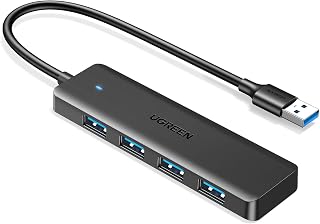
The UGREEN USB 3.0 Hub is a practical solution for anyone running out of USB ports on their laptop or desktop. This compact expander converts a single USB-A port into four, making it essential for professionals, students, and remote workers who frequently connect multiple peripherals like keyboards, mice, external drives, and printers.
Performance is where this hub truly shines. It delivers authentic 5Gbps USB 3.0 speeds, which means transferring a 10GB file takes just 16.4 seconds. This isn't marketing exaggeration, it's real-world speed that makes a difference when backing up large files or working with video and photo libraries. The plug-and-play design works immediately on Windows, macOS, Linux, Chrome OS, and even gaming consoles like Xbox Series and PS5, with zero driver installation required.
Build and design reflect practical engineering rather than luxury aesthetics. The ultra-slim 0.3-inch profile and 33-gram weight make this hub genuinely portable, fitting effortlessly into a laptop bag or backpack. The plastic construction is durable enough for frequent travel, though it won't match the feel of premium metal alternatives. The short 0.5-foot cable keeps the hub close to your computer, which is great for compactness but limits flexible desk placement.
One realistic consideration: since all four ports share a single 5Gbps connection, running multiple high-speed transfers simultaneously will distribute bandwidth. For typical mixed-use scenarios with a keyboard, mouse, and occasional file transfer, this is negligible. If you're constantly transferring from multiple devices at once, performance may dip.
The UGREEN USB 3.0 Hub delivers excellent value for the price. It solves a real problem with genuine performance, reliable compatibility, and real portability. Backed by a 24-month warranty and proven by thousands of customer reviews, this is a no-regrets purchase for anyone needing extra USB capacity.
Interface: USB 3.0
Ports: 4x USB-A
Data Transfer Rate: 5 Gbps
Dimensions: 3.1 inch L x 0.8 inch W x 0.3 inch H
Weight: 33 grams
Cable Length: 0.5 feet
Material: Plastic enclosure
Color: Black
Compatibility: Windows 10, macOS, Linux, Chrome OS, Xbox Series, PS5
Compatible Devices: Keyboards, mice, laptops, tablets, USB flash drives, printers
Model Number: 25851
Warranty: 24 months

Pros
- Exceptional data transfer speeds of 5Gbps make file syncing noticeably fast
- Incredibly compact and lightweight, perfect for mobile professionals and travelers
- Plug-and-play installation requires zero setup or driver downloads
- Highly durable construction with heat resistance for long-term reliability
- Excellent value at an affordable price point with strong customer ratings
Cons
- Not designed for device charging, only for data transfer and peripherals
- Some users report occasional connection recognition issues that require replugging
- 2-foot cable length may be limiting for certain desk configurations
The Anker 4-Port USB 3.0 Hub is a straightforward solution for anyone suffering from port scarcity. Whether you have a laptop with limited USB access, a desktop with all ports occupied, or simply need more connectivity options, this ultra-slim hub transforms a single USB port into four functional ports. It's built for users who prioritize functionality over charging capability and want reliable, fast data transfer without complexity.
Performance is where this hub shines. With SuperSpeed 5Gbps data transfer rates, file synchronization is noticeably quicker than older hubs. The compact design doesn't compromise on build quality either. The plastic enclosure is precision-engineered for heat resistance, and users consistently report solid performance with external hard drives, USB flash drives, keyboards, and mice. Setup is refreshingly simple: plug it in and start using it immediately, no driver installation needed.
The build quality reflects Anker's reputation for durability. At just 1.28 ounces and measuring under 5 inches long, this hub is genuinely portable without feeling flimsy. The ultra-slim profile makes it easy to position without creating cable tangles or consuming valuable desk real estate. The 2-foot cable provides reasonable flexibility for typical desk arrangements, though users with specific cable routing needs may find it slightly constraining.
The primary drawback is that this hub is designed purely for data transfer and peripheral connectivity, not for charging devices. Additionally, a small percentage of users report occasional connection drops that resolve with disconnection and reconnection. These are minor issues for a product in this price category and don't significantly detract from overall functionality.
For budget-conscious users who need reliable USB expansion for data transfer and peripherals, the Anker 4-Port USB 3.0 Hub delivers excellent value. The combination of fast speeds, durability, ease of use, and affordable pricing makes it a practical choice for home offices, student setups, and anyone whose devices need more USB ports. With an 18-month warranty backing your purchase, this is a low-risk upgrade.
Connectivity: USB 3.0 SuperSpeed, 5Gbps data transfer rate
Ports: 4 USB-A ports, all compatible with USB 3.0 standard devices
Design: Ultra-slim form factor, 4.23 inches long by 1.23 inches wide by 0.39 inches tall
Material: Durable plastic enclosure with heat-resistant engineering
Weight: 1.28 ounces for maximum portability
Cable: 2-foot integrated USB-A connector cable
Compatibility: Windows XP and later, Linux, desktops, laptops, and any device with USB-A port
Power: Data transfer only, no charging support
Warranty: 18-month manufacturer's warranty with friendly customer support
Laptop Users: If your laptop has limited USB ports and you constantly juggle peripherals, this hub immediately solves the problem without requiring a bulky power adapter.
Content Creators and Photographers: Fast 5Gbps data transfer means less waiting time when transferring large files from cameras, external drives, or memory cards to your computer for editing and backup.
Students and Remote Workers: Affordable expansion for home office setups where you need to connect multiple devices like monitors, keyboards, mice, and external storage simultaneously.
Business Travel: The ultra-slim, lightweight design fits into laptop bags without adding noticeable bulk, and it works reliably in hotel rooms, coffee shops, and conference venues.
Budget-Conscious Buyers: At this price point, you get reliable performance from a trusted brand without paying premium prices for features like fast charging that you may not need.
Pros
- Exceptional portability and durability for frequent travelers and remote workers
- Extended cable eliminates the need for additional adapters and keeps workspace organized
- Four simultaneous connections support keyboards, mice, external drives, and more without bottlenecks
- Affordable price point for professional-grade performance and reliability
- Consistently praised for ease of use and instant setup
Cons
- Does not support charging through the hub, limiting functionality for power-dependent devices
- Limited to lower-power applications as noted by users with high-bandwidth requirements
- Single color option (black) with no aesthetic customization available
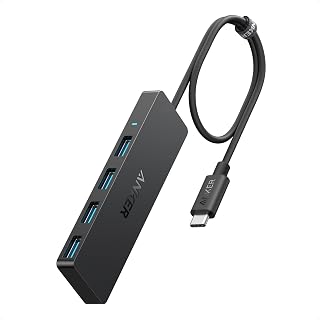
The Anker 4-in-1 USB-C Hub is a practical solution for anyone struggling with limited USB ports on modern laptops and computers. Whether you work remotely, travel frequently, or simply need to connect multiple peripherals, this hub transforms a single USB-C port into four functional connections. It's especially useful for MacBook owners and Windows users with Surface devices or Dell XPS laptops.
Performance is where this hub shines. The 5Gbps data transfer rate ensures files move quickly, and the four ports handle simultaneous connections without noticeable slowdowns when using standard peripherals like mice, keyboards, and external drives. The 2-foot cable is a thoughtful design choice that prevents the hub from sitting directly on your desk or blocking adjacent ports, giving you real flexibility in setup configurations.
Build quality reflects Anker's reputation for durability. The plastic enclosure is compact and lightweight at just 1.12 ounces, yet reviewers consistently report the hub withstands drops and regular handling. The sleek design measures only 4.2 by 1.2 by 0.4 inches, making it genuinely pocketable for travelers who consolidate their cable management. True plug-and-play operation means instant connectivity without software installation.
The main limitation is lack of charging support, which means this hub cannot power your laptop or deliver energy to other devices. Additionally, while the 5Gbps speed handles most daily tasks, power-hungry applications may require dedicated connections. These constraints are acceptable for the price point and intended use case.
Overall, the Anker 4-in-1 USB-C Hub delivers exceptional value for professionals, students, and travelers who need reliable device connectivity. Its combination of performance, portability, and durability makes it a smart investment for anyone tired of dongle management and port limitations.
Connectivity and Performance: 4 USB 3.0 ports, 5Gbps data transfer rate, USB-C input connection
Physical Design: Dimensions: 4.2 inches L x 1.2 inches W x 0.4 inches H, Weight: 1.12 ounces, Color: Black, Material: Plastic enclosure, Cable length: 2 feet
Compatibility: Works with Mac OS 9 and Windows 10 or later, compatible with MacBooks, Mac Pro, iMac, Microsoft Surface, Dell XPS, and any device with USB-C port
What's Included: Anker 4-in-1 USB-C Hub, welcome guide, 18-month warranty, and customer support

Acer USB 3.0 Hub 4 Port with 5Gbps Transfer Speed
Pros
- Easy access to ports with compact footprint, even for small USB devices
- Works seamlessly across multiple operating systems and device types
- Excellent build quality and durability at an affordable price point
- Plug-and-play convenience means instant setup without software installation
- Power input option stabilizes transfers when using power-hungry peripherals
Cons
- Hub gets warm under full load, requiring adequate ventilation
- USB-C port only provides power input and cannot transfer data or charge devices
- May have compatibility issues with some USB devices requiring special drivers
The Acer USB 3.0 Hub is a straightforward solution for anyone needing more USB ports on their laptop or desktop. This four-port hub is designed for professionals, students, gamers, and creative workers who juggle multiple peripherals like keyboards, mice, external drives, and printers simultaneously.
What sets this hub apart is its combination of speed and reliability. With 5Gbps USB 3.0 data transfer, you can move files quickly without bottlenecks. The included USB-C power input is a smart touch, allowing you to supply power to the hub independently so that demanding devices like external hard drives get stable connectivity and consistent performance. All four USB-A ports work at the same time, making multitasking effortless.
The design prioritizes portability and ease of use. At just over 4 inches wide with a slim 2-foot cable, it fits easily into a backpack or laptop bag. The compact form factor means even small USB devices are accessible without stacking or crowding. Setup is instant: plug it in and start connecting your gear. No drivers, no setup wizards, no delays.
One consideration is heat generation. Like most hubs operating at full capacity, this device gets warm, so placing it in a location with adequate airflow helps ensure longevity. Additionally, the USB-C port is power-only and cannot be used for data transfer or device charging, which is a minor limitation but clearly documented.
Bottom line: this is a reliable, affordable hub that does exactly what it promises. It's best suited for users who need quick, no-nonsense port expansion without premium pricing. Backed by strong customer satisfaction and a one-year warranty, it's a practical upgrade for any multi-device workflow.
Connectivity: 4x USB 3.0 ports plus 1x USB-C power input
Data Transfer Speed: 5Gbps per USB 3.0 port
Chipset: GL3510 with advanced thermal management
Cable Length: 2 feet
Dimensions: 4.13in L x 1.18in W x 0.35in H
Weight: 1.6 ounces
Material: ABS plastic with anti-slip base
Compatible Operating Systems: Windows 11, macOS, Chrome OS, Linux
Warranty: 1 year manufacturer coverage
Model: ACER-UH501
Who Should Buy This Hub? This hub is ideal for laptop users with limited USB ports, students managing multiple study and entertainment devices, content creators working with external drives and peripherals, and office workers needing to connect printers and scanners.
Power Considerations: The USB-C power input is optional but recommended when using power-hungry devices like external hard drives or when connecting all four ports simultaneously. This ensures stable data transfer and protects connected devices.
Compatibility Check: Works with Windows 11, macOS, Chrome OS, and Linux. Compatible with desktops, laptops, tablets, gaming consoles, and most standard USB devices. Verify your device's USB port type before purchasing.
Setup and Usage: Simply plug the hub into your device's USB port. If using power-hungry peripherals, connect the included USB-C cable to a power adapter. No software installation needed. Allow adequate airflow around the hub during extended use.

Pros
- Exceptional durability and heat management compared to cheaper alternatives
- Individual port switches reduce power consumption and device charging conflicts
- Universal compatibility across operating systems with true plug-and-play setup
- Lightweight, compact design fits under desks or laptop stands without taking up much space
- Sturdy construction with quality cables and power adapter included in the box
Cons
- Some older bus-powered external drives may cause compatibility issues with other connected devices
- Requires wall power for full functionality, limiting portability for mobile users
- No master on-off switch for all ports at once, requiring individual control
The atolla 11-Port USB 3.0 Hub is a powered expansion solution designed for users who need to connect multiple peripherals, external storage, and charging devices to a single computer port. Whether you're a content creator managing drives and accessories, a busy professional juggling keyboards and mice, or someone who simply needs to charge multiple devices, this hub consolidates your connectivity needs into one organized solution.
The standout feature is the combination of 7 dedicated USB 3.0 data ports running at 5Gbps alongside 4 smart charging ports with a powerful 12V/4A adapter. Each port has an individual illuminated on-off switch, allowing you to control power independently and avoid conflicts between devices. Real-world users report a year or more of stable operation without overheating, a significant advantage over cheaper hubs that have reliability issues.
Build quality is solid throughout. The hub feels substantial with beefy cables and a detached power brick that won't block adjacent outlets. Color-coded LED indicators (blue for data, red for charging) make it immediately clear which port serves which purpose. The 100cm USB cable provides enough reach to position the hub comfortably on a desk or underneath a laptop stand, keeping cables organized and out of sight.
The main limitation is compatibility with older bus-powered external drives, which occasionally prevent other devices from being recognized by Windows. This is rare with modern drives. Additionally, the hub requires wall power to function, so it is not suitable for portable setups where you need unplugged expansion. A master on-off switch would be convenient, though individual port control is more flexible once you adjust to the workflow.
The atolla 11-Port Hub is a worthwhile investment if you need reliable, expandable connectivity with independent port control. At this price point, you get solid construction and performance that outlasts budget alternatives, backed by an 18-month warranty and proven user satisfaction.
Connectivity: 11 total ports: 7 USB 3.0 data ports plus 4 USB 3.0 charging ports with individual on-off switches
Data Transfer Speed: Up to 5Gbps for USB 3.0 connections
Power: 12V/4A power adapter with up to 2.4A charging output per device
Compatibility: Windows 7, 8, 8.1, 10; Mac OS X 10.x and above; Linux. Plug-and-play, no drivers required
Cable: 100cm USB 3.0 cable included
Dimensions: 9.84 inches L x 4.41 inches W x 2.24 inches H
Warranty: 18-month manufacturer warranty

SABRENT 10-Port USB 3.0 Hub with 60W Power Adapter
Pros
- Individual port switches eliminate need to unplug devices, saving time and extending cable lifespan
- Powerful 60W adapter supports simultaneous fast charging and high-speed data transfers
- Blue LED indicators provide clear visual feedback on port activity and device status
- Works instantly on any major operating system without software installation
- Highly rated by thousands of users with strong 4.6-star review average
Cons
- Limited to 5Gbps speeds, which is adequate for most devices but slower than USB 3.1 alternatives
- Requires external power adapter, adding one more cable to your setup
- No Thunderbolt support, limiting compatibility with newer Apple devices
The SABRENT 10-Port USB 3.0 Hub is a practical expansion solution for anyone dealing with the frustration of limited USB ports. Whether you are a content creator juggling external drives, a student connecting multiple peripherals, or a remote worker managing various devices, this hub streamlines your connectivity needs by converting a single port into ten capable connections.
The standout feature here is the individual power switches paired with blue LED indicators on each port. This thoughtful design lets you control which devices receive power without unplugging cables, reducing wear on connectors and giving you granular control over your setup. The included 60W power adapter ensures you can charge and transfer data simultaneously across multiple devices without performance degradation, a capability many cheaper hubs lack.
Build quality is solid for the price point. The compact ABS enclosure weighs just 43 grams and measures a modest 5.7 by 1.9 inches, making it genuinely portable. The layout is intuitive with ports positioned for easy access, and the construction feels durable enough to handle daily use. The included USB 3.0 cable and user manual add to the complete out-of-the-box experience.
The main limitation is that USB 3.0 speeds max out at 5Gbps compared to newer USB 3.1 standards. For file transfers and most day-to-day tasks this is plenty, but video professionals and data-intensive workflows may want to explore faster alternatives. Additionally, the external power adapter adds another cable to manage, though the robust power delivery justifies this tradeoff.
Overall, the SABRENT 10-Port Hub delivers reliable, feature-rich connectivity at a competitive price. Its individual port controls and solid power delivery make it a standout choice in the crowded USB hub market, earning its strong customer ratings through consistent, practical performance.
Connectivity and Performance: USB 3.0 with 5Gbps data transfer rate, backward compatible with USB 2.0 and 1.1 devices. 10 total ports with individual power switches and blue LED indicators.
Power and Compatibility: Includes 60W 12V/5A power adapter. Plug-and-play compatible with Windows 10 and later, macOS, and Linux. Universal compatibility with most USB devices including phones, tablets, external drives, and card readers.
Physical Specifications: Compact dimensions of 5.7 inches L by 1.9 inches W by 0.94 inches H. Lightweight at 43 grams. ABS plastic enclosure. Model HB-BU10 with 1-year limited warranty.
Best For: Content creators managing multiple external storage devices, students needing to connect numerous peripherals, office workers with limited desk ports, anyone requiring simultaneous charging and data transfer functionality.
Consider This Hub If: You need reliable plug-and-play connectivity without driver installation, want individual control over each port's power, value a compact and portable design, or work across multiple operating systems regularly.
Look Elsewhere If: You require USB 3.1 or Thunderbolt speeds for professional video editing or data management, need a hub with integrated charging capabilities, or work exclusively with Apple's latest devices that have different connectivity standards.

Pros
- Robust 60W power delivery handles multiple high-power devices without performance drops
- Smart charging ports auto-detect connected devices for optimal power output
- Individual port switches provide granular control and reduce idle power consumption
- Fast 5Gbps USB 3.0 speeds satisfy demanding file transfer and backup workflows
- Universal compatibility eliminates driver hassles across all major operating systems
Cons
- 7 USB ports plus 3 charging ports means limited desk space in compact setups
- No USB-C ports, so newer devices with USB-C only will need adapters
- Power adapter cable adds another cord to manage on your desk
The SABRENT HB-B7C3 is a 10-port powered USB hub designed for users who need to connect multiple devices and keep them charged simultaneously. It's ideal for content creators, power users, and anyone with a crowded desk managing numerous peripherals, external drives, and mobile devices.
The hub delivers on its core promise: 7 USB 3.0 ports provide 5Gbps transfer speeds for fast file operations, while 3 dedicated charging ports intelligently distribute up to 2.4A per port. The 60W power adapter is the real standout, supplying stable power to all ports even when everything is plugged in and actively transferring data or charging. Individual port switches and LED indicators give you complete control, letting you power down unused ports to save energy and reduce clutter.
Build quality is solid with a compact, mirrored design that looks professional on any desk without taking up excessive space. The plug-and-play setup means no software hassles on Windows, macOS, or Linux. Setup takes literally seconds, which is refreshing compared to older hubs that required driver installation.
The main trade-off is that seven USB-A ports may feel dated as USB-C adoption increases. If your newer devices require USB-C, you'll need adapters. Additionally, the power adapter introduces another cable to manage, though this is a minor inconvenience for the power delivery capability you gain.
The SABRENT HB-B7C3 is a reliable, well-powered hub that solves real connectivity problems without premium pricing. It won't win beauty contests, but it delivers practical functionality for anyone serious about managing multiple devices from one place.
Port Configuration: 7 USB 3.0 ports + 3 charging ports (10 total)
Data Transfer Speed: Up to 5Gbps per USB 3.0 port
Charging: Up to 2.4A per charging port with auto-detection
Power Adapter: 60W, 12V/5A
Compatibility: USB 3.0 and lower devices, Windows, macOS, Linux
Design: Compact mirrored black chassis with individual port switches and LED indicators
Installation: Plug-and-play, no drivers required
Best For: Content creators, software developers, IT professionals, and anyone managing multiple USB peripherals and mobile devices from a single workstation.
Consider This Hub If: You regularly transfer large files to external drives, need to charge multiple devices simultaneously, or want individual control over each port's power delivery.
May Not Be Right If: Your devices are predominantly USB-C, you have extremely limited desk space, or you prioritize minimalist aesthetics over functionality.
Setup Tip: Use the port switches to disable charging ports when not in use, extending the lifespan of your connected devices and reducing standby power consumption.

Pros
- Comprehensive 7-in-1 design eliminates need for multiple dongles and adapters
- 100W PD charging handles demanding laptops like MacBook Pro while using other ports simultaneously
- Durable aluminum build with excellent heat dissipation for reliable extended use
- 5Gbps data speeds deliver fast file transfers without bottlenecking workflow
- Broad OS compatibility spans Windows, macOS, Chrome OS, and Linux
Cons
- Requires external power supply connected to PD port for full functionality and stable operation
- 4K video limited to 30Hz, not suitable for high-refresh gaming or professional 4K editing at 60Hz+
- No reviews available yet to validate real-world performance and long-term durability
The Acer ODK360 USB-C hub is a comprehensive connectivity solution designed for laptop users who need instant access to video, charging, data transfer, and card reading from a single port. It appeals to MacBook Pro and Air owners, Windows laptop users, and anyone working across multiple devices who demands professional-grade portability without compromise.
The standout feature is its 100W Power Delivery charging combined with simultaneous functionality. You can charge a demanding laptop, stream 4K video to an external monitor, transfer files at 5Gbps, and read SD cards all at once. The 7-port architecture is genuinely practical for anyone tired of carrying multiple dongles. 4K output at 30Hz handles presentations, video editing previews, and content consumption smoothly, though it's not optimized for high-refresh gaming or professional 4K production work.
Build quality shines through the aluminum construction and compact 5.1-inch design. The material provides excellent heat dissipation during extended use and feels durable enough for regular commuting. The lightweight 68-gram form factor won't noticeably burden a laptop bag, and the space grey finish matches modern devices aesthetically.
One caveat: this hub requires an external power supply connected to the PD port to deliver its full feature set. This is a common trade-off with high-capacity USB-C hubs but worth noting if you expected a purely passive solution. Additionally, the 30Hz 4K limitation means power users needing 4K@60Hz or 2K@144Hz will need to look elsewhere.
The Acer ODK360 delivers exceptional value for professionals and hybrid workers who need a reliable, compact hub that handles charging and connectivity simultaneously. It's a solid choice for MacBook users and Windows laptop owners seeking to reduce desk clutter and simplify cable management.
Ports and Connectivity: 1x HDMI 4K@30Hz, 2x USB 3.1, 1x USB-C data, 1x USB-C PD charging, 1x SD card slot, 1x microSD card slot
Performance: 5Gbps data transfer rate, 100W Power Delivery, 4K video output with mirror or extend modes
Build: Aluminum enclosure, space grey color, dimensions 5.1" x 1.4" x 0.7", weight 68g
Compatibility: Chrome OS, Mac OS 12+, Windows 11, Linux. Works with MacBook Pro, MacBook Air, XPS, Acer laptops, and tablets including Samsung DeX devices
Warranty: 1-year manufacturer warranty
Who Should Buy: Remote workers and frequent travelers who need a single adapter for video, charging, and file transfer. MacBook Pro and Air users, Windows laptop owners with USB-C ports, and anyone managing multiple peripheral connections.
Who Should Skip: Users requiring 4K@60Hz video output, gamers needing high-refresh displays, or those wanting purely passive charging without an external power supply. Users with older devices lacking USB-C or DP Alt Mode support.
Setup Requirements: You'll need a separate 65W+ charger to connect to the PD port. Ensure your device supports USB Type-C DP Alt Mode for video functionality. Samsung DeX users should enable DeX Mode before connecting.
Real-World Use: Ideal for docking setups where you connect once and stay connected. Works well for travel and shared workspaces where frequent plug-and-unplug cycles occur. The aluminum build handles daily bag commuting reliably.

Pros
- Solid aluminum build quality feels premium and reliable compared to plastic alternatives
- 4ft cable length eliminates need to reach around computers or desks
- Genuinely fast data transfers make moving large files noticeably quicker
- All 7 ports work consistently without connection drops during heavy use
- Universal compatibility with Windows, Mac, Linux, and Chrome OS
Cons
- Data transmission only, does not support device charging despite Type-C port presence
- Type-C port placement on the side limits cable orientation flexibility
- Limited to data transfer speeds without power delivery capability
This 7-port USB 3.0 hub is a desktop essential for professionals, photographers, content creators, and anyone dealing with cable clutter. It solves the universal problem of limited USB ports by providing seven high-speed connections in a compact, aluminum enclosure.
The standout performance feature is its genuine 5Gbps USB 3.0 speed, which delivers noticeably faster file transfers than older USB 2.0 setups. Users report that moving large files, backing up photos, and streaming media happens in a fraction of the time. The dual-chip processor maintains stability when multiple devices operate simultaneously, and the hub works seamlessly across Windows, Mac, and Linux platforms with zero driver installation required.
Build quality is genuinely impressive for the price point. The premium aluminum construction provides superior heat dissipation and feels substantially more durable than plastic alternatives. The 4ft cable is a practical advantage, allowing you to position the hub on your desk surface rather than hidden behind your tower, improving accessibility and cable management significantly.
The primary drawback is that this hub supports data transmission only and cannot charge connected devices. Additionally, the Type-C port position on the side rather than at an end limits cable orientation flexibility. These limitations are worth noting if you planned to use this for device charging.
Overall, this hub delivers excellent value for desktop and laptop users who need fast, reliable USB expansion. It excels at cable organization, maintains consistent performance, and offers the speed and build quality typically found in more expensive alternatives. Recommended for anyone juggling multiple USB devices who values both performance and durability.
Connectivity: 7 x USB 3.0 ports, 1 x Type-C port (5V/3A, data transfer only)
Speed: 5 Gbps USB 3.0 data transfer rate
Cable Length: 4 feet with durable, heavy-duty construction
Material: Premium aluminum with heat dissipation design
Dimensions: 5.3 inches long x 1.2 inches wide x 0.66 inches deep
Color: Silver
Processor: Dual high-performance chips for enhanced stability
Compatibility: Windows, Mac OS, Linux, Unix, Chrome OS
Installation: Plug and play, no drivers required
Warranty: 20 months manufacturer coverage
Model: HB437
Who Should Buy This Hub: This hub is ideal for desktop users, content creators, photographers, gamers, and professionals who regularly connect multiple USB devices. It is perfect if you work with external hard drives, need multiple peripheral connections, or want to eliminate cable management hassles.
Who Should Look Elsewhere: If you need to charge devices through the hub, this is not the right choice as it supports data transmission only. Users requiring mounting solutions or shorter cable lengths may want to explore alternative options.
Installation and Use: Simply connect the hub to your computer via USB and connect your devices to the 7 available ports. No software installation is necessary. The hub works immediately upon connection.
Performance Tips: For optimal speeds, connect USB 3.0 devices to this hub. USB 2.0 devices will work but at reduced speeds. Keep the hub in a well-ventilated area to take advantage of the aluminum heat dissipation design during extended use with multiple connected devices.

TP-Link UH720 9-Port USB 3.0 Hub with 7 Data Ports
Pros
- Fast USB 3.0 data transfer speeds eliminate bottlenecks for large file operations and external drive connectivity
- Dedicated 2.4A charging ports charge multiple devices simultaneously without slowing down data transfers on other ports
- Truly plug-and-play with no driver hassles across all major operating systems, making setup and use effortless
- Comprehensive circuit protection and surge defense safeguard both your connected devices and valuable data
- Powered adapter included, eliminating the need for a separate purchase and ensuring reliable operation
Cons
- Charging ports are dedicated to power only and cannot perform data sync, requiring strategic port planning
- 2.4GHz wireless devices like keyboard and mouse adapters may experience interference when used near the hub, potentially requiring repositioning
- Plastic enclosure feels less premium than metal alternatives, though it maintains adequate durability for normal use
The TP-Link UH720 is a 9-port USB hub designed for professionals, content creators, and power users who need seamless connectivity for multiple devices. With 7 USB 3.0 data ports and 2 dedicated 2.4A charging ports, this powered hub transforms a single USB connection into a complete connectivity ecosystem, perfect for anyone managing keyboards, mice, external drives, smartphones, tablets, and other peripherals simultaneously.
Performance is the standout strength. USB 3.0 delivers a blazing 5Gbps transfer rate, making file operations 10 times faster than older USB 2.0 standards. The dual smart charging ports intelligently detect connected devices and deliver full 2.4A output, allowing you to charge a smartphone and tablet at maximum speed without compromising data transfer speeds on other ports. Real-world usage confirms the hub handles mixed workloads reliably, whether syncing large video files, backing up photos, or charging multiple devices.
Build quality is practical and functional. The black plastic enclosure feels solid despite its material choice, and the compact 7.8" x 5.8" footprint fits neatly on most desks. The included 12V/4A power adapter provides consistent power delivery without external power draws from your computer, ensuring stable operation even with demanding peripherals. A convenient power on/off button lets you toggle the hub as needed.
Two minor trade-offs merit mention. The charging ports work exclusively for power and cannot sync data, so you'll need to plan port usage accordingly. Additionally, 2.4GHz wireless peripherals may experience brief interference when positioned too close to the hub, though moving wireless adapters to different USB ports typically resolves this issue.
The TP-Link UH720 is a reliable, no-nonsense expansion hub backed by universal OS compatibility and a 2-year warranty. It excels at what it's designed to do: consolidate connectivity and simplify your desk setup. Recommended for anyone seeking a straightforward, powered hub without complexity or compromise.
This hub is ideal for productivity-focused users including remote workers managing multiple monitors and peripherals, content creators transferring large files daily, students needing reliable multi-device charging and data access, and anyone tired of USB port limitations on their computer.
It's particularly valuable if you have several smartphones or tablets that need charging while working, frequently transfer data between external drives and your computer, or use multiple USB peripherals like printers, scanners, or external backup drives simultaneously.
Connectivity: 7 USB 3.0 Standard-A data ports, 2 USB 2.4A charging ports, 1 USB 3.0 Micro-B upstream port
Speed: 5Gbps (USB 3.0) with backward compatibility to USB 2.0/1.1
Power: 12V/4A power adapter included, power on/off button
Compatibility: Windows 8.1 and later, Mac OS X 10.6 and later, Linux, Chrome OS
Dimensions: 7.8" L x 5.8" W x 2.8" H
Weight: 500g (1.1 lbs)
Color: Black plastic enclosure
Warranty: 2-year manufacturer warranty with technical support
Model: UH720 by TP-LINK
USB Hub Buying Guide: What to Look For
Powered vs. Bus-Powered
Bus-powered hubs draw electricity directly from your computer’s USB port. They are slim, require no extra cable, and are ideal for connecting low-draw peripherals like keyboards, mice, and flash drives. The Anker USB Hub, 4-in-1 USB Splitter and the UGREEN USB 3.0 Hub, 4 Ports USB A Splitter are classic examples of this category.
Powered hubs come with an external adapter that delivers consistent, dedicated power to every port. If you plan to connect external hard drives, charge devices, or run many peripherals simultaneously, a powered hub is the right call. Options like the SABRENT 10-Port Powered USB 3.0 Hub include a 60W power adapter precisely for this reason.
Port Count and Port Types
A 4-port hub covers most casual users, but if you run a multi-monitor workstation or frequently juggle storage drives, cameras, and input devices, consider a 7 to 11 port model. The Powered USB 3.0 Hub, atolla 11 Ports offers 7 data ports alongside 4 dedicated charging ports, giving you clear separation between devices you use for transfers and devices you just need to keep topped up.
Also consider whether you need USB-C connectivity. The Acer USB C Hub, 7 in 1 Multi-Port Adapter expands a single USB-C port into HDMI output, card readers, and multiple USB-A ports, making it a versatile choice for modern thin-and-light laptops that have dropped USB-A entirely.
Data Transfer Speed
USB 3.0 delivers transfer speeds up to 5Gbps, which is fast enough to move a large video file in seconds. Every hub in this guide operates at that standard, but it is worth confirming that your host port also supports USB 3.0 to get the full benefit. Pairing a USB 3.0 hub with a USB 2.0 port will cap your speed at the slower standard.
If you frequently move large files between drives, you will appreciate hubs with independent bandwidth per port rather than shared bandwidth across all ports. This is one area where powered hubs with dedicated chipsets, like the SABRENT 10-Port 60W Powered USB 3.0 Hub, tend to outperform budget bus-powered alternatives under load. For users pairing their hub with fast storage, our roundup of the best PCIe 5.0 SSD is worth a read.
Build Quality and Cable Length
Cheap plastic hubs can introduce heat issues over time, especially when all ports are in use. The 4FT 7-Port USB 3.0 Hub Multiport Adapter uses a premium aluminum enclosure specifically for better heat dissipation, which is a meaningful advantage for always-on setups.
Cable length matters more than most buyers expect. A short 0.5 ft cable forces the hub to sit right next to your computer, while a 2 ft or 4 ft cable lets you position it wherever it is most convenient on your desk. The Anker USB C Hub, USB Extender ships with a 2 ft cable for exactly this flexibility, and the 4FT 7-Port model gives you even more reach. For a full peripheral-friendly build, also consider browsing our best PC speakers for gaming to round out your workspace.
Final Thoughts
For most users looking for a compact, no-fuss solution, the Anker USB Hub, 4-in-1 USB Splitter delivers excellent reliability and fast 5Gbps transfers at a slim profile that travels well. If your workflow demands more ports, dedicated charging, and individual port control, the TP-Link Powered USB Hub brings a 9-port setup with smart charging and solid circuit protection that holds up in demanding desk environments.
Frequently Asked Questions
What is the difference between a powered and unpowered USB hub?
An unpowered hub draws all its electricity from your computer’s USB port, making it simple and cable-free but limited in how many high-draw devices it can support. A powered hub includes its own external power adapter, allowing it to supply consistent energy to every connected device without straining your computer. For connecting external hard drives or charging smartphones, a powered hub is strongly recommended.
Will a USB hub slow down my internet or data transfers?
A USB hub shares available bandwidth across all connected devices. If you are transferring files on multiple drives simultaneously, each drive will get a portion of the total 5Gbps available rather than the full amount. For typical use cases like keyboards, mice, and occasional file transfers, you will not notice any slowdown. Choosing a hub with independent controllers, as found in higher-end powered models, helps maintain consistent speeds under heavier loads.
Do I need a USB hub with individual port switches?
Individual power switches let you disable specific ports without unplugging devices, which is useful when you want to cut power to a device that is not in use or troubleshoot a connection. Hubs like the storage-heavy setups benefit from this control, and models like the SABRENT 10-Port hubs include per-port switches and LED indicators for exactly this reason. For a simple 4-port travel hub, this feature is less critical.
Are USB hubs compatible with both Mac and Windows in 2026?
Every hub reviewed in this guide is plug-and-play across Windows, macOS, Linux, and Chrome OS with no drivers required. Compatibility with these major operating systems is a standard feature of USB 3.0 hubs in 2026, so you do not need to worry about platform-specific versions. The Acer USB C Hub, 7 in 1 Multi-Port Adapter also includes notes for Samsung DeX mode compatibility, showing how broad modern hub support has become.
Common questions
What is the best USB-C hub for PC setups right now?
The best USB-C hub for PC use depends on your port needs, since the models here focus on USB-A rather than USB-C. The Acer USB Hub 4 Ports stands out because it includes USB Type C alongside USB 3.0 and USB-A, plus anti-slip design and an indicator light. For heavier desktop setups needing more simultaneous connections, the SABRENT 10-Port Powered USB 3.0 Hub offers far more ports and dedicated charging capacity. Check each listing for current pricing.


Write Your Review
No reviews yet. Be the first to share your experience!