

A sluggish PC can make even simple tasks feel drawn out, whether you are waiting for a game level to load, copying large media files, or opening everyday apps. The nvme vs sata ssd decision matters because each drive type uses a different connection, has different speed limits, and fits different computers.
This guide compares practical upgrade paths for gamers, creators, students, and anyone replacing an aging hard drive. Browse our broader storage upgrade guides if you are also weighing external drives, backups, or other components.
Quick answer
This guide compares 10 picks, with WD_Black SN7100 2TB NVMe SSD: Ultra-Fast PCIe Gen4 ranked first. SSK M.2 NVMe SATA SSD Enclosure USB 3.2 Gen2 10Gbps has the most customer reviews.

Readers chasing the top end of the NVMe upgrade path should look at this drive's 7,250 MB/s read speed, which sits near the ceiling of what Gen4 PCIe allows. That headroom matters most for handheld gaming devices and laptops doing heavy load-ins, where SATA's fixed 6 Gbps ceiling simply can't compete. It's built for readers deciding the upgrade is worth maxing out.
Pros
- Exceptional sequential read and write speeds position it among the fastest consumer NVMe drives
- Significant power efficiency improvements extend battery life on portable devices
- Reliable TLC 3D NAND with strong track record from both WD and Sandisk
- Compact M.2 2280 form factor fits virtually all modern laptops and gaming systems
- Excellent value proposition for the performance tier with strong customer satisfaction ratings
Cons
- Power efficiency gains only matter on battery-powered devices, less relevant for desktop users
- WD_BLACK Dashboard software is Windows-only, limiting optimization options for Mac users
The WD_Black SN7100 is a high-performance NVMe SSD designed specifically for gamers and content creators who work on laptops or handheld gaming devices. With its PCIe Gen4 interface and advanced TLC 3D NAND technology, this drive targets users who refuse to compromise on speed and responsiveness. If you're tired of long load times and stuttering performance, this is a drive worth considering.
Where the SN7100 truly shines is in raw speed. With up to 7,250 MB/s read speeds and 6,900 MB/s write speeds on the 1-2TB models, this drive delivers noticeable real-world improvements over its predecessors. Game loading times drop dramatically, large file transfers complete faster, and system responsiveness feels snappier overall. The 35% performance boost claims are backed by these impressive numbers, making it a tangible upgrade for those moving from SATA or older Gen3 NVMe drives.
Beyond pure speed, the SN7100 distinguishes itself through thoughtful engineering for portable gaming. The drive includes enhanced power efficiency features that provide up to 100% improvement over previous generations, which translates to longer battery life on laptops and gaming handhelds. The M.2 2280 form factor is compact and fits seamlessly into modern devices without compatibility issues. The included WD_BLACK Dashboard software (Windows only) helps users monitor and optimize drive performance, though Mac users will miss out on this utility.
The main drawbacks are price and platform specificity. At $305 for 2TB, it commands a premium compared to mainstream SSDs. For desktop users without portability concerns, cheaper alternatives may deliver better value. Additionally, the Dashboard software limitation for non-Windows systems and the dependency on power efficiency benefits for laptop users means this drive isn't the best fit for everyone.
The WD_Black SN7100 is an excellent choice for serious gamers and mobile professionals who prioritize speed and want a drive that keeps pace with next-generation gaming demands. The combination of blazing performance, improved efficiency, and reliable NAND technology makes it a worthwhile investment for those who can justify the premium.
Storage Capacity: 2TB (also available up to 4TB)
Interface: PCIe Gen4 NVMe
Form Factor: M.2 2280
Read Speed: Up to 7,250 MB/s (1-2TB models)
Write Speed: Up to 6,900 MB/s (1-2TB models)
Cache Memory: 1024 MB
NAND Technology: Next-gen TLC 3D NAND
Warranty: 3-year limited manufacturer warranty
Weight: 4.54g
Dimensions: 3.14" L x 0.86" W x 0.04" thickness
Compatible Devices: Laptops, desktops, PS4, handheld gaming consoles
Software Included: WD_BLACK Dashboard (Windows only)
Who Should Buy: Gamers upgrading to next-gen consoles or fast gaming laptops, content creators handling large video files, and professionals who need rapid file transfers and responsiveness. Also ideal for anyone upgrading from SATA or older Gen3 NVMe drives.
Who Should Skip: Budget-conscious buyers seeking the most affordable NVMe option, users with Mac systems who want full software support, and desktop gamers for whom storage speed makes minimal practical difference in gameplay.
Key Considerations: Verify your device supports PCIe Gen4 NVMe before purchasing. While this drive works in Gen3 slots, you won't access its full speed potential. For laptops, the power efficiency gains are a genuine benefit worth considering. Backup important data before installation, as any drive replacement carries some risk.
Value Assessment: The premium pricing reflects genuine performance advantages and reliability from a trusted manufacturer. For professionals and serious gamers who benefit from faster load times and improved responsiveness, the cost justifies the investment. For casual users, mainstream alternatives offer better value.
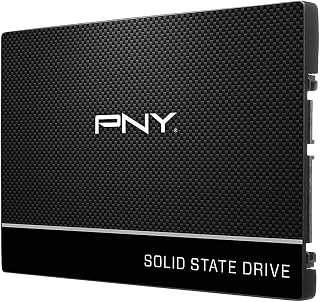
This drive represents the other half of the comparison for readers who don't need NVMe at all. Its SATA III interface and 2.5-inch form factor make it a drop-in replacement for aging laptop hard drives, while hardware encryption adds a security layer that matters for anyone upgrading a work laptop rather than chasing peak throughput.
Pros
- Real upgrade path for systems without an M.2 NVMe slot
- 535MB/s read and 500MB/s write, well above mechanical hard drives
- Hardware encryption included for baseline data security
- Thin, light 2.5-inch design fits easily into older laptops and desktops
Cons
- SATA interface caps performance well below any NVMe drive
- 250GB capacity is tight for larger game or media libraries
Not every PC needs or can use NVMe, and that is exactly where the PNY CS900 fits into this comparison. If your laptop or desktop only has a SATA bay, this drive is the realistic upgrade path rather than NVMe. It delivers 535MB/s read and 500MB/s write speeds, a massive improvement over a mechanical hard drive, even though it sits well below what NVMe drives achieve. For everyday computing, office work, and general gaming, that SATA ceiling is rarely the bottleneck people assume, since most daily tasks don't saturate even SATA's bandwidth. The 2.5-inch form factor is thin and light, dropping easily into older laptop and desktop bays where M.2 slots may not exist at all. Hardware encryption adds a layer of data security that many SATA drives skip, and low power consumption helps portable devices stretch battery life. This drive makes sense specifically for readers of this comparison who discover their system lacks an M.2 NVMe slot and need the SATA alternative explained clearly.
Capacity: 250GB
Form Factor: 2.5-inch
Interface: SATA 6.0 Gb/s (backwards compatible with SATA II 3GB/sec)
Read Speed: 535MB/s sequential
Write Speed: 500MB/s sequential
Cache Memory: 250MB
Security: Hardware Encryption
Power Consumption: Ultra-low
Warranty: 3 years
Compatibility: Mac and PC (laptops and desktops)
Model: SSD7CS900-250-RB
Weight: 45g
Dimensions: 7.1L x 5.9W x 0.3 inches (thickness)
Buy this if your system has no M.2 slot and SATA is your only upgrade path, or if you're reviving an older laptop or desktop for everyday use, office work, or light gaming on a tight budget. Skip it if your motherboard supports NVMe, since this comparison exists precisely because NVMe offers far higher throughput, and skip it too if you need more than 250GB for a large media library.

For anyone comparing interfaces on a budget, this drive's power-efficient architecture paired with PCIe 4.0 NVMe speed shows how far NVMe has come without demanding a high-end platform. At 500GB, it suits readers wanting a straightforward NVMe entry point for a laptop or desktop without needing a huge capacity bump to feel the SATA-to-NVMe difference.
Pros
- PCIe 4.0 NVMe speeds up to 6600MB/s, well beyond SATA's limits
- Power-efficient architecture keeps heat low on laptops
- Lightweight at 5.7 grams, simple to install
- Covers business, gaming, and personal use cases
Cons
- Write speeds trail read speeds more than premium NVMe drives
- 500GB capacity can fill quickly with media-heavy workflows
The SanDisk Optimus 5100 500GB is a strong example of what the NVMe side of this comparison can offer. It runs PCIe 4.0 over an M.2 2280 interface, with the 500GB capacity reaching around 6600MB/s read, a speed category SATA drives simply cannot approach given their interface limits. That difference is the entire argument for upgrading to NVMe: faster boot times, quicker app launches, and smoother multitasking that becomes obvious the moment you compare it against a SATA bay. The drive's power-efficient architecture keeps heat output low, which matters in laptops where thermal headroom is limited, and it runs without needing a separate heatsink in most builds. At just 5.7 grams, it's easy to install and barely adds weight to a laptop upgrade. Business, gaming, and personal use cases are all covered by the specs, making it broadly applicable rather than niche. The one caveat is that write speeds trail the read figure more than on premium drives, but for anyone deciding between SATA and NVMe for a 2026 upgrade, this drive demonstrates NVMe's real-world advantage clearly.
Speed Performance: PCIe 4.0 interface, up to 7,100MB/s read (1TB/2TB models), 6,600MB/s read (500GB model), up to 6,700MB/s write across most capacities.
Capacity and Storage: Available in 500GB, 1TB, 2TB, and 4TB options. The 500GB model provides 460GB of usable space after OS allocation.
Endurance and Reliability: Up to 1,200 TBW on the 4TB model. 5-year limited warranty covers defects and failures. BiCS QLC 3D NAND technology ensures proven long-term stability.
Power and Thermals: Power-efficient architecture reduces heat generation. Stays cool under load without active cooling in most systems, extending laptop battery life during mobile work.
Good for anyone upgrading from a SATA SSD or hard drive who wants a clear, noticeable performance jump for gaming, business use, or personal computing, particularly on laptops where the power-efficient design helps battery life. Skip it if your system lacks an M.2 PCIe 4.0 slot, since you won't access these speeds, or if 500GB is too tight for your media or game library needs.

This drive fits readers who want NVMe's advantages without paying for extreme speed, since its PCIe 4.0 interface tops out at a measured 6000 MB/s, still multiples beyond SATA's throughput limit. The 1TB capacity in a compact 2280 form factor makes it an easy drop-in for anyone replacing a SATA boot drive in a desktop or laptop.
Pros
- PCIe 4.0 speeds up to 6000MB/s read, far ahead of any SATA drive
- Compact single-sided M.2 2280 fits desktops and laptops alike
- Includes Acronis cloning software for easy migration from an old drive
- Low power draw keeps heat in check without a heatspreader
Cons
- Write speed caps at 4000MB/s, a noticeable gap from the read speed
- No heatspreader included, though testing shows it isn't strictly needed
If you are weighing NVMe against SATA for a 2026 upgrade, the Kingston NV3 1TB shows exactly why the jump makes sense. It runs on PCIe 4.0 Gen 4x4, hitting read speeds up to 6000MB/s, which dwarfs what any SATA drive can physically deliver given SATA's interface ceiling. That gap translates directly into faster boot times, quicker load screens, and snappier app launches, the core reasons most people consider this upgrade in the first place. Write speeds land at 4000MB/s, still well beyond SATA territory even though it trails the read figure. The M.2 2280 form factor is single-sided and compact, so it drops into desktops and laptops without the mounting or clearance headaches SATA drives sometimes bring in tight laptop bays. Kingston includes Acronis cloning software, which matters a lot in an upgrade scenario since you can move your existing OS and files over instead of starting fresh. There is no heatspreader, but efficient power management keeps thermals in check. For anyone deciding whether NVMe is worth the switch, this drive makes the case on performance and migration ease alike.
Performance: Read Speed up to 6000 MB/s, Write Speed up to 4000 MB/s, PCIe 4.0 Gen 4x4 interface
Capacity: 1TB, also available in 500GB, 2TB, and 4TB options
Form Factor: M.2 2280 (22mm x 80mm x 0.89mm thickness), single-sided design
Compatibility: Desktop and laptop computers, backward compatible with PCIe 3.0 slots
Cache Memory: 1GB DRAM cache
Warranty: 5-year limited warranty from Kingston
Weight: 4.54 grams
Included Software: Acronis cloning software for data migration
Best for anyone currently on a SATA SSD or hard drive who wants a tangible, noticeable speed jump for gaming, creative work, or daily productivity, especially since the included cloning software smooths the transition. Laptop and desktop users with a free M.2 slot both qualify. Skip it if your system only supports SATA or PCIe 3.0 slots, since you won't see the full benefit, or if you regularly move very large files and need write speeds closer to the read speed.

This drive targets readers who want proof that NVMe benefits extend past raw gaming, since its PCIe Gen4 interface hits up to 7,100MB/s while still being labeled for business and personal workstation use. The included Acronis recovery software also matters to anyone migrating from an aging SATA SSD who's nervous about transferring data during the upgrade.
Pros
- 7100MB/s read, far beyond SATA ceilings
- Works across desktop, laptop, and handhelds
- Backward compatible with Gen3 motherboards
- Includes Acronis cloning and backup software
Cons
- 1TB can feel tight for large libraries
- No heatspreader included
The Crucial P310 makes the NVMe-versus-SATA decision easy by showing what you gain beyond raw speed. Yes, 7100MB/s read and 6000MB/s write dwarf anything SATA can offer, roughly double a Gen3 NVMe drive and worlds ahead of SATA's ceiling, but the real argument here is flexibility. It works across desktops, laptops, workstations, and handhelds like the Steam Deck and ROG Ally X, and it stays backward compatible with Gen3 boards, so upgrading doesn't force a new motherboard purchase. For readers comparing their options in 2026, that combination of top-tier speed and broad compatibility addresses the practical side of the decision, not just the benchmark side. The G8 NAND and thermal design keep performance steady without excessive heat, and bundled Acronis software makes migrating off your old SATA drive straightforward rather than an extra chore. The 1TB capacity is the one place this pick asks for a tradeoff, since heavy game libraries or large creative files can fill it faster than you'd like.
Capacity: 1TB
Form Factor: M.2 2280
Interface: PCIe Gen4 x4 NVMe
Read Speed: Up to 7,100MB/s
Write Speed: Up to 6,000MB/s
NAND Type: G8
Weight: 10g
Dimensions: 3.15 inch length, 0.86 inch width, 0.09 inch thickness
Compatibility: PCIe Gen4 and Gen3 systems (backward compatible), ROG Ally X, Lenovo Legion Go, AYANEO Kun, Steam Deck, desktops, and laptops
Warranty: 5-year limited warranty
Included Software: Acronis True Image, 1 month Adobe Creative Cloud All-Apps trial, Crucial Storage Executive
Buy this if you want the clearest performance leap over SATA plus assurance it'll work in whatever system or handheld you own now or later. It suits gamers, creators, and business users upgrading an existing SATA-based machine. Skip it if 1TB won't hold your library or project files, or if you don't need Gen4 speeds and would rather save capacity budget for a larger Gen3 drive.

Pros
- Excellent value for budget-conscious users upgrading from HDD or SATA storage
- Fast enough for gaming, boot times, and file transfers with real-world speeds often exceeding rated specs
- Reliable performance on PCIe 3.0 systems with low power consumption suitable for various use cases
- Easy installation and compatibility with most modern motherboards
- Strong customer satisfaction with consistently positive real-world performance reports
Cons
- QLC technology may show slower sustained write performance during heavy workloads compared to higher-tier drives
- Best suited for PCIe 3.0 systems, so newer PCIe 4.0 or 5.0 motherboards won't fully benefit from faster specifications
- Limited cache memory may impact performance during intensive sequential operations
The WD Green SN350 2TB is a solid entry-level NVMe SSD designed for users looking to breathe new life into aging systems or add fast storage to mid-range PCs and laptops. This drive targets everyday computing tasks, casual gaming, and users who want noticeably faster boot and load times without investing in premium storage solutions.
Performance is the standout feature here. With read speeds up to 3,200 MB/s, it delivers significant speed gains over traditional SATA SSDs and mechanical hard drives, often exceeding advertised speeds in real-world benchmarks. Users report smooth performance for gaming, file transfers, and general system responsiveness, making it an excellent value for the price point in this category.
The M.2 2280 form factor makes installation straightforward on any compatible system, and the included Western Digital SSD Dashboard provides helpful monitoring of drive health. The QLC architecture keeps costs low, though this may mean slightly reduced sustained write performance during heavy workloads compared to pricier drives with TLC or MLC memory.
The main limitation is that this is a PCIe Gen3 drive, so newer motherboards with PCIe 4.0 or 5.0 support won't realize faster speeds. Additionally, the limited cache memory may impact performance during intensive sequential operations, though typical daily computing remains unaffected.
For budget-conscious buyers upgrading from older storage or looking for affordable fast storage on PCIe 3.0 systems, the WD Green SN350 2TB is a smart choice that delivers noticeable performance improvements and reliable daily operation backed by a 3-year warranty.
Choose the WD Green SN350 if you're upgrading from a mechanical hard drive, older SATA SSD, or need affordable NVMe storage on a system with a PCIe 3.0 slot. This drive excels for gaming, general computing, and content consumption where its speed is more than sufficient.
Skip this model if you have a PCIe 4.0 or 5.0 motherboard and want to maximize drive speeds, or if you perform heavy sustained write operations that demand higher cache and faster memory technology. For those workloads, consider higher-tier WD Blue or Samsung alternatives.
Verify your motherboard has an available M.2 NVMe slot and supports PCIe 3.0 before purchasing. The installation takes minutes and requires no additional tools. The drive comes with installation guidance and the optional SSD Dashboard software for health monitoring.
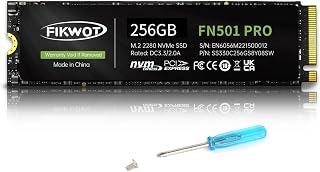
Budget-focused readers sizing up their first NVMe drive will notice the modest 256GB capacity and 3,000MB/s ceiling, numbers that still comfortably beat SATA while keeping cost low. The graphene cooling sticker is a nice touch for small-form desktops where airflow is tight, making this a sensible low-risk way to test NVMe before committing to a bigger drive.
Pros
- PCIe Gen3 x4 NVMe speeds far exceed typical SATA SSDs
- Read speeds up to 2800MB/s, write speeds around 900MB/s
- Graphene cooling sticker helps avoid thermal throttling
- Standard M.2 2280 form factor fits most modern systems
Cons
- 256GB capacity is limiting for gaming or media libraries
- PCIe Gen3, not Gen4, so it's not the fastest NVMe option available
For readers deciding whether NVMe is worth the jump over SATA in 2026, the FN501 Pro is a clear illustration of what that upgrade actually buys you. Its PCIe Gen3 x4 interface pushes read speeds up to 2800MB/s and write speeds around 900MB/s, numbers that leave typical SATA SSDs far behind despite not being the newest Gen4 standard. That gap is the whole point of this comparison: even an entry-level NVMe drive like this one outpaces SATA by a wide margin in boot times, app loading, and file transfers. The graphene cooling sticker helps sustain that performance under load, and the SLC cache keeps things responsive during heavier tasks. At 256GB, it's not built for massive game libraries or large media archives, but as a demonstration of NVMe's speed advantage, or as the drive you install once you've decided NVMe is the right call, it fits naturally into an article framed around making that exact decision.
Capacity: 256GB
Form Factor: M.2 2280
Interface: PCIe Gen3 x4 (NVMe 1.3)
Read Speed: Up to 3000MB/s
Write Speed: Up to 900MB/s
Memory Type: 3D NAND TLC with SLC cache
Thermal Management: Graphene heat dissipation sticker
Compatibility: M.2 PCIe 3.0 compatible laptops and desktops (Windows 7/8/10/11)
Durability: Up to 200TBW
Warranty: 3-year product registration warranty with 24-hour technical support
Good for anyone who has read the NVMe vs SATA comparison and wants to actually make the switch on a budget, especially for an OS or boot drive. Also fits laptop owners replacing an old hard drive. Skip it if you need PCIe Gen4 speeds or if 256GB won't cover your game and media library, since capacity fills up fast.
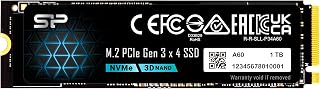
For readers upgrading an older system that may not support the newest standards, this drive's Gen3x4 NVMe interface offers a meaningful jump over SATA while staying backward compatible with boards that haven't moved to Gen4. It's a practical pick for anyone whose motherboard limits them, showing NVMe gains are still real even without the latest PCIe generation.
Pros
- Clear speed jump over any SATA SSD
- Backward compatible with Gen3 boards
- Standard M.2 2280 fits most systems
- Reasonable endurance for everyday use
Cons
- M-key only, no B-key support
- Write speeds trail Gen4 options
If you're weighing whether an NVMe upgrade is even worth it over SATA, this Silicon Power 1TB drive is the entry point that makes the case clearly. At 2200MB/s read and 1600MB/s write, it sits comfortably above any SATA SSD's hard ceiling, so the jump feels real in boot times and load screens without requiring a Gen4 budget. For this comparison, it represents the practical floor of NVMe performance, the speed tier where you stop asking 'is it worth switching' and start asking 'how much more do I need.' The 600 TBW endurance and M.2 2280 form factor cover typical desktop and laptop builds, and backward compatibility means it drops into older Gen3 boards without issue. It won't win any benchmark headlines against Gen4 drives, but as a demonstration of what NVMe brings to a SATA-to-NVMe decision, it's a clean, affordable reference point rather than a stretch purchase.
Storage Capacity: 1TB (1000GB)
Interface: PCIe Gen3x4 NVMe
Form Factor: M.2 2280 (80mm)
Read Speed: 2,200MB/s
Write Speed: 1,600MB/s
Cache Memory: 2GB
NAND Type: TLC
Endurance: 600 TBW
Weight: 8.53g
Dimensions: 3.15 inches L x 0.87 inches W x 0.16 inches Th
Warranty: Manufacturer warranty (whichever occurs first: warranty length or 600 TBW limit)
Connector Type: M-key M.2 slot (B-key not compatible)
Compatible Platforms: Desktop PCs and Laptops with M.2 NVMe support
Buy this if you're upgrading from SATA for the first time and just want to feel the difference without chasing top-tier numbers. It suits budget builds, everyday computing, and light content work. Skip it if you've already decided you need Gen4-class speeds for video editing or heavy multitasking, or if your board only has a B-key M.2 slot, since this drive is M-key only.

Console and PC gamers weighing the upgrade will notice this drive's 7350MB/s read speed and explicit PS5 compatibility, both aimed squarely at expanding storage where load times matter most. The included heatsink also speaks to readers worried about thermal throttling under sustained Gen4 transfers, a concern SATA drives never had to manage.
Pros
- 7350MB/s read is a dramatic step up from SATA
- PS5 and desktop compatible out of the box
- Includes heatsink and installation accessories
- Backward compatible with older PCIe slots
Cons
- Write speed specs not disclosed
- Heatsink may not suit tight laptop builds
When the question is NVMe versus SATA, the SIX X7400 answers it emphatically. At 7350MB/s, it isn't just faster than SATA, it's in a different category entirely, making it the drive to point to when someone asks what the top end of this upgrade actually looks like. The PCIe 4.0 x4 interface and included heatsink mean the performance claim comes with the thermal management to sustain it, which matters for anyone moving from a SATA drive that never had heat concerns in the first place. It's built for PC gaming, PS5 storage expansion, and creative workflows, so it fits readers evaluating this upgrade for load times or large file handling rather than light browsing. The bundled screwdriver, screws, and heatsink lower the barrier for someone making this leap for the first time. The tradeoff is that write speed and sustained performance data aren't published, so while the headline read number clearly justifies the SATA-to-NVMe jump, the full performance picture under heavy workloads stays partly unproven.
Storage and Interface: 1TB capacity, M.2 2280 form factor, PCIe Gen4x4 interface with up to 7350MB/s read speeds.
Compatibility: Desktop, laptop, and PS5 gaming console support. Backward compatible with PCIe Gen3 systems. Dimensions: 3.15 inches length, 0.87 inches width, 0.08 inches thickness. Weight: 0.02kg.
Included Accessories and Warranty: Heatsink, screwdriver kit, mounting screws, and quick-start guide included. Protected by 5-year limited warranty from SIX.
Buy this if you're moving off SATA specifically for gaming, PS5 expansion, or creative file work and want a dramatic, well-documented speed jump with an easy install. Skip it if you need confirmed write performance for sustained professional workloads, or if your laptop's cooling clearance is tight, since the heatsink may not fit every chassis.

Readers who already own a drive and are deciding whether to repurpose it instead of buying new will want this enclosure, since its USB 3.2 Gen2 10Gbps interface lets an old NVMe or SATA SSD serve as fast external storage. It's the practical answer for anyone whose SATA-to-NVMe upgrade leaves a perfectly good drive without a home.
Pros
- Works with both NVMe PCIe and SATA M.2 drives for direct comparison
- USB 3.2 Gen2 delivers up to 10Gbps with compatible NVMe drives
- Aluminum body with thermal pads manages heat well
- Reversible USB-C with USB-A/USB-C cables included
Cons
- No support for 2.5-inch SATA or mSATA drives
- SSD sold separately, and 10Gbps needs a USB 3.2 Gen2 or Thunderbolt 3 host
If you're weighing NVMe against SATA for your 2026 upgrade, you don't actually have to choose. This SSK enclosure turns either type of M.2 drive into a fast external volume, which makes it a useful way to test both sides of that decision before committing to an internal swap. Pop an NVMe drive in and you get real USB 3.2 Gen2 speed, up to 10Gbps, so you can feel the difference NVMe makes without opening your PC case. Use a SATA M.2 drive instead and you still get a solid portable upgrade, just at a lower ceiling, which is exactly the kind of side-by-side comparison this article is about. The aluminum build dissipates heat well, UASP and TRIM support keep whichever SSD you use running properly, and the reversible USB-C connector plus backward compatibility means it works on new and older machines alike. It's less a drive and more a tool for understanding what each interface actually delivers in practice.
Interface: USB 3.2 Gen2 (10Gbps) with USB-C connector, backward compatible with USB 3.1 Gen1 and USB 3.0.
Compatibility: NVMe PCIe and SATA M.2 SSDs with M-Key or B+M connectors in 2242, 2260, and 2280 sizes. Supports up to 4TB capacity. Works with Windows 7/8/8.1/10, macOS, Linux, Android, and iOS.
Controller: RTL9210B chip with UASP and TRIM support for optimized performance and SSD longevity.
Physical: Aluminum alloy construction, space gray color, 4.52 inches long by 1.55 inches wide by 0.43 inches tall, weighs 0.1kg.
Package Contents: M.2 enclosure, USB 3.2 Type-C cable, USB 3.0 Type-A cable, 2x thermal pads, screwdriver, and user documentation. Includes 1-year warranty.
Buy this if you want to compare NVMe and SATA SSD performance firsthand, or you need flexible external storage that accepts either drive type. It suits anyone upgrading gradually who wants to repurpose an old M.2 drive. Skip it if you only want a straightforward internal upgrade, since you'll need to buy an SSD separately, or if you need support for 2.5-inch SATA or mSATA drives, which this enclosure doesn't take.
How to Choose Between NVMe and SATA SSDs
Check the Slot Before You Choose a Drive
A 2.5-inch SATA SSD needs a SATA data port, a SATA power lead, and a physical mounting point in your desktop or laptop. An NVMe SSD normally uses an M.2 slot, but an M.2 connector alone does not confirm that your system accepts an NVMe PCIe drive.
The PNY CS900 250GB 2.5" SATA III Internal SSD is the straightforward route for systems with a vacant SATA bay. If your manual confirms an M-key PCIe M.2 slot, the Silicon Power 1TB – NVMe M.2 PCIe Gen3x4 2280 SSD is a suitable 2280-size alternative; our M.2 to USB adapter picks can also help when cloning or reusing a compatible drive.
Match Interface Speed to Your Work
SATA III SSDs generally top out around the mid-500 MB/s range, which is still a dramatic move up from a mechanical hard drive. The PNY CS900 250GB 2.5" SATA III Internal SSD is rated for up to 535 MB/s reads and 500 MB/s writes, making it sensible for routine computing and older hardware.
NVMe runs through PCIe and can move far more data during large transfers, demanding games, and creative projects. The WD_Black SN7100 2TB NVMe SSD – Gen4 PCIe reaches up to 7,250 MB/s reads, while the Crucial P310 1TB SSD, PCIe Gen4 NVMe M.2 2280 targets up to 7,100 MB/s reads; compare more high-performance options in our Sabrent SSD recommendations and TeamGroup SSD choices.
Plan Capacity, NAND Type, and Write Endurance
Capacity should leave room for your operating system, applications, game library, and working files without keeping the drive nearly full. The Fikwot FN501 Pro 256GB NVMe SSD is more appropriate for a light boot-drive role, while 1TB models offer more flexibility for a primary PC drive and 2TB options give larger libraries breathing room.
Look beyond capacity when you create, edit, or move files often. The Western Digital 2TB WD Green SN350 NVMe Internal uses QLC flash for everyday computing, while the Silicon Power 1TB – NVMe M.2 PCIe Gen3x4 2280 SSD lists 600 TBW endurance; preserve important work with separate copies, such as the options in our backup-drive guide.
Account for Heat, Power, and Portable Use
Fast Gen4 drives can generate extra heat during lengthy transfers, so check whether your motherboard includes an M.2 cover or heatsink. The SIX NVME M.2 SSD PCIe 4.0-1TB m.2 2280 ssd includes a heatsink and installation accessories, while the WD_Black SN7100 2TB NVMe SSD – Gen4 PCIe emphasizes power efficiency for laptops and handheld gaming devices.
For portable access, the SSK M.2 to USB NVMe SATA SSD Enclosure USB 3.2 accepts supported NVMe and SATA M.2 drives in several common lengths. Its USB connection places a ceiling on transfer speed, but it is useful for cloning, file access, and drive reuse; a hard drive dock guide is helpful if you also manage larger SATA backup drives.
Final Thoughts
If your PC has a PCIe Gen4 M.2 slot and you want rapid game loads or large-file performance, the WD_Black SN7100 2TB NVMe SSD – Gen4 PCIe is the stronger fit. For a dependable refresh of a desktop or laptop that uses standard SATA connections, the PNY CS900 250GB 2.5" SATA III Internal SSD remains the simpler upgrade path.
Frequently Asked Questions
Will an NVMe SSD make my computer feel quicker than a SATA SSD?
NVMe has much higher sequential throughput and can handle demanding file transfers more efficiently than SATA. You are more likely to notice the difference when moving large media folders, loading expansive games, or working with substantial project files. Everyday browsing and basic office tasks can feel responsive on either type of SSD.
Does an M.2 SSD automatically mean it is NVMe?
No. M.2 describes the physical card format, while NVMe and SATA describe different protocols and connections. Some M.2 slots accept only SATA drives, some accept NVMe drives, and some support both, so consult your motherboard or laptop documentation before ordering.
Is a SATA SSD still worth buying in 2026?
Yes, especially when you are upgrading a PC with no NVMe-capable M.2 slot or adding storage to an open 2.5-inch bay. SATA SSDs offer silent operation, fast application launches, and an easy replacement for an older hard drive. They are also practical when extreme PCIe transfer speeds are not necessary for your workload.
Can I use an NVMe or SATA M.2 drive as an external SSD?
Yes, but the enclosure must support the protocol used by your specific M.2 drive. A dual-protocol enclosure such as the SSK model can accommodate supported NVMe and SATA designs, while USB bandwidth limits the speed you see externally. Format a new drive with a file system your computer supports before storing files on it.





Write Your Review
No reviews yet. Be the first to share your experience!