

You’ve narrowed it down to NVIDIA’s two flagship Blackwell GPUs, and now you’re stuck at the fork: the RTX 5080 with its 16GB GDDR7 and exceptional efficiency, or the RTX 5090 with its 32GB GDDR7 and raw computational dominance. Both are serious investments, and the right answer depends on what you actually do at your desk.
This guide is built for enthusiast gamers, content creators, and power users who want a clear comparison of the top RTX 5080 and RTX 5090 cards available right now. We’ve evaluated models from MSI, ASUS, ZOTAC, GIGABYTE, and NVIDIA’s own Founders Edition to help you find the card that fits your build and your needs. You can also browse the full Graphics Cards category for more options.
Quick Comparison
Ratings reflect the most recent data pull. Check each listing for current price and availability.
Quick answer
This guide compares 9 picks, with MSI RTX 5080 SUPRIM SOC 16GB GDDR7 Gaming Graphics ranked first. ASUS TUF Gaming RTX 5080 16GB GDDR7 OC Graphics Card has the most customer reviews. ASUS TUF Gaming RTX 5090 32GB GDDR7 OC Edition, PCIe leads this list on VRAM.
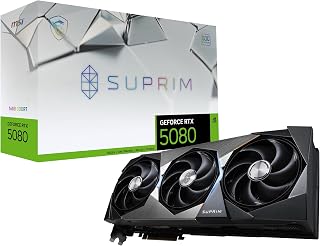
The SUPRIM SOC's 2760 MHz boost clock delivers the headroom you need when comparing these two flagship GPUs for demanding workloads. Its 16GB GDDR7 memory provides ample capacity for 4K gaming and content creation, positioning it as the performance sweet spot between the 5080 and 5090 tiers. The triple DisplayPort 2.1a outputs ensure future-proof multi-monitor setups for productivity or immersive gaming.
Pros
- 2760 MHz boost clock sits at the top of the RTX 5080 stack
- Cooling solution carried over from MSI's RTX 5090 line keeps temperatures exceptionally low
- Three DisplayPort 2.1a plus HDMI 2.1b covers next-generation display setups
- 16GB GDDR7 at 30 GHz memory clock delivers strong bandwidth for 4K and compute workloads
Cons
- Requires a minimum 1000W power supply, demanding significant system infrastructure
- Large physical footprint requires advance case planning
When the question is RTX 5080 vs RTX 5090, the MSI SUPRIM SOC lands squarely in the 5080 camp for buyers who want maximum headroom without crossing into 5090 territory. The Blackwell architecture combined with 16GB of GDDR7 on a 256-bit bus gives this card the memory throughput to handle 4K gaming at maximum settings across modern AAA titles, and the 2760 MHz boost clock keeps it competitive at the top of the 5080 stack. Three DisplayPort 2.1a outputs and HDMI 2.1b mean the display ecosystem is fully future-proofed, a real consideration when weighing 5080 versus 5090 longevity. MSI borrowed the cooling solution from its RTX 5090 SUPRIM line, which is a meaningful differentiator: reviewers consistently note quiet operation even under sustained load, and temperatures stay exceptionally low. For someone who has decided the 5090 is more than they need, this card delivers flagship-tier engineering and thermal headroom without the larger card's demands on the rest of the system.
GPU and Memory: NVIDIA GeForce RTX 5080, 16GB GDDR7, 256-bit memory interface, 30 GHz memory clock speed
Performance: 2760 MHz GPU clock speed, NVIDIA Blackwell architecture, PCI-Express x16 interface
Display Outputs: 3x DisplayPort 2.1a, 1x HDMI 2.1b, maximum resolution 7680x4320 (8K)
Physical and Warranty: 6.8 lbs weight, 3-year manufacturer warranty, includes quick setup guide, UPC 824142395752
The right buyer is a high-end gaming or workstation builder who has settled on the 5080 tier and wants the best-executing version of it, particularly anyone prioritizing sustained quiet operation and premium build quality. Skip it if your case is compact, your power supply is under 1000W, or if budget pressure makes the 5090 performance gap feel worth examining more carefully.

The IceStorm 3.0 cooling system tackles the thermal demands that matter when pushing either GPU tier to its limits during extended sessions. With 16GB GDDR7 and a 2640 MHz boost clock, this card offers solid 5080 performance for buyers weighing capability against the 5090's higher power draw. The triple DisplayPort 2.1b connections support high-refresh 4K displays that showcase the differences between these architectures.
Pros
- Vapor chamber plus composite heatpipes and three 90mm fans delivers near-silent sustained performance
- Documented 66 to 88 FPS in Cyberpunk 2077 at 4K with ray tracing ultra and DLSS 4
- PCIe 5.0 and 30 Gbps GDDR7 maximize available bandwidth on current platforms
- Reinforced frame, metal backplate, and support stand indicate thorough build quality
Cons
- 11.9-inch length requires careful case compatibility check before purchase
- RGB control depends on ZOTAC's Firestorm software, which is less polished than third-party alternatives
In an RTX 5080 versus RTX 5090 decision, the ZOTAC SOLID CORE OC makes the case for the 5080 on thermal and bandwidth grounds. The vapor chamber paired with composite heatpipes and three 90mm BladeLink fans produces a cooling setup that reviewers describe as whisper-quiet under sustained load, which matters when comparing a card you plan to run hard at 4K. The 16GB GDDR7 memory running at 30 Gbps over PCIe 5.0 provides the bandwidth ceiling needed for both gaming and parallel professional tasks, and verified performance figures of 66 to 88 FPS in Cyberpunk 2077 at 4K with ray tracing ultra and DLSS 4 confirm the Blackwell architecture delivers in real workloads. Three DisplayPort 2.1b and one HDMI 2.1b output give it a slight display connectivity edge over some competing 5080 cards. For anyone weighing whether the 5090 jump is justified, this card represents a complete high-end 5080 implementation with reinforced frame, metal backplate, and an included support stand.
GPU: NVIDIA GeForce RTX 5080 (Blackwell Architecture)
Memory: 16GB GDDR7, 256-bit, 30 Gbps, PCIe 5.0
Clock Speed: 2640 MHz base with OC support up to +125 MHz confirmed
Cooling: Vapor chamber, composite heatpipes, three 90mm fans, active fan control, FREEZE fan stop
Outputs: 3x DisplayPort 2.1b, 1x HDMI 2.1b, 8K capable, 4-display ready
Form Factor: 2.5 slots, 11.9 inches length, 2.2 inches width
Power: 8-pin to 16-pin cable connectors included
Warranty: 3 years
Best suited to 4K gamers and creators who want a fully realized RTX 5080 with strong thermal management and broad display output options. Also fits triple-monitor simulation setups where sustained quiet operation matters. Skip it if you run tight on case space at 11.9 inches, dislike proprietary RGB software, or are sensitive to coil whine.

The TUF's 2730 MHz clock speed and dual HDMI 2.1b outputs make it versatile for buyers evaluating GPU options across gaming and productivity scenarios. Its 16GB GDDR7 memory ensures smooth performance in titles where the 5080 and 5090 both excel, while the robust cooling allows sustained performance during comparison testing. This OC edition balances capability and reliability for those choosing between flagship tiers.
Pros
- 2730 MHz boost clock delivers top-end Blackwell performance in the 5080 tier
- Phase-change thermal pad sustains consistent performance under prolonged heavy loads
- DLSS 4 support narrows real-world frame rate gap with the RTX 5090
- Military-grade components with protective PCB coating support long-term reliability
Cons
- 850W PSU minimum and 348mm length demand careful system compatibility checks
- 16GB VRAM may become limiting for professional workloads where the 5090's 32GB offers a clear advantage
When the question is RTX 5080 versus RTX 5090, the ASUS TUF Gaming RTX 5080 OC Edition makes the case for the more accessible side of that equation without sacrificing flagship-tier engineering. Its 16GB GDDR7 frame buffer handles 4K gaming workloads confidently, and the 2730 MHz boost clock keeps it competitive in the top tier of Blackwell-based cards. The phase-change GPU thermal pad is a meaningful differentiator over standard paste solutions, sustaining performance through extended sessions rather than throttling under heat. Three Axial-tech fans and a dense fin array back that up. DLSS 4 support closes a significant portion of the raw throughput gap with the 5090 in supported titles. For buyers deciding between these two cards, the TUF 5080 targets those who want elite 4K performance without the extreme power, size, and cost overhead the 5090 demands. Military-grade components and Auto-Extreme manufacturing add long-term confidence. The 3.6-slot footprint and 348mm length require case verification, and an 850W PSU is the firm minimum.
GPU: NVIDIA GeForce RTX 5080
Memory: 16GB GDDR7
Boost Clock: 2730 MHz (OC Mode), 2700 MHz (Default Mode)
Physical Dimensions: 348mm length, 3.6-slot design, 4.3 lbs
Video Outputs: 3x DisplayPort 2.1a, 2x HDMI 2.1b
Power Requirement: Minimum 850W PSU with 16-pin 12V-2x6 (12VHPWR) connector
Manufacturing: Auto-Extreme precision automated manufacturing
Cooling: Three Axial-tech fans, phase-change GPU thermal pad, protective PCB coating
Power Supply: Verify your PSU is rated for 850W minimum and includes the required 16-pin 12V-2x6 (12VHPWR) connector. Standard 6-pin or 8-pin connectors are insufficient for this card.
Physical Clearance: Confirm your case accommodates the 348mm length and can support the 3.6-slot width requirement. Measure internal dimensions and account for storage drives, fans, and other components that may interfere with the card's placement.
System Integration: The card includes a GPU bracket for secure installation. Ensure your motherboard provides adequate PCIe slot access and that your monitor cables support DisplayPort 2.1a or HDMI 2.1b for optimal performance.
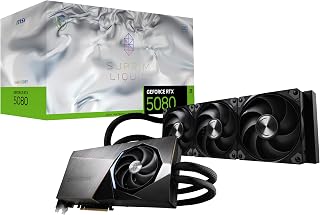
Liquid cooling makes this variant ideal for users deciding between GPU tiers based on thermal performance and overclocking potential. The 2760 MHz boost clock extracts maximum performance from the 5080 architecture, helping close the gap with the 5090 in thermally constrained builds. Its 16GB GDDR7 handles modern gaming and creative workloads without the 5090's premium, making it a pragmatic choice for most enthusiasts.
Pros
- Liquid cooling holds temperatures at 35 to 40 degrees Celsius, eliminating thermal throttling under sustained load
- 200-plus FPS reported on AAA titles at high settings
- Near-silent operation even when the card runs at peak clock speeds
- 2745 MHz boost clock with sustained thermal headroom maximizes 5080-tier output
Cons
- Substantial heat output means case airflow and ambient room conditions have a meaningful impact
- A small number of users report game compatibility issues with specific titles
For the RTX 5080 versus 5090 comparison, the MSI SUPRIM Liquid answers a specific question: what does the 5080 look like when thermal constraints are essentially removed from the equation? The integrated liquid cooling system holds GPU temperatures in the 35 to 40 degree Celsius range during extended sessions, which means the 2745 MHz boost clock can sustain peak output for hours without throttling. That matters in a head-to-head framing because it narrows the performance gap between a perfectly cooled 5080 and a 5090 running warmer. Users report 200-plus FPS on AAA titles at high settings, and the single-fan plus liquid cooler combination keeps acoustics low while the card runs at its ceiling. The 16GB GDDR7 on a 256-bit bus matches the rest of the 5080 lineup on memory specifications. For a buyer who wants to extract every available frame from the 5080 tier before concluding they need a 5090, the liquid cooling variant makes that evaluation as favorable as possible for the smaller card.
GPU Chipset: NVIDIA GeForce RTX 5080 (Blackwell Architecture)
Memory: 16GB GDDR7
Memory Interface: 256-bit
Boost Clock: 2760 MHz
Memory Speed: 30 GHz
Outputs: 3x DisplayPort 2.1a, 1x HDMI 2.1b
Max Resolution: 7680 x 4320
Power Connection: PCIe x16
Cooling: Integrated Liquid Cooler
Dimensions: 10.5 inches length, 4.4 inches width
Warranty: 3 Years
Ideal for serious gamers and creators who want the 5080's efficiency profile but with liquid-cooling thermal headroom, especially in cases or environments where ambient heat is a concern. Also suits anyone who values near-silent operation under long workloads. Skip it if you are not comfortable managing liquid cooling hardware or if your setup cannot accommodate the additional installation requirements.

The WINDFORCE cooling system keeps temperatures in check during intensive tasks where 5080 and 5090 performance diverges most noticeably. With a 2.73 GHz boost clock and 16GB GDDR7, this card delivers strong 5080 performance for gamers and creators evaluating whether the 5090's extra power justifies the upgrade. Its triple-fan design ensures quiet operation even when stress-testing the limits of each GPU tier.
Pros
- 16GB GDDR7 at 30000 MHz memory clock and PCIe 5.0 interface eliminate common bandwidth bottlenecks
- Enhanced RT Cores and Tensor Cores with DLSS 4 deliver top-tier ray tracing and AI frame generation
- WINDFORCE three-fan system handles sustained thermal loads across extended high-demand sessions
- Included VGA holder and power adapter simplify installation compared to bare-card alternatives
Cons
- 13.46-inch length and four-pound weight require deliberate case and mounting verification before purchase
- 16GB VRAM ceiling is a genuine constraint relative to the RTX 5090 for professional multi-monitor or large-model AI workloads
The GIGABYTE RTX 5080 Gaming OC enters the RTX 5080 vs 5090 debate as the option that maximizes Blackwell-generation performance without crossing into the 5090's extreme system requirements. Its 16GB GDDR7 at 30000 MHz memory clock and 2730 MHz GPU boost clock land it squarely in competition with other 5080-tier cards, and PCIe 5.0 bandwidth keeps the interface from becoming a bottleneck in GPU-intensive workflows. Enhanced RT Cores and Tensor Cores paired with DLSS 4 bring ray-traced visuals and AI frame generation up to the Blackwell standard, making 4K gaming at maximum settings a practical target. The WINDFORCE three-fan cooling system manages the thermals of sustained high-end loads, though the 13.46-inch length and four-pound weight mean physical fit must be confirmed before purchase. Compared to choosing the RTX 5090, buyers who opt for this card accept a 16GB VRAM ceiling in exchange for more manageable PSU demands and a smaller overall footprint. For workloads that stay within that ceiling, the trade-off is favorable.
GPU Architecture: NVIDIA GeForce RTX 5080 (Blackwell)
Memory: 16GB GDDR7, 256-bit interface
Memory Speed: 30,000 MHz
GPU Clock: 2.73 GHz boost
Interface: PCIe 5.0 x16
Cooling: WINDFORCE triple-fan system
Power Connectors: 1x 12V connector, 2x 6-pin to 3x 8-pin adapter
Display Outputs: DisplayPort, HDMI
Max Resolution: 7680x4320 pixels
Physical Dimensions: 13.46 inches (L) x 5.59 inches (W)
Weight: 4 pounds
Warranty: 3-year manufacturer
Model: GV-N5080GAMING OC-16GD
Well matched for serious 4K gamers, 3D artists, and AI researchers whose workloads fit within 16GB of VRAM and who want the performance ceiling of the Blackwell architecture without the 5090's system overhead. The included VGA holder and adapter ease installation in compatible builds. Skip it if your workflows regularly push past 16GB of GPU memory, or if triple-monitor professional rendering is your primary use case, where the RTX 5090's 32GB offers a decisive advantage.

The Founders Edition's 2806 MHz boost clock represents the highest out-of-box speed among 5080 variants, making it the reference point when comparing raw performance against the 5090. Its 16GB GDDR7 memory handles demanding workloads where both GPUs shine, while the compact design fits builds where space considerations influence the decision between these flagship options. This is the baseline for evaluating aftermarket cooling and overclocking potential.
Pros
- Consistent 120-plus FPS at 4K maximum settings with headroom beyond 200 FPS in supported titles
- 16 GB GDDR7 memory with DLSS 4 and neural rendering on Blackwell architecture
- Runs cool under sustained load without requiring additional support brackets
- Dual HDMI and DisplayPort outputs support multi-monitor and high-refresh-rate setups
Cons
- Large physical footprint demands adequate case clearance
- 16 GB VRAM ceiling may fall short for the most memory-intensive professional workloads
When the question is RTX 5080 vs RTX 5090, the RTX 5080 Founders Edition is the card that makes the 5080 side of the argument compelling. Built on Blackwell architecture with 16 GB of GDDR7 memory and full DLSS 4 support including neural rendering, it hits 120-plus FPS in demanding AAA titles at maximum settings and pushes well past 200 FPS in less intensive workloads at 4K. That level of headroom means the 5080 Founders Edition can legitimately satisfy most enthusiast use cases without requiring the step up to a 5090. The Founders Edition build quality reinforces the value proposition: clean construction, robust materials, surprisingly low weight for its size, and thermal performance that keeps the card cool under sustained load without extra support hardware. Dual HDMI and DisplayPort outputs cover multi-monitor and high-refresh-rate configurations. For users weighing whether the 5090 is truly necessary, this card's combination of Blackwell efficiency and flagship-tier output makes it the strongest counterargument available.
GPU Architecture: NVIDIA Blackwell
Memory: 16GB GDDR7
GPU Clock: 2806 MHz
Display Outputs: HDMI, DisplayPort
Interface: PCI Express 4.0
Max Resolution: 3840x2160 (4K)
Weight: 2 pounds
Model: 900-1G144-2545-000
Format: Founders Edition Desktop Graphics Card
Buy this if you want 5080-class Blackwell performance in NVIDIA's own reference design, game at 1440p or 4K, and are genuinely deciding whether the 5090 is worth the added cost. Skip it if your case cannot accommodate a large card, you need more than 16 GB of VRAM for professional workloads, or you have already determined the 5090's additional headroom is essential for your workflow.

Pros
- 32GB GDDR7 provides substantial headroom over the 5080 for professional and multi-monitor workloads
- 772 AI TOPS with DLSS 4 support for top-tier AI-accelerated rendering performance
- Dual BIOS switch enables toggling between performance and quiet operating modes
- 0dB fan technology and dual-ball bearings deliver silent idle operation and extended hardware lifespan
Cons
- 1200W PSU minimum and full-size E-ATX case requirement impose significant system upgrade costs
- Overkill for single-display 4K gaming where the RTX 5080 delivers comparable results with lower system demands
In a direct RTX 5080 vs 5090 comparison, the ASUS TUF Gaming RTX 5090 OC Edition sits at the undisputed top. The jump to 32GB GDDR7 is the clearest functional argument for choosing it over the 5080: professional rendering, large AI model inference, and multi-monitor 4K configurations can exhaust 16GB in ways that 32GB absorbs without issue. At 2580 MHz boost clock alongside 772 AI TOPS, the card is built for workloads where the 5080 genuinely runs out of room. DLSS 4 integration and the dual BIOS toggle between performance and quiet modes add operational flexibility that serious users will appreciate. The Axial-tech fan array with 0dB idle mode and dual-ball bearings rated for extended lifespan reflect the same TUF build philosophy seen in the 5080, but scaled to a larger thermal envelope. That envelope is the central trade-off: 13.7 inches long, 5.7 inches wide, 2.5-slot depth, and a 1200W PSU requirement make this a card that demands a purpose-built or carefully validated system.
GPU and Memory: NVIDIA GeForce RTX 5090 with 32GB GDDR7 memory, 2580 MHz boost clock (OC mode), 2550 MHz default mode.
Performance: 772 AI TOPS, NVIDIA Blackwell architecture, DLSS 4 support, 7680x4320 maximum resolution output.
Connectivity: 3x Native DisplayPort 2.1a, 2x Native HDMI 2.1b, PCIe 5.0 x16 interface.
Cooling: 3x Axial-tech fans with dual-ball bearings, vapor chamber, 0dB technology, 2.5-slot design.
Power: Up to 600W draw, requires 1200W+ power supply minimum.
Dimensions: 13.7 inches length x 5.7 inches width, 5 pounds weight.
Warranty: 3-year manufacturer warranty, includes GPU Tweak III software and mounting accessories.
The RTX 5090 is for professionals, simulation enthusiasts, and competitive gamers who have confirmed their system can support it and whose workloads genuinely exceed what a 5080 can deliver. Multi-monitor setups, demanding sim racing platforms, and AI-accelerated creative pipelines all benefit from the 32GB VRAM ceiling. Skip it if your use case is primarily single-display 4K gaming; the 5080 handles that well and imposes far fewer system requirements.

Pros
- 12-inch length and 2.5-slot width fit SFF and ITX cases that cannot house a 5090
- 243 FPS in path-traced 1440p gaming demonstrates genuine Blackwell flagship output
- Vapor chamber, Axial-tech fans, and 0dB idle keep thermals and noise in check
- Dual BIOS switch offers user-selectable Quiet and Performance modes
Cons
- Requires a minimum 850W PSU with a 16-pin 12V-2x6 connector
- Boost clock is slightly lower than other RTX 5080 variants at 2685 MHz
In a direct RTX 5080 vs RTX 5090 comparison, the ASUS Prime RTX 5080 OC Edition adds a dimension most reviews overlook: form factor. At 12 inches long and 2.5 slots wide, it brings full Blackwell 5080 performance into builds where a 5090 would simply not fit. That makes the 5090 vs 5080 decision partly a case compatibility question, and this card answers it decisively for compact and small-form-factor builds. Performance credentials are legitimate: 16 GB GDDR7 memory, a 2685 MHz boost clock, DLSS 4 with frame generation, and real-world output of 243 FPS in path-traced 1440p gaming. The three Axial-tech fans paired with a vapor chamber and phase-change thermal pad hold temperatures low and noise minimal, with 0dB operation during light loads. A dual BIOS switch lets users toggle between Quiet and Performance modes depending on the session. For anyone whose case rules out a larger 5090 board, this card effectively resolves the comparison in the 5080's favor on practical grounds alone.
GPU Specs: NVIDIA GeForce RTX 5080 Blackwell, 16GB GDDR7 memory, 2685MHz boost clock (OC mode), 2655MHz default boost clock, PCIe 5.0 interface.
Connectivity: 2x HDMI 2.1b, 2x DisplayPort 2.1, 12VHPWR 16-pin connector, requires 850W minimum PSU.
Cooling: 3x Axial-tech fans with dual-ball bearings, vapor chamber, phase-change thermal pad, 0dB technology, dual BIOS profiles.
Physical: 2.5-slot design, 12 inches long, 5 inches wide, 2.9 pounds, SFF-ready. Includes adapter cable, Velcro straps, manual, and thank you card.
Support: 3-year warranty, GPU Tweak III software for overclocking and monitoring.
Buy this if you are choosing between a 5080 and 5090 while also running a compact or ITX case that cannot house a full-size flagship board. It also suits upgraders from RTX 40-series cards who want genuine generational gains in a manageable footprint. Skip it if your build is full-size and the 5090's additional performance headroom is your primary criterion, or if your PSU is below 850W.

Pros
- 2715 MHz boost clock is the highest among RTX 5080 options, strengthening the 5080 side of the comparison
- Three DisplayPort 2.1a outputs plus HDMI 2.1b support multi-monitor and 8K configurations
- Yellow-painted 12V HP connector indicator prevents hardware damage from an improperly seated cable
- DLSS 4 and frame generation deliver meaningful frame rate gains in supported titles over RTX 40-series
Cons
- Overkill for 1080p gaming and offers limited benefit for users already on RTX 40-series hardware
- Isolated driver compatibility issues have been reported on certain system configurations
The MSI RTX 5080 Gaming Trio OC sits at the center of the 5080 vs 5090 debate by demonstrating how much performance the 5080 tier can deliver before the 5090 becomes necessary. Its 2715 MHz boost clock is the highest among the RTX 5080 cards here, paired with 16 GB GDDR7 on a 256-bit interface and DLSS 4 with frame generation. That combination handles 1440p at 144 Hz and 4K ultra settings in demanding open-world and path-traced titles without stuttering, and the maximum resolution support reaches 8K at 7680 x 4320. Three DisplayPort 2.1a outputs alongside an HDMI 2.1b port give it the connectivity range to match. Cooling holds up under the elevated clock speeds, with the Gaming Trio OC solution maintaining quiet operation even during sustained loads. A standout safety feature is the yellow-painted 12V HP connector indicator, which alerts users to an improperly seated power cable before damage can occur. For buyers asking whether the 5090 is truly justified, this card represents the 5080's strongest performance case.
GPU and Memory: Nvidia GeForce RTX 5080, 16GB GDDR7, 256-bit memory interface, 30 GHz memory clock
Performance: 2715 MHz boost clock, 112 ROPS, PCI-Express x16 interface
Display Outputs: 3x DisplayPort 2.1a, 1x HDMI 2.1b, supports up to 7680x4320 resolution
Cooling and Design: Gaming Trio OC cooling solution, cable connection indicator, compact form factor
Warranty and Support: 3-year manufacturer warranty, quick setup guide included
Buy this if you want the highest factory boost clock available on an RTX 5080, game at 1440p high-refresh or 4K, and are weighing whether those specs close the gap enough to make the 5090 unnecessary. It also suits multi-monitor users who need three DisplayPort outputs. Skip it if you are at 1080p, already own an RTX 40-series card and are satisfied with it, or if 8K output and absolute peak frame rates justify the 5090 step-up for you.
Performance Tier: Gaming vs. Professional Workloads
For high-refresh 4K gaming, the RTX 5080 delivers exceptional frame rates and is more than capable of handling the latest titles with DLSS 4 and full ray tracing enabled. Cards like the ASUS TUF Gaming GeForce RTX™ 5080 16GB GDDR7 OC and the GIGABYTE GeForce RTX 5080 Gaming OC 16G Graphics hit boost clocks above 2700 MHz, which translates to smooth, stutter-free performance in demanding scenes.
The RTX 5090 is a different animal. With 32GB GDDR7 and an AI performance rating of 772 TOPS on the ASUS TUF Gaming GeForce RTX 5090 32GB GDDR7 OC, this card is built for 8K gaming, large-model AI inference, and GPU-accelerated creative pipelines. If you’re rendering, training, or pushing resolution beyond 4K, the 5090 justifies its footprint.
Cooling Solutions: Air vs. Liquid
Most RTX 5080 cards use advanced air cooling that handles sustained loads without complaint. The ZOTAC Gaming GeForce RTX 5080 Solid CORE OC DLSS 4 pairs a vapor chamber with three 90mm BladeLink fans and composite heatpipes in a compact 2.5-slot design. The ASUS Prime GeForce RTX 5080 16GB GDDR7 OC Edition uses a similar approach with a phase-change GPU thermal pad for long-term thermal reliability.
If you want the absolute lowest thermals on an RTX 5080, the msi Gaming RTX 5080 16G SUPRIM Liquid SOC Graphics integrates liquid cooling directly into the card, keeping temperatures under control even in compact or poorly ventilated cases. It’s the right pick if your chassis runs hot or you plan to push an aggressive overclock long-term.
Form Factor and Case Compatibility
Triple-slot behemoths are common at this performance tier, but not universal. The ASUS TUF Gaming RTX 5090 uses a 2.5-slot design despite its power output, making it genuinely SFF-friendly for a flagship card. Several RTX 5080 options follow the same approach: the ASUS Prime and ZOTAC Solid CORE both land at 2.5 slots, while the ASUS TUF 5080 stretches to 3.6 slots with a 348mm length.
Before ordering, confirm your case has the internal clearance and the PCIe slot spacing to accommodate the card you choose. The ASUS TUF 5080 comes with a GPU bracket specifically because its weight and size can stress motherboard slots over time. This is worth thinking through before your parts arrive.
Power Supply Requirements and Connectivity
Both the RTX 5080 and RTX 5090 require a 16-pin 12V-2×6 connector, and you’ll need at minimum an 850W PSU for any RTX 5080 variant. The RTX 5090 demands even more headroom, so a high-quality 1000W or higher unit is strongly recommended. Don’t cut corners here: an underpowered system will throttle performance and could damage components.
On the display side, every card in this roundup supports DisplayPort 2.1 and HDMI 2.1b, with 8K output capability across the board. Whether you’re running a single ultrawide or a multi-monitor creative workstation, the connectivity is covered. The NVIDIA GeForce RTX 5080 Founders Edition is a clean reference option if you want NVIDIA’s own implementation without third-party modifications.
Final Thoughts
For most enthusiast gamers who want elite 4K performance without going all-in on raw compute power, the msi Gaming RTX 5080 16G SUPRIM SOC Graphics Card delivers a premium overclocked experience with a strong cooling solution and a 4.9-star rating that reflects real-world satisfaction. If you genuinely need the top of the stack for 8K gaming, large creative workloads, or AI-accelerated workflows and are willing to invest accordingly, the ASUS TUF Gaming GeForce RTX 5090 32GB GDDR7 OC is the most complete enthusiast GPU on the market right now.
Frequently Asked Questions
Is the RTX 5090 worth it over the RTX 5080 for gaming in 2026?
For pure gaming at 4K, the RTX 5080 closes the gap significantly and most titles won’t fully saturate either card. The RTX 5090 makes more sense if you’re gaming at 8K, running AI workloads alongside games, or using your GPU for professional creative applications where the extra VRAM is a concrete advantage. For gaming alone, the 5080 is the smarter choice for the majority of users.
What PSU do I need for an RTX 5080 or RTX 5090?
NVIDIA and its AIB partners recommend a minimum 850W PSU with a 16-pin 12V-2×6 connector for the RTX 5080. For the RTX 5090, you should plan for at least 1000W from a reputable, high-efficiency unit. Using an underpowered supply risks throttling and long-term hardware stability issues, so this is one area where you shouldn’t compromise. Check your specific card’s documentation for its exact TDP and connector requirements before building.
How does DLSS 4 improve performance on these cards?
DLSS 4 uses NVIDIA’s fourth-generation AI upscaling to reconstruct high-resolution frames from lower-resolution inputs, dramatically boosting frame rates with minimal visual quality loss. On Blackwell GPUs like the RTX 5080 and 5090, the dedicated Tensor Cores handle this workload in parallel, so the performance gain comes with very little overhead. Multi Frame Generation, a feature introduced with DLSS 4, can multiply frame output further in supported titles, making both of these GPUs exceptional at high-refresh gaming.
Are RTX 5080 cards compatible with small-form-factor builds?
Several RTX 5080 options are explicitly SFF-ready, including the ASUS Prime GeForce RTX 5080 16GB GDDR7 OC Edition and the ZOTAC Solid CORE OC, both of which use a 2.5-slot design. That said, you still need to verify case length clearance and confirm your PSU can supply enough power in a compact enclosure. Our Electronics hub covers more component guides if you’re planning a full SFF system build.
More on the RTX 5080
- Best 4K Monitor for RTX 5080 in 2026: Top Picks for Every Setup
- Best RTX 5080 Model: 10 Top Graphics Cards Reviewed for 2026
- RTX 5070 Ti vs RTX 5080: Which GPU Is Right for You in 2026?
- RTX 5070 vs RTX 5080: Which GPU Should You Buy in 2026?
- RTX 5080 vs RX 9070 XT: Which GPU Should You Buy in 2026?
- Best PSU for RTX 5080: Top Power Supplies in 2026
- Best CPU for RTX 5080: 6 Processors Reviewed (2026)
- Best PC Case for RTX 5080 in 2026: Top Picks for Every Builder





Write Your Review
No reviews yet. Be the first to share your experience!