

Your laptop screen becomes a daily trade-off when you move between a crowded lecture hall, a compact airline tray, and a multiwindow desk. The 14 inch vs 16 inch laptop choice influences not only how much you see at once, but also keyboard space, carrying comfort, battery demands, and the bag you need.
This guide separates the mobility, display, performance, and connectivity questions behind that decision. It is for students, remote professionals, frequent travelers, and casual creators who want the screen to match their routine rather than a marketing label. For additional options, browse our laptop buying category.
Quick answer
This guide compares 5 picks, with Dell 14 DC14250 AI Laptop - Intel Core 7 150U, 16GB ranked first. HP 14 Laptop 2025 Quad-Core Intel N150 16GB RAM 628GB holds the highest customer rating among them.

For readers leaning toward the 14 inch side of this comparison, this Dell pairs a FHD+ IPS panel with 512GB of storage, giving portability without sacrificing screen clarity for text and spreadsheets. Running Windows 11 Pro with integrated Intel graphics, it fits anyone prioritizing a compact footprint over graphics muscle, exactly the tradeoff this guide frames as the core 14 inch appeal.
Pros
- Light 3.5 lb, 1 inch thin build for daily carrying
- 16:10 aspect ratio adds vertical space despite the compact 14-inch size
- Fast DDR5 memory and 512GB SSD for responsive multitasking
- Modern WiFi 6 and Bluetooth 5.4 connectivity
Cons
- Integrated graphics only, not suited to visually demanding tasks
- No Thunderbolt port, limiting advanced peripheral support
Choosing between a 14 inch and 16 inch laptop usually comes down to one question: do you move around a lot, or do you sit at one desk most of the day? The Dell 14 DC14250 answers firmly on the side of mobility. At 3.5 pounds and about an inch thin, it is built for people who carry a laptop between an office, a home desk, and a coffee shop without noticing the weight. The 14-inch WUXGA display runs a 16:10 aspect ratio, so the smaller footprint still gives you useful vertical space for documents and spreadsheets, narrowing the gap with larger screens for everyday productivity. Inside, an Intel Core 7 150U and 16GB of DDR5 memory keep office work, video calls, and browsing responsive, with a 512GB SSD for quick launches. If your work is mostly text, meetings, and multitasking rather than visual design or gaming, this size class covers you without the extra bulk a 16 inch model would add to a daily commute or bag.
Processor: Intel Core 7 150U (15th Gen, 10-cores, 12-threads, 1.8GHz base, up to 5.4GHz, 12MB Cache)
Memory: 16GB DDR5 SO-DIMM (max 64GB)
Storage: 512GB PCIe NVMe SSD
Graphics: Intel Integrated Graphics
Display: 14-inch IPS WUXGA (1920x1200), 60Hz, 16:10 aspect ratio
Operating System: Windows 11 Pro 64-bit
Connectivity: WiFi 6 (802.11ax), Bluetooth 5.4, HDMI, USB 3.2 Type-C, SD card reader, 3.5mm audio jack
Camera: Integrated webcam with microphone
Battery: 4-cell 54 WHr, 65W power adapter
Design: Black, Standard form factor
Dimensions: 12.4 inches (L) x 9 inches (W) x 1 inch (H)
Weight: 3.5 pounds

HP 14 Laptop 2025 Quad-Core Intel N150 16GB RAM
Choosing a smaller laptop often means asking what you give up, and this 14 inch model answers with 16GB RAM and Wi-Fi 6, keeping everyday multitasking smooth despite the compact chassis. The anti glare coating also matters for students or workers who want a portable screen usable in bright classrooms or offices without the bulk a 16 inch body brings.
Pros
- Light 3.2 lb build suited to frequent carrying
- Comes with USB-C docking station and 500GB external storage
- 16GB RAM and 628GB combined storage for multitasking
- Lifetime Microsoft Office and Copilot AI included
Cons
- 1366x768 resolution is basic next to modern 1080p panels
- No touchscreen or keyboard backlighting
If the 14 vs 16 inch decision for you is really about getting a compact machine that still handles a full workload, this HP checks that box by bundling in everything needed to get started. The 14-inch HD display with anti-glare coating keeps the footprint small and the laptop light at 3.2 pounds, which matters if portability is the main reason you are leaning toward the smaller size. What sets it apart in this comparison is the included accessory kit: a USB-C docking station and 500GB external storage effectively extend a compact laptop into a more capable desk setup when you need it, while still letting you unplug and go small when you do not. 16GB of RAM and 628GB of combined storage support solid multitasking for browsing, office work, and light video. Lifetime Microsoft Office and Copilot AI add value for students and professionals who want productivity tools ready out of the box, without needing a 16-inch machine to get there.
Processor: Intel Core N150 Quad-Core, up to 3.6 GHz with 6MB L3 cache
Memory: 16GB DDR4 RAM for smooth multitasking
Storage: 128GB UFS internal plus 500GB external portable drive
Display: 14-inch diagonal HD (1366 x 768), micro-edge anti-glare, 250 nits, 60Hz refresh rate
Graphics: Intel Integrated Graphics
Operating System: Windows 11 Pro with built-in security and Copilot AI
Connectivity: Wi-Fi 6 (802.11ax), Bluetooth 5.4, Ports include USB-C 5Gbps, 2x USB-A 5Gbps, HDMI 1.4b, headphone combo jack
Battery: 3-cell 41Wh lithium-ion, up to 9 hours battery life with fast charging
Camera: 720p HD front-facing camera with temporal noise reduction and dual-array microphones
Dimensions: 12.76 x 8.86 x 0.71 inches
Weight: 3.24 lbs
Color: Sky Blue
Best for students and remote workers who want a small, light 14-inch laptop but still need expanded storage and docking flexibility at a desk. The included accessories make it a good pick for anyone setting up a workspace from scratch. Skip it if you want sharp visuals or outdoor usability, since the 1366x768 resolution and lack of touchscreen or backlit keys fall short of what some 16-inch alternatives offer.
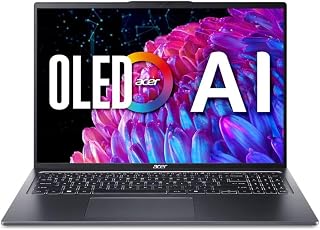
For readers leaning toward the 16 inch side of this guide, this Acer offers an OLED display, giving the larger screen real visual payoff for video, photos, or spreadsheets with more room to spread out. Paired with Intel Arc graphics, it suits anyone willing to carry a bigger laptop for sharper detail and extra workspace over sheer portability.
Pros
- 16-inch 3.2K OLED display at 120Hz with 100% DCI-P3 and HDR True Black 500
- Only 6.5 pounds and 0.59 inches thick for a 16-inch laptop
- Core Ultra 5 125H with NPU, Thunderbolt 4, and Wi-Fi 6E
- Aluminum chassis with fingerprint reader and Eyesafe certification
Cons
- 8GB RAM is fixed and non-upgradeable
- Intel Arc graphics suit light creative work, not heavy rendering
If you have settled on 16 inches because you want more screen for creative work, spreadsheets, or multitasking without stepping up to a desktop replacement, this is one of the strongest arguments for going big. The 16-inch panel is a 3.2K OLED running at 120Hz with 100% DCI-P3 coverage and HDR True Black 500, so the extra real estate actually gets used for accurate color and sharp detail rather than just scaled-up text. At 6.5 pounds and 0.59 inches thick, it stays within reach of what a 14-inch laptop user would tolerate carrying, which matters if you are debating whether a larger screen means a heavier bag. The Core Ultra 5 125H with NPU and Intel Arc graphics gives you enough power for business use, light creative editing, and modern multitasking. Thunderbolt 4 and Wi-Fi 6E support external monitors easily if you eventually want even more screen. For anyone weighing 14 versus 16, this model makes the case that the jump in size does not have to cost you in portability.
Display: 16-inch 3.2K OLED (3200x2000), 120Hz refresh rate, 100% DCI-P3 color gamut, VESA DisplayHDR True Black 500, TUV Rheinland Eyesafe Certified
Processor: Intel Core Ultra 5 125H (14-core, 13th Gen equivalent)
Graphics: Intel Arc Graphics
Memory: 8GB RAM
Storage: 512GB SSD
Connectivity: Wi-Fi 6E (802.11ax), Dual USB-C with Thunderbolt 4 and USB4 (40Gbps), DisplayPort
Security: Fingerprint Reader, Windows Hello
Dimensions: 14.02in W x 9.62in L x 0.59in Th
Weight: 6.5 pounds
Operating System: Windows 11 Home
Special Features: Backlit keyboard with numeric keypad, HD webcam, premium aluminum chassis
Color: Steel Grey
Buy this if you want the biggest practical screen for creative or detail-heavy work and are willing to accept 8GB of fixed RAM in exchange for OLED color quality and a lighter-than-expected 16-inch chassis. Skip it if you run memory-hungry apps, need upgradeable RAM, or are still undecided between 14 and 16 inches and want a smaller, lighter option for travel-first use.

Pros
- Sharp 14-inch FHD resolution provides a comfortable workspace for documents, browsing, and video.
- Lightweight 2.87-pound design and up to 10 hours of battery life support mobile use.
- Useful selection of USB, USB-C, HDMI, audio, Wi-Fi, and Bluetooth connections.
- Includes a 720p camera and integrated Intel UHD Graphics for common communication and media needs.
Cons
- The 4GB of RAM and dual-core Celeron processor are better suited to basic tasks than demanding multitasking.
- The 64GB eMMC storage capacity is limited for large local files and applications.
- Windows 11 in S Mode may restrict app installation choices, while cloud storage availability depends on the associated service.
The ASUS Vivobook 14 is a compact Windows laptop designed for students, business users, and households that need dependable performance for everyday computing. It is well matched to web browsing, email, documents, online learning, streaming, and video calls.
Its 14-inch Full HD LED display is a strong feature for this class, providing sharper detail and more usable workspace than a basic HD panel. The Intel Celeron N4500, 4GB of DDR4 RAM, and Intel UHD Graphics can manage routine tasks, though they are not intended for intensive creative work or demanding multitasking.
The thin Star Black chassis measures 0.71 inches and weighs 2.87 pounds, making the laptop easy to carry between home, school, and the office. Up to 10 hours of battery life, an anti-glare coating, a 720p camera, and a practical mix of USB, USB-C, HDMI, Wi-Fi, and Bluetooth add useful flexibility.
The main limitations are the modest 4GB memory and 64GB eMMC storage, which can feel restrictive as applications and local files accumulate. The listed 1TB cloud storage provides additional capacity, but it should not be treated as a replacement for generous built-in storage, and Windows 11 S Mode limits software installation options.
Overall, the Vivobook 14 is a sensible choice for affordable, portable productivity rather than high-performance computing. Buyers who prioritize a sharp display, long battery life, and everyday connectivity should find it appealing, while power users should consider a model with more RAM and faster, larger local storage.

This Dell shows what a business-focused 14 inch option looks like, built around an i5-1145G7 processor and 16GB DDR4 RAM for solid everyday performance in a small frame. Its matte screen reduces glare for long document or email sessions, a detail that matters to readers comparing screen size against portability for daily commuting and travel.
Pros
- Light 3 lb, 0.76 inch thick design for easy carrying
- Matte FHD screen reduces glare during long sessions
- Core i5-1145G7 with 16GB RAM handles multitasking well
- 256GB SSD for fast boot and app launch times
Cons
- Integrated graphics not suited for gaming or video editing
- 60Hz refresh rate and renewed condition may limit appeal
For readers weighing 14 inch against 16 inch, the Dell Latitude 5420 is a case for staying compact if your work is mostly office tasks rather than visual production. At 3 pounds and 0.76 inches thick, it is genuinely easy to carry, and the matte 14-inch FHD screen cuts glare during long work sessions, which can matter more for comfort than raw screen size. The Intel Core i5-1145G7 and 16GB of RAM handle multitasking across browser tabs, office apps, and video calls without strain, and the 256GB SSD keeps things responsive. Since it is a renewed unit, it also offers a way to get reliable business-grade hardware without stepping up to a larger, pricier machine just to get decent specs. The tradeoff for staying in the 14-inch class here is a 60Hz refresh rate and integrated graphics, neither of which will bother everyday productivity use but would show their limits if you were leaning toward a 16-inch screen for gaming or video editing instead.
Processor: Intel Core i5-1145G7 (2.00 GHz)
RAM: 16GB DDR4
Storage: 256GB SSD
Display: 14-inch FHD LCD (1920 x 1080), 60Hz refresh rate, matte finish
Graphics: Intel Integrated
Operating System: Windows 11 Pro
Connectivity: Wi-Fi 802.11n, Bluetooth, USB, Ethernet, HDMI
Audio: HD Audio
Weight: 3 pounds
Dimensions: 12.76in L x 8.35in W x 0.76in thickness
Keyboard: Full-size with touchpad
Warranty: Limited (refurbished)
Suits business users, students, and remote workers who want a compact, lightweight laptop for everyday computing and don't need a bigger screen for visual work. The matte display is a plus for long reading or writing sessions. Skip it if you want a larger canvas for creative work or gaming, or if you are not comfortable with the cosmetic variability and limited warranty that come with a renewed device.
What to Consider Before Choosing a Screen Size
Screen size is the starting point, not the whole buying decision. Compare the physical footprint with the display shape, processor, memory, storage, ports, and the work you intend to do most often.
Carry footprint and everyday mobility
Fourteen-inch laptops favor people whose office changes throughout the day. The Dell 14 DC14250 AI Laptop, 14" FHD+ IPS Display combines a 1920 x 1200, 16:10 panel with 16GB of memory, giving you more vertical workspace than a conventional Full HD display. It is a sensible direction for commuters who want capable productivity hardware in a compact footprint.
The HP 14-inch business and student configuration and Dell Latitude 5420 14" FHD Business Laptop also suit shared desks and classrooms, while the ASUS Vivobook 14" FHD Laptop is listed at 2.87 pounds for an especially light carry. Its 4GB memory and eMMC storage establish a much simpler performance ceiling, however. Pair a smaller notebook with a protective sleeve from our laptop accessories collection instead of assuming every bag provides enough padding.
Workspace, resolution, and image quality
A 16-inch laptop earns its larger footprint when your routine depends on side-by-side documents, wide spreadsheets, timelines, or visual media. The Acer Swift Go 16in OLED Laptop SFG16-72-5844 supplies a 3200 x 2000 OLED panel with a 120Hz refresh rate, creating substantially more room for detailed work. That additional canvas can reduce the constant window shuffling common on compact displays.
Screen quality can matter more than size alone. Acer lists 100% DCI-P3 color coverage and DisplayHDR True Black 500 support, attributes that make its OLED panel a stronger fit for photo work, video viewing, and color-conscious projects. The Dell 14-inch WUXGA display remains a practical office choice, while a dedicated desk can benefit from the broader setup ideas in our electronics coverage.
Performance that matches your workload
Screen dimension does not establish speed. The Dell 14 DC14250 uses an Intel Core 7 150U processor with 10 cores and 16GB DDR5 memory, backed by a 512GB PCIe SSD for responsive multitasking. That combination is more important to office workers than choosing a larger panel simply because it appears more capable.
The Acer pairs its 16-inch display with an Intel Core Ultra 5 125H processor, integrated AI acceleration, and a 512GB SSD, which makes the configuration more appealing for demanding creative sessions. HP’s Intel N150 model includes 16GB of RAM and expanded external storage, while the renewed Dell Latitude offers 16GB RAM with a quad-core Core i5 for general business work. The ASUS model is better reserved for browsing, document writing, streaming, and other lighter tasks because it has 4GB RAM and 64GB eMMC storage.
Ports, wireless connections, and desk flexibility
Ports and wireless support shape how effectively either screen size works in a fixed workspace. The Acer includes dual USB-C ports with Thunderbolt 4 and USB4 support for fast transfers, charging, and external display output. The Dell 14 DC14250 adds Wi-Fi 6 and Bluetooth 5.4, while the HP bundle includes a USB-C dock that can simplify a monitor-and-peripherals setup.
Also consider the features you use when the laptop is closed or away from a desk, including webcam quality, microphone clarity, fingerprint login, and charging convenience. A 16-inch model can become a comfortable primary machine when it connects easily to your accessories, whereas a 14-inch model can stay productive with the right hub. As configurations and bundles change, our current deals section can help you compare available options without letting extras overshadow the core hardware.
Final Thoughts
Choose the Dell 14 DC14250 AI Laptop, 14" FHD+ IPS Display if you want a current, well-equipped 14-inch model that keeps a compact profile. Select the Acer Swift Go 16in OLED Laptop SFG16-72-5844 when OLED color, a roomy 16-inch canvas, and expansive connectivity matter more than having the smallest bag.
Frequently Asked Questions
Is a 14 inch or 16 inch laptop better for college?
A 14-inch model is often the easier college choice because it fits more comfortably on lecture-room desks and in everyday backpacks. A 16-inch option is more appealing for design assignments, coding, research with many open sources, or split-screen writing. Students planning security-focused coursework should also prioritize processor, memory, and storage with guidance from our cybersecurity student laptop guide.
Is a 16 inch laptop too large for travel?
Not necessarily, but a 16-inch laptop needs a larger compartment and feels less convenient on tight tables or during quick transitions. It works well for travelers who spend long stretches editing, presenting, or working from a hotel desk. If you carry your device all day and frequently work in transit, a 14-inch chassis is usually the more comfortable companion.
Is a 16 inch laptop better for photo and video work?
A larger panel gives you more room for editing controls, preview windows, and timelines, but resolution and color quality remain crucial. The Acer’s 3.2K OLED display, 120Hz refresh rate, and wide DCI-P3 coverage make it the stronger creative-oriented option among these choices. Confirm that the memory capacity and storage arrangement also fit the size of your project files.
Can a 14 inch laptop handle work multitasking?
Yes, provided the configuration has enough memory, a capable processor, and fast storage. In 2026, a 14-inch screen with a 16:10 aspect ratio can comfortably support documents, communication apps, browser tabs, and video calls without feeling restrictive. The Dell 14 DC14250 and the HP configuration both offer 16GB RAM, while the ASUS model is more appropriate for a lighter, one-task-at-a-time routine.








Write Your Review
No reviews yet. Be the first to share your experience!