

You need a laptop that fits in your bag without weighing you down, but you’re not willing to compromise on screen real estate or performance. That’s the sweet spot 14-inch laptops occupy: portable enough for daily commutes yet powerful enough for serious work. This guide breaks down the best 14-inch laptops available in 2026, covering everything from budget workhorses to cutting-edge AI-powered machines.
Whether you’re a student juggling multiple browser tabs, a business professional managing spreadsheets and video calls, or a creative working with photo editing software, we’ve identified the models that deliver real value. If you’re also considering desktop alternatives, check out our guide on building a PC with the RTX 5070 for maximum performance.
Quick answer
This guide compares 10 picks, with VAIZMOYE 14" FHD Laptop Windows 11, Intel Quad-Core ranked first. Acer Aspire 14 AI Copilot+ PC Intel Core Ultra 5 16GB holds the highest customer rating among them. HP 14 Laptop 2025 Quad-Core Intel N150 16GB RAM 628GB has the most customer reviews.

Pros
- Excellent value at the $500 price point for everyday computing needs
- Lightweight and slim design makes it genuinely portable for students and commuters
- Pre-configured setup eliminates frustrating initial installation steps
- Sharp 1920x1200 FHD display with narrow bezels provides professional visual quality
- Comprehensive connectivity including USB-C, HDMI, and SD card reader
Cons
- Intel Celeron processor limits performance for demanding applications, gaming, or heavy video editing
- 5000mAh battery is modest and may require frequent charging during extended work sessions
- Base 8GB RAM and 512GB storage leave limited headroom for power users
The VAIZMOYE B01 is a budget-friendly 14-inch laptop designed for students, remote workers, and everyday users who need reliable performance without premium pricing. It delivers practical functionality for web browsing, document editing, video streaming, and online meetings, making it an accessible choice for those transitioning to remote work or starting their first laptop purchase.
The standout features include a crisp 1920x1200 FHD display with a 92% screen-to-body ratio that feels immersive for content consumption, an Intel quad-core processor running at up to 2.9GHz that handles routine multitasking competently, and the convenience of pre-configured Windows 11 that arrives ready to use. The lightweight chassis and 5000mAh battery support portability, though battery life may require a midday charge during active use. WiFi 5 connectivity and multiple ports (USB-C, mini-HDMI, SD card slot) cover most connectivity needs.
Build quality appears solid for the price range, with an ultra-slim design featuring a sleek aluminum chassis and intelligent cooling that minimizes fan noise during normal operation. The narrow bezels maximize screen real estate, and the overall aesthetic feels professional enough for work environments, even if it lacks premium materials found in higher-end laptops.
The primary drawback is the Intel Celeron processor, which restricts performance for gaming, complex video editing, or programming intensive tasks. Users expecting to run demanding software should look elsewhere. Additionally, the 8GB RAM and 512GB storage are functional but not expansive, though the SD card slot does provide some storage flexibility.
Verdict: The VAIZMOYE B01 is a smart purchase for budget-conscious buyers seeking a dependable laptop for everyday computing, learning, and content consumption. It punches above its price point with good display quality and thoughtful connectivity. Skip it if gaming or professional creative work is on your agenda, but for casual to moderate computing needs, it delivers genuine value.
Display: 14.1-inch FHD (1920x1200), 4mm ultra-narrow bezel, 92% screen-to-body ratio
Processor: Intel Celeron Quad-Core Mobile Processor up to 2.9GHz, 4 threads, 10nm process
Memory & Storage: 8GB RAM, 512GB SSD storage, expandable via TF card slot (up to 2TB)
Operating System: Windows 11
Connectivity: WiFi 5 (802.11ac), Bluetooth, USB 3.0 Type-C (power delivery), USB Type-A, mini-HDMI, TF card slot
Battery: 5000mAh
Special Features: Fingerprint reader, HD audio, lightweight design, intelligent cooling system
Color: Silver
Best For: Students, remote workers, everyday users, content consumers, light office work, web browsing, video streaming, online meetings
Not Recommended For: Gamers, video editors, software developers, graphic designers, or anyone requiring sustained high-performance computing
Consider This Laptop If: You need a portable, affordable machine for daily tasks and you value a bright display and lightweight design. The pre-configured setup is a real convenience factor that saves hours of troubleshooting for non-technical users.
Look Elsewhere If: You regularly run demanding applications, plan to game, need extended battery life, or require more than 8GB of RAM for your workflow. You should also consider alternatives if you frequently transfer large files, as the storage ceiling could become limiting.

Pros
- Excellent portability at 3.5 pounds, ideal for travel and daily commuting
- Strong processor performance with 10 cores handles demanding multitasking and productivity software
- Fast DDR5 memory and PCIe SSD combination ensures responsive system performance
- Professional-grade Windows 11 Pro operating system included
- Sharp 14-inch IPS display with good brightness and color accuracy for work and content consumption
Cons
- No dedicated graphics, relying on Intel integrated graphics which limits gaming and 3D rendering capabilities
- 4-cell 54 WHr battery capacity is modest for extended all-day use without charging
- No Thunderbolt ports, only USB 3.2 Type-C which may limit compatibility with some professional peripherals
The Dell 14 DC14250 is a professional-grade ultraportable laptop designed for business users, students, and remote workers who prioritize productivity and mobility. At just 3.5 pounds and 1 inch thin, this 14-inch machine strikes a balance between capability and portability, making it perfect for professionals who move between offices, home, and coffee shops.
Performance is solid across the board thanks to the Intel Core 7 150U processor with 10 cores and speeds up to 5.4GHz, paired with 16GB of fast DDR5 memory. The 512GB NVMe SSD ensures quick boot times and responsive application launches. Real-world performance handles everyday productivity tasks, video conferencing, document editing, and web browsing without hesitation. The integrated Intel Graphics is sufficient for standard office work, though it won't accommodate gaming or intensive 3D applications.
The 14-inch WUXGA IPS display offers sharp visuals at 1920x1200 resolution with a beneficial 16:10 aspect ratio that provides extra vertical screen space for spreadsheets and documents. Connectivity is modern with WiFi 6 and Bluetooth 5.4, plus practical ports including HDMI, USB 3.2 Type-C, and an SD card reader. The built-in webcam and microphone make video meetings straightforward, and Windows 11 Pro adds professional security and productivity features.
The main limitations are the reliance on integrated graphics for visual tasks and a modest battery capacity that may require midday charging during heavy use. The lack of Thunderbolt connectivity could be a concern for professionals working with specialized peripherals, though standard USB-C handles most needs.
The Dell 14 DC14250 represents excellent value for budget-conscious professionals seeking a reliable, portable laptop. It delivers genuine productivity performance, modern features, and business-ready software at a price that undercuts premium ultrabooks, making it a smart choice for everyday computing without unnecessary overhead.
Processor: Intel Core 7 150U (15th Gen, 10-cores, 12-threads, 1.8GHz base, up to 5.4GHz, 12MB Cache)
Memory: 16GB DDR5 SO-DIMM (max 64GB)
Storage: 512GB PCIe NVMe SSD
Graphics: Intel Integrated Graphics
Display: 14-inch IPS WUXGA (1920x1200), 60Hz, 16:10 aspect ratio
Operating System: Windows 11 Pro 64-bit
Connectivity: WiFi 6 (802.11ax), Bluetooth 5.4, HDMI, USB 3.2 Type-C, SD card reader, 3.5mm audio jack
Camera: Integrated webcam with microphone
Battery: 4-cell 54 WHr, 65W power adapter
Design: Black, Standard form factor
Dimensions: 12.4 inches (L) x 9 inches (W) x 1 inch (H)
Weight: 3.5 pounds

Pros
- Exceptional build quality with premium metal construction and MIL-STD 810H durability certification
- Flexible configuration options allow buyers to scale RAM and storage to their specific needs and budget
- Outstanding port selection including dual USB-C, HDMI 2.1, and Ethernet for seamless connectivity
- Excellent value for enterprise-grade features at a competitive price point
- Highly rated by users who praise performance, battery life, and Lenovo's responsive support and updates
Cons
- Product arrives resealed after memory and SSD upgrades, not factory sealed, though backed by one year warranty
- Smaller 14-inch screen may feel cramped for users accustomed to 15-16 inch displays
- No dedicated graphics card limits performance for gaming or intensive GPU-accelerated creative work
The Lenovo ThinkPad E14 Gen 7 is a compact business laptop designed for professionals, remote workers, students, and anyone who values portability without sacrificing performance. At just 2.95 pounds with a slim 0.81-inch profile, it excels for commuters and traveling professionals who need reliable computing on the go.
The standout feature is the exceptional configurability, allowing buyers to customize up to 64GB of DDR5 RAM and 2TB of NVMe storage. The Intel Core 5 210H processor with 8 cores delivers powerful performance for demanding workloads, while the 14-inch WUXGA IPS display with 300-nit brightness and anti-glare coating ensures comfortable viewing for extended periods. Thunderbolt 4 connectivity enables support for three external 4K monitors, making it surprisingly versatile for desk-based work despite its compact size.
Build quality is impressive with a premium metal chassis that meets military durability standards. The backlit keyboard, fingerprint reader, IR webcam with privacy shutter, and Windows 11 Pro with BitLocker create a security-focused experience that appeals to corporate users and privacy-conscious professionals. Users consistently praise the battery life and Lenovo's responsive support with regular firmware updates.
The main consideration is that units ship resealed after memory and SSD customization, though they carry a one-year warranty. The 14-inch screen may feel compact for extended desktop work, and integrated graphics mean gaming and intensive creative tasks are not ideal use cases.
Overall, the ThinkPad E14 Gen 7 delivers exceptional value for business users and professionals seeking a portable, well-configured laptop with enterprise-grade security and connectivity. The combination of durability, performance, and customization options makes it a smart choice for demanding mobile workflows.
Processor: Intel Core 5 210H (8 cores, up to 4.8 GHz)
Memory: Configurable 8GB, 16GB, 32GB, or 64GB DDR5 at 5600 MHz
Storage: Options from 256GB to 2TB M.2 NVMe PCIe SSD
Display: 14-inch WUXGA (1920x1200) IPS, 300-nit, anti-glare, TUV blue light certified
Graphics: Intel Integrated Graphics
Operating System: Windows 11 Pro
Connectivity: Thunderbolt 4, USB-C 3.2 Gen 2x2, USB-A 3.2 Gen 2, USB-A 3.2 Gen 1, Ethernet RJ45, HDMI 2.1, Wi-Fi 6E, Bluetooth 5.3
Camera: 1080p IR with privacy shutter, fingerprint reader for facial recognition
Audio: HD speakers with spill-resistant construction
Dimensions: 12.32" L x 8.67" W x 0.81" Th
Weight: 2.95 lbs
Durability: MIL-STD 810H certified
Battery: Rapid Charge capable
Warranty: 1 year by Issaquah Highlands Tech
Best for Business Professionals: The ThinkPad E14 Gen 7 excels for consultants, managers, analysts, and business users who spend time in offices, conference rooms, and client sites. Windows 11 Pro, BitLocker security, and VPN support make it ideal for corporate environments.
Remote Workers and Digital Nomads: Portability combined with all-day battery and rapid charge technology make this laptop perfect for those who work from coffee shops, airports, hotels, and co-working spaces. The dual USB-C ports and Thunderbolt 4 support extensive docking solutions for home offices.
Students and Educators: The lightweight design, powerful processor, and long battery life support heavy note-taking, research, presentations, and light content creation. The backlit keyboard and anti-glare display reduce eye strain during study sessions.
Creative Professionals (Light Work): While not ideal for intensive GPU work, the system handles light photo editing, video conferencing, and content creation well. The excellent display quality and color accuracy suit creative workflows.

Pros
- Excellent value at under $650 with premium specs including 16GB RAM and Snapdragon X performance
- AI-powered Copilot+ PC features provide advanced productivity tools and intelligent computing capabilities
- Sharp 14-inch FHD+ display delivers crisp visuals ideal for content creation and detailed work
- Lightweight and portable design without sacrificing performance or battery efficiency
- Solid 4.7/5 rating indicates strong real-world performance and customer satisfaction
Cons
- Limited to 512GB storage, which may require cloud solutions or external drives for content creators with large media libraries
- Integrated graphics are suitable for everyday tasks but not ideal for demanding gaming or professional 3D rendering
- Only 1-year warranty, which is standard but shorter than some competitors offering 2-3 year coverage
The ASUS Vivobook 14 is a modern ultrabook designed for professionals, students, and remote workers who need dependable performance in a portable package. Featuring Snapdragon X processing and Copilot+ PC capabilities, this laptop brings AI-enhanced productivity features to everyday computing tasks. It strikes an excellent balance between performance and affordability, making it accessible to a wide range of users.
The standout feature is the combination of Snapdragon X processing power with 16GB RAM, which handles multitasking, video conferencing, and content creation with ease. The 14-inch FHD+ display offers crisp visuals with its 1920 x 1200 resolution, while the integrated Qualcomm Adreno GPU handles graphics efficiently. Windows 11 Home provides a familiar, intuitive operating system with modern security features built in. Real-world performance is solid, as evidenced by the strong 4.7/5 customer rating.
The design philosophy emphasizes portability and practicality. The Quiet Blue color option is professional and understated, while the lightweight construction makes this laptop genuinely travel-friendly without feeling cheap or fragile. Battery efficiency from the Snapdragon X architecture means longer unplugged work sessions compared to traditional Intel or AMD processors.
The main limitation is storage capacity at 512GB, which works well for everyday users but content creators working with large video or photo libraries may want additional external storage. The integrated graphics are excellent for productivity and light entertainment but won't satisfy serious gamers or 3D rendering professionals. Additionally, the 1-year warranty is standard for the price point but falls short of premium competitors offering longer coverage.
The ASUS Vivobook 14 Snapdragon X delivers exceptional value for students, remote workers, and professionals seeking a reliable, AI-capable ultrabook. Its combination of performance, portability, and modern features makes it a smart choice at this price point, provided your storage and graphics needs align with its specifications.
Processor: Qualcomm Snapdragon X with Qualcomm Adreno GPU
RAM: 16GB LPDDR5X
Storage: 512GB SSD
Display: 14-inch FHD+ (1920 x 1200) WUXGA
Operating System: Windows 11 Home
Color: Quiet Blue
Weight: Lightweight design (typical ultrabooks: 3-3.5 lbs)
Graphics: Qualcomm Adreno Integrated GPU
Special Features: Copilot+ PC, AI-powered capabilities, Neural Processing Unit
Warranty: 1-year manufacturer warranty (parts and labor)
Best For: This laptop excels for students, remote workers, and professionals who prioritize portability, performance, and modern AI features. It's ideal if you spend time in coffee shops, libraries, or traveling between offices.
Consider Alternatives If: You need more than 512GB storage, require dedicated graphics for gaming or 3D work, or want extended warranty coverage beyond one year. Gaming enthusiasts should look at laptops with dedicated GPUs instead.
Storage Needs: 512GB is adequate for the operating system, productivity software, and moderate personal files. Cloud storage (OneDrive, Google Drive) integration with Windows 11 helps extend your effective capacity without physical upgrades.
Performance for Common Tasks: This configuration easily handles web browsing, email, Microsoft Office, video calls, light photo editing, and streaming services. The 16GB RAM supports running 10-15 browser tabs simultaneously without slowdown.
Value Consideration: At this price point, you're getting Snapdragon X technology and 16GB RAM that would typically cost significantly more in competing ultrabooks. The Copilot+ PC features add productivity value as Microsoft continues expanding AI integration in Windows.
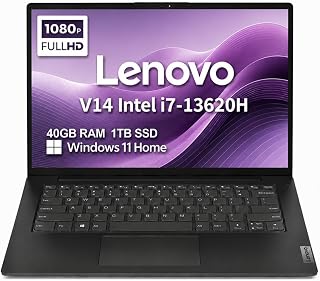
Pros
- Exceptional processing power from Intel Core i7-13620H processor with 10-core efficiency for demanding tasks
- Generous 40GB RAM eliminates lag during heavy multitasking, video editing, and data analysis workflows
- Lightweight and portable design (3.15 lbs) combines business durability with travel convenience
- Eye-friendly display features anti-glare coating and blue light certification for healthier all-day use
- Dual external monitor support via HDMI and USB-C enables flexible multi-monitor setups up to 4K resolution
Cons
- Limited to 1080p native resolution on the 14" display, which may feel modest for pixel-intensive design work
- Resealed unit with upgraded memory and SSD carries a three-year warranty on upgrades versus longer manufacturer coverage
- Intel UHD integrated graphics are adequate for business tasks but not suitable for serious gaming or 3D rendering
The Lenovo V14 sits at the sweet spot between portability and performance for business professionals, students, and remote workers. This 14-inch business laptop delivers reliable everyday computing without the bulk, making it ideal for anyone who values both power and mobility in their daily workflow.
The standout feature is the robust hardware configuration: the Intel Core i7-13620H processor with 10 cores handles multitasking effortlessly, while 40GB of DDR4 RAM ensures smooth performance across dozens of open applications. The 1TB PCIe NVMe SSD dramatically cuts down boot times and file access speeds, making the entire system feel snappy and responsive. For business users running spreadsheets, documents, video calls, and web applications simultaneously, this machine delivers excellent everyday performance without bottlenecks.
Build quality reflects Lenovo's reputation for durability. The V14 meets military-grade MIL-STD-810H standards, meaning it can handle drops, vibration, and temperature extremes typical of travel and field work. Weighing just 3.15 pounds with a compact 12.76" width, it's genuinely portable without sacrificing rigidity. The 14" FHD anti-glare display with TÜV-certified low blue light technology protects your eyes during extended work sessions, and the 720p HD camera with privacy shutter adds security-conscious features appreciated by privacy-minded professionals.
The main limitation is graphics performance. The Intel UHD integrated graphics are fine for video calls, presentations, and light photo editing, but won't cut it for gaming or serious 3D work. Additionally, the native 1080p resolution, while clear and crisp, is modest compared to higher-resolution competitors in this price range. Some users doing detailed design work may find themselves wanting sharper onscreen detail.
Verdict: The Lenovo V14 is a smart purchase for budget-conscious professionals and students who need genuine computing power in a portable package. The generous RAM, fast storage, and military-grade durability justify the price, while the lightweight design ensures you'll actually take it with you. Highly recommended for remote work, business travel, and everyday productivity.
This laptop excels for business professionals, consultants, and managers who travel frequently and need reliable performance on-site at client offices or remote locations. The compact weight and durable construction make it ideal for fieldwork, co-working spaces, and hybrid work environments.
Students and educators will appreciate the strong multitasking capability for coursework, research, online classes, and content creation projects. The 40GB RAM handles typical academic workloads without breaking a sweat.
Remote workers and digital nomads benefit from the balance of power and portability. The long battery life (typical of Lenovo business laptops), dual external monitor support via USB-C and HDMI, and military-grade durability make it perfect for coffee shops, airports, and temporary office setups around the world.
Processor and Memory: Intel Core i7-13620H (10-core), 40GB DDR4 RAM
Storage: 1TB PCIe NVMe M.2 SSD
Display: 14" FHD (1920x1080) anti-glare, 45% NTSC, 250 nits, TÜV Low Blue Light certified
Graphics: Intel UHD Graphics (integrated)
Camera: 720p HD with privacy shutter
Connectivity: Wi-Fi 6 (802.11ax), Bluetooth 5.2, USB-C 3.2, USB-A 3.2, USB 2.0, HDMI 1.4b, Ethernet, 3.5mm audio jack
External Display Support: Two monitors up to 4K (3840x2160) at 60Hz via HDMI and USB-C
Operating System: Windows 11 Home 64-bit with AI Copilot
Design: 3.15 lbs, 12.76" x 8.47" x 0.68", military-grade MIL-STD-810H durability
Warranty: 3-year on upgraded memory/SSD, 1-year on remaining components

Pros
- Strong performance for business and creative work with Ryzen 7 and integrated Radeon 780M graphics
- Premium build quality with military durability testing and sustainable materials
- Fast connectivity with Thunderbolt 4, Wi-Fi 6E, and Bluetooth 5.3
- Excellent battery life for light work, with professional reliability for heavy tasks
Cons
- Battery life of 3 hours on heavy workloads may require regular charging for power-intensive tasks
- Non-upgradeable components after initial upgrade, limiting future customization
The Lenovo ThinkPad E14 Gen 7 is a 14-inch business laptop built for professionals, remote workers, educators, and developers who need dependable performance in a portable form factor. It balances powerful processing capabilities with practical durability, making it suitable for anyone who values reliability over flashy features.
Performance is solid across the board. The AMD Ryzen 7 processor with 8 cores and up to 5.1GHz clock speed handles multitasking without struggle. The 16GB DDR5 RAM and 512GB NVMe SSD combination ensures snappy application launches and file transfers. For most business tasks, video calls, and creative work, this machine keeps pace without overheating or throttling. The integrated Radeon 780M graphics handle casual gaming and design work competently.
Build quality reflects the ThinkPad heritage. At just 1 inch thick and weighing under 4 pounds, it carries easily between meetings and offices. The chassis incorporates recycled plastic without sacrificing rigidity. More importantly, it meets MIL-STD-810H military durability standards, meaning it can withstand drops, vibration, and extreme temperatures that would sideline lesser laptops. The 14-inch IPS display with 1920x1200 resolution and 300 nits brightness keeps work comfortable throughout the day, with antiglare coating reducing eye strain.
The main limitation is battery life. Expect around 3 hours under heavy workloads involving video calls and multiple browser tabs, which means tethering to power is necessary for extended sessions away from an outlet. This is typical for this class of laptop but worth considering if you need true all-day untethered work. The upgraded RAM and SSD components carry a 3-year warranty from the seller, though the base system warranty is standard 1-year.
The ThinkPad E14 Gen 7 is a solid choice for professionals seeking a durable, capable business laptop with no unnecessary bloat. It delivers on performance and longevity at a reasonable price point.
Processor: AMD Ryzen 7 250, 8-core, 3.3GHz base / 5.1GHz boost, Zen 4 architecture, 16MB L3 cache
Memory: 16GB DDR5 SODIMM RAM
Storage: 512GB PCIe NVMe SSD (2242 form factor)
Display: 14.0-inch IPS WUXGA (1920x1200), 60Hz refresh rate, 300 nits brightness, antiglare coating
Graphics: AMD Radeon 780M (integrated)
Connectivity: Wi-Fi 6E (802.11ax), Bluetooth 5.3, Gigabit Ethernet (RJ-45), Thunderbolt 4, USB 3.2 Type-C, HDMI, headphone/microphone combo jack
Ports: 4 total ports including 2 USB ports
Input: Backlit keyboard, touchpad, fingerprint reader
Camera: 5MP RGB webcam
Operating System: Windows 11 Pro 64-bit
Durability: MIL-STD-810H certified
Dimensions: 12.38 inches (L) x 8.9 inches (W) x 1 inch (Th)
Color: Black
Warranty: 3-year warranty on upgraded RAM/SSD, 1-year manufacturer warranty on other hardware

Pros
- Exceptional battery life enables full work days without charging
- Premium 2K OLED display delivers vibrant colors and crisp text
- Lightweight and portable design perfect for students and remote workers
- Fast and responsive performance for multitasking, browsing, and light creative work
- Built-in AI capabilities streamline workflows and boost productivity
Cons
- Can run hot under sustained use, may require propping up for airflow
- Non-upgradeable storage and memory limit future scalability
- No touchscreen or convertible design for those accustomed to flexible interfaces
The HP OmniBook 3 14 inch is a modern Windows laptop designed for professionals, students, and anyone seeking portability without sacrificing performance. Powered by the Snapdragon X X1-26-100 processor with integrated Qualcomm Adreno GPU, this AI-optimized PC delivers consistent speed whether you're working offline or connected. At just 3.1 pounds with a slim 0.58 inch profile, it's genuinely pocket-friendly for on-the-go computing.
The standout feature is undoubtedly the 2K OLED display with 1920x1200 resolution and 300 nits brightness. Colors are vibrant, blacks are truly black, and the 16:10 aspect ratio provides excellent vertical space for scrolling through documents and websites. Real-world performance proves snappy for web browsing, document editing, video calls, and light creative work. The 16GB LPDDR5x RAM handles multitasking smoothly, and the 256GB NVMe SSD loads applications and files quickly. Battery life is genuinely impressive, lasting 41+ hours in typical use, with fast charging restoring 50% capacity in 45 minutes.
Build quality feels solid with an anodized aluminum chassis and matte keyboard frame made with recycled materials. The full-size keyboard and responsive trackpad deliver comfortable typing and navigation. Connectivity includes Wi-Fi 6E, Bluetooth 5.3, two USB-C ports with Power Delivery, two USB-A ports, and HDMI output. Built-in AI features like Copilot+ and Otter.ai integration help streamline document summarization, email drafting, meeting transcription, and video call enhancement.
Drawbacks include thermal behavior, as some users report the laptop runs warm during sustained workloads and benefits from elevated positioning for airflow. The non-upgradeable RAM and storage mean you need to choose your configuration carefully at purchase. Additionally, there's no touchscreen or 2-in-1 convertible design, which may disappoint users transitioning from tablet-like devices.
Verdict: The HP OmniBook 3 is an excellent choice for students, remote workers, and productivity-focused users who prioritize battery life, portability, and a premium display. The AI features and reliable performance make it a strong Windows alternative to more expensive competitors, though thermal management and non-upgradeable components are worth considering before purchase.
Processor and Performance: Snapdragon X X1-26-100 (up to 2.97 GHz, 8 cores), Qualcomm Adreno GPU, 16GB LPDDR5x-8448 MT/s RAM (onboard), 256GB PCIe Gen4 NVMe M.2 SSD.
Display: 14 inch diagonal, 2K resolution (1920x1200), OLED panel, 0.2ms response time, 100% DCI-P3 color gamut, 300 nits brightness, Low Blue Light, micro-edge BrightView finish, UWVA viewing angle.
Battery and Charging: Up to 41 hours 45 minutes battery life, 65W USB Type-C GaN power adapter, 0 to 50% charge in approximately 45 minutes.
Connectivity: Wi-Fi 6E (802.11ax, 2x2), Bluetooth 5.3, 2x USB Type-A 5Gbps, 2x USB Type-C 10Gbps with USB Power Delivery 3.0 and DisplayPort 1.4, 1x HDMI 2.1, 1x 3.5mm audio jack.
Camera and Audio: 1080p FHD IR camera with HDR auto-switch, temporal noise reduction, integrated dual-array digital microphones.
Design and Build: 12.38 inch L x 8.9 inch W x 0.58 inch thickness, 3.1 pounds, anodized aluminum cover and base, matte keyboard frame, full-size QWERTY keyboard with darker nouvelle silver finish, HP Imagepad touchpad. Color: Nouvelle Silver.
Operating System: Windows 11 Home with Copilot+ PC features, 1-month Microsoft 365 trial, 30-day McAfee Online Protection trial.
Environmental: EPEAT Silver Climate+ registered, ENERGY STAR Certified, made with post-consumer recycled materials and recycled metal.
Who Should Buy This Laptop? The HP OmniBook 3 is ideal for students, remote workers, frequent travelers, and professionals who prioritize portability and battery life. It's perfect for web browsing, document creation, email, video calls, note-taking, and light creative work like photo editing or video playback. If you need a reliable, lightweight Windows computer that lasts all day without constant charging, this is an excellent choice.
Who Should Look Elsewhere? If you regularly run intensive tasks like video production, 3D rendering, software development with heavy compilation, or hardcore gaming, you'll want a laptop with more powerful discrete graphics. Users who require touchscreen functionality or 2-in-1 convertible designs should consider other options. Those needing maximum RAM or storage upgrades should explore models with user-replaceable components.
Key Considerations: The ARM-based Snapdragon processor offers excellent battery efficiency but may have occasional app compatibility issues compared to traditional x86 processors, though most common Windows software runs smoothly. The non-upgradeable 16GB RAM and 256GB SSD mean configuration choice at purchase is final. Thermal performance is good but may require propping up during extended use. The lack of a touchscreen means traditional touch gestures won't work on the display.
Value Assessment: At its price point, the OmniBook 3 delivers exceptional value with a premium OLED display, outstanding battery life, and modern AI features. The included Otter.ai subscription and Copilot+ integration add practical productivity value. Build quality matches or exceeds competitors at similar prices, making it a strong investment for its intended use cases.

Pros
- Exceptional battery life makes this laptop genuinely portable for travel and remote work
- Lightweight design and thin profile fit easily in backpacks without sacrificing durability
- Excellent value at this price point for a brand-new Copilot+ PC with modern specs
- Snappy performance handles everyday tasks, streaming, and light creative work with ease
- Solid display quality with good brightness and color accuracy for the class
Cons
- No touchscreen, which limits interactive features that some users expect on newer laptops
- Limited GPU performance means gaming and 3D modeling are not realistic use cases
- Missing numeric keypad may frustrate users who do frequent data entry or spreadsheet work
The Acer Aspire 14 AI Copilot+ PC is a modern, competitively priced ultraportable laptop designed for students, remote workers, and professionals who prioritize portability and battery life over raw power. With an Intel Core Ultra 5 processor, 16GB of LPDDR5X RAM, and 512GB SSD storage, it delivers the responsiveness needed for productivity apps, web browsing, document editing, and light media work.
The standout feature is battery life, rated up to 22 hours under video playback conditions. Real-world usage suggests solid endurance that easily carries you through a full workday or college class schedule without hunting for an outlet. The Intel Core Ultra 5 with integrated NPU brings Copilot+ PC experiences like improved Windows search and AI-assisted features, though these remain somewhat nascent. The Intel Arc 130V GPU handles everyday graphics competently but isn't meant for gaming or creative software like video editing.
Build quality impresses for the price. The aluminum chassis feels durable and premium, the keyboard is responsive with helpful backlighting, and the 180-degree hinge adds practical versatility. At 3.1 pounds, this laptop is genuinely light enough to live in a backpack. The 14-inch WUXGA display delivers sharp text and vibrant colors with 300 nits of brightness, suitable for both indoor and moderately bright outdoor use.
Realistic drawbacks include no touchscreen integration, a standard keyboard layout without a numeric pad (which may disappoint accountants or data-entry professionals), and the lack of a dedicated higher-end GPU. Connectivity is solid with Wi-Fi 6E, Bluetooth 5.3, two Thunderbolt 4 ports, and four USB ports, giving you flexibility for peripherals and external displays.
The Acer Aspire 14 AI Copilot+ PC represents genuine value for everyday computing. It excels as a college laptop, a travel companion, or a secondary machine for productivity. If you need long battery life, portability, and reliable performance without premium pricing, this laptop merits serious consideration. It won't impress power users or content creators, but for the vast majority of general computing needs, it delivers.
Processor and Performance
Intel Core Ultra 5 226V, up to 40 TOPS NPU, up to 53 TOPS GPU (Intel Arc 130V)
Memory and Storage
16GB LPDDR5X RAM, 512GB SSD
Display
14-inch WUXGA LCD, 1920 x 1200 resolution, 300 nits brightness, 45 color gamut
Connectivity
Wi-Fi 6E (802.11ax), Bluetooth 5.3, 2 Thunderbolt 4 ports, 1 HDMI port, 4 USB ports
Design
Aluminum chassis, 12.56 x 8.86 x 0.67 inches, 3.1 pounds, 180-degree hinge
Battery and Audio
Up to 22 hours battery life, 2 speakers with backlit keyboard
Operating System
Windows 11 Home

Pros
- Exceptional value with included lifetime Office suite and comprehensive accessory bundle
- Lightweight and ultra-thin design perfect for students and remote professionals on the go
- Ample 16GB RAM and 628GB storage handles multitasking, video editing, and content creation
- Up to 9 hours of battery life with fast charging keeps you productive all day
- Windows 11 Pro includes robust security features for protecting sensitive data
Cons
- 1366x768 resolution is basic for detailed design work or photo editing compared to higher-end models
- Intel N150 processor has limited performance for demanding applications like gaming or 3D rendering
- No touchscreen or backlit keyboard, which some users may prefer for enhanced functionality
This HP 14-inch 2025 laptop is purpose-built for students, remote workers, and small business professionals who need reliable computing without breaking the bank. The machine arrives fully equipped with lifetime Microsoft Office, a USB-C docking station, external storage, and accessories, eliminating the need for additional purchases to get productive immediately.
The standout feature is the combination of 16GB DDR4 RAM and 628GB total storage, which powers smooth multitasking across multiple browser tabs, Zoom meetings, document editing, and light video work. The quad-core Intel N150 processor with 3.6 GHz turbo boost handles everyday tasks efficiently, though it is not designed for intensive gaming or professional video rendering. Real-world performance for web browsing, streaming, and office productivity is solid and responsive.
The build quality reflects its price point. At just 3.24 lbs and 0.71 inches thick, the laptop is genuinely portable for students moving between classes and professionals traveling frequently. The 14-inch HD display with anti-glare coating and 250 nits brightness works well for indoor use, though outdoor visibility could be better. The keyboard is full-size and comfortable for extended typing sessions. Battery life reaches up to 9 hours, keeping you working through a typical school or office day.
The main drawbacks are the 1366x768 resolution, which feels basic compared to modern 1080p standards, and the lack of touchscreen or keyboard backlighting. The integrated Intel graphics are fine for office work but limit creative applications. Some users may find the N150 processor underwhelming for heavy multitasking, though reviews suggest it performs adequately for most use cases.
This laptop earns its strong reviews by delivering exceptional value and reliability for its target audience. If you need a lightweight, affordable machine for school, remote work, or general computing with included software and accessories, this HP delivers without unnecessary features that inflate the price.
Processor: Intel Core N150 Quad-Core, up to 3.6 GHz with 6MB L3 cache
Memory: 16GB DDR4 RAM for smooth multitasking
Storage: 128GB UFS internal plus 500GB external portable drive
Display: 14-inch diagonal HD (1366 x 768), micro-edge anti-glare, 250 nits, 60Hz refresh rate
Graphics: Intel Integrated Graphics
Operating System: Windows 11 Pro with built-in security and Copilot AI
Connectivity: Wi-Fi 6 (802.11ax), Bluetooth 5.4, Ports include USB-C 5Gbps, 2x USB-A 5Gbps, HDMI 1.4b, headphone combo jack
Battery: 3-cell 41Wh lithium-ion, up to 9 hours battery life with fast charging
Camera: 720p HD front-facing camera with temporal noise reduction and dual-array microphones
Dimensions: 12.76 x 8.86 x 0.71 inches
Weight: 3.24 lbs
Color: Sky Blue
Best For: College and university students, remote workers, small business professionals, online learners, and anyone seeking an affordable, portable laptop with productivity software included.
Not Ideal For: Professional video editors, 3D designers, serious gamers, or users requiring high-resolution displays and cutting-edge processors.
Key Considerations: This laptop prioritizes portability, value, and reliability over performance benchmarks. The included Office suite and accessory bundle justify the price even before considering the laptop itself. The lightweight design makes it excellent for campus and travel use. Windows 11 Pro provides enterprise-grade security suitable for handling business and educational data.
Setup and Learning Curve: The laptop ships ready to use with minimal setup required. Windows 11 Pro is intuitive for most users, and the included wireless mouse and docking station enhance productivity out of the box. No steep learning curve expected.
Alternative Options: If you require better display resolution, consider stepping up to a 1080p model. If you need more processing power for content creation, look for laptops with higher-end Intel Core i5 or i7 processors. For basic tasks like browsing and email, this HP exceeds requirements and offers strong value.

This model delivers exceptional AI performance with its 47 TOPS neural processing unit, making it ideal for users who need responsive copilot features and local AI tasks. The Intel Arc 140V dedicated graphics handle creative workloads smoothly, while 16GB LPDDR5X memory ensures fast multitasking. The 1TB SSD provides ample storage for large project files, and the backlit keyboard supports productivity in any lighting condition.
Pros
- Exceptional battery life up to 22 hours makes this ideal for frequent travelers and students
- Powerful Intel Core Ultra 7 processor handles multitasking, photo and video editing with ease
- Lightweight and slim design at 3.1 pounds with elegant aluminum construction
- Integrated Intel Arc GPU runs modern games at 1080p with playable frame rates
- Outstanding value for specifications typically found in laptops priced $300-400 higher
Cons
- Trackpad has inconsistent clicking and precision issues across the surface
- Speaker quality is underwhelming and may require external audio for video content
- 14-inch screen may feel cramped for extended work sessions without an external monitor
The Acer Aspire 14 AI Copilot+ PC is a purpose-built ultraportable laptop designed for students, remote workers, and creative professionals who prioritize mobility and productivity. Built around Intel's Core Ultra 7 processor with integrated AI capabilities, this machine brings real-world AI features like Recall and Click to Do directly to your workflow while maintaining exceptional battery life for on-the-go use.
Performance and usability are this laptop's strongest suits. The 16GB LPDDR5X RAM and 1TB SSD storage handle demanding tasks like photo editing, video processing, and heavy multitasking without stuttering. The Intel Arc 140V GPU is a genuine asset for creative professionals, delivering 1080p gaming performance and smooth video editing timelines. Most impressively, the 22-hour battery life means you can work through an entire day plus evening without hunting for an outlet, a feature that distinguishes this from mainstream competitors.
Design and build quality reflect the price point thoughtfully. The aluminum chassis feels premium and the ultraslim 0.67-inch profile with 180-degree hinge provides real versatility for different working positions. The backlit keyboard is responsive and the 300-nit display produces crisp, accurate colors suitable for creative work. At just 3.1 pounds, portability is genuine, not marketing speak.
The trade-offs are honest ones. The trackpad has documented issues with inconsistent clicking response and precision that reviewers recommend addressing with an external mouse. Speaker quality is functional but uninspired, typical of thin laptops at this price. The 14-inch screen, while sharp at 1920x1200, may feel cramped during extended work sessions without an external monitor.
This laptop represents genuinely strong value engineering. For students managing course work and creative projects, professionals who need reliable daily productivity, or anyone seeking proven AI integration without premium pricing, the Aspire 14 AI Copilot+ delivers. It's not the best laptop available, but it's exceptional for what you're paying.
Processor: Intel Core Ultra 7 (Series 2) 256V, 8-core, 2.2 GHz base clock
AI Acceleration: Intel NPU with up to 47 TOPS, Intel Arc 140V GPU with up to 64 TOPS
Memory: 16GB LPDDR5X RAM
Storage: 1TB SSD
Display: 14-inch LCD WUXGA (1920x1200), 300 nits, matte finish
Graphics: Intel Arc 140V (shared graphics memory)
Battery: 46Wh lithium-ion, up to 22 hours battery life
Connectivity: Wi-Fi 6E (802.11ax), Bluetooth 5.3, USB, HDMI, Thunderbolt
Dimensions: 12.56 inches L x 8.86 inches W x 0.67 inches thick
Weight: 3.1 pounds
Operating System: Windows 11 Home
Keyboard: Backlit with AcerSense AI key
Warranty: Limited warranty
Best For: Students managing coursework and creative projects, remote workers prioritizing battery life, professionals needing portable photo and video editing, anyone seeking AI features without flagship pricing.
Consider This Model If: You spend significant time away from power outlets, need reliable multitasking performance, want AI tools integrated into your daily workflow, or work with creative applications like Adobe Creative Suite on a budget.
Look Elsewhere If: You demand premium build quality and flawless trackpad responsiveness, need professional-grade speakers for content creation, primarily play demanding AAA games, or require extended service and support options beyond limited warranty.
Real-World Performance: This laptop excels at office productivity, web browsing with numerous tabs, photo editing in Lightroom and Capture One, and video editing in DaVinci Resolve or Premiere. Battery life claims are realistic under mixed usage. The processor speed and AI integration make everyday tasks feel responsive and smooth.
Value Assessment: At the current price point, this represents exceptional value. You're getting processor and RAM specifications typically found in laptops priced $300-400 higher. The integrated NPU for AI features is a genuine differentiator that will become more valuable as software support expands through 2025.
Buying Guide: What Makes a Great 14-Inch Laptop
Processor Performance and Daily Usability
The processor determines how smoothly your laptop handles everyday tasks. Intel Core Ultra processors and AMD Ryzen 7 chips deliver excellent multitasking performance, while quad-core Intel N-series processors suit lighter workloads. Look for at least 8GB RAM paired with your processor, though 16GB provides noticeably smoother performance when running multiple applications simultaneously.
The 2026 Latest 14″ Laptop Windows 11 offers an Intel quad-core processor reaching 2.9GHz, adequate for web browsing and document work. For heavier multitasking, the Lenovo Laptop Computer, 14″ FHD, Intel i7-13620H provides 10-core power that handles video editing and complex spreadsheets without hesitation.
Display Quality and Eye Comfort
A 14-inch display needs sharp resolution to remain readable during long work sessions. FHD+ (1920×1200) resolution has become the practical minimum, offering more vertical space than traditional 1920×1080 screens. Anti-glare coatings reduce eye strain, especially important if you work near windows or under bright office lighting.
The Lenovo ThinkPad E14 Gen 7 Business Laptop includes TÜV Rheinland Low Blue Light certification alongside its 300-nit brightness, protecting your eyes during extended use. For those considering higher-end peripherals, our recommendations for the best silent mechanical keyboards can further enhance your workspace ergonomics.
Battery Life and Portability
Weight matters when you carry your laptop daily. Most 14-inch models weigh between 2.95 and 3.5 pounds, light enough for comfortable all-day transport. Battery life varies dramatically: budget models typically deliver 6-8 hours, while premium options with efficient ARM processors can stretch beyond 20 hours on a single charge.
The HP OmniBook 3 14 inch Next Gen AI PC, 2K Display achieves remarkable endurance with its Snapdragon X processor, rated for over 40 hours of battery life. Rapid charging features also reduce downtime, restoring 50% capacity in under 45 minutes on supported models.
Connectivity and Future-Proofing
Modern 14-inch laptops should include USB-C ports with power delivery, allowing you to charge the laptop and connect peripherals through a single cable. Thunderbolt 4 support enables connection to multiple 4K displays and high-speed external storage. WiFi 6 or 6E ensures your laptop won’t bottleneck your home network speed as internet connections continue getting faster.
The Acer Aspire 14 AI Copilot+ PC provides comprehensive connectivity with WiFi 6E, multiple USB ports, and HDMI output. Business-focused models like the Lenovo ThinkPad E14 Gen 7 14″ FHD+ Display Ryzen 7 add Ethernet jacks and fingerprint readers for enhanced security. If you’re building a complete workstation, our guide on choosing RAM for Blender can help with your desktop setup.
Final Thoughts
The right 14-inch laptop balances portability with the performance you need for your specific workflow. For budget-conscious buyers who primarily handle web browsing, streaming, and document work, the HP 14″ Laptop 2025 Business Student Slim Computer delivers solid everyday performance without breaking the bank. If you need professional-grade reliability with military-spec durability and expansion options up to 64GB RAM, the Lenovo ThinkPad E14 Gen 7 Business Laptop provides exceptional long-term value for business users and power users alike.
Frequently Asked Questions
What’s the real-world battery life I can expect from a 14-inch laptop?
Actual battery life depends heavily on your usage patterns and the processor type. Traditional Intel and AMD laptops typically deliver 6-10 hours with mixed use, while newer ARM-based Snapdragon X models can exceed 20 hours. Brightness level, number of open applications, and whether you’re streaming video all significantly impact runtime. The ASUS Vivobook 14, Snapdragon X, 14 Inch, 16GB RAM represents the newer generation that prioritizes exceptional battery efficiency.
Can a 14-inch laptop handle video editing and creative work?
Yes, but performance varies widely by model. Entry-level 14-inch laptops with quad-core processors handle basic photo editing and light video work in 1080p. For serious creative projects, look for models with Intel Core i7 or AMD Ryzen 7 processors plus 16GB or more RAM. The Dell 14 DC14250 AI Laptop, 14″ FHD+ IPS Display with its Core 7 150U processor delivers professional-grade performance for multimedia editing. Dedicated graphics cards remain rare in 14-inch form factors, so GPU-intensive 3D rendering performs better on larger workstations.
Are AI-powered Copilot+ laptops worth the investment in 2026?
Copilot+ PCs bring genuinely useful AI features directly to Windows, including improved search, content recall, and intelligent automation that works offline. If your workflow involves frequent document summarization, meeting transcription, or creative brainstorming, these features save measurable time. The Acer Aspire 14 AI Copilot+ PC with Intel Core Ultra 7 showcases how dedicated NPU hardware accelerates AI tasks without draining battery. For users who primarily browse and email, standard laptops provide better value.
How much RAM do I actually need for a 14-inch laptop?
For basic web browsing, email, and streaming, 8GB suffices but feels limiting with multiple browser tabs open. We recommend 16GB as the practical sweet spot for most users in 2026, providing comfortable multitasking headroom for years. Power users running virtual machines, large datasets, or professional creative software benefit from 32GB or more. Consider future needs: RAM upgrades aren’t possible on many modern laptops with soldered memory, so purchasing adequate RAM upfront protects your investment.








Write Your Review
No reviews yet. Be the first to share your experience!