

You want a gaming laptop that does not force you to choose between a compact build and a screen you can actually see. The 16-inch form factor hits that sweet spot, giving you enough display real estate for immersive gameplay while staying portable enough for a backpack. Whether you are a competitive player chasing high frame rates or a creative who doubles up on demanding workloads, this size class has a strong answer for you.
We evaluated seven of the most capable 16-inch gaming laptops available right now, covering everything from budget-friendly entry points to premium machines built around the latest NVIDIA Blackwell GPUs. If you are also considering a desktop setup, check out our guide to the best PC build for the RTX 5060 Ti for a comparison of what a full tower can offer.
Quick answer
This guide compares 7 picks, with ASUS TUF Gaming A16: Ryzen 7 7445HS, RTX 4050, 144Hz ranked first. ASUS ROG Strix G16 2025 Gaming Laptop, Intel i7, RTX has the most customer reviews.
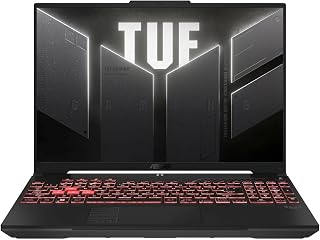
The A16 delivers smooth gameplay with its 145Hz Full HD+ display, eliminating motion blur during fast-paced sessions. The RTX 4050 handles modern AAA titles at respectable settings, while 16GB DDR5 RAM ensures consistent performance during extended gaming marathons. Its spill-resistant keyboard adds durability for intense moments, and the anti-glare coating reduces eye strain during longer play sessions.
Pros
- RTX 4050 GPU handles modern AAA games with DLSS support
- 145Hz Full HD+ display delivers smooth motion for competitive gaming
- Spill-resistant keyboard and TUF durability for rough handling
- Anti-glare coating improves visibility in bright environments
Cons
- 7-pound weight limits portability
- 512GB SSD may fill quickly with large game installs
The ASUS TUF Gaming A16 brings dedicated GPU power to the 16-inch gaming laptop space with its NVIDIA GeForce RTX 4050, making it a capable choice for gamers who want smooth performance across a wide range of titles. The AMD Ryzen 7 7445HS processor delivers strong multi-core performance for gaming and streaming simultaneously, while 16GB of DDR5 RAM keeps system responsiveness high when switching between applications. The 16-inch Full HD+ display runs at 145Hz, providing fluid motion in fast-paced shooters and competitive games where every frame matters. The RTX 4050 handles modern AAA games at medium to high settings, and DLSS support extends performance further in supported titles. The anti-glare coating reduces reflections during daytime gaming, and the spill-resistant keyboard adds durability for accident-prone setups. TUF build quality ensures the chassis withstands travel and daily use. At 7 pounds, this laptop leans heavier, trading portability for robust construction and cooling capacity. The 512GB SSD offers decent storage for a core game library, though frequent installers may need external drives. HD audio and Windows 11 Home round out a gaming-focused package.
This laptop handles 1080p gaming well with its RTX 4050 graphics and Ryzen 7 processor combination. Esports titles and older AAA games run smoothly at 144Hz, taking full advantage of the high refresh display. Newer demanding games will require medium settings to maintain smooth frame rates.
The 144Hz refresh rate makes a noticeable difference in fast-paced games, providing smoother motion and more responsive gameplay compared to standard 60Hz laptops. Paired with the 1920x1200 IPS display, the visuals are clear and color accurate. Sustained gaming performance remains stable with adequate cooling system design, though fan noise increases under load.
Buy this if you want a 16-inch gaming laptop with RTX features like ray tracing and DLSS for modern AAA titles at reasonable settings. The 145Hz display appeals to competitive gamers who value smooth motion, and the durable TUF build suits students or travelers who need something rugged. Skip it if portability is a priority, as the 7-pound weight makes it cumbersome for frequent commutes. Gamers who demand ultra settings or 4K resolution should consider higher-tier GPUs instead.

The F16 combines a 144Hz IPS-level display with RTX 4050 graphics for responsive, visually engaging gameplay. Its 16:10 aspect ratio provides extra vertical space, useful for strategy games and multitasking between Discord and your game. The Core 5 210H processor handles modern titles efficiently, while Wi-Fi 6 ensures stable online multiplayer connections with minimal latency.
Pros
- 144Hz IPS-level display with 16:10 aspect ratio for immersive gaming
- RTX 4050 GPU with DLSS support handles 1080p gaming smoothly
- PCIe Gen4 SSD ensures fast game load times
- WiFi 6 provides stable connections for online multiplayer
Cons
- 16GB RAM may limit heavy multitasking scenarios
- 512GB storage requires external drives for large game libraries
The ASUS TUF Gaming F16 combines Intel's Core 5 210H processor with an NVIDIA GeForce RTX 4050 GPU, creating a balanced 16-inch gaming laptop for players who want solid frame rates without overspending. The 16-inch FHD+ display in a 16:10 aspect ratio offers extra vertical space compared to traditional 16:9 panels, which helps in both gaming and productivity tasks. Running at 144Hz, the IPS-level screen ensures smooth visuals in competitive shooters and fast-action games where motion clarity matters. The RTX 4050 provides enough power for 1080p gaming at high settings in most current titles, and DLSS technology boosts performance in supported games. The 16GB of DDR5 RAM handles multitasking well, whether you're streaming, running voice chat, or keeping multiple browser tabs open alongside your game. The 512GB PCIe Gen4 SSD delivers fast load times, cutting down wait periods between matches. WiFi 6 ensures stable online connections for lag-free multiplayer. The backlit keyboard aids visibility during late-night sessions, and TUF's military-grade construction adds confidence for gamers who move their setup frequently. Windows 11 Home comes preinstalled, ready for gaming out of the box.
Display: 16 inches, FHD+ (1920x1200), 144Hz, IPS-Level, 16:10 aspect ratio, 100% sRGB color gamut
Processor: Intel Core 5 210H, Multi-core architecture optimized for gaming and productivity
Graphics: NVIDIA GeForce RTX 4050, Max TGP 115W, NVIDIA Advanced Optimus for dynamic GPU switching
Memory: 16GB DDR5 RAM
Storage: 512GB PCIe Gen4 NVMe SSD
Connectivity: Wi-Fi 6, multiple USB ports, audio jacks
Operating System: Windows 11 Home
Design: Mecha Gray, military-grade durability (MIL-STD-810H), backlit keyboard, Arc Flow Fans with 4 exhaust vents
Cooling: 5 dedicated heat pipes, anti-dust filter, optimized for quiet operation
This laptop fits gamers seeking a 16-inch screen with competitive refresh rates and RTX capabilities for modern titles at 1080p. The 16:10 aspect ratio benefits players who also use their laptop for schoolwork or content creation, offering more screen real estate. It's ideal for esports enthusiasts who value frame rates and response times. Skip it if you need maximum portability or plan to game at resolutions above 1080p, as the RTX 4050 is best suited for Full HD gaming. Heavy multitaskers needing 32GB RAM should also look elsewhere.

Pros
- 180Hz display delivers smooth motion in fast competitive games
- RTX 5050 with DLSS 4 boosts frame rates through AI generation
- 16-inch screen provides more visibility without excessive bulk
- Dual-fan cooling keeps thermals stable during extended play
Cons
- Performance drops significantly when running on battery
- 1TB storage fills quickly with modern game install sizes
For gamers seeking a larger display without sacrificing refresh rate, the Acer Nitro V delivers a 16-inch WUXGA IPS panel at 180Hz. That high refresh rate paired with the RTX 5050 GPU and DLSS 4 technology means competitive shooters and fast-paced games benefit from smoother motion and AI-enhanced frame generation. The 10-core Intel Core 7 240H processor provides enough overhead for streaming while gaming, and the 16GB DDR5 RAM handles multitasking across Discord, browsers, and your game client simultaneously. The dual-fan cooling system with quad intake and exhaust vents maintains stable thermals during marathon sessions, preventing throttling when the action heats up. At 5.3 pounds, it remains transport-friendly for LAN parties or gaming on the go. The 1TB Gen 4 SSD loads games quickly, though large libraries may eventually need external storage. Connectivity covers all bases with Thunderbolt 4, multiple USB 3.2 ports, Wi-Fi 6, and a microSD slot. The backlit keyboard aids visibility during late-night raids. This laptop targets 1080p gaming at high to ultra settings across modern titles, making it a practical choice for gamers who want that bigger screen advantage without jumping to premium pricing.
Processor: Intel Core 7 240H, 10-core, 2.5 GHz base with Intel Application Optimization
Graphics: NVIDIA GeForce RTX 5050 with 8GB GDDR7 memory, DLSS 4, ray tracing, 440 AI TOPS
Memory: 16GB DDR5, expandable to 32GB (2 slots)
Storage: 1TB PCIe Gen 4 SSD, microSD card reader
Display: 16 inch WUXGA IPS, 1920x1200 resolution, 180Hz refresh rate, 3ms response time, 300 nit brightness, 16:10 aspect ratio
Cooling: Dual-fan, quad-intake, quad-exhaust architecture with NitroSense AI tracking
Ports: 1 Thunderbolt 4 USB-C (10Gbps, DisplayPort, 65W charging), 2 USB 3.2 Gen 2 (one with power-off charging), 1 USB 3.2 Gen 1, 1 HDMI 2.1, headphone jack, Ethernet RJ-45, Kensington lock
Connectivity: Intel Killer Wi-Fi 6 AX1650, Bluetooth 5.2, Intel Killer E2600 Ethernet
Battery: Power-off charging capable, best performance when AC-connected
Dimensions: 14.17 inches L x 10.81 inches D x 0.63 to 0.96 inches H
Weight: 5.3 pounds
Operating System: Windows 11 Home
Keyboard: Backlit
Warranty: One-Year International Travelers Limited Warranty

The Nitro V 16S stands out with its RTX 5060 GPU delivering 572 AI TOPS, providing exceptional performance for ray tracing and DLSS-enhanced titles. The 180Hz WUXGA display offers ultra-smooth visuals, while 32GB DDR5 RAM accommodates demanding games and streaming simultaneously. The 1TB Gen 4 SSD provides ample storage for large game libraries without compromising load times.
Pros
- 32GB DDR5 RAM handles heavy multitasking and streaming
- 180Hz WUXGA display with IPS panel quality
- 572 AI TOPS enables intelligent performance optimization
- Backlit keyboard with numeric keypad for productivity
Cons
- Wi-Fi 6 instead of newer Wi-Fi 7 standard
- Understated design may lack gaming aesthetic appeal
The Acer Nitro V 16S AI brings a compelling combination to the 16-inch gaming space: AMD Ryzen 7 260 processing power, RTX 5060 graphics with 572 AI TOPS, and a generous 32GB of DDR5 memory that separates it from typical mid-range configurations. That extra RAM makes a tangible difference when you're running games alongside streaming software, Discord, and browser tabs. The 180Hz WUXGA IPS display delivers smooth visuals with excellent viewing angles, and the RTX 5060 has enough muscle to take advantage of that refresh rate in most titles. The 1TB Gen 4 SSD provides fast loading and ample initial storage. Acer equipped this model with a backlit keyboard and numeric keypad, practical touches for productivity between gaming sessions. The AI capabilities built into the Ryzen 7 260 and RTX 5060 GPU optimize performance dynamically, learning your usage patterns over time. Wi-Fi 6 handles online gaming reliably, though Wi-Fi 7 would have been a nice addition at this tier. The black finish keeps the aesthetic understated and professional.
Processor: AMD Ryzen 7 260 with up to 38 AI TOPS
Graphics: NVIDIA GeForce RTX 5060 Laptop GPU with 572 AI TOPS, Blackwell architecture, 4th-gen RT Cores, 5th-gen Tensor Cores
Display: 16 inch WUXGA (1920 x 1200) IPS, 180Hz refresh rate, 100% sRGB color coverage
Memory: 32GB DDR5 5600MHz (2 DDR5 slots, maximum 32GB)
Storage: 1TB PCIe Gen 4 SSD (2 M.2 slots, 1 available)
Operating System: Windows 11 Home
Keyboard: Backlit with numeric keypad
Connectivity: Wi-Fi 6
Color: Black
This laptop suits gamers who multitask heavily, streaming or recording gameplay while running multiple applications. The 32GB RAM configuration makes it ideal for content creators and students who juggle creative software alongside games. Buy it if you value memory headroom and AI-enhanced performance optimization. Skip it if you prioritize maximum portability, need cutting-edge Wi-Fi 7 connectivity, or want premium build materials and design flourishes.

The ROG Strix G16 pairs an RTX 5060 with a 165Hz display and 3ms response time, minimizing input lag for competitive gaming. The Core i7 14650HX handles CPU-intensive titles effortlessly, while ROG Nebula Display technology delivers vibrant colors and contrast. Tri-Fan cooling keeps temperatures controlled during marathon sessions, and Wi-Fi 7 future-proofs your online gaming experience.
Pros
- 165Hz display with 3ms response keeps competitive games fluid
- Vapor chamber and liquid metal cooling sustain performance
- 16GB DDR5 and 1TB Gen 4 SSD handle multitasking smoothly
- Wi-Fi 7 connectivity future-proofs network speeds
Cons
- Two-hour battery limits unplugged gaming sessions
- RTX 5060 occasionally requires settings tweaks in newest AAA titles
When you need a 16-inch gaming laptop that handles everything from competitive shooters to AAA storytelling without breaking stride, the ROG Strix G16 deserves attention. The Intel Core i7 14650HX paired with the RTX 5060 GPU pushes modern titles beyond 100 fps at high settings, while DLSS 4 extends performance headroom further. The 165Hz FHD+ display keeps motion crisp and responsive, critical for fast-paced gaming. ASUS built real cooling into this machine: vapor chamber technology and liquid metal thermal compound maintain performance during long sessions without throttling or excessive fan noise. The 16GB DDR5 RAM and 1TB PCIe Gen 4 SSD eliminate bottlenecks in load times and multitasking. At 2.65kg, it strikes a practical balance between screen size and portability. Wi-Fi 7 support ensures your network connection won't limit your gaming experience. The Eclipse Gray chassis feels durable, and the full RGB lighting and esports keyboard show ASUS understands its audience. Battery life sits around two hours under load, so plan accordingly.
Processor: Intel Core i7 14650HX (16 cores, 2.2 GHz base)
Graphics: NVIDIA GeForce RTX 5060 (8GB GDDR5, DLSS 4)
Display: 16 inch FHD+ (1920x1200) 165Hz IPS LED, 3ms response time
Memory: 16GB DDR5-5600MHz (upgradeable)
Storage: 1TB PCIe Gen 4 SSD (upgradeable)
Connectivity: Wi-Fi 7 (802.11be), USB ports, HDMI output
Audio: Dolby Atmos speakers
Keyboard: Gaming-grade QWERTY with RGB
Battery: 90Wh Lithium-Ion, 2 hours gaming, 50 hours standby
Weight: 2.65kg
Dimensions: 13.94 x 10.55 x 0.9 inches
OS: Windows 11 Home
Warranty: Limited
Buy this if you're a competitive gamer or esports player who values high refresh rates, reliable cooling, and build quality without paying flagship prices. It suits players who game primarily at a desk or LAN events where portability matters but isn't the sole priority. Skip it if you need all-day battery life away from outlets, want desktop-level GPU horsepower for ultra settings in every new release, or prefer a lighter travel companion.

Pros
- MUX switch enables direct GPU connection for maximum fps
- 180-degree hinge allows versatile positioning and sharing
- GiMATE AI learns usage patterns and optimizes dynamically
- Golden Curve keyboard design reduces typing fatigue
Cons
- No touchscreen for digital art or note-taking workflows
- 1TB SSD fills quickly with large modern game installations
GIGABYTE designed the Gaming A16 to deliver 16-inch gaming without excessive weight or bulk, hitting 4.9 pounds while packing meaningful performance. The AMD Ryzen 7 260 and RTX 5060 combination handles modern gaming at the native resolution, with the 165Hz display providing smooth motion in fast games and fluid desktop use. The MUX switch allows direct GPU-to-display connection, extracting maximum frame rates by bypassing integrated graphics bottlenecks. GiMATE, GIGABYTE's AI system, monitors your usage and adjusts performance profiles automatically, a rare feature that genuinely improves the experience over time. The 19.45mm slim chassis feels premium without sacrificing structural integrity. That 180-degree hinge proves surprisingly useful for presentations, shared viewing, or tent mode streaming setups. Dolby Atmos audio creates genuine spatial awareness in supported games. The Golden Curve keyboard design reduces fatigue during extended sessions. The 1TB SSD loads games quickly, though serious collectors will eventually need expansion. At this weight and screen size, it functions more as a desktop replacement than ultraportable, but the tradeoff brings a larger workspace and better thermals.
Processor: AMD Ryzen 7 260 with AI capabilities
Graphics: NVIDIA GeForce RTX 5060 with 8GB GDDR7 VRAM
Display: 16-inch IPS LCD, 1920x1200 resolution, 165Hz refresh rate, matte finish
Memory: System RAM not specified in available data
Storage: 1TB SSD with solid-state interface
Operating System: Windows 11 Home
Weight: 4.9 pounds
Dimensions: 14.11 inches L x 0.9 inches W x 10.33 inches Thick
Connectivity: Wi-Fi 7, Bluetooth 5.0, Gigabit Ethernet, 4 USB ports, HDMI output
Features: MUX Switch, 180-degree hinge, GiMATE AI agent, Golden Curve keyboard, Dolby Atmos audio
Gaming Performance: The RTX 5060 excels at 1440p gaming and handles 1080p gaming at ultra settings with frame rates well above 60fps. At the native 1920x1200 resolution, expect high frame rates in modern AAA titles with medium-to-high settings. NVIDIA DLSS 4 further boosts performance by intelligently upscaling lower-resolution renders, allowing ultra-quality visuals with minimal performance cost.
Multitasking & Streaming: The Ryzen 7 260 has the multi-core muscle to game while streaming to Twitch or YouTube. Its architecture supports simultaneous encoding for recordings without stuttering your in-game performance.
Content Creation: The RTX 5060 and NVIDIA Studio drivers provide hardware acceleration for video editing, 3D rendering, and image generation. GiMATE's AI optimization ensures your workload gets the system resources it needs when it matters most.

Gamers who want a capable 16-inch machine without hauling a heavy rig will appreciate the lightweight build paired with the AMD Ryzen 7 H255 running up to 4.9GHz, which handles modern titles and multitasking smoothly. The 24GB DDR5 RAM gives headroom for background apps while gaming, and the backlit keyboard with numeric keypad makes this a practical pick for gamers who also use their laptop for work or late-night sessions.
Pros
- 24GB DDR5 RAM supports multitasking during gaming sessions
- Dual-fan cooling prevents throttling under load
- 16-inch IPS display with 100% color gamut for vibrant visuals
- Lightweight at 1.75kg for a 16-inch gaming machine
Cons
- Integrated Radeon RX Vega 8 struggles with demanding AAA titles
- 1920x1200 resolution falls short of modern gaming standards
The KAIGERR 16-inch laptop targets gamers seeking a larger screen experience without committing to high-end hardware costs. Its AMD Ryzen 7 H255 processor with 8 cores and 16 threads runs up to 4.9GHz, providing enough headroom for multitasking between games, streaming apps, and background tools. The 24GB of DDR5 RAM stands out in this segment, allowing smoother performance when running modern games alongside Discord, browsers, and other software. The 16-inch IPS display delivers a 100% color gamut with wide viewing angles, making visuals pop whether you're exploring open worlds or watching gameplay footage. The dual-fan cooling system keeps temperatures in check during longer sessions, preventing thermal throttling that could hurt frame rates. However, the integrated Radeon RX Vega 8 graphics limit gaming to less demanding titles or lower settings on AAA releases. The 1920x1200 resolution is functional but not cutting-edge. At 1.75kg, it remains portable enough for LAN parties or dorm room setups. The backlit keyboard adds convenience for evening gaming sessions, and WiFi 6 ensures stable online play.
Processor: AMD Ryzen 7 H255, 8-core/16-thread, up to 4.9GHz, 16MB L3 Cache
Memory: 24GB DDR5 SDRAM, dual-channel, upgradeable to 64GB
Storage: 512GB M.2 2280 NVMe SSD, upgradeable to 4TB
Graphics: Integrated AMD Radeon RX Vega 8
Display: 16-inch IPS LCD, 1920x1200 native resolution, 100% color gamut
Battery: Lithium-ion, 38 watt-hours, up to 8 hours battery life
Connectivity: WiFi 6 (802.11ax), Bluetooth, HDMI, USB ports
Weight: 1.75kg, Dimensions: 14.52" L x 9.19" W x 0.74" Th
Operating System: Windows 11
Keyboard: Backlit, numeric keypad included
This laptop suits students and casual gamers who want a 16-inch screen for immersive gameplay without spending heavily on discrete graphics. It handles esports titles, indie games, and older AAA games comfortably while doubling as a productivity machine for schoolwork or content creation. Skip it if you plan to play the latest AAA titles at high settings or need ray tracing support. Competitive gamers prioritizing frame rates above 60fps in demanding shooters should also look elsewhere for stronger GPU performance.
How to Choose the Right 16-Inch Gaming Laptop
GPU Generation and Architecture
The GPU is the single most important component for gaming performance. Several laptops in this roundup feature NVIDIA’s latest Blackwell architecture, including the RTX 5060 found in the ASUS ROG Strix G16 (2025) and the GIGABYTE Gaming A16, along with the RTX 5050 in the Acer Nitro V. These newer GPUs unlock DLSS 4 with Multi Frame Generation, a significant leap over the previous generation for both frame rates and visual quality.
If you do not need the absolute latest, the RTX 4050 in the ASUS TUF Gaming A16 and ASUS TUF Gaming F16 still delivers solid 1080p gaming performance. Pairing GPU generation with your intended resolution and game library will point you toward the right tier. For a deeper look at how these GPUs perform in a desktop context, our RTX 5070 PC build guide covers the architecture in detail.
Display Refresh Rate and Panel Quality
A fast GPU means nothing if the display cannot keep up. The Acer Nitro V 16S AI and the Acer Nitro V both feature 180Hz IPS panels with a 16:10 aspect ratio, which adds extra vertical screen space that competitive and productivity users will appreciate. The ASUS ROG Strix G16 runs at 165Hz with a 3ms response time and an anti-glare ACR film that reduces eye strain during long sessions.
For budget shoppers, the ASUS TUF Gaming A16 and TUF Gaming F16 offer 144Hz and 145Hz displays respectively, both with 100% sRGB coverage. Refresh rate matters most in fast-paced games where motion clarity is the difference between winning and losing a fight.
Processor and Memory Configuration
The CPU you choose shapes how well your laptop handles streaming, recording, and multitasking alongside gaming. The Acer Nitro V 16S AI runs the AMD Ryzen 7 260 with AI-assisted task allocation, while the Acer Nitro V pairs an Intel Core 7 240H with Thunderbolt 4 connectivity. The ASUS ROG Strix G16 uses an Intel Core i7 14650HX, a strong performer in CPU-bound workloads.
RAM capacity is equally important. The Acer Nitro V 16S AI ships with 32GB of DDR5, giving it a meaningful edge for creators and streamers. Most other options in this list come with 16GB, which is adequate for gaming but may feel tight if you run virtual machines or heavy creative software alongside your games. Always check whether the memory slots are upgradeable before committing.
Cooling, Build Quality, and Portability
Sustained performance under load depends on how well a laptop manages heat. The ASUS ROG Strix G16 uses a full vapor chamber paired with tri-fan technology and liquid metal on the chipset, one of the most aggressive thermal solutions in this category. The ASUS TUF Gaming F16 earned its MIL-STD-810H certification, meaning it has been validated for operation in harsh conditions including humidity, vibration, and temperature extremes.
The GIGABYTE Gaming A16 takes a different angle with a 19.45mm slim chassis and a 180-degree hinge that lets it lie completely flat. That design flexibility makes it a strong option for students and professionals who move between desk setups and shared spaces. If peripherals like a keyboard are part of your setup, our best silent mechanical keyboard guide is worth a look.
Final Thoughts
The 16-inch gaming laptop market in 2026 offers genuinely strong options across a wide range of needs. For most gamers who want the latest GPU architecture with a robust display and premium cooling, the ASUS ROG Strix G16 (2025) Gaming Laptop stands out as the top all-around performer. Budget-focused buyers who still want solid everyday gaming performance without spending at the premium tier will find the KAIGERR Gaming Laptop, 24GB DDR5 512GB NVMe SSD a surprisingly capable entry with generous RAM and good upgradability.
Frequently Asked Questions
Is a 16-inch laptop good for gaming?
Yes, 16-inch gaming laptops are an excellent choice for most players. They strike a balance between screen size and portability that smaller 14-inch machines cannot match, while still fitting in a standard laptop bag. The larger chassis also allows for better thermal designs, which helps maintain consistent frame rates during extended sessions.
What GPU should I look for in a 16-inch gaming laptop in 2026?
In 2026, NVIDIA’s Blackwell-based RTX 50 Series GPUs represent the current generation and bring meaningful improvements through DLSS 4 and full ray tracing support. The RTX 5060 is a strong mid-range choice for 1080p and 1200p gaming, while the RTX 5050 handles mainstream titles comfortably. If you are on a tighter budget, an RTX 4050 still performs well at 1080p for most game libraries. For desktop GPU comparisons, our RX 9070 PC build guide provides useful context on what AMD brings to the table as well.
How much RAM do I need in a gaming laptop?
For gaming alone, 16GB of DDR5 is sufficient for the vast majority of current titles. If you plan to stream, record, or run creative applications alongside your games, 32GB gives you a comfortable buffer. Many laptops in this category support memory upgrades, so starting at 16GB and expanding later is a reasonable strategy if your budget is tight right now.
Are 16-inch gaming laptops too big to carry daily?
Not necessarily. Slim designs like the GIGABYTE Gaming A16, with its 19.45mm chassis, show how far manufacturers have come in reducing bulk without sacrificing performance. Weight varies by model, so checking the listed weight before purchasing is worthwhile if daily commuting is a priority. Most 16-inch gaming laptops fit standard laptop compartments in backpacks designed for 15 to 17-inch machines.








Write Your Review
No reviews yet. Be the first to share your experience!