

You’ve got the GPU, the CPU, and the RAM sorted. The last piece is the case, and it shapes everything from airflow to cable routing to how your build looks on your desk. A great black PC case does more than look sharp: it needs to fit your motherboard, accommodate your cooler, and move enough air to keep your components running comfortably under load. Whether you’re building a high-performance gaming rig or a clean workstation, the right enclosure makes a real difference. If you’re also planning the rest of your components, our best PC build for RTX 5070 ti covers compatible hardware worth pairing with any of these cases.
This guide evaluates ten of the best black PC cases on the market right now, covering mid-towers, compact builds, and panoramic glass designs. Every option here has been assessed for real-world build compatibility, thermal performance, and value. Read on to find the one that fits your setup.
Quick Comparison
Ratings reflect the most recent data pull. Check each listing for current price and availability.
Quick answer
This guide compares 10 picks, with Lian Li V100 ATX Mid-Tower PC Case with 4 ARGB Fans ranked first. CORSAIR 4000D RS ARGB Modular Mid-Tower Case has the most customer reviews.

This mid-tower delivers versatile storage with 4 internal bays, making it ideal for builders who need space for multiple drives alongside their components. The built-in RGB lighting adds visual appeal without requiring separate controllers, while the included dust filters help maintain clean internals. ATX motherboard support and bottom-mount PSU placement provide a standard foundation for most builds in a sleek black finish.
Pros
- Four pre-installed ARGB fans plus integrated LED strip included
- Panoramic tempered glass with black and stainless steel construction
- Supports up to 420mm GPUs, 360mm radiators, and nine 120mm fans
- Tool-less panels and spacious layout simplify building and cable management
Cons
- Minimal sound dampening due to showcase glass design
- Glass panels require frequent cleaning to maintain appearance
The Lian Li V100 brings panoramic tempered glass styling to black PC case buyers who want their components on full display. Four pre-installed ARGB fans and an integrated LED strip provide immediate visual impact and functional cooling without requiring separate purchases. The black finish combined with stainless steel accents creates a refined look that fits gaming setups and workstation environments equally well. Support for up to nine 120mm fans and 360mm radiators gives you serious thermal headroom, while GPU clearance up to 420mm and CPU cooler height up to 178mm accommodate high-performance hardware without compromise. The tool-less side panels and spacious PSU compartment make building and upgrading straightforward, with rear cable routing that keeps the visible side clean. The angled PSU shroud integrates naturally into the design. Builders appreciate the intuitive layout whether tackling their first build or their tenth. The combination of tempered glass, stainless steel, and engineered plastic delivers durability that feels premium. This case prioritizes showcase aesthetics with serious thermal capability, making it a strong choice for black case buyers who value both visual presence and component performance.
Form Factor: Mid-Tower ATX
Motherboard Support: ATX, Micro-ATX, Mini-ITX
GPU Clearance: Up to 420mm
CPU Cooler Height: Up to 178mm
Radiator Support: Top radiator up to 360mm
Fan Configuration: Supports up to nine 120mm fans
Pre-Installed Fans: 4x 120mm PWM ARGB fans
Fan Speed: 1800 RPM max
Airflow: 61.47-60.4 CFM
Air Pressure: 2.54-2.17 mm-H2O
Noise Level: 26.5-30.8 dBA
Bearing Type: Hydraulic
Lighting: Integrated 26-LED ARGB strip with full spectrum color control and daisy-chain connectivity
Materials: Tempered Glass, Stainless Steel, Plastic
Internal Bays: 4
Dust Filters: Yes
Weight: 8200g
Warranty: 1 Year

Back-connect motherboard support routes all cables behind the motherboard tray for exceptionally clean front-side aesthetics. Extended ATX compatibility accommodates high-end motherboards while maintaining the compact O11 footprint. Dual cooling method support for both air and water configurations gives builders maximum flexibility, and the combination of USB 2.0 and 3.0 ports ensures broad peripheral compatibility.
Pros
- Outstanding cable management system keeps builds clean and professional-looking
- Three-sided tempered glass provides uninterrupted 270-degree component visibility
- Supports multiple motherboard sizes (Extended ATX, ATX, Micro ATX, Mini ITX) and cooling solutions
- Dual-chamber layout cleverly conceals AIO tubing for a seamless appearance
- Excellent airflow despite glass design, suitable for high-performance builds
Cons
- Compact size and 26.4-pound weight make it challenging to work with without proper support
- Premium glass design requires careful handling and periodic cleaning to maintain clarity
- Limited internal storage bays at only 3 options compared to some larger cases
The Lian Li O11 Vision Compact is a premium mid-tower case designed for PC enthusiasts who want a showcase build without sacrificing practicality. This case combines compact dimensions with intelligent internal layout, making it perfect for gamers and content creators building high-end systems with custom water cooling.
The standout feature is its three-panel tempered glass design, providing an impressive panoramic view of your components from multiple angles. The innovative dual-chamber layout cleverly routes AIO tubing into a hidden chamber when positioned on the side, eliminating visible hoses from your showcase. The included top mesh panel accommodates 360mm radiators, and the case supports various motherboard sizes from Mini ITX to Extended ATX, offering significant flexibility.
Build quality is exceptional with premium SECC steel construction and smooth finish throughout. Cable management is a major strength, with generous space behind the motherboard tray and well-positioned routing holes that make cable hiding effortless. Back-connect motherboard support further reduces visible clutter on the motherboard itself, enhancing the overall aesthetic appeal.
The main drawback is the compact size, which can make initial building feel tight without proper workspace setup. At 26.4 pounds, it's also heavy enough to benefit from a lazy Susan or rotating platform during assembly. Additionally, the tempered glass requires regular cleaning to maintain its showcase clarity.
The Lian Li O11 Vision Compact delivers premium build quality, intelligent design, and exceptional visual appeal at a competitive price point. It's a standout choice for builders prioritizing both performance and aesthetics who want a case that makes their investment visible.
Case Type: Mid Tower
Motherboard Support: Extended ATX, ATX, Micro ATX, Mini ITX
Cooling Support: Air and water cooling (360mm AIO compatible)
Power Supply: Bottom mount
Internal Bays: 3
USB Ports: 4 total (2x USB 2.0, 2x USB 3.0)
Dimensions: 17.6"D x 11.3"W x 17.57"H
Weight: 26.4 pounds
Material: SECC steel with tempered glass panels
Warranty: 1 year manufacturer warranty
Model: O11VPX
Best For: The O11 Vision Compact suits gamers, content creators, and enthusiasts building high-end systems who want a premium showcase case with excellent thermals and cable management.
Consider This Case If: You prioritize visual appeal and component showcase, want flexible cooling options including 360mm radiators, value exceptional cable management, and appreciate compact dimensions that still accommodate high-end hardware.
Skip If: You need maximum internal storage bays, prefer larger work areas during assembly, or want a case that minimizes maintenance from glass cleaning requirements.
Setup Tips: Use a rotating platform or lazy Susan during initial building. Plan your cable routing before installation. Allow extra time for first assembly to familiarize yourself with the dual-chamber layout and routing options.
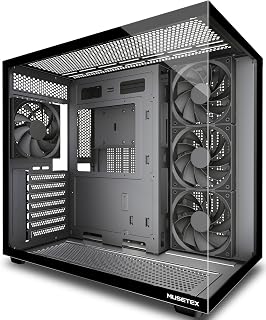
Four pre-installed non-LED fans deliver strong out-of-the-box airflow without the distraction of lighting, ideal for performance-focused builders. The 270-degree tempered glass provides extensive visibility of your components from front and side angles. Type-C connectivity on the front panel ensures modern device compatibility, while support for ATX, Micro-ATX, and Mini-ITX motherboards accommodates various build scales.
Pros
- 270-degree black tempered glass for expansive hardware showcase
- Four pre-installed fans and dual-chamber PSU separation for cooling
- Fits 410mm GPUs, 360mm radiators, and 160mm CPU coolers
- Tool-free panels, magnetic dust filters, and cable management included
Cons
- Substantial 13.1-pound weight and 16.73-inch depth require desk space
- Some Micro-ATX builds missing standoff holes suggest QC inconsistencies
The MUSETEX Y6 brings a bold black mid-tower design centered on its 270-degree dual tempered glass panels, offering expansive hardware visibility wrapped in a black matte finish. This creates a striking black showcase that works equally well for gaming rigs and professional workstations. The case arrives with four 120mm fans pre-installed, covering immediate airflow needs without additional investment. Its dual-chamber architecture isolates the PSU into a dedicated ventilation zone, letting the three front intakes and rear exhaust concentrate entirely on CPU and GPU temperatures. Support for 360mm radiators and up to nine total fans provides genuine expansion room for ambitious cooling configurations or liquid setups. Internally, the case handles graphics cards up to 410mm, CPU coolers up to 160mm tall, and PSUs up to 230mm, with tool-free side panel access and included cable management supplies like Velcro ties. Magnetic dust filters on top and bottom reduce upkeep while preserving airflow. The substantial 13.1-pound build and 16.73-inch depth demand sturdy desk placement. Some Micro-ATX builds have encountered missing standoff holes, pointing to occasional quality control gaps.
Case Type: Mid Tower ATX
Motherboard Support: ATX, Micro-ATX, Mini-ITX
Cooling Capacity: CPU cooler up to 160mm, GPU up to 410mm, Radiator up to 360mm, PSU up to 230mm
Pre-Installed Fans: 4x 120mm (3 reverse on side, 1 forward on rear, non-LED)
I/O Ports: 1x USB 3.0, 1x USB 2.0, 1x Type-C, Audio, Microphone
Materials: Metal, Plastic, Tempered Glass
Dimensions: 16.73"D x 10.83"W x 15.67"H
Weight: 13.1 lbs
Color: Black Matte
Warranty: 10 Years
This case fits builders creating black ATX or Mini-ITX systems who want dramatic glass visibility and strong out-of-the-box cooling for gaming or content creation. It works for those with adequate desk space and comfortable assembling standard builds. Skip it if you need guaranteed Micro-ATX compatibility without potential standoff issues, prefer compact footprints, or want minimalist designs without extensive glass. The weight and size may challenge smaller setups or frequent movers.
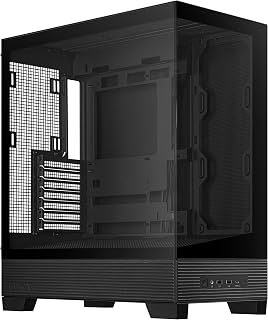
With rear-mount PSU positioning and dual USB 3.0 ports on the front panel, this ATX mid-tower offers straightforward connectivity for everyday builds. The fan-based cooling method keeps things simple and effective for standard components. Its mid-tower form factor balances workspace and desk footprint, making it suitable for builders seeking a no-nonsense black enclosure without extra features.
Pros
- BTF hidden connectors eliminate visible cable clutter completely
- Dual tempered glass panels with frameless design for panoramic showcase
- 8-degree angled base improves airflow and ARGB lighting visibility
- Supports 360mm AIO coolers with generous component clearance
Cons
- Limited to 2 HDD bays for mechanical storage
- No pre-installed fans included with the case
The ASUS A31 redefines what a black mid-tower case can deliver through its BTF hidden connector design and dual tempered glass construction. This case eliminates visible cable clutter entirely by routing all modular cables behind the motherboard, creating a pristine front view that showcases your components without distraction. The frameless dual tempered glass panels deliver panoramic visibility from both sides, while the black alloy steel frame provides structural integrity. An 8-degree angled base improves airflow circulation and enhances ARGB lighting visibility. Support for 360mm AIO coolers with generous clearance and elevated PSU placement ensures thermal performance matches the visual ambition. The engineering prioritizes intuitive assembly, with included cable ties and straps that make achieving clean internal routing straightforward. Compatibility spans ATX, mATX, and ITX motherboards alongside GPUs and PCIe expansion cards. This case suits builders who want a black showcase that pairs modern aesthetics with functional thermal design. Users report excellent temperatures even with air cooling alone, demonstrating that the angled base and strategic fan mounting deliver real performance benefits beyond visual appeal. The alloy steel construction feels solid without unnecessary weight, and the frameless glass integration avoids distracting bezels that interrupt the clean lines.
Form Factor: ATX Mid-Tower
Motherboard Support: ATX, Micro-ATX, Mini-ITX
Cooling Support: Up to 360mm AIO coolers with 80mm clearance
GPU Compatibility: RTX 5090/4090 and equivalent length cards
Storage: 2x 3.5-inch HDD bays, multiple SSD mounting locations
Ports: 2x USB 3.0, USB-C ready
Connectivity: BTF hidden connector design with behind-motherboard cable routing
PSU Mounting: Rear mount (ATX standard)
Fans Included: Mounting points for multiple configurations
Materials: Alloy steel frame, tempered glass panels, reinforced plastic components
Dimensions: 17.13 inches deep, 9.37 inches wide, 20.12 inches high
Weight: 18.1 pounds
Features: Dual-sided tempered glass, frameless design, 8-degree angled base, ARGB-ready, easy dust filters
Warranty: 2-year manufacturer coverage
This case is ideal for gamers and enthusiasts who want a black build with completely hidden cables and dual glass panels for panoramic component display. It works especially well for builders using BTF-compatible motherboards who prioritize clean aesthetics and are planning ARGB lighting setups. The angled base and generous AIO support make it suitable for high-performance gaming rigs and content creation systems. Skip this if you need extensive HDD storage beyond two mechanical drives or prefer cases with pre-installed fans, as you will need to purchase additional cooling hardware separately.

Three included ARGB PWM fans with panoramic glass panels create an excellent foundation for RGB-focused builds right away. The high airflow design with 120mm fan support and 7 expansion slots suits gamers running hot graphics cards. PWM fan control allows automatic speed adjustment based on temperatures, keeping noise down during light use while ramping up cooling when needed.
Pros
- Excellent compatibility with modern high-end components, supporting RTX 40-series GPUs and 360mm AIO coolers in a compact footprint
- Pre-installed ARGB cooling solution with smart reverse-blade design maximizes airflow efficiency without additional purchases
- Premium build quality with dual tempered glass, magnetic dust filters, and sophisticated wood-grain I/O design
- Exceptional value proposition, ranking in top 10 best-selling computer cases with 4.7-star rating from 775 verified reviews
- Expandable cooling capacity with support for up to 9 fans allows room for growth and customization
Cons
- Compact size, while space-efficient, requires careful planning when installing large power supplies or multiple storage drives
- Heavy at 14.5 pounds and relatively large footprint (17.1D x 9W x 17.7H inches) may challenge some desk setups despite mid-tower classification
- Wood-grain I/O aesthetic is distinctive but may not appeal to users preferring traditional minimalist case designs
The MONTECH XR redefines what a compact mid-tower case can deliver. Purpose-built for serious gamers and professionals who demand high-end component compatibility without sacrificing valuable desk space, this case proves that smaller doesn't mean compromised performance.
The standout feature is undeniable compatibility. Despite its compact dimensions, the XR accommodates 360mm radiators at the top and high-end 40-series GPUs, making it a rare find in this size category. The three pre-installed ARGB fans arrive configured intelligently: two reverse-blade variants on the side and one regular-blade fan at the rear, creating efficient airflow dynamics that work immediately. Support for up to nine total fans gives enthusiasts the freedom to build custom cooling arrays without limitations.
Build quality impresses across all touchpoints. Dual tempered glass panels showcase your components beautifully, while the distinctive mature wood-grain I/O interface adds unexpected sophistication and premium appeal. The comprehensive three-stage dust filtration system covering top, bottom, and side panels keeps components clean and maintains thermal efficiency over extended use periods.
The main consideration is planning around the compact layout. Large power supplies and multiple storage configurations require careful arrangement, though the case supports standard ATX motherboards and 3.5-inch drives. The 14.5-pound weight and generous footprint mean you'll want adequate desk real estate despite the mid-tower classification.
At this price point with professional cooling integration, modern I/O design, and exceptional component support, the XR delivers outstanding value for builders pursuing high-performance systems in space-conscious setups.
Case and Dimensions
Case Type: Mid Tower
Dimensions: 17.1 inches deep x 9 inches wide x 17.7 inches high
Weight: 14.5 pounds
Material: Tempered Glass (dual panels)
Motherboard Support: ATX, Micro-ATX, Mini-ATX
Cooling and Fans
Pre-installed Fans: 3 (2 reverse-blade side fans, 1 rear fan)
Fan Size: 120mm
Maximum Fan Speed: 1500 RPM
Total Fan Support: Up to 9 fans
Radiator Support: 360mm at top
GPU Clearance: Up to 420mm
Connectivity and Ports
USB 3.0 Ports: 2
USB 2.0 Ports: 2
USB-C: Yes
Total Expansion Slots: 7
Internal Bays: 3 (3.5 inch)
Power Supply: Bottom mount (750W maximum)
Additional Features
Dust Filters: Top, bottom, and side panels (magnetic)
Fan Lighting: Multi-color ARGB
I/O Interface: Mature wood-grain design
Warranty: 1 year
Who Should Buy This Case
The MONTECH XR is perfect for enthusiast gamers and professionals building systems around current-generation high-end GPUs and liquid cooling solutions. It's especially suited for those who value desk-friendly footprints without compromising component compatibility or cooling capacity. Content creators, streamer setups, and competitive gamers will appreciate the aesthetics and functionality balance.
Best Use Cases
High-end gaming builds with RTX 40-series or similar tier GPUs; enthusiast workstations with premium AIO coolers; compact streaming or content creation setups requiring modern I/O; creators seeking distinctive case aesthetics beyond standard industrial designs. The case excels when building systems that need maximum cooling potential within spatial constraints.
What to Consider Before Buying
Ensure your power supply and storage configuration fit the compact layout; measure your desk space, as the case occupies notable real estate; verify your motherboard size fits ATX specifications. If you prefer minimal or aggressive minimalist aesthetics, the wood-grain I/O design may not align with your vision. The case is heavier than typical mid-towers, so consider where it will live permanently.
Similar Alternatives
Other compact high-performance cases exist, but few offer 360mm radiator support combined with 40-series GPU compatibility at this price point. Cases with more traditional designs or smaller form factors may sacrifice one of these critical compatibility features, making the XR a standout value proposition for this specific build category.

The InfiniRail mounting system and compatibility with back-to-front motherboard designs from ASUS, MSI, and Gigabyte make cable management significantly cleaner in this chassis. Three pre-installed 120mm RS fans provide strong airflow right out of the box, while 7 expansion slots accommodate multi-GPU setups or additional cards. The modular frame design lets builders customize their layout for optimal component arrangement.
Pros
- FRAME Modular System allows motherboard tray and I/O customization
- InfiniRail mounting supports dual 360mm radiators and complex fan setups
- Three pre-installed RS ARGB fans deliver excellent thermal performance
- Toolless design and comprehensive cable management simplify building
Cons
- Large physical footprint requires significant desk or tower space
- Pre-installed fan orientation needs verification for optimal airflow
The CORSAIR 4000D RS ARGB delivers modular flexibility and exceptional cooling performance for black case buyers planning high-end systems. The FRAME Modular System allows you to swap the motherboard tray for billet aluminum and customize the front I/O panel as your build evolves, while the InfiniRail mounting system provides unmatched flexibility for fan and radiator placement. Support for dual 360mm radiators and complex multi-fan configurations ensures thermal headroom for demanding hardware. Three pre-installed RS ARGB fans and the 3D Y-Pattern front panel deliver excellent airflow immediately, with users reporting GPU temperatures as low as 29 degrees Celsius under load. The combination of alloy steel and aluminum construction creates a robust black chassis that feels premium without excessive weight. Cable management benefits from rear routing, integrated shrouds, rear motherboard tray SSD mounting, and a removable internal side panel that lets you choose between clean aesthetics or additional cooling airflow. Toolless design for side, top, and panel removal streamlines building and upgrades significantly. Compatibility with ASUS BTF, MSI Zero, and Gigabyte Stealth motherboard systems adds future-proof versatility. Seven expansion slots accommodate multiple GPUs and PCIe cards. This case targets serious builders who value both immediate performance and long-term adaptability in their black tower.
Case Design: Mid-tower ATX modular system with removable panels and customizable frame components
Motherboard Support: ATX, mATX, ITX
Cooling Capacity: Dual 360mm radiators, up to 10 total fans (120mm or 140mm)
Expansion Slots: 7 total slots for expansion cards and GPUs
Storage Bays: 3 internal bays with SSD mounting on motherboard tray rear and HDD mounting on case floor
Power Supply: Rear-mounted, supports up to 1600W
Pre-Installed Fans: 3x CORSAIR RS ARGB PWM with 8 LEDs each, daisy-chainable 4-pin connectors
USB Ports: 3x USB 3.0 ports
Material: Alloy steel and aluminum construction
Dimensions: 19.17" D x 9.41" W x 19.13" H
Weight: 22.7 pounds
Warranty: 2-year manufacturer coverage
This case suits serious PC enthusiasts and gamers building high-end black systems with advanced cooling requirements and plans for future upgrades. The modular FRAME system and InfiniRail mounting make it ideal for builders who want long-term flexibility and compatibility with BTF motherboard systems from ASUS, MSI, and Gigabyte. It works well for gaming, streaming, and content creation builds. Skip this if you have limited desk space or are a first-time builder, as the case requires ample physical space and the pre-installed fans need directional verification to optimize airflow properly.

Pros
- Frameless black tempered glass and alloy steel construction for premium look
- 10-degree angled intake and five reverse-blade fans for strong cooling
- Supports full ATX, M-ATX, Mini-ITX with room for large GPUs
- Cable management with anti-sag brackets and routing holes
Cons
- Factory fans audible around 800 RPM for silent setups
- Vertical GPU mounting requires separate riser cable purchase
The Lian Li O11D Mini V2 Flow delivers a sophisticated black aesthetic paired with thermal engineering that stands out in the crowded mid-tower market. Its frameless tempered glass panels create a seamless black-on-black corner design that feels refined rather than flashy, making it an ideal centerpiece for builds prioritizing understated elegance. The black alloy steel frame and smoked glass maintain visual cohesion while keeping components visible. What makes this case particularly compelling is the 10-degree angled bottom intake channeling cool air straight to the GPU and PSU, working in tandem with five factory-installed 120mm reverse-blade fans. Support for up to nine total 120mm fans means serious thermal capacity for high-end hardware. The case accommodates full ATX, M-ATX, and Mini-ITX boards with room for large GPUs, and the thoughtful cable management system with abundant routing holes and component-specific brackets keeps builds clean. Minor trade-offs include audible fan noise around 800 RPM for silence-focused users and the need to purchase a riser cable separately for vertical GPU mounting.
This case delivers exceptional thermal performance that rivals significantly more expensive alternatives. The 10-degree angled intake design is not a gimmick but a genuine engineering solution that improves cold air delivery to heat-generating components. Real-world testing shows GPUs running at remarkably low temperatures even during sustained high-load scenarios.
The five pre-installed reverse-blade fans are positioned strategically to maximize intake efficiency. The case supports up to nine 120mm fans total, giving you significant flexibility for adding cooling capacity if needed. Users report that the fan placement and angled baseplate create smooth airflow paths without the noise and turbulence common in poorly designed cases.
For reference, one reviewer achieved under 55 degrees on a high-end GPU running at over 350 watts with the stock fan configuration in quiet mode. This level of thermal performance is typically reserved for cases costing $150 or more.
The O11D Mini V2 Flow feels premium in hand and throughout assembly. Alloy steel construction is sturdy without being excessive weight, and the tempered glass panels are thick and clear. The frameless glass-on-glass corner design on the V2 revision is noticeably more stable than previous versions, with reviewers praising the structural integrity during transport and setup.
The cable management system is one of the best-designed aspects of this case. Numerous routing holes positioned throughout the chassis allow cables to hide cleanly without kinking or forcing awkward bends. Dedicated brackets for motherboard power cables and other common connectors help maintain organization and visual appeal.
The compact footprint makes this case ideal for desk setups where space is premium. Despite the smaller form factor, the interior feels spacious and well-organized, with removable drive bays and plenty of room for routing and component placement.
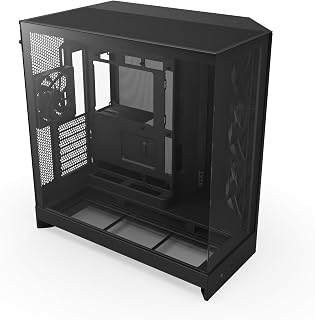
The dual-chamber design physically separates the motherboard compartment from the PSU and cables, dramatically improving both airflow and aesthetics. With 10 internal bays, this chassis accommodates extensive storage arrays for content creators or data hoarders. Bottom-mount PSU placement in the isolated chamber keeps heat sources separated, helping maintain lower component temperatures during demanding workloads.
Pros
- Exceptional airflow and thermal performance confirmed by users upgrading from cramped cases
- Abundant internal space makes component installation and future upgrades straightforward
- Pre-installed fans and radiator support eliminate immediate upgrade costs for most builds
- Premium build quality with precision-engineered motherboard mounting alignment
- Panoramic glass design showcases custom components while maintaining excellent thermal efficiency
Cons
- Large physical dimensions may not fit in compact desk setups or smaller entertainment centers
- Quality control inconsistency noted in rare instances with stripped mounting screws
- Stock fans may not satisfy audiophile or extreme performance enthusiasts seeking premium alternatives
The NZXT H9 Flow is a mid-tower ATX case designed for PC enthusiasts and gamers who refuse to compromise on cooling performance and cable management. Its dual-chamber architecture physically separates your motherboard and GPU from the power supply and storage drives, creating two optimized thermal zones that work together to keep systems running cool under load.
The standout feature is undoubtedly the engineering behind airflow. With support for up to 10 fans total, three pre-installed F140Q fans in the front-right, and one F120Q rear exhaust fan, the H9 Flow delivers exceptional thermal performance right out of the box. Users report that even high-end GPUs like the RTX 5090 maintain safe temperatures where cramped competing cases caused throttling and system reboots. The 420mm radiator compatibility on top and front means you can scale cooling capacity for virtually any build configuration.
Build quality and attention to detail are evident throughout. The case features precision-aligned motherboard screw holes that match major boards like the ASUS ROG Strix, eliminating frustration during installation. Panoramic tempered glass panels wrap around the case for a stunning visual presentation, while the generous 19.29-inch width and 20.08-inch depth provide ample elbow room for cable routing. Built-in Velcro straps and cable tie-down points transform what is usually a tedious chore into a manageable task, even for complex custom builds.
The primary consideration is physical footprint. At nearly 20 inches deep and 19 inches wide, this case demands dedicated desk or tower space and may not work in compact setups. Additionally, while the pre-installed fans are solid performers, some enthusiasts may want to replace them with premium alternatives for sound profile or extreme performance optimization.
The NZXT H9 Flow earns its place as a top-tier case choice for anyone building a high-performance system where thermals, space, and clean aesthetics matter equally. Whether you are installing an RTX 5090, running custom water cooling, or simply want a case that makes building and upgrading enjoyable, the H9 Flow delivers exceptional value and longevity.
The NZXT H9 Flow is purpose-built for ATX motherboards and works best with high-end GPU configurations or custom cooling loops. It is an excellent choice if you are planning a future upgrade path, as the 10-fan capacity provides room to grow without replacing the case.
Consider this case if you prioritize airflow and have an RTX 40-series or newer GPU, plan to use a 360mm or larger CPU cooler, or want a visually stunning build where cable management matters. The dual-chamber design is particularly beneficial in warm environments or systems that run demanding workloads like gaming, 3D rendering, or content creation.
Skip this case if space is at a premium in your setup, you prefer a compact form factor, or you are building a budget-constrained system where case cooling is less critical. Standard mid-tower alternatives may serve you better in tight spaces.

This compact ATX option fits full-size motherboards while maintaining a smaller desk footprint than typical mid-towers. Seven expansion slots and 120mm fan support provide adequate cooling capacity for standard gaming builds. Micro-ATX compatibility adds flexibility for builders downsizing from larger platforms, while the bottom-mount PSU keeps the design conventional and familiar.
Pros
- Perforated PSU shroud and mesh panels maximize airflow
- Supports 360mm front and 240mm top radiators
- Smooth interior with multiple cable anchor points
- Compact footprint for ATX and Micro-ATX builds
Cons
- Mesh design exposes rear cable management from outside
- Only one 3.5-inch drive bay by default
The NZXT H5 Flow brings efficient cooling to a compact black mid-tower footprint through its perforated design. Ultra-fine mesh panels cover the front, top, and side, creating an open-air structure that prioritizes thermal performance over visual flourishes. The perforated PSU shroud enables bottom intake fans to feed cool air directly to graphics cards, a smart approach for GPU-heavy builds. Two pre-installed 120mm Quiet Airflow fans get you started, while the interior supports up to a 360mm front radiator and 240mm top radiator for liquid cooling expansion. The case handles ATX and Micro-ATX motherboards across seven expansion slots. Inside, the layout features smooth edges, multiple cable management anchor points, and wide routing channels that simplify component installation. The spacious internal volume keeps the build process accessible whether you're installing your first system or your fiftieth. Metal construction provides durability without excessive weight, and the included tempered glass side panel displays your hardware. The mesh design does expose rear cable routing from the outside, so tidy cable work matters for clean presentation. Storage is limited to one 3.5-inch drive bay by default.
Case Type: Compact ATX Mid-Tower
Motherboard Support: ATX, Micro-ATX, Mini-ITX, E-ATX compatible
Dimensions: 16.93in W x 18.31in H x 8.86in D
Weight: 8 kg
Material: Metal with tempered glass panel
Cooling Support: Front 360mm radiator, top 240mm radiator
Pre-installed Fans: Two 120mm Quiet Airflow fans (front intake, rear exhaust)
Fan Size Support: 120mm standard
Power Supply: Bottom mount
Internal Bays: 4 total
Drive Support: One 3.5-inch bay, two 2.5-inch bays
I/O Ports: Two USB 2.0, two USB 3.0
Expansion Slots: 7 total
Cable Management: Wide channels, hooks, and straps included
Warranty: 2-year manufacturer warranty
This case fits builders wanting strong thermal performance in a smaller black mid-tower without complex features. The mesh construction and thoughtful interior appeal to first-time builders seeking straightforward assembly and experienced users downsizing without sacrificing cooling capability. It works for gaming systems and general-purpose builds where airflow matters more than RGB lighting. Skip this if rear cable visibility bothers you or if you need multiple 3.5-inch drive bays without adapters.
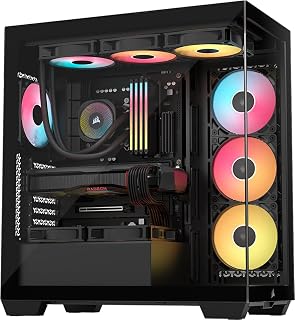
Panoramic tempered glass panels showcase your build from multiple angles, perfect for those who want maximum visibility of their components and RGB lighting. Support for Extended ATX and Mini ITX motherboards offers flexibility across different build sizes. The combination of bottom-mount PSU, dual USB 3.0 ports, and pre-installed RGB fans with dust filters creates a feature-rich foundation for display-focused builds.
Pros
- Wraparound tempered glass showcases components from multiple angles
- Supports Mini-ITX to EATX motherboards with room for large hardware
- Three pre-installed ARGB fans included
- Tool-free magnetic dust filters on front, side, and top
Cons
- Nearly 20-inch depth requires substantial desk or floor space
- No dedicated 3.5-inch hard drive bays
When you need a black case that puts your components on full display, the CORSAIR 3500X RS delivers with its wraparound tempered glass design. This mid-tower supports Mini-ITX through EATX motherboards and comes equipped with three RS120-R ARGB fans that provide both illumination and airflow right out of the box. The panoramic glass construction turns your build into a showcase piece while the spacious interior accommodates large graphics cards, tower coolers, and radiators up to 360mm for either air or liquid cooling setups. Cable management is handled through numerous routing channels and a dedicated rear storage area that keeps wiring hidden from view. Premium touches include a GPU anti-sag stabilization arm and magnetic dust filters positioned on the front, side, and top that maintain cleanliness without choking airflow. The removable glass panels and tool-free filter access simplify maintenance. The main consideration is footprint, as the case measures nearly 20 inches deep and requires adequate space. Top cable management covers may need removal if installing multiple 140mm intake fans, though they detach without tools. The design skips dedicated 3.5-inch drive bays entirely.
This case supports a broad range of motherboard form factors, from Mini-ITX compact builds to Extended ATX high-end platforms. Cooling capacity is impressive with support for up to 10x 120mm fans across side, roof, and PSU mounting points, allowing flexible thermal configurations. The case accommodates radiators up to 360mm, making it suitable for both air and all-in-one liquid cooling solutions.
The CORSAIR 3500X is compatible with the latest reverse-connection motherboards including ASUS BTF, MSI Project Zero, and Gigabyte Project Stealth, enabling cable-free interior builds for an exceptionally clean aesthetic. Storage flexibility includes multiple drive mounting options, though traditional 3.5-inch hard drive bays are limited. Front connectivity includes two USB 3.0 ports plus standard audio connectors for convenient access.
Model: CORSAIR 3500X RS-R ARGB (CC-9011322-WW). Case type: Mid-tower. Supported motherboards: Mini-ITX to Extended ATX. Dimensions: 18.11W x 19.92D x 9.45H inches, weighing 9.02 kg. Material: Tempered glass front and side panels with metal chassis. Power supply: Bottom-mounted. Includes 3x RS120-R ARGB fans with simple +5V motherboard header control.
Cooling capacity: 10x 120mm fan mounting points, supports radiators up to 360mm. Connectivity: 2x USB 3.0 ports. Features include removable glass panels, magnetic dust filters, GPU anti-sag stabilization arm, double-shot cable grommets, and rear cable storage. Warranty: 2-year manufacturer coverage. Best Sellers Rank: #13 in Computer Cases.
What to Look for When Buying a Black PC Case
Airflow and Fan Support
Thermal performance starts with the case design. Mesh-fronted and perforated panel cases like the NZXT H5 Flow – Compact ATX Mid-Tower PC Case and the NZXT H9 Flow push air through the system far more efficiently than solid-panel alternatives. Look for cases that support at least 240mm radiators up top and have generous front intake options.
Pre-installed fans are a bonus, but the total fan capacity matters more for future upgrades. The NZXT H9 Flow – Dual-Chamber ATX PC Case – Black supports up to ten fans, which gives you serious headroom for expansion. Cases with daisy-chain fan connectors, like the Lian Li V100-ATX Mid-Tower PC Case-Black-V100RX and the CORSAIR 4000D RS ARGB Frame Modular Mid-Tower ATX, also simplify your build considerably.
Motherboard and Hardware Compatibility
Most mid-tower cases here support ATX, Micro-ATX, and Mini-ITX motherboards, but a few go further. The CORSAIR 3500X RS ARGB Panoramic Mid-Tower PC Case accommodates everything from Mini-ITX up to EATX, which is worth noting if you’re running a high-end workstation board. Always verify GPU clearance too, since modern flagship cards are enormous.
Several cases on this list, including the Lian Li O11 Vision Compact ATX PC Case and the Lian Li O11D Mini V2 Flow ATX PC Case with 5, are specifically optimized for back-connect motherboards like ASUS BTF and MSI Project Zero. If a cable-free aesthetic is your goal, those back-connect compatible options are the ones to shortlist. Our best PC build for RX 9070 digs deeper into compatible component pairings for that kind of build.
Cable Management
A clean build depends on how well the case routes and hides your cables. Wide rear channels, built-in Velcro straps, and dedicated PSU shroud areas all contribute to a tidy result. The NZXT H9 Flow earns high marks here with its extra-wide channels, tie-down points, and dedicated dual-chamber layout that separates the PSU from the main components.
The ASUS A31 ATX Mid-Tower PC Case takes this further with its BTF hidden connector design, routing all modular cables behind the motherboard tray for a completely clutter-free interior. If cable management is a priority, that design philosophy is worth the extra consideration. Builders putting together a clean AMD build might also find our best PC build for RX 9060 XT helpful for planning the full system.
Tempered Glass and Aesthetics
Black cases range from minimal and stealthy to bold panoramic showcases. If you want maximum visibility into your build, look for cases with dual or triple tempered glass panels. The Lian Li O11 Vision Compact ATX PC Case features glass on the front, top, and side simultaneously, while the MUSETEX Y6 PC Case, Pre-Installed 4 Non-LED Fans offers a 270-degree view with a matte black exterior that reads as understated and premium.
Tool-less panel removal, like what the Lian Li V100-ATX offers on both side panels, saves real time during builds and maintenance. It sounds minor until you’re swapping coolers for the third time and wrestling with thumbscrews. Ease of access should weigh into your decision alongside looks. If RGB lighting is part of your plan, the MONTECH XR Panoramic High Airflow ATX PC Case and the CORSAIR 4000D RS ARGB both deliver strong ARGB integration without overwhelming the exterior design.
Final Thoughts
The black PC cases on this list cover a wide range of builder needs, from budget-conscious first builds to high-end showpiece rigs. If you want an outstanding all-rounder with great airflow, ARGB lighting, and broad compatibility at a reasonable entry point, the Lian Li V100-ATX Mid-Tower PC Case-Black-V100RX is a standout choice, while enthusiasts who want a panoramic dual-chamber experience with serious cooling headroom will find the NZXT H9 Flow – Dual-Chamber ATX PC Case – Black hard to beat.
Frequently Asked Questions
What is the best black PC case for airflow in 2026?
Cases with mesh or perforated front panels consistently outperform solid-panel designs when it comes to airflow. In 2026, strong options include the NZXT H5 Flow and the NZXT H9 Flow, both of which use perforated steel panels and strategic fan placement to maximize thermal performance. The MONTECH XR Panoramic High Airflow ATX PC Case also earns recognition for its multi-angle filtration and reverse-blade fan configuration.
Are black PC cases harder to keep clean than other colors?
Black cases can show dust and fingerprints more visibly on glossy surfaces, but matte finishes like the one on the MUSETEX Y6 are considerably more forgiving. Magnetic dust filters, which many cases on this list include, help reduce interior dust buildup significantly. Regular maintenance every few months keeps any case looking sharp regardless of color.
Do black PC cases support large radiators for liquid cooling?
Most modern mid-tower black cases support 360mm radiators at a minimum. The NZXT H9 Flow supports up to a 420mm radiator on both the top and front-right, which covers even the largest all-in-one coolers. The Lian Li O11 Vision Compact ATX PC Case also includes a dedicated top mesh panel specifically for 360mm AIO installation. If you’re planning a liquid-cooled build, our best PC build for RTX 5060 ti walks through cooler and case pairing considerations in detail.
What black PC case works best with back-connect motherboards?
Back-connect motherboards like ASUS BTF and MSI Project Zero need cases designed with rear cable routing channels and appropriate cutouts. The Lian Li O11 Vision Compact ATX PC Case, the Lian Li O11D Mini V2 Flow ATX PC Case with 5, and the CORSAIR 4000D RS ARGB Frame Modular Mid-Tower ATX all explicitly support back-connect builds. The ASUS A31 ATX Mid-Tower PC Case takes it even further with its purpose-built BTF hidden connector system for a seamlessly clean interior.





Write Your Review
No reviews yet. Be the first to share your experience!