

Your internet connection may feel fast beside the modem, then struggle in an upstairs office, a detached workspace, or the patio where you actually use your devices. A mesh system can solve those coverage gaps by placing multiple nodes around your home under one network name, rather than relying on a single router to do everything.
This guide compares the best eero mesh system choices for apartments, busy family homes, outdoor spaces, and high-bandwidth networks, plus capable TP-Link and NETGEAR alternatives. If you are replacing an all-in-one gateway, our guidance on modem-router combos can also help you understand how your new mesh hardware fits with your provider equipment.
Quick answer
This guide compares 7 picks, with eero Outdoor 7 Wi-Fi 7 Mesh Router, IP66 Weatherproof ranked first. TP-Link Deco X55 AX3000 WiFi 6 Mesh System 3-Pack, 6500 has the most customer reviews.

Pros
- Exceptional outdoor range with strong signal penetration through obstacles like metal sheds and dense woods
- Simple app-based setup takes minutes, even for users with limited technical experience
- Robust build quality and weatherproofing inspire confidence for permanent outdoor installation
- Backward compatible with existing eero mesh systems for easy expansion of existing networks
- Thread and Matter support future-proofs your smart home ecosystem
Cons
- Requires either AC power nearby or a separate PoE+ power source, limiting placement flexibility in remote areas
- Single unit covers large areas but multiple units may be needed for very large properties or complex terrain
The eero Outdoor 7 is a Wi-Fi 7 mesh router engineered specifically for outdoor environments where traditional indoor equipment fails. It's ideal for homeowners with large properties, vacation homes, commercial patios, or anyone who refuses to accept dead zones beyond the house perimeter.
Performance is where this router shines. Wi-Fi 7 technology delivers up to 2.1 Gbps of bandwidth, and real-world user reports confirm strong coverage extending 100+ yards through open space and penetrating obstacles like metal structures. The dual-band 2x2 configuration and advanced TrueMesh software ensure you stay connected to the strongest available signal. Whether you're streaming 4K content on the patio or connecting outdoor security cameras, speeds remain consistent.
Build quality is exceptional. The IP66 weatherproof rating means dust and rain won't compromise performance, and the tested operating range of -40F to 131F handles seasonal extremes without degradation. The included 30W PoE+ adapter provides flexible power options, though installation does require either nearby AC outlets or a PoE+ infrastructure investment. The mounting bracket and accessory kit fit wood, vinyl, fiber cement, and stucco surfaces.
The main trade-off is price and power requirements. At $309.99, this is a premium product targeting serious outdoor connectivity needs rather than casual backyard browsing. Additionally, while PoE+ offers clean installation on poles or high structures, it requires compatible power infrastructure that not all properties have readily available.
The eero Outdoor 7 earns its reputation through proven performance, smart design, and reliable technology. It solves the outdoor Wi-Fi problem definitively for users willing to invest in quality infrastructure. Highly recommended for anyone working with properties larger than typical suburban lots or dealing with stubborn coverage obstacles.
Connectivity: Wi-Fi 7 (802.11a/b/g/n/ac/ax), 2x2 2.4 GHz (688 Mbps peak), 2x2 5 GHz (2161 Mbps peak), BE5000. One 2.5 GbE PoE-capable Ethernet port.
Coverage and Capacity: Up to 15,000 sq ft outdoors (70-foot radius). Connects 100+ devices. Backward compatible with all previous eero generations.
Durability: IP66 weatherproof rating. Operating temperature range -40F to 131F. 3-year limited warranty.
Power and Installation: Powered by AC or 30W 802.3at/802.3bt PoE+. Includes 30W Outdoor PoE+ adapter, mounting bracket, and accessories for wood, vinyl, fiber cement, and stucco. Setup via eero app.
Smart Home and Security: Thread, Zigbee, and Matter controller support. Bluetooth LE 5.0. WPA2, WPA3, TLS 1.2+ encryption. Optional eero Plus subscription includes VPN and Malwarebytes protection.
Best For: Homeowners with large properties, rural or wooded areas with coverage gaps, those expanding existing eero networks, commercial outdoor venues, and anyone with outdoor security cameras or smart devices requiring reliable connectivity.
Also Consider If: You need coverage for multiple acres, have metal structures blocking indoor signals, want to connect a separate cabin or garage, are setting up outdoor entertainment spaces, or value future-proof smart home technology with Thread and Matter support.
Skip If: You only need basic patio coverage from an existing router, have tight budget constraints, or lack nearby AC outlets and PoE+ power infrastructure in your installation area.
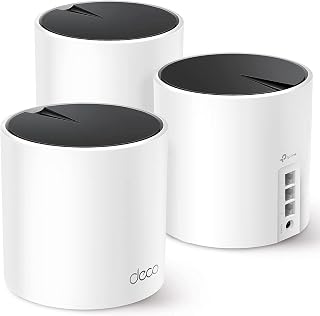
The X55 system covers your whole home with dual-band Wi-Fi 6 connectivity and supports over 55 devices simultaneously, making it reliable for families with multiple smartphones, tablets, smart TVs, and security cameras. Its compatibility with 802.11ax ensures modern speeds while backward compatibility with older standards keeps legacy devices connected throughout your coverage area.
Pros
- Covers 6500 sq ft with support for 150 devices
- Three gigabit ethernet ports per unit for wired connections
- Ethernet backhaul support for faster inter-unit connectivity
- AI-driven optimization adapts to home layout automatically
Cons
- AX3000 speeds trail faster WiFi 6E and WiFi 7 systems
- Premium security features require paid subscriptions
The TP-Link Deco X55 three-pack delivers WiFi 6 mesh coverage across 6500 square feet with support for up to 150 connected devices, making it a strong contender for homes needing reliable whole-home connectivity. The AX3000 dual-band system provides combined speeds up to 3000 Mbps, enough for streaming, gaming, and smart home demands across multiple rooms. Each unit includes three gigabit ethernet ports, allowing you to hardwire critical devices like gaming consoles or security cameras for stable connections. AI-driven mesh optimization adapts to your home's layout and interference patterns automatically, while ethernet backhaul support between units provides faster backbone connectivity when wired. The straightforward mobile app setup typically completes in under five minutes. WPA3-Personal security protocol ensures modern protection standards. The system handles 802.11ax (WiFi 6) alongside legacy standards, ensuring compatibility with older devices while delivering improved performance for newer WiFi 6 clients. The Omada operating system and internal antennas provide consistent performance without external components cluttering your space.
Buy this if you have a large home with many rooms to cover, run gigabit internet service, or manage numerous smart home devices and need ethernet ports on each mesh unit. It suits those upgrading from older routers or range extenders who want WiFi 6 without premium pricing. Skip this if you have multi-gigabit internet plans exceeding 1 Gbps, want the latest WiFi 6E or WiFi 7 standards, or prefer a fully wireless mesh setup without running ethernet cables between units for optimal performance.
Coverage and Performance: Up to 6500 square feet, AX3000 WiFi 6, 2402 Mbps (5GHz) plus 574 Mbps (2.4GHz), supports 802.11ax, 802.11ac, 802.11n, 802.11g, 802.11b. Three internal antennas per unit.
Connectivity and Ports: Three gigabit ethernet ports per unit (nine total in 3-pack), supports wired and wireless backhaul, compatible with all major ISPs. Works with smartphones, computers, tablets, printers, gaming consoles, smart TVs, and security cameras.
Security and Control: WPA3-Personal, WPA2-Personal, WPA-Personal encryption, High-level firewall, HomeShield service included, parental controls, guest mode, app-based control and remote management. Operates on TP-Link's Omada system.
Specifications: 12-volt power adapters included, 2-year manufacturer warranty, 24/7 technical support. Package includes three Deco X55 units, three power adapters, one ethernet cable, and quick installation guide.

This system blankets up to 4,500 square feet with Wi-Fi 6 coverage and handles 75+ connected devices, ideal for households juggling streaming, smart home gadgets, and remote work. Two gigabit Ethernet ports on each unit let you hardwire bandwidth-hungry devices like gaming consoles or desktop computers for maximum stability across your mesh network.
Pros
- WiFi 6 with 160 MHz bandwidth reduces congestion under load
- Built-in Zigbee and Thread hub eliminates separate smart home hardware
- TrueMesh technology minimizes drop-offs across coverage area
- Dual gigabit ethernet ports per unit for wired backhaul
Cons
- Performance degrades when mixed with older eero hardware
- WPA3 and advanced security features require eero Labs or paid subscription
The eero 6+ three-pack brings WiFi 6 with 160 MHz channel support to homes up to 4500 square feet, handling 75+ connected devices with dual-band AX3000 speeds. The system supports internet plans up to a gigabit while using TrueMesh technology to intelligently route traffic between nodes and minimize dead zones. Two gigabit ethernet ports on each unit enable wired backhaul between nodes or direct connections to devices needing stable links. The built-in 802.15.4 radio supports both Zigbee and Thread protocols alongside Bluetooth Low Energy 5.0, consolidating smart home connectivity without separate hubs for compatible devices. Setup through the eero app completes in minutes with Amazon Frustration Free Setup and ongoing network management from anywhere. The 1 GHz dual-core processor with 512MB RAM handles routing efficiently, while WPA3 (currently in eero Labs) and WPA2 encryption provide security alongside features like IPv6, VPN passthrough, and port forwarding. The compact units blend into home environments easily. Each unit operates on 100-240V AC for worldwide compatibility.
Coverage and Performance: Supports up to 4,500 sq ft, AX3000 speed rating, WiFi 6 dual-band concurrent, supports ISP plans up to 1 gigabit.
Connectivity: Two auto-sensing gigabit Ethernet ports per unit, WiFi 6 (802.11ax), compatible with older WiFi standards, Bluetooth 5.0, 802.15.4 radio for Zigbee and Thread.
Smart Home: Built-in smart home hub for Thread and Zigbee devices, works with Alexa, Amazon Frustration Free Setup.
Security: WPA3 support (eero Labs), WPA2, TLS v1.2+, VPN passthrough, IPv6, NAT, UPnU, port forwarding, automatic security updates.
Hardware: 1 GHz dual-core processor, 512MB RAM, 4GB flash storage per unit, dimensions 3.9 x 3.8 x 2.6 inches, 1-year limited warranty, operates 0-40 degrees Celsius.
This system fits families, remote workers, and smart home users covering up to 4500 sq ft who want WiFi 6 performance and integrated Zigbee/Thread connectivity. It works well for gigabit internet plans and homes with multiple simultaneous users streaming or video calling. Skip this if you have multi-gigabit internet exceeding 1 Gbps, already own older eero hardware you plan to mix in (which degrades performance), or need WiFi 6E or WiFi 7 capabilities for future-proofing.

The dual-band Wi-Fi 7 router covers up to 6,000 square feet and supports internet plans up to 2.5 Gbps, future-proofing your network as ISP speeds increase. Its 240 MHz channel width on the 5 GHz band delivers faster throughput than Wi-Fi 6, ensuring smooth 4K streaming and video calls across every room in larger homes.
Pros
- WiFi 7 with 240 MHz channels and 2.5 Gbps internet support
- Covers 6000 sq ft with reliable outdoor reach
- Dual 2.5 GbE ports future-proof wired connectivity
- TrueMesh optimization handles 120+ devices efficiently
Cons
- Requires adequate ventilation in warm or tight spaces
- Full-featured security needs optional eero Plus subscription
The eero 7 three-pack brings WiFi 7 (802.11be) mesh coverage to 6000 square feet with support for 120+ devices, representing a substantial upgrade path for homes needing modern wireless standards. This dual-band BE5000 system supports internet plans up to 2.5 Gbps with dual 2.5 GbE ports on units, future-proofing connectivity as faster service tiers become available. The 2x2/2x2 MU/SU-MIMO configuration with six spatial streams handles multiple simultaneous connections efficiently, while support for up to 240 MHz channel widths on the 5 GHz band delivers improved throughput over previous generations. TrueMesh software continuously optimizes routing across the mesh network, maintaining consistent performance even in outdoor areas adjacent to the home. Automatic channel selection reduces interference without manual configuration. The system maintains backward compatibility with 802.11a/b/g/n/ac/ax devices while delivering WiFi 7 benefits to compatible clients. WPA3 and WPA2 encryption provide security, with support for IPv4, IPv6, UPnP, DHCP reservations, and port forwarding included. The compact form factor and wireless setup enable flexible placement, though adequate ventilation around units helps with thermal management.
Wi-Fi Technology: Wi-Fi 7 (802.11be), dual-band with 2.4 GHz and 5 GHz support. Maximum wireless speed of 1.8 Gbps with BE5000 rating.
Coverage and Capacity: Up to 6,000 sq ft coverage with three units. Supports 120+ simultaneous device connections without degradation.
Connectivity: Two auto-sensing 2.5 Gigabit Ethernet ports per unit, USB-C power input, and advanced support for IPv4, IPv6, UPnP, DHCP, and port forwarding.
Smart Home Integration: Built-in smart home hub supporting Thread, Zigbee, Bluetooth 5.0LE, and Matter compatibility. Works with Alexa devices and eero Built-in functionality on select Echo devices.
Security and Software: WPA3 and WPA2 encryption, advanced band steering, automatic channel selection, and device pause controls. Patented TrueMesh, TrueRoam, and TrueChannel software for optimal routing and connection management.
Hardware: 1.1 GHz quad-core Qualcomm Dragonwing processor, 1 GB RAM, 4 GB flash storage. Dimensions: 5.12in x 5.12in x 2.52in. Operating temperature 32°F to 104°F. 15W USB-C power adapter included.
This system suits homeowners covering 6000 sq ft who want WiFi 7 capabilities with multi-gigabit internet support up to 2.5 Gbps. It fits families with heavy streaming, gaming, and video call demands across many devices, plus those seeking simple mobile app setup without technical complexity. Skip this if you need tri-band operation for maximum device density, prefer systems without thermal considerations in warm or enclosed spaces, or want full-featured security without optional subscription services.

With tri-band Wi-Fi 7 and support for internet plans up to 5 Gbps, the Pro 7 handles extreme bandwidth needs across 6,000 square feet without congestion. The dedicated 6 GHz band with 320 MHz channel width provides a clear highway for Wi-Fi 7 devices, keeping your network fast even when dozens of gadgets compete for bandwidth.
Pros
- Covers 6,000 sq ft with tri-band Wi-Fi 7 and TrueMesh optimization
- Handles 600+ devices with dual 5 GbE ports and 5 Gbps plan support
- Quad-core processor maintains stability under heavy load
- Backward compatible with existing eero networks
Cons
- Premium cost with full benefits requiring Wi-Fi 7 devices
- Advanced security features need eero Plus subscription
For whole-home Wi-Fi that scales to sprawling layouts, the eero Pro 7 three-pack tackles 6,000 square feet with tri-band Wi-Fi 7 architecture and intelligent TrueMesh routing. The BE10800 rating translates to wireless speeds hitting 3.9 Gbps, while dual 5 GbE ports and support for internet plans up to 5 Gbps ensure the system won't bottleneck your connection. The quad-core 1.5 GHz processor and 1GB RAM maintain stability even when managing 600+ connected devices across multiple floors or wings. Automatic channel selection and TrueMesh software continuously optimize paths between nodes, keeping bandwidth-heavy activities like 4K streaming and gaming smooth throughout the property. WPA3 encryption, IPv6 support, and features like DHCP reservations and port forwarding address security and network management needs. The compact form factor and straightforward mobile app setup simplify deployment in multi-story homes. Backward compatibility with older eero hardware offers a migration path for existing users. The catch is cost and the need for Wi-Fi 7 devices to realize full capability, plus advanced security tools require an eero Plus subscription after the trial period.
Connectivity: Wi-Fi 7 tri-band (2.4 GHz, 5 GHz, 6 GHz) with BE10800 rating, supporting speeds up to 3.9 Gbps wireless and 5 Gbps wired via dual 5 GbE ports.
Coverage and Capacity: 3-pack covers up to 6,000 sq ft and supports 600+ connected devices with advanced band steering and automatic channel selection.
Smart Home Integration: Built-in Thread and Zigbee controllers, Matter support, Alexa compatibility, and smart home hub functionality for unified device management.
Security: WPA3 and WPA2 wireless encryption, optional eero Plus subscription with advanced malware protection, ad blocking, parental controls, and Guardian VPN service.
Hardware: Qualcomm Dragonwing N7 processor, 1GB RAM, 4GB storage, dual 5 GbE Ethernet ports, USB-C power input, and 2x2 MIMO on all three bands.
Warranty and Support: Industry-leading 3-year limited warranty with access to eero support team via email or phone.
Buy this if you're covering a large home or multi-level property with demanding connectivity needs and want a future-ready system that handles hundreds of devices without degradation. It's ideal for households mixing remote work, gaming, and heavy streaming across sprawling floor plans. Skip it if your space is under 3,000 square feet, your budget is tight, or you don't have Wi-Fi 7 devices to justify the premium. Simpler mesh systems or Wi-Fi 6E alternatives deliver solid whole-home coverage at lower cost for moderate use cases.
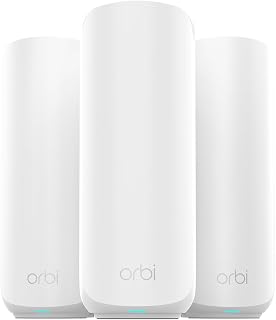
The Orbi 370 delivers Wi-Fi 7 performance across 6,000 square feet with Multi-Gig Ethernet ports that accommodate ultra-fast internet connections beyond standard gigabit speeds. Its dual-band 802.11be standard ensures cutting-edge wireless performance for gaming consoles, 8K streaming, and bandwidth-intensive applications throughout your entire home.
Pros
- Three units cover 6,000 sq ft with WiFi 7 speeds up to 5 Gbps
- Enhanced Backhaul maintains quality with 70+ connected devices
- 2.5 Gbps multi-gig ports support high-speed fiber plans
- Straightforward app setup with automatic updates and security
Cons
- Dual-band configuration limits advanced optimization options
- Some users report satellite dropout with poor placement
The Orbi 370 Series addresses whole-home coverage with a three-unit WiFi 7 mesh configuration spanning up to 6,000 square feet. One router and two satellites create seamless connectivity across multi-story layouts or homes with challenging floor plans. WiFi 7 delivers up to 5 Gbps throughput, roughly 2.4 times the speed of WiFi 6, while Enhanced Backhaul reserves bandwidth between units to prevent congestion when 70+ devices compete for signal. The 2.5 Gbps multi-gig Ethernet ports accommodate high-speed fiber plans, positioning the system to grow with your internet service. Dual-band architecture keeps the design simpler than tri-band alternatives while still covering expansive spaces effectively. The Orbi app handles initial setup and automatic firmware updates, and included security features run without ongoing management. Internal antennas and tower-style units blend into home environments without drawing attention. The system handles heavy streaming, video calls, and gaming simultaneously across the coverage area. WiFi 7's 802.11be standard ensures compatibility with newer devices while maintaining backward support for older hardware. The dual-band configuration is the primary limitation for users wanting maximum segregation and optimization across frequency bands.
Coverage and Performance: Up to 6,000 sq ft coverage area, supports up to 70 connected devices, WiFi 7 dual-band with speeds up to 5 Gbps.
Hardware: Router model RBE371, two satellite units model RBE370, 10 total Ethernet ports, 2.5 Gbps LAN and WAN ports, internal antennas, includes one Ethernet cable and three power adapters.
Connectivity: 802.11be wireless standard, compatible with WiFi 6 and WiFi 5 devices, works with any cable or fiber ISP supporting plans up to 2.5 Gbps.
Security: WPA3 and WPA2-PSK encryption, Advanced Router Protection enabled by default, automatic firmware updates, 30-day NETGEAR Armor trial included, high-level router firewall.
Control and Compatibility: Managed via Orbi app, compatible with gaming consoles, PCs, printers, and security cameras, suitable for both home and business use.
This system suits families in larger homes who need reliable whole-home WiFi for heavy device loads and want WiFi 7 capability without exceeding mid-range budgets. It's a practical choice for households running multiple 4K streams, video calls, and gaming across 6,000 square feet. Skip it if you need tri-band or quad-band segmentation for specialized network optimization, or if your home is compact enough that a two-pack or single router would suffice. Power users prioritizing advanced configuration may find the dual-band design limiting.
Pros
- Solid Wi-Fi 6 performance that genuinely reduces dead zones and keeps connections stable
- Built-in Zigbee hub saves money and simplifies smart home device integration
- User-friendly setup and intuitive app for non-technical users
- Expandable architecture allows gradual upgrades without replacing existing hardware
- Reliable automatic updates improve performance and security over time
Cons
- 900 Mbps ceiling means it may not maximize speeds on gigabit-plus internet plans
- Single unit covers 1,500 sq ft, requiring additional eero nodes for larger homes
- Limited customization options compared to enterprise-grade mesh systems
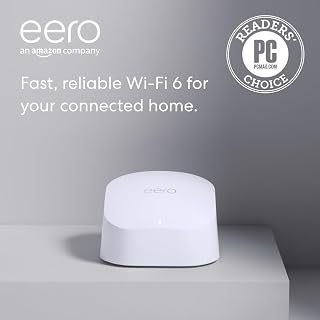
The eero 6 is a Wi-Fi 6 mesh router designed for households that want solid coverage, fast connections, and support for multiple devices without the complexity of professional networking equipment. It's ideal for families streaming content, gamers, and anyone running a smart home ecosystem.
The standout feature is TrueMesh technology, which intelligently routes traffic to minimize drop-offs and buffering. In real-world use, the router delivers stable 4K streaming and gaming performance across typical homes, and Wi-Fi 6 support ensures you can connect 75+ devices simultaneously without noticeable slowdowns.
The built-in Zigbee smart home hub is a practical addition that eliminates the need to buy separate hubs for Alexa-compatible devices. Setup takes minutes through the mobile app, and the interface is intuitive enough for users without networking experience. Free U.S. customer support is available seven days a week.
The main limitation is the 900 Mbps speed ceiling, which means it won't fully leverage gigabit internet plans. Single-unit coverage maxes out at 1,500 sq ft, so larger homes will need additional nodes. The system also lacks advanced customization options compared to enterprise routers.
Overall, the eero 6 offers genuine value for homes seeking reliable mesh Wi-Fi with smart home integration. It excels at eliminating dead zones and handling heavy device loads, making it a solid choice for modern households with diverse connectivity needs.
Coverage: Up to 1,500 sq ft (22-foot radius)
Speed: Up to 900 Mbps
Wi-Fi Standard: Wi-Fi 6
Connected Devices: 75+
Smart Home Hub: Built-in Zigbee
Setup: App-based, typically 5-10 minutes
Expandable: Cross-compatible with other eero products
Updates: Automatic security and feature updates
Best For: This router is ideal if you live in a home under 1,500 sq ft, have internet plans up to 900 Mbps, want smart home device integration, or are new to mesh networking. It's a good fit for moderate to heavy internet users who value simplicity and reliability.
Consider Alternatives If: You have internet speeds above 900 Mbps and need a router that maximizes those speeds, have a home larger than 1,500 sq ft without wanting to buy additional nodes, or require advanced networking customization and control.
Budget Consideration: The eero 6 offers strong value for its price range, balancing performance, coverage, and features. Factor in potential expansion costs if your home grows or you want redundancy through additional nodes.
How to Choose the Right Mesh Wi-Fi System
Coverage claims are a useful starting point, but your internet plan, home layout, connected devices, and wired connections matter just as much. We focused on published coverage, Wi-Fi generation, ports, smart-home features, and expansion flexibility to separate the strongest fits for different households.
Match Wi-Fi Generation to Your Internet Plan
The Amazon eero 6 mesh wifi router is a sensible match for plans up to 900 Mbps and modest coverage needs, while the Amazon eero 6+ mesh wifi system supports plans up to a gigabit and uses a 160 MHz channel for added Wi-Fi 6 bandwidth. Both are practical for streaming, video calls, and everyday smart-home traffic without adding complexity.
For faster service, the Amazon eero 7 dual-band mesh Wi-Fi 7 router supports plans up to 2.5 Gbps and includes two auto-sensing 2.5 GbE ports. The Amazon eero Pro 7 tri-band mesh Wi-Fi 7 router goes further with support for plans up to 5 Gbps, two 5 GbE ports, and higher wireless capacity for demanding homes or small business spaces.
Plan Node Placement Around Your Actual Coverage Gaps
Do not select a system based on square footage alone. The single Amazon eero 6 mesh wifi router is designed for up to 1,500 square feet, while three Amazon eero 7 dual-band mesh Wi-Fi 7 router units cover up to 6,000 square feet, and the three-pack TP-Link Deco X55 AX3000 WiFi 6 Mesh System is rated for up to 6,500 square feet.
Dense walls, brick fireplaces, metal ductwork, and multiple floors can reduce real-world reach, so position a node between the main router and a weak zone instead of placing it inside the dead spot. For large yards, the IP66-rated Amazon eero Outdoor 7 dual-band mesh wifi router can extend coverage up to 15,000 square feet outdoors and can run on AC or PoE+ power.
Use Ethernet Backhaul When Your Home Allows It
A wireless mesh is convenient, but a wired connection between nodes can preserve more bandwidth where you need it most. The TP-Link Deco X55 AX3000 WiFi 6 Mesh System supports Ethernet backhaul and provides three Gigabit Ethernet ports on each unit, making it especially useful when you have wired rooms, consoles, or desktop computers.
Before committing to a wired layout, count the devices that need Ethernet and the ports available at each location. Our guide to home network switches can help if you need to turn one wired port into connections for a TV, game console, workstation, or extra mesh node.
Choose Capacity and Controls for Your Household
Dual-band hardware works well for many homes, but heavy wireless use can favor more capable models. Three Amazon eero Pro 7 tri-band mesh Wi-Fi 7 router units support more than 600 devices, while the three-unit Amazon eero 7 dual-band mesh Wi-Fi 7 router system supports more than 120 devices, both with Wi-Fi 7 features such as multi-link operation.
The eero app provides guided setup, remote management, and automatic updates, while eero 6 includes a Zigbee hub and eero 6+ adds Thread and Zigbee support for compatible Alexa-connected devices. If you want a wired-first design for a large home, compare mesh placement with our home access point guide before choosing your network layout.
Final Thoughts
For most homes with a gigabit connection and several rooms to cover, the Amazon eero 6+ mesh wifi system balances straightforward setup, broad compatibility, and capable Wi-Fi 6 coverage. If your household has multi-gig service, many active devices, or more demanding work and streaming needs, the Amazon eero Pro 7 tri-band mesh Wi-Fi 7 router offers considerably more headroom.
Frequently Asked Questions
Which eero mesh system is right for a gigabit internet plan in 2026?
The eero 6+ is a strong starting point for an internet plan up to a gigabit because it supports that level of service and offers Wi-Fi 6 with 160 MHz channel support. Choose eero 7 instead if you have service beyond a gigabit, want 2.5 GbE ports, or want Wi-Fi 7 capabilities for newer devices. Your device mix and node placement still influence the speeds you experience in each room.
Is eero 7 or eero Pro 7 better for a busy home?
Both systems cover up to 6,000 square feet in a three-unit configuration, but they target different network demands. eero 7 supports plans up to 2.5 Gbps and more than 120 devices, while eero Pro 7 supports plans up to 5 Gbps, more than 600 devices, and adds a tri-band design. The Pro model makes more sense when several people are streaming, gaming, working, and running smart devices at once.
Can I mix older eero devices with newer eero mesh routers?
Yes, the eero models covered here are backward compatible with previous eero generations, making it possible to expand an existing system gradually. For the strongest result, use the most capable unit as your gateway near the modem and place older nodes where coverage demands are lighter. Browse our Networking category for more help with building a reliable home setup.
Should I buy a mesh system, a Wi-Fi extender, or a travel router?
Choose a mesh system when several rooms or floors need seamless coverage under one network, especially if you move between rooms during calls or gaming sessions. A single weak area may only need one of the options in our Wi-Fi extender guide for gaming, while a compact device from our travel router recommendations is better suited to hotels, temporary workspaces, and public Wi-Fi.



Write Your Review
No reviews yet. Be the first to share your experience!