

You sit down to fly a combat mission or cruise through a realistic civilian route, and your gamepad just does not cut it anymore. The inputs feel vague, the immersion breaks, and you find yourself wishing your hands were wrapped around something purpose-built for the cockpit. That is exactly the problem a dedicated flight stick solves, and there has never been a better selection of hardware to choose from than in 2026.
Whether you are a newcomer picking up Microsoft Flight Simulator for the first time or a seasoned sim pilot looking to upgrade to a full HOTAS rig, this guide covers the ten best flight sticks on the market right now. We have evaluated each one for build quality, precision, button layout, and value so you can make a confident decision. If you are also gearing up for a gift, check out these top gifts for gamers for more ideas.
Quick answer
This guide compares 10 picks, with Thrustmaster HOTAS Warthog A-10C Flight Stick - Hall ranked first. Thrustmaster T-Flight Hotas X Flight Stick and Throttle has the most customer reviews.

Pros
- Exceptional build quality with metal detachable handle provides premium feel and lasting durability
- Hall Effect sensors deliver surgical precision with zero degradation over extended use
- Extensive button mapping eliminates keyboard reaching during critical flight simulator moments
- Intuitive T.A.R.G.E.T. software makes customization accessible to both beginners and advanced users
- Authentic military design immerses you in realistic combat and flight scenarios
Cons
- Premium pricing places it at the higher end of consumer flight stick options
- Learning curve for Advanced and Script programming modes may overwhelm casual gamers
- Requires desk or cockpit mount setup to properly utilize the weighted stability advantage
The Thrustmaster HOTAS Warthog is a professional-grade flight stick designed for serious flight simulator enthusiasts, military enthusiasts, and competitive combat pilots. This isn't a casual gaming peripheral, it's a replica of the authentic A-10C Warthog control stick used by real U.S. Air Force pilots, making it the go-to choice for DCS World, Microsoft Flight Simulator, and hardcore flight sim communities.
The standout feature is the Hall Effect sensor technology with 16-bit resolution providing 65536 values per axis. This translates to surgical precision that never drifts or develops dead zones, even after thousands of hours of use. Combined with 19 programmable buttons, three 8-way hats, a 4-way hat with push button, a metal dual trigger, and pinkie switches, you have complete command authority without reaching for your keyboard during critical moments.
Build quality is exceptional with an all-metal detachable handle that weighs over 6 lbs on its own. This substantial weight provides rock-solid stability on your desk or cockpit setup during aggressive dogfights and precision maneuvers. The ergonomic design matches the military original, giving your hands the exact same grip and layout they would experience in actual combat aircraft, deepening immersion significantly.
The included T.A.R.G.E.T. software suite handles customization with intuitive drag-and-drop controls across Basic, Advanced, and Script programming levels. While beginners can get flying immediately, advanced users can create complex profiles. The stick also works with the HOTAS Cougar base, giving you flexibility to build your dream cockpit setup over time.
The main consideration is price and learning investment. This is premium equipment for dedicated enthusiasts, not casual players. If you're serious about flight simulation and want hardware that will last decades, the Thrustmaster HOTAS Warthog delivers military-grade precision and authenticity that justifies the investment.
Technical Specifications
Controller Type: Joystick with Hall Effect sensors
Connectivity: USB corded connection
Resolution: 16-bit Hall Effect per axis with 65536 values
Button Count: 19 action buttons plus multiple hat switches
Programmable Controls: 3 eight-way hat switches, 1 four-way hat with push button, metal dual trigger, pinkie switches
Weight: 9.8 lbs total package, stick weighs over 6 lbs
Dimensions: 10.55" D x 9.65" W x 12.36" H
Detachable Handle: Yes, all-metal construction
Software: Thrustmaster T.A.R.G.E.T. with drag-and-drop programming
Compatibility: PC via USB, cross-compatible with HOTAS Cougar base
Warranty: One year manufacturer warranty
Included: Flight stick and instruction manual
Is This Right for You?
Choose the Thrustmaster HOTAS Warthog if you actively play DCS World, Microsoft Flight Simulator, or other professional flight simulators and want military-authentic hardware that matches your software experience. This stick is ideal if you're building a dedicated cockpit setup, enjoy long flight sessions where comfort matters, or want equipment that will last 10+ years of regular use without degradation.
Skip This If
You're a casual flight sim player looking for something entry-level and budget-friendly. You prefer wireless controllers for flexibility. You don't have dedicated desk space for a mounted stick, or you play primarily arcade-style flight games that don't benefit from precision equipment.
Setup Tips
Plan for a desk or cockpit mount to properly secure this stick due to its weight. Allow time to explore T.A.R.G.E.T. software programming so you can customize profiles for different aircraft and scenarios. Join flight simulation communities to get profile recommendations from experienced users who have optimized their configurations.

Pros
- Exceptional precision with 16-bit non-contact sensors and customizable response curves
- Complete bundle includes everything needed for realistic flight sim without additional purchases
- Extensive programmability with 189 controls covers combat sims, civilian flight sims, and space sims
- Premium build quality with military-grade engineering designed for professional-level simulation
- Self-centering rudder pedals with adjustable damping and differential braking add authentic control
Cons
- Premium price point may be prohibitive for casual or entry-level flight sim enthusiasts
- Steep learning curve with 189 programmable buttons requires significant setup time for optimization
- Requires adequate desk space for joystick, throttle, and pedal configuration
The Logitech G X56 H.O.T.A.S bundle is a complete flight simulation control system designed for serious pilots. This package combines the flagship X56 joystick and throttle unit with the Pro Flight Rudder Pedals, delivering everything needed for authentic, multi-axis aircraft control. It's built for flight sim enthusiasts, VR pilots, and professional training environments where precision matters.
The standout feature is the military-grade 16-bit non-contact sensor technology that provides the most accurate stick control available. With 189 programmable buttons and controls across both the joystick and throttle, you can map every function your flight sim demands. The four adjustable spring options let you customize stick resistance, while configurable response curves and deadzones fine-tune performance for anything from light aircraft to high-performance fighters to spacecraft.
Build quality reflects the premium positioning with a stealthy black and gray finish and ergonomic design optimized for long sessions and VR use. The X56 places controls precisely where your fingers naturally rest, reducing fatigue during extended flights. RGB lighting allows full customization to match your setup. The included Pro Flight Rudder Pedals feature smooth, self-centering action with adjustable damping and differential toe brakes that replicate how real aircraft respond.
The main drawbacks are the high price and substantial setup investment required. With nearly 200 programmable controls, you'll spend significant time configuring profiles for different aircraft and scenarios. You'll also need adequate desk or mounting space for the three components. The learning curve is steep, though rewarding for those committed to serious simulation.
The X56 H.O.T.A.S bundle is the clear choice for flight sim enthusiasts who demand professional-grade control. The combination of precision sensors, extensive programmability, and complete pedal integration delivers the authentic experience that casual controllers simply cannot match. If you're ready to invest in your flight sim setup, this bundle justifies every cent.
Controller Type: Joystick, Throttle, and Rudder Pedals
Programmable Controls: 189 total
Sensor Technology: 16-bit non-contact sensors
Connectivity: Dual USB (corded)
Compatibility: Windows PC
Colors: Black and Gray
Spring Options: 4 customizable settings
Rudder Pedal Features: Self-centering with adjustable tension, differential toe brakes, adjustable foot rests
Additional Features: RGB lighting, ergonomic design, VR-ready
Best For: This bundle is ideal for serious flight simulation enthusiasts, including combat flight sim pilots, civil aviation students, space sim players, and VR flight sim enthusiasts. It's also suitable for professional flight training environments where precision is critical.
Consider Alternatives If: You're a casual flight sim player looking for entry-level controls, have limited desk space, or prefer wireless connectivity. Budget-conscious buyers should also note the premium pricing compared to basic flight controllers.
Not Recommended For: Console-only gaming or players primarily interested in arcade-style flight games rather than realistic simulation.
Pros
- Exceptional build quality and responsiveness for the price point, rivaling much more expensive systems
- Detachable throttle design lets you configure the controller for desk, lap, or cockpit-style play
- Extensive button mapping and adjustable stick resistance accommodate beginner and expert pilots alike
- Seamless compatibility with major flight sim platforms and Xbox ecosystem without additional setup
- Expandable modular design supports future upgrades like rudder pedals for enhanced immersion
Cons
- No rudder pedals included, requiring a separate purchase to complete a full flight sim setup
- Limited feedback mechanisms compared to higher-end HOTAS systems with force feedback or haptic features
- Throttle design may feel less robust than premium alternatives, though adequate for most users
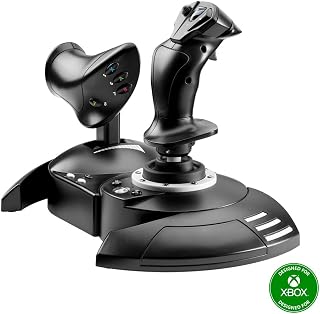
The Thrustmaster T-Flight HOTAS One is a feature-rich flight control system that brings genuine cockpit-style control to flight simulation on PC and Xbox Series X|S. It's designed for both casual simmers who want to step up from a gamepad and dedicated enthusiasts building a complete home cockpit setup. The package includes a precision joystick and detachable throttle, giving you multiple configuration options right out of the box.
The standout features center on control precision and versatility. The 14 programmable buttons, responsive trigger, hat switch, and dual rudder control put essential aircraft functions within reach without moving your hands. The adjustable stick resistance lets you fine-tune the feel for different aircraft, whether you're flying commercial jets, helicopters, or combat fighters. Real-world testing shows the system delivers smooth, responsive input across supported titles like Microsoft Flight Simulator and DCS, making takeoffs, landings, and aerial maneuvers feel authentically challenging.
Build quality is solid throughout. The joystick offers satisfying weight and stability during intense maneuvers, while the detachable throttle attaches securely and moves smoothly through its full range. The modular design is a practical advantage, letting you position the throttle on your lap or desk depending on your preferred setup. USB connectivity is straightforward, requiring just a plug-and-play connection with no software installation needed.
The main limitation is the absence of force feedback or haptic features found on premium HOTAS systems. Additionally, while adequate for most uses, some experienced simmers may find the throttle feel less refined than higher-end alternatives. The system also works best as part of a larger setup, especially if you later want to add Thrustmaster rudder pedals for full directional control.
Verdict: The T-Flight HOTAS One delivers genuine flight simulation control at a reasonable price point, with enough features and build quality to satisfy both newcomers and intermediate enthusiasts. It's an excellent entry to HOTAS-style flying and a smart foundation for building a complete home cockpit.
This controller is ideal for flight sim enthusiasts stepping up from standard game controllers, as well as serious pilots building affordable home cockpit setups. It works well for players who want authentic HOTAS control on Xbox and PC without spending premium prices. If you're already invested in flight simulators and want realistic, responsive input for extended sessions, this system delivers strong value. It's also a solid choice if you plan to eventually expand with rudder pedals and other Thrustmaster accessories.
The T-Flight HOTAS One connects via USB and requires no drivers or complex setup on Windows PC, Xbox One, Xbox Series S, or Xbox Series X. Simply plug it in and begin flying with compatible titles including Microsoft Flight Simulator, DCS, War Thunder, and other major flight sim software. The detachable throttle can be positioned on your desk alongside the joystick or held in your lap for added immersion. The system is expandable, working seamlessly with Thrustmaster TFRP rudder pedals to create a complete multi-axis control setup as your sim experience grows.

Pros
- Exceptional value for entry-level and casual flight sim pilots seeking professional HOTAS experience
- Highly responsive joystick with smooth precision control across all flight simulator titles
- Flexible modular design adapts to any desk space or gaming setup preference
- Built-in memory preserves all custom programming permanently
- Weighted base provides excellent stability during intense maneuvers
Cons
- Throttle notch at mid-position works great for some simulations but may require adjustment in others
- PC/PS3 switch on rear can be easily overlooked during initial setup, causing configuration confusion
The Thrustmaster T-Flight Hotas X is a complete flight control system designed for PC gamers and flight simulator enthusiasts seeking an affordable entry into immersive cockpit flying. Whether you are piloting commercial aircraft in Microsoft Flight Simulator, engaging in dogfights in combat sims, or exploring elite space exploration games, this HOTAS combo delivers the control precision and ergonomic comfort traditionally found only in premium equipment costing three times as much.
The standout feature is the exceptional ergonomic design, featuring a wide hand rest and real-size throttle control that keeps your hands in a naturally relaxed position during marathon gaming sessions. The high-precision joystick responds instantly to every input with smooth, accurate control, while the adjustable resistance dial lets you fine-tune stick tension to match your flying style. Dual rudder options via handle rotation or progressive tilting lever provide multiple ways to execute natural aerial maneuvers. With 12 fully programmable buttons and 5 axes, you have complete freedom to map controls exactly how you want them for civil or military scenarios.
The detachable throttle design is genuinely innovative, allowing you to separate the two halves for a wider immersive cockpit setup on your desk, or snap them together for a compact footprint that fits any space. Built-in memory stores all your custom programming even when disconnected, and the exclusive preset button lets you swap between different profiles mid-flight without interruption. Plug-and-play functionality with preconfigured controls means you can fly immediately out of the box without wrestling with complex configuration.
The primary drawback is that this system offers fewer programmable buttons and lighter construction than premium HOTAS setups costing significantly more. Some users report the throttle's neutral position notch, while helpful in certain simulations, requires adjustment workflows in others. The rear-mounted PC/PS3 switch can be overlooked during initial setup, potentially causing confusion if throttle or other functions seem unresponsive.
For casual to intermediate flight sim players and anyone transitioning from keyboard controls, the Thrustmaster T-Flight Hotas X represents outstanding value. It delivers genuine cockpit immersion and control precision without premium pricing, making it the ideal starting point for serious virtual flying. Recommended for Microsoft Flight Simulator, X-Plane, DCS, Elite Dangerous, and similar titles.
Connectivity and Compatibility: USB wired connection, compatible with PC and PlayStation 3. Requires Windows operating system on desktop or laptop.
Control Configuration: 12 fully programmable action buttons, 5 programmable axes, dual rudder control options (handle rotation or progressive tilting lever), multi-directional hat switch for panoramic view, trigger for brakes or rapid fire.
Physical Design: Detachable full-size throttle control, high-precision joystick with adjustable resistance dial, weighted base for stability, ergonomic hand rest. Dimensions: 10.39 x 9.53 x 10.43 inches. Weight: 4.3 pounds. Color: Black.
Features and Memory: Exclusive preset button for mid-flight profile switching, built-in memory stores custom programming, preconfigured controls for instant setup, one-year manufacturer warranty included.

Pros
- Superior hall effect sensors deliver zero drift and maintain precision performance indefinitely, unlike traditional potentiometer joysticks
- Exceptional value at this price point, delivering capabilities usually found in premium flight controllers twice the cost
- Ergonomic ambidextrous design with swappable components ensures comfort whether you fly left or right-handed
- Complete four-axis control with integrated throttle and rudder eliminates the need to buy separate pedals or controllers
- Highly customizable button mapping through T.A.R.G.E.T software makes it compatible with every major flight sim on the market
Cons
- Twist rudder control feels awkward for some users during coordinated turns, with some pilots preferring dedicated rudder pedals for more intuitive control
- Some users report durability issues with the twist axis or throttle wearing out within a year of regular use, despite hall effect promises
- Limited to PC compatibility, unlike some competing joysticks that work with console platforms
The Thrustmaster T16000M FCS is a mid-range flight stick built for PC pilots who want precision, comfort, and control without spending hundreds on premium equipment. Whether you fly combat jets in DCS, explore the galaxy in Star Citizen, or enjoy civilian aviation in X-Plane, this joystick delivers the responsiveness and reliability serious simmers demand.
The standout feature is Thrustmaster's patented H.E.A.R.T hall effect magnetic sensor technology, which eliminates the drift and wear that plagues traditional potentiometer-based joysticks. Users consistently report that the stick maintains pinpoint accuracy even after years of use, making it a long-term investment worth the price. The 16 programmable buttons with tactile braille identification let you operate every function without looking away from your screen, while the 8-way hat switch provides instant situational awareness in any flight scenario you encounter.
Build quality is solid throughout, with a sturdy base that stays planted on your desk during intense maneuvers. The fully ambidextrous design with three removable, swappable grip components is genuinely thoughtful, ensuring left and right-handed pilots can customize the controller to their dominant hand for maximum comfort during marathon flying sessions. The four independent axes including integrated twist rudder give you complete pitch, roll, yaw, and throttle control without needing additional pedals or controllers.
The main drawback is the twist rudder implementation, which some pilots find awkward for coordinated turns. Several users noted that dedicated rudder pedals provide a more natural flying experience, though the stick remains functional as a complete all-in-one controller. Additionally, some user reports mention durability concerns with the twist axis or throttle wearing out within a year of regular use, which contradicts the hall effect reliability promise. These issues appear sporadic rather than widespread, but worth noting if you plan heavy use.
The Thrustmaster T16000M FCS represents the best value in mid-range flight simulation hardware. Its hall effect precision, customizable T.A.R.G.E.T software, and thoughtful design make it ideal for pilots stepping up from entry-level joysticks or looking for a reliable backup controller. Highly recommended for anyone serious about flight simulation on PC.
This joystick is perfect for PC flight sim enthusiasts who want professional-grade precision without the premium price tag. If you regularly fly DCS, Il-2, Star Citizen, Kerbal Space Program, Elite Dangerous, or X-Plane, the T16000M FCS delivers the accuracy and customization these demanding sims require.
Left-handed and right-handed pilots alike will appreciate the ambidextrous design. The swappable grip components make it easy to adjust for comfort, whether you fly for 30 minutes or entire weekends. The integrated throttle and rudder control eliminate the need to buy additional peripherals, making this an excellent all-in-one solution for cockpit builders on a budget.
Skip this stick if you exclusively play arcade flying games, need console compatibility, or demand the absolute premium build quality of professional mil-spec controllers. For serious PC flight simmers prioritizing precision and value, this joystick is a proven winner.
Compared to older potentiometer-based joysticks like the Logitech Extreme 3D Pro, the T16000M FCS's hall effect sensors eliminate drift and calibration drift that plagued previous generations. Users who owned older Thrustmaster models note the FCS version feels noticeably more refined and responsive.
Versus high-end alternatives like the Warthog, the T16000M sacrifices some premium build materials and feels less robust, but delivers surprisingly similar precision at a fraction of the cost. Many experienced simmers own both, using the T16000M as a primary stick and the Warthog as a backup or specialized HOTAS setup.
The key advantage over budget competitors is the hall effect technology combined with four independent axes and T.A.R.G.E.T software customization. These features justify the mid-range price and explain why this stick consistently ranks number one in PC flight controls across major retailers.

Pros
- Officially licensed Airbus design creates unmatched authenticity for commercial aviation simulations
- Contactless magnetic sensor technology ensures drift-free performance after thousands of hours of use
- Eliminates need for separate throttle quadrant or rudder pedals, reducing desk clutter and cost
- Extensive button customization with braille identification supports complex combat and commercial missions
- Solid construction at competitive price point for users seeking professional-grade flight controls
Cons
- No reviews currently available, limiting user feedback on long-term durability and real-world reliability
- Steep learning curve for programmable buttons requires time investment for optimal customization
- Limited to Windows PC, excluding Mac users from this Airbus-specific flight control experience
The Thrustmaster TCA Sidestick Airbus Edition is a professional-grade flight controller designed for simulation enthusiasts who demand authenticity. This officially licensed 1:1 scale replica of the Airbus A320 sidestick brings genuine cockpit ergonomics to your desktop setup, making it the ideal choice for commercial aviation pilots training in simulators or experienced simmers seeking maximum immersion.
What truly sets this controller apart is its contactless magnetic Hall sensor technology. Unlike traditional potentiometer-based joysticks that degrade with use, this system eliminates mechanical friction entirely, ensuring perfect calibration after thousands of hours. Combined with 17 programmable buttons featuring braille identification and four swappable head modules, the TCA adapts to any flight mission from peaceful commercial routes to intense military scenarios.
The integrated throttle axis with thrust reverser mechanism and rotatable rudder control with lockable twist represent genuine design innovation. You get complete six-degree-of-freedom control without cluttering your desk with separate throttle quadrants or pedals, making this a space-efficient solution for serious flight sim enthusiasts.
The primarily noted limitation is the absence of user reviews, which makes it difficult to assess real-world longevity claims independently. Additionally, the extensive button customization, while powerful, demands a meaningful time investment to master.
For Windows-based flight sim pilots seeking authentic Airbus cockpit controls with professional-grade precision and integrated throttle management, the Thrustmaster TCA Sidestick Airbus Edition delivers exceptional value and realism in a compact, all-in-one package.
This flight stick is best suited for serious flight simulation enthusiasts rather than casual players. If you primarily fly commercial routes in Microsoft Flight Simulator or X-Plane and want to train muscle memory on authentic Airbus controls, this is an excellent investment. The integrated throttle makes it particularly valuable if desk space is limited or if you want to avoid purchasing separate hardware.
Consider this purchase if you own multiple flight sims and need extensive button customization for different aircraft types. The four swappable head modules and 12 remappable buttons provide tremendous flexibility. However, if you exclusively fly combat scenarios or non-Airbus aircraft, the authentic A320 design may feel less immediately useful.
Budget buyers and casual simmers should note the premium pricing. This controller targets users willing to invest in quality and authenticity rather than those seeking the most affordable entry point into flight simulation. Windows exclusivity also matters if you use Mac for your simulations.
Physical Specs: Dimensions 9 inches depth, 10.5 inches width, 8.5 inches height. Weight 7.68 ounces. Color black. Package includes instructions manual and flight stick controller only.
Technical Specs: USB plug-and-play connectivity. Compatible with Windows desktop and laptop systems. Features contactless magnetic Hall effect sensors, 17 action buttons, 4 swappable joystick head modules, integrated throttle axis with thrust reverser, and rotatable rudder control with lockable twist mechanism.
Support: One year manufacturer warranty included. Model number 2960844. Made by Thrustmaster VG. UPC 663296422309. Currently ranks number 12 in PC Game Flight Controls and number 1,623 in overall Video Games category.

Pros
- Exceptional button count and layout puts nearly every critical flight sim function within reach of your hands
- Hall Effect technology eliminates potentiometer wear for consistent, drift-free performance over years of use
- Smooth and stable construction with quality feel that justifies the investment for serious flight sim players
- Adjustable throttle detent allows you to customize tactile reference points for your preferred flight profile
- Modular ecosystem design lets you upgrade grips and bases to evolve your setup without replacing the entire system
Cons
- Throttle and flight stick may feel stiff initially, though users report this does not cause fatigue during extended use
- Does not include enough buttons to map every single function in complex space sims like Star Citizen without mode-switching
- Modular upgrades like alternative bases may require additional investment to further customize your setup
The Thrustmaster Sol-R4 is a professional-grade HOTAS system designed for PC flight simulation enthusiasts who demand precision, customization, and reliability. This complete joystick and throttle set places 58 programmable buttons at your fingertips, making it ideal for combat flight sims like DCS, space sims like Elite Dangerous and Star Citizen, and civil aviation simulators where every control matters.
The standout feature is the Hall Effect magnetic sensor technology integrated into the flight stick, which delivers drift-free input across all three axes with 16-bit resolution. Users upgrading from older systems report that the pinpoint accuracy translates directly to smoother maneuvers and faster reaction times during dogfights. The throttle offers 3.1 inches of smooth travel with a repositionable detent, giving you granular engine management that feels natural whether you are managing civil aviation approaches or pushing to full afterburner in combat scenarios.
Build quality is genuinely solid. The ambidextrous grip includes 21 action buttons plus two triggers, dual hat switches, a mini stick, and a thumbwheel, all positioned ergonomically. The feature-rich base adds switches, directional pads, a selector, and a mini throttle, with customizable RGB LEDs so you can personalize your cockpit layout. Multiple users praise the stability and overall construction compared to other premium competitors at this price point.
The throttle and flight stick may feel slightly stiff out of the box, but this tightness does not typically cause fatigue and is part of the robust construction. One limitation is that even with 58 buttons, complex sims like Star Citizen may not have enough capacity to map every function without mode-switching, though this is a limitation of most HOTAS systems on the market.
Verdict: If you are a serious flight simulation enthusiast who wants professional-grade precision, extensive customization, and modular upgrades within the Thrustmaster ecosystem, the Sol-R4 delivers exceptional value. Highly recommended for Elite Dangerous, DCS, and No Man's Sky players seeking a reliable upgrade.
The Sol-R4 is best suited for dedicated flight sim players who spend significant time in complex simulations and need reliable, programmable controls. This HOTAS excels for space sim enthusiasts playing Elite Dangerous, No Man's Sky, and similar games where Z-axis control is critical and button count matters.
Players upgrading from entry-level systems like the T16000 or X52 will notice immediate improvements in precision and ergonomics. DCS World players appreciate the extensive button count and build quality as a major step up. This system is overkill for casual players or single-game users, but essential for anyone who plays multiple demanding flight sims regularly.
Pros
- Exceptional build quality with Hall-effect sensors that resist stick drift and provide years of reliable performance
- Massive game library support including all major flight and space sims on both Xbox and PC platforms
- Intuitive OLED display and rotary configuration wheel make adjustments quick without software or menus
- True ambidextrous functionality with full programmability ensures comfort for any pilot
- Expandable ecosystem pairs perfectly with VelocityOne Rudder Pedals for complete cockpit immersion
Cons
- Requires custom USB-C cable from Turtle Beach support for Xbox compatibility with Rudder Pedals, adding friction to full setup
- 4.2 rating with limited review data makes it harder to assess real-world durability and long-term user satisfaction
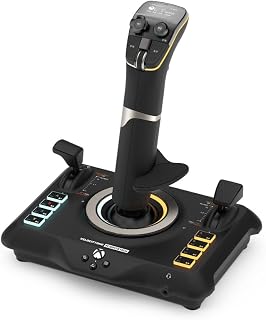
The Turtle Beach VelocityOne Flightstick is a serious flight simulation controller designed for Xbox Series X|S, Xbox One, and Windows PC. It targets dedicated flight sim enthusiasts, competitive pilots in air combat games, and space sim fans who demand precision and customization. This is not a casual controller, but rather a professional-grade input device built to rival dedicated flight sim rigs.
The standout technical features are its Hall-effect non-contact sensors that eliminate stick drift entirely, a problem that plagues traditional potentiometer-based joysticks. Combined with 27 programmable buttons, 8 precision axes, and dual multi-function throttle levers with swappable heads, the VelocityOne gives pilots complete control customization for everything from airliners to fighter jets. The integrated OLED Flight Management Display is a game-changer, allowing real-time adjustments to control profiles, trim sensitivity, rudder lock, and RGB lighting without leaving your cockpit or booting up software.
Build quality feels solid with an ambidextrous design and reversible wrist rest accommodating both left and right-handed pilots equally. The touch sensor pad provides mouse-cursor functionality for navigating complex sim interfaces, while Xbox-licensed navigation buttons ensure seamless console control. At 1.8 pounds with a footprint of 6.46 x 8.54 x 9.07 inches, it demands desk space but stays manageable for most setups.
The main drawback is setup complexity, especially when pairing with optional Rudder Pedals on Xbox, which requires contacting Turtle Beach for a custom USB-C pass-through cable. Additionally, the ecosystem is expensive to fully expand, and with limited review data available, long-term durability remains to be proven by wider user adoption. The $139.99 price also represents a significant investment compared to entry-level alternatives.
Verdict: The VelocityOne Flightstick is an excellent choice for serious flight simulation pilots who want precision, customization, and durability. Its compatibility across Xbox and major PC sims, combined with Hall-effect technology and extensive programmability, justifies the premium price for dedicated enthusiasts. If you fly Microsoft Flight Simulator 2024, Elite Dangerous, DCS World, or similar titles regularly, this controller delivers the immersion and control you need.
Compatibility: Windows 10/11 PC, Xbox One, Xbox Series X|S. Supports Microsoft Flight Simulator 2020/2024, Elite Dangerous, DCS World, X-Plane 11/12, War Thunder, Star Citizen, Ace Combat, and others.
Controls: 27 programmable buttons, 8 high-precision Hall-effect axes, 8-way digital POV hat, rapid-fire trigger, nano trim wheel, analog POV hat, multi-function throttle and flap levers with precision detents, touchpad navigation sensor.
Display: Integrated OLED Flight Management Display with rotary configuration dial and click-to-select interface. On-board memory stores all settings and profiles in real-time.
Connectivity: USB-C with 10-foot cable (USB-A to USB-C included). Integrated input mode switch for Xbox/PC selection. Bluetooth app available for iOS and Android.
Design: Ambidextrous with reversible wrist rest. Adjustable RGB LED lighting across multiple zones. Dimensions: 6.46 x 8.54 x 9.07 inches. Weight: 1.8 pounds. Color: Black.
Warranty: 1-year limited manufacturer warranty. Manufacturer: Turtle Beach. Model: TBS-0722-05.

Pros
- Exceptional precision and smooth, responsive movement across all axes
- Extensive programmable controls with 18 buttons enable complex aircraft systems management
- Premium build quality and ergonomic design feel substantial and durable
- Works seamlessly across both PC and Mac platforms
- Realistic stick behavior without center detent provides authentic control feel
Cons
- Durability concerns reported in some reviews, particularly with trigger button longevity
- Requires manual control mapping for X-Plane, though MSFS comes pre-configured
- Larger size may require dedicated desk space for comfortable operation
The Honeycomb Foxtrot Aviation Stick is a premium flight control device designed specifically for PC and Mac users who demand authentic stick-controlled aircraft simulation. Built for enthusiasts flying demanding titles like X-Plane and Microsoft Flight Simulator, this controller brings genuine stick-based flight dynamics to the home cockpit.
The standout feature is its 16-bit Hall effect sensor technology paired with a premium gimbal mechanism that delivers exceptional precision without dead zones. The linear resistance system with no center detent authentically recreates the feel of real aircraft sticks, while the extensive programmable control layout (18 buttons total) enables management of complex flight systems. Users consistently praise the smooth, responsive movement and realistic control feel across all flight regimes.
Build quality impresses most users, with the stick feeling substantially constructed and ergonomic during extended sessions. The larger-than-expected physical size translates to a premium feel that justifies the investment for serious sim pilots. Compatibility with both PC and Mac platforms expands its appeal, and the pre-mapped control scheme for Microsoft Flight Simulator makes setup straightforward.
The primary concern involves durability, with isolated reports of button failures after extended use. Additionally, X-Plane requires manual control configuration rather than plug-and-play setup, though this is standard practice in the flight simulation community and part of the platform experience.
For dedicated flight simulation enthusiasts seeking a mid-range controller that delivers authentic stick dynamics, extensive control options, and professional build quality, the Honeycomb Foxtrot represents excellent value. Casual users may find the control complexity unnecessary, but serious virtual pilots will appreciate the precision and versatility this stick provides.
Connectivity: USB wired connection for reliable, lag-free control.
Compatibility: PC and Mac platforms supporting standard joystick drivers.
Control Layout: 18 programmable buttons including 1 POV hat switch, 4 action buttons, 2 rocker switches, trigger, left/right twist axes, plus dedicated 3-way, 4-way, and 5-way switches with rotary encoders.
Sensor Technology: 16-bit Hall effect sensors for precision without mechanical wear.
Resistance: Adjustable linear tension with no center detent for authentic stick behavior.
Physical Dimensions: 8 x 5 x 10 inches, weight 1600g (3.5 lbs).
Power: Corded electric via USB, no batteries required.
Warranty: Manufacturer warranty included.
Is this stick right for you? The Honeycomb Foxtrot targets serious flight simulation enthusiasts rather than casual gamers. If you fly X-Plane, MSFS, or similar high-fidelity simulators and value authentic stick-based control, this controller delivers the precision and versatility required.
Who should buy: Flight sim enthusiasts using X-Plane 11/12 or Microsoft Flight Simulator, aerobatics enthusiasts, and users seeking stick-controlled aircraft realism. Works on both PC and Mac setups.
Who might skip it: Casual flight gamers who prefer arcade-style experiences, users with limited desk space for a larger controller, or those seeking a budget entry-level option.
Setup expectations: PC and Mac compatibility is straightforward. MSFS users get pre-mapped controls, while X-Plane requires manual configuration of switches and buttons. Plan 30-60 minutes for initial setup and calibration in X-Plane, but the extensive customization options reward this effort with precise aircraft-specific control schemes.
Quality assurance: Most users report solid build quality, though isolated durability concerns exist. Purchase from retailers offering return policies and consider extended coverage if available.

Pros
- Unmatched precision with 16-bit non-contact hall-effect sensors and adjustable deadzone control
- Extensive customization via 4-spring system, response curves, and 189 total programmable controls
- Dual mini analog sticks and dual throttle handles deliver professional-grade control surface options
- Proven reliability with engineering refinements addressing community feedback in the updated model
- Excellent value compared to higher-end professional flight control systems
Cons
- Plastic construction may feel less premium than metal alternatives, and throttle can have slight play between halves
- Throttle requires direct USB connection to PC or powered hub to avoid ghost inputs and interference
- Learning curve with 24 buttons plus mini stick controls, and adjustable spring stiffness range could be wider
The Logitech G X56 is a dual-throttle HOTAS system engineered for serious flight simulation pilots who demand accuracy, customization, and extensive control mapping. This system shines for players of Elite Dangerous, Star Citizen, DCS World, and other complex flight sims, as well as VR enthusiasts seeking precision controls outside the cockpit view. The updated model addresses past reliability concerns and delivers a mature platform backed by Logitech support.
The standout feature is the 16-bit hall-effect sensor joystick, which ranks among the most accurate consumer flight controls available. Paired with dual mini analog sticks for true 6 degrees of freedom, a 4-spring adjustment system, and fully customizable response curves and deadzones, the X56 lets you dial in control feel to match your aircraft type and flying style. With 189 programmable controls across the stick, throttle, and ancillary buttons, even complex modern sims leave headroom for secondary control modes.
Design-wise, the X56 uses plastic throughout rather than metal, which some users find acceptable given the price point but others view as a drawback compared to premium offerings. The ergonomic layout places controls naturally under your fingers, though users with small hands may struggle reaching all hat switches and buttons. The dual throttle handles with friction adjustment and throttle lock deliver authentic flight dynamics, though the throttle requires a direct USB connection to avoid ghost inputs if plugged into a shared hub.
Real-world performance generally matches the marketing claims. The joystick responds smoothly with minimal lag, and the extensive programmability means you can build setups that rival systems costing hundreds more. However, some users report the throttle stiffness adjustment range feels limited between easy and hard settings, and a few note minor tolerances in throttle construction.
Verdict: The X56 is a powerful choice for sim pilots who prioritize precision, customization, and value over luxury materials. Best suited for players willing to spend time mapping controls and fine-tuning spring settings in exchange for professional-grade performance at a mid-tier price.
This HOTAS is ideal for Elite Dangerous pilots who want full control mapping across multiple ships and modes, DCS World enthusiasts seeking precision combat controls, and VR flight sim players who need responsive input without removing headsets.
The X56 also suits competitive space sim players in Star Citizen and X4, as well as sim racing enthusiasts stepping into flight controls. It is NOT recommended for casual arcade flight gamers or players with severely limited desk space, and may frustrate users unwilling to invest time in control customization and driver setup.
If you already own a mid-tier HOTAS and are satisfied, the jump to X56 is incremental. If you are upgrading from a basic controller or 20-year-old Saitek, the difference will be dramatic.
The X56 requires Logitech G Hub software to access full programmability, RGB lighting controls, and response curve adjustments. Download is required and the software is generally reliable, though some users report occasional reconnection issues if the throttle is connected to an unpowered hub.
Key setup note: connect the throttle directly to a USB 2.0 port on your PC or a powered hub with sufficient current draw. Shared, unpowered hubs cause ghost inputs and erratic throttle behavior. The stick can tolerate hub connection more gracefully, but direct connection is recommended for best results.
Compatibility spans Windows 7 through Windows 11, and the system works flawlessly with all major flight sims including VR titles through SteamVR.
Flight Stick Buying Guide
Sensor Technology and Precision
The single biggest factor separating a great flight stick from a frustrating one is the sensor system under the hood. Potentiometer-based sticks drift and degrade over time, while Hall Effect magnetic sensors, like the H.E.A.R.T. system found in the Thrustmaster T16000M FCS and the Thrustmaster HOTAS Warthog A-10C replica metal, deliver consistent 16-bit resolution with zero wear.
If you plan to log hundreds of hours in the sim, prioritize Hall Effect sensors. They ensure your subtle stick inputs translate faithfully every single session, whether you are threading a canyon or nailing a crosswind landing.
HOTAS vs. Standalone Joystick
A standalone joystick handles pitch, roll, yaw, and a built-in throttle axis, making it ideal for beginners or pilots with limited desk space. The Thrustmaster TCA Sidestick Airbus Edition Flight and the Thrustmaster T16000M FCS are great examples of compact, full-featured options that do not demand a dedicated cockpit corner.
A full HOTAS setup, like the logitech G X56 H.O.T.A.S Throttle and Joystick or the Thrustmaster Sol-R4 HOTAS Space Combat Flight, pairs a joystick with a separate throttle unit for a dramatically more immersive experience. You get independent control of both hands, which is especially valuable in complex combat or multi-engine scenarios. For serious sim enthusiasts, a complete HOTAS rig is worth exploring alongside top picks for esports fans when building out a full gaming station.
Compatibility: PC, Xbox, or Both
Not every flight stick works across all platforms. Most options here are PC-only via USB, but a few stand out for cross-platform use. The Thrustmaster T-Flight Hotas One Flight Stick and the Turtle Beach VelocityOne Flightstick Universal Sim are officially compatible with Xbox Series X|S alongside Windows PCs, making them smart picks if you switch between console and desktop.
Always confirm compatibility with your specific sim software before buying. Titles like DCS World, Microsoft Flight Simulator, and Elite Dangerous each have their own controller support quirks, and some sticks come with manufacturer software to help you remap axes and buttons to suit any game.
Build Quality and Ergonomics
All-metal construction, like the detachable metal handle on the Thrustmaster HOTAS Warthog A-10C replica metal, provides a premium weighted feel that stays planted during aggressive maneuvers. It also tends to last significantly longer than plastic alternatives under heavy use.
Ergonomics matter just as much as materials. The Thrustmaster T16000M FCS features a fully ambidextrous design with swappable components for left- and right-handed pilots, while the Honeycomb Foxtrot Aviation Stick uses a linear resistance system with no center detent, which is specifically tuned for Airbus-style and aerobatic flying. Think about how long your average sim session runs and choose a grip shape that will feel comfortable throughout. If you are putting together a full gaming peripheral setup, our keyboard and mouse deals guide is worth a look too.
Final Thoughts
There is a strong option at every level in this lineup, from approachable entry points to serious professional-grade rigs. For most sim pilots wanting a reliable all-rounder with proven sensor accuracy and broad game compatibility, the Thrustmaster T16000M FCS is a standout choice, while those ready to invest in a full immersive HOTAS experience will find the Thrustmaster HOTAS Warthog A-10C replica metal in a class of its own for authentic military-sim realism.
Frequently Asked Questions
What is the best flight stick for beginners in 2026?
The Thrustmaster T-Flight Hotas X USB Flight Sim Stick is a popular starting point thanks to its plug-and-play setup and detachable throttle. It requires no complex configuration and covers all the basics you need to get airborne. As your skills grow, you can always upgrade to a more advanced HOTAS system.
Do I need rudder pedals with a flight stick?
Not necessarily. Many flight sticks, including the Thrustmaster T16000M FCS, have a built-in twist rudder axis so you can handle yaw without separate pedals. That said, dedicated rudder pedals like those bundled with the logitech G X56 H.O.T.A.S Throttle and Joystick offer a more realistic and precise feel for serious sim pilots. It depends on how deep into the hobby you want to go.
Is a HOTAS setup worth it for Microsoft Flight Simulator?
Absolutely, especially if you are flying commercial airliners or enjoying long-haul routes. A full HOTAS like the Thrustmaster Sol-R4 HOTAS Space Combat Flight or the Logitech G X56 H.O.T.A.S Throttle and Joystick gives you dedicated throttle control and a far more immersive cockpit feel. The jump in immersion from a gamepad to a proper HOTAS is immediately noticeable. You might also find a full sim rig pairs well with gear covered in our guide to gifts for tech lovers.
What should I look for in a flight stick for space sims like Elite Dangerous or Star Citizen?
Space sims benefit from high button counts and a mini analog stick for fine thruster control. The Thrustmaster Sol-R4 HOTAS Space Combat Flight was practically designed for this use case, with 58 programmable buttons and a feature-packed ambidextrous grip. The logitech G X56 H.O.T.A.S Throttle and Joystick is another strong option, with its mini analog stick surfaces covering pitch, roll, yaw, and gimballed weapon control independently from your main stick axes.




Write Your Review
No reviews yet. Be the first to share your experience!