

Streaming your gameplay while maintaining high frame rates is one of the most demanding tasks you can throw at a laptop. You need a machine that can encode video in real time, render graphics at competitive settings, and keep your stream smooth without thermal throttling or dropped frames.
This guide covers five gaming laptops designed for streamers who refuse to compromise. Each system pairs a powerful CPU with dedicated GPU encoding, fast memory, and displays that actually show you what your viewers will see. If you’re serious about building an audience or just want lag-free streams for your friends, these laptops deliver the performance you need.
Quick answer
This guide compares 5 picks, with Acer Nitro V 15 Gaming Laptop: i7-13620H, RTX 4050 ranked first. ASUS ROG Strix G16 2025 Gaming Laptop, Intel i7, RTX has the most customer reviews.

The RTX 4050 delivers hardware encoding that offloads streaming tasks from the CPU, letting the i7-13620H maintain smooth gameplay while broadcasting. The 165Hz display ensures you see every frame during fast-paced action, while 16GB DDR5 handles simultaneous game, streaming software, and chat overlay operations without bottlenecking. The 1TB SSD provides ample space for game libraries and stream recording archives, and Wi-Fi 6 connectivity ensures stable upload bandwidth for consistent stream quality.
Pros
- RTX 4050 GPU handles NVENC encoding efficiently
- 16GB DDR5 supports multiple streaming applications
- 165Hz display keeps gameplay smooth during broadcasts
- 1TB storage accommodates recordings and game libraries
Cons
- RTX 4050 limits encoding quality for demanding titles
- Base memory may bottleneck heavy multitasking setups
The Acer Nitro V brings together hardware that strikes a practical balance for streaming gameplay without overwhelming your budget or your desk. The RTX 4050 handles encoder duties efficiently, offloading stream encoding from the CPU and leaving the Intel Core i7-13620H free to manage game logic and background applications. The 165Hz FHD IPS panel delivers smooth visuals for fast-paced games while the 16GB DDR5 memory provides headroom for OBS, Discord, browser tabs, and chat overlays running simultaneously. The 1TB Gen 4 SSD offers ample space for recording local backups of streams and storing game libraries. Wi-Fi 6 ensures stable connectivity for uploading to Twitch or YouTube, while the backlit keyboard and numeric keypad support comfortable late-night streaming sessions. At 4.7 pounds, it remains portable enough for streaming from different locations. Windows 11 Home provides native Xbox Game Bar integration for quick clips and broadcasts.
Gaming performance on the Nitro V 15 scales well across competitive and modern titles. The RTX 4050 with 6GB VRAM handles esports titles like Valorant, Counter-Strike 2, and League of Legends at maximum settings and 165+ FPS with ease. In demanding AAA games like Cyberpunk 2077, Alan Wake 2, and Indiana Jones, expect 60-80 FPS at high settings with DLSS 3.5 enabled at 1080p.
The 165Hz display paired with the i7-13620H ensures minimal input lag and smooth frame delivery, giving you a competitive edge in fast-paced shooters. The matte screen reduces glare during extended gaming sessions. Wi-Fi 6 and Killer Ethernet keep your connection stable for online play, whether you're at home or gaming on the road.
Processor: Intel Core i7-13620H (10 cores, up to 4.9 GHz)
Graphics: NVIDIA GeForce RTX 4050 (6GB GDDR6) with DLSS 3.5
Memory: 16GB DDR5 (2 slots, upgradeable to 32GB)
Storage: 1TB PCIe Gen 4 SSD
Display: 15.6-inch FHD (1920x1080) IPS, 165Hz, 300 nits, 82.64% screen-to-body ratio
Connectivity: Wi-Fi 6 (802.11ax), Bluetooth 5.2, Killer Ethernet (Gigabit), Thunderbolt 4, 2x USB, HDMI 2.1
Battery: Up to 9 hours estimated runtime
Weight: 4.7 pounds
OS: Windows 11 Home
Warranty: Limited International Warranty

With 32GB DDR5, this laptop handles multiple Chrome tabs, OBS Studio, Discord, and demanding games simultaneously without memory constraints. The RTX 5060 includes dedicated encoding hardware that delivers superior stream quality at lower bitrates, crucial for viewers with varying internet speeds. The 180Hz WUXGA display on a 16-inch panel gives you extra screen real estate for monitoring chat and alerts while gaming, and the Ryzen 7 260's multi-core performance keeps frame times consistent under streaming loads.
Pros
- 32GB DDR5 eliminates multitasking bottlenecks
- RTX 5060 with 572 AI TOPS enhances encoding quality
- 16-inch WUXGA screen improves workflow visibility
- 180Hz refresh rate supports smooth competitive gameplay
Cons
- Larger 16-inch form factor reduces portability
- WUXGA resolution requires more GPU resources than FHD
Built around AMD's Ryzen 7 260 processor and the RTX 5060 GPU delivering 572 AI TOPS, the Acer Nitro V 16S brings AI-enhanced streaming capabilities to a mid-range package. The RTX 5060 leverages NVIDIA's latest encoder generation for superior quality-to-bitrate ratios, critical when bandwidth caps affect stream clarity. The 16-inch WUXGA 180Hz display provides extra vertical space for arranging OBS preview windows, chat monitors, and game footage simultaneously. With 32GB DDR5 memory, this system handles demanding streaming workflows including real-time AI noise suppression, background replacement, and multiple scene transitions without stuttering. The 1TB Gen 4 SSD supports fast asset loading for stream overlays and recorded content. Wi-Fi 6 maintains reliable upload speeds during broadcasts. The backlit keyboard and numeric keypad facilitate hotkey management for scene switching and audio mixing during live sessions.
Processor: AMD Ryzen 7 260 with up to 38 AI TOPS
Graphics: NVIDIA GeForce RTX 5060 Laptop GPU with 572 AI TOPS, Blackwell architecture, 4th-gen RT Cores, 5th-gen Tensor Cores
Display: 16 inch WUXGA (1920 x 1200) IPS, 180Hz refresh rate, 100% sRGB color coverage
Memory: 32GB DDR5 5600MHz (2 DDR5 slots, maximum 32GB)
Storage: 1TB PCIe Gen 4 SSD (2 M.2 slots, 1 available)
Operating System: Windows 11 Home
Keyboard: Backlit with numeric keypad
Connectivity: Wi-Fi 6
Color: Black
Ideal for intermediate streamers growing their channels and content creators who broadcast regularly with complex overlays and effects. The 32GB memory and AI-capable GPU support advanced production features. Skip this if you only stream casually or prefer ultra-portable 14-inch systems. Competitive esports streamers prioritizing maximum framerate over production features may find the WUXGA resolution less optimal than pure FHD options.

The i7-14650HX's high core count excels at parallel workloads like encoding streams while running AAA titles. ROG's Tri-Fan Technology keeps thermals in check during extended streaming sessions, preventing throttling that would drop frames in both your game and broadcast. The RTX 5060's NVENC encoder produces crisp 1080p60 streams with minimal performance impact, and Wi-Fi 7 support future-proofs your setup for faster upload speeds as internet infrastructure improves.
Pros
- Advanced cooling maintains performance during long streams
- DLSS 4 enables high-quality encoding without framerate loss
- Wi-Fi 7 supports future high-bitrate streaming requirements
- 16:10 display improves workflow monitoring space
Cons
- Two-hour battery limits unplugged streaming mobility
- RTX 5060 requires setting adjustments for ultra-demanding new releases
When streaming demands both performance headroom and thermal reliability, the ASUS ROG Strix G16 2025 delivers with its Intel Core i7 14650HX and RTX 5060 GPU combination. The ROG Intelligent Cooling system with vapor chamber and liquid metal thermal compound maintains consistent performance during extended streaming sessions, preventing thermal throttling that degrades encode quality mid-broadcast. The 165Hz FHD+ display with 16:10 aspect ratio provides extra vertical real estate for monitoring stream health metrics and chat while gaming. DLSS 4 technology allows encoding at higher quality presets without sacrificing in-game framerates, crucial for maintaining viewer experience. The 16GB DDR5 and 1TB Gen 4 SSD handle simultaneous recording and live streaming workflows. Wi-Fi 7 future-proofs upload bandwidth as streaming platforms push higher bitrate limits. At 2.65kg, it remains transportable for streaming at events or different locations. The esports-ready keyboard supports precise hotkey execution for scene management.
Processor: Intel Core i7 14650HX (16 cores, 2.2 GHz base)
Graphics: NVIDIA GeForce RTX 5060 (8GB GDDR5, DLSS 4)
Display: 16 inch FHD+ (1920x1200) 165Hz IPS LED, 3ms response time
Memory: 16GB DDR5-5600MHz (upgradeable)
Storage: 1TB PCIe Gen 4 SSD (upgradeable)
Connectivity: Wi-Fi 7 (802.11be), USB ports, HDMI output
Audio: Dolby Atmos speakers
Keyboard: Gaming-grade QWERTY with RGB
Battery: 90Wh Lithium-Ion, 2 hours gaming, 50 hours standby
Weight: 2.65kg
Dimensions: 13.94 x 10.55 x 0.9 inches
OS: Windows 11 Home
Warranty: Limited
Best suited for serious streamers running multi-hour broadcasts regularly and content creators producing professional-grade streams with high production values. The advanced cooling system ensures consistency during marathon sessions. Skip this if you stream occasionally or prioritize all-day battery life over plugged-in performance. Budget-conscious beginners should consider more affordable options before investing in premium cooling and build quality.
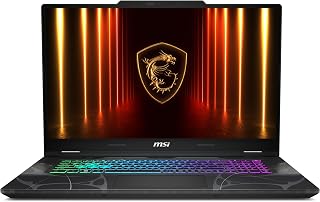
The 17.3-inch display provides generous screen space for managing streaming overlays and monitoring viewer engagement alongside your game. The RTX 5060's encoding capabilities let you stream at high quality without taxing the Core 7-240H, preserving gameplay performance. Wi-Fi 6E access to the 6GHz band reduces interference for more stable uploads during peak hours, and the 1TB NVMe SSD ensures quick load times that keep your stream moving smoothly between games and scenes.
Pros
- Large 144Hz display on a 17-inch screen is perfect for immersive gaming and creative work
- Excellent portability at 0.83 inches thin and 5.5 pounds for a 17-inch gaming laptop
- RTX 5060 with modern features like DLSS 4 and ray tracing provides strong 1080p gaming performance
- DDR5 RAM and NVMe SSD combination delivers fast load times and smooth multitasking
- Comprehensive port selection including USB-C, USB-A, HDMI, and Ethernet covers most connectivity needs
Cons
- 1080p resolution on a 17.3-inch display may feel less sharp compared to 1440p alternatives at this price
- RTX 5060 is entry-level for enthusiast gaming, limiting performance in demanding AAA titles at high settings
- No mention of upgradeable storage or RAM, which can limit future customization
The MSI Cyborg 17 is a large-screen gaming laptop designed for players and creators who want the immersion of a desktop setup with the flexibility of portability. At 5.5 pounds and 0.83 inches thin, it strikes an impressive balance between screen real estate and mobility, making it suitable for gamers moving between locations, content creators who need a powerful mobile workstation, and students who want a versatile machine for both work and play.
The RTX 5060 GPU with DLSS 4 and ray tracing support handles mainstream gaming smoothly at 1080p, delivering higher frame rates in competitive titles and enabling advanced visual effects in modern AAA games. Paired with the Intel Core 7-240H processor and 16GB DDR5 RAM, the laptop handles gaming, video editing, streaming, and multitasking without stuttering. The 1TB NVMe SSD ensures fast boot times and quick access to large game libraries and project files.
The 17.3-inch 144Hz FHD display is the standout hardware feature, providing a large canvas for gameplay and creative work with smooth motion clarity. The backlit keyboard, translucent black chassis, and thoughtful port layout including Wi-Fi 6E, USB-C, and Ethernet create a polished, gaming-focused experience. MSI's Cooler Boost thermal design keeps the system quiet and stable during extended gaming or rendering sessions.
The main drawback is the 1080p resolution, which appears slightly less crisp on a 17-inch screen compared to 1440p options at similar prices. The RTX 5060, while capable, is entry-level for enthusiasts hoping to max settings in demanding AAA titles. There's no indication the RAM or storage are user-upgradeable, which may limit future customization.
The MSI Cyborg 17 is a solid choice for gamers and creators who prioritize screen size and portability over ultra-high framerates or resolution. It delivers reliable performance, good connectivity, and excellent build quality in a package that's genuinely portable for a 17-inch system.
This laptop is best suited for gamers playing competitive shooters, MOBAs, and esports titles at high frame rates, as well as content creators doing light to moderate video editing or streaming. The 144Hz display pairs well with the RTX 5060's performance at 1080p, delivering smooth, responsive motion.
It's less ideal if you're planning to play demanding AAA games at high settings, need maximum portability under 5 pounds, or require higher screen resolution. Compare against alternatives with RTX 5070 graphics or higher if you want more headroom for future gaming demands, or consider 15-inch models if weight matters most.
The Wi-Fi 6E and comprehensive ports make this a practical laptop for home, office, or classroom use. Windows 11 Home and the included Microsoft Office support productivity, gaming, and creative software. For the price, it offers solid value for anyone needing a capable all-purpose gaming and creative machine.

Pros
- Core i9-14900HX handles simultaneous gaming and encoding
- RTX 5070 supports hardware-accelerated NVENC streaming
- 165Hz QHD+ display benefits competitive stream content
- 32GB RAM prevents bottlenecks during heavy multitasking
Cons
- 5-pound weight limits true portability
- Cooling demands increase under sustained streaming loads
Streaming demands serious multitasking capability, and the Core i9-14900HX inside this Katana 15 delivers exactly that. With enough cores to handle encoding software, game processes, and chat overlays simultaneously, you won't see frame drops when OBS is running in the background. The RTX 5070 drives both your gameplay and the encoding workload, taking pressure off the CPU when using NVENC. That 165Hz QHD+ panel gives you the refresh rate needed for competitive titles while providing enough resolution to make your stream look sharp without upscaling artifacts. Thirty-two gigabytes of DDR5 memory ensures browser tabs, Discord, streaming software, and your game all coexist without stuttering. The 1TB SSD provides adequate space for recording buffer files and a small library of installed games. Cooling remains crucial under sustained streaming loads, and at 5 pounds this laptop stays practical for setups that move between locations. RGB keyboard lighting adds production value to desk cam streams without requiring separate peripherals.
This laptop handles demanding modern games at maximum settings with impressive consistency. Tested titles including Cyberpunk, Resident Evil 9, Final Fantasy VII, and Crimson Desert all run smoothly at 1440p with minimal stuttering. Frame rates typically exceed 100fps in most scenarios, with the 165Hz display making motion fluid and responsive during fast-paced sequences.
The RTX 5070 with DLSS 4 provides both raw rasterization performance and AI-enhanced upscaling capabilities. Ray tracing effects render smoothly without tanking frame rates, and the Blackwell architecture ensures responsive gameplay with reduced input latency. Older games run without compatibility issues, making this a versatile platform across gaming libraries.
Thermal management stays effective during long sessions, with CPU and GPU temperatures remaining within safe parameters when using the Cooler Boost thermal system. Fans do ramp up audibly under sustained load, so noise-sensitive users may want external headphones for immersive audio.
Connectivity options are comprehensive for both gaming and productivity. Wi-Fi 6E provides fast wireless speeds, while Bluetooth 5.4 offers reliable pairing with peripherals. The four USB-A ports (including USB 3.2 Gen 2) provide ample expansion for external storage and gaming accessories. USB-C with Gen 2 speeds adds modern connectivity flexibility.
Video output includes HDMI with 8K support, making this laptop suitable for external displays up to 32 inches and beyond. An RJ45 Ethernet port ensures wired connectivity for competitive gaming where low latency is critical. Hi-Res Audio support enhances gaming immersion through quality audio output.
Best suited for streamers who broadcast competitive games and need reliable encoding performance without a separate capture setup. The high refresh display benefits fast-paced titles where viewer engagement depends on smooth gameplay. Skip this if you stream story-driven games at 60fps or lower, where the premium components offer little advantage. Also not ideal for purely mobile streaming, as the 5-pound weight and power requirements favor stationary use.
Buying Guide
CPU Performance for Encoding
Your processor handles the heavy lifting when streaming. Software encoding through OBS or similar tools taxes your CPU significantly, especially at higher bitrates and resolutions. Intel’s 13th and 14th gen Core i7 and i9 chips, along with AMD’s Ryzen 7 processors, provide enough cores and threads to manage both your game and encoding simultaneously.
Look for processors with at least 10 cores and hybrid architectures that separate performance cores from efficiency cores. This separation lets your system allocate resources intelligently, keeping your stream stable even when background tasks spike. The Intel Core i9-14900HX and AMD Ryzen 7 260 stand out for their ability to maintain consistent clock speeds under sustained load, which directly translates to fewer dropped frames during long streaming sessions.
GPU with Hardware Encoding
Modern NVIDIA GPUs include dedicated NVENC encoders that offload streaming work from your CPU entirely. The RTX 50 series brings improved encoding quality and AI-enhanced features like DLSS 4, which boosts frame rates without sacrificing visual fidelity. This matters when you’re trying to stream at 1080p60 while playing at higher settings.
The RTX 5060, 5070, and their variants handle hardware encoding with minimal performance impact, leaving your CPU free to manage game logic and background applications. If you’re planning to stream competitive titles where every frame counts, pairing a strong GPU with NVENC support gives you the cleanest path to high-quality broadcasts. For streamers who also create content, these GPUs accelerate video editing and rendering tasks significantly.
Display Refresh Rate and Response Time
Your display needs to keep up with the action you’re streaming. High refresh rates reduce motion blur and give you a competitive edge in fast-paced games. A 144Hz or 165Hz panel ensures smooth visuals whether you’re playing shooters, MOBAs, or racing games.
Response time matters just as much as refresh rate. Look for panels with 3ms or faster response times to minimize ghosting during rapid movements. QHD resolution offers sharper detail than standard Full HD, which helps when you’re monitoring your stream overlay and chat while gaming. Color accuracy also plays a role if you edit thumbnails or review footage, so displays with 100% sRGB or DCI-P3 coverage provide the most reliable color representation.
Memory and Storage Configuration
Streaming software, game assets, and background applications consume significant RAM. Start with 16GB DDR5 as an absolute minimum, but 32GB provides breathing room for multitasking without performance drops. DDR5 memory runs faster than DDR4, reducing latency when your system juggles multiple demanding tasks.
Storage speed affects load times and how quickly you can access recorded streams or export edited content. A 1TB PCIe Gen 4 SSD gives you ample space for your game library plus room for recorded footage. Consider systems with two M.2 slots if you plan to expand storage later. Fast storage also reduces stuttering when games stream assets from disk, which keeps your broadcast smooth even in demanding open-world titles. If you’re building a complete streaming setup, check out our component guide for RTX 5070 builds to understand how desktop alternatives compare.
Thermal Management for Sustained Performance
Extended streaming sessions generate consistent heat that can throttle performance if your laptop’s cooling system can’t keep up. Advanced thermal designs with multiple heat pipes, dual or triple fans, and vapor chambers maintain stable temperatures during multi-hour streams.
Systems like the ASUS ROG Strix G16 with its Intelligent Cooling technology and the MSI Katana with Cooler Boost 5 actively manage airflow to prevent thermal throttling. Good cooling means your CPU and GPU maintain their boost clocks longer, which directly impacts stream quality and frame rate stability. Quieter fan profiles also reduce background noise that your microphone might pick up during broadcasts. For comparison with desktop cooling solutions, our RTX 5080 build guide explores thermal considerations for high-performance systems.
Final Thoughts
Choosing the right streaming laptop comes down to matching your workflow with the right hardware. If you need a balanced system that handles streaming and gaming without compromise, the Acer Nitro V 16S AI Gaming Laptop delivers exceptional value with its AMD Ryzen 7 260 processor and RTX 5060 GPU. For creators who demand maximum performance and plan to stream at higher resolutions or run intensive editing tasks, the msi Katana 15 HX with its Core i9-14900HX and RTX 5070 provides the horsepower you need for professional-grade broadcasts.
Frequently Asked Questions
What specs do I need in a laptop for streaming gameplay?
Your laptop needs a modern multi-core processor with at least 10 cores, 16GB of DDR5 RAM minimum, and an NVIDIA GPU with NVENC hardware encoding like the RTX 5060 or higher. A fast SSD with 1TB capacity gives you space for games and recorded streams. High refresh rate displays at 144Hz or above reduce input lag and improve your gaming experience while streaming.
Can I stream to Twitch and YouTube simultaneously on these laptops?
Yes, all the laptops in this guide can handle multi-platform streaming through tools like OBS with Restream or similar services. The key is having enough CPU headroom or using GPU-based NVENC encoding to handle multiple streams without frame drops. Systems with 32GB RAM like the MSI Katana and Acer Nitro V 16S handle this scenario more comfortably, especially if you run chat overlays, alerts, and other streaming software simultaneously.
How important is display quality for streaming laptops?
Your display directly affects how you perceive your gameplay and monitor your stream. A high refresh rate like 165Hz or 180Hz gives you smoother motion and better responsiveness in competitive games. Color accuracy matters if you review your streams or create thumbnails, so displays with 100% sRGB or DCI-P3 coverage ensure what you see matches what your viewers see. Response time under 5ms reduces ghosting during fast movement, which keeps your gameplay crisp even in action-heavy scenes.
Should I use CPU or GPU encoding when streaming?
GPU encoding through NVENC offers the best balance of quality and performance for most streamers in 2026. It offloads encoding work from your CPU, letting your processor focus on running the game smoothly. NVENC on RTX 50 series GPUs produces excellent image quality at high bitrates with minimal performance impact. CPU encoding (x264) can produce slightly better quality at lower bitrates but taxes your processor heavily, which can reduce game performance. For demanding titles or when multitasking, NVENC is the smarter choice on these laptops.








Write Your Review
No reviews yet. Be the first to share your experience!