

You want a gaming laptop that can actually keep up, whether you’re pushing frames in competitive shooters, streaming your sessions, or jumping between gaming and creative work. The challenge is narrowing down a market flooded with options that all claim to be the best. That’s exactly what this guide is here to solve.
We evaluated five of the strongest contenders available right now, covering a range of processors, GPU tiers, display specs, and build quality. Whether you’re a first-time buyer or upgrading from an older rig, you’ll find a clear recommendation here. For context on how these laptops compare to building a desktop, our RTX 5060 Ti build guide is a useful reference point.
Quick answer
This guide compares 5 picks, with Acer Nitro V 15 Gaming Laptop: i7-13620H, RTX 4050 ranked first.

The RTX 4050 GPU delivers smooth 1080p gaming performance across modern titles, while the 165Hz FHD display ensures fluid visuals during fast-paced gameplay. With 16GB DDR5 RAM and a spacious 1TB Gen 4 SSD, you get enough memory for multitasking and ample storage for your entire game library without compromise.
Pros
- Lightweight at 4.7 pounds for a gaming laptop, making it easy to carry
- 165Hz FHD IPS display delivers smooth 1080p gaming
- Intel Core i7-13620H handles gaming and productivity workloads well
- 1TB Gen 4 SSD provides fast storage with room for multiple game installs
Cons
- 16GB DDR5 is adequate but less competitive than 32GB options at this price tier
- RTX 4050 is a previous-generation GPU compared to newer laptops in this budget range
The i7-13620H is a capable hybrid-architecture processor that handles both gaming loads and background tasks efficiently. The RTX 4050 handles modern titles at 1080p comfortably, and the 165Hz FHD IPS panel means motion stays fluid during fast-paced gameplay. At 16GB DDR5, the memory is solid, though not as generous as some competitors at this tier. The 1TB Gen 4 SSD keeps installs and load times moving quickly. Weighing 4.7 pounds, it sits on the portable end of gaming laptops, making it a reasonable daily carry. Wi-Fi 6 and a backlit keyboard round out a feature set that covers both gaming sessions and student or business use. Windows 11 Home is preinstalled, so setup friction is minimal.
Gaming performance on the Nitro V 15 scales well across competitive and modern titles. The RTX 4050 with 6GB VRAM handles esports titles like Valorant, Counter-Strike 2, and League of Legends at maximum settings and 165+ FPS with ease. In demanding AAA games like Cyberpunk 2077, Alan Wake 2, and Indiana Jones, expect 60-80 FPS at high settings with DLSS 3.5 enabled at 1080p.
The 165Hz display paired with the i7-13620H ensures minimal input lag and smooth frame delivery, giving you a competitive edge in fast-paced shooters. The matte screen reduces glare during extended gaming sessions. Wi-Fi 6 and Killer Ethernet keep your connection stable for online play, whether you're at home or gaming on the road.
Processor: Intel Core i7-13620H (10 cores, up to 4.9 GHz)
Graphics: NVIDIA GeForce RTX 4050 (6GB GDDR6) with DLSS 3.5
Memory: 16GB DDR5 (2 slots, upgradeable to 32GB)
Storage: 1TB PCIe Gen 4 SSD
Display: 15.6-inch FHD (1920x1080) IPS, 165Hz, 300 nits, 82.64% screen-to-body ratio
Connectivity: Wi-Fi 6 (802.11ax), Bluetooth 5.2, Killer Ethernet (Gigabit), Thunderbolt 4, 2x USB, HDMI 2.1
Battery: Up to 9 hours estimated runtime
Weight: 4.7 pounds
OS: Windows 11 Home
Warranty: Limited International Warranty
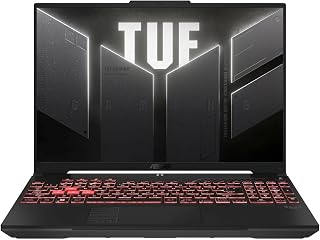
The 16-inch Full HD+ 145Hz display provides extra vertical space for better in-game visibility, paired with an RTX 4050 that handles AAA titles at high settings. The AMD Ryzen 7 7445HS processor offers excellent multi-threaded performance for gaming and content creation, backed by 16GB DDR5 for smooth multitasking.
Pros
- Spill-resistant, durable TUF build quality stands up to everyday wear
- Anti-glare IPS display reduces eye strain during long sessions
- Ryzen 7 7445HS and RTX 4050 deliver solid 1080p gaming performance
- 145Hz refresh rate keeps fast-paced games smooth and responsive
Cons
- 512GB SSD is tight for a gaming library compared to 1TB options at this budget
- At 7 pounds, it is notably heavier than other laptops in this price range
The spill-resistant chassis and anti-glare display coating are practical features for gamers who use their machines in varied environments. Under the hood, the AMD Ryzen 7 7445HS pairs with an RTX 4050 to handle modern games at 1080p, and the 16-inch Full HD+ panel at 145Hz keeps gameplay smooth. The 16GB DDR5 RAM is sufficient for most gaming workloads. Where this model asks for compromise is storage: 512GB is tighter than the 1TB drives found on competing machines at similar price points, so managing your game library will take more attention. At 7 pounds it is one of the heavier options in this roundup, which is worth considering if portability matters. The TUF line's reputation for build quality and the backlit keyboard make it a solid choice for gamers who prioritize longevity over cutting-edge specs.
This laptop handles 1080p gaming well with its RTX 4050 graphics and Ryzen 7 processor combination. Esports titles and older AAA games run smoothly at 144Hz, taking full advantage of the high refresh display. Newer demanding games will require medium settings to maintain smooth frame rates.
The 144Hz refresh rate makes a noticeable difference in fast-paced games, providing smoother motion and more responsive gameplay compared to standard 60Hz laptops. Paired with the 1920x1200 IPS display, the visuals are clear and color accurate. Sustained gaming performance remains stable with adequate cooling system design, though fan noise increases under load.
Gamers who put durability and build quality near the top of their checklist will feel at home with the TUF A16. The spill-resistant design and sturdy chassis suit dorm rooms and shared spaces. Those who need more than 512GB of fast storage without upgrading or those who travel frequently and feel the weight of 7 pounds should weigh alternatives before committing.

This model's 16:10 aspect ratio on a 16-inch FHD+ 144Hz display gives you more screen real estate for immersive gaming sessions. The Intel Core 5 210H processor and RTX 4050 GPU combination handles demanding games efficiently, while 16GB DDR5 ensures responsive performance across gaming and productivity tasks.
Pros
- RTX 4050 handles 1080p gaming at high settings
- 16:10 display ratio adds useful vertical space
- 144Hz refresh rate smooths fast-motion gameplay
- DDR5 RAM and Gen4 SSD provide modern performance
Cons
- 512GB storage fills quickly with large game installs
- Core 5 210H trails higher-tier processors in demanding workloads
Its Intel Core 5 210H processor and RTX 4050 GPU handle modern titles at 1080p with room to spare, while the 144Hz refresh rate keeps motion fluid in competitive shooters and fast-paced action games. The 16:10 aspect ratio FHD+ IPS panel offers extra vertical space compared to standard 16:9 screens, useful when browsing build guides or streaming between matches. With 16GB DDR5 RAM and a 512GB PCIe Gen4 SSD, load times stay reasonable and multitasking remains smooth. The TUF series prioritizes durability over flashy aesthetics, evident in the Mecha Gray finish and military-grade construction standards ASUS applies to this line. Wi-Fi 6 connectivity ensures stable online play, and the backlit keyboard helps during late-night sessions. Windows 11 Home comes pre-installed. This laptop occupies the practical middle ground where performance meets affordability, delivering current-generation components without premium markups or unnecessary extras.
Display: 16 inches, FHD+ (1920x1200), 144Hz, IPS-Level, 16:10 aspect ratio, 100% sRGB color gamut
Processor: Intel Core 5 210H, Multi-core architecture optimized for gaming and productivity
Graphics: NVIDIA GeForce RTX 4050, Max TGP 115W, NVIDIA Advanced Optimus for dynamic GPU switching
Memory: 16GB DDR5 RAM
Storage: 512GB PCIe Gen4 NVMe SSD
Connectivity: Wi-Fi 6, multiple USB ports, audio jacks
Operating System: Windows 11 Home
Design: Mecha Gray, military-grade durability (MIL-STD-810H), backlit keyboard, Arc Flow Fans with 4 exhaust vents
Cooling: 5 dedicated heat pipes, anti-dust filter, optimized for quiet operation
Buy this if you want reliable 1080p gaming performance in a larger screen format without exceeding budget constraints. The 16-inch display and solid build quality appeal to students, casual gamers, and anyone splitting time between work and play. Skip it if you need maximum graphical fidelity at high settings, plan to game at 1440p or beyond, or require more than 512GB storage out of the box. Content creators needing GPU-accelerated workflows may find the RTX 4050 limiting for professional tasks.

With 32GB DDR5 RAM and an RTX 5060 GPU delivering 572 AI TOPS, this laptop tackles both current AAA games and future AI-enhanced titles with ease. The 180Hz WUXGA display on a 16-inch panel provides exceptional smoothness and clarity, while the 1TB SSD ensures you never run out of space for your gaming collection.
Pros
- RTX 5060 Laptop GPU delivers next-gen performance within the budget
- 32GB DDR5 RAM provides generous headroom for gaming and multitasking
- 180Hz WUXGA IPS display pairs well with the GPU for smooth gameplay
- 1TB Gen 4 SSD offers fast load times and ample storage
Cons
- WUXGA resolution tops out at 1920x1200, which may feel limiting for media consumption
- No mention of advanced cooling features beyond standard Nitro V thermal design
The RTX 5060 Laptop GPU brings next-gen graphics muscle to the table, rated at 572 AI TOPS, which positions it well ahead of previous-generation options at this price point. Paired with an AMD Ryzen 7 260 processor and 32GB of DDR5 RAM, multitasking and demanding game workloads have plenty of headroom. The 16-inch WUXGA IPS panel running at 180Hz is a strong match for the GPU, giving you smooth, detailed visuals without needing an external monitor. Storage comes in at 1TB via a Gen 4 SSD, so load times stay snappy and you have room for a solid game library. Wi-Fi 6 keeps online sessions stable, and the backlit keyboard with numeric keypad adds everyday usability.
Processor: AMD Ryzen 7 260 with up to 38 AI TOPS
Graphics: NVIDIA GeForce RTX 5060 Laptop GPU with 572 AI TOPS, Blackwell architecture, 4th-gen RT Cores, 5th-gen Tensor Cores
Display: 16 inch WUXGA (1920 x 1200) IPS, 180Hz refresh rate, 100% sRGB color coverage
Memory: 32GB DDR5 5600MHz (2 DDR5 slots, maximum 32GB)
Storage: 1TB PCIe Gen 4 SSD (2 M.2 slots, 1 available)
Operating System: Windows 11 Home
Keyboard: Backlit with numeric keypad
Connectivity: Wi-Fi 6
Color: Black
The 32GB DDR5 and fast SSD also make it viable for creators who game on the side. Anyone prioritizing a slim, lightweight build should look elsewhere, and those who need a high-resolution display beyond 1080p-class WUXGA may want to consider other options.

The latest RTX 5050 GPU brings current-generation graphics performance to 1080p gaming, complemented by a fast 165Hz display with 3ms response time for competitive advantage. The Intel Core i5 14450HX processor handles gaming workloads efficiently, while Wi-Fi 7 support ensures future-proof connectivity for online multiplayer sessions.
Pros
- 165Hz display with 3ms response suits competitive gaming
- Vapor chamber and tri-fan cooling prevent thermal throttling
- Tool-free upgrade access simplifies storage expansion
- DLSS 4 boosts frame rates in supported titles
Cons
- RTX 5050 struggles at resolutions above 1080p
- 512GB base storage insufficient for large game libraries
The Intel i5 14450HX and RTX 5050 combination targets 1080p esports and AAA gaming at medium to high settings, with DLSS 4 upscaling stretching performance further in supported games. That 165Hz FHD+ panel with 3ms response time and Dolby Vision HDR keeps visuals sharp and responsive, critical when milliseconds matter in ranked matches. The 16:10 aspect ratio delivers more screen real estate than standard laptop displays. Thermal management stands out: vapor chamber cooling with tri-fan exhaust and liquid metal application on the chipset prevents throttling during marathon gaming sessions. The tool-free upgrade latch lets you expand storage or RAM without screwdrivers, and Stealth Mode kills the RGB when you need a professional look. Wi-Fi 7 future-proofs connectivity. Eclipse Gray styling keeps things understated. The customizable RGB light bar syncs with peripherals for those who want it. At this tier, you get current-generation hardware engineered for sustained performance rather than peak specs that thermal-throttle under load.
At 1080p with high settings, the RTX 5050 handles modern titles like Valorant, League of Legends, and Fortnite at well above 100fps, making full use of the 165Hz display. Demanding AAA games like Cyberpunk 2077 or Black Myth Wukong run at 60-80fps on medium settings with DLSS 4 enabled, trading visual fidelity for frame stability.
The MUX Switch provides a 5-10% performance uplift by routing graphics directly from the dedicated GPU, bypassing integrated graphics overhead. Advanced Optimus intelligently switches between iGPU and dGPU based on the task, preserving battery life during lighter work. This dual-mode design is rare at this price point and adds real value for mobile gamers.
Thermal performance is exceptional for the class. The vapor chamber and liquid metal cooling keep sustained frame rates stable without aggressive fan noise that would distract during gameplay or creative work.
Processor: Intel Core i5-14450HX, 10-core, 2.4GHz base, 14th generation
Graphics: NVIDIA GeForce RTX 5050 with 8GB GDDR7 memory, DLSS 4 support
Memory: 16GB DDR5-5600MHz (tool-free upgrade possible)
Storage: 512GB PCIe Gen 4 NVMe SSD (user replaceable)
Display: 16 inch FHD+ (1920x1200), 165Hz refresh rate, anti-glare coating, 300 nits brightness, Dolby Vision HDR
Connectivity: Wi-Fi 7, Bluetooth 5.4, Gigabit Ethernet, HDMI, USB ports
Battery: 90Wh lithium-ion
Build: Eclipse Gray, 13.94" x 1.21" x 1.55", tool-free access panel
OS: Windows 11 Home
Extras: 2 months Xbox Game Pass Premium included, customizable RGB light bar, gaming keyboard, Dolby Atmos audio
Gaming Laptop Buying Guide
GPU Tier and Architecture
The GPU is the single most important component in a gaming laptop. All five picks here feature NVIDIA discrete graphics, ranging from the RTX 4050 up to the newer Blackwell-architecture RTX 5060 and RTX 5050. If you play demanding AAA titles or want ray tracing without heavy compromises, aim for the RTX 5060 found in the higher-end tier.
For esports titles and 1080p gaming, the RTX 4050 paired with DLSS 3.5 delivers excellent performance at a lower cost. The Acer Nitro V Gaming Laptop and the ASUS TUF Gaming A16 Laptop: AMD Ryzen 7 7445HS both land in this category and handle popular titles with ease.
Display Quality and Refresh Rate
Refresh rate directly affects how smooth your gameplay feels. A 144Hz or 165Hz panel makes a noticeable difference over the standard 60Hz screens found on general-purpose laptops. The Acer Nitro V 16S AI Gaming Laptop leads the pack here with a 180Hz WUXGA display and 100% sRGB coverage, making it equally capable for content creation.
If you prefer a larger canvas, the ASUS TUF Gaming F16 Gaming Laptop offers a 16-inch 16:10 FHD+ panel with Adaptive-Sync to eliminate tearing. The taller aspect ratio gives you more vertical screen real estate, which helps in both games and productivity apps.
Processor and Multitasking Performance
Modern gaming laptops are increasingly used for streaming, video editing, and heavy multitasking alongside gaming. The Intel Core i7-13620H in the Acer Nitro V handles this dual-use workload well, while the AMD Ryzen 7 7445HS in the ASUS TUF A16 offers strong multi-threaded performance for creative pipelines. If AI-accelerated tasks are part of your workflow, the Acer Nitro V 16S AI’s Ryzen 7 260 with dedicated AI TOPS is worth a serious look.
For gamers who want a desktop GPU pairing reference, our RTX 5070 Ti build guide and RX 9070 build guide show what top-tier CPU and GPU combinations look like on the desktop side.
Build Quality, Cooling, and Portability
Thermal performance separates a laptop that sustains peak performance from one that throttles under load. The ASUS ROG Strix G16 Gaming Laptop is standout here, featuring an end-to-end vapor chamber, tri-fan cooling, and liquid metal on the chipset. It also ships with a MUX Switch that routes frames directly from the dGPU for a measurable performance uplift.
The ASUS TUF Gaming F16 earns its spot with MIL-STD-810H certification, meaning it has been rigorously assessed to handle real-world wear and harsher environments. If you travel frequently or commute with your laptop, build durability is worth weighing alongside raw specs.
Final Thoughts
This lineup covers the full spectrum of gaming laptop needs, from value-focused performers to future-ready machines with next-gen GPUs. If you want the most balanced all-around package with modern AI features and a top-tier display, the Acer Nitro V 16S AI Gaming Laptop is the clear standout. For buyers who prioritize advanced cooling, premium build quality, and a cutting-edge GPU architecture, the ASUS ROG Strix G16 Gaming Laptop delivers a flagship-level experience that’s hard to match in this price range.
Frequently Asked Questions
What GPU should I look for in a gaming laptop in 2026?
For 1080p and 1200p gaming at high frame rates, an RTX 4050 is a solid entry point that handles most titles without compromise. If you want ray tracing, DLSS 4, and more headroom for future games, the RTX 5060 found in the Acer Nitro V 16S AI represents a meaningful generational jump. The RTX 5050 in the ASUS ROG Strix G16 lands in between, offering Blackwell architecture at a slightly lower power tier.
Is 16GB of RAM enough for gaming laptops?
For most games and general use in 2026, 16GB of DDR5 is sufficient and handles multitasking comfortably. If you plan to run demanding creative applications alongside games, the Acer Nitro V 16S AI ships with 32GB out of the box, which gives you more breathing room. Most of the other laptops in this roundup can be upgraded to 32GB later since they have two RAM slots available.
Should I choose AMD or Intel for a gaming laptop?
Both platforms are competitive in 2026, and the choice often comes down to specific model configurations rather than the platform itself. Intel’s Core i7-13620H and Core i5 14450HX deliver strong single-core performance that benefits certain game engines. AMD’s Ryzen 7 series excels at multi-threaded workloads, which makes a difference if you stream, edit video, or run AI-assisted tools. Check out our gaming headphone guide to complete your setup once you’ve chosen your laptop.
How important is the display refresh rate for gaming laptops?
Refresh rate matters a lot for competitive gaming, where the difference between 144Hz and 60Hz is immediately visible in how smooth motion appears. For story-driven or slower-paced games, the gap is less critical, but you’ll still appreciate the sharper responsiveness. All five laptops in this guide offer at least 144Hz panels, with the Acer Nitro V 16S AI reaching 180Hz for the smoothest experience in the group.








Write Your Review
No reviews yet. Be the first to share your experience!