

Choosing a laptop with an Intel processor means investing in proven performance, widespread software compatibility, and consistent reliability. Whether you need a lightweight machine for daily tasks or a powerful workstation for demanding applications, Intel-based laptops offer configurations that span every use case and budget.
This guide reviews 10 standout Intel laptops in 2026, covering everything from budget-friendly options to premium business machines. We’ll help you understand what separates entry-level processors from high-performance chips and show you which models deliver the best value for specific tasks like content creation, business productivity, and everyday computing.
Quick answer
This guide compares 10 picks, with HP Core i7-1255U 15.6" FHD Laptop | 16GB RAM | 1TB SSD ranked first. Dell Inspiron 15 3530 13th Gen i7 15.6" FHD Touchscreen holds the highest customer rating among them. Lenovo IdeaPad Slim 3 15.6" FHD Laptop, Intel N150, 8GB has the most customer reviews.

The 12th-gen i7-1255U processor reaching 4.7GHz delivers responsive multitasking for business documents and academic research, while the 1TB PCIe SSD provides ample storage for large project files and presentations. The 16GB RAM ensures smooth operation when running multiple productivity applications simultaneously. Intel Iris Xe graphics handle video conferencing and light content creation without stuttering. The spill-resistant keyboard and anti-glare display make this a practical choice for students and professionals working in varied environments.
Pros
- Hardware webcam shutter and mic mute key provide tangible privacy for video calls
- Spill-resistant chassis and lightweight 3.52 lb build suit mobile and campus use
- 1TB PCIe SSD with 16GB DDR4 RAM ensures smooth multitasking for office and academic work
- Full numeric keypad and anti-glare FHD display support extended productivity sessions
Cons
- Battery life averages around 3.5 hours under moderate use, limiting time away from a charger
- 12th-generation Intel architecture trails newer Intel Core Ultra chips in AI and efficiency features
HP's 2026 Intel Core i7 laptop targets business and academic users who want a reliable Intel-powered machine without chasing the latest platform. The i7-1255U is a 10-core 12th-generation chip that boosts to 4.7GHz, and paired with 16GB DDR4 RAM and a 1TB PCIe SSD, it handles multitasking, office suites, and browser-heavy sessions without hesitation. Intel Iris Xe graphics manage everyday display tasks competently. What makes this model notable in the context of Intel laptops is its combination of practical security and durability features: a hardware webcam shutter physically blocks the camera, a mic mute key cuts audio in one press, and the spill-resistant chassis adds real-world resilience for campus or office environments. The full-size keyboard includes a numeric keypad, the anti-glare 15.6-inch FHD display reduces reflection indoors, and Wi-Fi 6 with Bluetooth 5.3 keeps connections fast. At 3.52 lbs and 0.73 inches thick, it travels without effort.
Processor: 12th Gen Intel Core i7-1255U, 10-core, up to 4.7GHz, 12MB L3 cache
Memory: 16GB DDR4-3200 MT/s
Storage: 1TB PCIe SSD
Display: 15.6-inch FHD (1920x1080), anti-glare, 250 nits, 85% screen-to-body ratio
Graphics: Intel Iris Xe Graphics
Connectivity: Wi-Fi 6 (802.11ax), Bluetooth 5.3
Ports: 1 USB-C (5Gbps), 2 USB-A (5Gbps), 1 HDMI 1.4b, 1 headphone/mic combo, 1 AC smart pin
Camera: 720p HD with noise reduction
Audio: HD Audio with stereo speakers
Keyboard: Full-size chiclet with numeric keypad
Battery: 3-cell 41Wh Li-ion polymer
Power: 45W AC adapter
Dimensions: 14.17 in (W) x 9.29 in (D) x 0.73 in (H)
Weight: 3.52 lbs
Operating System: Windows 11 Home
Color: Natural Silver

Pros
- Latest Intel Core Ultra processor with 12 cores handles heavy workloads without compromise
- DDR5 RAM and PCIe SSD combination ensures responsive performance for multitasking workflows
- Touchscreen display adds intuitive navigation while anti-glare coating protects vision during long work hours
- Comprehensive port selection, USB-C with Power Delivery, USB-A, and HDMI supports multiple peripherals
- Windows 11 Pro pre-installed with professional-grade security and domain management capabilities
Cons
- Single review sample size is too small to validate long-term durability and real-world reliability
- Integrated graphics may limit high-end gaming and GPU-intensive creative work compared to dedicated options
- 9-hour battery life is moderate for all-day work, depending on usage intensity and workload
The Dell 15.6-inch FHD Touchscreen Business Laptop represents a strong option for professionals, students, and remote workers seeking a portable workstation. With its Intel Core Ultra 7 255U processor, 16GB DDR5 RAM, and 1TB SSD, this machine delivers the performance needed for everyday productivity tasks, video conferencing, and light creative work without breaking the bank.
The standout feature is the responsive touchscreen display paired with Windows 11 Pro, which modernizes user interaction while maintaining enterprise-grade security. The Intel Ultra 7's 12-core architecture, combining performance and efficiency cores, handles context switching and background tasks smoothly. Wi-Fi 6 connectivity ensures reliable video calls and fast downloads, while the backlit keyboard supports productive work in varied lighting conditions.
Build quality appears solid with a slim 0.75-inch profile and lightweight 3.67 lbs frame, making this laptop genuinely portable for commuting or travel. The comprehensive port selection, including USB-C with Power Delivery and HDMI output, accommodates external displays and peripherals typical in professional environments. The 720p HD camera and dual speakers handle video conferencing adequately for business communication.
The main limitation is that integrated graphics will not satisfy users requiring serious gaming or GPU-intensive video editing, and the 9-hour battery life means you may need to charge during extended workdays depending on your typical power consumption. Additionally, the single customer review limits confidence in long-term durability claims.
This laptop excels as a no-compromise business machine for professionals and students who prioritize portability, responsive performance, and modern features. The combination of current-generation processing power, touchscreen convenience, and professional operating system makes it a practical investment for everyday computing demands.
Processor: Intel Core Ultra 7 255U, 12 cores, 14 threads, 5.2 GHz max turbo, 12MB Smart Cache
Memory: 16GB DDR5 RAM
Storage: 1TB PCIe SSD
Display: 15.6-inch FHD (1920x1080) anti-glare touchscreen, LED backlight
Graphics: Intel Integrated Graphics
Operating System: Windows 11 Pro
Connectivity: Wi-Fi 6 (802.11ax), Bluetooth 5.0
Ports: 1 USB 3.2 Type-C, 1 USB 3.2 Type-A, 1 USB 2.0, 1 HDMI 1.4, 1 audio jack
Battery: 3-Cell 41Wh, up to 9 hours
Keyboard: Backlit, US English, full-size
Webcam: 720p HD integrated
Dimensions: 14.11 x 9.27 x 0.75 inches
Weight: 3.67 lbs
Color: Black
Who Should Buy: This laptop suits professionals who need a balance of performance and portability, students juggling coursework and video calls, remote workers requiring reliable performance for office applications, and anyone seeking a touchscreen laptop for intuitive navigation without premium pricing.
Who Might Want to Look Elsewhere: If you require dedicated graphics for gaming or video rendering, need battery life exceeding 9 hours consistently, or prefer ultraportable devices under 3 pounds, consider alternatives in different categories. Users prioritizing maximum performance over portability may find value in desktop or workstation options.
Value Proposition: At this price point, the combination of current-generation processor, touchscreen display, DDR5 RAM, and Windows 11 Pro delivers strong value. The Intel Core Ultra 7 represents the latest mobile processing technology, ensuring your investment remains viable for several years of typical productivity work and content consumption.

The Intel 12-core Ultra 7 255U processor clocking up to 5.2GHz delivers exceptional speed for intensive business applications and data analysis. Its 16GB DDR5 RAM and 1TB SSD ensure smooth operation even with multiple demanding programs running simultaneously. The AI Copilot key and touchscreen interface modernize the user experience, while Wi-Fi 6 and Windows 11 Pro cater to professionals needing robust connectivity and security.
Pros
- Intel Core Ultra 7 255U with 12 cores and AI acceleration for modern workloads
- 16GB DDR5 RAM and 1TB NVMe SSD deliver fast, responsive multitasking
- 15.6-inch FHD touchscreen with anti-glare coating adds workflow flexibility
- Windows 11 Pro with AI Copilot key and Wi-Fi 6 for business-ready connectivity
Cons
- No dedicated GPU makes it unsuitable for gaming or advanced video editing
- 220-nit brightness can feel dim in bright outdoor or high-ambient-light settings
The Dell 15 LD15260 earns its place on this Intel laptop list by pairing the Intel Core Ultra 7 255U, a 12-core chip capable of reaching 5.2GHz, with genuine AI acceleration built into the silicon. That combination makes it one of the more forward-looking picks here, especially for professionals managing cloud applications, video calls, and document-heavy workflows simultaneously. The 16GB DDR5 memory and 1TB PCIe NVMe SSD keep everything moving quickly between tasks. A 15.6-inch Full HD touchscreen with an anti-glare WVA panel adds an interaction layer most Intel laptops at this tier skip entirely. Windows 11 Pro and a dedicated AI Copilot key deepen the integration with Intel's AI platform. The Carbon Black chassis weighs 4.28 lbs and includes Wi-Fi 6, HDMI, multiple USB ports, and a backlit keyboard, covering the practical needs of a mobile professional without unnecessary bulk. Integrated Intel Graphics handle everyday display tasks, though GPU-intensive work is off the table.
Processor: Intel Core Ultra 7 255U, 12 cores, 14 threads, up to 5.2 GHz, 12 MB Smart Cache with AI acceleration
Memory and Storage: 16GB DDR5 5600MT/s RAM, 1TB PCIe NVMe SSD
Display: 15.6-inch Full HD (1920 x 1080), IPS/WVA anti-glare touchscreen, 60Hz refresh rate, 220 nits brightness
Graphics: Intel integrated graphics
Operating System: Windows 11 Pro with AI Copilot key
Connectivity: Wi-Fi 6 (802.11ax), Bluetooth, 3x USB ports (1x USB 3.2 Gen 1, 1x USB 3.2 Gen 2, 1x USB 2.0), HDMI 1.4, 3.5mm headset jack
Input and Audio: Backlit US keyboard, capacitive touchpad, 720p HD webcam with built-in microphone
Battery and Power: 3-cell 41Wh integrated battery, 65W AC adapter
Design: Carbon Black finish, 14.11" W x 9.27" D x 0.75" H, 4.28 lbs
Best suited for business professionals, remote workers, and students who want an Intel AI-era processor, a touchscreen, and Windows 11 Pro in one package. The numeric keypad is absent, so heavy spreadsheet users may prefer another pick on this list. Anyone needing dedicated graphics for video editing or gaming should look elsewhere, and users who frequently work outdoors may find the 220-nit brightness limiting.

Pros
- Exceptional processing power and RAM make it suitable for professional workflows and creative tasks
- Bright 16-inch display with crisp IPS panel ideal for video conferencing and extended work sessions
- Enterprise-ready security features including Windows 11 Pro and biometric login
- Premium build quality with spill-resistant keyboard and business-class durability
- Comprehensive connectivity with Thunderbolt 4, USB-C 3.2, and HDMI 2.1 for versatile peripherals
Cons
- 16-inch size makes it less portable for frequent travelers, though still manageable for occasional commutes
- Non-touch display may feel limiting for users accustomed to touchscreen productivity features
The Lenovo ThinkPad E16 Gen 3 is a premium 16-inch business laptop engineered for professionals who refuse to compromise on performance or reliability. This machine targets remote workers, business professionals, creative content creators, and students pursuing demanding coursework. It combines cutting-edge hardware with enterprise-grade features to deliver a comprehensive productivity solution.
The Intel Core Ultra 7 255H processor paired with 32GB DDR5 RAM creates a powerful combination that handles video conferencing, large spreadsheets, photo editing, and multitasking with remarkable fluidity. The 1TB NVMe SSD ensures rapid application launches and file transfers. In real-world use, this configuration eliminates slowdowns during intensive workflows, making it feel genuinely responsive even when pushing multiple applications simultaneously.
Build quality reflects Lenovo's ThinkPad heritage, featuring a spill-resistant backlit keyboard comfortable for extended typing sessions. The 16-inch WUXGA display with 300 nits brightness delivers crisp visuals suitable for detailed work and video presentations. Connectivity is comprehensive, including Wi-Fi 6E, Ethernet, Thunderbolt 4, and multiple USB ports, accommodating diverse workplace peripherals and external displays.
The main consideration is size and weight, which may feel cumbersome for frequent travelers seeking maximum portability. Additionally, the non-touch display represents a design choice favoring reliability over modern touch interfaces. Some users may prefer touch functionality for presentation or collaborative work scenarios.
The ThinkPad E16 Gen 3 represents an excellent investment for professionals and serious students seeking a durable, high-performance machine backed by Lenovo's reputation. The combination of specifications, security features, and build quality justifies the premium pricing for users whose productivity directly impacts their work or studies.
Processor: Intel Core Ultra 7 255H (up to 5.1GHz)
Memory: 32GB DDR5 RAM
Storage: 1TB NVMe SSD PCIe
Display: 16-inch WUXGA (1920x1200) IPS, 300 nits brightness
Graphics: Integrated Intel Graphics
Operating System: Windows 11 Pro
Connectivity: Wi-Fi 6E (AX211), Bluetooth, RJ-45 Ethernet, Thunderbolt 4 USB-4, USB-C 3.2, HDMI 2.1
Security: Fingerprint Reader, Windows 11 Pro encryption
Audio: HD Audio
Color: Black
Warranty: 1-Year Lenovo Warranty + 1-Year Oemgenuine Limited Warranty
Who Should Buy: Business professionals requiring reliable performance, remote workers needing video conferencing capability, content creators handling photo and video editing, students pursuing engineering or design coursework, and anyone seeking an enterprise-grade laptop that will remain relevant for several years.
Key Considerations: Evaluate whether the 16-inch size fits your portability needs. If frequent travel is essential, consider a 14-inch alternative. For touch display support, weigh whether your workflow genuinely benefits from touchscreen input or if trackpad and keyboard provide sufficient control. The Windows 11 Pro operating system ensures security and compatibility with corporate environments, making this ideal for professional deployments.
Value Proposition: Compare this against other business laptops in the same price range. The ThinkPad E16 Gen 3 offers competitive specifications, proven durability heritage, and comprehensive warranty coverage. The combination of processing power, memory capacity, and display quality delivers strong value for users whose productivity justifies the investment.

The 13th Gen Intel Core i7-1355U with Intel Iris Xe Graphics handles multimedia tasks efficiently, from photo editing to moderate gaming. Its 15.6-inch FHD touchscreen and 1TB SSD provide flexibility for creative work and ample storage for media libraries. Windows 11 Pro and 16GB RAM support seamless multitasking, making this a versatile mid-range option for prosumers seeking reliable Intel performance.
Pros
- Intel Core i7-1355U with 10 cores handles demanding multitasking
- 16GB RAM and 1TB SSD for smooth operation
- FHD touchscreen with anti-glare coating
- Windows 11 Pro for business security features
Cons
- Integrated graphics unsuitable for gaming or 3D rendering
- Single HDMI output limits multi-display configurations
The 13th-generation Core i7-1355U processor makes this Inspiron a compelling choice for anyone seeking proven Intel performance without flagship pricing. This chip's 10-core, 12-thread design handles simultaneous applications with ease, whether you're managing video conferences, spreadsheets, and browser research tabs or compiling code while running background services. Windows 11 Pro adds enterprise-grade security and management features that home editions lack, making this configuration particularly relevant for business buyers. The 16GB RAM and 1TB SSD pairing eliminates the storage anxiety and multitasking sluggishness that plague budget configurations. The 15.6-inch FHD touchscreen with anti-glare coating serves dual purposes: the touch input accelerates certain workflows, while the coating reduces eye fatigue during marathon work sessions. Intel Iris Xe graphics provide enough acceleration for photo editing and presentations without requiring discrete silicon. At 3.6 pounds, this remains a practical travel companion. The carbon black finish maintains professional appearance, and the inclusion of HDMI, webcam, and Wi-Fi 6 covers connectivity essentials without forcing adapter dependency.
Processor and Memory: 13th Gen Intel Core i7-1355U (10 cores, 12 threads, up to 5.0 GHz turbo), 16GB DDR4 RAM, 12MB Smart Cache.
Storage and Display: 1TB PCIe NVMe SSD, 15.6-inch FHD (1920x1080) anti-glare LED touchscreen, 60Hz refresh rate.
Graphics and Audio: Intel Iris Xe integrated graphics with 4GB DDR4 dedicated memory, stereo speakers, 1080p HD webcam with microphone.
Connectivity: Wi-Fi 6 (2x2/160), Bluetooth 5.0, USB 2.0, USB 3.2 Gen 1 (2 ports including Type-C), HDMI 1.4, SD card reader, 3.5mm audio jack.
Power and Design: 41 WHr 3-cell battery, AC adapter, dimensions 14.11 x 9.25 x 0.75 inches, weight 3.6 pounds, carbon black finish.
This suits professionals and students who need reliable Intel performance for productivity work, value Windows 11 Pro's business features, and want generous storage without constant file management. The touchscreen appeals to users who interact directly with presentations or design mockups. Avoid this if you need multi-monitor setups beyond one external display, require dedicated graphics for 3D work or gaming, or prioritize ultralight portability over screen size.
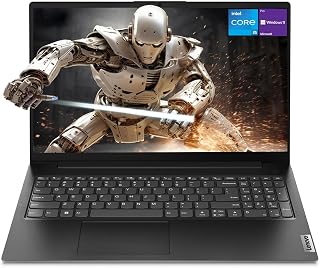
Business users will appreciate the Intel Core i5-13420H processor paired with 16GB RAM and 512GB SSD, offering smooth performance for spreadsheets, presentations, and video calls. The RJ45 Ethernet port ensures stable wired connections in office environments, while Windows 11 Pro adds enterprise-grade security features. The numeric keypad and HDMI output complete the package for productivity-focused professionals.
Pros
- Full numeric keypad is rare at this size and a genuine productivity advantage for data work
- Intel Core i5-13420H delivers strong multi-core performance for business workloads
- Physical RJ45 Ethernet port supports secure wired office network connections
- At 3.6 lbs with Windows 11 Pro, it balances portability and business-class software
Cons
- Battery life is not exceptional, keeping this laptop dependent on nearby power access
- RAM and storage are not user-upgradeable, so the chosen configuration is permanent
Among Intel laptops built for business use, the Lenovo V15 Gen 4 stands out for one feature that most modern designs quietly dropped: a full numeric keypad. For accountants, analysts, and anyone processing figures all day, that addition alone changes the daily experience. The Intel Core i5-13420H is the engine here, a processor that outpaces the i7-1355U in multi-core workloads despite its positioning, paired with 16GB of RAM and a 512GB SSD for responsive everyday performance. The 15.6-inch FHD display gives adequate screen space for side-by-side applications, and the physical Ethernet port via RJ45 is a genuine asset for office environments where wired connections are preferred for security or reliability. At 3.6 lbs, the chassis is portable without sacrificing the durability expected of a business-class machine. Windows 11 Pro rounds out the package with enterprise-grade security and management tools. This is a no-frills Intel laptop that prioritizes practical productivity features over style.
A strong match for office professionals, data entry workers, accountants, and small business users who want a capable Intel processor, Windows 11 Pro, and a numeric keypad in a lightweight chassis. Less ideal for users who need long battery life away from a power outlet, and the 512GB storage may feel tight for anyone managing large local file libraries. RAM and storage cannot be upgraded post-purchase.
Processor: Intel Core i5-13420H, 8 cores, 12 threads, up to 4.6 GHz turbo
Memory: 16GB high-bandwidth RAM (not upgradeable)
Storage: 512GB PCIe NVMe SSD
Display: 15.6-inch FHD LCD, 1920 x 1080 resolution, 60Hz refresh rate
Graphics: Intel UHD Graphics (integrated)
Operating System: Windows 11 Pro
Ports: 1x USB 3.0, 1x USB 2.0, 1x USB Type-C, 1x HDMI, 1x RJ45 Ethernet, headphone/mic combo
Special Features: Full numeric keypad, built-in webcam, Wi-Fi 802.11ac, Bluetooth
Weight: 3.6 pounds
Dimensions: 14.13" x 9.29" x 0.78"
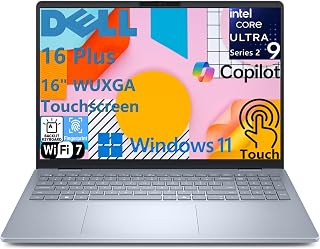
The Intel Core Ultra 9 processor and 32GB LPDDR5X RAM make this a powerhouse for demanding workflows like video editing, 3D rendering, and multitasking across dozens of tabs. Its 16-inch touchscreen and 1TB SSD provide ample workspace and storage for large project files. Wi-Fi 7 connectivity and on-device AI capabilities position it as a premium choice for professionals who need cutting-edge Intel performance.
Pros
- Core Ultra 9 with 48 TOPS NPU for AI workloads
- 32GB LPDDR5X and 1TB SSD handle demanding multitasking
- 16-inch touchscreen with Intel Arc graphics
- Wi-Fi 7 and Thunderbolt 4 connectivity
Cons
- Integrated Arc GPU not suitable for intensive 3D rendering
- Wi-Fi 7 benefits require compatible router infrastructure
Intel's Core Ultra 9 processor anchors this premium workstation, delivering the kind of performance that justifies its place among the best Intel laptops available. The chip's architecture combines high-performance cores with an integrated NPU delivering 48 TOPS, enabling on-device AI tasks that keep sensitive work local rather than cloud-dependent. Pair that silicon with 32GB of LPDDR5X memory and a 1TB SSD, and you have a machine built for professionals running virtual machines, large datasets, or Adobe Creative Suite workflows without compromise. The 16-inch touchscreen provides ample workspace, while Intel Arc graphics handle GPU-accelerated tasks competently. Wi-Fi 7 and Thunderbolt 4 ensure this laptop won't bottleneck your peripherals or network. At 4.12 pounds with a 0.67-inch profile, it remains transportable for a machine in this performance class. The Ice Blue finish distinguishes it from standard black business laptops, and practical touches like the backlit keyboard with numeric keypad, fingerprint reader, and 1080p webcam with AI noise cancellation address real workflow needs. Windows 11 Home and Copilot+ integration bring Microsoft's AI tools directly into your productivity environment.
Processor: Intel Core Ultra 9 288V, 8 cores, up to 5.1 GHz, 48 TOPS NPU
Memory: 32GB LPDDR5X 8533MT/s, memory on package
Storage: 1TB M.2 PCIe NVMe SSD
Display: 16-inch FHD+ (1920 x 1200) touchscreen, 16:10 aspect ratio, 300 nits brightness, WVA panel with ComfortView
Graphics: Intel Arc 140V GPU
Operating System: Windows 11 Home, Copilot+ PC
Camera: 1080p FHD at 30 fps with dual-array microphones and AI noise cancellation
Audio: Dual speakers with Waves MaxxAudio Pro and Dolby Atmos, 5W total output
Wireless: Wi-Fi 7 (2x2/160) Gig+ and Bluetooth 5.3
Ports: 1 USB 3.2 Gen 1 (5 Gbps), 1 USB 3.2 Gen 2 Type-C with DisplayPort 1.4 and Power Delivery, 1 Thunderbolt 4 with DisplayPort 2.1 and Power Delivery, 1 HDMI 2.1, 1 audio jack
Keyboard: Backlit English keyboard with numeric keypad and dedicated Copilot key
Security: Fingerprint reader on power button
Dimensions: 14.05 x 9.87 x 0.67 inches
Weight: 4.12 lbs
Color: Ice Blue
Power: 65W USB Type-C adapter
Buy this if you need Intel's latest architecture for demanding professional work, appreciate on-device AI capabilities, or regularly multitask between resource-heavy applications. The generous memory and storage configuration suits content creators, data analysts, and business users who cannot afford performance bottlenecks. Skip it if you need dedicated gaming graphics, prefer lightweight ultraportables under 3 pounds, or work primarily with basic office tasks that don't justify the premium configuration.

This entry-level option delivers essential computing with its Intel processor and 8GB DDR5 RAM, enough for web browsing, document editing, and streaming. The 15.6-inch FHD anti-glare display reduces eye strain during long work sessions, while the numeric keypad speeds up data entry. At 128GB storage, it covers basic needs without excess, making it ideal for students or casual users seeking straightforward Intel performance.
Pros
- Intel N150 handles everyday productivity smoothly
- FHD display with anti-glare and 250-nit brightness
- Lightweight at 3.42 pounds with military-grade durability
- Wi-Fi 6 and Microsoft 365 Personal included
Cons
- 128GB storage fills quickly with applications
- Entry-level processor not designed for gaming or heavy multitasking
Intel's N150 processor positions this IdeaPad as the budget entry point for anyone seeking genuine Intel silicon without premium cost. While this chip sits at the entry level of Intel's lineup, it handles the everyday computing that defines most users' actual needs: web browsing, document editing, video streaming, and video calls run smoothly. The 8GB of DDR5 RAM represents current-generation memory technology, providing headroom for multitasking between office applications and browser tabs. The 15.6-inch FHD display with 250-nit brightness and anti-glare coating delivers clarity for extended work sessions, and Wi-Fi 6 connectivity brings modern wireless performance to this affordable package. Windows 11 Home and Microsoft 365 Personal inclusion means immediate productivity without additional software purchases. At 3.42 pounds with a 0.70-inch profile, this laptop moves easily between locations while maintaining a full-size keyboard with numeric keypad. Military-grade durability testing and a physical camera privacy shutter address practical concerns. The dedicated AI Copilot hotkey integrates Microsoft's assistant directly into the keyboard layout.
Choose this if you need an affordable Intel laptop for web browsing, office work, remote learning, or video streaming and appreciate the included Microsoft 365 subscription. The lightweight build suits students and mobile workers moving between locations. Skip it if you need substantial local storage beyond 128GB, plan to run demanding applications or games, or require performance for content creation beyond basic photo organization.
Processor: Intel N150 Quad-Core, up to 3.6GHz with 6MB Smart Cache
Memory: 8GB LPDDR5-4800 RAM
Storage: 128GB UFS 3.1 SSD
Display: 15.6-inch FHD (1920x1080) IPS Anti-Glare, 250 nits, 88% screen-to-body ratio
Graphics: Integrated Intel Graphics
Connectivity: Wi-Fi 6 (802.11ax), Bluetooth 5.2, USB-C with Power Delivery and DisplayPort, 2x USB-A 5Gbps, HDMI 1.4, 3.5mm audio jack, SD card reader
Camera: HD 720p with physical privacy shutter
Keyboard: Full-size with dedicated AI Copilot hotkey
Weight: 3.42 lbs
Thickness: 0.70 inches
Operating System: Windows 11 Home in S mode with Microsoft 365 Personal
Security: Firmware TPM 2.0, privacy camera shutter
Certifications: ENERGY STAR 9.0, EPEAT Silver, MIL-STD-810H, TÜV Low Blue Light
Pros
- Lightweight and portable design makes it easy to carry between home, office, or coffee shops
- Touchscreen adds intuitive navigation without significant premium over standard laptops
- Solid processor and RAM combination handles everyday multitasking, web browsing, and productivity work
- Generous port selection accommodates external devices without needing adapters
- Abyss Blue finish adds modern aesthetics compared to typical silver or gray laptops
Cons
- Integrated Intel UHD Graphics limits performance for gaming, video editing, and graphically intensive applications
- Single external display support may feel limiting for power users who need multi-monitor setups
- 45% NTSC color gamut indicates reduced color accuracy compared to premium laptops, affecting design work
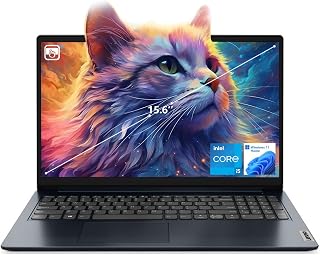
The Lenovo IdeaPad 1i is a well-rounded 15.6-inch laptop designed for students, remote workers, and professionals who need dependable everyday computing without premium pricing. With its Intel Core i5-1235U processor, 16GB RAM, and 512GB SSD, this system handles standard productivity tasks, web browsing, and multimedia smoothly. The inclusion of a touchscreen display adds modern convenience at this price point.
Performance standouts include Wi-Fi 6 connectivity for faster wireless speeds, a responsive touchscreen interface with anti-glare coating, and a lightweight 3.74 lb form factor that prioritizes portability. The 10-core processor delivers solid multitasking capabilities, while fast SSD storage ensures quick boot times and application loading. Port variety is generous, including USB-C, USB-A, HDMI, SD card reader, and a standard headphone jack.
Design and build quality reflect the budget-conscious positioning. The Abyss Blue finish stands out visually, and the slim 0.78-inch profile fits easily into backpacks and messenger bags. The 15.6-inch FHD display offers good screen real estate without excessive weight. However, the 300-nit brightness and 45% NTSC color gamut indicate this is a general-purpose display rather than a professional-grade panel.
Notable limitations include integrated graphics that cannot handle gaming or intensive video editing, support for only one external monitor, and color accuracy that falls short for design work. Battery life and thermal performance specifications are not provided in available data. The one-year seller warranty offers basic coverage but lacks extended protection options.
Verdict: The Lenovo IdeaPad 1i represents excellent value for everyday computing. It excels as a student laptop, remote work machine, or secondary device for general browsing and productivity. Skip it if you need gaming performance, professional color work, or multi-monitor support. For straightforward laptop needs at an accessible price, this Lenovo delivers practical performance and modern features.
Processor: Intel Core i5-1235U, 10 cores, 12 threads, up to 4.4 GHz max turbo speed
Memory: 16GB DDR4 RAM
Storage: 512GB PCIe NVMe SSD
Display: 15.6-inch FHD (1920x1080), IPS panel, anti-glare, touchscreen, 300 nits, 60Hz refresh rate
Graphics: Intel UHD Graphics integrated
Operating System: Windows 11 Home
Connectivity: Wi-Fi 6 (802.11ax), Bluetooth 5.1, USB-C 3.2 Gen 1, USB-A 3.2 Gen 1, USB-A 2.0, HDMI 1.4, 3.5mm audio jack, SD card reader
Webcam: 720p with built-in microphone
Dimensions: 14.26" L x 9.98" W x 0.78" thickness
Weight: 3.74 lbs (2.37 kg)
Color: Abyss Blue
Warranty: One-year seller warranty

Pros
- Excellent processor and RAM combination handles productivity tasks, streaming, and light gaming without stuttering
- Thoughtful ergonomic features including backlit keyboard and separate numeric keypad enhance comfort for extended work sessions
- ComfortView technology and matte anti-glare display reduce eye strain during all-day use
- Lightweight at 3.6 pounds with slim 0.69-inch profile makes it genuinely portable for school or travel
- Wi-Fi 6 and Bluetooth 5.3 provide fast, stable wireless connectivity
Cons
- No dedicated graphics card limits performance for demanding video editing, 3D rendering, or competitive gaming
- Integrated graphics with shared RAM may throttle under heavy creative workloads
- Non-touch display limits interactivity compared to newer premium 2-in-1 alternatives
The Dell 15 is a well-rounded mainstream laptop designed for students, remote workers, and everyday users who need reliable performance without premium pricing. It strikes a practical balance between capability and portability, making it suitable for general productivity, content consumption, and light creative work.
At its core sits the 13th Gen Intel Core i7-1355U processor paired with 16GB of RAM and a 512GB SSD. This configuration handles email, document editing, web browsing, video conferencing, and multitasking with confidence. The 120Hz display refresh rate and solid specs mean streaming content looks smooth, though this laptop won't excel at demanding video editing or 3D rendering tasks.
Dell invested thoughtfully in ergonomics and comfort. The lifted hinges create a natural typing angle, the backlit keyboard with numeric keypad feels spacious, and the matte anti-glare display combined with ComfortView blue light filtering technology helps reduce eye strain during extended work sessions. At just 3.6 pounds and 0.69 inches thick, it's genuinely portable for traveling between home, office, or campus.
The main limitation is the lack of dedicated graphics, so intensive creative workflows will feel constrained. The non-touch display also misses the intuitive interaction that many users now expect. For gaming, you'll want something more powerful.
Verdict: The Dell 15 delivers solid everyday performance, thoughtful design details, and a full year of onsite support. It's an excellent choice for professionals and students seeking a dependable, comfortable laptop that balances productivity with portability at a competitive price point.
Processor: Intel Core i7-1355U (13th Gen). Memory: 16GB RAM. Storage: 512GB SSD. Display: 15.6-inch FHD (1920x1080) LED, 120Hz refresh rate, matte anti-glare coating, non-touch. Graphics: Intel UHD Graphics (integrated, shared VRAM). Operating System: Windows 11 Home. Connectivity: Wi-Fi 6 (802.11ax), Bluetooth 5.3. Ports: HDMI, memory card slot, USB connectors. Keyboard: Backlit with separate numeric keypad. Weight: 3.6 lbs. Dimensions: 14.11" W x 9.25" D x 0.69" H. Battery: Energy-efficient with Express Charge support. Warranty: 1-year onsite hardware service.
What to Look for When Buying an Intel Laptop
Processor Generation and Core Count
Intel’s processor lineup spans multiple generations, with 12th, 13th, and newer Core Ultra chips offering significant performance advantages over older models. Higher core counts translate to better multitasking, with 10-core and 12-core processors handling demanding workloads like video editing, 3D rendering, and heavy multitasking with ease.
The Core i5 processors strike a solid balance for most users, while Core i7 and Core Ultra 7 chips provide extra headroom for professional work. If you’re building a complete system, check out our guide on optimal component pairings for high-performance setups to understand how processors work alongside other components.
RAM and Storage Configuration
Modern laptops should include at least 16GB of RAM for smooth performance, with DDR5 memory offering faster data transfer rates than DDR4. Storage capacity matters too, and 512GB SSDs serve as the baseline for most users, while 1TB drives accommodate larger media libraries and professional software installations.
Pay attention to whether RAM is upgradeable or soldered, as this affects your ability to expand capacity later. PCIe NVMe SSDs deliver dramatically faster boot times and file transfers compared to older SATA drives, making them essential for responsive performance.
Display Quality and Size
Screen quality directly impacts your daily experience, with Full HD (1920×1080) resolution serving as the minimum standard for crisp text and detailed images. Larger 15.6-inch and 16-inch displays provide more workspace for multitasking and creative work, while touchscreen capabilities add convenience for certain workflows.
Consider brightness levels if you work in various lighting conditions, with 300 nits or higher ensuring comfortable visibility outdoors. Anti-glare coatings reduce eye strain during extended work sessions, and IPS panels offer superior color accuracy and viewing angles compared to standard TN displays. For those interested in peripherals that complement productivity, our overview of quiet keyboards covers options that pair well with professional laptops.
Connectivity and Port Selection
Modern Intel laptops should include USB-C ports with Power Delivery and DisplayPort support, enabling single-cable connections to monitors and fast charging. Traditional USB-A ports remain valuable for older peripherals, while HDMI outputs provide straightforward display connectivity without adapters.
Wi-Fi 6 or Wi-Fi 6E delivers faster wireless speeds and better performance in crowded networks, making it essential for reliable video conferencing and cloud-based work. Ethernet ports matter for users who need stable wired connections, and SD card readers prove invaluable for photographers and content creators who regularly transfer large files.
Final Thoughts
Intel laptops continue to offer compelling combinations of performance, compatibility, and features across every price segment in 2026. For professionals seeking premium build quality and cutting-edge AI capabilities, the Dell 16 Plus Touchscreen Laptop delivers exceptional power with its Core Ultra 9 processor and expansive display. Budget-conscious users will find the Lenovo Essential 15.6″ FHD Laptop provides solid everyday performance without unnecessary extras. Choose based on your specific workflow requirements, and remember that investing in adequate RAM and storage upfront saves frustration down the road.
Frequently Asked Questions
What’s the difference between Intel Core i5, i7, and Core Ultra processors?
Core i5 processors handle everyday tasks and moderate multitasking efficiently, making them ideal for students and general users. Core i7 chips add more cores and higher clock speeds for demanding applications like video editing and software development. The newer Core Ultra series includes dedicated AI acceleration and improved efficiency cores, delivering superior performance for content creation and professional workloads while maintaining better battery life.
How much RAM do I need in an Intel laptop in 2026?
16GB represents the comfortable baseline for most users, providing smooth multitasking across multiple browser tabs, office applications, and light creative work. Professional users working with large files, virtual machines, or memory-intensive software should consider 32GB configurations. Budget configurations with 8GB remain usable for basic tasks but may feel constrained as software demands increase. If you’re interested in memory considerations for specialized tasks, our guide on RAM for 3D rendering explores how memory capacity affects creative workflows.
Are touchscreen displays worth the extra cost on Intel laptops?
Touchscreens add convenience for casual browsing, note-taking, and presentations, making them valuable for students and presenters. They prove less essential for traditional productivity work where keyboard and mouse inputs dominate. The added cost typically ranges modestly, but touchscreens can slightly reduce battery life and add minor weight. Consider your actual usage patterns before prioritizing this feature over other specifications like processor speed or storage capacity.
Which Intel laptop offers the best battery life for travel?
Battery life varies significantly based on processor efficiency, display brightness, and usage patterns, with newer Core Ultra processors delivering improved endurance through better power management. Laptops with smaller 13-14 inch displays generally outlast 15-16 inch models due to reduced screen power consumption. For extended travel sessions, look for models advertising 8+ hours of typical use and consider lower-resolution displays, which consume less power than higher-resolution alternatives while still maintaining comfortable clarity for most tasks.








Write Your Review
No reviews yet. Be the first to share your experience!