

Shopping for a laptop for your elementary-aged child means balancing durability, simplicity, and enough power for schoolwork without overspending on features they won’t use. Whether your student needs a device for Google Classroom assignments, educational apps, or video calls with teachers, the right laptop makes remote learning smoother for everyone.
This guide covers 10 laptops we’ve evaluated specifically for elementary school use, from budget Chromebooks to versatile Windows machines. We focus on what matters most: battery life that lasts through the school day, rugged builds that survive backpack trips, and interfaces young learners can navigate independently.
Quick answer
This guide compares 10 picks, with Acer Chromebook 15.6 FHD Intel Celeron, 4GB RAM, 64GB ranked first. PADIX 15.6 Inch Laptop, Intel Celeron N4020, 4GB RAM holds the highest customer rating among them. HP Chromebook 14 Intel Celeron, 4GB RAM, 64GB Storage has the most customer reviews.

Pros
- Spacious 15.6-inch screen with Full HD resolution reduces eye strain and improves productivity
- Full-size keyboard with numeric keypad offers superior comfort compared to cramped laptop keyboards
- ChromeOS delivers exceptional speed, security, and simplicity ideal for education and everyday tasks
- All-day 10-hour battery life minimizes charging during school or work
- Lightweight and portable design makes it easy to carry between locations
Cons
- Intel Celeron processor and 4GB RAM limit performance for demanding applications or heavy multitasking
- 64GB storage is modest and fills quickly without cloud reliance
- Limited to ChromeOS software ecosystem, incompatible with Windows or macOS programs
The Acer Chromebook 315 is a 15.6-inch budget laptop engineered for students, remote learners, and everyday users who prioritize simplicity, reliability, and value. Powered by ChromeOS and built with Google Classroom integration, it delivers a purpose-built computing experience for K-12 education, online coursework, and general productivity tasks at home or school.
Its standout features include a large Full HD display with anti-glare coating that reduces eye strain during extended use, a full-size keyboard with numeric keypad that feels like a desktop experience, and an impressive 10-hour battery life that easily handles a full school day. WiFi 6 connectivity ensures smooth video calls and streaming, while the lightweight 3.53-lb design makes it highly portable. ChromeOS handles boot-up in seconds and keeps the system responsive even with multiple browser tabs open.
The build quality is solid and practical. At 0.7 inches thin and finished in pure silver, this Chromebook balances durability with portability. The spill-resistant keyboard and HD audio quality add practical touches for students, though the 720p HD webcam is adequate but not exceptional for video conferencing.
Limitations include the Intel Celeron N4500 processor and 4GB RAM, which are sufficient for web browsing, document editing, and streaming but struggle with heavy multitasking or demanding applications. The 64GB eMMC storage is tight and requires reliance on cloud services like Google Drive. Additionally, ChromeOS limits software compatibility to web apps and Chrome extensions, incompatible with traditional Windows or Mac programs.
The Acer Chromebook 315 is an excellent value for students and budget-conscious buyers seeking a dependable, fast, and secure laptop for online learning and everyday computing. Its large display, comfortable keyboard, and exceptional battery life make it a standout in the budget Chromebook category.
Processor: Intel Celeron N4500, 2 Cores, up to 2.8 GHz with 2MB Smart Cache
Graphics: Intel UHD Graphics (integrated)
Display: 15.6-inch Full HD (1920 x 1080) LED, anti-glare BrightView coating, 220 nits
Memory: 4GB LPDDR4 RAM
Storage: 64GB eMMC SSD
Battery: Up to 10 hours of continuous use
Connectivity: WiFi 6 (802.11ac), Bluetooth, Ethernet via USB adapter
Ports: 1x USB-C, 2x USB-A, 1x HDMI 1.4, 1x 3.5mm audio jack, 1x SD card reader
Keyboard: Full-size with numeric keypad
Webcam: 720p HD with dual-array digital microphones
Audio: Dual stereo speakers with HD audio
Dimensions: 14.4 inches L x 9.6 inches W x 0.7 inches Th
Weight: 3.53 lbs
Color: Pure Silver
Operating System: ChromeOS
Ideal For: Students in K-12 or early college, remote learners, teachers, home office workers, and budget-conscious families seeking an affordable, reliable laptop for everyday computing and online education.
Perfect Use Cases: Online classes and video conferencing via Google Meet or Zoom, document editing and spreadsheet work in Google Docs and Sheets, web browsing and email, video streaming, research and assignment work, email and web-based productivity tools.
Not Recommended For: Professional graphic design, video editing, software development, gaming, or users requiring Windows or Mac-specific applications. Heavy multitasking with many simultaneous applications is limited by the 4GB RAM.
Pros
- Excellent value for budget-conscious buyers and students
- Silent operation with no cooling fans makes it ideal for quiet study environments
- Bright, clear 1080p display with anti-glare coating reduces eye strain
- Modern connectivity with dual Type-C ports and USB 3.2 ports
- Lightweight and slim profile perfect for portability
Cons
- 4GB RAM and 128GB storage limit multitasking and demanding applications
- Intel Celeron N4020 processor handles only basic computing tasks, not gaming or video editing
- 1MP webcam quality is basic for professional video calls
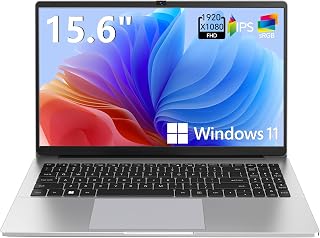
The PADIX NB15 is a practical 15.6-inch laptop built for students, remote workers, and everyday users who prioritize affordability and reliability over cutting-edge performance. It delivers exactly what it promises: a dependable machine for email, document editing, online classes, and web browsing without unnecessary complexity or bloated features.
The standout feature is the fanless, silent design paired with the Full HD anti-glare display. You get crystal-clear visuals without annoying fan noise, making this ideal for libraries, classrooms, and shared workspaces. The dual USB Type-C ports with fast charging and multi-monitor support show thoughtful engineering at this price point, and the expandable storage option via microSD card addresses the modest 128GB base capacity.
Build quality impresses for the price range. The slim aluminum chassis feels solid, the micro-edge bezels maximize screen real estate, and the overall design conveys more premium appeal than typical budget laptops. The 38Wh battery with 45W fast charging provides all-day productivity without frequent searching for outlets.
The limitations are honest ones: 4GB RAM and the Celeron N4020 processor handle daily tasks smoothly but struggle with heavy multitasking, video editing, or gaming. The 1MP webcam is functional but basic. These compromises are necessary to hit the sub-$250 price point.
The PADIX NB15 earns its excellent rating by delivering on its core promise. If you need a lightweight, quiet, reliable laptop for school or light work without premium performance demands, this represents outstanding value. The fanless design and expandable storage justify the investment for practical buyers.
Display: 15.6-inch FHD (1920x1080) anti-glare, micro-edge bezel
Processor: Intel Celeron N4020, 1.1 GHz
RAM: 4GB LPDDR4
Storage: 128GB eMMC, expandable to 1TB via microSD card
Graphics: Intel Integrated Graphics
Operating System: Windows 11 Home
Ports: 2x USB Type-C (with charging and display output), 2x USB 3.2 Gen1, 3.5mm audio jack
Webcam: 1MP HD
Battery: 38Wh with 45W Type-C fast charging
Design: Fanless, silent operation
Color: Gray
Model: PADIX NB15
Best For: This laptop suits students, remote workers, and everyday users who prioritize portability and quiet operation over raw performance. Teachers, librarians, and anyone working in noise-sensitive environments will appreciate the fanless design.
Consider Alternatives If: You need sustained multitasking with many browser tabs, video editing capability, gaming performance, or demanding software like design tools. The 4GB RAM and Celeron processor are intentional trade-offs for affordability and battery life.
Storage Advice: The 128GB eMMC fills quickly. Plan to use the microSD card slot for media files and documents, or budget for a USB external drive for additional backup storage.
Upgrade Path: While RAM is typically soldered on budget models, verify teardown reviews before purchasing if upgrading is important to you. However, the microSD expansion handles most users' growing storage needs effectively.
Warranty & Support: Verify PADIX's warranty terms and customer support availability before purchase. Budget brands sometimes offer limited support compared to major manufacturers.

Pros
- Exceptional versatility with 360-degree hinge accommodates different work styles and entertainment preferences
- Lightweight and thin design combined with generous 12-hour battery life creates a truly portable solution for students and professionals
- Touchscreen display with high brightness and low blue light certification reduces eye strain during extended study sessions
- Strong connectivity options including Wi-Fi 6, Bluetooth 5.3, and support for dual external 4K displays enhance productivity
- Affordable price point for a quality 2-in-1 Chromebook with reliable Lenovo build quality and extended warranty coverage
Cons
- 4GB RAM may feel limited for power users running multiple browser tabs or demanding applications simultaneously
- 128GB storage, while expanded with microSD card slot, relies on cloud services typical of Chrome OS for optimal performance
- Integrated Intel UHD Graphics limits gaming and graphics-intensive applications compared to dedicated GPUs
The Lenovo IdeaPad Flex 3i is a 12.2-inch 2-in-1 Chromebook designed for students, educators, and remote workers who prioritize portability and versatility. Running Chrome OS with support through June 2031, it offers automatic security updates, built-in cloud integration, and access to thousands of educational apps, making it an excellent choice for online learning and everyday computing tasks.
The standout feature is its 360-degree convertible hinge, which enables four distinct usage modes: traditional laptop for typing and work, tent mode for presentations and group viewing, flip mode for watching videos hands-free, and tablet mode for intuitive touch interaction. The 12.2-inch WUXGA touchscreen delivers sharp visuals at 1920x1200 resolution with 300 nits brightness and TUV-certified low blue light protection, reducing eye strain during marathon study sessions. Performance is handled by the Intel N100 processor with 4GB DDR5 RAM, which handles web browsing, video conferencing, document editing, and video streaming smoothly without lag.
Design and portability are where this Chromebook truly excels. At just 2.76 pounds and 0.72 inches thin, it slides easily into backpacks and laptop bags. The integrated 47Wh battery delivers up to 12 hours of runtime, ensuring you stay productive through a full day of classes or work without hunting for a power outlet. Wi-Fi 6 connectivity with dual 2x2 antennas provides fast, stable wireless performance, while Bluetooth 5.3 simplifies pairing with accessories. Connectivity is comprehensive with USB-C with USB PD 3.0, dual USB-A 5Gbps ports, HDMI 1.4, microSD card reader, and headphone jack.
Potential drawbacks include the 4GB RAM limit, which may cause slowdowns if you run many browser tabs simultaneously, though this is typical for budget Chromebooks. The 128GB storage is adequate for most users thanks to Chrome OS's cloud-first architecture, though the split between eMMC and microSD card storage may feel fragmented. Graphics are handled by integrated Intel UHD, making this unsuitable for gaming or video editing, though it handles streaming and everyday productivity with ease.
Verdict: The Lenovo IdeaPad Flex 3i delivers excellent value for students and remote workers. Its versatile 2-in-1 design, lightweight construction, exceptional battery life, and reliable performance in Chrome OS create an compelling package for online learning and portable productivity. The 1-year Lenovo warranty plus extended 3-year warranty on expanded storage demonstrates confidence in build quality. Recommended for budget-conscious students and professionals who prioritize portability and flexibility over raw processing power.
Who should buy this Chromebook? The IdeaPad Flex 3i is ideal for K-12 and college students managing online classes, attending Zoom meetings, taking notes, and completing assignments. It's also perfect for educators, remote workers, and casual users who need reliable everyday computing in a portable package. If you spend most of your time in web browsers, Google Workspace apps, and cloud-based services, this Chromebook will feel snappy and responsive.
Who should look elsewhere? If you require local storage for large video files, use Windows or Mac-specific software, play demanding games, or edit videos and graphics regularly, consider a traditional Windows or Mac laptop. Power users managing dozens of browser tabs simultaneously may find 4GB RAM constraining, though most users with typical browsing habits won't notice limitations.
Comparison context: At this price point, the IdeaPad Flex 3i outperforms budget Windows laptops in battery life and simplicity. Chrome OS eliminates antivirus concerns and system maintenance headaches common on Windows. The 2-in-1 design offers flexibility that traditional clamshell laptops cannot match, making it particularly valuable for students in lecture halls or coffee shops who benefit from tent and tablet modes.
Best use scenarios include online schooling, video conferencing, web research, document editing via Google Docs or Microsoft 365, streaming entertainment during travel, and general web browsing. The touchscreen and convertible design shine when you need flexibility. The privacy shutter on the webcam and security features provide peace of mind for students handling personal information online.
Processor and Memory: Intel N100 processor with 4 cores, 4 threads, and max turbo up to 3.4GHz with 6MB cache. Integrated Intel UHD Graphics. 4GB soldered LPDDR5-4800 RAM for multitasking and smooth app switching.
Display and Graphics: 12.2-inch WUXGA IPS touchscreen at 1920x1200 resolution, 300 nits brightness, 50% NTSC color gamut. TUV Rheinland Low Blue Light certification. Glossy finish with capacitive touch technology. Supports dual external 4K displays via USB-C with DisplayPort 1.4.
Storage and Connectivity: 128GB total storage combining 64GB eMMC and 64GB microSD card. Wi-Fi 6 802.11ax 2x2, Bluetooth 5.3, and NFC. USB-C 10Gbps with USB PD 3.0, dual USB-A 5Gbps, HDMI 1.4, and microSD card reader. 3.5mm headphone/microphone combo jack.
Audio and Video: HD 720p front webcam with privacy shutter. Stereo speakers with 2W x 2 output, optimized with Waves MaxxAudio and MAX98357A amplifier. High-definition Realtek ALC5682I-VD audio codec for clear video calls and entertainment.
Battery and Power: Integrated 47Wh battery with 45W AC power adapter. Up to 12 hours battery life under typical use. Security includes H1 security chip, camera privacy shutter, and Kensington Nano security slot. Operating System: Chrome OS with Auto Update Expiration date June 2031. Dimensions: 11.18 x 8.27 x 0.72 inches. Weight: 2.76 lbs. Color: Blue. Warranty: 1-year Lenovo warranty, plus 3-year warranty on expanded SD card storage from Issaquah Highlands Tech.

The 14-hour battery life means this Chromebook lasts through a full school day plus homework time without needing a charge. Intel Quad-Core N4120 provides responsive performance for typing assignments and educational websites. Chrome OS simplifies device management for parents while keeping students safe online. The built-in webcam and ZOOM support make virtual learning and parent-teacher conferences straightforward for young users.
Pros
- 14-hour battery lasts an entire school day plus homework time
- Chrome OS stays secure and requires minimal parent management
- Lightweight 3.35-pound design fits easily in backpacks
- Anti-glare screen reduces eye strain during extended use
Cons
- 4GB RAM limits heavy multitasking across many tabs
- 64GB storage fills quickly if downloading videos or large files
Elementary students need a laptop that can survive a full school day without needing a charge, and this HP Chromebook delivers exactly that with its 14-hour battery life. Chrome OS keeps things simple and secure, making it ideal for younger users who primarily work in Google Classroom, watch educational videos, and join virtual sessions. The Intel Celeron N4120 quad-core processor handles typical school tasks like typing reports in Google Docs, researching topics across multiple tabs, and streaming learning content without slowdowns. The anti-glare coating on the 14-inch HD screen helps reduce eye fatigue during those long homework sessions. At 3.35 pounds, it's light enough for small hands to carry between home and school. The micro-edge bezel design gives kids plenty of viewing space in a compact form. Fast charging gets the battery to 50% in about 45 minutes, perfect for quick power-ups before the bus arrives. Dual USB Type-A ports plus USB-C and HDMI mean kids can connect a mouse, printer, or display for projects. The 720p webcam and dual microphones work well for class video calls.
Best for elementary students whose schoolwork centers on Google Workspace apps, web research, and video learning. Parents who want a secure, low-maintenance device will appreciate Chrome OS automatic updates and built-in virus protection. Skip this if your child uses desktop software for creative projects or advanced STEM programs that require Windows or macOS. The 4GB RAM and 64GB storage limit multitasking and local file storage, so it's not ideal for students who need to run many apps simultaneously or store large media libraries offline.
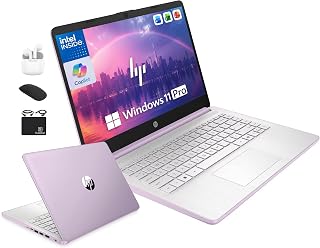
Windows 11 Pro with built-in Microsoft Copilot AI provides intelligent homework assistance that grows with elementary learners. The 4GB DDR5 RAM ensures smooth multitasking when switching between educational apps and browser tabs. At 128GB UFS plus 500GB external storage, students have plenty of space for multimedia projects and digital portfolios. The quad-core Intel processor handles typing practice, math games, and video lessons without lag.
Pros
- Outstanding value for money with lifetime Microsoft Office included
- Lightweight and portable design perfect for students and remote workers
- Complete bundle with wireless accessories eliminates need for additional purchases
- Windows 11 Pro with hardware-based security and Copilot AI assistance
- Up to 9 hours of battery life keeps you productive without constant charging
Cons
- Base storage of 128GB fills quickly, though external 500GB drive helps offset this limitation
- HD display at 1366x768 resolution is functional but lacks modern sharp detail for creative work
- Initial setup takes time due to Windows and Microsoft updates upon first startup
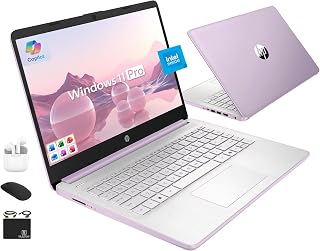
The HP 14-inch Business Laptop is a budget-friendly powerhouse designed for students, small business owners, and professionals who need reliable productivity without breaking the bank. Its standout feature is the inclusion of lifetime Microsoft Office 2024 Professional Plus, which alone justifies the purchase price compared to subscription models. This makes it an intelligent choice for anyone seeking a complete, ready-to-work solution.
Performance-wise, the Intel Quad-Core N150 processor handles everyday tasks with ease, from web browsing and document editing to video conferencing and light photo editing. Paired with 4GB LPDDR5 RAM and 628GB of combined storage, the system delivers responsive performance for typical workloads. The 14-inch anti-glare display is vibrant enough for presentations and online classes, while Wi-Fi 6 connectivity ensures fast, reliable internet access. Real-world users praise its speed for managing portfolios, financial tasks, and Discord communication.
Design and build quality reflect the entry-level positioning, but in a positive way. At just 3.24 lbs and 0.71 inches thick, the Honey Lavender finish creates a stylish, portable package that fits easily into bags and backpacks. The full-size keyboard, precision touchpad, and HD audio with stereo speakers support comfortable daily use. The bundled accessories, including wireless mouse, earbuds, and external drive, eliminate the need to shop separately for essentials.
The main drawbacks are the modest 128GB base storage and 1366x768 display resolution, both typical for this price range. Initial Windows setup can take time due to automatic updates. Some users have reported minor audio issues requiring earbuds for consistent sound output. Storage isn't a major concern thanks to the included 500GB external drive and SD card reader for expansion.
This HP laptop is an excellent entry point for students transitioning to college, professionals on a tight budget, and anyone needing a dependable secondary computer. The combination of lifetime Office, complete accessory bundle, Windows 11 Pro security, and proven reliability makes it a smart, practical investment.
Who should buy this laptop? Students will appreciate the lifetime Office suite and portability, while remote workers benefit from the Copilot AI assistance and professional Windows 11 Pro. Small business owners can justify the purchase through the bundled accessories and long-term Office savings. It's also ideal as a secondary computer for streaming, browsing, and light work.
When considering this laptop, prioritize your use case. If you primarily need Microsoft Office applications, email, browsing, and video conferencing, this machine excels. For graphic design, video editing, or programming with large files, the modest specs may feel limiting. The 128GB base storage requires discipline or active use of the external drive. Battery life of up to 9 hours with fast charging supports full school days or office hours without hunting for outlets.
Compare storage needs before purchase. The included 500GB external drive helps significantly, but if you work with large video files or databases, consider external SSDs. The keyboard and touchpad are functional but basic; users preferring premium ergonomics might add a separate mouse and keyboard. Finally, the Windows setup takes time initially, but this is standard across Windows systems and worth the trade-off for the included Office license.
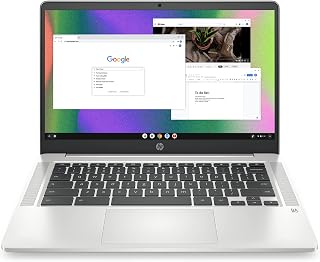
The 14-inch HD display with anti-glare coating helps young students read text comfortably during long school days without eye strain. Chrome OS boots quickly and updates automatically, so kids can focus on learning rather than troubleshooting software issues. The Intel Celeron N4120 handles web-based educational apps and Google Classroom smoothly. With 64GB eMMC storage, there's enough room for assignments and projects without overwhelming complexity.
Pros
- Exceptional battery longevity provides genuine all-day productivity without frequent charging
- Compact and lightweight form factor makes it genuinely portable for on-the-go use
- Chrome OS offers superior security with automatic updates and minimal maintenance
- Responsive multi-touch touchpad with four-finger gesture support enhances productivity
- Solid connectivity with dual Wi-Fi bands and Bluetooth for seamless streaming and work
Cons
- 4GB RAM and 64GB storage may feel limiting for power users or those needing extensive local file storage
- Intel Celeron processor is entry-level and not suitable for video editing, gaming, or intensive applications
- HD resolution at 1366x768 is adequate but lower than full HD alternatives at similar price points
The HP Chromebook 14 is a budget-friendly laptop designed for everyday computing tasks. It caters to students, remote workers, and casual users who need a reliable device for browsing, email, document editing, and streaming content. The 2022 model represents a solid entry point into Chromebook computing without breaking the bank.
The standout feature is undoubtedly the 14-hour battery life, which genuinely supports a full workday or extended travel without needing a power outlet. The Intel Celeron N4120 processor handles multitasking smoothly across multiple browser tabs and Chrome applications, while the 4K-ready Intel UHD Graphics 600 ensures smooth streaming of high-quality video. The 14-inch anti-glare HD display is viewable in direct sunlight and provides enough screen real estate for comfortable daily use.
Build quality is solid for the price point. The lightweight 3.2-pound chassis feels durable, and the full-size keyboard with multi-touch touchpad supporting four-finger gestures enhances the computing experience. The micro-edge bezel design maximizes screen space, and the device's thin 0.7-inch profile makes it genuinely portable in a backpack or laptop bag.
The main limitations are the modest 4GB RAM and 64GB storage, which constrain power users and those managing large file libraries. The entry-level processor struggles with video editing, modern gaming, or running heavy desktop applications. Additionally, the HD resolution at 1366x768 is lower than full HD alternatives available at similar prices.
The HP Chromebook 14 excels as an affordable, practical device for students and remote workers prioritizing battery life and portability. Chrome OS delivers security and simplicity, while the competitive price and solid real-world performance make this a smart choice for budget-conscious buyers entering the Chromebook ecosystem.
Students and educators will find the HP Chromebook 14 ideal for classroom work, research, and document collaboration through Google Workspace. The long battery life supports full school days without charging, and the affordable price point fits education budgets.
Remote workers and freelancers can rely on this Chromebook for email, video calls via Google Meet, document editing in Google Docs, and web-based project management tools. The lightweight design accommodates work-from-anywhere scenarios, and fast Wi-Fi connectivity ensures reliable online collaboration.
Casual users and seniors will appreciate the simplicity of Chrome OS, automatic security updates, and straightforward Google Play Store app access. The device removes complexity while providing essential computing for browsing, email, and media consumption.
Travel enthusiasts and commuters benefit from the exceptional 14-hour battery life and portability. The device handles streaming entertainment, productivity apps, and web browsing across extended travel days without frequent charging interruptions.
Display: 14.0-inch HD anti-glare micro-edge display, 1366 x 768 resolution
Processor: Intel Celeron N4120 quad-core
Graphics: Intel UHD Graphics 600
RAM: 4GB DDR4 SDRAM
Storage: 64GB eMMC flash storage
Operating System: Chrome OS
Battery: Up to 14 hours with HP Fast Charge to 50% in 45 minutes
Weight: 3.2 pounds
Dimensions: 12.82 inches L x 8.6 inches W x 0.7 inches H
Connectivity: 802.11a/b/g/n/ac Wi-Fi, Bluetooth, 3 USB ports including USB 3.0 Type-C
Keyboard: Full-size with multi-touch touchpad supporting four-finger gestures
Camera: Front-facing
Warranty: 1-year limited hardware warranty
Certifications: ENERGY STAR certified, EPEAT Silver registered

Pros
- Exceptional durability meets everyday portability in a slim, lightweight package
- Outstanding 12-hour battery life covers full school days and beyond
- Affordable price point makes premium computing accessible to budget-conscious buyers
- Chrome OS is fast, secure, and requires minimal maintenance
- Seamless Google ecosystem integration enhances productivity and collaboration
Cons
- 4GB RAM and 64GB storage limit multitasking and local file capacity compared to Windows laptops
- Intel Celeron N4500 processor handles basic tasks well but struggles with demanding applications
- Chrome OS dependency means limited software compatibility for specialized desktop programs
The Samsung Galaxy Chromebook Go is a 14-inch laptop designed specifically for students, remote workers, and users who prioritize portability and affordability. Running Chrome OS with built-in Google apps like Gmail, Docs, and Gemini AI, it delivers everything you need for schoolwork, streaming, and everyday computing without the bulk or price tag of traditional Windows laptops.
The standout features here are durability and battery life. Samsung engineered this Chromebook with military-grade toughness to survive accidental drops and dings, making it ideal for busy students juggling classes and travel. The 12-hour battery means you can power through a full school day and evening study sessions without hunting for a charger. The upgraded Wi-Fi is noticeably faster than previous models, delivering 3x speed improvements for smoother video calls, quick downloads, and lag-free streaming.
The design is impressively slim and lightweight, slipping easily into backpacks and messenger bags. At 14 inches, the screen offers comfortable viewing without excessive bulk. The integration between your Chromebook and Android phone adds genuine convenience, letting you transfer files and control your phone directly from the laptop. The included 3-month Google AI Pro trial with 5TB cloud storage is a nice bonus for new users.
The main limitations are the 4GB RAM and 64GB storage, which constrain heavy multitasking and local file storage compared to Windows competitors. The Intel Celeron N4500 processor handles everyday tasks smoothly but cannot handle demanding applications. If you rely on specialized desktop software or need extensive local storage, this Chromebook is not the right fit.
The Samsung Galaxy Chromebook Go is an excellent value for students, casual users, and anyone seeking a durable, portable, and affordable Chromebook. The combination of build quality, battery longevity, and Google ecosystem integration makes it one of the best sub-$300 options available for straightforward computing needs.
This Chromebook is ideal for students, remote workers on a budget, and anyone who spends most of their time in a web browser. If your workflow centers around Gmail, Google Docs, YouTube, and web apps, the Galaxy Chromebook Go will feel snappy and responsive. The military-tough construction and extended battery are perfect for life in dorms, offices, or constant travel.
Avoid this model if you need to run Windows software, use specialized applications like Adobe Creative Suite or professional design tools, or require significant local storage for video and photo files. Those users should consider Windows-based alternatives with more RAM and storage capacity. Similarly, if you frequently work with large files offline, the 64GB storage limit becomes a real constraint.
The current price point makes this one of the most affordable 14-inch laptops on the market. For students and budget-conscious buyers, the combination of durability, performance, and ecosystem integration represents exceptional value compared to similarly priced competitors.

At just 3.24 lbs, this lightweight design is easy for small hands to carry between classroom and home. The 16GB RAM ensures smooth operation when running multiple educational programs simultaneously. HP Fast Charge technology reduces downtime, getting students back to learning quickly during short breaks. The micro-edge HD display maximizes screen space for reading digital textbooks and completing interactive lessons.
Pros
- 16GB RAM handles multiple apps and tabs without slowdown
- Windows 11 S mode restricts installations to Microsoft Store for safety
- 128GB storage accommodates more files and offline content than competitors
- Wi-Fi 6 delivers faster, more reliable connectivity for virtual learning
Cons
- S mode limits software to Microsoft Store apps only
- Windows updates require more parent involvement than Chrome OS
Elementary students benefit from having enough memory to keep educational apps and browser tabs running smoothly, and this HP laptop's 16GB RAM provides exactly that headroom. Windows 11 S mode keeps the computing environment safe by only allowing apps from the Microsoft Store, giving parents peace of mind while still offering access to educational software beyond web-based tools. The Intel Processor N150 handles typical schoolwork like typing assignments, creating presentations, and watching instructional videos. The 14-inch micro-edge anti-glare HD display maximizes screen space while protecting young eyes during extended learning sessions. At 3.24 pounds, it's light enough for kids to carry comfortably throughout the day. Wi-Fi 6 and Bluetooth 5.4 provide fast, stable connections for virtual classrooms and wireless peripherals. HP Fast Charge technology means quick power boosts between activities. The 128GB eMMC storage gives students room for documents, photos for school projects, and offline educational content. Microsoft Copilot AI Assistant can help with age-appropriate research and writing tasks, offering a gentle introduction to AI tools.
Processor: Intel Processor N150 with 4 cores, up to 3.6 GHz
Memory: 16GB DDR4 RAM (max 32GB)
Storage: 128GB UFS plus 256GB microSD expansion (up to 384GB combined)
Display: 14-inch HD (1366 x 768) LED with anti-glare coating
Graphics: Intel Integrated Graphics
Battery: Up to 11 hours with fast charging (0-50% in 45 minutes)
Operating System: Windows 11 Home in S Mode
Connectivity: Wi-Fi 6, Bluetooth 5.4, USB-C 3.1, USB-A 3.0 (x2), HDMI 1.4, 3.5mm audio jack
Camera: 720p HD front-facing
Weight: 3.24 lbs | Thickness: 0.71 inches
Included Software: Microsoft 365 1-year subscription, Microsoft Copilot AI Assistant
Ideal for elementary students who need Windows-specific educational software or whose school curriculum extends beyond web apps. The 16GB RAM accommodates students who work across multiple applications simultaneously or families sharing one device among siblings. Parents who want controlled software access will value the S mode protection. Skip this if your child's school is fully invested in Google Workspace and Chromebooks, as you'd be paying for Windows features you won't use. Also not the best choice if you need to install programs from outside the Microsoft Store.
Pros
- Exceptional value for money with a sub-$100 price tag for a fully functional laptop
- Compact and lightweight design perfect for travel, commuting, and mobile workspaces
- Chrome OS provides fast, secure, and intuitive user experience with automatic updates
- Strong 4.2-star rating from over 1700 verified customer reviews builds confidence
- Solid 16GB storage and 4GB RAM handle multiple browser tabs and productivity apps smoothly
Cons
- Renewed condition means it's refurbished, not brand new, though backed by Amazon's guarantee
- Limited storage and RAM compared to traditional Windows laptops may constrain power users
- Chrome OS dependency requires stable internet connection for optimal functionality
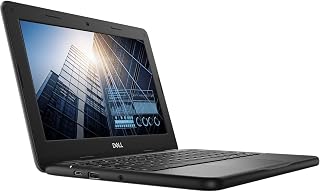
The Dell Chromebook 11 3100 is a lightweight, budget-friendly laptop designed for students, remote workers, and business professionals who live in the cloud. This 11.6-inch Chromebook runs Chrome OS and combines portability with reliable everyday performance at an unbeatable price point.
Key strengths include its speedy Intel Celeron N4020 processor, 4GB RAM, and 16GB SSD storage that handle web browsing, email, and productivity apps without lag. The 1366x768 display provides crisp visuals, and the traditional keyboard with touchpad offers a comfortable typing experience for extended work sessions.
Design and build quality are solid for the price segment. At just 2.9 pounds and 1-inch thin, this device is remarkably portable. The black finish feels durable, and the compact form factor makes it ideal for students carrying multiple devices or professionals who work across different locations.
Potential drawbacks include the renewed condition and Chrome OS limitations for users requiring desktop software. The lack of optical drive and limited USB ports (5 total) may require adapters for some peripherals. However, Bluetooth and Wi-Fi connectivity cover most modern accessories.
Verdict: The Dell Chromebook 11 3100 is an exceptional value for budget-conscious buyers seeking a reliable, portable web-based laptop. Its strong customer rating, lightweight design, and fast Chrome OS performance make it ideal for students, remote workers, and anyone needing a secondary device for cloud productivity.
Display: 11.6-inch AMOLED, 1366x768 resolution, 720p native.
Processor: Intel Celeron N4020 with Intel HD Graphics integrated chipset.
Memory: 4GB RAM, 16GB SSD Flash Storage with ATA interface.
Connectivity: Wi-Fi 802.11ac, Bluetooth, 5 USB ports, USB video output.
Input: Traditional keyboard, touchpad pointing device, English US layout.
Physical: 8in L x 11in W x 1in thick, 2.9 pounds, Black color, 3.6V voltage.
Software: Chrome OS with automatic updates and limited 1-year warranty.
Best For: Students, remote workers on a budget, business professionals needing a secondary portable device, or anyone seeking an affordable web-based laptop.
Not Ideal For: Power users requiring desktop software, video editing, gaming, or resource-intensive applications beyond web browsers.
Renewed vs. New: This is an Amazon Renewed unit, meaning it's a refurbished device thoroughly inspected and tested. It comes with Amazon's satisfaction guarantee, making it a lower-risk purchase for budget shoppers.
Why Choose Chrome OS: If your work revolves around Google Workspace, Microsoft 365 web apps, email, and video conferencing, Chrome OS offers fast performance, strong security, and automatic updates without the overhead of traditional operating systems.
Pros
- Outstanding value at this price point with included lifetime Office and premium accessories
- Lightweight and portable design makes it perfect for students and traveling professionals
- 16GB DDR4 RAM ensures smooth multitasking and application performance
- Long battery life up to 9 hours keeps you productive throughout the day
- Windows 11 Pro delivers enterprise-grade security and productivity features
Cons
- 720p HD display resolution is basic by 2025 standards, better suited for work than content creation
- Intel N150 processor is entry-level, not ideal for heavy gaming or professional video editing
- Limited to 128GB internal storage though offset by included 500GB external drive
The HP 14 Ultrabook 2025 is a budget-friendly laptop designed for students, remote workers, and small business users who prioritize portability and value over cutting-edge performance. This Honey Lavender model delivers dependable everyday computing in a thin, lightweight package that weighs just 3.24 pounds.
Performance centers on the quad-core Intel N150 processor running up to 3.6 GHz, paired with 16GB DDR4 RAM for smooth multitasking. You can comfortably browse the web, edit documents, stream video, and run multiple applications simultaneously without noticeable slowdowns. The 628GB total storage combines 128GB fast UFS internal storage with a 500GB portable external drive, giving you flexibility for documents, media, and backups.
The 14-inch HD anti-glare display at 1366 x 768 resolution is adequate for office work and streaming but lacks the sharpness and color accuracy needed for photo and video editing. The keyboard is full-size and responsive, and the 720p HD webcam with dual microphones handles video calls and online classes effectively. WiFi 6 connectivity ensures you stay connected at high speeds.
Real drawbacks include the entry-level processor and screen resolution, which limit performance for demanding creative work or modern gaming. The 3-cell 41 Wh battery provides solid all-day usage around 9 hours with light to moderate use, though heavy workloads will drain it faster.
Verdict: This HP delivers strong value for the price, especially with lifetime Microsoft Office, premium included accessories, and Windows 11 Pro. It excels as a student or business laptop where portability and affordability matter more than raw processing power. Skip this if you need serious gaming or professional creative capabilities.
This bundle includes everything you need to get started immediately. The HubxcelAccessory package features wireless earbuds, a 500GB external USB drive for backup and extra storage, a wireless mouse, USB extension cord, HDMI cable, and mouse pad. You also receive lifetime access to Microsoft Office 2024, eliminating recurring subscription costs.
Students who need a reliable laptop for classes, research, and online learning without breaking their budget. Remote workers and freelancers seeking a portable workstation with long battery life and professional software included. Small business owners and entrepreneurs needing an affordable computer for everyday business tasks, email, and presentations. Home users who want a thin, lightweight laptop for web browsing, streaming, and general computing without high-performance requirements.
Buying Guide: What to Look for in Elementary Student Laptops
Battery Life and Charging Speed
Elementary students typically spend 6-7 hours at school, and their laptop needs to last from morning announcements through afternoon assignments without hunting for outlets. Look for models advertising 10+ hours of battery life under typical use.
Fast charging matters too. The best silent mechanical keyboard won’t help if the laptop dies mid-assignment. Models with USB-C charging often support fast charge technology that restores 50% battery in under an hour, perfect for quick top-ups between classes.
Operating System: ChromeOS vs Windows
ChromeOS dominates elementary education because it boots quickly, updates automatically, and centers around Google Classroom tools most schools already use. Chromebooks require minimal maintenance and resist viruses naturally, making them ideal for young users.
Windows 11 laptops offer broader software compatibility and familiarity with desktop computing. They work well if your student needs specific Windows applications or if you want one device that grows with them into middle school. The best RAM for Blender becomes relevant later, but elementary students need straightforward interfaces first.
Durability and Build Quality
Elementary school laptops live in backpacks, slide across lunch tables, and occasionally meet the floor. Look for reinforced corners, spill-resistant keyboards, and rubberized edges that absorb impacts.
Some manufacturers specifically design education models with military-grade durability ratings (MIL-STD-810G). The Samsung Galaxy Chromebook Go and similar models pass drop assessments that simulate real classroom accidents. Lightweight builds (under 3.5 pounds) reduce strain on small shoulders during daily commutes.
Screen Size and Display Quality
Screen size creates a balancing act for young students. Displays between 11.6 and 14 inches work best, providing enough workspace for split-screen learning apps without overwhelming small desks or backpacks. The best PC build for RX 9070 XT targets different users entirely, while elementary students benefit from anti-glare coatings that reduce eye strain during extended reading sessions.
HD resolution (1366×768) suffices for most elementary tasks like document editing and educational videos. Full HD (1920×1080) provides sharper text but drains batteries faster. Touchscreens add intuitive navigation for younger children, though they increase weight and reduce battery life slightly.
Final Thoughts
The right laptop turns homework battles into independent learning sessions. For budget-conscious families seeking reliable ChromeOS simplicity, the HP 14″ HD Chromebook Laptop for Students delivers solid battery life and enough screen space for comfortable viewing. Families wanting Windows flexibility with expandable storage should consider the 15.6 Inch Laptop Computer, N4020, 4GB DDR4 RAM, which includes both eMMC storage and expansion options. Both handle Google Classroom, Zoom calls, and typing assignments without slowdowns, giving your elementary student the tools they need to succeed.
Frequently Asked Questions
How much RAM does an elementary student laptop need?
Most elementary students work comfortably with 4GB RAM for web browsing, Google Docs, and educational apps. ChromeOS manages memory efficiently, making 4GB adequate for typical schoolwork. Windows laptops benefit from 8GB or more if you plan to keep the device through middle school, but 4GB handles current elementary curricula without issues.
Are Chromebooks good for elementary school students in 2026?
Chromebooks excel in elementary education because they integrate seamlessly with Google Classroom, boot in seconds, and require minimal maintenance. Most school districts standardize on ChromeOS, ensuring compatibility with assigned digital tools. The automatic updates and built-in security features mean parents spend less time troubleshooting and more time supporting actual learning. For students who need powerful gaming builds or specialty software, Windows makes more sense later in their education journey.
What screen size works best for elementary age children?
Screens between 11.6 and 14 inches hit the sweet spot for elementary students. An 11.6-inch display keeps the laptop lightweight and backpack-friendly for smaller children, while 14-inch models provide more comfortable workspace for reading assignments and dual-window layouts. Avoid larger 15.6-inch screens unless desk space and portability aren’t concerns, as they add significant weight for daily carrying.
How long should a laptop battery last for school use?
Target laptops advertising 10 hours or more of battery life to cover a full school day plus homework time. Real-world performance typically runs 1-2 hours shorter than manufacturer claims depending on screen brightness and activity. Models with fast charging capabilities let students recharge during lunch or recess, providing backup for days when morning charging gets skipped in the rush to catch the bus.








Write Your Review
No reviews yet. Be the first to share your experience!