

Whether you’re compiling large codebases, running virtual machines, or juggling multiple IDEs, your laptop needs to keep up. The right programming laptop combines processing power, sufficient RAM, and a comfortable keyboard for those long coding sessions.
This guide covers 10 laptops verified for development work, from budget-friendly options to professional workstations. We’ve focused on models that handle demanding workflows while remaining practical for daily use. If you’re building a desktop setup instead, check out our complete component guide for RTX 5070 builds.
Quick answer
This guide compares 10 picks, with HP OmniBook 5 16" AI Laptop - Ryzen AI 7, Touchscreen ranked first. Lenovo ThinkBook 16 Gen 8 Intel Core Ultra 7 32GB RAM holds the highest customer rating among them. ASUS ROG Strix G16 2025 Gaming Laptop, Intel i7, RTX has the most customer reviews.
Pros
- Exceptional value for an AI-ready laptop with premium features at an affordable price
- Responsive touchscreen display with 1920x1200 resolution provides excellent clarity and usability
- Lightweight yet durable construction ideal for business travel and daily commuting
- AMD Radeon 860M integrated graphics handle everyday graphics tasks and light creative work
- Comprehensive connectivity options support a full range of peripherals and external displays
Cons
- Limited graphics performance for demanding games or intensive 3D rendering work
- Integrated graphics may require optimization for resource-heavy applications
- Only two reviews available, so long-term durability data is still emerging
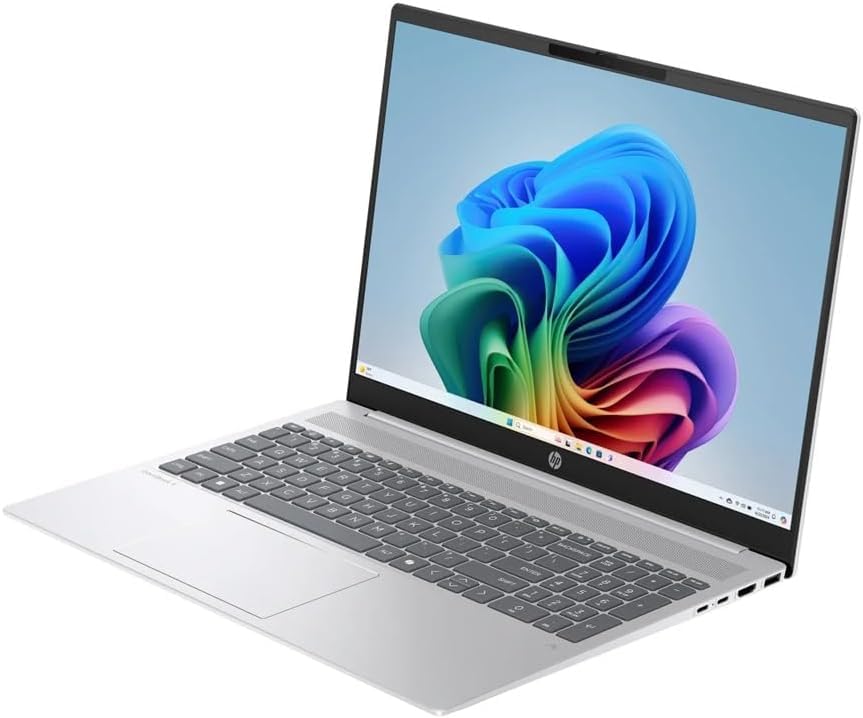
The HP OmniBook 5 is a 16-inch laptop built for professionals, students, and remote workers who want a capable machine without paying flagship prices. As a Copilot+ PC, it integrates Microsoft's latest AI capabilities into Windows 11 Pro, making it well-suited for anyone exploring AI-assisted productivity tools and modern computing workflows.
Performance is solid across the board. The AMD Ryzen AI 7 350 processor with 8 cores delivers snappy responsiveness for everyday tasks like web browsing, document editing, and video conferencing. The 16GB of shared graphics RAM and 1TB SSD ensure smooth multitasking and fast file access. The integrated AMD Radeon 860M graphics handle content creation and light gaming respectably, though demanding 3D applications will require optimization or lower settings.
The 16-inch 2K touchscreen is a standout feature for this price point. The 1920x1200 resolution with IPS display technology provides vibrant colors and wide viewing angles, while capacitive touch responsiveness makes navigation intuitive and productive. The larger screen real estate is genuinely useful for spreadsheets, design work, and streaming content. At 6 pounds, the laptop remains surprisingly portable for its size, making it practical for daily transport between office and home.
Build quality appears solid with a silver aluminum chassis and thoughtful connectivity: Wi-Fi 6 for speed, Bluetooth 5.4 for accessories, four USB ports, HDMI 2.1, and DisplayPort 2.1 for dual external monitor support. HD audio and a comprehensive charger round out the package, though the exact speaker quality and thermal performance under load deserve hands-on evaluation.
The main limitation is the integrated graphics, which won't satisfy demanding gamers or professional 3D artists. However, for productivity, creative work, and AI exploration, the OmniBook 5 delivers impressive value. The extended warranty adds confidence, and Windows 11 Pro ensures you get pro-grade features. This is a genuinely smart choice for budget-conscious professionals seeking reliable AI-ready computing.
Display: 16-inch IPS touchscreen, 1920x1200 resolution, capacitive touch
Processor: AMD Ryzen AI 7 350 (8-core, 5 GHz)
Memory: 16GB shared graphics RAM
Storage: 1TB SSD
Graphics: AMD Radeon 860M integrated
OS: Windows 11 Pro
Connectivity: Wi-Fi 6 (802.11ax), Bluetooth 5.4, 4x USB ports, HDMI 2.1, DisplayPort 2.1
Weight: 6 pounds
Dimensions: 19" L x 12" W x 3" H
Audio: HD Audio with combo headphone/microphone jack
Warranty: Extended coverage included
Perfect For: Remote workers, business professionals, students, content creators on a budget, anyone exploring AI-powered productivity features, and professionals needing a portable secondary laptop with touchscreen convenience.
Not Ideal For: Hardcore gamers seeking high-end GPU performance, professional video editors and 3D artists requiring dedicated graphics, or users requiring extreme portability (ultralight form factor) or high-end processing power for intensive workloads.

Pros
- Exceptional processing power from Ryzen 7 7735HS handles professional workloads, virtualization, and creative tasks
- Larger 16-inch display with extra vertical space improves workflow efficiency compared to standard 16:9 laptops
- Biometric security with fingerprint and Windows Hello facial recognition provides convenient yet secure access
- Latest WiFi 6E connectivity ensures future-proof wireless performance with access to less congested 6GHz band
- Lightweight aluminum design balances premium build quality with portability for mobile professionals
Cons
- Base configuration with 512GB storage may feel limiting for users working with large files or datasets
- Integrated Radeon 680M graphics limits intensive 3D gaming and heavy GPU-accelerated workloads compared to dedicated GPUs
- 300 nits display brightness is adequate for office use but not ideal for outdoor work in bright sunlight
The Lenovo ThinkPad E16 Gen 2 is a premium business laptop designed for professionals who prioritize performance, security, and reliability. With its 16-inch display and lightweight aluminum construction, it appeals to executives, developers, consultants, and mobile workers who need a portable yet powerful workstation.
The AMD Ryzen 7 7735HS processor delivers impressive performance with 8 cores, 16 threads, and boost speeds up to 4.75GHz. Combined with 16GB DDR5 RAM and a 512GB PCIe 4.0 SSD, this machine handles demanding business applications, multitasking, and light creative work with ease. The 16-inch WUXGA display with its 16:10 aspect ratio provides 11% more vertical workspace than standard 16:9 displays, significantly enhancing productivity for spreadsheets, coding, and document editing.
Build quality is exceptional. The premium aluminum chassis feels solid and professional, while the 3.99-pound weight and 0.78-inch thickness make this a genuinely portable device for business travel. The backlit keyboard, Dolby Atmos speakers with HARMAN tuning, and dual-array microphones create a polished professional experience for video conferencing and presentations.
Security is a major strength. The fingerprint reader built into the power button, discrete TPM 2.0 chip, Windows Hello facial recognition via IR camera, and BitLocker encryption protect sensitive business data. WiFi 6E connectivity with 6GHz band support and Bluetooth 5.3 deliver future-proof wireless performance, while the dual USB-C, dual USB-A, HDMI 2.1, and Ethernet ports provide comprehensive connectivity options.
The main limitations are the 512GB storage capacity, which may feel tight for heavy file users, and the integrated Radeon 680M graphics, which handles business applications but isn't designed for intensive gaming or GPU-accelerated workloads. The 300-nit display is suitable for office environments but limited for outdoor use. Overall, this is an excellent choice for business professionals seeking a reliable, secure, and portable workstation.
Processor: AMD Ryzen 7 7735HS (8 cores, 16 threads, 3.2GHz base, up to 4.75GHz boost)
Display: 16-inch WUXGA (1920x1200) IPS, 300 nits, 16:10 aspect ratio
Memory: 16GB DDR5 RAM
Storage: 512GB PCIe 4.0 NVMe SSD with Opal 2.0 encryption
Graphics: AMD Radeon 680M integrated graphics
Operating System: Windows 11 Pro
Connectivity: WiFi 6E (802.11ax) 2x2, Bluetooth 5.3, dual USB-C (5Gbps and 10Gbps with USB PD 45-65W), dual USB-A (5Gbps and 10Gbps), HDMI 2.1, Gigabit Ethernet
Security: Fingerprint reader, TPM 2.0, Windows Hello IR camera, BitLocker encryption, Kensington Nano Security Slot
Weight: 3.99 lbs, Thickness: 0.78 inches
Webcam: 1080p FHD with privacy shutter
Audio: Dolby Atmos stereo speakers (2W x2) by HARMAN, dual-array microphones
Business Executives and Managers: The combination of security features, professional design, and reliable performance makes this ideal for executives who handle sensitive information and require enterprise-grade protection.
Developers and IT Professionals: The powerful Ryzen 7 processor, 16GB DDR5 RAM, and comprehensive connectivity options support development work, virtual machines, and system administration tasks.
Consultants and Mobile Workers: The lightweight design, exceptional portability, and all-day battery capability make this perfect for professionals constantly on the move between client locations and offices.
Financial Analysts: The large display with extra vertical workspace and powerful processing are ideal for spreadsheet work, data analysis, and financial modeling.
Content Creators (Non-GPU): Light creative work like video conferencing, presentations, and basic photo editing are handled well, though intensive video editing or 3D rendering would benefit from dedicated graphics.

Pros
- Exceptional portability at 3 lbs makes daily commuting and travel genuinely painless
- Powerful AI and GPU performance handles creative work, coding, and light gaming without throttling
- Exceptional battery endurance delivers up to 27 hours of video playback for true all-day unplugged work
- Military-spec durability means the laptop can handle real-world drops, temperature extremes, and vibration
- Intelligent cooling system prevents thermal issues even during sustained high-performance tasks
Cons
- Limited to 4 USB ports and 2 Thunderbolt ports, which may feel restrictive for power users with many peripherals
- Windows 11 Home lacks advanced features like Windows Update for Business and BitLocker encryption
The LG gram Pro 16-inch is a premium ultrabook engineered for professionals, content creators, and developers who need genuine portability without sacrificing performance. At just 3 pounds and 0.62 inches thin, it challenges the assumption that powerful laptops must be heavy and bulky. This is the machine for remote workers, freelancers, and students who demand a single device capable of handling everything from video editing to AI-powered development.
Performance is where the gram Pro truly shines. The Intel Core Ultra 7 Series 2 processor paired with 32GB DDR5 RAM handles multitasking effortlessly, while the NVIDIA RTX 5050 GPU opens doors to light gaming and real-time 3D rendering. The hybrid AI architecture blends on-device processing for local tasks with cloud-powered generative AI through gram chat, giving you flexibility without constant internet dependency. The 16-inch 2560x1600 IPS display delivers crisp, color-accurate visuals perfect for creative work.
Build quality exceeds expectations for an ultraportable device. The gram Pro survived seven military-grade durability tests including altitude, temperature extremes, and vibration, meaning it can handle real-world travel abuse. The internal dual cooling system keeps thermals in check, and the 90Wh battery achieves an impressive 27 hours of video playback with AI-optimized power management. Dolby Atmos speakers and a backlit keyboard round out the premium feel.
Two limitations temper the otherwise stellar package. The $2,499 price is genuinely premium, positioning this above mainstream ultrabooks. Connectivity is also modest with only 4 USB ports and 2 Thunderbolt connections, which may frustrate users juggling multiple external drives, displays, or peripherals simultaneously.
Verdict: The LG gram Pro is one of the best ultrabooks available for anyone willing to invest in a laptop that combines featherweight portability, serious computing power, and genuine durability. It's particularly compelling for creators and remote workers who view their laptop as their primary office.
Processor and Memory: Intel Core Ultra 7 Series 2 (Intel Evo Edition), 32GB DDR5 RAM, 2TB SSD storage with SSD Security
Display: 16-inch IPS with 2560x1600 native resolution, 400 nits brightness, matte anti-glare coating, 14.1in x 9.9in x 0.62in dimensions
Graphics and Performance: NVIDIA GeForce RTX 5050 GPU, Windows 11 Home operating system with Copilot AI integration
Connectivity: Wi-Fi 7, Bluetooth 5.4, 4 USB ports (3.2 Gen 1 and Type-C), 2 Thunderbolt 4 ports, 1 HDMI, 1 DisplayPort, dual external display support
Battery and Audio: 90Wh high-capacity battery with up to 27 hours video playback, four built-in speakers with Dolby Atmos 3D Surround Sound, 4-channel amplifier
Build and Durability: 3 lbs weight, passed 7 MIL-STD-810H military durability tests, dual internal cooling system, backlit keyboard, front camera
Best For: This laptop excels for content creators (video editing, 3D work), software developers, digital nomads, and professionals who value portability without compromise. The AI capabilities make it ideal for anyone exploring machine learning or working with generative AI tools. Light gaming and streaming are effortless at these specs.
Consider Alternatives If: You need maximum connectivity (many USB devices), require desktop-level performance for 3D rendering or video production, or are budget-constrained. The RTX 5050 is capable but not a replacement for desktop GPUs for heavy professional work.
Real-World Performance Notes: Reviews consistently praise the weight and thinness as transformative for travel. Processing speed is described as amazing by existing users. The battery life is genuinely exceptional for a 16-inch laptop with this much performance. Thermal management keeps the device quiet during normal tasks.
AI and Software: LG gram chat on-device handles local searches and system tasks instantly. Cloud-powered features (document creation, analysis) require active subscription after the first free year. Windows 11 Copilot provides additional AI assistance for productivity.
Ecosystem Value: LG gram Link connectivity to 10 devices simultaneously is a significant productivity multiplier for users with multiple phones, tablets, and peripherals. The included 30-day Microsoft 365 trial bridges to professional software.

The Ryzen 5 7520U delivers solid performance for web development and scripting tasks, while 16GB DDR5 RAM ensures smooth multitasking across IDEs, browsers, and local servers. The 512GB SSD offers enough storage for typical project repositories and development tools, and Windows 11 Pro includes features like Hyper-V for running virtual machines during testing. The spill-resistant keyboard adds durability for long coding sessions.
Pros
- Dual 4K display support enables productive multi-monitor development setups
- 16GB DDR5 handles multiple development tools and services simultaneously
- Spill-resistant keyboard and MIL-SPEC durability protect against daily wear
- Gigabit Ethernet provides stable connection for repository and server operations
Cons
- 512GB storage may constrain developers with extensive project libraries
- Integrated graphics limits machine learning and GPU-accelerated tasks
For developers whose work centers on scripting, web development, and standard application coding, the Lenovo V15 offers a practical foundation without excess. The AMD Ryzen 5 7520U handles code editors, compilers for interpreted languages, and typical development toolchains efficiently. With 16GB DDR5 memory, running VS Code alongside Docker containers, database clients, and a dozen browser tabs for documentation remains smooth. The 512GB SSD provides adequate space for multiple projects, though developers managing numerous large repositories may find it limiting. The 15.6-inch FHD anti-glare display reduces eye fatigue during long coding sessions, while TUV low blue light certification supports extended focus. The full numeric keypad streamlines data entry and shortcut workflows. Dual 4K display support at 60Hz through USB-C and HDMI enables true multi-monitor setups without docking stations, essential for comparing code, reviewing documentation, and monitoring logs simultaneously. The spill-resistant keyboard protects against coffee accidents common in developer workspaces. At 3.6 pounds with MIL-SPEC durability, it handles the commute between home and office reliably. Gigabit Ethernet ensures stable connections for remote server work and large repository operations.
Processor: AMD Ryzen 5 7520U with Radeon 610M integrated graphics
Memory: 16GB DDR5 RAM
Storage: 512GB PCIe NVMe M.2 SSD
Display: 15.6-inch FHD (1920x1080) anti-glare LCD with TUV Low Blue Light certification
Operating System: Windows 11 Pro 64-bit with Microsoft Copilot
Connectivity: Wi-Fi 6E, Bluetooth 5, USB-C 3.2 Gen 1 with DisplayPort 1.2, two USB-A 3.2 Gen 1, HDMI 1.4b, Gigabit Ethernet
Security: BitLocker encryption, Remote Desktop, privacy webcam shutter
Keyboard: Full-size with dedicated numeric keypad, spill-resistant
Durability: Military-grade MIL-SPEC 810H tested
Weight: 3.6 pounds
Dimensions: 14.14 inches L x 9.28 inches W x 0.78 inches Th
Color: Gray
Warranty: One-year limited warranty from Lenovo
Best suited for web developers, Python programmers, DevOps engineers managing infrastructure as code, and backend developers working primarily in text editors or lightweight IDEs. Excellent for professionals prioritizing reliability and multi-display productivity over raw horsepower. Avoid if you regularly compile large C++ projects, run heavy virtualization workloads, develop mobile apps requiring emulators, or need discrete graphics for machine learning tasks.

Pros
- Exceptional processing power handles complex spreadsheets, CAD work, and data analysis with ease
- Large 16-inch display eliminates the cramped feeling of smaller business laptops
- Strong battery life reduces dependency on finding power outlets during workdays
- Professional build quality and security features instill confidence for business use
- Solid thermal performance and connectivity options (Thunderbolt 4, multiple USB ports, HDMI)
Cons
- Price point is premium, making it an investment for budget-conscious buyers
- Non-touchscreen display limits flexibility for certain creative or interactive workflows
- Some user reports indicate potential inventory or refurbishment concerns, so verify seller reputation
The Lenovo ThinkBook 16 Gen 8 is a premium business laptop engineered for professionals who need serious computing power without compromise. It targets executives, consultants, financial analysts, engineers, and creative directors who run resource-intensive applications daily and demand a machine that keeps pace with their ambition.
The standout feature is the Intel 16-Core Ultra 7 255H processor paired with 32GB DDR5 RAM and 1TB PCIe SSD storage. This combination eliminates lag when multitasking or running enterprise software, making video conferencing smooth and data processing fast. The WiFi 6E connectivity ensures stable connections even in crowded environments, while the 12-hour battery life means you can power through full workdays or long flights without hunting for outlets.
The 16-inch FHD+ display is genuinely spacious compared to typical 14-inch business laptops, providing room for multiple windows, spreadsheets, and CAD drawings. The 0.69-inch thickness and 4.4-pound weight strike a reasonable balance between portability and screen real estate, though it is not ultraportable. Build quality feels solid with Arctic Grey finish and professional aesthetic, backed by Windows 11 Professional and fingerprint biometric security.
Drawbacks include the premium pricing, lack of touchscreen functionality, and isolated user reports suggesting potential refurbishment concerns. The non-touch display is a limitation if you value modern interactive capabilities. Additionally, verify seller authenticity to ensure you receive a truly new unit, as some reviews indicate prior configurations.
Verdict: The ThinkBook 16 Gen 8 is an excellent choice for business professionals who prioritize performance, screen real estate, and reliability over portability. If you run demanding applications and need a laptop that functions as a mobile workstation, this delivers genuine value despite its cost.
Processor: Intel Core Ultra 7 255H, 16-core, up to 5 GHz
Memory: 32GB DDR5 RAM
Storage: 1TB PCIe SSD
Display: 16-inch FHD+ (1920x1200), 60Hz, non-touch LCD
Graphics: Intel Arc 140T integrated graphics
Battery: Up to 12 hours
Weight: 4.4 pounds
Dimensions: 14.01 inches (L) x 9.98 inches (W) x 0.69 inches (Th)
Connectivity: 4x USB-A, 1x USB-C Thunderbolt 4, 1x HDMI, 1x Ethernet, WiFi 6E (802.11ax), Bluetooth 5.3, SD card reader
Audio: HD Audio
Operating System: Windows 11 Professional
Security: Fingerprint reader, TPM 2.0
Warranty: Limited warranty included
Color: Arctic Grey
Who Should Buy: Business professionals, consultants, financial analysts, data scientists, engineers, and creative directors who need a powerful mobile workstation. Ideal if you run multiple applications simultaneously, process large datasets, or depend on stable video conferencing.
Who Might Want to Skip: Budget buyers, students seeking affordable laptops, ultraportable enthusiasts prioritizing weight over screen size, or users who need touchscreen or gaming capabilities.
Price Consideration: The premium pricing reflects the professional-grade components and build quality. If you spend 8+ hours daily on your laptop for demanding work, the investment typically pays for itself through productivity gains.
Seller Verification: Check seller rating and return policy before purchasing. Some reviews mention potential refurbishment or prior configurations, so ensure you are buying from an authorized Lenovo retailer or Amazon's first-party store.
Alternatives: Consider the Dell Latitude 5000 or HP EliteBook 16 if you want comparable specs from other manufacturers, though they often price similarly or higher.

Pros
- Exceptional GPU performance with RTX 1000 Ada handles complex 3D projects and 4K video editing smoothly
- Fast 64GB DDR5 RAM and NVMe SSD enable rapid file processing and seamless multitasking across heavy applications
- Robust build quality with military testing ensures reliability in office, studio, and on-site environments
- Comprehensive connectivity supports professional workflows with Thunderbolt 4 and multi-monitor capability
- ISV certified software compatibility provides confidence for architects, engineers, and creative professionals
Cons
- Premium pricing reflects professional-grade hardware, making it less accessible for budget-conscious buyers
- 16-inch FHD+ display has lower pixel density than higher-resolution alternatives, potentially limiting detail work
- Limited user reviews available to confirm long-term reliability and real-world performance feedback
The Dell Precision 7680 is a flagship mobile workstation engineered for creative professionals, engineers, architects, and data scientists who require uncompromising performance in their daily workflows. This machine sits at the top of Dell's Precision lineup and is designed to handle the most demanding tasks, from 3D rendering and CAD design to video production and machine learning development.
The standout technical foundation combines an Intel Core i7-13850HX vPro processor with an NVIDIA RTX 1000 Ada GPU, 64GB DDR5 CAMM RAM, and a 1TB NVMe SSD. This configuration delivers exceptional GPU-accelerated performance for professional applications, while the advanced CAMM memory standard allows for faster speeds and thinner laptop profiles compared to traditional SODIMM. Real-world performance excels at rendering complex 3D models, encoding 4K video, running CAD simulations, and handling data science workloads with AI acceleration built into Windows 11 Pro.
The design and build quality reflect its professional positioning with an anti-glare 16-inch FHD+ display, backlit keyboard for extended work sessions, and military-grade MIL-STD-810H durability testing. Connectivity is comprehensive, featuring Thunderbolt 4, USB-C, HDMI, and Ethernet, plus Wi-Fi 6E and Bluetooth 5.2 for versatile workspace integration. The ability to connect four external 4K monitors expands creative possibilities for architects and design teams requiring multi-monitor setups.
Potential drawbacks include the premium price point, which limits accessibility for budget-conscious professionals, and a relatively modest FHD+ resolution for such a powerful machine, which may feel limiting for detail-oriented design work. The small number of user reviews available makes it harder to verify long-term reliability and user satisfaction independently.
The Dell Precision 7680 delivers enterprise-grade performance, professional software certifications, and robust build quality that justifies its premium positioning. It is the ideal choice for professionals whose workflows demand GPU-accelerated computing and require a portable yet powerful mobile workstation.
Processor: Intel Core i7-13850HX vPro
GPU: NVIDIA RTX 1000 Ada 6GB
RAM: 64GB DDR5 CAMM 5200MHz
Storage: 1TB PCIe NVMe M.2 SSD
Display: 16 inches FHD+ (1920 x 1200) Anti-Glare 45% NTSC
Operating System: Windows 11 Pro 64-bit with AI Copilot
Connectivity: 2x Thunderbolt 4, USB-C, 2x USB-A, HDMI, Ethernet, Audio combo jack
Wireless: Wi-Fi 6E, Bluetooth 5.2
Webcam: 1080p FHD RGB
Keyboard: Backlit
Special Features: Anti-Glare Coating, CAMM Memory, HD Audio, MIL-STD-810H Durability Testing
External Monitors: Supports 4 external monitors at 4K (3840x2160) at 60Hz
Warranty: ProSupport until January 2029
Ideal For: Architects and engineers working with demanding CAD and 3D modeling software, video editors and content creators handling 4K or higher resolution projects, product designers and digital artists using GPU-accelerated design tools, data scientists and machine learning developers requiring GPU acceleration, and photographers managing large-scale post-processing workflows.
Professional Applications: This workstation excels with professional software including Autodesk AutoCAD and Revit, Adobe Creative Suite (Premiere Pro, After Effects), Blender and other 3D software, JetBrains development environments, TensorFlow and PyTorch for machine learning, and MATLAB for engineering simulations. ISV certifications ensure optimized compatibility and performance.
Not Ideal For: General consumers seeking a casual laptop, budget-conscious professionals who can compromise on GPU performance, gamers prioritizing aesthetics over ISV-certified workstation optimization, or users whose workflows do not require GPU acceleration or professional software certifications.

Pros
- Excellent value for money with professional-grade specs at under $1000
- Lightweight and portable design ideal for remote workers and frequent travelers
- Windows 11 Pro includes business-focused tools like single sign-on and remote desktop
- Fast performance handles multitasking without lag, confirmed by user reviews
- Reliable build quality with no reported issues in early ownership periods
Cons
- No optical drive, limiting compatibility with legacy media
- Battery life not specified and should be verified before purchase
- Integrated graphics limit gaming and GPU-intensive creative work capabilities
The HP 255 G10 is a 15.6-inch business laptop built for professionals who need reliable performance without breaking the bank. With its AMD Ryzen 7 processor, 32GB RAM, and Windows 11 Pro operating system, this machine targets remote workers, small business owners, and productivity-focused users seeking everyday computing power.
Performance stands out as the real strength here. The 8-core Ryzen 7 7730U processor handles multitasking with ease, and the 32GB RAM ensures smooth operation even with dozens of browser tabs and applications running simultaneously. User feedback confirms snappy performance, with one reviewer noting the speed improvement solved their work-from-home headaches. The 1TB PCIe SSD delivers fast boot times and quick file transfers, making daily work feel frictionless.
Design and portability are genuinely impressive for this price point. At just 3.3 pounds and 0.73 inches thin, the laptop feels portable enough for travel without sacrificing screen real estate. The 15.6-inch FHD display features anti-glare coating and IPS technology, reducing eye fatigue during extended work sessions. The included numeric keypad is a nice touch for data entry tasks. Wi-Fi 6 connectivity delivers fast, reliable internet speeds that users consistently praise.
A few trade-offs merit consideration. The integrated graphics mean gaming or creative work requiring GPU acceleration is limited. Battery life specifications are absent from the product data, so endurance should be verified before purchase. The lack of an optical drive won't matter for most modern users. These limitations are reasonable compromises at this price and don't diminish the laptop's appeal for business users.
The HP 255 G10 delivers impressive value for professionals and remote workers. Solid build quality, ample RAM and storage, and genuine performance make it a smart choice for those prioritizing productivity and reliability over gaming prowess or premium features.
This laptop is ideal for remote workers, small business owners, and professionals who spend their day in Microsoft Office, email, video calls, and web browsers. If you work from home or travel for business, the lightweight design and reliable performance make this a practical choice.
Teachers, accountants, financial advisors, and administrative professionals will find the numeric keypad and Windows 11 Pro features particularly useful. The 32GB RAM ensures smooth performance even during heavy multitasking.
Skip this if you're a content creator, video editor, or gamer. GPU-intensive work will suffer with integrated graphics. If you need ultra-long battery life or premium design, consider alternatives in a higher price bracket.
Processor: AMD Ryzen 7 7730U, 8 cores, 16 threads, 2.0 GHz base, up to 4.5 GHz turbo
Memory: 32GB high-bandwidth RAM
Storage: 1TB PCIe M.2 SSD
Display: 15.6 inch FHD (1920 x 1080), IPS, anti-glare, 250 nits brightness
Graphics: AMD Radeon integrated graphics
Operating System: Windows 11 Pro
Connectivity: Wi-Fi 6 (802.11ax), Bluetooth 5.2
Ports: 2x USB Type-A, 1x USB Type-C, 1x HDMI, 1x headphone/microphone combo
Weight: 3.3 pounds
Dimensions: 14.17 x 9.29 x 0.73 inches
Special Features: Numeric keypad, webcam, stereo speakers

The 16-inch FHD+ display with 16:10 aspect ratio gives you extra vertical space for code editors and documentation side by side, while the Core i7-14650HX and 16GB DDR5 handle intensive compilation and virtualization workloads without slowdown. The 1TB Gen 4 SSD provides fast project loading and ample room for multiple development environments, and the RTX 5060 accelerates machine learning tasks or GPU-intensive simulations when needed.
Pros
- Powerful multi-core CPU handles compilation and virtualization efficiently
- 16:10 display shows more code lines than standard aspect ratios
- 1TB fast storage accommodates large repositories and dependencies
- Advanced cooling maintains performance during sustained development workloads
Cons
- Two-hour battery limits unplugged coding sessions
- Gaming-focused design may feel excessive for pure development work
Programming demands processing power for compilation, virtualization, and multi-threaded builds, and the ROG Strix G16 delivers exactly that foundation. The Intel Core i7 14650HX processor provides exceptional multi-core performance for heavy development workloads like Docker containers, Android Studio emulation, and parallel compilation. The 16GB DDR5 RAM handles multiple IDEs, browser tabs with documentation, and local development servers without slowdown. The 1TB Gen 4 SSD ensures quick project loads and fast read/write operations during version control operations. The 16-inch FHD+ display with its 16:10 aspect ratio offers more vertical space than standard 16:9 screens, showing more code lines simultaneously and reducing scrolling during reviews. The RTX 5060 GPU accelerates CUDA-based machine learning workflows and GPU-accelerated compilation tasks. The ROG Intelligent Cooling system with vapor chamber and liquid metal maintains thermal performance during sustained compilation tasks. At 2.65kg with Wi-Fi 7 connectivity, it balances portability with desktop-class performance for developers who need power on the go.
Processor: Intel Core i7 14650HX (16 cores, 2.2 GHz base)
Graphics: NVIDIA GeForce RTX 5060 (8GB GDDR5, DLSS 4)
Display: 16 inch FHD+ (1920x1200) 165Hz IPS LED, 3ms response time
Memory: 16GB DDR5-5600MHz (upgradeable)
Storage: 1TB PCIe Gen 4 SSD (upgradeable)
Connectivity: Wi-Fi 7 (802.11be), USB ports, HDMI output
Audio: Dolby Atmos speakers
Keyboard: Gaming-grade QWERTY with RGB
Battery: 90Wh Lithium-Ion, 2 hours gaming, 50 hours standby
Weight: 2.65kg
Dimensions: 13.94 x 10.55 x 0.9 inches
OS: Windows 11 Home
Warranty: Limited
Ideal for software engineers working with resource-intensive development environments, machine learning practitioners running local training, and full-stack developers juggling multiple services. Perfect for professionals building mobile apps with emulators or compiling large codebases regularly. Skip this if your work involves primarily web development with lightweight editors, you need all-day battery life away from outlets, or you prioritize extreme portability over raw processing capability.

Pros
- Exceptional CPU performance with 24 cores handles multitasking, compilation, and rendering without lag
- Professional ISV certifications guarantee compatibility with CAD, design, and development software
- 16-inch 16:10 display maximizes workspace compared to standard 16:9 laptops, ideal for detailed design work
- MIL-STD 810H durability certification ensures reliable performance across demanding work environments
- Extensive port selection and Wi-Fi 6E enable flexible connectivity for external monitors and peripherals
Cons
- Integrated Intel UHD Graphics limits performance for extreme 3D gaming or GPU-intensive machine learning work
- At 5.9 lbs and 1.03 inches thick, it is heavier and bulkier than ultraportable alternatives, reducing mobility for frequent travelers
- FHD+ resolution on a 16-inch screen delivers functional clarity but lower pixel density than higher-res options for precision detail work
The Dell Precision 7680 is a flagship mobile workstation engineered for professionals who need serious computing power on the go. Architects, engineers, creative directors, data scientists, and software developers will find a machine built specifically for their workflows, with ISV certifications ensuring compatibility with the professional software they rely on daily. This laptop sits at the top of Dell's Precision lineup, positioning it for demanding work that smaller laptops simply cannot handle.
Performance is the standout feature here. The Intel Core i9-13950HX vPro processor with 24 cores and turbo speeds up to 5.5GHz delivers exceptional multi-threaded performance for CAD rendering, video encoding, software compilation, and simulations. Paired with 32GB of DDR5 CAMM memory, this machine handles complex multitasking and resource-intensive applications without bottlenecking. The 1TB PCIe SSD ensures fast file access and system responsiveness. The 16-inch 16:10 display provides more vertical screen real estate than typical 16:9 laptops, giving architects and designers extra workspace for detailed work. At 250 nits brightness with anti-glare coating and ComfortView Plus blue light reduction, it is comfortable for extended work sessions without eye strain.
Build quality reflects Dell's professional workstation heritage. MIL-STD 810H certification means this laptop has been tested to handle typical wear and tear from daily use in offices, studios, and on-site locations. The backlit keyboard with numeric keypad supports productive work in low-light environments. Connectivity is comprehensive with dual Thunderbolt 4 ports, USB-A, HDMI, Ethernet, and Wi-Fi 6E, allowing you to connect multiple high-resolution displays and peripherals without compromise. The 1080p webcam with privacy shutter supports professional video calls.
The main limitation is the integrated Intel UHD Graphics, which handles general professional workflows but cannot compete with dedicated GPUs for GPU-accelerated machine learning, extreme 3D gaming, or cutting-edge rendering tasks requiring hardware acceleration. Weight and thickness are also considerations for professionals who travel frequently. The FHD+ resolution, while functional, falls short of higher-density displays that provide pixel-perfect precision for detailed design work.
Verdict: The Dell Precision 7680 is an excellent choice for professionals whose work demands genuine workstation performance, software compatibility, and durability. If your workflow involves CAD design, video editing, 3D modeling, software development, or data analysis, this machine justifies its cost through productivity gains and reliability. It is less suitable for extreme GPU workloads or professionals prioritizing portability over performance.
Who should buy the Precision 7680? This laptop is designed for professionals with demanding workflows, not casual users. Architects, engineers, and CAD professionals benefit from ISV-certified compatibility with design software. Creative professionals handling video editing, 3D animation, and motion graphics appreciate the CPU power and multi-display support. Data scientists and developers value the processing muscle for running simulations, compiling code, and training models. Technical project managers and IT professionals need a reliable, secure machine for enterprise environments.
Who should look elsewhere? If your primary need is gaming or GPU-intensive machine learning, this laptop's integrated graphics will disappoint. If you travel constantly and value thinness and light weight, consider more portable workstations. If your budget is under $2,000 or you do primarily web browsing, office work, and light design tasks, a standard laptop or MacBook Pro may be more cost-effective.
What to know before buying: The disclosure notes this is a brand-new computer with a resealed SSD upgrade, carrying a three-year warranty from the SSD provider and Dell coverage on remaining components through July 2029. Verify warranty terms align with your needs. Consider whether you need a docking station for office use, as the laptop supports up to three external monitors but you will want a dock for optimal desk setup. Ensure your preferred professional software is on Dell's ISV certification list for guaranteed compatibility.
Processor: Intel Core i9-13950HX vPro (24 Cores, 32 Threads, 36 MB Cache, up to 5.5GHz)
Memory: 32GB DDR5 CAMM 5600MHz
Storage: 1TB PCIe NVMe M.2 SSD
Display: 16-inch FHD+ (1920 x 1200) anti-glare, 250 nits, 45% NTSC, wide-viewing angle
Graphics: Integrated Intel UHD Graphics
Networking: Wi-Fi 6E, Bluetooth 5.0, Gigabit Ethernet
Operating System: Windows 11 Pro 64-bit
Battery: 6-cell, 83 Wh
Ports: 2x Thunderbolt 4 USB 3.2 Gen 2 Type-C, 2x USB 3.2 Type-A, HDMI, 3.5mm audio jack, Ethernet
Camera: 1080p FHD with privacy shutter
Dimensions: 14.02 x 10.18 x 1.03 inches
Weight: 5.9 lbs
Keyboard: English, backlit, numeric keypad
Durability: MIL-STD 810H certified

Lenovo ThinkPad X1 Extreme Gen 3 15.6" FHD Laptop
The X1 Extreme Gen 3 pairs a six-core i7-10750H with 16GB of RAM, giving you enough headroom to run multiple development environments, Docker containers, and heavy IDEs without slowdown. The dedicated GTX 1650 Ti with 4GB GDDR5 handles GPU-accelerated tasks like machine learning workflows or Android emulator rendering. The 15.6-inch FHD display offers plenty of screen real estate for side-by-side code and documentation, while the ThinkPad keyboard remains one of the most comfortable for long coding sessions.
Pros
- 6-core processor handles parallel compilation and virtualization efficiently
- Dedicated GPU supports CUDA development and ML frameworks
- ThinkPad keyboard provides superior typing experience for long coding sessions
- 15.6-inch display offers ample workspace for split-pane development
Cons
- 16GB SSD fills quickly with development tools and project repositories
- Renewed condition means no manufacturer warranty coverage
Programming demands a machine that can compile large codebases, run multiple virtual machines, and handle containerized development environments without throttling. The ThinkPad X1 Extreme Gen 3 brings that capability through its 6-core Intel Core i7-10750H processor with 5 GHz boost speeds, making it well-suited for heavy compilation tasks and parallel builds. The 16GB RAM provides headroom for running Docker containers, IDEs, and database instances simultaneously, while the dedicated NVIDIA GeForce GTX 1650 Ti GPU accelerates machine learning workflows and supports CUDA programming. The 15.6-inch FHD display offers comfortable screen real estate for side-by-side code comparison and debugging sessions. ThinkPad's legendary keyboard remains a standout feature for developers who spend hours typing, offering exceptional tactile feedback and key travel that reduces fatigue during extended coding sessions. The professional build quality ensures durability for daily use. As a renewed unit, this configuration delivers workstation-class performance at a more accessible price point, making it attractive for developers building compute-intensive applications or working with data-heavy stacks.
Best for backend developers, data engineers, and software architects working with resource-intensive applications, containerization, or machine learning pipelines who value keyboard quality and build durability. The generous screen size suits developers who prefer a single-display workflow. Skip this if you're a web developer focused on lightweight front-end work who prioritizes portability over power, or if you need more than 16GB storage without relying on external drives. The renewed status may deter those requiring manufacturer warranty coverage.
Processor: Intel Core i7-10750H, 6 cores, up to 5 GHz
GPU: NVIDIA GeForce GTX 1650 Ti, 4GB GDDR5
RAM: 16GB DDR4
Storage: 16GB SSD
Display: 15.6-inch FHD (1920x1080)
Operating System: Windows 11 Pro
Color: Black
Features: Integrated webcam, ThinkPad keyboard, Renewed condition
What to Look for in a Programming Laptop
Processor and Core Count
Your processor determines how quickly you can compile code, run build scripts, and handle containerized environments. Multi-core processors excel at parallel compilation, making 8-core chips the practical minimum for serious development work.
Modern AMD Ryzen 7 and Intel Core i7 processors provide the performance needed for development tools, virtual machines, and background services running simultaneously. The right memory configuration complements processor performance when running resource-intensive applications.
Memory Configuration
RAM directly impacts how many applications, browser tabs, and development tools you can run without slowdowns. For programming, 16GB is the baseline, while 32GB accommodates Docker containers, database instances, and multiple IDEs comfortably.
DDR5 memory provides faster data transfer rates than DDR4, which matters when loading large projects or switching between applications. Systems with CAMM modules offer improved performance in a thinner profile compared to traditional SODIMM configurations.
Storage Speed and Capacity
PCIe NVMe SSDs deliver the fast read and write speeds essential for loading projects, running builds, and installing dependencies. A 512GB drive works for focused development, but 1TB provides breathing room for multiple projects, local databases, and virtual machine images.
PCIe Gen 4 SSDs offer faster transfer rates than Gen 3, reducing wait times during large file operations and improving overall system responsiveness during intensive workflows.
Display Quality and Size
A quality display reduces eye strain during extended coding sessions. FHD (1920×1080) resolution provides clear text rendering, while FHD+ (1920×1200) and higher resolutions offer additional vertical space for viewing more code lines simultaneously.
Anti-glare coatings and IPS panels improve visibility in varied lighting conditions and provide accurate color representation for front-end development. For specialized workflows like gaming development, consider options from our RTX 5060 Ti build guide.
Final Thoughts
Your programming laptop should match your specific workflow and portability needs. For mobile developers and students who prioritize lightweight design with solid performance, the Lenovo Laptop Computer V15, AMD Ryzen 5 7520U delivers reliable capabilities in a budget-friendly package. For professionals handling intensive workloads like CAD, 3D rendering, or machine learning, the Dell Precision 7680 Laptop provides workstation-class performance with ISV-certified compatibility and enterprise durability.
Frequently Asked Questions
How much RAM do I really need for programming in 2026?
Most developers find 16GB sufficient for web development, mobile apps, and general coding. However, 32GB becomes necessary when running multiple virtual machines, Docker containers, or memory-intensive applications like Android Studio with emulators. If you work with large datasets, machine learning models, or extensive testing environments, prioritize systems with 32GB or more.
Should I choose AMD or Intel for a programming laptop?
Both AMD Ryzen and Intel Core processors perform excellently for development work. AMD typically offers better multi-core performance per dollar, making Ryzen 7 chips ideal for compilation-heavy workflows. Intel processors often provide slightly better single-threaded performance and wider compatibility with certain development tools. Your choice depends more on specific model capabilities than the brand itself.
Do I need a dedicated GPU for programming?
Integrated graphics handle most programming tasks perfectly well, including web development, mobile apps, and backend services. You only need a dedicated GPU for specific use cases like game development, machine learning with local model training, 3D graphics programming, or GPU-accelerated data processing. For general development work, invest in more RAM or storage instead. If you’re interested in GPU-intensive development, our RX 9070 XT build guide covers desktop GPU options.
What keyboard features matter most for coding?
Look for keyboards with good key travel, responsive feedback, and backlight illumination for low-light environments. A full-size layout with a dedicated numeric keypad proves useful for data entry and shortcut combinations. ThinkPad keyboards remain popular among programmers for their tactile feel and durability. Consider a quality mechanical keyboard for your desk setup if you frequently work at a fixed location.
Common questions
What are the best laptops for coding?
The best laptops for coding prioritize strong processors, ample RAM (16GB minimum, 32GB ideal), and fast SSD storage for quick compile times and smooth multitasking. Models like the Lenovo ThinkBook 16 Gen 8 with Intel Ultra 7 255H and 32GB DDR5 RAM excel at handling IDEs, containers, and local development environments. A comfortable keyboard and reliable build quality matter for long coding sessions.
What are the best laptops for developers and software development?
The best laptops for developers need multi-core processors for compilation, 16-32GB RAM for running virtual machines and containers, and fast NVMe SSDs (512GB minimum). Business-class models like the HP 255 G10 with Ryzen 7 7730U and 32GB RAM or the Lenovo ThinkPad E16 offer durability and expansion options. Look for good I/O ports including HDMI and USB-C for external monitors.
What are the best laptops for web development?
The best laptops for web development need solid processors for local servers and build tools, 16GB+ RAM for browser testing and Node.js workflows, and good displays for design work. The Lenovo ThinkBook 16 Gen 8 with its 16-inch FHD+ screen and Intel Ultra 7 255H handles modern frameworks and hot-reload efficiently. Integrated graphics suffice since web development rarely needs dedicated GPUs.
What are the best laptops for Python programming?
The best laptops for Python programming need strong CPUs for data processing and machine learning workloads, 16-32GB RAM for Jupyter notebooks and pandas operations, and fast storage. Models like the HP 255 G10 with 32GB RAM handle data science libraries comfortably. For ML training, consider options with discrete GPUs like the LG gram Pro 16 with RTX 5050 to accelerate TensorFlow and PyTorch.
What are the best gaming laptops for programming?
Gaming laptops for programming combine powerful CPUs and discrete GPUs useful for ML, graphics programming, and game development. The LG gram Pro 16 with Intel Ultra 7 255H, RTX 5050, and 32GB RAM balances performance with portability at 3 pounds. Gaming laptops typically offer better cooling for sustained workloads, but verify battery life and port selection for development needs beyond just raw power.








Write Your Review
No reviews yet. Be the first to share your experience!