

Finding a capable laptop that delivers genuine value without exceeding your budget can feel overwhelming. Whether you need a machine for remote work, online classes, content creation, or everyday browsing, the right laptop exists in the under-$700 range. You’ll discover models with Full HD displays, all-day battery life, modern processors, and enough storage to handle your daily workload comfortably.
This guide examines eight laptops that balance performance, build quality, and features. We’ve focused on machines that offer tangible benefits like responsive processors, vibrant displays, and practical connectivity options. If you’re also building a desktop setup, check out our complete component guide for RTX 5070 builds to explore complementary hardware options.
Quick answer
This guide compares 8 picks, with HP 255 G10 15.6" Business Laptop, AMD Ryzen 3, 16GB ranked first. Apple MacBook Neo 13 inch A18 Pro AI Laptop, 16HR holds the highest customer rating among them.
Pros
- Excellent value for business professionals seeking reliable everyday performance
- Portable lightweight build fits easily into bags without fatigue
- Sharp 1920x1080 IPS display with anti-glare coating reduces eye strain
- Strong video conferencing features including wide dynamic range camera and noise-canceling mics
- Solid port selection covers USB Type-C, USB Type-A, HDMI, and headphone connectivity
Cons
- No touchscreen capability may limit productivity for certain workflows
- Integrated AMD Radeon graphics not ideal for gaming or heavy graphics work
- 3-cell battery is modest, may require midday charging during intensive use
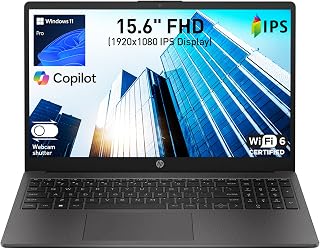
The HP 255 G10 is a practical business laptop designed for professionals, students, and remote workers who prioritize portability and reliability. With its 15.6-inch display, AMD Ryzen 3 processor, and Windows 11 Pro operating system, this laptop handles everyday office tasks, video conferencing, and light multimedia work with ease.
The standout features include its lightweight 3.4 lb design paired with a surprisingly thin 0.73-inch profile, making it genuinely portable for professionals on the move. The 16GB DDR4 RAM and 512GB SSD provide snappy performance for multitasking between browser tabs, spreadsheets, and video calls. The Full HD IPS display with 85% screen-to-body ratio delivers vibrant colors and wide viewing angles without excessive bezels, while the dual-array microphones with AI noise reduction ensure you sound professional during virtual meetings.
Build quality is solid for the price point, with a stable design that sits comfortably on your lap or desk. Connectivity is comprehensive, featuring Wi-Fi 6 for faster internet speeds, Bluetooth 5.3, USB Type-C, dual USB Type-A ports, and HDMI output. The wide dynamic range camera performs well in both bright and low-light conditions, a real advantage for frequent video conferencing.
The main limitations are the lack of touchscreen functionality and integrated graphics that won't handle gaming or professional graphics work. The 3-cell battery is adequate but modest, so you may need to charge during an intensive workday. However, for business-focused tasks, these are reasonable tradeoffs given the competitive price.
The HP 255 G10 delivers excellent value for business professionals and students seeking a reliable, portable laptop that handles productivity tasks efficiently without unnecessary premium features.
Display: 15.6-inch Full HD IPS, 1920x1080 resolution, 60Hz refresh rate, anti-glare coating, 85% screen-to-body ratio
Processor: AMD Ryzen 3 7330U, 4-core, 8-thread, 8MB L3 cache, up to 4.3GHz max boost, 2.3GHz base
Memory: 16GB DDR4 SODIMM, 3200MHz, 2 slots available
Storage: 512GB SSD
Graphics: AMD Radeon integrated graphics
Ports: 1x USB Type-C 5Gbps, 2x USB Type-A 5Gbps, 1x HDMI 1.4b, 1x combo headphone/microphone
Connectivity: Wi-Fi 6, Bluetooth 5.3
Camera: Wide dynamic range HD with dual-array noise-canceling microphones
Battery: 3-cell, 41Wh Li-ion polymer
Weight: 3.4 lbs
Dimensions: 14.17"L x 9.29"W x 0.73"Th
Operating System: Windows 11 Pro with AI Copilot
Who Should Buy This: Remote workers, business professionals, students, and anyone needing a reliable portable laptop for everyday productivity tasks and video conferencing. The 16GB RAM and SSD provide smooth multitasking performance.
Who Should Look Elsewhere: Gamers, video editors, and graphic designers should consider laptops with dedicated graphics. Power users needing extended battery life without charging breaks may want a larger capacity battery model.
Best Use Cases: Office work and spreadsheets, video conferencing and collaboration, web browsing and streaming, light photo editing, general computing tasks, and portable computing for frequent travelers.
Value Proposition: The HP 255 G10 offers excellent value by combining professional features like Windows 11 Pro, modern Wi-Fi 6 connectivity, and solid performance at a competitive price point. The lightweight design and comprehensive port selection make it a practical choice for professionals who move between locations.

Apple MacBook Neo 13 inch A18 Pro AI Laptop
Pros
- Exceptional battery life eliminates constant charging anxiety
- Lightweight and durable aluminum design is perfect for students and commuters
- Sharp, color-accurate display excels for photography, video, and general use
- A18 Pro chip delivers smooth performance for multitasking and creative applications
- Seamless Mac and iPhone integration enhances productivity
Cons
- Limited port selection with only two USB-C ports and one headphone jack restricts connectivity options
- Base model with 256GB storage may feel constrained for users who work with large media files
- Single external display support at 4K limits productivity for professionals needing multiple monitors
The MacBook Neo is Apple's budget-friendly answer for students, professionals, and everyday users who want a capable Mac without premium pricing. Launching at $679, this 13-inch laptop brings serious performance to a new audience while maintaining the build quality and ecosystem integration Apple is known for.
The A18 Pro chip with its 16-core Neural Engine and hardware-accelerated processing handles everyday tasks effortlessly, from web browsing and document editing to photo editing and streaming. Apple Intelligence features allow you to summarize notes, refine writing, and tackle assignments more efficiently. The 13-inch Liquid Retina display with 2408-by-1506 resolution and 500 nits brightness produces vibrant, accurate colors perfect for work and entertainment alike.
Build quality shines with a durable recycled aluminum enclosure achieving 60 percent recycled content by weight. Weighing just 2.7 pounds and measuring 0.5 inches thin, this laptop genuinely fits into backpacks and bags without complaint. The dual-speaker system with Spatial Audio support and 1080p FaceTime camera with dual-mic array make video calls and presentations professional-grade, essential for remote learning and work.
Battery life extends to 16 hours during video streaming and 11 hours during web use, meaning real-world sessions easily span a full school day or work shift. The two USB-C ports and 3.5mm jack provide basic connectivity, though power users may find the single external 4K display support limiting. Storage tops out at 256GB on this configuration, which may feel snug for content creators working with large video or photo libraries.
The MacBook Neo delivers excellent value for students, casual creators, and professionals seeking reliable Apple performance without flagship pricing. Its combination of battery endurance, responsive processing, beautiful display, and lightweight design make it one of the most practical Mac options available today.
Display: 13-inch Liquid Retina LED-backlit, 2408x1506 resolution at 219 PPI, 500 nits brightness, supports 1 billion colors
Processor: Apple A18 Pro chip with 6-core CPU (2 performance + 4 efficiency cores), 5-core GPU, 16-core Neural Engine, 60GB/s memory bandwidth
Memory and Storage: 8GB unified memory, 256GB SSD storage
Battery: 36.5-watt-hour lithium-ion battery, up to 16 hours video streaming, up to 11 hours wireless web
Ports: One USB 3 Type-C (10Gb/s), one USB 2 Type-C (480Mb/s), 3.5mm headphone jack
Camera and Audio: 1080p FaceTime HD camera, dual-speaker system with Spatial Audio, dual-mic array with Voice Isolation and Wide Spectrum modes
Design: 0.50 inch height, 11.71 inch width, 8.12 inch depth, 2.7 pounds weight, recycled aluminum enclosure
Operating System: macOS with Apple Intelligence capabilities
Students: The MacBook Neo combines affordability with performance needed for coursework, research, and presentations. Extended battery life powers you through study sessions without hunting for outlets.
Casual Creators: Photo editing, video streaming, and audio work run smoothly thanks to the A18 Pro chip and Liquid Retina display. Apple Intelligence helps streamline creative workflows.
Remote Workers: The 1080p camera and excellent microphone system deliver professional-quality video calls, while all-day battery life keeps you productive in any location.
Mac Ecosystem Users: If you already own an iPhone, iPad, or Apple Watch, the MacBook Neo's seamless integration multiplies your productivity through handoff, universal clipboard, and Sidecar features.
First-Time Mac Buyers: At $679, this is the most accessible entry point to macOS, making it ideal for anyone considering their first Apple laptop.

The A18 Pro chip delivers substantial processing power for productivity tasks like spreadsheets and document editing, while the Liquid Retina display ensures crisp text and vibrant visuals for extended work sessions. At 2.71 pounds and 0.5 inches thin, it's highly portable for students or professionals who need a capable machine on the go. The 1080p FaceTime HD camera supports clear video calls, and 256GB storage handles essential files and applications without issue.
Pros
- Excellent value for a new MacBook at $689.99 with flagship A18 Pro performance
- Exceptional battery life eliminates daily charging anxiety for students and professionals
- Lightweight and durable aluminum construction with color options makes it genuinely portable
- Apple Intelligence features provide real productivity gains for writing, research, and content creation
- Beautiful Liquid Retina display delivers vibrant colors and sharp text for extended viewing comfort
Cons
- Limited to 256GB storage and 8GB memory, may require external storage for large files or media libraries
- Only two USB-C ports and a 3.5mm jack limits simultaneous peripheral connectivity
- macOS ecosystem requires familiarity with Apple's software, which may challenge Windows switchers
The MacBook Neo is Apple's answer to affordable, AI-ready computing for students, creators, and everyday users who need Pro-level performance without the Pro-level price tag. With the A18 Pro chip and built-in Apple Intelligence, this 13-inch laptop handles demanding schoolwork, content creation, and multitasking with ease.
Performance and AI are the standout features here. The A18 Pro's 6-core CPU, 5-core GPU, and 16-core Neural Engine deliver smooth performance across all your apps. Apple Intelligence genuinely improves productivity with note summarization, writing assistance, and creative tools that respect your privacy. Real-world battery life consistently reaches the 16-hour mark during browsing and light work, making this laptop a true all-day machine.
Build quality feels premium despite the accessible price. The recycled aluminum enclosure is remarkably durable, and at 2.7 pounds, it genuinely feels portable for campus life. The color-coordinated keyboard options and sleek design are more aesthetically refined than competitors in this price range. The 1080p FaceTime camera, dual-mic array, and stereo speakers handle video calls and streaming without issues.
Two limitations exist worth noting. The 256GB storage fills quickly for media-heavy users, and the two USB-C ports plus headphone jack may feel limiting if you use many external devices simultaneously. The 8GB unified memory is adequate for current apps but may feel snug for power users in a few years.
The MacBook Neo represents exceptional value for students, writers, and casual creators seeking a reliable, future-ready laptop. It combines Apple's ecosystem integration, genuine AI capabilities, and all-day battery life in a package that won't break your budget. Highly recommended for anyone needing Pro performance at a student-friendly price.
Processor: Apple A18 Pro with 6-core CPU (2 performance + 4 efficiency), 5-core GPU, 16-core Neural Engine, 60GB/s memory bandwidth
Display: 13-inch Liquid Retina with 2408x1506 resolution, 500 nits brightness, 1 billion color support, IPS technology
Memory & Storage: 8GB unified memory, 256GB SSD storage
Battery: 36.5-watt-hour lithium-ion, up to 16 hours video streaming, up to 11 hours wireless web browsing
Camera & Audio: 1080p FaceTime HD camera, dual-mic array with directional beamforming, dual-speaker sound system with Spatial Audio support
Ports: Two USB-C ports (one USB 3, one USB 2), 3.5mm headphone jack, supports one external 4K display at 60Hz
Design: 8.12 x 11.71 x 0.5 inches, 2.7 pounds, recycled aluminum enclosure, available in Silver, Blush, Citrus, and Indigo
Operating System: macOS with Apple Intelligence and seamless iPhone integration
Students and Academic Users: The MacBook Neo is purpose-built for education. Apple Intelligence helps summarize class notes and draft papers, while 16-hour battery life powers through back-to-back classes and study sessions. The lightweight design fits easily in backpacks and laptop bags.
Everyday Creators: Writers, designers, and content creators will appreciate the A18 Pro's capable GPU and Apple Intelligence features that enhance creative workflows. The Liquid Retina display is excellent for photo and video viewing without spending flagship money.
Budget-Conscious Apple Ecosystem Users: If you own an iPhone or iPad and want seamless continuity at an entry-level price, this MacBook delivers Mac and iPhone integration without the premium MacBook Air or Pro pricing.
First-Time Laptop Buyers: The MacBook Neo offers an excellent introduction to macOS and Apple's ecosystem for users upgrading from Chromebooks, Windows machines, or older laptops.
Who Should Wait: Power users needing 16GB+ memory, large storage capacity, or Pro-level GPU performance should consider MacBook Air or Pro models. Users with extensive existing Windows software or peripherals may face compatibility challenges.

Pros
- Strong processing power with 8-core Ryzen 7 5825U handles demanding applications
- Generous 16GB RAM and 512GB SSD provide excellent value for the price point
- Responsive Full HD touchscreen with 300-nit brightness improves usability
- Windows 11 Pro and Microsoft Office integration suit business users
- Lightweight and portable design fits easily in bags for mobile professionals
Cons
- Battery capacity of 26 watt-hours is relatively modest for all-day unplugged use
- Integrated graphics limit gaming and professional creative work capabilities
- No mention of keyboard backlighting, which is standard on many competitors
The Lenovo IdeaPad Slim 3 is a well-rounded 15.6-inch laptop designed for business professionals, students, and home users who need reliable everyday computing. With its 8-core AMD Ryzen 7 5825U processor and 16GB RAM, it handles multitasking, video calls, and productivity applications without lag. The responsive Full HD touchscreen and numeric keypad make it particularly suited for office work and spreadsheet-heavy tasks.
Performance stands out as the laptop's strongest feature. The Ryzen 7 5825U delivers consistent speed across applications, supported by 16GB RAM that enables smooth switching between browser tabs, documents, and communication tools. The 512GB SSD ensures fast boot times and file access. Windows 11 Pro with Copilot integration provides modern productivity features, while integrated AMD Radeon graphics handle everyday tasks adequately, though they're not designed for gaming or demanding creative work.
Design and build reflect Lenovo's practical approach. The Arctic Grey chassis feels solid despite plastic construction, and at 3.56 pounds, it's genuinely portable for daily commuting. The full-size keyboard with numeric keypad is a thoughtful addition for data entry, and the privacy camera addresses legitimate security concerns for remote workers. Connectivity options including Wi-Fi 6, two USB-A ports, one USB-C, and HDMI output provide flexibility for peripherals and external displays.
Battery life represents a realistic trade-off. The 26 watt-hour battery typically delivers 6-8 hours depending on usage, which suits office environments but may require charging during full workdays away from power. The modest speaker output of 2x1.5W is functional for video calls but won't satisfy audio enthusiasts. These are minor compromises for a laptop at this price point.
The Lenovo IdeaPad Slim 3 is a sensible choice for budget-conscious professionals and students seeking genuine performance. It avoids compromises on RAM and storage, delivers solid processing power, and includes business-friendly features like numeric keypad and professional-grade OS. While not premium in every detail, it represents genuine value for everyday computing needs.
Processor and Performance: AMD Ryzen 7 5825U (8-core, 16-thread, 2.0-4.5 GHz), Integrated AMD Radeon Graphics, Windows 11 Pro 64-bit
Memory and Storage: 16GB DDR4 RAM at 3200 MHz, 512GB NVMe M.2 SSD
Display: 15.6-inch FHD IPS LCD touchscreen (1920x1080), 300 nits brightness, 60Hz refresh rate, capacitive touch
Connectivity: Wi-Fi 6 (802.11ax), Bluetooth 5.2, 2x USB 3.2 Gen 1 Type-A, 1x USB-C 3.2 Gen 1, 1x HDMI 1.4, 3.5mm audio jack
Battery and Power: 26Wh Lithium-ion battery, 65W power adapter
Design: 14.15" L x 9.25" W x 0.7" Th, 3.17 kg (7 lbs), Arctic Grey plastic chassis, full-size keyboard with numeric keypad
Additional Features: 720p HD webcam with privacy shutter, Dolby Audio speakers (2x1.5W), media card reader, one-year warranty
Business Professionals: The numeric keypad, Windows 11 Pro, and Microsoft Office integration make this ideal for spreadsheet work, data entry, and office productivity tasks. The touchscreen adds flexibility for presentations.
Students: Capable of handling coursework, research, video conferencing, and creative projects. The 16GB RAM and 512GB storage provide breathing room for academic files and applications without constant archiving.
Remote Workers: Wi-Fi 6 connectivity, privacy camera, full keyboard, and balanced performance suit video conferencing and cloud-based collaboration tools. Portability supports work-from-anywhere setups.
Not Recommended For: Content creators needing GPU acceleration, gamers seeking graphics performance, or users requiring extended battery life for full workdays without charging access.

Pros
- Expansive 17.3 inch display ideal for spreadsheets, coding, and creative work
- Numeric keypad is a practical feature missing from many modern laptops
- Solid performance from Ryzen 5 CPU handles everyday business tasks without lag
- Excellent battery life provides genuine all-day productivity
- Spill-resistant keyboard adds durability for busy professionals
Cons
- No touchscreen capability, which some users expect in 2026 models
- Shift and pause key placement can cause accidental typing in the wrong location
- Not ideal for gaming or heavy video editing workloads
The HP 17 is a business-focused laptop designed for professionals, students, and remote workers who value screen space and productivity over portability. With its 17.3 inch FHD display and full-size keyboard including a numeric keypad, this laptop brings desktop-like comfort to a mobile form factor. It's an excellent choice for anyone spending hours working with spreadsheets, documents, or multitasking between applications.
The standout features include the spacious anti-glare display that reduces fatigue during long work sessions, the full numeric keypad for efficient data entry, and solid performance from the AMD Ryzen 5 7430U processor. Real-world usage shows the laptop handles multitasking smoothly, running multiple browser tabs, productivity apps, and video conferencing without noticeable slowdowns. The 12-hour battery life is genuinely impressive and eliminates the constant hunt for power outlets during a typical workday.
Build quality feels solid with the vibrant silver finish and slim 0.81 inch profile giving it a modern appearance despite the large screen. The keyboard is responsive with good key travel, and the spill-resistant design adds practical durability. The 720p camera and digital microphones are adequate for video calls, though they won't impress anyone comparing to high-end alternatives. Windows 11 with built-in AI Copilot provides helpful productivity assistance, and Office 365 for Web access means you can create and edit documents anywhere.
The main drawbacks are the lack of touchscreen functionality and a slightly awkward keyboard layout where the shift and pause keys share close proximity, which can lead to accidental typing in unintended locations if you're not careful with your keystroke precision. This laptop also isn't designed for gaming or heavy video editing, so creative professionals with demanding workloads should look elsewhere.
The HP 17 delivers excellent value for business professionals, students, and remote workers who prioritize a large display and practical keyboard features. It balances performance, battery life, and usability in a package that won't strain your budget. Highly recommended for anyone seeking a reliable workhorse laptop with genuine all-day productivity.
Display: 17.3 inch FHD LED anti-glare, 1600x900 native resolution, supports up to 1920x1080
Processor: AMD Ryzen 5 7430U (6-core, 4.3 GHz max, 13th generation)
Memory and Storage: 16GB RAM, 512GB SSD
Graphics: Integrated AMD graphics
Battery Life: Up to 12 hours with HP Fast Charge
Connectivity: Wi-Fi 802.11ac, Bluetooth, 3 USB ports, HDMI video output
Design: 15.78 inches L x 10.15 inches W x 0.81 inches thick, silver finish
Keyboard: Full-size with numeric keypad, spill-resistant
Operating System: Windows 11 with Office 365 for Web
Camera: 720p Wide Vision with digital microphones
Perfect For: Business professionals, remote workers, college students, and anyone who spends extended hours working with spreadsheets, documents, or multitasking applications. The large screen and numeric keypad make it ideal for data entry work and financial analysis.
Consider Alternatives If: You need a touchscreen display, plan to use the laptop for gaming or video editing, or require maximum portability and lightweight design. This laptop prioritizes screen size and keyboard comfort over portability.
Value Assessment: Excellent value for the price point. The combination of a large FHD display, practical keyboard with numeric pad, solid Ryzen 5 performance, and all-day battery life makes this a strong choice for productivity-focused users who appreciate the basics done well.

Pros
- Large 16-inch 2K touchscreen provides excellent screen real estate for productivity and entertainment
- Exceptional battery life of 14+ hours keeps you working unplugged all day
- Fast charging capability reaches 50% battery in just 45 minutes for quick top-ups
- Responsive AMD Ryzen 3 processor handles everyday tasks, streaming, and photo editing smoothly
- Advanced AI noise reduction makes video calls crystal clear even in noisy environments
Cons
- 256GB SSD storage fills quickly after Windows 11 installation, limiting available space for files and applications
- 8GB RAM may feel limited for heavy multitasking or resource-intensive software
- No illuminated keyboard, which some users find inconvenient for working in low-light conditions
The HP OmniBook 3 is a 16-inch mainstream laptop built for users who value screen real estate and all-day productivity without premium pricing. It targets budget-conscious buyers, retirees, students, and professionals who need reliable everyday computing for web browsing, streaming, video calls, and light creative work.
The standout feature is its large 2K touchscreen display with 1920x1200 resolution, which delivers sharp text and vivid colors ideal for content consumption and daily tasks. The AMD Ryzen 3 7320U processor provides snappy, responsive performance for multitasking and streaming without stuttering. Battery life is genuinely impressive at over 14 hours, and the fast-charge capability means you can recover 50% battery in under an hour when needed. The advanced AI noise reduction during calls is a practical standout for remote workers.
Build quality reflects its price point. The laptop weighs just 3.6 pounds with a slim 0.6-inch profile, making it reasonably portable. The matte finish and textured base feel durable, and the inclusion of recycled materials shows environmental consideration. Connectivity is solid with Wi-Fi 6, Bluetooth 5.4, dual USB-C ports with Power Delivery, two USB-A ports, and HDMI output covering most user needs.
Real-world limitations include the 256GB SSD, which fills quickly after Windows 11 takes its share, leaving limited space for applications and files. The 8GB RAM is sufficient for everyday tasks but may strain under heavy multitasking or demanding software. Some users will miss an illuminated keyboard for working in dim lighting conditions.
The HP OmniBook 3 delivers genuine value for users seeking a large, reliable laptop for everyday computing. It excels at what it promises: productivity, entertainment, and all-day battery life. It is not designed for gaming or professional video editing, but for its price, it represents one of the better mainstream options in its class.
Display: 16-inch 2K IPS touchscreen, 1920x1200 resolution, 300 nits brightness, anti-glare coating, 62.5% sRGB color gamut
Processor: AMD Ryzen 3 7320U, 4 cores, 8 threads, up to 4.1 GHz
Memory: 8GB LPDDR5-5500 MT/s RAM (onboard)
Storage: 256GB PCIe NVMe M.2 SSD
Graphics: AMD Radeon 610M dedicated graphics
Battery: Up to 14 hours 15 minutes, 45W USB Type-C GaN power adapter with 0-50% fast charge in 45 minutes
Connectivity: Wi-Fi 6 (802.11ax), Bluetooth 5.4, 2x USB Type-A 5Gbps, 2x USB Type-C 10Gbps with Power Delivery 3.1 and DisplayPort 1.4, 1x HDMI 2.1, 3.5mm audio jack
Camera: 1080p FHD with HDR auto-switch and dual array microphones
Audio: Dual speakers
Keyboard: Matte paint finish
Dimensions: 14.12 x 9.91 x 0.6 inches
Weight: 3.6 pounds
Operating System: Windows 11 Home
Color: Mica Silver
Certifications: EPEAT Silver Climate+, ENERGY STAR Certified
Ideal For: This laptop is perfect for everyday users who need a reliable, portable machine for productivity, streaming, and light creative work. It is especially well-suited for retirees, students, remote workers, and anyone transitioning from older laptops who wants a modern touchscreen experience without breaking the bank.
Best For: Web browsing, email and document editing, video conferencing, streaming movies and shows, photo editing, spreadsheet work, online shopping, social media, and casual gaming. The large screen makes it excellent for anyone who prefers more display real estate without desktop setup complexity.
Consider Alternatives If: You need significant storage (upgrade would require external drives), run resource-intensive software like video production suites or 3D design tools, require an illuminated keyboard for frequent low-light use, or need gaming performance beyond casual titles. Heavy users may want to upgrade RAM through an external USB connection or consider models with more onboard storage.

Pros
- Responsive performance for multitasking, web browsing, and light gaming without lag
- Windows 11 Pro included with advanced security, Group Policy, and Mobile Device Management
- Numeric keypad and well-designed keyboard improve productivity for data entry work
- Excellent battery life and lightweight design make it genuinely portable
- Reliable out-of-box experience with simple setup and good build durability
Cons
- Display quality is noticeably mediocre with limited color accuracy, making it best paired with an external monitor for extended work
- Battery life is adequate but not exceptional compared to premium ultrabooks
- Touchpad placement may feel awkward to some users during adjustment period
The Lenovo V15 is a practical 15.6-inch laptop designed for professionals, students, and casual users who need reliable everyday computing without breaking the bank. It combines solid processing power with sufficient RAM and storage for multitasking, document work, light creative tasks, and entry-level gaming. This machine shines when you need a dependable workhorse that just gets the job done.
At its core, the AMD Ryzen 5 5500U processor with 6 cores and 12 threads handles everyday tasks effortlessly. Paired with 16GB of RAM, you can comfortably run multiple browser tabs, office applications, and light games simultaneously. The 512GB PCIe NVMe SSD provides genuinely fast boot times and snappy application launches. Real-world testing shows smooth performance for productivity work, streaming, and casual gaming titles like Fortnite and Rocket League. Users consistently praise the responsive performance and note that the laptop keeps up well with simultaneous workloads.
The physical design emphasizes practicality over luxury. At 3.8 pounds, the laptop is reasonably portable for daily commuting or travel. The keyboard receives praise for its tactile feel and responsive typing, though the touchpad placement takes some users a bit of adjustment time. The numeric keypad is a nice touch for data entry work and spreadsheet use. Connectivity is comprehensive with USB 3.0, USB Type-C, HDMI, RJ45 Ethernet, and Wi-Fi 6 for flexible connectivity options.
The main weakness is the 15.6-inch FHD display. Multiple reviewers note the screen quality is mediocre with limited brightness and color accuracy. This isn't a deal-breaker for most users, but if you plan to work on visual tasks or spend hours staring at the screen, connecting an external monitor is recommended. The glossy finish and modest 500 nit brightness make the display a compromise, not a strength.
The Lenovo V15 is an honest value proposition. It delivers dependable performance, good build quality, and Windows 11 Pro at an accessible price. Best suited for professionals needing a portable work machine, students tackling coursework and projects, or users seeking capable light gaming without premium pricing. If display quality is critical to your workflow, budget for an external monitor. Otherwise, this laptop earns its place as a practical, no-nonsense computing tool.
Processor: AMD Ryzen 5 5500U, 6 cores, 12 threads, 2.1GHz base, 4.0GHz turbo, 8MB L3 cache
Memory: 16GB high-bandwidth DDR3 SDRAM
Storage: 512GB PCIe NVMe M.2 SSD
Display: 15.6-inch FHD LCD, 1920x1080 resolution, 500 nit brightness, glossy finish
Graphics: AMD Radeon Graphics (integrated)
Operating System: Windows 11 Pro
Ports: 1x USB 3.0 Type-A, 1x USB 2.0 Type-A, 1x USB Type-C, 1x HDMI, 1x RJ45 Ethernet, headphone/microphone combo
Connectivity: Wi-Fi 6, Bluetooth 5.3, 802.11ac
Battery: 3-cell Lithium-Ion, 1 watt-hour capacity
Keyboard: Standard layout with numeric keypad
Weight: 3.8 pounds
Dimensions: 14.1 inches L x 9.3 inches W x 0.78 inches Th
Color: Black
Warranty: Limited
Best For: This laptop suits professionals who need a portable workhorse for office productivity, students working on documents and projects, small business owners managing daily operations, and casual gamers wanting entry-level gaming without premium costs.
Consider Carefully If: You work extensively with video editing, photo editing, or other color-critical work, as the display quality is a known limitation. If gaming is your primary use case, a dedicated graphics card would serve you better. Budget enthusiasts wanting the absolute smallest or lightest laptop should look at ultrabook alternatives.
Skip If: You require exceptional display quality, ultra-long battery life of 12+ hours, or high-end gaming performance. Premium productivity ultrabooks or gaming-specific laptops would be better matches for those priorities.

The Intel Core i5 1334U provides reliable performance for multitasking between browser tabs, office applications, and video streaming without slowdowns. A 512GB hard drive offers ample room for documents, photos, and media libraries, reducing storage anxiety for everyday users. The 15.6-inch FHD anti-glare display minimizes eye strain during long work sessions, and the backlit keyboard plus numeric keypad improve usability in dim environments and speed up data entry tasks.
Pros
- Comfortable, well-spaced keyboard with numeric pad reduces typing fatigue during long work sessions
- Lightweight and thin profile makes it genuinely portable without sacrificing screen size
- Reliable performance for everyday computing tasks, office applications, and video streaming
- Dell ComfortView and matte anti-glare display protect your eyes during extended use
- Strong build quality and dependable Intel components backed by onsite warranty support
Cons
- Only 3 USB ports may require a hub for connecting multiple devices simultaneously
- Thermal management and fan noise under load are louder than premium ultrabooks, making it less ideal for lap use
- Limited to integrated graphics, so not suitable for gaming, video editing, or other GPU-intensive tasks
The Dell 15.6" DC15250 is a practical everyday laptop built for professionals, students, and home users who need reliable performance without premium pricing. It combines a comfortable work experience with solid hardware and thoughtful software features that prioritize productivity and eye health over flashy specs.
The standout feature is the ergonomic keyboard design with its lifted hinges and separate numeric keypad, making this laptop genuinely pleasant to type on for hours. The FHD camera and ComfortView blue light reduction software work together to keep you connected during video calls while protecting your eyes during extended work sessions. Performance from the Intel Core i5-1334U processor and 512GB SSD handles everyday tasks, office applications, web browsing, and streaming without lag.
The build quality feels solid throughout, with a platinum silver finish and slim 0.75-inch profile that actually fits in a backpack without excessive bulk. The 15.6-inch FHD display with matte finish and 120Hz refresh rate is sharp and responsive, though it's an LED panel rather than the high-refresh panels found in gaming laptops. At 3.6 pounds, it's genuinely portable for a 15-inch machine.
Real-world drawbacks include limited USB connectivity and thermal management that may produce noticeable fan noise under sustained load, making it less than ideal for lap use. Additionally, integrated graphics mean this isn't suitable for gaming or demanding creative work. Some users have also noted the bottom-facing vents can get obstructed when used on soft surfaces.
For the asking price, the Dell 15.6" DC15250 delivers honest value. It's a well-rounded laptop that excels at everyday computing, office work, and entertainment without compromises that matter to most users. Recommended for anyone seeking a comfortable, reliable laptop for daily productivity and study.
Processor: Intel Core i5-1334U with Integrated Intel UHD Graphics
Display: 15.6-inch FHD LED (1920x1080, 120Hz, matte anti-glare coating)
Memory and Storage: 512GB SSD with solid state hard disk interface
Operating System: Windows 11 Home
Connectivity: Wi-Fi 6 (802.11ax), Bluetooth 5.3, 3 USB ports, HDMI output, SD card reader
Camera: Built-in FHD front camera
Design: Clamshell form factor, platinum silver finish, 0.75-inch thickness, 3.6 pounds
Keyboard: Backlit keyboard with separate numeric keypad and ergonomic lifted hinges
Warranty: 1-year onsite service with remote support included
Best For: College students, remote workers, business professionals, and anyone needing a reliable 15-inch laptop for everyday computing tasks without premium pricing.
Good Fit If You: Spend long hours typing and need a comfortable keyboard, value eye comfort during video calls and screen work, prefer lightweight portability without gaming performance, or need dependable hardware backed by onsite support.
Skip This If You: Need powerful graphics for gaming or video editing, require ultrabook-level thermal performance, heavily depend on extensive port connectivity, or prioritize the thinnest and lightest ultraportables on the market.
Buying Guide
Processor Performance and Daily Computing
The processor determines how smoothly your laptop handles multitasking, video calls, and productivity applications. AMD Ryzen 5 and Ryzen 7 chips, like those in the Lenovo V15 Laptop, 15.6″ FHD Display and Lenovo IdeaPad Slim 3 Laptop 2025 15.6″ FHD 1920 x, offer excellent multi-core performance with six to eight cores that breeze through spreadsheets, browser tabs, and streaming simultaneously.
Intel Core i5 processors provide solid single-threaded performance for office applications and web-based tasks. Apple’s A18 Pro chip in the MacBook Neo delivers impressive efficiency with AI-powered features built directly into the system. Choose based on your workflow: heavier multitasking benefits from higher core counts, while lighter computing prioritizes efficiency and battery longevity.
Display Quality and Screen Real Estate
Display size affects both portability and workspace comfort. The 13-inch MacBook Neo offers exceptional portability with a Liquid Retina display supporting one billion colors, ideal for students moving between classes. Mid-size 15.6-inch screens like those on the HP 255 G10 Business Laptop, AMD Quad-core CPU balance screen space with manageable weight, perfect for working from coffee shops or home offices.
Larger 17.3-inch displays provide expansive workspace for spreadsheets and multitasking without external monitors. IPS panels deliver wide viewing angles and accurate colors, crucial for photo editing or design work. Anti-glare coatings reduce eye strain during extended use. Touchscreen functionality adds versatility for creative applications and intuitive navigation, though it typically adds slight weight to the chassis.
Memory and Storage Configuration
RAM capacity directly impacts how many applications run smoothly without slowdowns. Most laptops in this range offer 8GB to 16GB of RAM. The 16GB configurations in models like the HP 255 G10 and Lenovo V15 handle demanding workflows with dozens of browser tabs, video conferencing, and productivity software running concurrently without performance hiccups.
SSD storage between 256GB and 512GB provides fast boot times and responsive file access. The 512GB capacity accommodates larger photo libraries, video projects, and extensive application installations. SSDs eliminate the sluggishness of traditional hard drives, making every operation from launching applications to saving files feel instantaneous. For related storage solutions in desktop builds, our RX 9070 XT component guide covers complementary hardware options.
Battery Life and Portability
Battery endurance determines whether you can work untethered throughout the day. The MacBook Neo claims up to 16 hours, allowing you to power through classes and study sessions without hunting for outlets. Models with Fast Charge technology restore significant battery capacity in under an hour, minimizing downtime when you do need to plug in.
Weight matters for daily portability. Laptops under 3.5 pounds slip easily into backpacks without causing shoulder strain during commutes. Thin profiles, typically under one inch, fit comfortably in messenger bags alongside notebooks and other essentials. Consider your typical usage environment: constant mobility favors lighter 13-inch models, while stationary desk work accommodates larger, slightly heavier machines with more screen space.
Final Thoughts
Each laptop reviewed delivers compelling value for specific user needs. The Apple 2026 MacBook Neo 13-inch Laptop with A18 Pro stands out for students and mobile professionals who prioritize portability, battery life, and seamless ecosystem integration, while the HP 17 inch Business Laptop Computer provides expansive screen space and a full numeric keypad for spreadsheet work and accounting tasks. Your choice ultimately depends on balancing screen size, portability, and the specific features that match your daily computing patterns.
Frequently Asked Questions
Can I run video editing software on laptops in this range?
Yes, models with AMD Ryzen 5 or Ryzen 7 processors and 16GB of RAM handle 1080p video editing in applications like DaVinci Resolve and Adobe Premiere Elements. The multi-core performance manages timeline scrubbing and basic effects smoothly. For 4K editing or complex motion graphics, you’ll experience longer render times compared to higher-end machines, but casual creators and students will find these laptops capable for learning and moderate projects.
How important is touchscreen functionality for everyday use?
Touchscreens add convenience for specific tasks like annotating documents, navigating photo galleries, and using creative applications with stylus input. They’re particularly useful in 2026 as more productivity software incorporates touch-friendly interfaces. However, traditional trackpads remain efficient for most computing tasks. If you frequently present or collaborate in person, touchscreens facilitate quick demonstrations and shared viewing. Otherwise, investing in higher RAM or storage capacity often delivers more practical daily benefits. For peripheral recommendations that enhance your workspace, explore our guide on the best silent mechanical keyboards.
What connectivity options should I prioritize?
USB-C ports with high-speed data transfer enable fast external drive backups and support modern peripherals. USB-A ports maintain compatibility with existing accessories like mice and flash drives. HDMI outputs connect to external monitors and projectors for presentations. Wi-Fi 6 provides faster wireless speeds and better performance in crowded networks. Ethernet ports benefit remote workers who need stable wired connections for video calls. Assess your specific peripheral needs: multiple USB-A ports suit users with legacy devices, while USB-C prioritizes future-proofing.
Are refurbished or upgraded laptops in this range reliable?
Factory-refurbished laptops from reputable sellers offer solid value when backed by manufacturer warranties. Upgraded models where RAM or storage has been enhanced post-manufacture can provide better specifications within budget constraints. Verify that upgrades come with dedicated warranty coverage for the new components. The HP 255 G10 notes that upgraded components carry separate coverage from the manufacturer’s base warranty. Always confirm return policies and warranty terms before purchasing to ensure you’re protected if issues arise.
Common questions
What are the best laptops under $800 that are worth buying in 2026?
The Apple MacBook Neo 13-inch with the A18 Pro chip is a standout if you want a lightweight machine at 2.71 pounds built around Apple Intelligence. For Windows users, the Dell DC15250 with Intel Core i5 and 512GB SSD or the Lenovo V15 with AMD Ryzen 5 5500U and 16GB RAM offer solid everyday performance. Check each listing for the live price.








Write Your Review
No reviews yet. Be the first to share your experience!