

You’re shopping for a laptop and know you want an OLED display, but the sheer number of options makes it hard to narrow down the right choice. Whether you need a portable powerhouse for creative work, a gaming rig with vivid visuals, or a lightweight machine for productivity on the go, OLED technology delivers deep blacks, vibrant colors, and sharp contrast that traditional LCD panels can’t match. This guide walks you through eight carefully selected OLED laptops that excel in different categories, helping you identify which model aligns with your workflow and budget. For related builds and component recommendations, explore our laptop and computer guides.
Quick answer
This guide compares 8 picks, with Lenovo Legion Pro 7i Gen 10 16in Gaming Laptop Intel ranked first. ASUS Zenbook Duo 14 inch Dual OLED Touch Laptop, Intel has the most customer reviews.

The Legion Pro 7i pairs a 16-inch WQXGA OLED display with 240Hz refresh rate and the RTX 5080 GPU, delivering both stunning visuals and competitive-level performance for gaming and creative work. With 64GB of RAM and 2TB of storage across dual NVMe drives, it handles intensive multitasking and large project files effortlessly. The 500-nit brightness ensures the OLED panel remains visible in varied lighting conditions, a practical advantage over dimmer alternatives.
Pros
- 240Hz WQXGA OLED with DisplayHDR True Black 1000 delivers exceptional image quality
- RTX 5080 and Core Ultra 9 275HX can fully utilize the high-refresh panel in demanding titles
- 64GB RAM and 2TB dual-drive SSD leave no configuration compromises
- Per-key RGB backlit keyboard suits both gaming and productivity work
Cons
- At nearly 5kg it is a desk-bound machine, not a portable one
- One-year warranty is modest for a flagship-tier investment
For an OLED laptop roundup, the Lenovo Legion Pro 7i Gen 10 sits at the top of the performance tier. Its 16-inch WQXGA OLED panel runs at 240Hz with 500 nits of brightness and DisplayHDR True Black 1000 certification, which means you get both the smooth motion that competitive gaming demands and the deep blacks that make OLED worth pursuing in the first place. The hardware behind that display is equally serious: an Intel Core Ultra 9 275HX with 24 cores drives an RTX 5080 with 16GB of VRAM, and 64GB of RAM ensures nothing bottlenecks the pipeline. That GPU-display pairing is the real story here. The RTX 5080 can push frame rates that actually stress a 240Hz panel at 1440p, so the OLED is never wasted on hardware that cannot feed it. Two terabytes of NVMe storage across two drives rounds out a configuration that leaves little on the table. The Eclipse Black chassis and per-key RGB keyboard complete a premium package built around one of the best screens you will find on any laptop in 2025.
Processor: Intel Core Ultra 9 275HX, 24-core (8P + 16E), up to 5.4GHz, 36MB cache
Graphics: NVIDIA GeForce RTX 5080, 16GB GDDR7, 175W TGP, 1334 AI TOPS
Display: 16-inch WQXGA OLED, 2560x1600, 240Hz, 500 nits, 100% DCI-P3, DisplayHDR True Black 1000, G-SYNC
Memory: 64GB DDR5-6400MHz (2x32GB), upgradeable configuration
Storage: 2TB NVMe SSD (2x1TB M.2 2280 PCIe Gen4)
Connectivity: Wi-Fi 7, Bluetooth 5.3, Thunderbolt 4, HDMI, USB ports
Battery: 99.99Wh Lithium-Ion, approximately 6.5 hours typical use
Weight: 4.92kg, Dimensions: 14.35in x 10.86in x 1.05in
OS: Windows 11 Pro 64-bit
Competitive gamers and content creators who want an OLED display that their hardware can actually keep up with will find this an excellent match. The RTX 5080 and 240Hz panel work together in a way that budget OLED configurations simply cannot match. Anyone who prioritizes portability should skip it entirely: at nearly 5kg, this is a desktop replacement, not a travel machine.

The Zenbook Duo's dual 14-inch 3K OLED touchscreens with 120Hz refresh transform multitasking by providing genuine dual-display real estate in a single portable chassis. Intel's Core Ultra 9 285H processor and 32GB RAM enable smooth operation across both screens simultaneously, whether you're editing video on one panel while monitoring timelines on the other. This configuration eliminates the need for external monitors while traveling or working in confined spaces.
Pros
- Dual 14-inch OLED panels with 3K resolution, 120Hz, and Pantone-validated color
- 19.8 inches of combined OLED screen space in a portable 3.64 lb chassis
- Intel Core Ultra 9 285H with AI Boost NPU and 32GB LPDDR5x RAM
- Five display modes and detachable Bluetooth keyboard for workflow flexibility
Cons
- Battery life drops to around 9 hours when actively using both OLED screens
- Dual-screen workflow has a learning curve that may slow initial productivity
The ASUS Zenbook Duo takes the OLED laptop concept further than any other model on this list by doubling the screen count. Both displays are 14-inch OLED panels running at 2880x1800 resolution with 120Hz refresh rates and Pantone-validated color accuracy, giving you 19.8 inches of combined OLED real estate in a 3.64-pound package that is 0.57 inches thin. For the OLED-specific use case, that means two color-accurate, high-contrast canvases available simultaneously, whether you are referencing footage on one screen while editing on the other or keeping communications open without losing workspace. The Intel Core Ultra 9 285H processor and 32GB LPDDR5x RAM keep up with demanding creative and AI workloads across both displays. Five configurable display modes and a detachable Bluetooth keyboard add genuine flexibility. Military-grade MIL-STD 810H durability and up to 16 hours of battery life in Laptop mode back up the premium build. The dual-screen setup does reduce battery endurance to around 9 hours in active use, which is worth factoring into daily workflows.
Display: Dual 14-inch OLED touchscreens, 2880 x 1800 resolution, 120Hz refresh rate, 500-nit HDR brightness, Pantone 100% DCI-P3 color accuracy
Processor and Memory: Intel Core Ultra 9 285H with AI Boost NPU, 32GB LPDDR5x RAM, Intel Arc Graphics
Storage and Battery: 1TB PCIe 4.0 SSD, 75Wh battery (up to 16 hours Laptop mode, 9 hours Dual Screen mode)
Connectivity: WiFi 7, Bluetooth 5.4, 2x Thunderbolt 4, USB 3.2 Gen 1 Type-A, HDMI 2.1, combo audio jack
Physical: Weight 3.64 lb, dimensions 12.34" x 8.58" x 0.57", Inkwell Gray color, detachable keyboard, built-in kickstand
Software and Accessories: Windows 11 Home, includes ASUS Pen 2.0, ASUS Sleeve, 65W USB-C charger, CapCut, MyASUS, ScreenXpert, GlideX
Ideal for content creators, developers, and analysts who specifically need two high-quality OLED screens in a portable form. If your work involves constant cross-referencing, timeline editing, or multitasking across applications, the dual-panel setup delivers real productivity gains. Skip it if you rarely use more than one window at a time or prioritize maximum battery life, as the dual-screen mode cuts endurance significantly.

This ultraportable GeekBook delivers a sharp 14-inch 2.8K OLED panel with 100% DCI-P3 color coverage and 120Hz refresh rate, making it ideal for professionals who need vibrant display quality on the go. At just 2.2 pounds and 0.23 inches thick, it's exceptionally lightweight for travel without sacrificing screen real estate. The 72Wh battery provides up to 16 hours of runtime, ensuring you can work through long days away from an outlet.
Pros
- 14-inch 2.8K OLED with 100% DCI-P3 and 120Hz refresh rate
- Exceptional portability at 2.2 lb and 0.23 inches thin
- Up to 16-hour battery life with 65W GaN fast charging
- Bundled docking station and dual USB4 ports for flexible connectivity
Cons
- Integrated Intel Arc graphics limit heavy video rendering and 3D workloads
- 14-inch screen may feel cramped for users accustomed to larger displays
The GEEKOM GeekBook X14 Pro earns its place on any best OLED laptop list by pairing one of the sharpest portable displays available with a chassis that barely registers in a bag. The 14-inch 2.8K OLED panel covers 100% of the DCI-P3 color space, hits 450 nits of brightness, and runs at 120Hz, making it a genuine tool for photo and video work rather than a marketing checkbox. At 2.2 pounds and 0.23 inches thick, it is among the lightest OLED notebooks on the market, and the aerospace-grade magnesium alloy body adds rigidity without adding grams. The Intel Arc integrated graphics handle light creative tasks, while the near-silent thermal system keeps things quiet in shared spaces. A 72Wh battery rated for up to 16 hours of use, combined with 65W GaN fast charging, means the display quality never comes at the cost of all-day usability. Two USB4 ports, HDMI, and a bundled docking station round out a connectivity story that suits both desk and travel setups.
Display: 14-inch 2.8K OLED (2880x1800), 16:10 aspect ratio, 100% DCI-P3 color gamut, 450 nits brightness, 120Hz refresh rate
Processor: Intel Core Ultra 9 185H (16 cores, 22 threads, up to 5.1 GHz, 24MB Smart Cache)
Graphics: Intel Arc Graphics with 8GB GDDR5 SDRAM, supports XeSS ray tracing and AV1 encoding
AI: Dedicated NPU integrated with Windows Copilot for on-device AI features
Memory: 32GB LPDDR5x at 7500MHz
Storage: 1TB PCIe Gen4 NVMe SSD
Battery: 72Wh high-density with up to 16-hour battery life
Charging: 65W GaN Power Delivery charger, reaches 80% in approximately 1 hour
Design: Aerospace-grade magnesium alloy unibody, Titanium Gray color, 2.2 lbs, 0.23 inches thick (12.2in L x 8.4in W)
Ports: 2x USB4 40Gbps with Power Delivery and DisplayPort 2.1, 1x HDMI 2.1, 1x USB 3.2 Type-A, 1x 3.5mm audio jack
Audio: Dual speakers with DTS:X Ultra surround sound
Security: Fingerprint recognition, physical camera shutter switch
Connectivity: Wi-Fi 6E (2.4/5/6 GHz), Bluetooth 5.4
Operating System: Windows 11, supports Linux
Warranty: 1-year limited warranty with 24/7 U.S.-based technical support
Included Accessories: Docking station
Best suited for travelers, students, and business professionals who want an OLED display without the bulk of a larger creative workstation. The 2.8K panel and DCI-P3 coverage make it appealing to photographers editing on the go. Skip it if you need a dedicated GPU for heavy video rendering or 3D work, or if a 14-inch screen feels too compact for extended creative sessions.
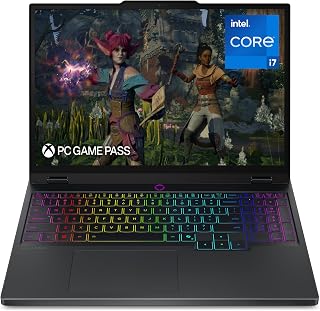
The 15-inch 2.5K WQXGA PureSight OLED display delivers the deep blacks and infinite contrast that video editors and photographers demand for color-accurate previews. Combined with a 165Hz refresh rate, creators get both the visual fidelity for precision work and smooth performance for motion graphics. The RTX 5070 handles GPU-accelerated rendering in creative applications like Premiere Pro and DaVinci Resolve efficiently.
Pros
- 2.5K OLED panel at 165Hz covers both professional color work and smooth gaming
- RTX 5070 provides meaningful GPU headroom for rendering and AI-accelerated creative tools
- 4.4-pound weight is competitive for a laptop with this display and GPU combination
- 3 months of PC GamePass included adds immediate gaming library value
Cons
- 15-inch screen size may feel limiting for creators used to larger workspaces
- 16GB base memory could be a constraint for heavy multitasking across large creative projects
The Lenovo Legion 5i brings one of the more compelling OLED panels in this roundup to a gaming-focused chassis. The 15-inch 2.5K WQXGA PureSight OLED display runs at 165Hz, a combination that is genuinely rare and directly relevant to creators: OLED delivers the deep blacks, wide color gamut, and per-pixel contrast that makes photo editing, color grading, and video work meaningfully better than IPS alternatives, while the 165Hz refresh rate keeps gaming fluid at the same time. Under the hood, the Intel Core i7-14700HX and RTX 5070 give this machine real GPU headroom, a step up from RTX 5060 options that matters for 3D rendering, AI-assisted editing tools, and running heavier creative applications alongside games. Storage is 1TB SSD with 16GB of memory. At 4.4 pounds the chassis is genuinely portable for a 15-inch machine with this level of hardware. The included 3 months of PC GamePass adds gaming value out of the box. For creators who want OLED color accuracy and high-refresh gaming in one laptop, the Legion 5i makes a strong case.
Processor: Intel Core i7-14700HX, 1.5 GHz base clock
Graphics: NVIDIA GeForce RTX 5070 with 8GB GDDR7 memory
Display: 15.1-inch 2.5K OLED, 2560x1600 resolution, 165Hz refresh rate, 500 nits brightness
Memory: 16GB RAM
Storage: 1TB SSD
Operating System: Windows 11 Home
Weight: 4.4 pounds
Dimensions: 13.58 inches L x 10.05 inches W x 0.85 inches thickness
Connectivity: Wi-Fi 7 (802.11.be), Bluetooth 5.3, 3x USB ports, 1x HDMI, USB Type-C charging
Battery: Fast-charging capable, 0-70% in under 30 minutes
Audio: Quad speakers with Nahimic by SteelSeries AI enhancement
Color: Eclipse Black
Warranty: Limited
The RTX 5070 is a game-changer for laptop gaming, built on NVIDIA's Blackwell architecture with significantly improved efficiency and performance over previous generations. It handles modern AAA titles at high settings and high refresh rates, making the 165Hz OLED display a perfect match for smooth, responsive gameplay.
The Intel i7-14700HX processor provides excellent single and multi-threaded performance with its hybrid core architecture. AI Engine+ dynamically adjusts game settings to maximize FPS, which is particularly useful when you want to maintain consistent frame rates in demanding scenes without manual tweaking.
The OLED display delivers true-to-life colors and exceptional contrast that makes games look stunning. Fast response times mean that competitive shooters and action games feel responsive, while the 165Hz refresh rate eliminates screen tearing for a smooth, fluid experience.

Pros
- Exceptional OLED display with 500 nit brightness and 165Hz refresh rate for immersive visuals
- Powerhouse specs with i9-14900HX and RTX 5070 crush high-end games and creative applications
- Generous 32GB RAM and 1TB SSD eliminate performance bottlenecks for streaming and content creation
- Lightweight and portable design belies performance capabilities, ideal for mobile gamers
- WiFi 7 connectivity ensures no lag during online multiplayer sessions
Cons
- Glossy OLED screen may cause reflections in bright environments despite exceptional image quality
- Premium performance specs position this at a higher price point than budget gaming laptops
- Limited cooling detail information may concern users planning extended gaming marathons
The Lenovo Legion 5 15IRX10 is a flagship gaming laptop designed for serious gamers and content creators who refuse to compromise on performance. It pairs professional-grade hardware with a consumer-friendly design, making it suitable for esports players, 3D artists, video editors, and anyone demanding absolute processing power in a portable form factor.
The standout feature is undoubtedly the 15.1-inch WQXGA OLED display running at 165Hz. This panel delivers the rich, accurate colors OLED technology is famous for, while the 2560x1600 resolution and 165Hz refresh rate ensure smooth, responsive gameplay. The Intel Core i9-14900HX with its 24 cores handles multithreaded workloads with ease, whether you're gaming, streaming, and recording simultaneously or rendering video in the background.
Build quality reflects Lenovo's gaming heritage, with a robust chassis, gaming-grade keyboard with RGB backlighting, and thermal design clearly engineered for sustained performance. At 4.19 lbs and 0.79 inches thick, it's remarkably portable for its capability level. The RTX 5070 with 8GB GDDR7 memory delivers the graphics horsepower needed for ray-traced games at high settings, while 32GB DDR5 RAM and the 1TB NVMe SSD eliminate common performance bottlenecks.
The glossy OLED finish may reflect overhead lighting in bright environments, and the premium specs command a higher price than mid-range alternatives. Potential buyers should also note that OLED displays, while exceptional, can carry different maintenance considerations than traditional panels over many years of use.
Verdict: The Lenovo Legion 5 15IRX10 is a top-tier gaming laptop that justifies its positioning through genuinely exceptional hardware and an OLED display that transforms the visual experience. It excels for competitive gaming, content creation, and professional applications requiring sustained peak performance.
Processor: Intel Core i9-14900HX (14th Gen, 24-core, 1.6GHz base)
Graphics: NVIDIA GeForce RTX 5070 with 8GB GDDR7 VRAM
Memory: 32GB DDR5-5600 RAM
Storage: 1TB PCIe Gen4 x4 NVMe M.2 SSD
Display: 15.1-inch WQXGA OLED, 2560x1600 resolution, 165Hz refresh rate, 500 nit brightness
Connectivity: WiFi 7 (802.11be) 2x2, Bluetooth 5.4, Gigabit LAN, HDMI output
Weight: 4.19 lbs (1.90 kg)
Operating System: Windows 11 Home
Camera: 5MP front-facing

Pros
- Exceptional OLED display quality with vibrant colors and perfect brightness levels, even in bright environments
- Powerful Intel Core Ultra 9 processor handles multitasking, content creation, and demanding software effortlessly
- Outstanding battery life up to 16 hours keeps you productive throughout extended workdays
- Lightweight and slim design at 3.3 lbs makes it genuinely portable for travel and daily use
- Premium build quality with metal chassis and thoughtfully designed keyboard provides professional feel and reliability
Cons
- Thermal management concerns reported by some users, with operating temperatures exceeding 60C under sustained load
- Glossy OLED screen is a fingerprint magnet and can cause reflections in brightly lit environments
- HDMI 2.1 port limitations with 4K 120Hz output, requiring USB-C adapter for full compatibility
The ASUS Vivobook S 16 OLED is a premium ultrabook designed for professionals, creators, and students who refuse to compromise between portability and performance. At just 3.3 lbs with an all-metal design, it challenges the notion that powerful laptops must be heavy. This machine is built for those who move constantly yet demand the processing power of a desktop workstation.
The standout feature is undoubtedly the 16-inch OLED display, which delivers cinema-quality colors, perfect blacks, and exceptional brightness that remains visible even in direct sunlight. Paired with the Intel Core Ultra 9 185H processor and integrated Arc Graphics, this laptop handles 4K video editing, complex 3D rendering, and triple-A gaming at high settings without stuttering. The keyboard is responsive and comfortable for extended typing sessions, while the generous touchpad provides precise control. Battery life genuinely reaches 16 hours during light work, making full-day usage without charging a realistic expectation.
Build quality is impressive for the price point, with a premium feel that rivals laptops costing significantly more. The 1080p IR camera with face recognition adds security, and the comprehensive port selection including dual Thunderbolt 4 connections provides excellent connectivity flexibility. The customizable RGB keyboard adds a personal touch without feeling gimmicky.
Thermal management is the primary weakness. Some users report operating temperatures consistently above 60 degrees Celsius under load, with the area around function keys becoming uncomfortably warm. The glossy OLED screen, while beautiful, acts as a fingerprint magnet and reflects ambient light in bright rooms. Additionally, the HDMI 2.1 port cannot deliver true 4K 120Hz output through native connection, requiring a USB-C adapter for full compatibility.
Verdict: The ASUS Vivobook S 16 OLED represents exceptional value for creative professionals and power users seeking a portable, high-performance machine. If you prioritize display quality, portability, and everyday performance over sustained thermal stability, this laptop delivers remarkable capability at a competitive price. Thermal-sensitive users should ensure adequate ventilation during intensive tasks.
Content creators who need portable editing power with color-accurate displays for photo and video work.
Students and professionals requiring all-day battery life without sacrificing performance for schoolwork, presentations, or daily computing.
Business travelers seeking a lightweight premium laptop that handles video conferencing and productivity applications reliably.
Casual gamers wanting to play modern titles at high settings on a machine light enough to carry daily.
Pros
- Breathtaking OLED display quality with vibrant colors, deep blacks, and 100% DCI-P3 color gamut praised by reviewers
- Lightweight and premium build quality that feels well-constructed despite the competitive price
- Smooth 120Hz refresh rate elevates everyday tasks from scrolling to video playback
- Intel Evo Edition optimization delivers responsive multitasking and solid battery efficiency
- Eye-friendly certification makes it comfortable for professionals working long hours
Cons
- 8GB RAM is base configuration and not upgradeable; Windows 11 consumes significant memory, limiting multitasking headroom
- Entry-level model may feel resource-constrained for demanding creative software or heavy virtual machine use
- Limited warranty (Limited type listed) may not provide extended peace of mind for premium pricing tier
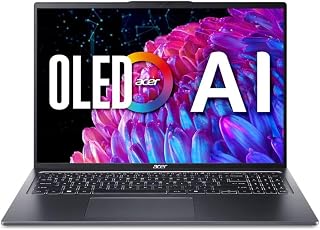
The Acer Swift Go 16 is a 2024 ultraportable laptop built for creative professionals, business users, and power consumers who refuse to compromise on display quality. Weighing just 6.5 pounds with a slim 0.59-inch profile, it delivers desktop-class visuals in a go-anywhere package that rivals machines costing significantly more.
The real standout here is the 16-inch 3.2K OLED display running at 120Hz. Reviewers consistently praised the stunning color vibrancy, jet-black levels, and buttery-smooth scrolling that make even routine tasks feel premium. The 100% DCI-P3 color gamut and HDR True Black 500 certification mean photographers, videographers, and designers get professional-grade color accuracy. At 3200x2000 resolution, text and details are crisp and readable without scaling headaches.
Performance is handled by Intel's latest Core Ultra 5 125H processor with integrated AI acceleration and NPU, paired with 512GB SSD storage. The Intel Arc graphics handle light creative work and modern apps smoothly, while the Evo Edition optimization ensures responsive multitasking and solid battery life. Wi-Fi 6E and dual Thunderbolt 4 ports enable fast connectivity for external displays and high-speed file transfers.
Build quality impresses with a premium aluminum chassis, fingerprint reader, and backlit keyboard that feels well-designed. The TUV Rheinland Eyesafe Certification is a welcome addition for anyone spending 8+ hours daily on screen work. The main drawback is the non-upgradeable 8GB RAM base configuration, which some users found limiting with Windows 11's baseline overhead. Power users or those running resource-intensive applications may feel the pinch here.
Verdict: The Swift Go 16 offers exceptional value for the OLED display and overall build quality alone. It excels for professionals prioritizing visual excellence and portability, though the RAM limitation warrants consideration if your workflow demands heavy multitasking or demanding software.
Display: 16-inch 3.2K OLED (3200x2000), 120Hz refresh rate, 100% DCI-P3 color gamut, VESA DisplayHDR True Black 500, TUV Rheinland Eyesafe Certified
Processor: Intel Core Ultra 5 125H (14-core, 13th Gen equivalent)
Graphics: Intel Arc Graphics
Memory: 8GB RAM
Storage: 512GB SSD
Connectivity: Wi-Fi 6E (802.11ax), Dual USB-C with Thunderbolt 4 and USB4 (40Gbps), DisplayPort
Security: Fingerprint Reader, Windows Hello
Dimensions: 14.02in W x 9.62in L x 0.59in Th
Weight: 6.5 pounds
Operating System: Windows 11 Home
Special Features: Backlit keyboard with numeric keypad, HD webcam, premium aluminum chassis
Color: Steel Grey
Best For: Creative professionals (photographers, designers, video editors), business travelers who value display quality, content creators, remote workers, students needing premium visuals, and professionals seeking AI-ready productivity in a portable form factor.
Consider Alternatives If: You need more than 8GB RAM without upgrading options, require extensive gaming performance, or work primarily offline and need longer battery benchmarks than Evo optimization provides.
Not Ideal For: Budget-conscious buyers seeking rock-bottom prices, users needing extensive RAM for heavy virtualization or data science workloads, or gamers expecting high-refresh gaming performance from integrated graphics.
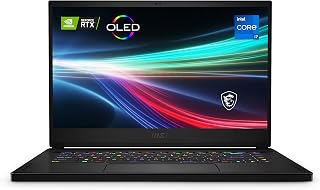
This Creator 15 combines a 15.6-inch UHD 4K OLED display with 100% DCI-P3 color accuracy and the RTX 3060 GPU, providing both the color precision and rendering power content creators require. The Thunderbolt 4 connectivity enables high-speed transfers and external GPU support for expanded workflows. Its 4K OLED panel offers pixel-perfect detail for photo editing, video color grading, and design work where visual accuracy is paramount.
Pros
- 15.6-inch 4K OLED display with 100% DCI-P3 for professional color work
- NVIDIA RTX 3060 with 6GB VRAM accelerates creative application performance
- Thunderbolt 4 and built-in RJ45 reduce adapter dependency
- Solid build with upgradeable components for longer device lifespan
Cons
- Glossy OLED panel causes noticeable reflections in bright or outdoor environments
- At 5.4 pounds, portability lags behind most other models on this list
The MSI Creator 15 brings a 4K OLED display to a larger 15.6-inch form factor, which makes it one of the most visually capable machines on this list for photographers and video editors who need screen size alongside color fidelity. The panel covers 100% of the DCI-P3 spectrum and pairs with an NVIDIA GeForce RTX 3060 with 6GB of dedicated VRAM, a combination that handles Adobe Creative Suite work with genuine headroom. The Intel Core i7-11800H provides eight cores for rendering and multitasking. Thunderbolt 4, multiple USB ports, and an RJ45 ethernet jack reduce reliance on adapters, which is practical for studio or desk-based creative work. Build quality is solid and the 0.78-inch profile is reasonable for the hardware inside. The trade-offs are real: the glossy OLED panel picks up reflections in bright environments, fans become audible under sustained load, and at 5.4 pounds it sits at the heavier end of this lineup. Users have also reported occasional driver-related stability issues. For those who prioritize display size and dedicated GPU performance, though, the 4K OLED panel remains the central reason to choose this laptop.
Display: 15.6-inch 4K OLED (3840 x 2160), 100% DCI-P3, ultra-thin 9mm bezel, glossy finish
Processor: Intel Core i7-11800H (11th Gen, 8 cores, up to 4.6 GHz)
Graphics: NVIDIA GeForce RTX 3060 (6GB GDDR6)
Memory: 16GB DDR4 (upgradeable)
Storage: 512GB NVMe SSD (upgradeable)
Connectivity: Thunderbolt 4, USB Type-A, USB Type-C, HDMI 2.1, 3.5mm audio, RJ45 (Killer E3100 2.5GbE), Wi-Fi 6E, Bluetooth 5.2
Build: Ultra-thin and light 0.78-inch profile, 5.4 pounds, aluminum chassis
Operating System: Windows 10 (free upgrade to Windows 11)
Power: 230W power adapter
Warranty: Limited warranty
A strong fit for photographers and video editors who work primarily at a desk or in controlled lighting and need a large, color-accurate OLED display paired with a dedicated GPU. Less suitable for frequent travelers given the 5.4-pound weight, or for users sensitive to fan noise during intensive workloads. Those needing a glossy-screen-free experience should also look elsewhere.
Buying Guide: What to Look For in an OLED Laptop
Display Quality and Color Accuracy
OLED panels deliver self-lit pixels that produce true blacks and infinite contrast ratios, but not all OLED displays are created equal. Look for models that offer 100% DCI-P3 color coverage if you work with photo or video editing, as this ensures accurate reproduction of a wide color gamut. Resolution matters too: 2.8K and 3K panels provide sharper text and more screen real estate than standard 1080p options, while 4K OLED displays offer the highest clarity for creative professionals.
Refresh rate is another critical factor. Gamers benefit from 120Hz, 165Hz, or even 240Hz panels that deliver smooth motion during fast-paced gameplay, while productivity users can prioritize color accuracy and brightness over high refresh rates. The ASUS Zenbook Duo Laptop, Dual 14″ OLED 3K 120Hz stands out with dual OLED touchscreens, giving you unprecedented flexibility for multitasking and content creation. If you’re building a desktop system alongside your laptop, check our RTX 5080 build guide for complementary hardware recommendations.
Performance and Thermal Management
The processor and GPU pairing determines how well your laptop handles demanding workloads. Intel Core Ultra 9 processors with dedicated NPUs enable on-device AI features like background blur, noise reduction, and content-aware upscaling, while Intel Core i7 and i9 CPUs from the 14th generation deliver strong multi-core performance for gaming and content creation. For graphics, NVIDIA GeForce RTX 5070 and 5080 GPUs provide ray tracing, DLSS upscaling, and AV1 encoding, making them ideal for gamers and video editors.
Thermal design is just as important as raw power. The Lenovo Legion Pro 7i Gen 10 16″ Gaming Laptop uses advanced cooling with turbo fans and copper heat pipes to maintain high performance during extended gaming sessions, while the GEEKOM GeekBook X14 Pro Laptop employs the IceBlade 2.0 system to stay whisper-quiet under load. If you’re also considering a desktop setup, our RTX 5070 component guide covers optimal cooling solutions for similar GPUs.
Portability and Battery Life
Weight and battery capacity define how practical your laptop is for mobile work. Ultra-portable models like the GEEKOM GeekBook X14 Pro Laptop weigh just 2.2 pounds and pack a 72Wh battery for up to 16 hours of use, making them ideal for frequent travelers and students. Heavier gaming laptops sacrifice some portability for larger batteries and more robust cooling, but modern designs like the Lenovo Legion 5i – Gaming Laptop still offer fast-charging via USB Type-C, reaching 70% capacity in under 30 minutes.
Consider your daily routine when evaluating battery life. OLED panels consume more power than traditional LCDs, especially when displaying bright content, so manufacturers often balance battery capacity with chassis thickness. The ASUS Zenbook Duo Laptop, Dual 14″ OLED 3K 120Hz manages dual displays with a 75Wh battery, providing up to 16 hours in single-screen mode and 9 hours with both displays active. For home office setups that complement your portable workflow, browse our home office equipment recommendations.
Build Quality and Connectivity
Premium materials and solid construction ensure your laptop withstands daily use. Look for magnesium or aluminum alloy chassis that resist flexing and scratches while keeping weight manageable. The GEEKOM GeekBook X14 Pro Laptop uses aerospace-grade magnesium alloy with a precision-milled unibody design, while the ASUS Vivobook S 16 OLED Laptop meets US MIL-STD 810H military standards for durability in harsh conditions.
Port selection matters for peripherals and external displays. USB4 and Thunderbolt 4 ports support 40Gbps data transfers, power delivery, and multi-monitor setups with a single cable, while HDMI 2.1 enables 4K output at 120Hz for gaming or presentation work. Wi-Fi 6E and Wi-Fi 7 provide faster wireless speeds and lower latency on congested networks, essential for remote work and cloud-based workflows. The Lenovo Legion Pro 7i Gen 10 16″ Gaming Laptop includes a full array of ports plus a 400W power adapter for sustained high-performance operation. For more electronics and tech recommendations, explore our broader guide.
Final Thoughts
Choosing the right OLED laptop depends on how you plan to use it. If you need maximum gaming performance and a stunning display, the Lenovo Legion Pro 7i Gen 10 16″ Gaming Laptop delivers desktop-class power with its RTX 5080 GPU and 240Hz OLED panel. For creative professionals who value portability and dual-screen versatility, the ASUS Zenbook Duo Laptop, Dual 14″ OLED 3K 120Hz offers an unmatched multitasking experience in a lightweight package. Both models represent the cutting edge of OLED laptop technology in 2026, giving you exceptional visual quality whether you’re gaming, editing, or working on the go.
Frequently Asked Questions
Do OLED laptops suffer from burn-in like OLED TVs?
Modern OLED laptops include pixel-shifting technology, automatic brightness limiters, and screensavers that reduce the risk of burn-in significantly compared to older OLED displays. Static elements like taskbars and menus can still cause image retention if left on screen for extended periods, so it’s smart to enable dark mode, use auto-hide for taskbars, and let the screen turn off when idle. Most manufacturers warranty their OLED panels against defects, and burn-in has become far less common with current-generation panels used in laptops released in 2026.
How does battery life compare between OLED and LCD laptops?
OLED displays consume less power when showing dark content because individual pixels turn off completely for true blacks, but they draw more power than LCDs when displaying bright, white-heavy interfaces. In real-world use, OLED laptops typically offer 10-20% shorter battery life than equivalent LCD models when working with bright productivity apps or browsing websites with white backgrounds. You can extend battery life by enabling dark mode across your operating system and applications, which takes full advantage of OLED’s power efficiency.
Are OLED laptops better for gaming or productivity?
OLED laptops excel at both tasks but shine in different ways. Gamers benefit from near-instant pixel response times that eliminate motion blur, deep blacks that enhance visibility in dark game scenes, and high refresh rates up to 240Hz for competitive play. Creative professionals and productivity users appreciate the accurate color reproduction, high contrast ratios for precise photo and video editing, and better eye comfort during long work sessions thanks to reduced blue light emission. The Lenovo Legion 5i – Gaming Laptop balances both worlds with its 165Hz OLED display and strong productivity performance.
What resolution should I choose for an OLED laptop in 2026?
The ideal resolution depends on your screen size and use case. For 14-inch displays, 2.8K (2880×1800) provides excellent sharpness without straining your GPU or battery life, as seen in the GEEKOM GeekBook X14 Pro Laptop. For 15-16 inch screens, 2.5K to 3K resolutions like WQXGA (2560×1600) offer the sweet spot between clarity and performance for most users, while 4K UHD panels suit professionals who need maximum detail for photo editing or CAD work. Higher resolutions demand more from your GPU and reduce battery life, so balance your visual needs against practical performance considerations.








Write Your Review
No reviews yet. Be the first to share your experience!