

You’ve committed to a 360mm all-in-one liquid cooler, and now the real challenge begins: finding a case that actually fits it without compromising airflow, aesthetics, or build quality. Not every mid-tower supports a 360mm radiator at the top or front, and the ones that do vary wildly in fan support, GPU clearance, and cable management. Whether you’re pairing your loop with a high-end GPU like the RTX 5090 or building a compact powerhouse, this guide has you covered. For reference on pairing your case with the right components, check out our best PC build for RTX 5070 ti guide.
We evaluated ten cases across different sizes, price points, and feature sets, focusing specifically on 360mm AIO compatibility, airflow design, build quality, and ease of installation. This list covers options from Thermaltake, Lian Li, MONTECH, ASUS, Corsair, and more, so there’s something here for every kind of builder.
Quick Comparison
Ratings reflect the most recent data pull. Check each listing for current price and availability.
Quick answer
This guide compares 10 picks, with Lian Li V100 ATX Mid-Tower PC Case with 4 ARGB Fans ranked first. CORSAIR 4000D RS ARGB Modular Mid-Tower Case has the most customer reviews.

The V100-ATX supports top-mounted 360mm radiators and includes RGB lighting to showcase your cooling setup. Its four internal bays give you flexibility for storage expansion, while the built-in dust filters protect your AIO from debris accumulation. The mid-tower footprint balances room for a large radiator with manageable desk space, making it practical for builders prioritizing liquid cooling performance.
Pros
- Pre-installed ARGB fans eliminate separate cooling purchases
- Nine 120mm positions support dual 360mm radiators simultaneously
- 420mm GPU clearance accommodates front-mounted AIOs with long cards
- Tool-less glass panels simplify radiator installation and maintenance
Cons
- Glass construction offers minimal sound dampening
- Limited to four internal drive bays for storage expansion
The Lian Li V100 brings exceptional radiator support to a mid-tower footprint without sacrificing GPU or cooler clearance. Its nine 120mm fan positions include dedicated 360mm radiator mounting at front or top, with enough interior volume to accommodate both simultaneously if you're planning push-pull configurations. The four pre-installed ARGB fans with hydraulic bearings handle 360mm AIO duty immediately out of the box, delivering quiet operation while moving sufficient air through radiator fins. Tempered glass panels wrap three sides, letting you showcase your liquid cooling loop while the stainless steel frame maintains rigidity under radiator weight. The angled PSU shroud keeps cables organized below your radiator tubing, and 420mm GPU clearance means even the longest cards fit alongside front-mounted 360mm AIOs. Tool-less panels speed up radiator installation, and the spacious rear cavity routes pump cables cleanly. Internal clearance of 178mm for tower coolers ensures no conflict with top-mounted radiators when using standard RAM heights. This case prioritizes cooling flexibility and visual presentation, making it suitable for builders who want their 360mm AIO featured prominently in a clean, illuminated build without stepping up to full tower dimensions.
Form Factor: Mid-Tower ATX
Motherboard Support: ATX, Micro-ATX, Mini-ITX
GPU Clearance: Up to 420mm
CPU Cooler Height: Up to 178mm
Radiator Support: Top radiator up to 360mm
Fan Configuration: Supports up to nine 120mm fans
Pre-Installed Fans: 4x 120mm PWM ARGB fans
Fan Speed: 1800 RPM max
Airflow: 61.47-60.4 CFM
Air Pressure: 2.54-2.17 mm-H2O
Noise Level: 26.5-30.8 dBA
Bearing Type: Hydraulic
Lighting: Integrated 26-LED ARGB strip with full spectrum color control and daisy-chain connectivity
Materials: Tempered Glass, Stainless Steel, Plastic
Internal Bays: 4
Dust Filters: Yes
Weight: 8200g
Warranty: 1 Year

The Cypress 7 explicitly supports 360mm radiators on top and ships with four 120mm PWM fans for comprehensive airflow. Its genuine walnut wood construction offers a premium aesthetic that complements high-end liquid cooling hardware. The Type-C front port and magnetic tempered glass side panel combine modern connectivity with easy access for AIO maintenance, while air and water cooling compatibility ensures versatile thermal management.
Pros
- 360mm top radiator support with genuine walnut aesthetics
- Four pre-installed 120mm PWM fans deliver 200 CFM
- Multiple radiator configuration options up to 360mm
- Generous cable management space for AIO tubes
Cons
- No vertical GPU mounting support
- 240mm side AIO may conflict with wider graphics cards
The Okinos Cypress 7 combines 360mm radiator support with genuine walnut wood aesthetics, making it ideal when you want your AIO-cooled build to complement professional or upscale environments. The top-mounted 360mm radiator placement works seamlessly with the case's thermal design, supported by four pre-installed 120mm PWM fans delivering 200 CFM of baseline airflow. Radiator compatibility extends beyond the top mount. You can install 280mm to 360mm units in multiple configurations depending on your cooling strategy, whether that's a single large AIO or combined liquid and air cooling. GPU clearance up to 415mm means your radiator won't force compromises on graphics card selection. Five SSD mounts give you ample storage flexibility around your cooling hardware. The magnetic tempered glass side panel hinges smoothly, making radiator installation and maintenance straightforward. Cable management space is generous, helping keep AIO tubes and cables organized. Type-C 3.2 Gen 2 on the front panel adds modern connectivity. Smooth edges and included cable straps reinforce the premium build quality, while the walnut finish ensures your cooling setup sits in an attractive enclosure rather than a purely utilitarian box.
Form Factor: Mid Tower ATX
Motherboard Support: ATX
Dimensions: 18.74 inches (D) x 8.66 inches (W) x 19.13 inches (H)
Weight: 6.45 kg
Cooling: 4x 120mm pre-installed PWM fans, 360mm radiator support on top, 280mm side mount capability
Storage Bays: Up to 5 SSDs, 3.5 inch HDD compatible
Expansion Slots: 7 total
Front Ports: 1x USB Type-C 3.2 Gen 2 (10Gbps), 2x USB 3.0, audio jack, power switch, reset button
Material: Genuine Walnut Wood exterior, tempered glass side panel, magnetic closure
Power Supply: Bottom mounted
Warranty: 1 year manufacturer
Buy this if you're building a 360mm AIO system for a professional workspace, home office, or any environment where aesthetics matter as much as performance. The genuine walnut finish and strong thermal support make this perfect for content creators and professionals. Skip it if you want vertical GPU mounting capability or if a 240mm side AIO is part of your cooling plan with a wide graphics card.
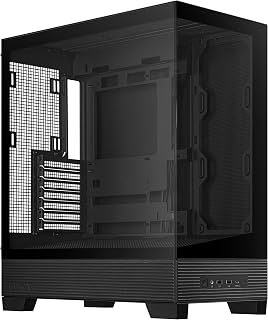
This mid-tower provides straightforward ATX compatibility and dual USB 3.0 ports for modern connectivity. The rear power supply mount keeps the PSU away from your AIO's airflow path, letting the radiator fans pull in cooler air. Its clean fan-based cooling approach works well when you're installing a 360mm AIO as the primary thermal solution without complex cable routing.
Pros
- BTF hidden connectors eliminate visible AIO pump and fan cables
- Dual tempered glass with frameless design showcases radiator from both sides
- 360mm radiator support with clearance for push-pull fan configurations
- Angled base improves airflow and radiator lighting visibility
Cons
- No pre-installed fans require separate cooling purchases
- HDD storage limited to two drives maximum
The ASUS A31 solves the visual clutter problem that plagues most AIO installations through its BTF hidden connector system. When mounting a 360mm radiator in this case, all pump cables, fan leads, and RGB connections route behind the motherboard tray through integrated channels, leaving your radiator and tubing fully visible without cable distractions. This matters especially for front-mounted AIOs where pump headers and fan splitters typically create visual noise. The dual tempered glass panels with frameless design provide unobstructed views from both sides, turning your 360mm cooler into a centerpiece rather than hiding it. The 8-degree angled base improves airflow intake for bottom-mounted fans while enhancing visibility of radiator-mounted ARGB lighting. Clearance accommodates 360mm radiators with standard thickness plus fans in push or pull configuration without compromising GPU length or motherboard component access. The elevated PSU placement keeps power supply heat separate from radiator exhaust paths. Support for ATX, mATX, and ITX boards gives flexibility in pairing your 360mm AIO with various platform sizes, and the alloy steel frame handles radiator weight securely at front or top positions.
Form Factor: ATX Mid-Tower
Motherboard Support: ATX, Micro-ATX, Mini-ITX
Cooling Support: Up to 360mm AIO coolers with 80mm clearance
GPU Compatibility: RTX 5090/4090 and equivalent length cards
Storage: 2x 3.5-inch HDD bays, multiple SSD mounting locations
Ports: 2x USB 3.0, USB-C ready
Connectivity: BTF hidden connector design with behind-motherboard cable routing
PSU Mounting: Rear mount (ATX standard)
Fans Included: Mounting points for multiple configurations
Materials: Alloy steel frame, tempered glass panels, reinforced plastic components
Dimensions: 17.13 inches deep, 9.37 inches wide, 20.12 inches high
Weight: 18.1 pounds
Features: Dual-sided tempered glass, frameless design, 8-degree angled base, ARGB-ready, easy dust filters
Warranty: 2-year manufacturer coverage
Ideal for builders who prioritize clean aesthetics and want their 360mm AIO installation to look professional without visible cable clutter. Best suited for those using BTF-compatible motherboards and PSUs to maximize the hidden connector benefit. Skip this if you need extensive HDD storage beyond two drives, prefer cases with pre-installed fans to reduce initial cost, or aren't using BTF hardware that takes full advantage of the routing system.

The XR Panoramic comes with three ARGB PWM fans that coordinate with your AIO's lighting ecosystem. Its panoramic glass design showcases your 360mm radiator installation, while seven expansion slots support enthusiast hardware configurations. Bottom-mounted PSU placement keeps heat-generating components separated from your liquid cooling loop, improving overall thermal efficiency in demanding workloads.
Pros
- 360mm top radiator support in compact dimensions
- Pre-installed fans configured for intelligent airflow
- Supports up to nine fans for custom cooling arrays
- Three-stage dust filtration protects AIO components
Cons
- Compact layout requires careful planning with large PSUs
- 14.5-pound weight and footprint need adequate desk space
The MONTECH XR manages a rare achievement: fitting a 360mm radiator at the top despite compact mid-tower dimensions. This makes it an excellent choice when desk space is at a premium but you refuse to compromise on liquid cooling performance. The top radiator mount accommodates full 360mm AIOs while still leaving room for high-end 40-series GPUs below, a compatibility combination hard to find in this size category. Three pre-installed ARGB fans arrive pre-configured with intelligent airflow design: two reverse-blade variants on the side and one regular-blade fan at the rear. This setup works immediately to support your AIO's thermal performance. If you want more cooling headroom, the case supports up to nine total fans, giving you freedom to build custom arrays around your liquid cooler. Dual tempered glass panels showcase your radiator installation beautifully, while the mature wood-grain I/O interface adds unexpected visual sophistication. Comprehensive three-stage dust filtration across top, bottom, and side panels protects your AIO and components from dust buildup. Build quality is solid throughout, maintaining a premium feel despite the compact footprint.
Case and Dimensions
Case Type: Mid Tower
Dimensions: 17.1 inches deep x 9 inches wide x 17.7 inches high
Weight: 14.5 pounds
Material: Tempered Glass (dual panels)
Motherboard Support: ATX, Micro-ATX, Mini-ATX
Cooling and Fans
Pre-installed Fans: 3 (2 reverse-blade side fans, 1 rear fan)
Fan Size: 120mm
Maximum Fan Speed: 1500 RPM
Total Fan Support: Up to 9 fans
Radiator Support: 360mm at top
GPU Clearance: Up to 420mm
Connectivity and Ports
USB 3.0 Ports: 2
USB 2.0 Ports: 2
USB-C: Yes
Total Expansion Slots: 7
Internal Bays: 3 (3.5 inch)
Power Supply: Bottom mount (750W maximum)
Additional Features
Dust Filters: Top, bottom, and side panels (magnetic)
Fan Lighting: Multi-color ARGB
I/O Interface: Mature wood-grain design
Warranty: 1 year
Perfect for builders who need 360mm AIO support but work with limited desk space or prefer smaller setups. The compact dimensions with full radiator compatibility make this ideal for space-conscious enthusiasts building high-performance systems. Skip it if you have a large power supply or need extensive storage, as the compact layout requires careful component arrangement and planning around the radiator.

The 4000D RS ARGB Frame includes three pre-installed RS fans and the InfiniRail mounting system for flexible radiator positioning. Seven expansion slots accommodate multi-GPU or extensive storage controller setups alongside your 360mm AIO. Support for ASUS BTF and similar back-connect standards streamlines cable management, keeping airflow paths clear for optimal radiator performance in high-heat builds.
Pros
- InfiniRail system supports dual 360mm radiators
- FRAME modularity allows customization as needs evolve
- Excellent cable management around radiator installations
- Toolless panels simplify AIO mounting process
Cons
- Genuinely large size requires ample desk space
- Pre-installed fans may need directional verification
For builders planning a 360mm AIO setup, the CORSAIR 4000D RS ARGB delivers exceptional radiator flexibility through its InfiniRail mounting system. This system supports dual 360mm radiators simultaneously, giving you placement options that adapt to your specific cooling configuration. The case handles complex multi-fan arrangements without compromise, ensuring your AIO has room to breathe alongside other cooling components. Three pre-installed RGB fans establish strong baseline airflow before you add your liquid cooler, and the 3D Y-Pattern front panel maintains excellent thermal performance. The FRAME Modular System offers swappable motherboard trays and customizable front I/O, so your build can evolve as cooling needs change. Cable management features include rear routing, integrated shrouds, and rear motherboard tray SSD mounting, keeping tubes and cables organized around your radiator installation. Alloy steel and aluminum construction feels premium and robust. The toolless design for panels speeds up installation when you're mounting a 360mm radiator. Build quality is excellent throughout, from the removable internal side panel to the thoughtful layout that accommodates large cooling hardware without fighting for clearance.
Case Design: Mid-tower ATX modular system with removable panels and customizable frame components
Motherboard Support: ATX, mATX, ITX
Cooling Capacity: Dual 360mm radiators, up to 10 total fans (120mm or 140mm)
Expansion Slots: 7 total slots for expansion cards and GPUs
Storage Bays: 3 internal bays with SSD mounting on motherboard tray rear and HDD mounting on case floor
Power Supply: Rear-mounted, supports up to 1600W
Pre-Installed Fans: 3x CORSAIR RS ARGB PWM with 8 LEDs each, daisy-chainable 4-pin connectors
USB Ports: 3x USB 3.0 ports
Material: Alloy steel and aluminum construction
Dimensions: 19.17" D x 9.41" W x 19.13" H
Weight: 22.7 pounds
Warranty: 2-year manufacturer coverage
Buy this if you're building a high-end gaming or content creation system around a 360mm AIO and want maximum radiator placement flexibility. The InfiniRail system and dual 360mm support make this ideal for enthusiasts planning complex liquid cooling configurations or future upgrades. Skip it if desk space is limited, since this case has a genuinely large footprint, or if you're on a tight budget and don't need the FRAME modularity features.

Pros
- Exceptional viewing area with dual tempered glass and pillarless front design
- Versatile cooling support accommodates both air and liquid cooling systems
- Large 420mm GPU clearance handles most high-end graphics cards without obstruction
- Well-organized interior with drive bays and cable management supports complex builds
- Included ARGB fans eliminate the cost of purchasing separate lighting-equipped fans
Cons
- Limited to 180mm CPU cooler height, which may restrict use with larger tower coolers
- Bottom-mounted PSU requires quality cables since airflow design exposes the power supply
- Tempered glass panels add weight and require careful handling during transport
The Thermaltake View 270 Plus TG ARGB is a mid-tower case designed for PC enthusiasts and builders who want their hardware to look as good as it performs. With support for full ATX and E-ATX motherboards, this case accommodates builds ranging from productivity workstations to high-end gaming rigs. The dual tempered glass panels offer nearly 360-degree visibility of your components, making this case a showcase piece for any desk setup.
Where this case truly shines is its cooling flexibility and capacity. Pre-installed with three 120mm ARGB fans and capable of supporting up to nine total fans plus a 360mm liquid cooler, the View 270 Plus delivers exceptional thermal management for demanding applications. The 420mm GPU clearance and 180mm CPU cooler support ensure compatibility with most current high-performance components, though enthusiasts running the largest tower coolers may find the height limit restrictive.
Build quality is solid throughout, with SPCC metal construction and dual tempered glass panels providing durability and premium aesthetics. The case weighs 14 pounds and measures 18 x 9.1 x 17.9 inches, making it a manageable size for most desks and gaming setups. The bottom-mounted PSU design creates a cleaner appearance inside the case and improves overall airflow efficiency by separating power supply heat from component cooling zones.
A few practical considerations matter before purchase. The restricted 180mm CPU cooler height eliminates some premium air cooling options, and the bottom-mounted PSU design means your power supply gets less direct airflow than traditional front mounts. However, the USB 3.2 Gen 2 Type-C port and dual USB 3.0 connections provide excellent front-panel connectivity for modern peripherals and fast data transfers.
The View 270 Plus TG ARGB delivers excellent value for builders seeking a visually striking case with genuine cooling capability and versatile expansion options. The included ARGB fans eliminate additional fan purchases, and the three-year warranty backs your investment. This case works best for mid-range to high-end builds where aesthetics matter as much as performance.
Dimensions and Weight
456 x 230 x 454 mm (18 x 9.1 x 17.9 inches), 6.35 kg (14 lbs)
Motherboard Support
Mini ITX, Micro ATX, ATX, E-ATX. Maximum dimensions: 12 x 13 inches for E-ATX
Cooling Capacity
Top: 360mm, 240mm, or 120mm radiator support. Rear: 120mm radiator support. Total fan support: up to 9 fans (120mm and 140mm combinations)
Storage
2 x 3.5-inch bays, 1 x 2.5-inch or 2 x 2.5-inch bays. 7 total expansion slots
I/O Connectivity
USB 3.2 Gen 2 Type-C x1, USB 3.0 x2, HD Audio x1
Component Clearance
CPU cooler: maximum 180mm height. GPU: maximum 420mm length. PSU: maximum 220mm length
Who Should Buy This Case
The View 270 Plus TG ARGB suits builders prioritizing visual appeal and cooling performance. Perfect for gaming PC enthusiasts, content creators, and anyone wanting to showcase their hardware investment with tempered glass visibility.
Build Types It Works Best With
This case accommodates full ATX and E-ATX builds with robust cooling needs. Ideal for liquid-cooled systems using 360mm radiators, air-cooled builds with multiple fans, or hybrid cooling setups. Works well for streaming workstations and rendering machines requiring sustained thermal management.
Important Compatibility Checks
Verify your CPU cooler height (max 180mm), GPU length (max 420mm), and PSU length (max 220mm). Large tower air coolers or enthusiast-grade PSUs may not fit. Confirm your motherboard is ATX-sized or smaller (E-ATX maximum 12 x 13 inches).
Value Assessment
At its price point, the View 270 Plus delivers genuine value through included ARGB fans, dual tempered glass panels, modern I/O ports, and a three-year warranty. The combination of aesthetics, cooling capacity, and connectivity justifies the investment for serious builders.

The HAF II 500 ships with dual 220mm and a 180mm fan for exceptional airflow around your 360mm radiator. E-ATX motherboard support and eight expansion slots provide room for high-end builds where a large AIO is just one component. Three USB 3.0 ports ensure fast peripheral connectivity, while the aggressive cooling design complements liquid cooling setups demanding maximum thermal headroom.
Pros
- Massive interior supports dual 360mm radiators simultaneously
- Split-level cable routing separates AIO pump cables from airflow path
- Mighty40 fans deliver high static pressure for radiator efficiency
- 430mm GPU clearance accommodates front-mounted AIOs with longest cards
Cons
- 22-inch depth requires significant desk or floor space
- Limited SATA drive mounting despite large case volume
The Cooler Master HAF II 500 tackles 360mm AIO cooling with a thermal-first approach built around its Mighty40 fan ecosystem. The 80-liter interior provides generous clearance for radiators at front, top, or both positions simultaneously, with the split-level cable management system routing AIO pump cables away from the primary airflow path. This design keeps radiator intake air cooler by separating it from PSU and cable heat, directly improving liquid cooling efficiency. The massive 220mm front fans can be replaced with or supplemented by 360mm radiators without airflow penalties, as the case was engineered for high static pressure scenarios. The 180mm rear exhaust, positioned away from cables thanks to the split-level design, actively pulls warm air from CPU blocks and radiators. Users report controlled GPU temperatures even when front-mounting a 360mm AIO, as the dedicated GPU airflow design compensates for restricted front intake. The MasterRail system and flexible panel removal simplify radiator installation in tight spaces, while 221mm CPU cooler clearance prevents top-mounted radiators from interfering with motherboard components. The PWM and ARGB fan hub centralizes all AIO fan control, though direct motherboard connection works better for compatibility. At 430mm GPU clearance, even the longest cards fit alongside front 360mm radiators with tubing clearance.
Form Factor: Mid-Tower ATX
Motherboard Support: ATX, E-ATX (up to 310mm wide), CEB-compatible
Dimensions: 21.93 inches deep, 21.57 inches wide, 10.32 inches high
Volume: Approximately 80 liters
Cooling System: 2x Mighty40 F220 (220x40mm front intake), 1x Mighty40 V180 (180x40mm rear exhaust)
Expansion: 8 total slots, MasterRail supports 3x 120/140mm or 2x 160/180mm fans at front/top
GPU Support: Up to 430mm graphics cards, dual-GPU support up to 72mm thick each
CPU Cooler Clearance: 221mm (Intel), 220mm (AMD)
Storage Compatibility: Supports 3.5-inch and 2.5-inch drives, accommodates PSUs up to 210mm (certain orientations)
I/O Ports: 3x USB 3.0
Fan Hub: 6x PWM, 6x ARGB
Materials: Metal and plastic construction
Weight: 21.3 pounds
Warranty: 2-year manufacturer coverage
Model: H500G2-KGNN-S00
Best for enthusiast builders running high-heat components who need maximum thermal capacity from their 360mm AIO, particularly those considering dual radiator setups or push-pull configurations. Ideal for large GPU builds where front AIO placement is necessary. Skip this if desk space is limited, as the 22-inch depth demands room, or if you need extensive SATA storage beyond a few drives given the limited mounting despite large interior volume.

Pros
- Excellent value with four quality fans included out of the box
- Large tempered glass panel provides impressive showcase for components
- Flexible motherboard compatibility fits various build sizes and budgets
- Mesh front design balances airflow performance with sleek black finish
- Tool-free assembly and installation process reduces build time
Cons
- Limited RGB lighting control compared to higher-end gaming cases
- Cable management space is tight for inexperienced builders
- Noise levels under load may be noticeable due to included fans
The Rosewill RWGC2 is a well-engineered mid-tower case designed for gamers and PC enthusiasts building systems on a budget. This case targets entry-level to mid-range gaming builds where performance and aesthetics matter, but premium pricing is not an option. With its impressive feature set and solid construction, it punches well above its price point.
The standout feature is undoubtedly the panoramic tempered glass side panel paired with four pre-installed 120mm PWM fans. The mesh front panel allows these fans to deliver excellent airflow to your components while creating a striking visual presentation. The tool-free installation of the glass panel makes access for upgrades and cleaning exceptionally convenient, a feature usually reserved for more expensive cases.
Build quality is solid throughout, with the case constructed from stainless steel and weighing 10.6 pounds for stability. The case supports diverse motherboard form factors (ATX, Micro-ATX, Mini-ITX) and offers impressive cooling expandability, accommodating up to 6 fans total and 360mm AIO radiators. The 7 PCIE slot layout lets you maximize your motherboard potential, making this case future-proof for component upgrades.
Real drawbacks exist primarily in cable management and acoustic performance. The internal bay configuration leaves limited space for managing cables behind the motherboard tray, which can frustrate newer builders. Additionally, the included fans are functional but not whisper-quiet under load, though this is typical for budget-tier components.
Verdict: The RWGC2 is an excellent choice for budget-conscious gamers seeking a reliable, visually appealing case with solid cooling fundamentals. If you value aesthetic presentation and don't require premium build quality or silent operation, this case delivers tremendous value and won't disappoint.
Case Type: Mid Tower ATX
Motherboard Support: ATX, Micro-ATX, Mini-ITX
Dimensions: 15.5 inches deep by 7.67 inches wide by 17.7 inches tall
Weight: 10.6 pounds
Material: Stainless steel construction
Fans: 4 x 120mm PWM fans pre-installed, supports up to 6 x 120mm fans total
Cooling Support: Supports 360mm AIO radiators and 160mm CPU air coolers
GPU Clearance: Accommodates graphics cards up to 340mm in length
Storage: 4 internal bays supporting 2.5 and 3.5 inch drives
Connectivity: 1 x USB 3.0 port, 2 x USB 2.0 ports, HD Audio, LED Control
Warranty: 1 year manufacturer warranty
Who Should Buy: First-time PC builders, budget-conscious gamers, and upgrades from older cases. If you want tempered glass aesthetics without spending $150+, this is your answer.
Who Should Skip: Users prioritizing silent operation or extensive RGB lighting customization. High-end enthusiasts seeking premium cable management and acoustics should consider alternatives in the $100+ range.
Build Compatibility: This case works perfectly with mid-range gaming CPUs and GPUs. Budget builds with lower-power components benefit from the strong airflow. High-end systems with top-tier components may need additional fan upgrades for optimal thermal performance.
Tips for Success: Plan your cable routing before installation to maximize the limited cable management space. Consider adding 2-3 additional 120mm fans to the rear and top for enhanced cooling on high-performance builds. The included PWM fans are best managed with a PWM hub if you add more fans.

The AP201 accommodates a 360mm radiator at the top while maintaining a compact micro-ATX footprint, making it ideal for builders who want powerful liquid cooling without committing to a full tower. Its four expansion slots provide flexibility for GPU and accessory installation, and the front-mounted PSU design keeps cable runs short. Air and water cooling support ensures you can mount your AIO optimally without thermal compromise.
Pros
- Incredibly space-efficient without compromising on radiator or GPU support
- Outstanding cable management makes building and upgrading intuitive
- Exceptional build quality and durability reported across customer reviews
- Tool-free side panels make access quick and secure
- Excellent value for a high-performance micro-ATX case
Cons
- 3.5-inch hard drive mounting requires careful alignment and may need aftermarket brackets
- Limited to Micro-ATX and Mini-ITX motherboards, not full-size ATX
The ASUS Prime AP201 is a breakthrough micro-ATX case designed for builders who refuse to compromise on performance due to space constraints. It accommodates modern high-end components including 360mm liquid coolers, full-length graphics cards, and front-mounted ATX power supplies, making it perfect for gaming PCs, workstations, and compact living room builds alike.
The standout engineering lies in its spatial efficiency and cooling capabilities. The quasi-filter mesh panels feature over 57,000 precision-machined holes that maximize airflow while showcasing your build. Support for up to six fans and both 280mm and 360mm radiators means you can run demanding hardware without thermal throttling in a case that fits on most desks.
Build quality is exceptional throughout. The case uses a combination of alloy steel and plastic construction that feels robust without excess weight at 12.7 pounds. The tool-free side panels use a clip mechanism that's secure yet intuitive, and the extended motherboard tray with strategically placed cutouts and 32mm cable routing gap makes even cable management enjoyable rather than frustrating.
The primary limitation involves 3.5-inch hard drive mounting, which requires precise alignment and may necessitate aftermarket brackets depending on your specific drive and configuration. Additionally, the case is limited to Micro-ATX and Mini-ITX motherboards, so full-size ATX builds are not supported.
The ASUS Prime AP201 represents exceptional value for anyone building a high-performance system in a constrained space. Its combination of modern features, thoughtful design, robust construction, and genuine cooling capability make it a best-in-class choice for micro-ATX enthusiasts.
Dimensions: 18.11 inches deep x 8.07 inches wide x 13.78 inches high
Volume: 33 liters
Motherboard Support: Micro-ATX, Mini-ITX
Power Supply: Front-mounted, up to 180mm length, supports ATX PSUs
Cooling Support: 280mm and 360mm radiators, up to six 12cm fans
GPU Length: Up to 338mm
Storage Bays: Four internal bays with support for 2.5-inch and 3.5-inch drives
Ports: 4x USB 3.0, 1x USB 2.0
Material: Alloy steel and plastic construction
Weight: 12.7 pounds
Warranty: 2 years

The A3-mATX supports a 360mm AIO radiator and clears GPUs up to 415mm, giving you room for both high-end cooling and flagship graphics cards in a micro-ATX form factor. Its mesh front panel promotes strong airflow to supplement radiator performance, while the three expansion slots and frontways PSU mounting keep the internal layout clean and efficient for a liquid-cooled micro build.
Pros
- Exceptional build quality with premium aluminum construction that feels solid and durable
- Modular design with flexible PSU placement dramatically improves cable management
- Supports high-end hardware (415mm GPU, 360mm AIO) while maintaining compact footprint
- Steel mesh panels provide excellent airflow for gaming GPUs and radiator setups
- Sleek minimalist aesthetic works well as a desk showcase piece
Cons
- Cable management can be challenging due to tight internal space constraints
- No fans included, requiring separate purchase for optimal cooling performance
- Glass side panel sold separately, limiting customization options out of the box
The Lian Li A3 is a premium micro-ATX case designed for gamers and PC enthusiasts who refuse to compromise performance for size. This 26.3L compact tower accommodates mATX and ITX motherboards while supporting hefty components like 415mm GPUs and 360mm AIO coolers, making it ideal for high-end small form factor gaming builds.
What sets the A3 apart is its thoughtful engineering, particularly the modular PSU mounting system that can be positioned front or side-mounted. This flexibility significantly eases cable management in what would otherwise be a cramped build environment. The steel mesh panels on the front and top deliver exceptional airflow, crucial for keeping high-TDP graphics cards cool without thermal throttling. Combined with support for up to 10 x 120mm fans, the cooling potential rivals much larger cases.
Build quality is genuinely impressive across the board. The aluminum construction feels premium, solid, and lightweight enough to repositionon your desk without strain. The minimalist design language is understated and elegant, with a clean front panel and balanced mesh-aluminum side panel that looks professional in any gaming setup. Assembly is straightforward, and internal accessibility is better than many competitors in this category.
The main drawback is cable management, which can still be tight despite the modular PSU mounting. Additionally, the case ships without fans, requiring buyers to invest in separate cooling solutions for optimal performance. The glass side panel is sold separately, which feels like a missed opportunity for an out-of-box showcase experience.
Verdict: The Lian Li A3 is the quintessential modern mATX case for serious builders who want high performance in a compact, beautiful package. Its exceptional build quality, hardware support, and modular design justify the modest price premium over basic alternatives. Highly recommended for gaming and content creation builds where space matters.
Physical Dimensions: 17.44 inches deep x 7.64 inches wide x 12.05 inches high. Total volume: 26.3 liters. Weight: 11 pounds.
Motherboard Support: Micro-ATX and ITX. Includes 4 total expansion slots for add-in cards.
Cooling and Fans: Supports 360mm radiators and up to 10 x 120mm fans. High-airflow steel mesh panels on front and top. Note: No fans included with purchase.
GPU Compatibility: Graphics cards up to 415mm in length. Flexible GPU slot mounting allows oversized cards to utilize multiple expansion slots without obstruction.
Power Supply: Flexible front or side mounting compatible with ATX, SFX, and SFX-L power supplies, plus Lian Li EDGE series PSUs.
Storage: 3 internal bays supporting 3.5-inch hard disk form factors for traditional drives or 2.5-inch SSDs.
Connectivity: 2 x USB 3.0 ports and 2 x USB 2.0 ports on the front panel. Material: Alloy steel enclosure. Warranty: 1 year manufacturer warranty.
Who Should Buy This: The Lian Li A3 is perfect for gamers and content creators building high-performance small form factor PCs. If you want a powerful gaming rig, a streaming workstation, or a 3D rendering machine that doesn't dominate your desk, this case delivers. It's also ideal for enthusiasts who value build quality and modularity.
Who Might Want to Look Elsewhere: If cable management is your top priority or if you're building a budget system, consider cases with more generous internal space. Budget builders should note that you'll need to purchase fans separately, which adds to total cost.
What You Need to Know Before Buying: This case requires planning. Decide on your motherboard (mATX or ITX), GPU size (up to 415mm), cooler type (air or 360mm AIO), and PSU wattage before purchasing. The modular design means you have options, but you need to know your component dimensions to take full advantage. Fans are not included, so budget for cooling solutions. The glass panel sold separately lets you showcase your build but costs extra.
Best Use Cases: High-end gaming builds with RTX-series GPUs, streaming PC workstations with custom water cooling, esports tournament PCs that need portability, and minimalist desk setups where space is premium. The DAN Cases collaboration heritage makes this especially appealing to SFF (small form factor) enthusiasts.
What to Look for in a 360mm AIO PC Case
Radiator Mounting Position and Clearance
The most critical factor is where the case allows you to mount the 360mm radiator and how much clearance it provides. Top mounting is the most common and thermally efficient option, but you need to confirm that the case supports three 120mm fan slots in a row at the roof without obstruction from RAM or VRM heatsinks.
Several cases on this list, including the ASUS A31 ATX Mid-Tower PC Case and the Thermaltake View 270 Plus TG ARGB Black Mid Tower, explicitly confirm 360mm top radiator support with generous AIO clearance up to 80mm. Always cross-reference the manufacturer’s spec sheet against your specific cooler’s thickness plus fan height.
Airflow Panel Design
A 360mm AIO generates significant heat that needs an unobstructed path out of the chassis. Cases with solid or tempered-glass front panels can restrict intake airflow and force your loop to work harder. Mesh and perforated steel panels are far more effective at pulling in cool air.
The Lian Li A3-mATX PC Case, Micro ATX, 415mm GPU uses steel mesh on both the side and top panels, making it an excellent choice for high-TDP setups. The CORSAIR 4000D RS ARGB Frame Modular Mid-Tower ATX features a 3D Y-pattern perforated steel front panel that minimizes airflow resistance while still looking sharp. If you’re building around a power-hungry GPU like those covered in our best PC build for RX 9070 guide, a mesh-forward case is non-negotiable.
GPU Clearance and Form Factor
Modern flagship GPUs are longer and thicker than ever. If your case is already housing a 360mm radiator, you need to confirm there’s still enough room for your graphics card. Many cases reserve front space for the radiator, which can reduce effective GPU length.
The Lian Li V100-ATX Mid-Tower PC Case-Black-V100RX supports GPUs up to 420mm, and the Thermaltake View 270 Plus matches that spec. If you’re building with an RTX 5060 Ti or similar card, our best PC build for RTX 5060 ti guide breaks down compatibility in more detail. For compact builders, the ASUS Prime AP201 Micro-ATX PC Case fits GPUs up to 338mm inside its remarkably compact 33-liter footprint.
Cable Management and Build Experience
A 360mm AIO comes with thick hoses, a pump head, and three fans, each with its own cable run. Poor cable management space turns what should be a satisfying build into a frustrating one. Look for cases with rear routing channels at least 25mm deep, dedicated cutouts near the CPU area, and enough tie-down points to keep everything tidy.
The ASUS A31’s BTF hidden connector design routes all modular cables behind the motherboard tray for an exceptionally clean result. The ASUS Prime AP201 offers a 32mm cable gap and strategically placed cutouts despite its compact size. If you want an effortless build experience, tool-less side panels like those on the Lian Li V100-ATX make installation and maintenance significantly smoother. Builders planning an RTX 5070-based system can find further component pairing advice in our best PC build for RTX 5070 guide.
Final Thoughts
For most builders, the Lian Li V100-ATX Mid-Tower PC Case-Black-V100RX delivers an outstanding combination of airflow, ARGB aesthetics, and 360mm AIO support at a highly competitive position in the market, making it our top recommendation for the majority of ATX builds. If you’re working within a compact footprint but refuse to give up liquid cooling performance, the ASUS Prime AP201 Micro-ATX PC Case is a remarkable engineering achievement that fits a 360mm radiator, a long GPU, and a full ATX PSU into just 33 liters. Whichever direction your build takes, every case on this list has been carefully assessed to ensure it handles a 360mm AIO without compromise.
Frequently Asked Questions
Can any mid-tower case fit a 360mm AIO radiator?
No, not every mid-tower supports a 360mm radiator. You need a case with at least three 120mm fan mounting positions in a continuous row, typically at the top or front panel. Always verify the manufacturer’s radiator support specifications before purchasing, since some mid-towers only go up to 240mm or 280mm.
Is it better to mount a 360mm AIO at the top or front of the case?
Top mounting is generally preferred because hot air rises naturally toward the radiator, which then exhausts it directly out of the chassis. Front mounting works well too, especially in cases with strong mesh panels, but it can reduce effective GPU length. The best choice depends on your specific case layout and GPU size.
Do I need a full-tower case for a 360mm AIO in 2026?
Not at all. In 2026, several compact and mid-tower options handle 360mm radiators with ease. The ASUS Prime AP201 fits one into just 33 liters, and multiple ATX mid-towers on this list support the same configuration. Full towers offer more flexibility, but they are by no means required for a 360mm AIO build. For a complete component pairing guide, see our best PC build for RX 9060 XT article.
What GPU length is safe in a case with a 360mm front radiator?
This varies by case, but you should expect reduced GPU clearance when mounting a 360mm radiator at the front. Many cases in this category support GPUs between 330mm and 420mm depending on radiator placement. Always check the case’s GPU clearance specification specifically when a front radiator is installed, not just the maximum GPU length listed on the product page.





Write Your Review
No reviews yet. Be the first to share your experience!