

You have a solid GPU, a capable CPU, and a motherboard picked out; but the case is where your entire build either comes together or falls apart. A great enclosure keeps thermals in check, makes cable routing painless, and looks sharp on your desk for years. The good news is you do not need to spend a fortune to get all of that.
This guide rounds up the best PC cases under $150 available right now, covering mid-towers and full-towers from trusted names like Lian Li, NZXT, Antec, and Corsair. Whether you are building a showcase rig with back-connect motherboard support or a workhorse system that just needs excellent airflow, there is a solid option here for you. If you are also pairing your new case with a high-end GPU, check out our roundup of the best PC cases for RTX 5090 builds for more specialized guidance.
Quick Comparison
| Model | Link | Rating | Case Type | Motherboard Compatability | Cooling Method |
|---|---|---|---|---|---|
| 1 Antec C8 Wood Full-Tower E-ATX Case with Tempered Glass,... | Check price | 4.7 of 5187 ratings | Full Tower | Extended ATX | Air |
| 2 Lian Li O11 Vision Compact ATX PC Case - Dual Chamber,...Highest rated | Check price | 4.8 of 5484 ratings | Mid Tower | Extended ATX, Mini ITX, Micro... | Air, Water |
| 3 NZXT H9 Flow Mid-Tower ATX PC Case with Dual-Chamber...Most reviewed | Check price | 4.7 of 5508 ratings | Mid Tower | ATX | Air |
| 4 Lian Li LANCOOL 217 ATX Mid-Tower Case with 5... | Check price | 4.8 of 5326 ratings | Mid Tower | ATX | Air |
| 5 CORSAIR FRAME 4500X RS ARGB Mid-Tower PC Case with... | Check price | 4.7 of 5313 ratings | Mid Tower | Mini ITX, Micro ATX, ATX,... | Air |
| 6 Antec Flux Pro Full-Tower E-ATX Case with 6 PWM Fans,... | Check price | 4.7 of 5429 ratings | Full Tower | Extended ATX | Air |
| 7 Lian Li O11 Vision Compact ATX Case - Tempered Glass,... | Check price | 4.5 of 5362 ratings | Mid Tower | ATX, Micro ATX | Air, Water |
Ratings reflect the most recent data pull. Check each listing for current price and availability.
Quick answer
This guide compares 7 picks, with Antec C8 Wood Full-Tower E-ATX Case with Tempered ranked first. Lian Li O11 Vision Compact ATX PC Case - Dual Chamber holds the highest customer rating among them. NZXT H9 Flow Mid-Tower ATX PC Case with Dual-Chamber has the most customer reviews.

Those planning a high-end workstation or enthusiast rig will find the E-ATX full-tower support gives them room to run the largest motherboards available today. The wooden front panel delivers a warm, distinctive look that stands out in a sea of tempered glass builds. Bottom-mounted PSU placement keeps weight low and airflow paths clean, and the front USB 3.0 ports handle fast peripheral transfers without hunting for a hub.
Pros
- Full-tower E-ATX support accommodates large motherboards and multi-GPU or oversized cooler configurations
- Dual-chamber design separates thermal zones for cleaner airflow
- Supports 360mm radiators in multiple orientations with room for up to three 140mm fans
- Exotic wood front panel and seamless-edge tempered glass create a refined, distinctive aesthetic
Cons
- No pre-installed fans, so cooling hardware is an additional purchase on top of the case cost
- Full-tower dimensions require dedicated space that compact or desk setups may not have
Its E-ATX support means it accommodates larger motherboards that mid-towers simply cannot fit, and the dual-chamber layout keeps the motherboard and storage zones thermally separated for cleaner airflow paths. Cooling headroom is substantial: the case accepts up to three 140mm or two 160mm fans on the top and bottom, and 360mm radiators can be mounted in multiple orientations, so cooling can scale from modest air setups to serious liquid loops. The exotic wood front panel paired with seamless-edge tempered glass gives it an aesthetic that stands apart from the typical aluminum-and-mesh look that dominates this price range. Cable management benefits from the spacious interior, and the included accessories kit means you're not sourcing standoffs and screws separately. The three internal 3.5-inch bays handle storage for most builds.
Physical Dimensions: 18.26 inches deep, 11.93 inches wide, 18.74 inches tall. Weight: 10.39 kg.
Motherboard Support: Extended ATX, ATX, Micro-ATX, and Mini-ITX compatible. Specifically optimized for E-ATX builds.
Cooling Capacity: Supports 360mm radiators on top, bottom, and side simultaneously. Fan mounting accommodates three 140mm or two 160mm fans. Full-cut bottom with interchangeable 120mm/140mm brackets.
Component Compatibility: GPUs up to 440mm length. Three 3.5-inch hard drive bays. Full cable management infrastructure.
Connectivity: Two USB 3.0 ports and two USB 2.0 ports on front panel.
Materials: Tempered glass side and front panels with exotic wood accents. Durable steel construction throughout.
Warranty: Two-year manufacturer warranty included.
A strong choice for builders working with E-ATX or large ATX motherboards, oversized air coolers, or multi-GPU configurations who also want the case to look presentable outside a dedicated gaming room. Also suits anyone who prefers choosing their own fans rather than replacing pre-installed ones. Skip it if you need a compact footprint or want fans included, and skip it entirely if a full-tower's physical size doesn't fit your space.

Pros
- Triple tempered glass panels showcase hardware from all angles
- Back-connect design eliminates visible cable clutter across the interior
- Dual-chamber layout hides PSU and AIO tubing behind partitions
- Supports Extended ATX to Mini ITX for flexible build sizes
Cons
- Internal space prioritizes aesthetics over extreme cooling configurations
- Requires back-connect motherboard to fully benefit from cable routing design
Three tempered glass panels surround your components, offering unobstructed views from every angle while the black frame provides contrast that makes RGB lighting and metallic finishes stand out. Back-connect motherboard compatibility transforms cable management from a chore into a quick task, routing wires behind the tray so your interior stays uncluttered. The dual-chamber architecture keeps power supply cables and AIO tubing hidden, maintaining visual focus on your GPU, RAM, and cooling setup. You get flexible cooling support with air and water options, including space for a 360mm radiator that handles high-end CPUs without thermal throttling. Bottom-mounted PSU placement is standard but effective, keeping additional bulk low and out of sight. Support spans Extended ATX down to Mini ITX, so you can build anything from a compact gaming rig to a full workstation. Four USB ports on the front panel cover your peripheral needs without requiring rear access. The case handles Mid Tower builds with room for serious hardware while keeping the footprint manageable.
Case Type: Mid Tower
Motherboard Support: Extended ATX, ATX, Micro ATX, Mini ITX
Cooling Support: Air and water cooling (360mm AIO compatible)
Power Supply: Bottom mount
Internal Bays: 3
USB Ports: 4 total (2x USB 2.0, 2x USB 3.0)
Dimensions: 17.6"D x 11.3"W x 17.57"H
Weight: 26.4 pounds
Material: SECC steel with tempered glass panels
Warranty: 1 year manufacturer warranty
Model: O11VPX
This case suits builders with back-connect motherboards who want maximum visibility for their components in a darker frame that complements RGB or stealth builds. Great for gamers and enthusiasts who value aesthetics alongside performance and appreciate streamlined cable routing. It's a smart pick if you're installing a 360mm AIO and want the tubing hidden from view. Skip it if you're working with a traditional motherboard layout, as the back-connect design won't benefit you. Also avoid if you need extreme internal capacity for multiple radiators or unconventional component arrangements, since the dual-chamber structure favors clean looks over maximum space.
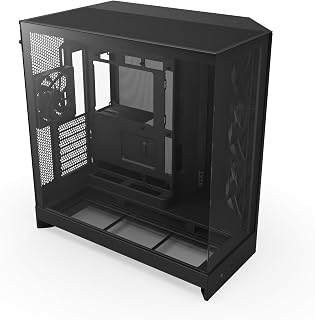
The dual-chamber layout is the headline feature for builders who dread cable clutter: power supply and cable runs live in a separate compartment, leaving the main chamber clean and unobstructed for airflow. Ten internal bays give plenty of room for storage-heavy builds, and the ATX mid-tower footprint keeps the overall size manageable. For anyone who wants a tidy, well-ventilated build without spending hours routing cables, this layout does a lot of the work upfront.
Pros
- Dual-chamber design creates dedicated thermal zones for the motherboard and GPU
- Four pre-installed fans with support for up to ten total and 420mm radiator compatibility
- Precision-aligned motherboard mounting holes reduce installation friction
- Built-in Velcro straps and cable tie-down points simplify cable management
Cons
- Nearly 20 inches deep and 19 inches wide, requiring substantial dedicated space
- Some enthusiasts may find the pre-installed fans insufficient for extreme performance builds and opt to replace them
Its dual-chamber architecture physically separates the motherboard and GPU from the PSU and drives, creating two distinct airflow zones rather than one shared cavity. That structural choice pays off in temperatures: users report that even high-end GPUs maintain safe thermals where competing cases caused throttling. Four fans come pre-installed, three F140Q units at the front-right and one F120Q at the rear, and the case supports up to ten fans total along with 420mm radiator compatibility on both the top and front for builders who want to push further. The panoramic tempered glass wraps around the chassis for a clean visual presentation, and precision-aligned motherboard mounting holes reduce installation frustration. Built-in Velcro straps and cable tie-down points make cable management approachable even in complex builds. At roughly 20 inches deep and 19 inches wide, it is a large case, but that footprint is the price of the airflow volume.
Well-suited for enthusiast and performance-focused builders who prioritize thermal headroom above all else and have the desk or floor space to accommodate a wider mid-tower. The pre-installed fans and thoughtful cable management features also make it a reasonable pick for first-time builders tackling a high-end build. Skip it if space is tight or if a compact, low-profile build is the goal.

Builders who want a standout aesthetic without sacrificing airflow will appreciate the black walnut wood accents here. The pair of 170mm PWM fans move serious air through a standard ATX mid-tower footprint, making thermal management straightforward for mid-range builds. With 7 expansion slots and front or bottom PSU mounting flexibility, it accommodates a wide range of component configurations while keeping the build looking sharp on a desk.
Pros
- Five pre-installed fans including two repositionable 170mm front fans for CPU or GPU cooling modes
- Quiet operation relative to other cases in this price range
- Real wood accents suit professional and studio environments where gaming aesthetics clash
- Dual PSU mounting options and toolless fan mounts simplify both builds and maintenance
Cons
- At 10.5 kg, it is heavier than most competitors in this price range
- Wood accents require extra care during transport and installation to avoid damage
Five pre-installed fans handle airflow straight out of the box, so you're not immediately shopping for extras after unboxing. The two 170mm front fans are the real differentiator: they can be repositioned between CPU mode for focused processor cooling and GPU mode for more balanced thermal distribution, giving builders real flexibility without buying additional hardware. The 140mm rear exhaust and two reversed-blade side fans round out a system that reviewers consistently describe as quiet for its performance tier. Beyond cooling, the build quality holds up: a solid steel frame, a well-fitted tempered glass panel, toolless fan mounts, and dual PSU mounting options. The real walnut wood accents push it firmly into premium territory visually, making it a natural fit for office or studio environments where most cases look out of place. Seven expansion slots and five internal bays cover standard ATX builds without issue.
The five-fan configuration provides impressive thermal capacity out of the box. The two 170mm front fans deliver substantial intake airflow, while the pair of 120mm reversed-blade fans and 140mm rear exhaust establish balanced pressure dynamics. Reviewers report that CPUs and GPUs remain cool during intensive gaming and workloads without audible noise.
The adjustable front fan positioning is genuinely useful. CPU mode positions both front fans high for direct processor cooling, while GPU mode distributes intake more evenly throughout the case. This flexibility means you can optimize thermals based on your specific component configuration. The pre-configured fan hub simplifies fan management, though connecting fans directly to the motherboard provides more granular control if desired.
Additional cooling expandability includes support for a 360mm radiator at the top and tool-free mounting points throughout. The case handles large graphics cards and thick liquid coolers without spatial conflicts, giving you room to grow your cooling solution if needed.
The LANCOOL 217 prioritizes builder experience. All side panels are completely removable, the PSU mount rotates for cable management flexibility, and internal layout provides ample working space even with larger components. Cable routing holes are thoughtfully positioned for clean, hidden wire management.
The toolless fan mounting system means you can reconfigure your cooling setup without screwdrivers. Front fans adjust vertically to switch between CPU and GPU cooling modes. The case supports ATX motherboards and PSUs up to 220mm in length, covering virtually all standard configurations.
Dual power buttons on the front panel accommodate different desk orientations and sitting positions. The included fan hub requires SATA power from your PSU, which is worth planning for during your cable management phase. Most builders complete their setup without complications, though the case's weight and size require careful handling during transport.

Versatility is the strong suit here, with support spanning Mini-ITX through E-ATX so a builder can reuse the case across future platform upgrades. Three pre-installed ARGB fans, a built-in dust filter, and GPU anti-sag support mean less shopping for accessories after the fact. The reverse-connection motherboard compatibility and modular design make cable management cleaner than most mid-towers in this class, and three USB 3.0 front ports cover modern peripheral needs comfortably.
Pros
- Exceptional build quality with thick tempered glass and sturdy steel construction that feels premium
- Outstanding cable management design makes organizing cables intuitive even for first-time builders
- Excellent thermal performance with robust airflow support and multiple fan mounting options
- Modular FRAME system adds genuine long-term value and customization beyond typical cases
- Sleek white finish with hidden top fan area reduces dust visibility and maintains clean aesthetics
Cons
- Included fans lack iCUE compatibility, requiring alternative RGB controllers or motherboard headers for lighting control
- No front radiator mounting option limits liquid cooling configurations for some advanced setups
- Requires careful cable routing due to spacious interior, so cable management demands user attention despite easier access
The CORSAIR FRAME 4500X is a premium mid-tower case designed for gamers and PC enthusiasts who refuse to compromise between visual appeal and thermal performance. This case targets builders upgrading from budget chassis who want a showcase-worthy system with room for high-end components including overclocked CPUs, liquid coolers, and the latest flagship graphics cards.
The standout feature is undoubtedly the single-piece wraparound tempered glass panel that provides an unobstructed 270-degree view of your hardware. Paired with the included reverse-rotor RGB fans, the case delivers visual impact out of the box. Real-world performance shines through its flexibility, supporting configurations from air cooling with up to 10 fans to advanced liquid cooling with dual 360mm radiators. Users consistently report excellent thermal results and praise the intuitive cable management routing that separates this case from competitors.
Build quality is exceptional throughout. The tempered glass is noticeably thick and crystal clear, the steel chassis feels rigid and well-engineered, and the overall industrial design with cascading lines gives the case a distinctive, professional appearance. The modular FRAME system adds genuine long-term value, allowing you to change internal configurations as your needs evolve rather than replacing the entire chassis.
The main drawback is that included fans lack direct iCUE software control, requiring you to use motherboard RGB headers or external controllers for lighting. Additionally, the front panel cannot accommodate radiators, which may limit liquid cooling configurations for some advanced builds. The spacious interior, while excellent for airflow, demands user discipline with cable routing despite improved accessibility compared to cramped cases.
The FRAME 4500X is the right choice if you prioritize build quality, thermal performance, and long-term modularity. It's an investment that pays dividends through superior cooling, easier maintenance, and a case that genuinely improves over time as you customize it to match your evolving system.
Physical Dimensions: 19.65 inches deep x 10.08 inches wide x 18.54 inches high
Motherboard Support: Mini-ITX, Micro-ATX, ATX, E-ATX (up to 305mm x 277mm)
Cooling Capacity: Supports dual 360mm radiators or up to 10x 120mm fans or 5x 140mm fans using InfiniRail system. Pre-installed with 3x RS120R ARGB reverse-rotor fans.
Component Clearances: 460mm GPU length, 185mm CPU cooler height, 250mm power supply depth
Storage: 2x 2.5-inch SSDs and 1x 3.5-inch HDD capacity across 3 internal bays
Front I/O: 2x USB 3.2 Gen1 Type-A, 1x USB 3.2 Gen2 Type-C, headphone and microphone jacks
Construction: Tempered glass front and side panel, steel chassis, plastic accents with dust filters on bottom and right side
Warranty: 2-year manufacturer coverage
Best For: This case excels for builders who prioritize both aesthetics and performance. It's ideal for gamers planning high-end systems with flagship components, enthusiasts who frequently modify their builds, and anyone who appreciates quality construction and thermal efficiency.
Consider Alternatives If: You need front radiator mounting for large custom water loops, prefer cases with integrated iCUE fan control, or want the absolute smallest footprint. Budget-conscious builders might also explore less expensive options without the modular system.
Fan and Cooling Setup: The three included reverse-rotor fans are quality components that work well out of the box. For optimal thermal performance, consider adding 2-3 additional 120mm or 140mm fans to rear and bottom mounting points depending on your component heat output.
Motherboard Compatibility: Reverse-connector motherboard support is a significant advantage if you own compatible boards, eliminating cable conflicts. Standard motherboards work perfectly fine, but this feature adds genuine value for specific setups.
RGB Control Note: Plan your RGB control strategy before purchase. Since included fans use standard headers rather than iCUE, budget for a separate RGB controller or ensure your motherboard has sufficient ARGB headers if you plan to expand the lighting system later.

Six included 140mm PWM fans means a buyer can drop components in and have a fully operational cooling setup from day one, which is a real cost and time saver on a budget-conscious build. The iShift 90-degree PSU mount is an unusual touch that improves clearance and simplifies installation in this E-ATX full tower. Eight expansion slots give enthusiasts room to run multi-GPU or high card-count configurations without compromise.
Pros
- Six PWM fans included with support for up to 12 total
- iShift 90-degree PSU mount simplifies cable management
- Built-in dual temperature display for CPU and GPU monitoring
- Walnut wood front panel and tempered glass deliver premium aesthetics
Cons
- 29-pound weight and full-tower footprint demand significant dedicated space
- Overkill for standard ATX builds that do not need E-ATX support or extensive fan mounting
E-ATX motherboard compatibility and eight expansion slots mean even the most aggressive builds have room to breathe. The six pre-installed PWM fans get you up and running with solid airflow immediately, and the multi-directional vent design opens the door to a 12-fan configuration if your workload demands it. The 90-degree iShift PSU mount keeps cables routed cleanly, and the built-in dual temperature display removes the need for third-party monitoring tools. Tempered glass panels keep your components on show, while the walnut wood front panel gives the whole build a finish that looks at home in a professional workspace as much as a gaming setup.
This case excels in thermal management with support for up to 12 fans across multiple configurations. The 6 pre-installed Tranquil and P12R PWM fans provide excellent baseline cooling and can be daisy-chained for synchronized operation.
The dual radiator support (420mm front plus 360mm top) enables advanced liquid cooling loops for high-end CPUs and GPUs. Multi-directional venting ensures hot air escapes efficiently while cool air is drawn in strategically, maximizing cooling effectiveness across all system components.
It also appeals to anyone who wants a showcase build with premium materials. Skip it if your desk space is limited, if you need to move your PC regularly, or if you are working with a standard ATX or smaller motherboard and do not need the extra room.

Pros
- Three-panel tempered glass turns builds into showpieces
- Back-connect support hides cables behind the motherboard tray
- Dual-chamber design conceals AIO tubing for clean water cooling
- 360mm radiator support on top for serious thermal performance
Cons
- 26.4-pound weight makes handling and transport cumbersome
- Dual-chamber layout limits space for extreme multi-radiator configurations
The three-panel tempered glass construction wraps your hardware in transparency, turning every component into part of the visual statement. Back-connect motherboard support is the real efficiency win here: cables route behind the tray instead of snaking across your view, cutting cable management time and frustration in half. The dual-chamber layout tucks AIO tubing out of sight when you mount a radiator on the side, so you get clean water cooling without the visual mess. A dedicated 360mm top mount gives you serious thermal headroom for air or liquid setups. SECC construction keeps the frame rigid, and bottom PSU placement maintains the uncluttered interior. At 26.4 pounds, this case feels substantial, not flimsy. The white finish stays crisp against the glass, making RGB pop if you use it or letting monochrome builds shine if you don't. For builders who care about presentation as much as performance, this case competes with options double its tier.
Form Factor: Mid-Tower ATX
Motherboard Support: ATX, Micro ATX
Special Features: Back-connect compatible, triple tempered glass panels, dual-chamber design
Cooling Support: Air and water cooling, 360mm AIO compatible
Power Supply: Bottom-mounted
Material: SECC steel
Color: White
Weight: 26.4 lbs
Brand: Lian Li
Buy this if you're running a back-connect motherboard and want a case that makes your hardware the centerpiece. It's ideal for enthusiasts building their second or third rig who understand that clean cable routing saves hours and improves airflow. Perfect for RGB showcases or sleek monochrome builds where every component deserves visibility. Skip it if you're using a standard motherboard without back-connect support, since you'll lose the main cable management advantage. Also pass if you need maximum internal space for multiple radiators or unusual component layouts, as the dual-chamber design prioritizes looks over sheer capacity.
What to Look for When Buying a PC Case
Airflow and Cooling Support
Thermal performance is often the most important factor in any case purchase. Look for perforated front or side panels, pre-installed fans, and support for large radiators if you plan to run a liquid cooling loop.
The NZXT H9 Flow – Dual-Chamber ATX PC Case – Black ships with four pre-installed fans and supports radiators up to 420mm, making it a standout for thermally demanding builds. Similarly, the Antec Flux Pro Full-Tower E-ATX PC Case supports simultaneous 420mm and 360mm radiator installation, which is rare at this price point.
Case Size and Motherboard Compatibility
Mid-tower cases like the Lian Li O11 Vision Compact ATX PC Case are the sweet spot for most builders, balancing a manageable footprint with enough internal room for full-sized components. Full-tower options like the Antec C8 Wood Full-Tower E-ATX PC Case are the right call when you need E-ATX support or plan to run multiple radiators simultaneously.
Always confirm your motherboard form factor before ordering. E-ATX boards will not fit in standard mid-tower enclosures, and oversized cases can feel unwieldy if your build is relatively modest. For complete build recommendations around a specific GPU, our RTX 5070 Ti build guide walks through compatible components from start to finish.
Aesthetics and Tempered Glass
If your components are worth showing off, a case with tempered glass paneling is worth the investment. The Lian Li O11 Vision Compact ATX PC Case in white features a patented three-panel tempered glass design that gives you an uninterrupted wraparound view of your internals.
The CORSAIR Frame 4500X RS ARGB Panoramic Mid-Tower PC takes a different approach with a single-piece curved glass panel that wraps from the front to the side. For builders who want a more natural material in the mix, both the Lian Li LANCOOL 217 ATX Mid-Tower PC Case and the Antec C8 Wood incorporate real wood accents that set them apart from the typical all-metal-and-glass competition.
Cable Management and Back-Connect Support
Clean builds are easier when the case is designed with cable routing in mind. Dual-chamber designs route the PSU and drives into a separate compartment, keeping the main chamber uncluttered. Both the NZXT H9 Flow and the Lian Li O11 Vision Compact use this approach effectively.
If you are running a back-connect motherboard like an ASUS BTF or MSI Project Zero model, compatibility is critical. The Lian Li O11 Vision Compact ATX PC Case, the NZXT H9 Flow – Dual-Chamber ATX PC Case – Black, and the Lian Li LANCOOL 217 ATX Mid-Tower PC Case all explicitly support back-connect configurations. You can browse our full PC cases category for more options if none of these quite fit your needs.
Final Thoughts
The PC cases in this guide cover a wide range of builds, from compact showcase setups to serious full-tower workhorses, all without pushing past the $150 ceiling. If you want a sleek, back-connect-ready mid-tower with exceptional glass coverage, the Lian Li O11 Vision Compact ATX PC Case is the one to beat. For builders who need maximum cooling headroom and full E-ATX support, the Antec Flux Pro Full-Tower E-ATX PC Case delivers an impressive feature set that is hard to match at this price range.
Frequently Asked Questions
What is a good PC case for a high-end GPU in 2026?
Modern GPUs are large and run hot, so you want a case with generous GPU clearance and strong front-to-back or bottom-to-top airflow. The NZXT H9 Flow is a strong choice here, offering ample GPU clearance and a perforated panel design that keeps thermals in check. If you are building around a flagship card, our guide to the best PC cases for RTX 5080 builds covers more specific recommendations.
Is a dual-chamber PC case worth it?
Yes, for most builders. A dual-chamber layout separates the PSU and storage from the main motherboard area, which reduces heat transfer and significantly simplifies cable management. Cases like the NZXT H9 Flow and the Lian Li O11 Vision Compact both use this design to great effect. The result is a cleaner-looking build that also runs cooler under load.
Can I fit a 360mm AIO radiator in a mid-tower case?
Many mid-tower cases in 2026 support 360mm radiators, though placement varies by model. The Lian Li O11 Vision Compact includes a dedicated top mesh panel specifically for a 360mm AIO, and the NZXT H9 Flow supports up to a 420mm radiator. Always verify the exact radiator support specs listed for a case before purchasing, especially if you plan to mount it in the front or top simultaneously.
Are wood-accented PC cases just aesthetic, or do they offer practical benefits?
Primarily aesthetic, but the build quality on cases like the Lian Li LANCOOL 217 and the Antec C8 Wood is genuinely high. The real wood panels are precisely integrated and do not interfere with airflow or structural integrity. For builders who want a rig that stands out from the typical all-glass look, these designs offer a sophisticated alternative. If you are pairing a distinctive case with a new GPU, our RX 9070 build guide has a full component list to get you started.





Write Your Review
No reviews yet. Be the first to share your experience!