

Your PC case is more than a shell. It determines how well your components breathe, how clean your build looks, and whether your next upgrade will even fit. With so many options flooding the market in 2026, narrowing down the right enclosure can feel overwhelming, whether you are assembling a compact everyday rig or a high-end workstation loaded with water cooling loops. If you are also planning a full system build, check out our guide on the best PC build for RTX 5070 ti to pair the right case with the right components.
We evaluated ten enclosures across airflow performance, build quality, cooling headroom, and ease of assembly to bring you this focused roundup. Whether you prioritize a panoramic tempered glass showcase or a stripped-down airflow machine, there is a strong option on this list for you.
Quick Comparison
Ratings reflect the most recent data pull. Check each listing for current price and availability.
Quick answer
This guide compares 10 picks, with Lian Li V100 ATX Mid-Tower PC Case with 4 ARGB Fans ranked first. ASUS TUF Gaming GT501 E-ATX Full Tower Case holds the highest customer rating among them. Fractal Design North Walnut Wood Gaming Case - ATX Mid has the most customer reviews.

Builders putting together a solid ATX system in 2026 will appreciate the thoughtful basics this mid-tower delivers. Four internal bays give enough storage flexibility for a modern gaming or productivity rig, while the built-in RGB lighting and dust filters mean the build stays clean and visually sharp without extra purchases. Bottom-mounted PSU placement keeps weight low and airflow unobstructed, making it a well-rounded pick for straightforward builds.
Pros
- Four ARGB fans and an LED strip included, no extra cooling purchases needed
- Supports GPUs up to 420mm, 360mm radiators, and up to nine 120mm fans
- Panoramic tempered glass with stainless steel construction looks and feels premium
- Tool-less side panels and rear cable routing make building and maintenance straightforward
Cons
- Large glass panels provide little sound dampening compared to insulated alternatives
- Open showcase design requires regular cleaning to stay presentable
The Lian Li V100 earns a spot on any best PC cases list by combining genuine visual impact with practical build flexibility. Four pre-installed ARGB fans and an integrated LED strip mean your build looks finished from day one without extra spending on cooling hardware. The panoramic tempered glass panels make it a natural showcase piece, and the steel and tempered glass construction backs that up with real durability. On the hardware side, support for GPUs up to 420mm, CPU coolers up to 178mm, and 360mm radiators means the V100 keeps pace with high-end components without forcing compromises. Capacity extends to nine 120mm fans total, so thermal headroom is genuinely there for demanding workloads. Tool-less side panel access and thoughtful rear cable routing keep the interior as clean as the exterior. The hydraulic bearing fans run quietly under normal loads, and the angled PSU shroud reinforces the tidy aesthetic. For builders who want a case that photographs well and performs reliably, the V100 delivers both without requiring a premium-tier investment.
Form Factor: Mid-Tower ATX
Motherboard Support: ATX, Micro-ATX, Mini-ITX
GPU Clearance: Up to 420mm
CPU Cooler Height: Up to 178mm
Radiator Support: Top radiator up to 360mm
Fan Configuration: Supports up to nine 120mm fans
Pre-Installed Fans: 4x 120mm PWM ARGB fans
Fan Speed: 1800 RPM max
Airflow: 61.47-60.4 CFM
Air Pressure: 2.54-2.17 mm-H2O
Noise Level: 26.5-30.8 dBA
Bearing Type: Hydraulic
Lighting: Integrated 26-LED ARGB strip with full spectrum color control and daisy-chain connectivity
Materials: Tempered Glass, Stainless Steel, Plastic
Internal Bays: 4
Dust Filters: Yes
Weight: 8200g
Warranty: 1 Year

Enthusiasts running extended ATX boards with multi-GPU setups will find the nine expansion slots here genuinely useful, since most mid-towers stop at seven. The hybrid air and water cooling support means builders are not locked into one thermal strategy as their needs grow. At full-tower capacity in a listed mid-tower footprint, this TUF Gaming enclosure gives high-end hardware room to breathe without demanding a desk the size of a dining table.
Pros
- Supports E-ATX motherboards with nine expansion slots for maximum build flexibility
- Liquid-cooling-ready with 360mm radiator support front and top, 140mm rear
- 4mm smoked tempered glass and steel construction feel genuinely durable
- Spacious interior simplifies cable management and GPU installation
Cons
- Large footprint and 26-pound weight make it impractical for transport or LAN events
- Overall size may be excessive for builders who do not need E-ATX or extensive expansion
When building a top-tier PC in 2026, the ASUS TUF Gaming GT501 stands out as one of the few cases that genuinely earns the word spacious. The interior accommodates Extended ATX motherboards, nine expansion slots, and GPUs that would crowd out most mid-tower competitors. Cooling is where it separates itself: three 120mm front intake fans, a 140mm rear exhaust, and mounting points for up to seven additional fans give builders real thermal flexibility. Pre-drilled positions support 360mm radiators at the front and top and a 140mm radiator at the rear, so custom liquid cooling loops fit without modification. The 4mm smoked tempered glass side panel and steel-reinforced chassis feel built to last, and the roomy interior consistently draws praise for simplifying cable routing, GPU installation, and future upgrades. Aura Sync RGB lighting ties the build together visually, while carrying handles rated for 65 lbs add practical value for occasional transport. For a build meant to last multiple hardware generations, the GT501 provides the workspace and expandability to support it.
Form Factor: Mid-tower with EATX support
Motherboard Compatibility: Extended ATX, ATX, and micro-ATX
Dimensions: 21.73"D x 9.88"W x 21.46"H
Weight: 26.2 lbs
Case Material: ABS Plastic, SGCC Steel, Tempered Glass, Zinc Alloy Steel
Fan Configuration: Pre-installed: 3x 120mm RGB front fans, 1x 140mm rear fan; up to 7 total mounting points
Radiator Support: Top/front 360mm, rear 140mm
Expansion Slots: 9 total (1 vertical GPU, 7 traditional)
Drive Bays: 6 internal bays for 3.5-inch drives
Front Ports: 1x USB 3.0, 2x USB 2.0
PSU Mounting: Bottom-mount, supports standard ATX power supplies
Features: 4mm smoked tempered glass, Aura Sync RGB lighting, ergonomic carry handles, magnetic dust filters
Warranty: 2 years
Color: Grey
This case is the right call for builders assembling a high-end or workstation-class system where long-term upgradability and cooling headroom matter more than saving desk space. Custom water cooling enthusiasts will appreciate the radiator support built in from the start. Skip it if you need something portable or compact since at over 26 pounds and nearly 22 inches deep, this case is not designed to move around.

The InfiniRail mounting system is the reason builders targeting BTF-style motherboards from ASUS, MSI, or Gigabyte should pay attention here. It allows fan and radiator positioning to be adjusted without committing to fixed mounts, which matters when cooling configurations change between builds. Three pre-installed RS ARGB fans and rear PSU mounting keep the interior organized from day one, making this ATX mid-tower a strong pick for anyone who values a clean, reconfigurable interior.
Pros
- InfiniRail system supports dual 360mm radiators and highly flexible fan layouts
- FRAME Modular System allows motherboard tray swaps and front I/O customization
- Three pre-installed ARGB fans deliver strong out-of-box thermals
- Thoughtful cable management with rear routing, shrouds, and removable side panel
Cons
- Large physical footprint requires significant desk or floor space
- Pre-installed fans need airflow direction verification, which can trip up less experienced builders
For builders putting together a serious high-end rig in 2026, the CORSAIR 4000D RS ARGB Frame Modular Mid-Tower checks nearly every box. The InfiniRail mounting system stands out as a practical advantage here, giving you genuine flexibility to position fans and radiators exactly where your cooling strategy demands, including dual 360mm radiator support for the most thermal-intensive builds. Three pre-installed RGB fans and a 3D Y-Pattern front panel mean the case is ready to breathe right out of the box, with reported GPU temperatures as low as 29 degrees Celsius under load. The FRAME Modular System takes things further, letting you swap in billet aluminum motherboard trays or reconfigure the front I/O over time. Construction blends alloy steel and aluminum for a premium feel without unnecessary bulk. Cable routing is genuinely well thought out, with rear channels, integrated shrouds, rear-mounted SSD bays, and a removable internal side panel. Seven expansion slots and three USB 3.0 ports round out a feature set built for ambitious, long-term builds.
Case Design: Mid-tower ATX modular system with removable panels and customizable frame components
Motherboard Support: ATX, mATX, ITX
Cooling Capacity: Dual 360mm radiators, up to 10 total fans (120mm or 140mm)
Expansion Slots: 7 total slots for expansion cards and GPUs
Storage Bays: 3 internal bays with SSD mounting on motherboard tray rear and HDD mounting on case floor
Power Supply: Rear-mounted, supports up to 1600W
Pre-Installed Fans: 3x CORSAIR RS ARGB PWM with 8 LEDs each, daisy-chainable 4-pin connectors
USB Ports: 3x USB 3.0 ports
Material: Alloy steel and aluminum construction
Dimensions: 19.17" D x 9.41" W x 19.13" H
Weight: 22.7 pounds
Warranty: 2-year manufacturer coverage
Best suited for enthusiast builders who want a case that can grow with their system, especially those planning high-end gaming or content creation setups with demanding cooling requirements. The modular design rewards builders who enjoy customizing over time. Skip it if you are working in a tight space, building on a budget, or are new to PC building and not yet comfortable verifying fan airflow direction during installation.
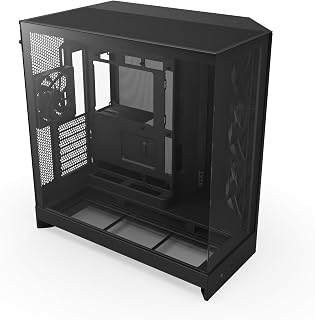
The dual-chamber design is the defining feature that sets this mid-tower apart in a crowded 2026 lineup. By isolating the PSU and cable routing from the main airflow path, thermals stay consistent even in compact spaces where heat buildup is a real concern. Ten internal bays is an unusually generous count for a mid-tower, so builders who need fast NVMe storage alongside several HDDs will not have to compromise on capacity to get a tidy, well-cooled system.
Pros
- Dual-chamber design isolates heat sources for better thermal management
- Supports 10 fans total or 420mm radiators on top and front
- Precision-aligned standoffs simplify motherboard installation
- Panoramic tempered glass and built-in cable management features
Cons
- Nearly 20-inch depth and width require dedicated desk or floor space
- Pre-installed fans may not satisfy users seeking premium acoustic profiles
The NZXT H9 Flow separates your motherboard and GPU from the PSU and drives using a dual-chamber layout that creates distinct thermal zones, a design choice that pays off when you're running high-power components under sustained load. Users report stable temps on demanding GPUs like the RTX 5090 in scenarios where single-chamber cases caused throttling. The case ships with three F140Q fans up front and one F120Q rear exhaust, with total capacity for 10 fans or 420mm radiators on the top and front, giving you room to scale cooling as your build demands. Precision-aligned motherboard standoffs match major boards like the ASUS ROG Strix without the usual alignment frustration. Panoramic tempered glass wraps around the chassis for full visibility, while the generous 19.29-inch width and 20.08-inch depth leave ample space behind the motherboard tray for routing cables. Built-in Velcro straps and tie-down points turn cable management into a structured task rather than a wrestling match. The physical footprint is substantial but justified if you need E-ATX support, high cooling capacity, and a layout that keeps hot and cool air paths separated.
Perfect for enthusiasts and gamers building high-performance systems with powerful GPUs or CPUs that generate significant heat, especially if you've struggled with thermal throttling in smaller cases. The dual-chamber design and extensive cooling support suit users planning custom loops or heavy fan configurations. Skip it if your desk or floor space is constrained, since the nearly 20-inch depth and width demand room. Also not ideal if you're building a compact mATX or ITX system where the extra volume goes unused.

The standout detail on this mid-tower is its 170mm fan support, which moves significantly more air per revolution than the 120mm fans found in most competitors at this size. That translates directly to quieter operation for a workstation or gaming PC running under sustained load. The black walnut wood accent also makes it one of the few cases in 2026 that looks at home in a living room setup without sacrificing ATX compatibility or a full seven expansion slots.
Pros
- Five pre-installed fans including 170mm front fans deliver standout airflow performance
- Real wood accents offer a distinctive, non-gaming aesthetic that suits professional spaces
- Dual PSU mounting and toolless fan mounts make configuration and maintenance flexible
- Solid steel frame with thick tempered glass feels premium throughout
Cons
- At 10.5 kg it is heavier than most mid-tower alternatives
- Wood accents require careful handling during transport and installation
The Lian Li LANCOOL 217 makes a compelling case for itself in any roundup of the best PC cases by doing something most competitors avoid: it looks genuinely distinctive. Real black walnut wood accents separate it from the aggressive styling that dominates the market, making it at home on a studio desk or in a professional office as much as a gaming setup. But aesthetics alone would not earn it a top-ten spot. The five pre-installed fans, including two 170mm front fans and two reversed-blade 120mm side fans, deliver cooling performance that reviewers consistently rank above other cases at a similar size. Those front fans switch between CPU mode for directed cooling and GPU mode for balanced distribution, giving builders real configuration control. The steel frame is solid, the tempered glass panel is thick and well-fitted, and dual PSU mounting positions add flexibility for different build layouts. Seven expansion slots and ATX motherboard support keep compatibility broad. At 10.5 kg it runs heavier than typical alternatives, and the wood accents need careful handling, but for builders who want a case that stands apart this is one of the most complete options available.
The five-fan configuration provides impressive thermal capacity out of the box. The two 170mm front fans deliver substantial intake airflow, while the pair of 120mm reversed-blade fans and 140mm rear exhaust establish balanced pressure dynamics. Reviewers report that CPUs and GPUs remain cool during intensive gaming and workloads without audible noise.
The adjustable front fan positioning is genuinely useful. CPU mode positions both front fans high for direct processor cooling, while GPU mode distributes intake more evenly throughout the case. This flexibility means you can optimize thermals based on your specific component configuration. The pre-configured fan hub simplifies fan management, though connecting fans directly to the motherboard provides more granular control if desired.
Additional cooling expandability includes support for a 360mm radiator at the top and tool-free mounting points throughout. The case handles large graphics cards and thick liquid coolers without spatial conflicts, giving you room to grow your cooling solution if needed.
The LANCOOL 217 prioritizes builder experience. All side panels are completely removable, the PSU mount rotates for cable management flexibility, and internal layout provides ample working space even with larger components. Cable routing holes are thoughtfully positioned for clean, hidden wire management.
The toolless fan mounting system means you can reconfigure your cooling setup without screwdrivers. Front fans adjust vertically to switch between CPU and GPU cooling modes. The case supports ATX motherboards and PSUs up to 220mm in length, covering virtually all standard configurations.
Dual power buttons on the front panel accommodate different desk orientations and sitting positions. The included fan hub requires SATA power from your PSU, which is worth planning for during your cable management phase. Most builders complete their setup without complications, though the case's weight and size require careful handling during transport.

Full-tower builders running extended ATX motherboards with large coolers or complex watercooling loops need room and airflow, and the six included 140mm PWM fans address both immediately out of the box. Eight expansion slots handle multi-card or heavy PCIe accessory configurations without issue. The iShift 90-degree PSU mount is a distinctive touch that improves cable routing clearance at the bottom of the case, a practical benefit that becomes obvious during a dense, high-end build.
Pros
- Six PWM fans included, supports up to 12 total for extreme cooling flexibility
- 90-degree iShift PSU mount simplifies cable management in dense builds
- Integrated dual temperature display for CPU and GPU monitoring
- E-ATX support with 10 internal bays and eight expansion slots
Cons
- 29-pound weight and full-tower size demand dedicated space
- Premium materials and features reflect higher cost
When you're planning a no-compromise build with extreme cooling requirements or multi-GPU ambitions, the Antec Flux Pro removes every constraint. This full-tower E-ATX chassis arrives with six PWM fans already mounted and supports up to 12 simultaneous fans across its multi-directional vent system, giving you absolute control over airflow topology. The innovative iShift PSU mount rotates your power supply 90 degrees to simplify cable routing in complex builds, while 10 internal bays accommodate storage arrays or reservoir placement for custom loops. The integrated dual temperature display tracks CPU and GPU metrics without software overhead. Walnut wood front paneling and tempered glass sides create a refined aesthetic that suits showcase environments. At 29 pounds with a 21.45-inch height, this is unapologetically large, built for users who need the room to install radiators, reserve space for future expansion, or house workstation-class hardware. Eight expansion slots and E-ATX compatibility ensure you won't outgrow the platform, making it a sound foundation for builds that evolve over years rather than months.
This case excels in thermal management with support for up to 12 fans across multiple configurations. The 6 pre-installed Tranquil and P12R PWM fans provide excellent baseline cooling and can be daisy-chained for synchronized operation.
The dual radiator support (420mm front plus 360mm top) enables advanced liquid cooling loops for high-end CPUs and GPUs. Multi-directional venting ensures hot air escapes efficiently while cool air is drawn in strategically, maximizing cooling effectiveness across all system components.
Buy this if you're building a high-end gaming rig, workstation, or enthusiast system that needs extensive cooling capacity, multiple GPUs, or custom water loops. The full-tower footprint and premium features suit users who treat PC building as a long-term project. Skip it if desk or floor space is limited, if you're working with a tight budget, or if you're assembling a simple single-GPU build where a mid-tower would suffice. The 29-pound weight and large dimensions also make it impractical for anyone who moves their system frequently.

Pros
- Genuine walnut wood front and brass accents elevate appearance
- Open mesh front, sides, and top deliver balanced airflow
- 355mm GPU clearance and 360mm radiator support handle high-end hardware
- Tool-free panel removal and seven bridgeless expansion slots
Cons
- Wood panels require periodic cleaning to maintain appearance
- Premium materials increase cost compared to standard mid-towers
The Fractal Design North brings genuine walnut paneling and open-mesh airflow to a mid-tower footprint that fits most desks without sacrificing thermal performance or GPU clearance. Real wood and brass accents replace the usual plastic shrouds, creating a case that looks deliberate in visible spaces like living rooms or shared workspaces. The mesh front intake works with full mesh side panels and top ventilation to establish balanced airflow, while two included 140mm Aspect PWM fans provide a starting point you can expand. GPU clearance reaches 355mm, or 300mm with a 360mm front radiator installed, so high-end cards and substantial cooling solutions both fit. Seven bridgeless expansion slots leave room for radiator routing or additional fans. Tool-free panel removal with integrated tabs simplifies assembly and future upgrades. The interior layout accommodates ATX, mATX, and ITX boards with multiple drive mounting locations. This is a case built around the idea that PC hardware can integrate into a home's aesthetic rather than dominate it, pairing natural materials with the airflow and capacity needed for modern gaming builds.
Form Factor: Mid-tower ATX case
Motherboard Support: ATX, mATX, ITX
GPU Compatibility: Up to 355mm, or 300mm with 360mm front radiator
Expansion Slots: 7 bridgeless slots
Drive Mounts: 2 combined 3.5"/2.5" mounts, 2 dedicated 2.5" mounts
Front Panel: Real sustainably-sourced walnut or oak wood
Ventilation: Mesh front, full mesh side panels, integrated top mesh
Included Fans: 2x 140mm Aspect PWM fans
Ports: 1x USB 2.0, 2x USB 3.0, USB Type-C
Dimensions: 17.6" D x 8.46" W x 18.46" H
Weight: 9.5 kg
Warranty: 2 years
Premium Aesthetic: The North stands out through its use of real wood paneling and metal accents rather than plastic or brushed aluminum. Each case features sustainably-sourced walnut or oak panels on the front, creating a warm, natural look that complements modern living spaces. The wood is complemented by sleek brass or steel details that add contemporary sophistication.
Build Quality: Fractal Design's engineering is evident in both the materials selected and the overall construction. The metal enclosure is robust and well-finished. The integration of natural materials with precision-engineered mesh ventilation demonstrates thoughtful design that balances form with function. Tool-free panel removal with integrated tabs shows attention to user experience.
Customization: The case accepts ATX, mATX, and ITX motherboards, giving flexibility for different build sizes. Seven bridgeless expansion slots accommodate water cooling setups, additional fans, and radiators. The generous interior layout prevents component conflicts while maintaining accessibility for upgrades and maintenance.

Pros
- Triple-chamber layout isolates CPU, GPU, and PSU heat zones
- Supports 360mm front radiator for liquid cooling builds
- Three-sided tempered glass provides panoramic component view
- Pre-installed RGB fans with iCUE LINK ecosystem support
Cons
- 18.5-inch depth requires significant desk or cabinet clearance
- Multi-panel glass exterior needs frequent cleaning to maintain appearance
The CORSAIR AIR 5400 LX tackles the thermal challenges of modern high-performance builds with a triple-chamber architecture that isolates heat sources into separate zones. The front chamber holds a 360mm radiator for CPU cooling, completely separated from the main compartment where your GPU and components breathe independently. The central chamber uses optimized airflow ducts on top and bottom to accelerate air through a narrow channel, delivering efficient cooling without cranking fan speeds to noisy levels. Three reverse-rotor RGB fans arrive pre-installed with iCUE LINK support for integrated lighting control. The panoramic tempered glass design wraps three sides of the case, showcasing your build from nearly every angle. Practical touches include anti-sag brackets, reverse motherboard mounting options, and intelligent cable routing that keeps wiring invisible. At 18.5 inches deep and 13.92 kg, this is a substantial mid-tower that requires adequate desk clearance. The triple-chamber layout and premium glass construction position it as a serious option for builders running overclocked systems or custom liquid cooling loops where thermal management directly impacts performance and component longevity.
Form Factor: ATX Mid-Tower
Motherboard Support: ATX
Radiator Support: 360mm in dedicated front chamber
Drive Bays: 5 internal bays for multiple storage configurations
Ports: 2x USB 3.0 headers
PSU Mount: Bottom mount with isolated chamber
Fans Included: 3x Pre-installed Reverse-Rotor RGB fans
Materials: Tempered glass, acrylic, plastic
Dimensions: 18.5 inches (D) x 13.39 inches (W) x 18.39 inches (H)
Weight: 13.92 kg
Warranty: 2-year manufacturer warranty
Model: CC-9011320-WW

Builders working with either ATX or Micro-ATX boards get genuine flexibility here, since the enclosure accommodates both without adapters or compromises. The compact mid-tower footprint suits smaller desks without dropping the seven expansion slots that a full ATX build typically needs. Bottom-mounted PSU placement and 120mm fan support round out a no-fuss layout that prioritizes practical airflow and ease of assembly, making it a reliable everyday choice in any 2026 build guide.
Pros
- Ultra-fine mesh panels on front, top, and side prioritize airflow throughout
- Supports up to 360mm front and 240mm top radiators for liquid cooling flexibility
- Intuitive interior layout with wide cable channels and multiple anchor points
- Compact footprint without sacrificing ATX motherboard support
Cons
- Mesh side panel makes rear cable management visible, so tidy routing is essential
- Only one native 3.5-inch drive bay, limiting storage options without adapters
The NZXT H5 Flow earns its place on this list by delivering clean airflow performance in a compact mid-tower footprint that does not demand much real estate. Supporting both ATX and Micro-ATX motherboards, it covers the most common build configurations without overcomplicating the interior. The mesh treatment on the front, top, and side panels is not decorative, it actively moves air, and the perforated PSU shroud enables bottom-intake GPU cooling that keeps temperatures in check. Two 120mm fans come pre-installed, so the case is functional from the moment you close it up. Radiator support reaches 360mm at the front and 240mm on top, which gives liquid cooling builds room to scale. The interior layout reflects careful planning: smooth edges, generous cable routing channels, and multiple anchor points make assembly straightforward whether you are building for the first time or the fiftieth. Metal construction keeps the chassis rigid without adding unnecessary weight, and the tempered glass panel lets the build speak for itself. For builders who want dependable airflow, easy assembly, and a tidy footprint, the H5 Flow is a strong all-around choice.
Case Type: Compact ATX Mid-Tower
Motherboard Support: ATX, Micro-ATX, Mini-ITX, E-ATX compatible
Dimensions: 16.93in W x 18.31in H x 8.86in D
Weight: 8 kg
Material: Metal with tempered glass panel
Cooling Support: Front 360mm radiator, top 240mm radiator
Pre-installed Fans: Two 120mm Quiet Airflow fans (front intake, rear exhaust)
Fan Size Support: 120mm standard
Power Supply: Bottom mount
Internal Bays: 4 total
Drive Support: One 3.5-inch bay, two 2.5-inch bays
I/O Ports: Two USB 2.0, two USB 3.0
Expansion Slots: 7 total
Cable Management: Wide channels, hooks, and straps included
Warranty: 2-year manufacturer warranty
A great pick for first-time builders who want an approachable build experience, and for experienced builders who want reliable performance without a bulky case. Works well for ATX and Micro-ATX builds alike. Skip it if you need more than one 3.5-inch drive bay natively, or if you plan heavy cable runs and are not willing to keep routing disciplined since rear cables are visible through the mesh.

The panoramic tempered glass construction is what makes this white mid-tower stand out for builders who want the interior on display from multiple angles. Supporting everything from Mini ITX to Extended ATX in a single enclosure gives it unusually broad compatibility, so it works as a long-term chassis across multiple hardware generations. Corsair's focus on gaming use cases means the design choices, from airflow to layout, are tuned for the kind of high-performance components that belong in a 2026 best-of list.
Pros
- Supports Mini-ITX through Extended ATX motherboards for build flexibility
- Holds up to 10x 120mm fans for scalable cooling capacity
- Three ARGB fans included with panoramic tempered glass design
- Removable panels simplify assembly and future maintenance
Cons
- Only three fans pre-installed, additional purchases needed for full cooling potential
- Cable management space is adequate but not generous with larger PSUs
The CORSAIR 3500X RS delivers flexible motherboard compatibility and extensive cooling capacity in a panoramic glass design that keeps builds visible from multiple angles. Supporting Mini-ITX through Extended ATX motherboards, it accommodates a wide range of configurations, making it a practical foundation for systems that may evolve over time. The case handles up to 10x 120mm fans across front, top, and rear positions, giving you room to scale cooling as your build demands increase. Three RS120-R ARGB fans arrive pre-installed and ready to run, providing immediate airflow while leaving seven additional mounting points open for expansion. The bottom-mounted power supply keeps cables organized below the main chamber, maintaining clean airflow paths and reducing visual clutter behind the motherboard tray. Tempered glass wraps the exterior, letting RGB lighting and component aesthetics take center stage. At 9.02 kg, the frame feels sturdy without becoming cumbersome to move or reposition. Removable front and side panels simplify installation and future upgrades. Cable management space is workable but requires some planning when dealing with larger power supplies or multiple storage drives.
Case Type: Mid-Tower
Motherboard Compatibility: Mini-ITX, Micro-ATX, ATX, Extended-ATX (EATX)
Material: Tempered Glass (front and side panels), Steel frame
Color: White
Fan Support: Up to 10x 120mm fans (front, top, rear, side mounting points)
Pre-Installed Fans: 3x RS120-R ARGB 120mm fans
Power Supply: Bottom-mount, supports standard ATX PSU
Cooling Method: Air cooling
Weight: 9.02 kg (approximately 19.8 lbs)
RGB Control: Motherboard control via 5V ARGB header
Ideal for gamers and enthusiasts building their first serious gaming PC or upgrading from a basic enclosure who want room to grow without overspending. The broad motherboard compatibility and 10-fan capacity mean you can start with a mid-range setup and expand cooling as you add more powerful components later. Skip this if you need a compact footprint or already know you're installing a high-end liquid cooling loop on day one, where more specialized thermal designs might serve better. Also pass if you prefer opaque panels over tempered glass.
PC Case Buying Guide: What to Look for in 2026
Airflow and Cooling Capacity
Thermals are the single most important factor in a case purchase. A cramped, poorly ventilated enclosure will throttle even the most capable hardware. Look for mesh front and top panels, pre-installed fans, and radiator support that matches your cooling ambitions.
Cases like the NZXT H9 Flow – Dual-Chamber ATX PC Case – Black use a dual-chamber layout and perforated steel panels to maximize airflow, while the CORSAIR 4000D RS ARGB Frame Modular Mid-Tower ATX pairs its InfiniRail fan mounting system with a 3D Y-pattern airflow front panel for excellent intake efficiency.
Form Factor and Motherboard Compatibility
Not every case fits every board. Mid-towers typically support ATX and smaller form factors, while full-towers open the door to E-ATX motherboards and larger custom loops. Confirm the maximum motherboard size before committing.
The ASUS TUF Gaming GT501 E-ATX Full-Tower PC Case accommodates E-ATX boards and offers vertical GPU support, making it a solid choice for enthusiast-grade setups. On the compact side, the NZXT H5 Flow – Compact ATX Mid-Tower PC Case keeps things tight without sacrificing ATX compatibility or radiator headroom. If you are building around a new AMD GPU, our best PC build for RX 9070 guide walks through compatible component pairings.
Aesthetics and Panel Design
Functionality matters, but so does how your build looks on your desk. Tempered glass side panels have become standard in the mid-to-high range, and some cases take visual design much further. The Fractal Design North – Genuine Walnut Wood Front incorporates sustainably sourced walnut or oak panels for a living-room-friendly aesthetic that stands apart from the typical all-black gaming enclosure.
Similarly, the Lian Li LANCOOL 217 ATX Mid-Tower PC Case offers real wood accents in dark walnut or light beech finishes, blending natural materials with a clean, modern build experience. If RGB lighting is a priority, the Lian Li V100-ATX Mid-Tower PC Case-Black-V100RX ships with four ARGB fans and an integrated 26-LED strip right out of the box.
Cable Management and Build Ease
A clean build is easier to maintain and often runs cooler. Wide cable routing channels, built-in Velcro straps, and modular shrouds all reduce the time you spend wrestling with wires. Back-connect motherboard support is increasingly relevant too, especially for those chasing a completely cable-free front chamber.
The NZXT H9 Flow – Dual-Chamber ATX PC Case – Black includes extra-wide channels and Velcro tie-downs as standard, while the CORSAIR 4000D RS ARGB Frame Modular Mid-Tower ATX uses a removable internal side panel that doubles as either a cable cover or an additional fan mounting surface. For builders pairing cases with the latest Intel or AMD platforms, our best PC build for RTX 5060 ti guide covers compatible setups in detail.
Final Thoughts
There is a well-matched case for every type of builder on this list. If you want a compact, no-fuss airflow workhorse, the NZXT H5 Flow – Compact ATX Mid-Tower PC Case delivers strong thermals in a tidy footprint, while builders who want a premium, statement-making enclosure with serious cooling headroom will find the CORSAIR AIR 5400 LX RGB Triple-Chamber Panoramic a genuinely impressive option with its isolated CPU and GPU chambers.
Frequently Asked Questions
What is the best PC case for airflow in 2026?
Cases with mesh front and top panels consistently outperform solid-panel designs when it comes to sustained airflow. In 2026, standouts include the NZXT H9 Flow with its dual-chamber layout and perforated steel panels, and the CORSAIR 4000D RS ARGB with its Y-pattern airflow front. Prioritize enclosures that ship with multiple pre-installed fans and support large-diameter radiators for future-proofing.
Is a full-tower case better than a mid-tower?
It depends entirely on your hardware and workspace. Full-tower cases like the Antec Flux Pro Full-Tower E-ATX PC Case and the ASUS TUF Gaming GT501 E-ATX Full-Tower PC Case support E-ATX motherboards, dual radiator setups, and more drive bays. Mid-towers are sufficient for the vast majority of ATX builds and take up considerably less desk or floor space.
Do PC cases come with fans included?
Many mid-to-high range cases ship with pre-installed fans, though the count and quality varies. The Antec Flux Pro includes six PWM fans, the Lian Li LANCOOL 217 comes with five, and the Lian Li V100 includes four ARGB fans. Budget cases sometimes include only one or two fans, so factor in the cost of additional cooling when comparing options. If you are planning a full rig from scratch, our best PC build for RX 9060 XT guide covers fan and cooling configurations alongside the rest of the component stack.
What should I look for in a PC case for a high-end GPU?
Modern flagship GPUs are large and generate substantial heat, so GPU clearance and dedicated airflow paths matter. Check the maximum GPU length the case supports and confirm there is adequate intake directly below or in front of the graphics card. Cases like the Lian Li V100 support GPUs up to 420mm, and the CORSAIR AIR 5400 LX features a dedicated GPU and motherboard chamber to keep thermals isolated from the CPU cooling loop.
Common questions
What are the best gaming PC cases in 2026?
The CORSAIR 4000D RS ARGB and NZXT H5 Flow are excellent gaming cases, offering high airflow with pre-installed fans and support for ATX builds with up to 7 expansion slots. For larger builds, the ASUS TUF Gaming GT501 supports E-ATX motherboards with 9 expansion slots and both air and water cooling. The Lian Li V100 accommodates GPUs up to 420mm and 360mm radiators, making it ideal for high-performance gaming systems with modern cards like the RTX 5080 or RX 9070 XT.
What are the best quiet PC cases available right now?
While none of the cases in our top picks emphasize acoustic dampening explicitly, the NZXT H5 Flow and CORSAIR 4000D RS ARGB offer balanced airflow designs that reduce the need for high-speed fans, keeping noise lower during normal use. For the quietest builds, look for cases with solid front panels, foam dampening material, and space for large, slow-spinning fans. Prioritize efficient cooling so your components stay cool without ramping fan speeds to noisy levels.





Write Your Review
No reviews yet. Be the first to share your experience!