

Slow Wi-Fi is frustrating, especially when multiple people in your home are streaming, gaming, and video calling at the same time. The good news is that you don’t need to spend a fortune to fix it. Some of the most capable routers on the market right now sit well within a tight budget, and this guide is here to help you find the right one.
Whether you’re outfitting a small apartment or a mid-sized home, the picks below cover a range of needs. We’ve evaluated options from leading brands like TP-Link and NETGEAR to bring you a shortlist worth your time. If you’re also dealing with dead zones beyond what a single router can fix, check out our guide to the best WiFi extenders for gaming for additional coverage solutions.
Quick answer
This guide compares 5 picks, with TP-Link AXE5400 WiFi 6E Router, Tri-Band, 5400 Mbps ranked first.

For a budget-conscious household that still wants credibility behind the pick, this tri-band WiFi 6E model carries a 2025 PCMag Editors' Choice nod. Built-in parental control and QoS help a family juggling multiple devices prioritize video calls or homework over background downloads, while Alexa compatibility and beamforming round out a setup that feels current without overcomplicating a modest home network.
Pros
- Tri-band WiFi 6E with dedicated 6 GHz spectrum
- 5400 Mbps total throughput across three bands
- OFDMA increases network capacity by 4x
- EasyMesh support for future coverage expansion
Cons
- Requires separate modem for most ISPs
- Fixed antennas limit placement flexibility
Total throughput reaches 5400 Mbps across all three bands, with OFDMA boosting capacity by 4x so devices stop fighting for airtime. The 1.0 GHz dual-core CPU and 512 MB RAM handle traffic routing without bottlenecks, while eight fixed antennas and beamforming push signals into harder-to-reach rooms. HomeShield security, WPA3 encryption, and VPN support protect the network without subscription fees. EasyMesh compatibility means you can add nodes later if coverage falls short. The fixed antennas require thoughtful placement, and you'll need WiFi 6E devices to exploit the 6 GHz band fully. A separate modem is required for cable or DSL connections. When priced right, this router delivers flagship-tier wireless technology at entry-level cost.
Wireless Performance: WiFi 6E, 5400 Mbps total (6 GHz: 2402 Mbps, 5 GHz: 2402 Mbps, 2.4 GHz: 574 Mbps)
Connectivity: Tri-band 802.11ax, 8 fixed antennas, 5 Gigabit ports, WAN/LAN connectivity
Processing Power: 1.0 GHz dual-core CPU, 512 MB RAM
Security: WPA2, WPA2-Enterprise, WPA3, VPN Server/Client support (OpenVPN, PPTP, L2TP), HomeShield protection, High-level firewall
Features: EasyMesh compatibility, Beamforming, QoS, Parental Controls, Alexa Compatible, App control
Warranty: 2-year manufacturer warranty, 24/7 technical support
Best for tech-forward households hunting premium features during sales, gamers needing low-latency 6 GHz connections, and multi-device homes willing to verify compatibility before buying. Skip if you lack WiFi 6E devices, need plug-and-play mesh without configuration, or require integrated modem functionality for simplified setup. Also avoid if your home layout demands adjustable antennas for signal optimization.
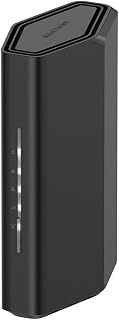
Homes needing coverage across roughly 2,000 square feet will appreciate this dual-band WiFi 7 router's 3.6 Gbps throughput ceiling, enough headroom for streaming, gaming, and smart cameras running simultaneously. Its wide device compatibility list, spanning consoles, smartphones, and security cameras, suits a household that's already leaning into connected gadgets and wants a router that won't bottleneck them as more devices join.
Pros
- WiFi 7 dual-band with 3.6 Gbps throughput
- Handles up to 50 connected devices
- 2.5 Gigabit WAN port for multi-gig internet
- Free Nighthawk app for remote management
Cons
- 2,000 sq ft coverage limited for larger homes
- Requires separate modem or bridge mode setup
This router targets homes where budget constraints meet genuine multi-device demands, handling up to 50 simultaneous connections across phones, cameras, smart speakers, and streaming boxes. The dual-band WiFi 7 architecture delivers 3.6 Gbps combined throughput, with MU-MIMO and OFDMA ensuring devices transmit and receive data without queue delays. The quad-core 2.0 GHz processor manages traffic efficiently, while the 2.5 Gigabit WAN port accommodates fiber or cable plans faster than traditional gigabit connections. Four gigabit LAN ports handle wired devices like gaming consoles and desktop workstations. Coverage reaches 2,000 sq ft with four fixed antennas, sufficient for single-story homes or strategically placed in smaller two-story layouts. The Nighthawk app simplifies network management with remote access, device pausing, and speed testing. Limitations surface in larger or heavily segmented floor plans where walls degrade signal strength. A separate modem is required, and some ISP combo units need bridge mode configuration. Real performance depends on your internet plan and device capabilities, not just the router's rated speeds.
Wireless Technology: WiFi 7 (802.11be) Dual-Band
Maximum Speed: 3.6 Gbps (BE3600)
Frequency Bands: 2.4 GHz and 5 GHz
Coverage Area: 2,000 square feet
Connected Devices: Up to 50 devices
Processor: Quad-core 2.0 GHz
Connectivity: 1x 2.5 Gigabit WAN port, 4x 1 Gigabit LAN ports
Antennas: 4 fixed antennas
Security: WPA2, WPA3 protocols, Advanced Router Protection, automatic firmware updates
Power: 12V/1.5A adapter
Control: Nighthawk mobile app (iOS and Android)
Warranty: 1 Year Limited
In the Box: RS90 router, 2.5A power adapter, 2-meter ethernet cable, quick start guide
Model: RS90-100NAS
Ideal for value-focused families in smaller homes needing WiFi 7 for heavy device loads, remote workers requiring stable connections for video calls, and buyers with fiber internet who need a 2.5G WAN port. Skip if you live in a multi-story home over 2,000 sq ft, need integrated modem functionality, or want mesh expandability for complex layouts.
Pros
- Wi-Fi 6 performance supports multiple simultaneous streaming, gaming, and smart-home connections.
- Four external antennas and Beamforming are designed to provide strong, reliable whole-home coverage.
- Includes useful network tools such as VPN support, QoS, guest mode, parental controls, and WPA3 security.
- Works with major internet providers and supports older Wi-Fi standards for broad device compatibility.
Cons
- A modem is required for most ISP setups, so the router does not provide a standalone internet connection.
- Fixed antennas cannot be repositioned or replaced for more specialized installations.
- Gigabit Ethernet ports limit wired network connections to 1 Gbps, and some advanced HomeShield features may require a premium service.
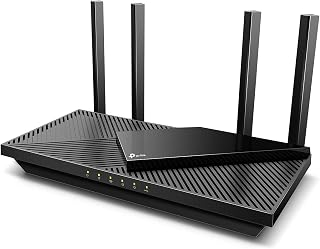
The TP-Link Archer AX55 is a dual-band AX3000 Wi-Fi 6 router designed for households with several connected devices. It is a practical choice for families, gamers, streamers, and smart-home users who need responsive wireless networking and broad device compatibility.
Its advertised 2402 Mbps 5 GHz and 574 Mbps 2.4 GHz rates provide plenty of wireless capacity for everyday streaming, gaming, downloads, and live feeds. OFDMA helps multiple devices share bandwidth more efficiently, while Beamforming and four high-gain antennas are designed to improve coverage and reduce weak-signal areas.
The router combines five Gigabit ports with USB 3.0 connectivity, VPN client and server support, app control, Alexa compatibility, and WPA3 security. A larger heat sink and redesigned enclosure are intended to improve cooling, which can help the system maintain more consistent performance during sustained use.
There are a few setup limitations to consider. Most internet providers require a separate modem, the antennas are fixed, and the Gigabit ports do not support wired speeds above 1 Gbps. HomeShield includes useful basic protections, while some advanced security functions may be part of the premium service.
Overall, the Archer AX55 is a well-equipped Wi-Fi 6 router for busy homes that value coverage, device capacity, security tools, and flexible management. It offers a strong feature set for typical gigabit-class home networks, as long as buyers account for the separate modem requirement and fixed antenna design.

Pros
- WiFi 6 AX3000 speeds up to 3 Gbps with quad-core processor
- Covers 2,000 sq ft and supports 25 simultaneous devices
- WPA3 security and built-in VPN for modern protection
- Four Gigabit Ethernet ports and straightforward app setup
Cons
- Router-only design requires separate cable modem
- Early stability issues may need firmware updates to resolve
When your budget caps at three figures, the NETGEAR Nighthawk RAX36 brings WiFi 6 to homes that need genuine speed improvements without stretching the wallet. This router delivers AX3000 wireless performance backed by a 1.7 GHz quad-core processor, handling up to 25 devices across 2,000 square feet without the lag that plagues older WiFi 5 hardware. The four Gigabit Ethernet ports handle wired connections for gaming consoles or desktop PCs, while the internal dual-band antennas push signal through typical home layouts. WPA3 security and built-in VPN capability add modern protection layers that matter for households sharing devices. The 160 MHz channel support ensures newer phones, tablets, and laptops get the full speed advantage WiFi 6 promises. Setup runs through a mobile app that simplifies configuration, and the compact black chassis fits living room shelves without drawing attention. Firmware updates have addressed early stability quirks reported by some users, and real-world speeds align with the advertised 3 Gbps ceiling when paired with compatible devices. For families streaming 4K content, working from home, or gaming online, this router checks the essential boxes at a price point that leaves room in the budget for a separate modem.
Connectivity: WiFi 6 (802.11ax), Dual-Band (2.4 GHz and 5 GHz), 4 Gigabit Ethernet ports, USB 3.0
Performance: Maximum speeds of 3,000 Mbps (AX3000), 1.7 GHz quad-core processor, 160 MHz channel support
Coverage: Up to 2,000 square feet, supports up to 25 connected devices
Security: WPA3 protocol, built-in VPN support, app-based management
Physical: 2 internal antennas, weighs 2.4 pounds, black color, includes Ethernet cable and power adapter
Warranty: 1-year limited warranty from NETGEAR
Buy this if you have a standard home under 2,000 square feet, multiple WiFi 6 devices, and want a straightforward upgrade from aging WiFi 5 hardware. It suits families streaming video, working remotely, and gaming online without needing advanced mesh systems or enterprise features. Skip it if you already own a cable modem gateway combo and don't want separate hardware, need coverage beyond 2,000 square feet, or require mesh expansion for multi-story layouts. Also pass if you demand instant plug-and-play reliability without waiting for firmware updates to iron out early quirks.

Anyone wanting next-gen WiFi 7 speeds without a sprawling feature list will find this dual-band Archer model approachable. Remote access and guest mode make it easy to manage the network from afar or hand visitors their own connection, while support across gaming consoles, tablets, and smart TVs means it fits a typical home's mixed device lineup without demanding technical fuss.
Pros
- Dual 2.5 Gbps Ethernet ports for fast wired connections
- WiFi 7 with Multi-Link Operation and 4K-QAM
- Supports up to 60 devices across 2000 sq ft
- HomeShield security with parental controls included
Cons
- Dual-band only, no 6 GHz spectrum
- Performance degrades through walls and distance
The router pushes 2882 Mbps on 5 GHz and 688 Mbps on 2.4 GHz, enough headroom for 4K streaming, online gaming, and simultaneous work-from-home video calls. Multi-Link Operation and 4K-QAM deliver measurable speed gains over WiFi 6, while the quad-core 2.0 GHz processor prevents traffic jams when managing up to 60 devices. The dual 2.5G ports future-proof wired connections for fiber upgrades or high-speed NAS transfers. Four internal antennas with beamforming cover 2000 sq ft in open layouts, though performance drops noticeably through walls and across floors. The Tether app handles setup in minutes, and HomeShield security provides parental controls and IoT threat detection without ongoing fees. The dual-band configuration omits the 6 GHz spectrum found in tri-band WiFi 7 models, a acceptable trade-off when working within tight budgets. One 2.5G port functions as WAN or LAN, forcing a choice between upload or download optimization. Best performance happens in direct line-of-sight scenarios, not sprawling multi-story homes.
Technical Details
Model: TP-Link Archer BE230. Frequency Bands: Dual-Band (2.4 GHz and 5 GHz). Wireless Standards: 802.11be, 802.11ax, 802.11ac, 802.11n, 802.11g. Maximum Speed: 3570 Mbps combined (2882 Mbps + 688 Mbps). Processor: Quad-core 2.0 GHz. Coverage: Up to 2000 sq ft. Device Capacity: 60+ devices. Antenna Configuration: 4 internal antennas with beamforming.
Connectivity
Ports: One 2.5 Gbps WAN/LAN port (switchable), one 2.5 Gbps LAN port, three 1 Gbps LAN ports. Connectivity Options: Ethernet, USB, Wi-Fi. Compatibility: Works with all internet service providers (modem required). Mesh: EasyMesh compatible for expandable whole-home coverage.
Features
Security: TP-Link HomeShield with real-time threat detection, parental controls, and remote access. Setup: Tether app for configuration and monitoring. Voice Control: Amazon Alexa and Google Assistant compatible. Color: Black. Included: Power adapter, Ethernet cable, quick install guide.
Perfect for budget buyers in smaller homes wanting WiFi 7 without flagship costs, users with gigabit or multi-gig internet plans who need 2.5G ports, and families managing many devices in open floor plans. Skip if you need tri-band 6 GHz spectrum, live in a multi-story home with challenging layouts, or require simultaneous 2.5G WAN and LAN optimization.
Buying Guide: What to Look for in a Budget Router
Wi-Fi Generation: 6, 6E, or 7?
Wi-Fi 6 is the reliable standard for most households right now, offering strong throughput and efficient device handling via OFDMA technology. If your devices support it, Wi-Fi 6E adds a 6 GHz band for near-zero latency, which is exactly what the TP-Link AXE5400 Tri-Band WiFi 6E Router brings to the table.
Wi-Fi 7 routers are now appearing at budget-friendly price points too. Both the NETGEAR Nighthawk WiFi 7 Router RS90 and the TP-Link Dual-Band BE3600 Wi-Fi 7 Router deliver Multi-Link Operation and 4K-QAM for noticeably better performance on compatible devices.
Coverage Area and Device Count
Coverage specs vary quite a bit across these routers, so match the router to your space. Several picks here, including the NETGEAR Nighthawk WiFi 6 Router (RAX36) and the TP-Link Dual-Band BE3600 Wi-Fi 7 Router, cover up to 2,000 sq. ft. That’s solid for most apartments and average-sized homes.
Device capacity matters just as much as square footage. The TP-Link Dual-Band BE3600 Wi-Fi 7 Router supports up to 60 simultaneous devices, while the NETGEAR Nighthawk WiFi 7 Router RS90 handles up to 50. If your household is packed with smart home gadgets, phones, and laptops, these numbers matter more than raw speed alone.
Wired Port Options
Most budget routers come with four Gigabit LAN ports, which is enough for a desktop, a gaming console, and a smart TV. But if you have a multi-gig internet plan, look for a router with a 2.5G WAN port. The TP-Link Dual-Band BE3600 Wi-Fi 7 Router stands out here with dual 2.5 Gbps ports plus three additional 1 Gbps LAN ports.
If you’re building a more complex home network with switches and access points, our roundup of the best network switches for home is a helpful companion read.
Security and Parental Controls
Built-in security features are increasingly standard at this price tier. TP-Link’s HomeShield service, available on the TP-Link Dual-Band AX3000 Wi-Fi 6 Wireless Gigabit, the TP-Link AXE5400 Tri-Band WiFi 6E Router, and the TP-Link Dual-Band BE3600 Wi-Fi 7 Router, includes IoT device identification, basic parental controls, and Quality of Service settings at no extra cost.
NETGEAR routers come with NETGEAR Armor, which offers a 30-day free trial and provides device-level protection against malware and hackers. After the trial, a subscription is required. If security is a top priority for your household, factor that ongoing cost into your decision. For broader network management, pairing your router with a quality modem router combo may also simplify your setup.
VPN Support
Router-level VPN support lets you protect every device on your network without installing apps on each one. Both the TP-Link Dual-Band AX3000 Wi-Fi 6 Wireless Gigabit and the TP-Link AXE5400 Tri-Band WiFi 6E Router support VPN server and client modes, including OpenVPN, PPTP, and L2TP protocols.
The NETGEAR Nighthawk WiFi 6 Router (RAX36) also includes a built-in VPN, making it a solid pick for remote workers who need a secure home office connection. If privacy and remote access are important to you, these features are worth prioritizing when choosing between otherwise similar models.
Final Thoughts
Each router in this lineup brings real value for a budget-conscious buyer, but two stand out for distinct needs. If you want the latest Wi-Fi technology at an approachable price, the TP-Link Dual-Band BE3600 Wi-Fi 7 Router is a forward-looking pick with multi-gig ports and broad device support. For households that prioritize tri-band performance and built-in 6 GHz access, the TP-Link AXE5400 Tri-Band WiFi 6E Router remains a highly rated, well-rounded option that consistently earns strong marks from users and reviewers alike.
Frequently Asked Questions
Is Wi-Fi 6 worth it for a home router in 2026?
Yes, Wi-Fi 6 is absolutely worth it in 2026 for most households. It handles multiple devices more efficiently than older standards using OFDMA technology, which reduces latency and keeps speeds stable when several people are online at once. All of the Wi-Fi 6 options in this guide offer meaningful real-world improvements over Wi-Fi 5 routers.
Do I need a separate modem with these routers?
Yes, every router in this guide requires a separate modem or gateway to connect to the internet. They are standalone routers, not modem router combos. If you’d prefer an all-in-one solution, our guide to the best modem router combos covers options that bundle both into a single device.
What’s the difference between Wi-Fi 6, Wi-Fi 6E, and Wi-Fi 7?
Wi-Fi 6 operates on the 2.4 GHz and 5 GHz bands and delivers strong efficiency improvements for busy networks. Wi-Fi 6E adds a 6 GHz band for less congestion and near-zero latency on supported devices. Wi-Fi 7 builds further on those gains with Multi-Link Operation, 4K-QAM modulation, and higher peak throughput, making it the most capable standard available right now for future-proofing your network.
Can a single router cover a large home?
Most of the routers here are rated for up to 2,000 sq. ft., which covers a typical apartment or single-story home comfortably. Larger or multi-story homes with thick walls will likely need additional coverage. In that case, you can extend your network with a mesh node or a dedicated extender. Our picks for the best access points for home are a great starting point for expanding coverage without replacing your router entirely.



Write Your Review
No reviews yet. Be the first to share your experience!