

Video calls freeze in the back bedroom, a console loses pace when the TV starts streaming, and a crowded smart home turns basic browsing into a wait. Those are usually capacity, coverage, or port problems, not just an internet-plan problem. This guide compares TP-Link choices designed to solve each scenario and explains the tradeoffs worth noticing before you replace your router.
The best TP-Link router for you depends on your space, the speed arriving from your modem, and how many devices compete at once. We cover simple dual-band models, Wi-Fi 6 and Wi-Fi 7 upgrades, plus Deco mesh options. If your current gateway also needs replacing, compare these modem router combo units before choosing a separate router.
Quick answer
This guide compares 10 picks, with TP-Link ER605 Multi-WAN Gigabit VPN Router with Omada ranked first. TP-Link Archer AX21 AX1800 WiFi 6 Dual-Band Router holds the highest customer rating among them.

Pros
- Multiple WAN options provide genuine redundancy and network resilience for business-critical operations
- Extensive VPN protocol support accommodates diverse corporate and remote access requirements
- Gigabit ports throughout deliver consistent high-speed connectivity without bottlenecks
- Advanced security features and firewall protect against modern network threats
- Affordable price point for enterprise-grade features typically found in much costlier equipment
Cons
- Wired-only design means it functions as a business router, not a Wi-Fi replacement for home use
- Setup and VPN configuration require technical knowledge, not ideal for non-technical users
- No built-in modem, so additional equipment may be needed depending on your ISP setup
The TP-Link ER605 is a compact, business-focused wired router built for organizations and power users who need reliable multi-WAN connectivity and rock-solid VPN support. It's purpose-built for small offices, remote sites, or anyone running a network where uptime and security matter more than Wi-Fi coverage.
What sets this router apart is its flexibility in WAN connectivity. With three Gigabit WAN ports plus a USB port for mobile broadband backup, you can load-balance traffic across multiple ISPs or instantly switch to a backup connection if your primary link goes down. The VPN capabilities are genuinely impressive for the price: support for 20 LAN-to-LAN IPsec tunnels, 16 OpenVPN connections, and additional L2TP and PPTP options give you enterprise-class remote access without the enterprise-class price tag.
The ER605 includes serious security features. Dual-layer firewall protection, DoS defense, IP and MAC filtering, and URL blocking all work together to keep your network safe. The Omada SDN integration lets you manage multiple TP-Link devices from a single dashboard, a huge bonus if you're scaling beyond one router. It's built to handle demanding network conditions with minimal maintenance.
The main limitation is that this is a wired router only, designed for backbone connectivity rather than Wi-Fi distribution. You'll need separate access points if you need wireless coverage. Setup requires technical competency, particularly for VPN configuration, so expect a learning curve if you're new to networking. Also, without a built-in modem, you'll need appropriate connectivity hardware depending on your ISP.
The ER605 is a smart investment for businesses and advanced users who prioritize network reliability, security, and flexibility over simplicity. The combination of multi-WAN support, extensive VPN options, advanced firewall, and 5-year warranty makes it excellent value for what you get.
This router excels at multi-WAN connectivity with three Gigabit WAN ports that can be configured for load balancing or automatic failover. Connect multiple ISPs and let the ER605 intelligently distribute traffic or switch to a backup connection instantly if your primary link fails. The USB port adds a fourth WAN option via 4G/3G mobile modems, giving you emergency connectivity when fixed-line ISPs go down.
Load balancing ensures no single connection becomes a bottleneck, critical for bandwidth-intensive applications. Failover is automatic and transparent to your users, meaning your business stays online even during ISP outages. This redundancy model is typically found in routers costing 2-3 times more.
The ER605 supports an impressive array of VPN protocols for diverse remote access scenarios. Whether you need 20 IPsec tunnels for site-to-site connections, 16 OpenVPN channels for remote workers, or L2TP and PPTP support for legacy systems, this router has you covered without compromising security.
Security goes deep with advanced SPI firewall, DoS protection, IP/MAC/URL filtering, and ALG support for FTP, H.323, PPTP, SIP, and IPsec. These protections guard against both external threats and internal misuse, essential for protecting business data and network integrity.

TP-Link Archer AX21 AX1800 WiFi 6 Dual-Band Router
The AX21 brings WiFi 6 and beamforming to households juggling laptops, tablets, gaming consoles, and smartphones without breaking a sweat. Its dual-band setup handles multiple device types simultaneously, so video calls don't stutter when someone fires up a console or streams in another room. For families running a mix of older and newer gear, backward compatibility with 802.11ac and earlier standards keeps every device connected reliably.
Pros
- OFDMA manages multiple devices without performance drops during peak use
- Built-in VPN server adds work-from-home security at no extra cost
- Tether app simplifies setup for non-technical family members
- Beamforming and high-gain antennas improve signal in busy households
Cons
- Dual-band only, no 6 GHz support for future devices
- Large homes may need additional units for full coverage
Busy households juggling video calls, homework downloads, and streaming need a router that won't choke when everyone comes home at once. The Archer AX21 brings WiFi 6's improved device handling to families overwhelmed by older routers that stutter under load. With 1.8 Gbps total bandwidth split across dual bands, it keeps tablets, laptops, smartphones, and smart home gadgets moving without the buffering that plagued WiFi 5. OFDMA technology divides channels efficiently so one person's 4K stream doesn't freeze another's video call. Four high-gain antennas with beamforming push signal into corners where kids do homework or parents take calls. The Tether app makes setup quick enough that you're not spending precious evening hours troubleshooting. A built-in VPN server adds security for remote work without extra subscriptions. The front-end module chipset boosts signal strength in typical suburban layouts. For homes where every family member has three devices and dinner time means peak network stress, this router handles the chaos without costing flagship money.
Model: TP-Link Archer AX21 V5
WiFi Standard: 802.11ax (WiFi 6), 802.11ac, 802.11n, 802.11g, 802.11b
Total Bandwidth: AX1800 with 1200 Mbps on 5 GHz and 574 Mbps on 2.4 GHz
Antenna Configuration: 4 high-gain antennas with beamforming technology
Technology: OFDMA, Beamforming, CISA Secure-by-Design certified
Security: VPN Server support (OpenVPN and PPTP)
Connectivity: WiFi and Ethernet, compatible with Gaming Consoles, PCs, Smartphones, and Tablets
Included: Power Adapter, Quick Installation Guide, RJ45 Ethernet Cable
Color: Black

Pros
- WiFi 6 standard provides faster speeds and better efficiency than older WiFi 5 systems
- Three Gigabit ports per unit offer more wired connection options than competing single-unit routers
- TP-Link's 2-year warranty and 24/7 support provide confidence and peace of mind
- HomeShield security features help protect smart home devices and connected family members
- Scalable design lets you add more Deco units as coverage needs grow
Cons
- Single unit may struggle to provide optimal coverage in very large homes or multi-story buildings over 2500 sq.ft
- No WiFi 6E support means it lacks the 6GHz band available on newer premium mesh systems
- Limited reviews available at launch suggest this is a newer or less widely adopted model
The TP-Link Deco X55 is a standalone WiFi 6 mesh router designed for homes up to 2500 square feet that need reliable, modern connectivity without paying for multi-pack systems. It's ideal for users with gigabit internet plans who want strong coverage throughout their home and don't need advanced features like WiFi 6E.
The standout feature is the three Gigabit Ethernet ports, which is more than most single routers offer. This matters because wired backhaul connections between mesh nodes dramatically improve speed and stability. Pair that with WiFi 6 (AX3000) performance of 2402 Mbps on the 5GHz band plus 574 Mbps on 2.4GHz, and you get responsive speeds for 4K streaming, video calls, and gaming without noticeable lag or buffering.
The AI-driven mesh technology learns your home layout and automatically adjusts signal strength to adapt to interference and walls. Setup happens through the intuitive Deco app in minutes, with clear visual guidance that doesn't require networking knowledge. TP-Link HomeShield adds free security tools including network protection, parental controls, and Quality of Service prioritization so you can control bandwidth for different devices.
The main drawback is that a single unit may not be adequate for very large homes significantly over 2500 sq.ft or multi-story buildings with dense construction. Additionally, this router lacks WiFi 6E support, meaning no access to the newer 6GHz band that premium systems offer for reduced congestion.
The Deco X55 is a practical choice for most households seeking WiFi 6 performance and solid build quality from a trusted brand. It delivers real value through app management, security features, and the flexibility to expand by adding more Deco units later. Backed by TP-Link's 2-year warranty and 24/7 support, it's a confident purchase for dependable home connectivity.
Wireless Performance: WiFi 6 (802.11ax) AX3000 with dual-band operation. 5GHz: 2402 Mbps (2x2 HE160). 2.4GHz: 574 Mbps (2x2). Backward compatible with WiFi 5, WiFi 4, and older standards.
Connectivity: Three Gigabit Ethernet ports (10/100/1000 Mbps). Supports wired Ethernet backhaul. Works with all major ISPs including Comcast, AT&T, Verizon, Charter, and Spectrum. Requires modem for most ISPs.
Coverage and Range: Up to 2500 square feet per unit. Can be stacked with additional Deco units for larger homes. AI-driven mesh automatically optimizes signal for your home environment.
Security: WPA3, WPA2, and WPA security protocols. CISA Secure-by-Design signatory. TP-Link HomeShield included with basic network security, parental controls, and QoS management.
Hardware: 128 MB RAM. Internal antennas. Dimensions: 4.33L x 4.33W x 4.49H inches. Powered by 12V adapter. Control via app and optional voice commands. Operating system: Tenda OS.
Best For: Homes up to 2500 sq.ft with gigabit internet who want WiFi 6 performance without buying a three-pack system. Ideal for users who value security features, multiple wired ports, and app-based management over the absolute top speeds of premium WiFi 6E routers.
Consider Alternatives If: You need coverage beyond 2500 sq.ft (add more Deco units), require WiFi 6E for the 6GHz band, or prefer traditional router plus extender setups. Not recommended for ultra-large homes or those prioritizing bleeding-edge specs.
Setup and Support: The Deco app walks you through installation visually so networking knowledge isn't required. TP-Link provides 24/7 technical support and backs the product with a 2-year warranty, which is longer than most competing brands.
Scalability: Start with one unit and add more Deco X55 units later as needed. All TP-Link Deco mesh systems can work together, giving you flexibility to upgrade gradually without replacing your entire network.

Tri-band architecture and WiFi 6E support make this router ideal when every family member is online at once. The 6GHz band offloads congestion from crowded 2.4GHz and 5GHz channels, so work-from-home calls stay clear even during peak evening streaming hours. Parental controls and QoS let you prioritize bandwidth for homework or meetings when the household is at full tilt.
Pros
- 6 GHz band eliminates congestion for demanding work and gaming traffic
- OFDMA increases capacity 4x for heavy multi-device households
- EasyMesh compatibility lets you expand coverage without replacing hardware
- HomeShield and WPA3 secure busy networks with many entry points
Cons
- Requires separate modem, adding cost and equipment
- Fixed antennas need careful placement for optimal whole-home coverage
When your household runs like a small data center with gaming rigs, remote offices, 4K TVs all streaming different shows, and a dozen smart home devices chattering in the background, you need bandwidth headroom that traditional routers can't provide. The Archer AXE75 opens up the 6 GHz band specifically for this chaos, delivering 5400 Mbps total throughput split across three bands. That third band acts as a dedicated express lane so your work Zoom call doesn't fight with your teenager's Fortnite session. OFDMA multiplies network capacity by four times, letting more devices talk simultaneously without waiting in line. Eight antennas and a 1.0 GHz dual-core CPU with 512 MB RAM keep traffic flowing even when every family member hits peak usage after dinner. EasyMesh compatibility means you can expand coverage as your smart home grows. HomeShield protection, WPA3 encryption, and VPN support secure the network without subscription fees. The optimized heat dissipation matters when the router runs hard all day supporting video calls, cloud backups, and streaming. For homes where downtime means lost productivity or missed game sessions, this tri-band system keeps everyone moving.
Wireless Performance: WiFi 6E, 5400 Mbps total (6 GHz: 2402 Mbps, 5 GHz: 2402 Mbps, 2.4 GHz: 574 Mbps)
Connectivity: Tri-band 802.11ax, 8 fixed antennas, 5 Gigabit ports, WAN/LAN connectivity
Processing Power: 1.0 GHz dual-core CPU, 512 MB RAM
Security: WPA2, WPA2-Enterprise, WPA3, VPN Server/Client support (OpenVPN, PPTP, L2TP), HomeShield protection, High-level firewall
Features: EasyMesh compatibility, Beamforming, QoS, Parental Controls, Alexa Compatible, App control
Warranty: 2-year manufacturer warranty, 24/7 technical support
Ideal for households where multiple people work from home, competitive gamers need low-latency connections, and 4K streaming runs on several screens simultaneously. Perfect if you already own or plan to buy WiFi 6E devices like newer laptops and phones. Skip this if most of your devices are older and can't use the 6 GHz band, making the investment wasted. Also pass if you need an all-in-one modem/router combo, since this requires a separate modem for cable or DSL internet.

Pros
- WiFi 6E with dedicated 6GHz band eliminates interference from legacy WiFi 5 and older devices
- 2.5G WAN/LAN port future-proofs your network for next-generation internet speeds
- Exceptional range and capacity handles 200 connected devices without performance drops
- Intuitive Deco app makes setup, monitoring, and troubleshooting simple for all users
- Solid 4.3-star rating from nearly 3,300 real users confirms reliable performance
Cons
- Requires a separate modem, which adds to total setup cost and complexity
- Premium pricing reflects WiFi 6E technology, which may exceed needs for basic users
- 6GHz band benefits only work with WiFi 6E-compatible devices currently on the market
The TP-Link Deco XE75 Pro is a cutting-edge WiFi 6E mesh router designed for power users who demand the latest wireless technology and maximum performance. This single-unit system targets gamers, content creators, and households with dozens of connected smart devices seeking reliable, fast connectivity across their entire home.
The standout feature is undoubtedly the new 6GHz band, which eliminates interference from legacy WiFi 5 devices and dramatically improves performance for compatible WiFi 6E gadgets. With a combined 5,400 Mbps across three bands and support for up to 200 devices, this router handles intensive tasks like 4K streaming, online gaming, and video conferencing simultaneously without lag. The 2.5 Gbps WAN/LAN port is crucial for users with multi-gig internet plans, ensuring your expensive internet bandwidth isn't wasted on slower connections.
Build quality appears solid based on customer feedback, with the router featuring six internal antennas and three ethernet ports for flexible device placement. The sleek design fits modern home decor, and the app-based control system is intuitive enough for non-technical users yet powerful enough for advanced network management. AI-driven optimization automatically routes traffic efficiently, adapting to your usage patterns without manual tweaking.
The main drawbacks are its premium price point and the requirement for a separate modem. Additionally, true 6GHz benefits currently require WiFi 6E-compatible devices, which limits immediate advantage for users with older equipment. The basic router firewall may also require supplemental security for power users with sensitive data.
Verdict: The Deco XE75 Pro is the right choice if you want next-generation WiFi technology, own or plan to own WiFi 6E devices, and have a multi-gig internet connection. For average households, older WiFi 6 routers offer better value. This is a future-proof investment for tech enthusiasts and demanding home networks.
WiFi Performance: WiFi 6E tri-band with 5,400 Mbps total speed. 6GHz band: up to 2,402 Mbps (HE160), 5GHz band: up to 2,402 Mbps (HE160), 2.4GHz band: up to 574 Mbps. Supports up to 200 connected devices.
Connectivity: One 2.5 Gbps WAN/LAN port plus two 1 Gbps LAN ports. Internal six-antenna design. Coverage area: 2,900 square feet. Wireless standards: 802.11ax, 802.11ac, 802.11n, 802.11g, 802.11b.
Security & Features: WPA3-Personal, WPA2-Personal, and WPA-Personal security protocols. TP-Link HomeShield with basic network security, IoT device identification, parental controls, and QoS. App-based control and management with automatic firmware updates.
Physical: Model Deco XE75 Pro (1-pack). Includes power adapter, RJ45 ethernet cable, and quick installation guide. 2-year manufacturer warranty.
Who Should Buy: The Deco XE75 Pro is ideal for tech-forward users with multi-gig internet plans, gaming enthusiasts, remote workers needing reliable speeds, households with 50+ smart devices, or anyone wanting future-proof WiFi 6E technology.
Who Should Consider Alternatives: Budget-conscious buyers, users with standard gigabit internet plans, renters with limited setup flexibility, or those with small homes under 1,500 square feet may find previous-generation WiFi 6 models more cost-effective.
Setup Requirements: A separate cable or fiber modem is required. Works with major ISPs including Comcast, Verizon, AT&T, Charter, and others. Ethernet connection recommended for optimal performance during initial setup.
Real-World Performance Factors: Speed varies based on distance from the router, physical obstacles, and interference sources. Peak 6GHz speeds require WiFi 6E-compatible devices. Wired connections via ethernet ports deliver maximum performance for stationary devices like gaming consoles and smart TVs.

The A6 covers essential connectivity for homes balancing security cameras, smart thermostats, and everyday browsing across phones and tablets. Gigabit Ethernet ports ensure wired devices like desktops get full speed, while guest mode isolates visitor traffic from your main network. Parental controls and QoS help manage bandwidth when multiple users compete for attention during busy mornings or evenings.
Pros
- MU-MIMO on 5 GHz keeps streaming smooth when multiple devices connect
- Four Gigabit Ethernet ports handle wired devices during peak wireless traffic
- WPA3 security protects networks against modern threats at budget pricing
- OneMesh compatibility allows simple expansion without replacing the router
Cons
- 2.4 GHz band capped at 300 Mbps may bottleneck with many legacy devices
- Fixed antennas limit ability to adjust coverage toward dead zones
Not every busy home needs flagship hardware. Some families just need reliable connectivity for the basics: kids streaming cartoons, parents checking email, a few smart plugs and bulbs responding to commands. The Archer A6 covers these everyday demands without asking you to finance router overkill. Dual-band architecture splits traffic intelligently with 867 Mbps on 5 GHz for streaming and gaming, while 300 Mbps on 2.4 GHz handles phones, tablets, and IoT devices that don't need blazing speed. MU-MIMO on the 5 GHz band keeps multiple devices fed simultaneously so one person's Netflix binge doesn't pause another's YouTube. Four Gigabit Ethernet ports let you hardwire work laptops or gaming consoles, bypassing wireless congestion entirely during crunch time. Beamforming with four external antennas focuses signal where your family actually sits instead of broadcasting blindly. The Tether app gets you online quickly without a manual. WPA3 security is rare at this budget level, protecting your network as threats evolve. OneMesh compatibility means you can add range extenders later if you move to a bigger place. For households managing routine demands without exotic requirements, this router keeps everyone connected.
Wireless Performance: AC1200 (300Mbps on 2.4GHz + 867Mbps on 5GHz), dual-band, 802.11a/b/g/n/ac compatible, MU-MIMO on 5GHz band.
Connectivity: 4 x Gigabit Ethernet LAN ports, 1 x Gigabit WAN port, total 5 ports, 10/100/1000 Mbps bandwidth per port.
Antennas: 4 fixed external antennas with Beamforming technology for extended coverage.
Security: WPA3 protocol, advanced firewall, parental controls, guest mode, internet security features.
Additional Features: Access Point mode, QoS, WPS, OneMesh support, app-based management via Tether (iOS/Android). Power: 12V adapter. Dimensions: 8.46in L x 4.92in W x 1.81in H. Warranty: 2-year manufacturer coverage. Compatible with all major ISPs (AT&T, Verizon, Xfinity, Spectrum, etc.).
Perfect for budget-conscious families in smaller homes where devices mostly do standard tasks like browsing, streaming, and video calls. Great for first-time router buyers or anyone replacing an ancient unit that can't handle modern device counts. Skip this if your household has power users gaming competitively or streaming 4K on multiple screens at once. Also pass if you have many legacy 2.4 GHz devices that would all crowd onto the slower 300 Mbps band together.
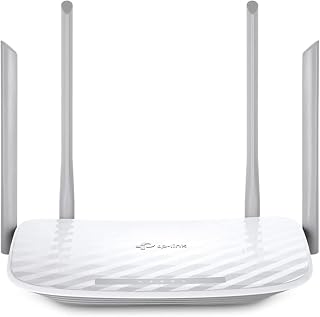
Dual-band AC1200 speeds and beamforming keep connections stable when several people are streaming, browsing, or working from different corners of the house. Guest mode protects your primary network when visitors need WiFi, and access point mode extends coverage if you're adding capacity to an existing setup. Its broad compatibility with older 802.11 standards ensures legacy devices stay connected alongside newer hardware.
Pros
- Four antennas provide solid 1,000 sq ft coverage for typical busy households
- WPA3 security and parental controls manage family device chaos effectively
- Tether app simplifies network adjustments when priorities shift mid-day
- EasyMesh compatibility allows future expansion without replacement
Cons
- Wi-Fi 5 limits speeds compared to newer standards under heavy load
- Coverage struggles in larger multi-story homes with thick walls
Busy homes juggling video calls, homework uploads, and simultaneous streaming need reliable connectivity that doesn't collapse under pressure. The Archer A54 delivers exactly that foundation with dual-band 1200 Mbps throughput split intelligently: 867 Mbps on 5 GHz handles bandwidth-hungry tasks while 300 Mbps on 2.4 GHz keeps smart home devices and older tablets connected across the house. Four external antennas push coverage to roughly 1,000 square feet, enough for typical apartments and single-story layouts. WPA3 security keeps the network locked down as kids bring friends online and parents work from makeshift home offices. The Tether app makes network management genuinely simple when you need to prioritize a work call or pause internet access during dinner. IPTV support means streaming boxes get clean feeds without buffering. Parental controls let you set boundaries without constant arguments. EasyMesh compatibility gives you a future expansion path if the household grows. This is Wi-Fi 5 technology, so it won't impress speed test screenshots, but it handles the real work of keeping a busy household online without drama.
Wireless Performance: Wi-Fi 5 (802.11ac), dual-band, 1200 Mbps total (867 Mbps on 5 GHz, 300 Mbps on 2.4 GHz), four external antennas, coverage up to 1,000 sq ft.
Connectivity: 5 ports total (4x 10/100 Mbps LAN ports, 1x WAN port), Ethernet and Wi-Fi connectivity, compatible with 802.11a, 802.11ac, 802.11b, 802.11g, and 802.11n devices.
Security: WPA3, WPA2-PSK, WPA2-Enterprise, WPA-PSK protocols, Internet Security, Guest Mode, Parental Controls, medium-level firewall protection.
Features: EasyMesh compatible, Access Point mode, Beamforming, IPTV optimization (IGMP Proxy/Snooping, Bridge and Tag VLAN), IPv6 support, LED indicators, WPS, app-based control via TP-Link Tether.
Power and Warranty: 100-240V compatible power adapter, 2-year manufacturer warranty, includes Quick Installation Guide and RJ45 Ethernet cable.
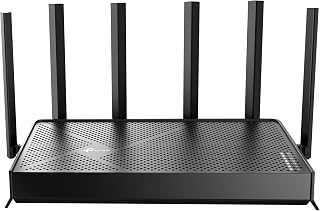
WiFi 7 and dual-band operation future-proof this router for homes adding smart TVs, security cameras, and gaming consoles to an already crowded network. Support for 802.11be delivers lower latency and higher throughput, so 4K streams and online gaming run smoothly even when smart home devices are chattering in the background. QoS and parental controls help you steer bandwidth where it matters most during peak hours.
Pros
- Multi-Link Operation handles 90-plus devices with verified stable performance
- Dual 2.5 Gbps ports fully utilize fiber and high-speed NAS connections
- 2,400 sq ft coverage with beamforming handles busy multi-story homes
- HomeShield isolates IoT devices and provides enterprise-grade threat detection
Cons
- Incompatible with TP-Link Deco mesh systems despite same brand
- Premium investment only justified with fast internet and many devices
Households running 90-plus connected devices while streaming, gaming, and working simultaneously hit a ceiling with older routers. The Archer BE400 removes that ceiling entirely. Multi-Link Operation technology keeps traffic flowing smoothly across 6.5 Gbps total bandwidth, with the 5 GHz band pushing 5,764 Mbps and 2.4 GHz adding 688 Mbps for older devices and smart home gear. Real households report stable 500 to 850 Mbps downloads over Wi-Fi even with dozens of active connections fighting for priority. Six external antennas with beamforming blanket up to 2,400 square feet, handling multi-story layouts without dead zones. Dual 2.5 Gbps ports mean fiber connections and NAS storage both get full-speed wired links. HomeShield security isolates IoT devices automatically, a critical feature when busy homes accumulate smart locks, cameras, thermostats, and voice assistants. The Tether app completes setup in under 10 minutes and makes ongoing adjustments intuitive when household needs shift. VPN server and client support plus WPA3 encryption keep remote work secure. The compact 10.6 x 6 x 1.9-inch footprint fits anywhere despite the antenna array.
Real-world performance metrics consistently exceed specifications. Users report sustained 500+ Mbps downloads on 1 Gbps fiber connections and 780+ Mbps on superior plans. The 2.5Gbps ports enable wired transfers at near-theoretical maximums, making this ideal for content creators and network enthusiasts.
Coverage extends reliably throughout 2,400 sq. ft. with minimal dead zones. The beamforming and six-antenna array intelligently direct signals, maintaining strong connections even in challenging environments like dense apartment buildings or multi-story homes with interference from neighboring networks.
Multi-Link Operation (MLO) dramatically improves stability compared to Wi-Fi 6 routers. By simultaneously using multiple frequency bands for single data streams, the BE400 reduces latency and packet loss, resulting in lag-free gaming and buffer-free streaming regardless of connection density.
HomeShield transforms network security from optional to essential. The real-time scanner identifies threats instantly, parental controls block inappropriate content by category and time window, and Quality of Service (QoS) ensures gaming or work devices get priority bandwidth when needed.
The ability to create separate SSIDs for IoT devices prevents smart home gadgets from accessing sensitive personal data. Combined with WPA3 encryption, VPN server capabilities, and access control features, your network gains protection rivaling enterprise solutions at consumer pricing.
Automatic firmware updates through the cloud keep security patches current without manual intervention, eliminating the common vulnerability window where routers run outdated security code.
Built for power users and large families managing 50-plus devices across home offices, gaming setups, streaming on multiple 4K TVs, and extensive smart home ecosystems. Ideal when you have fiber or multi-gig internet that older routers bottleneck. Skip this if you have basic internet under 300 Mbps, live in a small apartment with fewer than 15 devices, or need mesh expansion with TP-Link Deco units specifically, since this only supports EasyMesh partners.

The BE230 leverages WiFi 7's efficiency to handle simultaneous traffic from gaming consoles, smart TVs, tablets, and phones without bottlenecks. Remote access lets you tweak settings or troubleshoot from anywhere, handy when family members report connectivity hiccups while you're out. Guest mode and parental controls round out the feature set for households that need both performance and oversight.
Pros
- Wi-Fi 7 with Multi-Link Operation handles 60 devices and heavy traffic peaks
- Dual 2.5 Gbps ports maximize gigabit internet and wired device performance
- 2,000 sq ft coverage suits typical busy single-family home layouts
- HomeShield provides parental controls and automatic IoT threat isolation
Cons
- Dual-band configuration lacks 6 GHz spectrum available on tri-band models
- Performance degrades noticeably through walls and in multi-story homes
When a busy household outgrows basic Wi-Fi but doesn't need flagship overkill, the Archer BE230 hits the sweet spot. Wi-Fi 7 brings 2882 Mbps on 5 GHz and 688 Mbps on 2.4 GHz, giving bandwidth headroom for simultaneous 4K streaming, video conferencing, and online gaming without everyone yelling about lag. The quad-core 2.0 GHz processor keeps up to 60 devices moving efficiently, covering the typical mix of phones, laptops, tablets, smart TVs, and IoT gadgets in active households. Multi-Link Operation and 4K-QAM deliver measurable speed gains over Wi-Fi 6 when traffic peaks during evening hours. Dual 2.5 Gbps Ethernet ports future-proof wired connections for gaming PCs and media servers. Four internal antennas with beamforming push coverage to 2,000 square feet, handling most single-family homes in direct line-of-sight scenarios. HomeShield security manages parental controls and isolates vulnerable IoT devices automatically. The Tether app simplifies setup and ongoing adjustments. Performance does drop through walls and over longer distances, a realistic constraint for multi-story layouts with challenging floor plans.
Technical Details
Model: TP-Link Archer BE230. Frequency Bands: Dual-Band (2.4 GHz and 5 GHz). Wireless Standards: 802.11be, 802.11ax, 802.11ac, 802.11n, 802.11g. Maximum Speed: 3570 Mbps combined (2882 Mbps + 688 Mbps). Processor: Quad-core 2.0 GHz. Coverage: Up to 2000 sq ft. Device Capacity: 60+ devices. Antenna Configuration: 4 internal antennas with beamforming.
Connectivity
Ports: One 2.5 Gbps WAN/LAN port (switchable), one 2.5 Gbps LAN port, three 1 Gbps LAN ports. Connectivity Options: Ethernet, USB, Wi-Fi. Compatibility: Works with all internet service providers (modem required). Mesh: EasyMesh compatible for expandable whole-home coverage.
Features
Security: TP-Link HomeShield with real-time threat detection, parental controls, and remote access. Setup: Tether app for configuration and monitoring. Voice Control: Amazon Alexa and Google Assistant compatible. Color: Black. Included: Power adapter, Ethernet cable, quick install guide.
Ideal for growing families in single-story or open-concept homes managing 30 to 60 devices, especially with gigabit internet that older routers bottleneck. Content creators and gamers benefit from the dual 2.5 Gbps ports for wired priority connections. Skip this if you live in a large multi-story house with thick walls where coverage will struggle, need tri-band with 6 GHz spectrum for extreme device density, or plan mesh expansion requiring multiple units to cover your space.

Tri-band WiFi 7 architecture spreads device load across three channels, preventing slowdowns when everyone is home streaming, gaming, and video conferencing at once. Internal antennas and QoS prioritization keep latency low for gaming consoles and smart TVs while background tasks like software updates run on a separate band. USB and Ethernet ports add flexibility for wired backhaul or shared storage in dense household networks.
Pros
- Tri-band WiFi 7 spreads load across busy households
- 2.5G WAN and LAN ports for future-proof wired speed
- QoS and Guest Mode help manage multiple simultaneous users
- EasyMesh support for expanding coverage as needs grow
Cons
- Some users report occasional connection drops needing reboots
- Full speed benefits require WiFi 7 compatible devices, still limited
A busy household means multiple people gaming, streaming, and video calling at once, and the Archer BE550 is built to keep that chaos from turning into buffering. Its tri-band WiFi 7 design splits traffic across three bands, so a kid's console session doesn't have to compete with a work laptop or a 4K movie on the living room TV. Six ports including 2.5G WAN and LAN mean you can hardwire the devices that matter most, like a smart TV or gaming console, for zero-lag performance. QoS lets you prioritize bandwidth for whoever needs it most at any given moment, which matters when everyone's online after school and work hours. Guest Mode keeps visiting family or kids' friends off your main network without handing over your password. Six antennas with beamforming cover around 2,000 square feet, and EasyMesh support means you can expand coverage as your home fills up with connected devices. For a household juggling many devices and little patience for lag, this router earns its place.
WiFi Technology: WiFi 7 (802.11be) with tri-band support (2.4 GHz, 5 GHz, 6 GHz)
Maximum Speed: 9,300 Mbps total (5,760 + 2,880 + 574 Mbps across bands)
Ports: 1x 2.5G WAN, 4x 2.5G LAN ports, USB port
Antennas: 6 internal antennas with beamforming technology
Coverage: Up to 2,000 square feet
Security: WPA3 encryption, HomeShield protection, parental controls, IoT network isolation
Expansion: EasyMesh compatible for seamless network extension
Control: Free Tether app (iOS, Android), Alexa and Google Assistant voice control
Connectivity: Backward compatible with WiFi 6, 5, and legacy standards, works with any ISP modem
How to Choose a TP-Link Router
Match the Wi-Fi Generation to Your Devices and Internet Service
For everyday browsing, streaming, and smart-home gear, an AC1200 dual-band router can still be a sensible fit. The TP-Link AC1200 WiFi Router Dual Band and TP-Link AC1200 Gigabit Dual Band WiFi Router divide traffic between 2.4 GHz and 5 GHz, while the latter adds four Gigabit LAN ports. Neither has a 6 GHz band, so they suit homes that do not need newer-device features.
Move to the TP-Link AX1800 WiFi 6 Router (Archer AX21 V5) when several devices need a more efficient Wi-Fi 6 connection. The TP-Link AXE5400 Tri-Band WiFi 6E Router adds a dedicated 6 GHz band for compatible gear. For newer laptops and phones, the TP-Link Dual-Band BE3600 Wi-Fi 7 Router, TP-Link BE6500 Dual-Band WiFi 7 Router (BE400), and TP-Link Tri-Band BE9300 WiFi 7 Router offer Wi-Fi 7 features such as Multi-Link Operation, though their full benefits require compatible clients.
Plan Coverage Around Your Floor Plan
Router placement matters as much as the specification sheet. Put a standalone router in an open, central location and account for dense walls, long hallways, and floors between devices. The BE400 is rated for broad single-router coverage, but a mesh system is the more natural answer when signal must reach distant rooms without forcing your devices to cling to a weak connection.
The TP-Link Deco X55 AX3000 WiFi 6 Mesh System covers up to 2,500 square feet with one unit, while the TP-Link Deco XE75 Pro AXE5400 Tri-Band WiFi 6E offers up to 2,900 square feet per unit and a 6 GHz band. Add Deco units as needed for seamless coverage. In a smaller trouble spot, compare Wi-Fi extender choices for gaming or explore a dedicated home access point guide.
Make Wired Ports Part of the Decision
Ethernet remains the dependable choice for desktop PCs, consoles, televisions, and network storage. The Archer A6 gives you four Gigabit LAN ports, and each Deco X55 unit has three Gigabit ports. For a wired-first setup, the TP-Link ER605, Wired Gigabit VPN Router provides multiple WAN and LAN connections, but it needs a separate access point or wireless router to provide Wi-Fi.
Multi-gig ports matter only when your modem, service, and wired devices can use them. The Deco XE75 Pro has one 2.5 Gbps WAN/LAN port, while the BE400 includes two 2.5 Gbps ports. The BE550 goes further with one 2.5G WAN port and four 2.5G LAN ports, a strong match for a fast local network with several wired devices.
Choose the Management and Security Tools You Will Use
TP-Link’s Tether app manages Archer routers, while the Deco app handles mesh systems with a more coverage-focused view. HomeShield features on select models can provide network security, Quality of Service, parental controls, and connected-device awareness. The AX21 supports VPN server functions, while the AXE75 and BE550 support VPN client and server roles for households that need more flexible remote access.
Keep firmware current, use WPA3 where your devices support it, and create a guest network for visitors. The BE550 also lets you create a separate IoT network, which helps isolate smart devices from your primary computers and phones. Select the interface you will actually open regularly, because clear controls make it far easier to keep your network organized and secure.
Final Thoughts
For a fast, future-focused standalone network with multi-gig wired flexibility, the TP-Link BE6500 Dual-Band WiFi 7 Router (BE400) is an appealing fit for connected homes. If consistent coverage across a larger layout matters more than a single central router, the TP-Link Deco X55 AX3000 WiFi 6 Mesh System provides a simple path to expand your Wi-Fi room by room.
Frequently Asked Questions
Is Wi-Fi 7 worth choosing in 2026?
Wi-Fi 7 is worth considering if you are buying for the long term, use newer phones or laptops, or have a high-speed internet plan and many active devices. Features such as Multi-Link Operation can improve throughput and reliability with compatible hardware. A Wi-Fi 6 or Wi-Fi 6E router remains a capable choice if your devices do not support Wi-Fi 7 and your home network is already stable.
Do TP-Link routers work with every internet provider?
Most TP-Link routers work with major cable and fiber providers because they connect to an existing modem or optical network terminal through Ethernet. You generally need a separate modem for cable service unless your provider supplied a gateway or you are using a modem-router combo. Confirm your provider’s equipment requirements and disable overlapping Wi-Fi on an existing gateway when appropriate.
Should I buy a mesh system or a router with an extender?
A mesh system is usually easier for larger homes, multi-floor spaces, or layouts with repeated dead zones because its nodes work together under one network name. A router plus an extender can make sense when just one room needs better signal. If you need more Ethernet connections for wired devices, a network switch for home use can expand your available ports without replacing the router.
Can I use a TP-Link router for travel or a second location?
A full-size home router can work at a second location, but it is not the most convenient option for hotel rooms or frequent trips. For portable use, look at these travel router options, which are built for compact packing and connecting through unfamiliar networks. Keep a home router for coverage and multiple wired devices, then use a travel-focused model when portability is the priority.



Write Your Review
No reviews yet. Be the first to share your experience!