

If video meetings freeze at the far end of the house, games lag when several people stream, or an office guest network slows the entire floor, the router’s built-in radio may be in the wrong place. A dedicated access point lets you put wireless coverage where people actually work and relax, while its wired uplink provides a steadier connection back to the network.
This guide narrows the best Ubiquiti access point choices for apartments, larger homes, offices, and high-density deployments. We compare Wi-Fi generation, uplink needs, mounting style, and UniFi management, then include two Omada options for shoppers who value an alternative ecosystem. For broader placement advice, start with our home access point guide.
Quick answer
This guide compares 8 picks, with Ubiquiti UniFi nanoHD Compact 802.11ac Wave2 Access ranked first. Ubiquiti UniFi nanoHD WiFi 5 Access Point, 1733Mbps holds the highest customer rating among them.
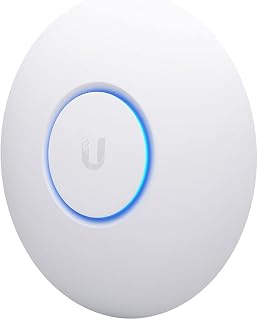
This compact Wave2 access point delivers 802.11ac MU-MIMO technology, letting multiple devices connect simultaneously without speed degradation. Internal antennas keep the profile minimal while dual-band operation ensures older and newer clients all get reliable throughput. Ethernet connectivity and PoE support simplify deployment in homes or offices where you need faster coverage without visible hardware.
Pros
- 4x4 MU-MIMO supports 200+ concurrent users
- 1733 Mbps Wave2 802.11ac throughput
- Compact, low-profile design for ceilings or walls
- Standard PoE powering simplifies installation
Cons
- 100 Mbps LAN port can bottleneck gigabit networks
- Requires separate UniFi controller and PoE source
If your goal for 2026 is faster Wi-Fi across a busy space, the nanoHD earns its spot by handling density, not just speed. Its 4x4 MU-MIMO dual-band radios support 200+ simultaneous connections without the slowdown you'd see on consumer gear, and the four-stream 802.11ac Wave2 design pushes 1733 Mbps of real throughput. MU-MIMO lets multiple devices send and receive at once instead of queuing, which is exactly what keeps a network fast when dozens of people are online together. At 6.3 inches square and 1.3 inches thick, it disappears onto a ceiling or wall, and 802.3af PoE means one cable handles power and data. The tradeoff for that speed is a 100 Mbps LAN port, a bottleneck in gigabit setups, plus the need for a UniFi controller and a separate PoE source. For anyone prioritizing consistent, fast Wi-Fi in a crowded environment over plug-and-play simplicity, this is a strong pick.
Wireless Performance: 802.11ac Wave2, dual-band (2.4GHz and 5GHz), 4x4 MU-MIMO, 1733 Mbps maximum data rate, supports 200+ concurrent users
Physical: 6.3"L x 6.3"W x 1.3"H, weighs 18.14g, white finish, internal antennas (4 total), includes ceiling/wall mount kit
Connectivity: 2 ethernet ports, 100 Mbps LAN port bandwidth, 802.3af PoE compatible, 48V operation
Security: WPA and WPA2 protocols, enterprise-grade encryption
Management: Requires Ubiquiti UniFi controller, compatible with all UniFi PoE switches, Linux-based operating system
Warranty: 1 year manufacturer warranty
Buy this if you're outfitting an office, school, or hospitality space where many users need fast, stable Wi-Fi at once. Skip it if you want a simple standalone router replacement, since you'll need a UniFi controller and separate PoE gear to get it running, and the 100 Mbps LAN port limits wired gigabit performance.

With 1733Mbps maximum throughput on 802.11ac, this model handles bandwidth-heavy tasks like 4K streaming and large file transfers across your network. Dual-band operation balances congestion between 2.4GHz and 5GHz, while PoE capability eliminates the need for separate power adapters. WPS support streamlines device pairing for smartphone users seeking faster wireless performance.
Pros
- 1733 Mbps real-world WiFi 5 throughput
- 4x4 MU-MIMO supports 200+ users at once
- WPA3 support alongside WPA2 and WPS
- Discreet design with optional finish skins
Cons
- Only WiFi 5, not WiFi 6 or 6E
- Single Gigabit Ethernet port limits wired connections
For 2026 buyers chasing faster Wi-Fi without a bulky access point in the way, the nanoHD delivers speed and discretion together. Its 4x4 MU-MIMO setup handles 200+ concurrent users while hitting the full 1733 Mbps WiFi 5 speed, fast enough for 4K streaming, gaming, and video calls running at the same time on different devices. The Wave-2 802.11ac design keeps connections steady even when the airwaves get crowded. What makes it fit a speed-focused shortlist is that performance doesn't come at the cost of aesthetics: optional skins in finishes like wood, marble, and fabric let it vanish into a room, and PoE power removes the need for a nearby outlet. It supports WPA3 for stronger security alongside WPA2 and WPS. The catch is a single Gigabit Ethernet port and WiFi 5 rather than WiFi 6, plus setup through the UniFi OS controller, which takes more effort than consumer alternatives but rewards you with finer control over the network.
Wireless Performance: WiFi 5 (802.11ac Wave-2) with 4x4 MU-MIMO delivers 1733 Mbps maximum throughput across dual-band frequencies. The 5 GHz band provides the high-speed capability while extensive coverage minimizes dead zones in medium-sized spaces.
Connectivity: Single Gigabit Ethernet port (1000 Mbps) supports IEEE 802.3af Power over Ethernet, eliminating the need for separate power supplies. Wireless compatibility extends to all modern smartphones and devices supporting WiFi 5 standards.
Security: WPA3, WPA2, and WPS protocols protect network traffic and simplify device pairing. UniFi OS app control provides secure remote management and real-time monitoring of all connected devices.
Installation: Compact dimensions (6.29 x 6.29 x 1.29 inches) and 320g weight make mounting effortless. Included hardware supports both wall and ceiling installation in virtually any environment.

Supporting 802.11ax with 3Gbps throughput, this Wi-Fi 6 model delivers the speed improvements 2026 networks demand. Dual-band operation and backwards compatibility with older standards mean all your devices benefit from reduced latency and increased capacity. Business-grade antenna placement ensures stable coverage across larger spaces where legacy access points struggle.
Pros
- WiFi 6 (802.11ax) for faster, more efficient connections
- 3 Gbps throughput with MIMO technology
- Dual-band coverage for range and speed
- Low 9W power draw with PoE+ support
Cons
- Requires Ubiquiti router or UniFi controller, no standalone use
- PoE+ injector needed if router lacks support
For readers specifically chasing faster Wi-Fi in 2026, the U6+ stands out for bringing WiFi 6 into this lineup. WiFi 6 (802.11ax) improves on older standards with faster data rates, better performance in congested networks, and more efficient power use for connected devices, which matters as more gadgets compete for bandwidth. Dual-band operation splits traffic across 2.4 GHz for range and older device support and 5 GHz for speed, and the access point is rated for 3 Gbps throughput with MIMO technology keeping handoffs between bands quick. It draws just 9W and supports PoE+ for a clean, outlet-free install, though you'll need an injector if your router lacks PoE. The catch is that it's built for the Ubiquiti ecosystem: a UniFi controller or Ubiquiti router is required to adopt and manage it, and standalone operation isn't an option. If speed is the priority and you're willing to commit to that ecosystem, it's a genuine step up.
The U6+ supports 802.11ax (WiFi 6), the latest wireless standard offering significant improvements over older generations. WiFi 6 delivers faster data rates, better handling of congested networks, and improved power efficiency for connected devices.
Dual-band operation lets the U6+ transmit on both 2.4 GHz (longer range, older device compatibility) and 5 GHz (faster speeds, shorter range) simultaneously. MIMO antenna technology amplifies signal strength and allows the access point to communicate with multiple devices at once without performance degradation.
Real-world benefit: Streaming, gaming, and video calls remain smooth even with a dozen devices connected. Network congestion becomes less of an issue compared to older WiFi standards.
Choose this if you want a real WiFi 6 speed upgrade and already use, or are willing to adopt, Ubiquiti's UniFi ecosystem. Skip it if you want a standalone access point with no controller requirement, or if you're mixing brands, since it needs a Ubiquiti router or UniFi controller to function.

The wall-mount form factor combines tri-band WiFi 7 with multi-link operation and 6 GHz band support, making it perfect for high-density environments where signal strength and client capacity matter most. Its design suits offices, retail spaces, or dense residential buildings where mounting flexibility and the ability to handle dozens of simultaneous connections directly impact network performance. The 802.11be standard ensures future-proof speeds as more devices adopt WiFi 7.
Pros
- Tri-band WiFi 7 with 6 GHz spectrum for less congestion
- 2000 Mbps upstream rate holds up under heavy load
- Centralized management via UniFi Controller dashboard
- WPA3 encryption for stronger connection security
Cons
- Fixed antennas limit coverage pattern adjustments
- Full functionality depends on UniFi Controller setup
When the goal is faster Wi-Fi that holds up under real load, the U7-PRO-Wall targets exactly that problem. This tri-band WiFi 7 access point adds 6 GHz spectrum on top of 2.4 GHz and 5 GHz, opening up bandwidth that dense environments desperately need. Multi-Link Operation spreads traffic intelligently across bands, and a 2000 Mbps upstream transfer rate keeps speeds consistent even with many devices connected at once, which real-world testing confirms holds up in dense client environments. For a 2026-focused buyer's guide, this is the pick for spaces where speed drops usually come from congestion rather than distance, like offices or schools packed with laptops, phones, and tablets. UniFi Controller integration turns network management into a single dashboard covering guest networks, traffic shaping, and device isolation, while WPA3 encryption keeps connections secure. The wall-mount form factor also means it won't eat into desk or rack space, a small but useful detail for tight installations.
Wireless Standard: WiFi 7 (802.11be), tri-band
Frequency Bands: 2.4 GHz, 5 GHz, 6 GHz
Maximum Data Rate: 2000 Mbps upstream
Security: WPA3
Antennas: 1 fixed antenna
Management: UniFi Controller via app
Form Factor: Wall-mount, white finish
Weight: 0.58 kg
Special Features: Multi-Link Operation, High Client Density support, UniFi Controller Managed
Good for offices, schools, and larger homes with many simultaneous devices where congestion, not just range, is slowing things down. Also fits buyers already in or willing to join the UniFi Controller ecosystem for centralized management. Skip it if you want a simple standalone AP, since fixed antennas limit coverage tuning and the full feature set depends on Controller setup that adds configuration steps.

This tri-band WiFi 7 access point leverages 802.11be to deliver maximum throughput across computers, smartphones, and tablets in business settings where speed and capacity cannot bottleneck productivity. The tri-band architecture spreads devices across three frequency ranges, reducing congestion and ensuring consistent performance even when supporting dozens of active clients. Its business-grade positioning targets offices, conference rooms, or managed networks requiring enterprise reliability.
Pros
- Wi-Fi 7 tri-band for faster, less congested connections
- 10 Gigabit Ethernet port removes wired bottlenecks
- MIMO keeps speeds consistent with many connected devices
- Compact 8.1 inch design fits ceiling or wall mounts
Cons
- Best performance requires Ubiquiti controller setup, not standalone use
- Advanced features come with a learning curve
If raw speed is what's driving your search for a faster network in 2026, the U7-PRO-XG is built around exactly that goal. As a Wi-Fi 7 tri-band access point, it spreads clients across 2.4, 5, and 6 GHz simultaneously, which is the core mechanism behind noticeably faster, less congested Wi-Fi versus older standards. The multi-gigabit wired backbone matters just as much here: a 10 Gigabit Ethernet port plus 5 and 2.5 Gigabit options mean the wireless speed gains aren't bottlenecked by the cabled side of the network. MIMO support lets it hold that speed steady even as more devices join, which is where budget access points typically slow down. The compact 8.1 inch design mounts on ceilings or walls without drawing attention, and app-based control keeps day to day management straightforward. For anyone chasing a genuine Wi-Fi 7 speed upgrade rather than a marginal bump, this is one of the more direct paths to it, provided the surrounding network hardware can keep pace.
Wireless Performance: Wi-Fi 7 (802.11be), tri-band support, 5.8 Gbps maximum data transfer rate, compatible with 802.11n/ac/ax standards
Connectivity: 10 Gigabit Ethernet (primary), 5 Gigabit Ethernet, 2.5 Gigabit Ethernet, and standard Gigabit Ethernet ports for flexible network integration
Coverage: Simultaneous 2.4 GHz, 5 GHz, and 6 GHz frequency bands, MIMO technology, designed for business environments and multi-device deployments
Physical: Dimensions 8.1 x 8.1 x 1.3 inches, weight 1.7 pounds, mountable to ceilings or walls, 22W power consumption at 28 volts
Memory and Control: 256 GB RAM, app-based controller, 1 USB connectivity port, touch control method
Best for households or offices upgrading their entire network for speed, with multi-gigabit internet or heavy local traffic to justify Wi-Fi 7 and multi-gigabit ports. Also fits anyone already using Ubiquiti gear who wants top tier throughput. Skip it if your internet plan or devices max out well under a gigabit, or if you want plug and play setup without any controller or app involvement, since standalone use limits what it can do.

This AX3000 access point brings Wi-Fi 6 speeds to your network with 802.11ax support, ideal for handling multiple high-bandwidth devices simultaneously. Dual-band capability balances traffic efficiently while Ethernet connectivity ensures stable backhaul. The included DC adapter and five-year warranty provide long-term reliability for home users upgrading to faster wireless standards.
Pros
- Wi-Fi 6 speeds up to 2976 Mbps across dual bands
- Covers 1,300+ sq ft homes from a single unit
- Flexible power via DC adapter, PoE, or passive PoE
- 5-year warranty with business-hours support
Cons
- Only one Ethernet port limits wired flexibility
- Best features require buying into the Omada ecosystem
If your goal is faster Wi-Fi in 2026 without ripping out your whole network, the EAP650 is the practical entry point into Ubiquiti-style managed access points, built by TP-Link's Omada line. Wi-Fi 6 support means better throughput and device handling than older AC gear, and the numbers back it up: users report full coverage of homes over 1,300 sq ft from one unit, even through thick metal walls, with speeds reaching the advertised 2976 Mbps across dual bands. For anyone comparing access points on speed per dollar, this one earns its spot by pairing genuine Wi-Fi 6 performance with a setup process that does not require a networking degree. The slim ceiling or wall mount keeps it out of sight, and PoE or passive PoE support gives you flexibility beyond the included DC adapter. A 5-year warranty backs the hardware, which matters if you are counting on this AP to carry your network's speed upgrade for years, not just months.
Wireless Performance: Wi-Fi 6 (802.11ax) dual-band with speeds up to 2976 Mbps. Features 1024-QAM modulation, HE60 and Long OFDM Symbol technology for optimized throughput.
Coverage and Connectivity: Wide extended range coverage with 1 internal antenna. Supports mesh networking, seamless roaming, WPA3 and WPA2 security protocols, band steering, load balancing, airtime fairness, and beamforming.
Power and Ports: Multiple power options including 802.3at PoE+, 48V passive PoE, and 12V/1.5A DC adapter included. Single Gigabit Ethernet port (10/100/1000 Mbps). 256 MB RAM.
Management: Cloud-based Omada management with hardware and software controller compatibility. Supports standalone mode. Control via mobile app. Compatible with Windows and Linux systems.
Buy this if you want a meaningful Wi-Fi 6 speed jump and centralized management without enterprise pricing, especially for homes, small offices, or hospitality spots needing solid coverage. Skip it if you need multi-gigabit wired backhaul or more than one Ethernet port, or if you want a truly plug-and-play device with zero networking setup, since getting the most from it means engaging with the Omada ecosystem.

Pros
- Exceptional WiFi 7 performance with noticeably faster speeds compared to WiFi 6
- Excellent coverage and seamless handoff between access points across entire homes
- Easy setup and integration into Omada ecosystem for scalable network management
- Tri-band design keeps network responsive even with many connected devices
- Future-proof investment with 2.5G port and support for advanced networking features
Cons
- Requires Omada controller or cloud subscription for full feature access and remote management
- WiFi 7 certification status unclear on some variants, verify compatibility before purchase
- Premium price point may be steep for users who only need basic WiFi coverage
The TP-Link Omada EAP770 is a WiFi 7 tri-band ceiling-mount access point designed for homes and businesses that demand reliable, high-speed wireless coverage. It delivers combined speeds up to 11 Gbps across 6GHz, 5GHz, and 2.4GHz bands, with enterprise-class features at a consumer-friendly price point.
Performance is the standout feature. Real users report seamless roaming between multiple EAP770 units with no connection drops, and devices consistently experience noticeably faster speeds than WiFi 6 predecessors. The tri-band design keeps the network responsive even with 100+ connected devices, making it genuinely useful for modern households with phones, tablets, smart home devices, and security cameras.
The 2.5G Ethernet port is a smart future-proofing choice. Today's gigabit internet is becoming common, and this port ensures you won't need to replace the access point when you upgrade to faster broadband. Setup is straightforward, and integration with the free Omada management platform provides professional-grade network monitoring and centralized control across multiple access points.
The main drawback is the learning curve for advanced features. While basic operation is simple, unlocking the full potential of Omada management requires some networking knowledge or a paid controller subscription. Additionally, some users have noted WiFi 7 certification issues on certain variants, so verify your specific model before purchasing.
The EAP770 delivers genuine WiFi 7 performance in a well-built package backed by solid customer support. It's the right choice for anyone replacing older access points or building a scalable home network that will satisfy growing device demands for years to come.
WiFi 7 represents a significant leap from WiFi 6. The EAP770 delivers real-world speed improvements through multi-link operation, which uses multiple bands simultaneously for a single connection. This means faster data transfer and lower latency compared to WiFi 6 access points that switch between bands.
The tri-band design with 6GHz support is crucial. This newer band has minimal interference and dedicated spectrum, eliminating congestion from WiFi 6 devices. Users consistently report snappier performance, especially when streaming 4K video or gaming while others are browsing on the same network.
If you have fewer than 50 connected devices and use basic internet activities, WiFi 6 may still be sufficient. However, the performance difference becomes obvious as device count grows or when running bandwidth-intensive applications simultaneously.
Basic setup takes minutes. Plug in the power adapter or PoE cable, mount the unit to your ceiling, and use the TP-Link app to create your SSIDs and passwords. The device auto-detects your gateway and simplifies initial configuration.
For advanced features, the Omada management platform transforms this into an enterprise-class system. You gain network monitoring, bandwidth management, guest networks, and remote management. The free tier covers essential features, while paid options unlock AI-driven optimization and advanced security.
Integrating multiple EAP770 units is seamless. They hand off devices smoothly as you roam through your home or office without manual reconnection. This mesh-like behavior works whether you use Omada's cloud service or local controller.

The U7-Pro delivers WiFi 7 speeds in a dual-band configuration that balances performance and compatibility for home networks transitioning to faster wireless. Its 802.11ax support ensures backward compatibility with older devices while the newer standard pushes throughput beyond what WiFi 6 could manage. This makes it ideal for households streaming 4K content, gaming, or running multiple high-bandwidth devices simultaneously without requiring tri-band complexity.
Pros
- WiFi 7 with 6 spatial streams and 6 GHz band
- Real-world coverage up to 1,500 square feet
- App-based management via UniFi OS
- Included mounting hardware and light 1.5-pound design
Cons
- PoE+ adapter required but not included
- Full WiFi 7 speed gains need compatible client devices
For readers chasing genuinely faster Wi-Fi in 2026, the UniFi 7 Pro is where Ubiquiti's speed story gets real. This ceiling-mounted access point brings WiFi 7 technology with 6 spatial streams and dedicated 6 GHz band support, stepping around the congestion that slows down 2.4 GHz and standard 5 GHz networks. That translates to real-world coverage up to 1,500 square feet, enough for large homes or open-plan offices where older APs struggle to keep speeds consistent room to room. Management runs through the UniFi OS app, so monitoring performance and tuning coverage happens from your phone rather than a clunky web interface. The enterprise-grade build carries over into a clean white ceiling-mount design that disappears into most rooms, with mounting hardware included and a light 1.5-pound body that keeps installation simple. It runs on PoE+, which means clean cable-free mounting once your network can supply that power. This is a strong pick for anyone specifically prioritizing top-end speed over simplicity.
Connectivity and Performance
WiFi Standard: WiFi 7 (802.11ax compatible)
Frequency Bands: Dual-band with 6 GHz support
Spatial Streams: 6
Data Transfer Rate: 5.7 Gbps
Maximum Upstream Rate: 312.5 Mbps
LAN Port Bandwidth: 1000 Mbps
Physical and Power
Model: U7-Pro (U7-PRO-US for US market)
Dimensions: Ceiling-mount form factor
Weight: 1.5 pounds
Color: White
Power Input: 57V DC via PoE+
Antennas: 6 internal antennas
Features and Control
Operating System: UniFi OS
Controller: App-based management
Security: WPA2 protocol
Coverage Area: 140 m2 (1,500 sq ft)
Included Accessories: Mounting plate and hardware kit
Best for homeowners with large or oddly shaped layouts and small business owners who want the fastest wireless standard available and are comfortable with app-based network management. Skip it if your network cannot supply PoE+ power, since the adapter is sold separately, or if your devices do not yet support WiFi 7, since you won't see the speed benefit without compatible hardware on the other end.
Buying Guide: How to Choose the Right UniFi Access Point
The right choice is not simply the unit with the biggest throughput figure. Consider the devices you own, cabling behind the walls, power method, and the number of users sharing each radio. These practical checks help you choose an AP that feels responsive now and remains useful as your network grows, without expensive surprises after installation.
Match the Wi-Fi Generation to Your Client Devices
Wi-Fi 7 is appealing when your phones, laptops, and network gateway can use 6 GHz, 2.5 GbE, or Multi-Link Operation. The Ubiquiti Networks UniFi 7 Pro has six spatial streams and a 6 GHz band, making it a strong starting point for busy homes and workspaces that need more capacity than a dual-band AP. It can also separate newer traffic from the more congested 5 GHz spectrum.
That does not make Wi-Fi 6 irrelevant. The Ubiquiti U6+ Dual Band IEEE 802.11 a/b/g/n/ac/ax 3 provides a practical dual-band path for networks whose clients largely use 5 GHz, while compact nanoHD designs remain useful where unobtrusive mounting and substantial client capacity matter. Select the radio class your clients can actually use, not merely the most ambitious specification on paper.
Plan the Wired Uplink and Power at the Same Time
The Ethernet link and power source deserve as much attention as the radio. A Gigabit connection is adequate for moderate internet plans and ordinary client loads, but a 2.5 GbE port better suits a multi-gig connection or an AP with Wi-Fi 7 capacity. The UbiQuiti U7-PRO-XG is aimed at deployments that need an especially robust wired path, and local NAS traffic can also influence this decision.
Confirm the PoE standard, per-port wattage, cable route, and injector availability before mounting anything. Ubiquiti Networks UniFi 7 Pro uses PoE+, and its power adapter is not included, so a compatible switch or injector is essential. Cat5e or better cabling supports dependable higher-speed uplinks, while our home network switch guide can help you plan ports, power, and room for expansion.
Choose Placement for Coverage and Capacity
Ceiling-mount units can distribute a signal evenly through central open areas, while a wall-mounted AP can solve a stubborn hallway, office wing, or room addition. Brick, concrete, metal, plumbing, and dense cabinetry all alter propagation, and a floor plan says more about placement than a claimed coverage distance. Walk the space and note where doors close, large appliances stand, and people use bandwidth most often.
Plan around usage, not empty square footage. A compact Ubiquiti UniFi nanoHD Compact 802.11ac Wave2 can be a clean fit for a busy central zone, whereas a high-capacity wall model is designed for dense indoor rooms. If one isolated room needs help, compare that choice with Wi-Fi extenders suited to gaming, but a hardwired AP normally provides a firmer foundation for latency-sensitive play.
Pick a Management Platform You Will Actually Use
UniFi makes the most sense when you want APs, switches, and gateways under a shared console. Central controls can help you create separate networks for guests or smart devices, review client connections, tune radios, and add hardware without adopting a different app for every device. That consistency becomes more valuable as the deployment grows beyond one unit. Browse our Networking buying guides while planning the surrounding hardware.
Management is also why the two Omada choices belong in this comparison. Omada AX3000 Wireless Access Point, w/DC Adapter supports cloud management, roaming, mesh features, and standalone use, while Omada 7 Pro BE11000 Wireless Access Point adds tri-band Wi-Fi 7 and a 2.5G port. Both platforms can serve homes or small organizations, but their ecosystems are not interchangeable, so select the dashboard you will be comfortable maintaining long term.
Final Thoughts
For a modern UniFi deployment, Ubiquiti Networks UniFi 7 Pro is the balanced choice when you need tri-band Wi-Fi 7 and room to grow. If you want an included power adapter and a simpler entry into managed Wi-Fi, Omada AX3000 Wireless Access Point, w/DC Adapter remains a practical alternative for smaller installations.
Frequently Asked Questions
Is Ubiquiti Networks UniFi 7 Pro worth it for a home network?
It is a strong fit if you use UniFi hardware already, expect devices that can join 6 GHz, or want more capacity for simultaneous streaming, calls, and large downloads. Its six spatial streams and tri-band design provide more headroom than a basic dual-band model, although the gain depends on your clients and wired uplink.
You also need PoE+ and a suitable mounting location rather than a nearby outlet. If the network is small and most client devices stay on Wi-Fi 5 or Wi-Fi 6, a simpler UniFi AP may offer a more sensible balance of capability and complexity.
Do Ubiquiti access points need a separate router?
Usually, yes. An access point adds or improves wireless coverage, but it does not replace the router functions that assign IP addresses, route traffic, and connect the local network to your internet provider. A UniFi gateway or a compatible existing router can handle that role.
Your modem may combine routing, Wi-Fi, or both, so review what it already provides before changing equipment. If you are rebuilding the core of a home network, our modem router combo guide explains the all-in-one route, while an AP remains valuable when placement is the central issue.
How many Ubiquiti access points do I need?
One centrally located AP can cover a compact, open layout, but there is no universal number because walls and wired-run locations vary. Large residences, multi-floor offices, and areas with dense rooms often benefit from two or more units positioned near user demand rather than pushed to the outermost edges.
Begin with one well-placed AP if you can, then add coverage only where signal quality or capacity genuinely falls short. For a coordinated large installation, Ubiquiti U7 Pro Wi-Fi 7 5-Pack Access Point is designed to support a multi-AP rollout managed from the same UniFi environment.
Is Wi-Fi 7 useful for access points in 2026?
Wi-Fi 7 is useful in 2026 when you have compatible devices, access to a clean 6 GHz band, or enough simultaneous users to benefit from added capacity. Its advantages are most noticeable with a wired network that can supply more than a basic Gigabit bottleneck.
Older phones, televisions, and smart-home gear will still join through earlier Wi-Fi standards, so upgrading does not require replacing everything at once. For temporary connectivity away from home, our secure travel router recommendations may be more useful than carrying a full-sized access point.



Write Your Review
No reviews yet. Be the first to share your experience!