

When your laptop reports little free space while a game library, 4K footage, or research files keep growing, storage stops feeling like a background detail. You may need a faster main drive, a simple way to carry work between devices, or a dependable backup destination. This internal vs external SSD guide helps gamers, creators, students, and everyday users choose based on how they actually use their files.
An internal SSD lives inside your computer and prioritizes speed, clean cable-free operation, and permanent capacity. An external SSD connects over USB and prioritizes portability, simple sharing, and no-installation convenience. Students creating a capable mobile workstation can also compare these priorities with our laptop choices for cybersecurity students.
Quick answer
This guide compares 10 picks, with Kingston NV3 1TB NVMe SSD PCIe 4.0 | 6000MB/s Read ranked first. Samsung T7 1TB Portable SSD: 1,050MB/s External Storage holds the highest customer rating among them.

Readers upgrading an aging laptop or building a budget desktop will appreciate the PCIe 4.0 Gen 4x4 interface delivering up to 6000 MB/s, a solid jump over SATA without the premium cost of top-tier drives. Backward compatibility means it still works in older PCIe 3.0 slots, making it a flexible internal pick for mixed hardware setups.
Pros
- 6000MB/s read speed on PCIe 4.0
- Backward compatible with older PCIe generations
- Single-sided M.2 2280 fits tight laptop and desktop builds
- Includes Acronis cloning software for easy migration
Cons
- Write speed caps at 4000MB/s, well below read speed
- No heatspreader included
For readers landing on the internal side of this comparison, the Kingston NV3 is the clear entry point. It's a PCIe 4.0 NVMe M.2 2280 drive, meaning it installs directly into a desktop or laptop's motherboard rather than riding along as a portable accessory, and it hits 6000MB/s read speed with backward compatibility for older PCIe slots. That makes it a straightforward way to replace an aging SATA drive or add fast internal storage without the bulk or cables an external drive requires. Write speeds top out at 4000MB/s, a real gap from its read performance, but for boot drives, game installs, and everyday productivity that difference rarely shows up. The single-sided design fits tight laptop enclosures and leaves airflow room in desktops, and Acronis cloning software makes migrating from an old internal drive simple. If the choice in this article comes down to internal for raw speed and simplicity versus external for portability, the NV3 represents the internal option well without asking for premium pricing.
Performance: Read Speed up to 6000 MB/s, Write Speed up to 4000 MB/s, PCIe 4.0 Gen 4x4 interface
Capacity: 1TB, also available in 500GB, 2TB, and 4TB options
Form Factor: M.2 2280 (22mm x 80mm x 0.89mm thickness), single-sided design
Compatibility: Desktop and laptop computers, backward compatible with PCIe 3.0 slots
Cache Memory: 1GB DRAM cache
Warranty: 5-year limited warranty from Kingston
Weight: 4.54 grams
Included Software: Acronis cloning software for data migration
Pick the NV3 if you're upgrading internal storage in a desktop or laptop and want strong PCIe 4.0 speeds without paying for flagship performance. It fits gamers, PC builders, and anyone replacing a SATA drive. Skip it if you need storage you can carry between devices, since this is an internal-only M.2 drive, and skip it if your workflow involves frequent large file transfers where the 4000MB/s write ceiling would slow you down.

For readers who need external storage that travels well, the shock resistant build and USB 3.2 Gen 2 interface hitting up to 1,050MB/s make this a dependable choice for backing up footage or files on the go. 256-bit AES encryption adds a layer of protection for anyone carrying sensitive business or creative work between locations.
Pros
- Pocketable size for an external backup or transfer drive
- 1,050MB/s read speed over USB 3.2 Gen 2
- Shock resistant with 6-foot drop protection
- 256-bit AES encryption for files on the move
Cons
- Requires USB 3.2 Gen 2 support to reach full speed
- Can run warm during heavy, sustained use
When you're deciding between internal and external storage, the T7 makes the case for keeping a fast external drive in your setup even if you add an internal SSD. At 2.08 ounces and smaller than a credit card, it's the external half of a hybrid storage strategy, something you grab for overflow files, backups, or moving projects between machines without opening a case. USB 3.2 Gen 2 gets you 1,050MB/s read and 1,000MB/s write, enough to edit video directly off the drive or offload RAW photos fast. The aluminum unibody and 6-foot drop protection mean it survives the bag-and-go lifestyle that internal drives never have to deal with. For anyone weighing a single internal upgrade against a mixed setup, the T7 shows why external still earns a slot. It needs USB 3.2 Gen 2 on the host device to hit full speed, and it can run warm under sustained loads, though thermal control keeps performance steady.
Buy this if your 2026 storage plan includes a portable drive for backups, travel, or moving files between an internal SSD and other devices. Skip it if you only need storage that lives permanently inside one machine, since an internal NVMe drive will outperform it and you'll never touch the portability features. Also skip it if your PC or laptop lacks USB 3.2 Gen 2, since you won't see the rated speeds.

For internal setups where you want headroom and speed, this drive's PCIe 4.0 interface pushing up to 7,450 MB/s makes it ideal as a primary boot drive for heavy workloads like video editing or large game libraries. The 2TB capacity means you won't be shuffling files between internal and external storage constantly, and the drop resistance adds peace of mind during installation.
Pros
- Sequential read speeds up to 7,450 MB/s on PCIe 4.0
- 55% random performance improvement over the previous generation
- 9.8 foot drop resistance plus water and dust resistance
- 5-year warranty and compact M.2 2280 form factor
Cons
- Requires a PCIe 4.0 compatible system to reach full speed
- Older motherboards will bottleneck performance significantly
If you've decided internal is the right call for 2026, the 990 PRO represents what that choice can actually deliver. This is a PCIe 4.0 M.2 drive meant to sit inside a desktop or laptop and extract every bit of speed that connection allows, something no external drive can match regardless of its advertised numbers. Sequential reads up to 7,450 MB/s and a 55 percent gain in random performance over its predecessor translate into faster boots, quicker load screens, and smoother large file handling, which matters for competitive gamers, video editors, and anyone processing big datasets. It's built to last too, with drop resistance to 9.8 feet, water and dust resistance, and a 5-year warranty backing it up. At 9 grams and in the standard M.2 2280 form factor, it slots into most modern builds without hassle, as long as that build has a free PCIe 4.0 slot. That last point is the one catch worth planning around before you buy.
Speed: Sequential Read 7,450 MB/s, Sequential Write 6,900 MB/s, significant random performance improvements over 980 PRO
Interface: PCIe 4.0 NVMe, M.2 2280 form factor, requires PCIe 4.0 slot on motherboard
Efficiency: 1,380 MB/Read per watt and 1,319 MB/Write per watt, representing 50% improvement in power efficiency over previous generation
Durability: 9.8-foot drop resistance, water and dust resistant, 5-year manufacturer warranty
Compatibility: Windows and MacOS systems, verified compatibility with PlayStation 5, works in any PCIe 4.0 compatible desktop or laptop
Choose this if you have a PCIe 4.0 compatible desktop or laptop and want internal storage that won't bottleneck a fast CPU or GPU. It suits competitive gamers, 4K editors, and anyone with large datasets. Skip it if your system only supports PCIe 3.0, since you won't see the rated speeds, or if you specifically need a drive you can move between devices.

For anyone expanding console storage or building a gaming rig, the PCIe x8 interface and read speeds up to 7350 MB/s cut load times noticeably, while the included heatsink keeps thermals in check during extended sessions. Compatibility with PS5 and desktop or laptop builds makes this a flexible internal choice for gaming-focused readers.
Pros
- Read speeds up to 7350MB/s on PCIe 4.0x4
- Includes heatsink, screws, and screwdriver for easy installation
- Compatible with desktop, laptop, and PS5 storage expansion
- Backward compatible for broader system support
Cons
- Write speed specifications are not disclosed
- No sustained workload performance data available
For readers landing on the internal side of this comparison, the X7400 is a practical entry point into PCIe 4.0 speed without needing a flagship budget mindset. It's an M.2 2280 drive built to go inside a desktop, laptop, or PS5, with a 7350MB/s read speed that beats SATA options by a wide margin for boot times and load screens. What makes it worth a look here specifically is the included accessory kit, screwdriver, screws, and heatsink, which lowers the barrier for anyone doing their first internal upgrade rather than just buying another external enclosure. Content creators moving large video or RAW photo files will notice the speed difference in daily workflow. The tradeoffs are real: write speed isn't disclosed, and there's no data on how it holds up under sustained heavy workloads, so demanding, continuous tasks are a bit of an unknown. Heatsink size could also be tight in slimmer laptops. For a straightforward internal expansion on desktop or PS5, though, it covers the basics well.
Storage and Interface: 1TB capacity, M.2 2280 form factor, PCIe Gen4x4 interface with up to 7350MB/s read speeds.
Compatibility: Desktop, laptop, and PS5 gaming console support. Backward compatible with PCIe Gen3 systems. Dimensions: 3.15 inches length, 0.87 inches width, 0.08 inches thickness. Weight: 0.02kg.
Included Accessories and Warranty: Heatsink, screwdriver kit, mounting screws, and quick-start guide included. Protected by 5-year limited warranty from SIX.
Good fit for PS5 owners or desktop builders doing their first internal SSD upgrade who want a complete kit rather than piecing together tools separately. Also reasonable for budget-conscious gamers wanting PCIe 4.0 speeds. Skip it if you need confirmed write speed specs or sustained performance data for heavy workloads, or if you're installing in a laptop with limited clearance for the heatsink.
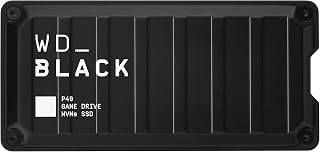
Console gamers looking to expand storage without opening up their system will find the 2,000MB/s speeds over USB 3.2 well suited to reducing load times on PS5 or Xbox libraries. Its portable form factor and RGB lighting make it a straightforward external option for anyone who swaps the drive between a console and a PC.
Pros
- Works across PlayStation, Xbox, PC, and Mac without reformatting
- Compact 2.5 inch design with shock resistance rated to 2 meter drops
- Dual cable kit covers USB-C and USB-A devices
- RGB lighting adds personalization on Windows systems
Cons
- Real world read speeds fall well short of the 2,000MB/s rating
- External USB connection caps performance below internal NVMe options
When you're weighing internal versus external storage, the P40 is the clearest case for going external. It's built specifically to live outside your system, moving between PS5, Xbox, PC, and Mac without reformatting, which is exactly the flexibility an internal drive can't offer. For anyone whose setup spans multiple gaming platforms or a console plus a laptop, this portability is the deciding factor rather than a bonus feature. The 2.5 inch form factor and shock resistant design mean it travels well, and dual USB-C and USB-A cables keep it connecting to whatever port you have on hand. RGB lighting is a nice extra for Windows users running the WD_BLACK Dashboard. Real world read speeds land well under the advertised 2,000MB/s ceiling, so treat this as a dependable mid-tier performer rather than a speed champion. If your 2026 storage plan centers on moving one drive across several devices, that's the P40's entire reason for existing.
Storage and Performance: 1TB capacity, up to 2,000MB/s read speed (real-world: approx. 900MB/s), 1,950MB/s media speed, USB 3.2 Gen2x2 interface
Design and Durability: 2.5-inch form factor, compact portable design, shock-resistant structure rated for 2-meter drops, polycarbonate enclosure, weighs 2.72 ounces
Dimensions and Connectivity: 4.21 inches L x 2 inches W x 0.51 inches thick, USB Type-C connectivity, includes USB-C to USB-A and USB-C to USB-C cables
Compatibility: PlayStation 5, PS4 Pro, Xbox Series X/S, Xbox One, PC, Mac, and compatible with any device supporting USB 3.2
Features and Warranty: Customizable RGB lighting via WD_BLACK Dashboard (Windows only), 5-year limited warranty, includes quick start guide and protective carrying case
Buy this if your games live across more than one platform, PS5, Xbox, and PC included, and you want one drive instead of three. Skip it if you only use a single desktop or laptop, since an internal drive will outperform it for the same job. Also skip it if you need the fastest possible transfer speeds, since real world performance trails the rated specs noticeably.
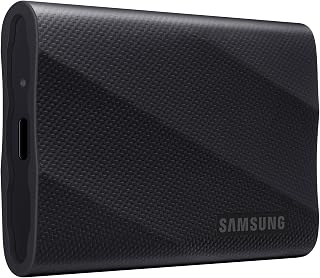
Creators moving large video files will benefit from read and write speeds up to 2,000 MB/s over USB 3.2 Gen 2x2, roughly double the throughput of standard portable drives. The rugged design rated for drops up to 9.8 feet suits readers who need external storage that survives being tossed in a bag between shoots.
Pros
- 2,000MB/s read and write, close to internal NVMe speeds
- Dynamic Thermal Guard prevents throttling during long sessions
- Rugged build rated for drops up to 9.8 feet
- Works across Mac, PC, tablet, and newer iPhone
Cons
- Needs USB 3.2 Gen 2x2 and UASP mode for max speed
- Included cable cannot be swapped for a standard USB-C cable
If this article's premise is choosing between an internal drive and an external one, the T9 is the strongest argument for external: it hits 2,000MB/s read and write, speeds that rival many internal NVMe drives, but in a pocketable 2.5-inch form factor you can move between a desktop, laptop, and phone. That versatility is the whole point of going external in 2026 rather than committing everything to one machine's internal bay. The Dynamic Thermal Guard keeps those speeds stable during long transfer or editing sessions instead of throttling under heat, and the 9.8-foot drop rating means it can live in a bag without babysitting. The tradeoff for that performance is dependency on USB 3.2 Gen 2x2 and UASP mode, which many laptops and older machines don't support, and the included cable can't be swapped for a generic USB-C one. For readers deciding whether external storage can actually replace or supplement an internal drive without a speed penalty, the T9 is the model that makes that case.
Storage Capacity: 1TB (also available in 2TB and 4TB options)
Interface: USB 3.2 Gen 2x2
Read/Write Speed: Up to 2000MB/s sustained
Form Factor: 2.5-inch compact design
Weight: 4.32 ounces
Dimensions: Portable and travel-friendly
Security: AES 256-bit hardware encryption
Durability: 9.8-foot drop protection
Operating Temperature: Stays below 140°F during normal use
Warranty: 5-year limited warranty
Compatibility: PC, Mac, iPad, iPhone 15/16, Xbox Series S/X, PlayStation 4/5
Choose the T9 if you want external storage that performs close to an internal NVMe drive, and your devices support USB 3.2 Gen 2x2. It suits creators who need one drive that works across a Mac, PC, tablet, and newer iPhone. Skip it if your laptop or desktop only has USB 3.2 Gen 2 or standard USB-C ports, since you'll lose the speed advantage that justifies choosing it over an internal upgrade.

For readers who just need a lightweight external backup option, the USB-C connection and 1050MB/s speed cover everyday file transfers without fuss. The compact 2 inch form factor and compatibility across desktops, laptops, and phones make it a practical pick for anyone juggling storage across multiple devices on a smaller budget.
Pros
- Read speeds up to 1050MB/s over USB 3.2 Gen2
- Lightweight 36.6 gram aluminum enclosure
- Includes both USB-C and USB-A cables
- SMART diagnostics and adaptive TRIM for longevity
Cons
- Windows reports about 35GB less than rated capacity
- 500GB may be tight for heavy 4K or ProRes libraries
Choosing between internal and external SSDs often comes down to one question: do you need the storage to travel with you? The SSK 500GB makes the case for external by removing the usual tradeoffs. At 36.6 grams in a 2mm aluminum shell, it disappears into a bag, yet read speeds up to 1050MB/s and write speeds to 1000MB/s over USB 3.2 Gen2 mean you are not sacrificing much compared to an internal drive. For anyone whose setup includes a laptop that moves between desk, studio, and location shoots, this is the external half of a hybrid storage strategy, pairing with a fast internal drive at home base while handling offloads and backups on the road. Included USB-C and USB-A cables mean it connects to nearly anything without extra purchases. The SLC cache keeps transfers consistent rather than tapering off mid-copy. Just note Windows will show roughly 35GB less than the rated 500GB due to binary calculation, standard across the industry but worth factoring into your 2026 storage planning.
Storage Capacity: 500GB
Interface: USB 3.2 Gen2
Connectivity: USB Type-C (with USB-A adapter cable included)
Read Speed: Up to 1050MB/s
Write Speed: Up to 1000MB/s
Dimensions: 2.6 x 1.5 x 0.5 inches
Weight: 36.6 grams
Enclosure: 2mm aluminum alloy
Operating Temperature: Up to 105.58°F
Power Consumption: Less than 2.4 watts
Compatibility: Windows, macOS, Linux, iOS, Android
Cache: SLC cache (25% of available capacity)
Warranty: 3 years manufacturer
Included Accessories: USB-C to USB-C cable, USB-C to USB-A cable
Good for people building a mixed internal and external setup who need a drive that travels, like photographers, videographers, or anyone backing up a laptop regularly. The compact aluminum body and bundled cables suit frequent movement between devices. Skip it if your plan is purely internal upgrades for a desktop, or if you need more than 500GB in a single external unit, since capacity here is fixed and modest.
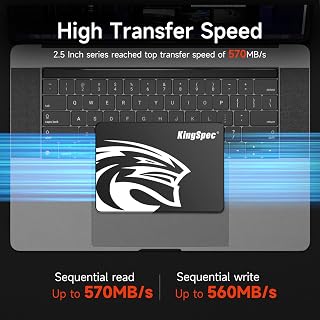
For straightforward internal upgrades, this drive's SATA III interface delivering 550MB/s read and 520MB/s write speeds is a dependable step up from a mechanical hard drive without needing a motherboard that supports NVMe. The 2.5 inch form factor fits easily into most laptops and desktops, making it a low-friction internal replacement.
Pros
- 570MB/s read and 560MB/s write via 3D NAND flash
- Shock resistant aluminum enclosure
- Wear leveling and TRIM support for longevity
- Low power draw, good for laptop battery life
Cons
- SATA interface is slower than modern NVMe drives
- No established customer review history for reliability
If this article's comparison leads you toward the internal side, the KingSpec 1TB SATA SSD represents the straightforward, budget-friendly entry point. It is built specifically for swapping into a laptop or desktop in place of an aging hard drive or older SSD, which is the core use case internal drives serve best: a permanent, fixed upgrade rather than something you carry around. With 570MB/s read and 560Mb/s write speeds via 3D NAND flash, it delivers a clear jump over mechanical drives for boot times and everyday application loading. The aluminum enclosure is shock resistant, a nice bonus for laptops that get moved often even though the drive itself stays internal. Wear leveling, garbage collection, and TRIM support help it hold performance over time. Where it will not compete is against NVMe internal drives, which push well past 3,500MB/s, so this is positioned for users prioritizing a reliable, affordable internal refresh over maximum throughput for demanding creative work.
Capacity: 1TB / Interface: SATA III (6Gb/s) / Form Factor: 2.5-inch / Read Speed: 550MB/s / Write Speed: 520MB/s
Technology: 3D NAND Flash / Weight: 35g / Material: Metal Enclosure / OS Support: Windows 7/8/8.1/10+, DOS, Linux, Unix / Gaming Support: PlayStation 4 Compatible
Reliability Features: Wear Leveling, Garbage Collection, Over-Provisioning, Native Command Queuing, TRIM, S.M.A.R.T Monitoring / Warranty: 3-Year Limited Warranty with Lifetime Technical Support
Suited to anyone upgrading an older laptop or desktop internally on a budget, including gamers and office users who want faster boots without NVMe pricing. Also fine for older gaming consoles with 2.5-inch SATA bays. Skip it if you edit large video or photo files professionally, since SATA bandwidth will bottleneck you, or if you specifically need external, portable storage, since this is an internal-only drive.
Pros
- Exceptional speed performance at 1050MB/s makes it faster than many competing models in this price range
- Remarkably compact and lightweight design perfect for professionals and travelers requiring maximum portability
- Includes both USB-C and USB-A cables, eliminating the need to purchase additional adapters
- Proven compatibility across multiple platforms including iPhones, Mac, PC, and PlayStation 5
- Excellent value for the storage capacity and performance with a competitive price point
Cons
- Windows displays approximately 931GB instead of full 1TB capacity due to binary calculation differences, which may confuse first-time users
- Instructions are sparse and may require additional effort for users unfamiliar with external SSD setup and file management
- Transfer speeds may slow down after SLC cache is exceeded, though performance remains solid for most use cases
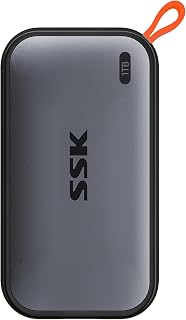
The SSK SD500 is a premium portable SSD designed for professionals, content creators, and power users who demand fast, reliable storage they can carry anywhere. Its compact aluminum form factor weighs just 36.6g, making it lighter than many smartphones while delivering enterprise-grade performance for demanding workflows.
Performance is the standout feature here. With certified read speeds up to 1050MB/s and write speeds up to 1000MB/s over USB 3.2 Gen 2, this drive handles large file transfers, 4K video editing, and intensive backup operations without bottlenecks. The SLC caching technology maintains these speeds for transfers within the cache capacity, and real-world testing confirms users experience smooth performance for professional-grade tasks like video production and photography workflows.
Build quality is impressive for the price. The 2mm aluminum alloy chassis provides superior heat dissipation, keeping operating temperatures well under 106 degrees Fahrenheit even during sustained use. The premium materials feel durable and the included dual USB-C and USB-A cables mean no adapters are needed, offering genuine convenience for connecting to laptops, tablets, iPhones, and even PlayStation 5 consoles.
One consideration is the capacity display variance on Windows systems, where 1TB appears as approximately 931GB due to binary calculations. This is normal across the industry and does not affect actual storage performance, though the documentation could be clearer about this upfront. Additionally, first-time users may find the included instructions minimal, though setup is straightforward for those familiar with external drives.
The SSK SD500 1TB represents excellent value for creators and professionals seeking high-performance portable storage. Its combination of genuine speed, proven cross-platform compatibility, premium build quality, and included accessories makes it a practical choice that outperforms many competitors at similar price points.
Capacity: 1TB (displays as ~931GB on Windows)
Interface: USB 3.2 Gen 2 (10Gbps)
Read Speed: Up to 1050MB/s
Write Speed: Up to 1000MB/s
Form Factor: 2.6 x 1.5 x 0.5 inches
Weight: 36.6g (0.03kg)
Material: 2mm Aluminum Alloy
Operating Temperature: Up to 105.58 degrees Fahrenheit
Power Consumption: Less than 2.4 Watts
Compatibility: Mac, Windows PC, Linux, iPhone, iPad, PlayStation 5, Android devices
Included Accessories: USB-C cable, USB-A cable, Installation Guide
Warranty: 3 Years
Features: S.M.A.R.T. health diagnostics, Adaptive TRIM, SLC caching, LED activity indicator
Content Creators: Video editors and photographers benefit from fast sustained speeds for transferring large 4K and RAW files, with proven compatibility for professional workflows on both Mac and PC systems.
Mobile Professionals: The ultra-portable 36.6g design and dual cable setup make it ideal for consultants, journalists, and remote workers who need reliable backup storage that fits in any bag.
iPhone and iPad Users: Seamless USB-C compatibility with iPhones enables direct external storage for 4K video recording and eliminates the need to sacrifice device storage for media libraries.
Console Gamers: PlayStation 5 compatibility combined with fast transfer speeds makes it practical for expanding game library storage without sacrificing performance.
Budget-Conscious Buyers: Those seeking high-performance portable storage without premium brand pricing will appreciate the competitive cost combined with genuine speed and build quality.

Readers with a spare 2.5 inch SSD sitting in a drawer can turn it into external storage using this tool free enclosure, which supports SATA 6.0 Gb/s drives up to 6TB. UASP support helps the drive perform closer to its native speed over USB, making this the practical bridge between an old internal drive and a new external setup.
Pros
- Supports 2.5-inch SATA I, II, or III drives up to 6TB
- UASP-enabled 5 Gbps transfer speeds
- Tool-free, hot-swappable drive installation
- Dual USB-C and USB-A connector options
Cons
- Limited to 2.5-inch drives, no 3.5-inch support
- Integrated cable cannot be replaced if damaged
An internal vs external comparison usually assumes you are buying a new drive outright, but this enclosure offers a third path: convert an internal SSD you already own into external storage. If you are upgrading a laptop to a new internal drive, this lets the old 2.5-inch SSD live on as a portable backup or transfer disk instead of sitting in a drawer. It also works the other way, letting you buy a bare internal-style SSD at internal pricing and give it external USB access through the enclosure. The 5 Gbps USB 3.2 Gen 1 interface with UASP support delivers real speed gains over older USB 3.0 enclosures, and the tool-free design means swapping a drive in takes under a minute. Dual USB-C and USB-A connectors cover laptops, desktops, and tablets without extra adapters. For a 2026 setup where you want flexibility between internal and external roles for the same drive, this enclosure is the piece that makes that flexibility possible, provided your drive is 2.5-inch SATA and 6TB or under.
This enclosure works with any 2.5-inch SATA I, II, or III drive up to 6TB capacity. Compatible with all major brands including Western Digital, Seagate, Toshiba, Samsung, Kingston, Crucial, and Hitachi. Supports Windows, macOS 8.0 and above, and Linux systems without requiring drivers.
USB connectivity covers Type-C and Type-A ports, ensuring compatibility with modern laptops, tablets, phones, and desktop computers. Backward compatible with USB 2.0 and 1.1 ports if you need to connect to older devices. Works with PS4 for game library expansion or backup storage.
Ideal for anyone repurposing an old internal 2.5-inch SATA SSD as external storage, or who prefers buying internal drives and adding external access themselves. Great for migrations, backups, and reviving drives pulled from an upgraded laptop. Skip it if you have a 3.5-inch desktop drive, since it only fits 2.5-inch drives, or if you want a complete all-in-one external SSD without assembly.
Buying Guide: Internal vs External SSD
Match the connection to the speed you need
The connection establishes the performance ceiling. PCIe 4.0 NVMe drives connect directly to the motherboard, making them well suited to operating systems, demanding applications, large game libraries, and active editing folders. Samsung SSD 990 PRO 2TB, PCIe 4.0 M.2 2280 is rated for up to 7,450 MB/s reads, while the SIX NVME M.2 SSD PCIe 4.0-1TB m.2 2280 ssd is rated for up to 7,350 MB/s reads.
A portable SSD moves files over USB, which is still quick but depends on the port in your computer or console. Samsung T9 Portable SSD 1TB and Western Digital 1TB P40 Game Drive SSD can reach up to 2,000 MB/s with a USB 3.2 Gen 2×2 connection, while Samsung T7 Portable SSD 1TB Titan Gray and both SSK options target up to 1,050 MB/s. Check your host device before paying for a higher-speed interface, since the connection will negotiate to what both devices support.
Confirm fit, installation, and upgrade path
An M.2 label alone is not enough to guarantee compatibility. Confirm that your laptop or desktop has an open M.2 slot, supports the drive’s PCIe generation, accepts the 2280 length, and has enough clearance for a heatsink. Kingston NV3 1TB M.2 2280 NVMe SSD is a compact single-sided Gen4 option, while the Samsung 990 PRO is a stronger match for high-throughput work where cooling and a compatible platform are already in place.
If your computer has a 2.5-inch SATA bay, KingSpec 1TB 2.5 SSD SATA III Internal offers a straightforward upgrade with up to 550 MB/s read performance. The BENFEI 2.5 Inch SATA to USB Tool Free External enclosure can also turn a spare 2.5-inch SATA drive into portable storage with tool-free access. For other drive formats, compare enclosure options in our M.2 to USB adapter guide or use a hard drive dock for backups and drive access when you work with several drives.
Prioritize portability and creative workflow features
External SSDs are the clear choice when you regularly move files among a desktop, laptop, tablet, and phone. Samsung T7 Portable SSD 1TB Titan Gray combines a compact aluminum body with shock resistance and drop protection, while SSK Portable SSD 1TB External Solid State Hard is especially light at 36.6 grams. SSK Portable SSD 500GB External Solid State Hard offers the same small-format approach for lighter project folders and everyday file transport.
For video work, consider sustained transfers, cable quality, heat control, and direct-recording support rather than focusing on a peak figure alone. Samsung T9 Portable SSD 1TB uses a thermal solution intended to maintain performance during longer jobs and supports iPhone 15 Pro ProRes 4K recording at 60fps with the recommended cable. If your portable drive will become part of a desk-based Apple workflow, pair that choice with the right display from our monitor picks for MacBook Pro.
Plan capacity around your library and backup routine
Internal capacity is usually for files you need available every day, while external capacity is useful for project handoffs, media archives, and separate backup copies. Leave working headroom instead of filling any SSD completely, especially if you routinely edit large videos or install oversized games. Also expect usable capacity displays to vary by operating system, which SSK notes can make a 1TB drive appear closer to 931GB in Windows.
Console use requires a closer look at what each platform allows you to play directly and what it lets you store for later. Western Digital 1TB P40 Game Drive SSD works with PlayStation and Xbox systems, but current-console game handling can differ from older-generation titles, so check your console’s storage rules. For a PC game build, storage is only one part of a smooth setup, so consider our GPU picks for Helldivers 2 and GPU options for Baldur’s Gate 3 alongside your drive choice.
Final Thoughts
Choose an internal drive when maximum everyday speed and a permanent computer upgrade matter most, and the Samsung SSD 990 PRO 2TB, PCIe 4.0 M.2 2280 is a compelling fit for demanding desktop or laptop workloads. If flexible file transport and easy device sharing matter more, the Samsung T7 Portable SSD 1TB Titan Gray delivers a practical compact solution.
Frequently Asked Questions
Is an internal SSD faster than an external SSD?
Generally, yes, especially when comparing PCIe NVMe internal drives with USB portable drives. An internal Gen4 NVMe SSD can use direct motherboard bandwidth, whereas an external model is limited by its USB connection and the host port. That said, a good external SSD is still very responsive for backups, media work, and moving large files.
Can I use an external SSD for gaming?
Yes, an external SSD can be an effective home for a PC game library and compatible console titles. The Western Digital 1TB P40 Game Drive SSD provides up to 2,000 MB/s read speed and is designed for PC, Mac, PlayStation, and Xbox compatibility. Confirm each console’s rules for playing current-generation titles directly from USB storage versus storing them there.
Can I turn an old internal SSD into an external drive?
Yes, provided you use an enclosure that matches the drive type. A 2.5-inch SATA SSD works with an enclosure such as the BENFEI model, while M.2 SATA and M.2 NVMe drives require compatible enclosures that are not interchangeable. Our guide to M.2 to USB adapters can help you match the enclosure interface to your spare drive.
Which SSD should I buy for a laptop in 2026?
Start by checking whether your laptop has an open M.2 slot or a 2.5-inch SATA bay. Choose an internal SSD when you want more permanent storage and quicker day-to-day loading, or choose an external SSD when you need capacity that can travel between devices. Keeping a separate external drive for important backups is often the most practical complement to either upgrade.





Write Your Review
No reviews yet. Be the first to share your experience!