

You are comparing gaming laptops, and the same question keeps coming up: is 16GB enough for a gaming laptop when your game, browser, Discord, launcher, and background updates all want memory at once? The answer depends less on the RAM number alone and more on your graphics hardware, the games you play, and how much multitasking you expect during a session.
This guide breaks down where 16GB still works well, where it can feel restrictive, and which features deserve your attention beyond memory capacity. It is built for students, casual players, competitive gamers, and anyone comparing models in our broader laptop buying guides before committing to a new machine.
Quick answer
This guide compares 9 picks, with AMD Ryzen 7 5700U Gaming Laptop 16GB RAM 512GB SSD 15.6 ranked first. ASUS ROG Strix G16 2025 Gaming Laptop, Intel i7, RTX holds the highest customer rating among them.

Running integrated graphics, the Ryzen 7 5700U draws directly from the same 16GB pool used by the system, making this a clear case where total memory gets split between CPU and GPU duties. It's a useful reference point for understanding why 16GB behaves differently without a dedicated graphics card in the mix.
Pros
- 16GB DDR4 RAM supports smooth multitasking and fast app launches
- 512GB NVMe SSD gives quick boot times and responsive performance
- Lightweight 3.6 pound build with a slim 0.66-inch profile
- Comprehensive connectivity including Wi-Fi 6 and USB Type-C
Cons
- Integrated Radeon graphics limit demanding or modern AAA gaming
- 512GB storage is tight for media-heavy or large game libraries
This laptop is a useful case study for anyone asking whether 16GB RAM is enough for gaming, because here the answer depends entirely on the graphics side. The 16GB DDR4 RAM and Ryzen 7 5700U give it plenty of headroom for multitasking, fast boots, and smooth everyday use, but the integrated AMD Radeon graphics mean it was never built for demanding AAA titles. It's a clear example of how RAM alone doesn't make a gaming laptop capable. Light gaming at moderate settings works fine, and the system handles document editing, browsing, and video calls without strain, backed by a crisp Full HD display. If your definition of gaming leans toward older or less graphically intensive titles, the memory and processor won't be the bottleneck. But if you're hoping 16GB will carry you through modern, graphically demanding games, this laptop shows why GPU matters just as much, since there's no dedicated graphics card to lean on here.
Processor: AMD Ryzen 7 5700U, 8 cores, 16 threads, up to 4.3GHz, 7nm manufacturing, 16MB L3 cache
Memory: 16GB DDR4 SODIMM RAM
Storage: 512GB M.2 2280 NVMe SSD
Display: 15.6-inch Full HD LCD, 1920 x 1080 pixels, 60Hz refresh rate, thin bezels, LED backlight
Graphics: AMD Radeon Integrated Graphics
Connectivity: Wi-Fi 6 (802.11ax), Bluetooth 5.2, HDMI, USB 3.2, Type-C, 3.5mm audio jack, memory card slot
Operating System: Windows 11 Pro
Battery: Solid battery life for daily office work and light use
Weight: 3.6 pounds
Dimensions: 14.06 inches L x 9 inches W x 0.66 inches thick
Power: Type-C 20V/3.25A charging
Consider this if your gaming needs are light to moderate and you mostly want a reliable, portable machine for work, school, and casual play, since the 16GB RAM and Ryzen 7 5700U won't bottleneck everyday use. Skip it if you're asking whether 16GB is enough specifically for demanding or modern games, because the integrated graphics will limit you well before the RAM does.

Integrated graphics mean the Ryzen 7430U shares system memory with the GPU, so 16GB has to cover both tasks at once. For readers asking whether 16GB holds up, this is the scenario where it matters most, since there's no dedicated VRAM pool to offload graphics workloads onto.
Pros
- 16GB DDR4 RAM handles multitasking smoothly
- Fast Ryzen 7 CPU up to 4.3GHz
- 512GB SSD for quick boot and load times
- Thin, portable 0.66 inch build
Cons
- Integrated graphics limit demanding AAA games
- 60Hz display refresh rate
If your question is whether 16GB is enough, this light gaming laptop is the clearest example of where that number actually makes sense. The AMD Ryzen 7430U clocks up to 4.3GHz, and paired with 16GB of DDR4 RAM, it handles multitasking, schoolwork, and casual gaming without stuttering. There is no dedicated GPU here, so the 16GB of system memory is doing double duty, supporting the integrated AMD Radeon graphics as well as your open browser tabs and background apps. That is exactly the scenario where 16GB matters most: without a dedicated graphics card to offload memory needs, system RAM becomes the bottleneck fast, and this laptop gives you enough headroom to avoid that. The 512GB SSD keeps boot and load times quick. Just understand this is a light gaming machine, not a competitive one, so set expectations around integrated graphics and a 60Hz panel accordingly.
Display: 15.6-inch FHD LCD, 1920x1080 pixels, 60Hz refresh rate with thin-bezel design
Processor: AMD Ryzen 7 (6-core), base 3.7GHz, up to 4.3GHz maximum
Memory: 16GB DDR4 SODIMM RAM (upgradeable up to 64GB)
Storage: 512GB M.2 NVMe SSD
Graphics: Integrated AMD Radeon Graphics at up to 1200MHz
Operating System: Windows 11 Pro pre-installed
Connectivity: WiFi 6, Bluetooth 5.2, HDMI, USB 3.2, Type-C, 3.5mm audio jack, memory card slot
Battery: 54.72 watt-hours lithium-ion
Dimensions: 14.06 inches L x 9 inches W x 0.66 inches thick
Model: KAIGERR LX15PRO, manufactured by Shenzhen CYX Industrial Co., Ltd.

With Radeon integrated graphics instead of a dedicated card, the Ryzen 5 7430U relies on the same 16GB RAM pool for both system tasks and graphics rendering. This setup illustrates why 16GB can feel more limited on integrated graphics than on machines with their own VRAM reserve.
Pros
- Excellent value at $499.99 for a full-featured 15.6-inch gaming laptop with modern specs
- Strong processor performance from AMD Ryzen 5 7430U handles gaming and creative workflows smoothly
- Highly expandable with upgradeable RAM up to 64GB and SSD storage up to 2TB for future-proofing
- WiFi 6 and comprehensive connectivity options including USB 3.2, HDMI, Type-C, and audio jack
- Quick 2.5 to 3-hour full charge time with large battery capacity suitable for travel and on-the-go work
Cons
- Integrated AMD Radeon Graphics limits performance for demanding AAA titles compared to dedicated GPUs
- 15.6-inch FHD resolution may feel cramped for extended creative work or multitasking on a single screen
- Thermal performance and sustained gaming capability not detailed in product information
The MALLRACE LX15PRO is a compact 15.6-inch gaming and productivity laptop designed for budget-conscious users who need solid everyday performance without premium pricing. It targets students, casual gamers, content creators, and professionals who value portability and expandability over cutting-edge GPU performance.
At its core sits an AMD Ryzen 5 7430U processor with 6 cores and 12 threads running up to 4.3GHz. Paired with 16GB of fast LPDDR4 memory and a 512GB NVMe SSD, this configuration delivers responsive multitasking, fast boot times, and smooth performance for gaming at medium settings, video editing, and daily business applications. The integrated AMD Radeon Graphics handles casual gaming and creative workflows adequately, though demanding titles will require reduced settings.
The design prioritizes travel readiness with a lightweight 1.6kg chassis and ultra-thin 0.66-inch profile. The 15.6-inch FHD display provides sharp 1920x1080 visuals with thin bezels, while the backlit gaming keyboard enhances usability in low-light environments. Connectivity is comprehensive with USB 3.2, Type-C with full functionality, HDMI, and a 3.5mm audio jack, complemented by WiFi 6 for speeds three times faster than WiFi 5.
Battery life is solid with a 54.72Wh capacity that fully charges in 2.5 to 3 hours, making it practical for classroom or office use. The laptop supports significant upgrades, with RAM expandable to 64GB and storage expandable to 2TB, adding substantial future-proofing value. However, sustained thermal performance under intensive gaming loads is not documented, which may be a consideration for extended use.
Verdict: The MALLRACE LX15PRO is a smart choice for anyone seeking a portable, expandable laptop with genuine gaming capabilities at a sub-$500 price. Its strong processor, fast storage, and upgrade potential outweigh the limitations of integrated graphics for typical users prioritizing value and versatility over raw performance.
Processor: AMD Ryzen 5 7430U, 6 cores, 12 threads, up to 4.3GHz
Memory: 16GB LPDDR4, expandable to 64GB dual-channel DDR4
Storage: 512GB M.2 NVMe SSD, upgradeable to 2TB
Graphics: Integrated AMD Radeon Graphics with 2GB DDR4 SDRAM
Display: 15.6-inch FHD LCD, 1920x1080 pixels, thin bezel design
Battery: 54.72Wh lithium-ion, 2.5 to 3-hour full charge
Weight: 1.6kg
Dimensions: 14.07in L x 9in W x 0.66in thickness
Operating System: Windows 11 Pro
Connectivity: WiFi 6 (802.11ax), Bluetooth 5.0
Ports: USB 3.2 x2, Type-C full function x1, HDMI x1, 3.5mm audio/microphone x1, SD card reader x1
Camera: 1x front webcam
Audio: Dual stereo speakers
Keyboard: Backlit gaming keyboard with numeric keypad
Color: Matte grey
Best For: This laptop excels for students managing coursework and light gaming, business professionals needing portable productivity, content creators handling photo and video editing at modest scales, and casual gamers seeking entry-level gaming performance. Its expandable design appeals to users planning to upgrade RAM or storage later.
Performance Expectations: The Ryzen 5 7430U delivers smooth performance in modern games at medium settings (30-60 fps depending on title), handles multitasking effortlessly, and accelerates creative software workflows. Integrated graphics mean AAA titles at high settings are not feasible, but indie games and esports titles run well. Office work, video conferencing, and web browsing are buttery smooth.
Expandability Advantage: Unlike many budget laptops with soldered components, the MALLRACE LX15PRO supports significant upgrades. You can add up to 48GB more RAM and expand storage to 2TB, effectively future-proofing your investment for 4 to 5 years of heavy use.
Who Should Look Elsewhere: If you need high-end gaming performance, a dedicated graphics card is essential. If your workflow requires very large displays or color-accurate screens for professional design work, consider larger models with better panels. If you need ultra-long battery life beyond 5 to 7 hours typical usage, heavier laptops with larger batteries exist.

Radeon 680M integrated graphics pull from the same 16GB DDR5 pool as the 8-core Ryzen 7 processor, so memory efficiency matters more than on dedicated-GPU machines. Readers comparing integrated versus discrete setups will find this a useful case for seeing how 16GB performs when it's doing double duty.
Pros
- Strong CPU performance that outclasses entry-level i5 processors for multitasking and coding
- Excellent value for the specs and warranty coverage relative to major brands
- Lightweight and portable without sacrificing connectivity or screen real estate
- Full HD display and backlit keyboard improve usability in varied work environments
- Fingerprint reader and security features add convenience for shared or mobile workspaces
Cons
- Integrated graphics are limited for demanding gaming or professional video editing beyond casual workflows
- Battery life claims lack specifics, and some users report keeping the laptop plugged in during gaming
- Quality control concerns noted in reviews, with at least one defective unit reported out of a small review sample
The NIMO 15.6-inch laptop is positioned as a practical choice for students, remote workers, and light content creators who need reliable everyday performance without the premium price tag of major brands. It combines a modern Ryzen 7 processor, fast DDR5 memory, and thoughtful connectivity in a sub-4-pound chassis that moves easily between home, office, and campus.
The Ryzen 7 7735HS is the clear standout, delivering noticeably better multitasking than common mainstream alternatives like the i5-1235U or Ryzen 5 7530U. Users report that opening multiple browser tabs, Zoom sessions, spreadsheets, and coding tools together feels responsive rather than sluggish. The Radeon 680M graphics handle everyday media tasks, light photo editing, presentations, and casual gaming without struggle, though demanding games and professional video work will hit limits quickly.
Design and build quality are straightforward and practical. The 15.6-inch Full HD display is large enough to reduce eye strain during long study sessions, the backlit keyboard works well in low light, and the port variety (USB-C with PD, HDMI, SD card, audio jack) means fewer adapters and less desk clutter. At under 1.7 kg, the laptop stays portable without feeling cheap, and the 180-degree hinge adds flexibility for collaborative work.
Two notable concerns emerge: first, battery life specifications are vague, and some early users keep the laptop plugged in during gaming sessions rather than relying on battery capacity. Second, quality control appears inconsistent in the early review period, with at least one defective unit reported. The 2-year warranty and US-based support help mitigate this risk, but buyers should be aware.
The NIMO laptop delivers solid value for students and professionals who prioritize multitasking performance, portability, and support over gaming prowess or ultra-premium build. If you need a reliable everyday machine with room for light creative work and don't require professional-grade graphics, this is a smart choice at the price.
Processor: AMD Ryzen 7 7735HS (8 cores, up to 4.75GHz)
Graphics: AMD Radeon 680M (RDNA 2 integrated)
Memory: 16GB DDR5-5600MHz (2 slots, up to 64GB max)
Storage: 512GB PCIe 4.0 SSD
Display: 15.6 inch Full HD 1920x1080
Battery: 53.58Wh with 100W USB-C PD charging
Weight: Under 1.7 kg (3.8 lbs)
Dimensions: 14.07 x 8.98 x 0.76 inches
Ports: 2 USB-C, 3 USB-A, HDMI 2.0, 3.5mm audio, microSD card reader
Security: Fingerprint reader, Windows 11
Warranty: 2-year manufacturer warranty, 90-day return window
OS: Windows 11
Best for: College students tackling coursework and coding, remote workers managing email and productivity tools, freelancers doing light photo editing or content creation, professionals seeking portability without premium pricing.
Consider alternatives if: You need sustained gaming performance beyond casual titles, require professional video editing or 3D rendering, want extended battery life on the road without a charger, or prioritize ultra-premium build materials and design.
Why this model stands out: The combination of Ryzen 7 processing, DDR5 memory, modern charging, and practical connectivity at under $700 is uncommon. Most competitors at this price use older processors or slower memory. The US-based warranty and support also differentiate NIMO from disposable laptop options.
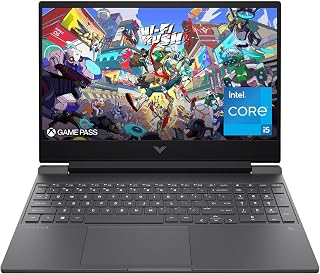
An RTX 3050 keeps graphics demands modest, so 16GB of RAM stretches comfortably across current titles at 1080p. The 144Hz display benefits from steady frame pacing rather than raw power, and the i5-12450H plus PCIe SSD combination means memory, not storage speed, is the ceiling worth watching here.
Pros
- 16GB RAM pairs well with RTX 3050 for 1080p gaming
- Handles esports titles at high framerates
- 512GB PCIe SSD for responsive performance
- Spill resistant keyboard and anti glare coating
Cons
- Battery life drops noticeably during gaming
- RTX 3050 limits high settings in demanding AAA titles
For the question this guide is built around, the HP Victus 15.6 is a solid middle example of how 16GB performs when it is supported by an entry-level dedicated GPU. The RTX 3050 handles 1080p gaming on its own, which means the 16GB of system RAM is not being asked to compensate for weak graphics the way it would on an integrated setup. Paired with the Intel i5-12450H, this combination runs esports titles like Valorant, CS2, and Fortnite at high framerates, while AAA games like Cyberpunk 2077 land in medium to high settings. The 512GB SSD keeps multitasking and load times responsive. This is a good reference point for showing that 16GB is enough as long as expectations match the GPU tier, since the RTX 3050 will hit its own ceiling in demanding titles before RAM becomes the issue.
The RTX 3050 6GB graphics card excels at 1080p gaming, comfortably running popular esports titles like Valorant, CS2, and Fortnite at high framerates. Modern AAA games like Cyberpunk 2077 and Starfield play at medium to high settings with 60+ fps, while demanding titles may require lowering settings to maintain smooth 144Hz performance.
The 144Hz display takes full advantage of the GPU capabilities, delivering noticeably smoother motion compared to standard 60Hz screens. This is particularly beneficial for competitive gaming where responsiveness matters. The anti-glare matte finish reduces reflections during long gaming sessions, minimizing eye fatigue.
Processor: Intel Core i5-12450H (4.4GHz)
Graphics: NVIDIA GeForce RTX 3050 6GB GDDR6
Display: 15.6" FHD IPS (1920x1080) 144Hz with anti-glare coating
Memory: 16GB DDR4-3200
Storage: 512GB PCIe SSD
Connectivity: Wi-Fi 6, Bluetooth
Ports: HDMI output, USB Power Delivery
Weight: 7 pounds
OS: Windows 11 Pro
Battery: Limited capacity for gaming use

ASUS ROG Strix G16 2025 Gaming Laptop, Intel i7
With an RTX 5060 paired to 16GB of DDR5, this one pushes that memory ceiling further than most, since the dedicated GPU handles its own VRAM load separately from system RAM. The 165Hz 16:10 panel rewards the extra headroom too, letting the i7 14650HX and SSD keep frame delivery smooth without system memory becoming the bottleneck first.
Pros
- RTX 5060 with dedicated 8GB graphics memory
- 16GB DDR5 keeps pace with high frame rates
- 165Hz FHD+ display for smooth gameplay
- Fast 1TB Gen 4 SSD
Cons
- Battery life limited to around 2 hours for gaming
- Fixed GPU tier with no upgrade path
This laptop is a useful case study for anyone asking if 16GB is enough, because here the answer depends entirely on the GPU doing the heavy lifting. The RTX 5060 with its own 8GB of dedicated graphics memory means system RAM is not stretched thin trying to cover graphics tasks too, so 16GB of DDR5 keeps pace comfortably with the Intel Core i7 14650HX for high-frame-rate gaming. This is the model to point to when explaining that 16GB paired with a strong dedicated GPU behaves very differently than 16GB on integrated graphics. The 165Hz display and fast 1TB Gen 4 SSD round out a setup where RAM is not the constraint. The tradeoff is battery life and a fixed GPU tier, so this is a plugged-in performance pick rather than an all-day portable one, but for the 16GB question specifically, it demonstrates the ceiling is much higher when a dedicated GPU shares the load.
Processor: Intel Core i7 14650HX (16 cores, 2.2 GHz base)
Graphics: NVIDIA GeForce RTX 5060 (8GB GDDR5, DLSS 4)
Display: 16 inch FHD+ (1920x1200) 165Hz IPS LED, 3ms response time
Memory: 16GB DDR5-5600MHz (upgradeable)
Storage: 1TB PCIe Gen 4 SSD (upgradeable)
Connectivity: Wi-Fi 7 (802.11be), USB ports, HDMI output
Audio: Dolby Atmos speakers
Keyboard: Gaming-grade QWERTY with RGB
Battery: 90Wh Lithium-Ion, 2 hours gaming, 50 hours standby
Weight: 2.65kg
Dimensions: 13.94 x 10.55 x 0.9 inches
OS: Windows 11 Home
Warranty: Limited
Choose this if you want proof that 16GB can be plenty, provided it is backed by a dedicated GPU like the RTX 5060 handling graphics memory separately. Good for competitive gamers and content creators who game at high settings. Skip it if you need long unplugged sessions or think you might want to upgrade GPU tier later, since it is fixed at RTX 5060.

Pairing the RTX 5060 with 16GB puts this near the edge of where that memory amount starts feeling tight, especially with a MUX switch enabling full GPU performance. Readers weighing whether 16GB suffices will want to watch background memory use closely, since the dedicated graphics card leaves less slack than lighter GPU options.
Pros
- RTX 5060 handles 1080p and 1440p gaming well within a 16GB system
- Ryzen 7 260 keeps multitasking smooth during streaming or recording
- 165Hz display lets the GPU's performance actually show on screen
- 180-degree hinge and sturdy 19.45mm chassis add real versatility
Cons
- No touchscreen, which limits digital art or note-taking use
- 4.9 pounds and 16-inch size make it a desktop replacement, not an ultra-portable
When you're deciding if 16GB is enough for gaming, the laptop built around that RAM matters as much as the number itself. The GIGABYTE Gaming A16 pairs its memory with an RTX 5060 and Ryzen 7 260, a combination that keeps 1080p and even 1440p gaming smooth without the system feeling starved during multitasking. That matters because 16GB setups run into trouble fastest when background apps, streaming software, or Discord compete with the game for memory. The Ryzen 7 260 handles that juggling act well, so you can stream or record while playing without everything slowing down. The 165Hz display means the GPU and RAM combo actually gets to show its performance, rather than being capped by a mediocre panel. For anyone weighing whether 16GB will hold up for real gaming sessions, this laptop demonstrates it can, provided you accept the tradeoff of a bulkier, 4.9 pound chassis built more for desk use than daily carrying.
Processor: AMD Ryzen 7 260 with AI capabilities
Graphics: NVIDIA GeForce RTX 5060 with 8GB GDDR7 VRAM
Display: 16-inch IPS LCD, 1920x1200 resolution, 165Hz refresh rate, matte finish
Memory: System RAM not specified in available data
Storage: 1TB SSD with solid-state interface
Operating System: Windows 11 Home
Weight: 4.9 pounds
Dimensions: 14.11 inches L x 0.9 inches W x 10.33 inches Thick
Connectivity: Wi-Fi 7, Bluetooth 5.0, Gigabit Ethernet, 4 USB ports, HDMI output
Features: MUX Switch, 180-degree hinge, GiMATE AI agent, Golden Curve keyboard, Dolby Atmos audio
Gaming Performance: The RTX 5060 excels at 1440p gaming and handles 1080p gaming at ultra settings with frame rates well above 60fps. At the native 1920x1200 resolution, expect high frame rates in modern AAA titles with medium-to-high settings. NVIDIA DLSS 4 further boosts performance by intelligently upscaling lower-resolution renders, allowing ultra-quality visuals with minimal performance cost.
Multitasking & Streaming: The Ryzen 7 260 has the multi-core muscle to game while streaming to Twitch or YouTube. Its architecture supports simultaneous encoding for recordings without stuttering your in-game performance.
Content Creation: The RTX 5060 and NVIDIA Studio drivers provide hardware acceleration for video editing, 3D rendering, and image generation. GiMATE's AI optimization ensures your workload gets the system resources it needs when it matters most.

Pros
- Exceptional value at under $450 with Windows 11 Pro and Office pre-installed
- Adequate performance for business applications, streaming, and light gaming
- Highly portable with lightweight construction and slim profile
- Full HD display with anti-glare coating reduces eye strain during work
- Backlit keyboard and numeric keypad enhance productivity and usability
Cons
- Intel i7-7600U is a 7th-generation processor that may struggle with demanding applications or modern games
- 6-hour battery life requires regular charging for all-day use without access to power
- Limited upgrade potential with only 2 RAM slots and fixed storage configuration
The CHIFUYOULAPTOPCOMPUTER Gaming Laptop targets budget-conscious users who need a reliable machine for office work, online classes, and casual entertainment. This 15.6-inch laptop delivers practical performance without breaking the bank, making it ideal for students, business professionals, and home users seeking a no-frills workhorse rather than a high-performance gaming rig.
The Intel Core i7-7600U processor with 3.9GHz speeds handles everyday multitasking smoothly, supported by 16GB of RAM and a 512GB SSD. You can comfortably run multiple browser tabs, Office documents, and streaming services simultaneously. The integrated Intel HD Graphics 620 provides enough power for casual gaming and video streaming, though demanding titles will require lower settings. Real-world performance matches the pricing, delivering solid responsiveness for productivity tasks.
Design-wise, the 3.5-pound laptop fits easily into a backpack with its 0.8-inch ultra-thin profile. The 15.6-inch Full HD display with anti-glare coating offers sharp text and vibrant colors suitable for work and entertainment. The backlit keyboard and numeric keypad add functionality appreciated by office users. Build quality appears adequate for the price point, though some users report durability concerns common to budget laptops.
The main limitations stem from the 7th-generation Intel processor, which is several generations behind current models and may feel sluggish with resource-intensive software or modern gaming. The 6-hour battery life necessitates regular charging, and the upgrade pathway is limited. However, the inclusion of Windows 11 Pro and Microsoft Office eliminates additional software costs and delays to productivity.
This laptop represents a sensible choice for budget-conscious buyers prioritizing affordability and basic functionality over cutting-edge performance. If you primarily use office applications, streaming, and web browsing, the value proposition is compelling. Expect solid everyday performance, not gaming prowess, and you'll find a capable machine that delivers on its promises.
Processor: Intel Core i7-7600U, up to 3.9GHz, 2 cores
Memory: 16GB LPDDR3 RAM at 1666MHz, 2 slots, expandable to 32GB maximum
Storage: 512GB SSD with eSATA interface
Display: 15.6 inch Full HD 1920x1080 with anti-glare coating, ultra-thin bezel
Graphics: Intel HD Graphics 620 with 32GB shared video memory
Operating System: Windows 11 Pro with Microsoft Office included
Connectivity: Mini HDMI video output, microSD card reader, headphone jack, USB ports
Battery: Lithium Polymer, up to 6 hours battery life
Physical: 14 inch length x 9 inch width x 0.8 inch thickness, weighs 3.5 pounds
Security: PIN biometric authentication, front-facing camera
Warranty: 2-year warranty, 6-month free return policy, 24/7 online support, 18-hour weekday phone support
Best For: Students needing a portable solution for classes and assignments, small business owners requiring office productivity tools, remote workers attending video calls and managing documents, casual users streaming content and browsing the web.
Consider This Laptop If: You prioritize affordability and portability over raw performance, you primarily use Office applications and web-based tools, you need immediate productivity with included software, you travel frequently and want a lightweight machine, you have a limited budget under $500.
Look Elsewhere If: You require cutting-edge gaming performance or demanding professional software like video editing or 3D rendering, you need all-day battery life without charging access, you plan to upgrade components significantly, you require the latest processor technology for future-proofing.
Value Assessment: At its price point, this laptop delivers solid everyday performance with the bonus of pre-installed Windows 11 Pro and Microsoft Office. The 16GB RAM and 512GB SSD provide sufficient capacity for most users, and the portable design adds convenience. The main trade-off involves accepting 7th-generation processor technology in exchange for budget pricing.

The 16GB of DDR4 here has to support both the Ryzen 7430U's processing and its integrated graphics output on the 1920p panel, with no separate VRAM to lighten the load. For anyone gauging whether 16GB is enough, this configuration shows how far shared memory stretches on integrated graphics setups.
Pros
- Strong CPU performance for the price point, outperforming budget processors in multitasking
- Ample 16-inch screen real estate reduces eye strain during extended work sessions
- Upgradeable RAM and storage allow customization as your needs grow
- 12-month warranty and unlimited technical support provide peace of mind
- Good battery endurance for a work laptop at this price range
Cons
- AMD Ryzen 7 4300U is an older processor generation, not ideal for demanding AAA gaming
- 38Wh battery capacity is modest for a 16-inch laptop, requiring careful power management for full-day usage
- Limited thermal management may require closing background apps when gaming for optimal performance
The KAIGERR LX16PRO is a 16-inch laptop designed for students, remote workers, and content creators who prioritize value and practical performance. It positions itself as an affordable alternative to mainstream brands, offering solid specs that handle everyday computing without premium pricing. The combination of a dedicated Ryzen processor, 16GB RAM, and SSD storage makes this laptop capable of handling real work, not just basic tasks.
The AMD Ryzen 7 4300U processor with 6 cores and 12 threads delivers noticeable improvements over budget chips like the Celeron series, particularly for multitasking scenarios. Paired with 16GB DDR4 RAM and a 512GB SSD, this configuration maintains snappy performance during web browsing, document editing, video calls, and moderate creative work. The integrated Radeon graphics handle casual gaming and video playback reasonably well, though demanding games will require lower settings or compromised frame rates.
The 16-inch display with thin bezels maximizes screen real estate without significantly increasing chassis size, making it practical for extended work sessions. Windows 11 comes pre-installed, and the included numeric keypad is useful for spreadsheet work and data entry. Connectivity includes WiFi 6, USB 3.2, and USB Type-C, covering modern connectivity needs. The lightweight build and 8-hour battery claim make it reasonably portable for a 16-inch laptop.
Potential drawbacks include the older Ryzen 4300U processor generation compared to current-gen options, and the 38Wh battery is modest for the screen size, meaning real-world endurance may fall short of the 8-hour claim under heavy use. The manufacturer recommends closing background apps when gaming, indicating thermal or power limitations during intensive tasks. Build quality and design language are functional rather than premium.
Overall, the KAIGERR LX16PRO offers solid bang for the buck if you prioritize value and practicality over cutting-edge performance or design. The 12-month warranty and technical support add confidence for budget-conscious buyers. Best suited for productivity-focused users rather than performance enthusiasts or serious gamers.
Processor: AMD Ryzen 7 4300U, 6 cores / 12 threads, up to 4.3 GHz
Graphics: Radeon Integrated UHD Graphics, up to 1200 MHz
RAM: 16GB DDR4
Storage: 512GB M.2 SSD (upgradeable to 2TB max)
Display: 16 inches, 1920x1080 FHD, Thin-bezel design
Battery: 38Wh, rated up to 8 hours
Operating System: Windows 11 Pre-installed
Connectivity: WiFi 6, USB 3.2, USB Type-C, Webcam with privacy slide cover
Design: Lightweight, numeric keypad, Sophisticated Grey color
Warranty: 12 months repair, unlimited technical support
Buying Guide: Is 16GB Enough for a Gaming Laptop?
Match RAM capacity to your games and multitasking habits
For many players, 16GB remains a sensible baseline. It can comfortably support esports games, older releases, indie titles, and many mainstream games while leaving room for Windows and a few everyday apps. Your experience can change when you keep dozens of browser tabs open, stream gameplay, use voice chat, record clips, or run large mods alongside a demanding new game.
Consider 32GB if you regularly play heavily modded sandbox games, edit video, use virtual machines, or want extra breathing room for years of ownership. The NIMO model pairs 16GB of fast DDR5 memory with a Ryzen 7 7735HS, which is a balanced starting point for daily work and lighter gaming. For school projects, coding tools, and heavier browser use alongside games, our guide to laptops for cybersecurity students also highlights why capable multitasking hardware matters.
Make the graphics processor your first gaming performance filter
System RAM and graphics performance are related, but they do different jobs. A laptop with integrated graphics may reserve part of its 16GB memory for visual processing, leaving less capacity for the game and background tasks. That makes memory management more important on models with Radeon integrated graphics, including several KAIGERR and MALLRACE configurations.
A dedicated GPU has its own video memory, so 16GB of system RAM generally goes further. The HP Victus uses an RTX 3050 graphics card, while the ROG Strix G16 and GIGABYTE Gaming A16 pair stronger RTX 5060-class graphics with 16GB DDR5 memory. If you are choosing hardware for graphically intense adventures, review our GPU guidance for Baldur’s Gate 3 to see why the GPU often determines visual settings and frame-rate potential more than an immediate RAM upgrade.
Check whether memory and storage can grow with your library
Even if 16GB is enough today, upgradeability can make a laptop a safer long-term choice. Some machines use memory that can be replaced or expanded, while others use fixed memory that stays at its original capacity. Before buying, confirm the exact configuration, the number of available memory slots, maximum supported RAM, and whether opening the system affects manufacturer support.
Storage deserves equal attention because modern game installs can fill a 512GB SSD quickly after Windows, applications, and personal files take their share. The MALLRACE configuration lists memory expansion up to 64GB and SSD expansion support, offering a clearer path for buyers who expect their needs to grow. The ROG Strix G16 starts with a 1TB PCIe Gen 4 SSD, which is more convenient if you want several large games installed without constant uninstalling and downloading.
Balance display speed, cooling, ports, and portability
Fast memory cannot compensate for a weak cooling design or a display that does not suit your games. A 144Hz or 165Hz screen can make motion look smoother when the processor and GPU can deliver enough frames, while a capable thermal system helps the hardware sustain performance during longer sessions. The HP Victus has a 144Hz Full HD panel, and the ROG Strix G16 combines a 165Hz FHD+ display with a vapor-chamber cooling approach.
Think about where you will use the laptop as well. The NIMO offers dual USB-C connectivity and 100W PD charging, while the GIGABYTE Gaming A16 uses a slim chassis and a 180-degree hinge for flexible positioning. If you carry your computer between class, work, and gaming sessions, pair it with one of these laptop bags for business travel so the portability advantage is not lost to inadequate protection.
Final Thoughts
For most gamers, 16GB is still enough when it is paired with the right processor, graphics hardware, and an upgrade plan that fits your routine. Choose the NIMO 15.6" Light-Gaming-Laptop for versatile work, school, and light integrated-graphics play, or consider the GIGABYTE Gaming A16 – AMD Ryzen 7 260 GeForce RTX when you want a dedicated GPU for more demanding games and creative workloads.
Frequently Asked Questions
Is 16GB enough for a gaming laptop in 2026?
Yes, 16GB is enough for many gaming laptops in 2026, especially when paired with a dedicated graphics card and a modern processor. It handles popular competitive games, many single-player releases, everyday multitasking, and light content creation well. Moving to 32GB is more worthwhile for demanding mod packs, frequent streaming, advanced creative apps, or professional workloads that stay open while you play.
Will 16GB RAM limit games on integrated graphics?
It can, because integrated graphics often use a portion of system memory as graphics memory. A 16GB laptop with integrated Radeon graphics can still be enjoyable for lighter games and reduced settings, but it has less headroom than a machine with dedicated graphics memory. Closing unused apps before launching a game can help preserve available memory and reduce stutters caused by background activity.
Should I get 16GB or 32GB RAM for games like Helldivers 2?
Sixteen gigabytes can work, but 32GB gives you more reserve if you multitask, capture gameplay, or want smoother performance with memory-hungry applications open. Your GPU remains the larger factor for visual quality and consistent frame rates in this type of game. Compare the graphics options in our GPU recommendations for Helldivers 2 before treating RAM as the only performance decision.
Is 16GB RAM enough for gaming and streaming at the same time?
For a casual stream, 16GB can be enough if the laptop has a capable CPU, a dedicated GPU encoder, and minimal background programs. Streaming software, a webcam feed, browser alerts, voice chat, and game capture can quickly reduce available memory, however. Choose 32GB if streaming is a regular part of your setup or if you also edit recordings on the same laptop.








Write Your Review
No reviews yet. Be the first to share your experience!