

You’ve narrowed your GPU shortlist to two serious contenders: NVIDIA’s GeForce RTX 5060 Ti and AMD’s Radeon RX 9070. Both target the 1080p and 1440p sweet spot, but they take very different approaches to get there. The RTX 5060 Ti leans on DLSS 4 and AI acceleration, while the RX 9070 delivers strong rasterization performance with generous VRAM at its price tier.
This guide covers ten of the best cards from both GPU families available right now, including options from ASUS, GIGABYTE, MSI, XFX, Sapphire, and PNY. Whether you’re a competitive gamer chasing frame rates or a content creator who needs stable, high-quality output, there’s a card on this list built for your workflow.
Quick Comparison
Ratings reflect the most recent data pull. Check each listing for current price and availability.
Quick answer
This guide compares 10 picks, with GIGABYTE Radeon RX 9070 GRE 12GB GDDR6 Gaming Graphics ranked first. ASUS Prime Radeon RX 9070 EVO 16GB GDDR6 Gaming holds the highest customer rating among them. ASUS Dual RTX 5060 Ti 16GB GDDR7 OC Gaming Graphics has the most customer reviews.

This Radeon option delivers 12GB of GDDR6 memory, which provides adequate capacity for modern gaming at high settings without the premium of 16GB models. The 2340 MHz clock speed handles demanding titles effectively while the GDDR6 architecture maintains strong bandwidth for texture-heavy workloads. For readers comparing AMD's RX 9070 lineup against Nvidia's 5060 Ti, this represents the entry point into the 9070 series.
Pros
- 12GB VRAM provides buffer over 8GB alternatives
- WINDFORCE cooling with server-grade thermal gel
- Hardware dual BIOS switch for mode changes
- PCIe 5.0 readiness for future platform upgrades
Cons
- Falls between tiers in the RX 9070 stack
- Power requirements need PSU verification
In the RX 9070 lineup, the GIGABYTE GRE variant carves out a middle ground that makes this head-to-head comparison more nuanced. This 12GB card sits below the full RX 9070 in raw specs but still brings PCIe 5.0 and a 2340 MHz clock to the table. Against the RTX 5060 Ti, it offers more memory headroom for texture-intensive scenes and typically stronger rasterization performance at 1440p. The WINDFORCE cooling with Hawk fan technology and server-grade thermal gel keeps sustained loads in check, which matters during extended play sessions where thermal throttling can swing results. The dual BIOS switch lets you toggle between Performance and Silent modes directly on the card, giving you control over the noise-versus-speed tradeoff without needing software. Display connectivity includes both DisplayPort and HDMI, covering most modern monitor setups. The 192-bit memory interface feeds the GPU adequately for current AAA titles. If you're weighing these two cards in 2026, the GRE's extra VRAM and AMD's continued driver improvements in rasterization workloads give it an edge in traditional rendering tasks, though ray tracing remains a consideration depending on your game library.
GPU: Radeon RX 9070 GRE
Memory: 12GB GDDR6, 192-bit interface
Clock Speed: 2340 MHz
Interface: PCI Express 5.0
Outputs: DisplayPort, HDMI
Cooling: WINDFORCE with Hawk fan and thermal gel
Features: Dual BIOS (Performance/Silent), RGB Lighting
Form Factor: ATX

The 16GB GDDR6 configuration offers substantial headroom for ultra settings and future-proofing, particularly valuable as games increasingly demand more VRAM. Its 2610 MHz boost clock provides solid performance across AAA titles. The inclusion of three native DisplayPort 2.1a outputs makes this particularly suitable for multi-monitor setups, a consideration for readers evaluating practical connectivity alongside raw performance in this matchup.
Pros
- 16GB VRAM for texture-heavy 4K workloads
- Triple-fan cooling with phase-change thermal pad
- Five display outputs with DP 2.1a and HDMI 2.1b
- Compact 2.5-slot design improves case compatibility
Cons
- Premium pricing stretches mid-range budgets
- Requires robust PSU and proper case airflow
The ASUS Prime RX 9070 EVO represents the upper bound of AMD's offering in this matchup, delivering 16GB GDDR6 and a 2610 MHz boost clock that positions it well above the RTX 5060 Ti in both memory and frequency. For this comparison, it's the card that demonstrates what the RX 9070 architecture can achieve when paired with premium cooling and factory overclocking. The triple axial-tech fans with dual-ball bearings and phase-change GPU thermal pad create a cooling solution that sustains high clocks without throttling. Native support for three DisplayPort 2.1a and two HDMI 2.1b outputs future-proofs multi-monitor setups, and the 7680x4320 maximum resolution capability exceeds what most 2026 displays demand. The dual BIOS gives you performance or quiet operation modes, while ASUS GPU Tweak III opens up voltage and clock tuning for enthusiasts. At 2.5 slots, it fits more systems than chunkier alternatives. Against the 5060 Ti, this card wins decisively in VRAM capacity and typically in rasterization-heavy games, though ray tracing performance depends heavily on AMD's driver optimizations by 2026. PCIe 5.0 ensures bandwidth isn't a bottleneck for years ahead.
GPU: AMD Radeon RX 9070, Architecture: RDNA 4
Memory: 16GB GDDR6, 2610 MHz memory clock
Boost Clock: 2610 MHz (OC mode), 2590 MHz (Default mode)
Game Clock: 2140 MHz (OC mode), 2120 MHz (Default mode)
Connectivity: PCIe 5.0 x16, 2x HDMI 2.1b, 3x DisplayPort 2.1a
Dimensions: 12 inches long, 5 inches wide, 2.5-slot design
Fans: 3x Axial-tech with dual-ball bearings
Max Resolution: 7680x4320 pixels
Weight: 2.4 pounds
Features: 0dB technology, Dual BIOS (Quiet/Performance), Phase-change thermal pad, Auto-Extreme manufacturing, GPU Tweak III software
Warranty: 3 years
Model Number: PRIME-RX9070-O16G-EVO
Ideal for 4K gamers and content creators who need generous VRAM and strong rasterization performance, especially those upgrading from RTX 3060 or 3070 cards. The extensive display outputs suit multi-monitor productivity setups. Skip if your budget aligns strictly with mid-tier pricing or if RT performance is your primary metric. Also pass if your PSU or case airflow can't support a high-performance card, as squeezing full potential requires adequate power delivery and ventilation.
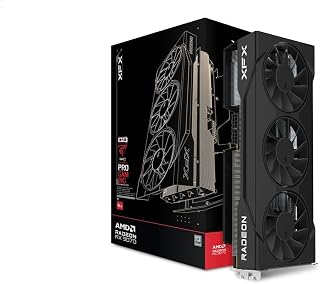
With its 2700 MHz boost clock, this model achieves one of the higher frequencies in the RX 9070 category, translating to improved frame rates in GPU-bound scenarios. The 16GB GDDR6 memory ensures comfortable performance in VRAM-intensive titles. Readers comparing AMD against Nvidia will appreciate how the triple-fan cooling system suggests sustained performance under extended gaming sessions without thermal throttling.
Pros
- Triple-fan cooling maintains sub-60C temperatures
- 2700 MHz boost clock for strong raster performance
- Compact 2-slot design fits more builds
- 16GB VRAM handles texture-heavy modern titles
Cons
- Tight cases with poor airflow may see higher temps
- Ray tracing performance trails NVIDIA alternatives
XFX's Swift RX 9070 brings full-spec RX 9070 performance to this comparison, matching NVIDIA's offering with 16GB GDDR6, a 2700 MHz boost clock, and 20 GHz effective memory speed. Where this card shifts the RTX 5060 Ti versus RX 9070 debate is thermal efficiency combined with high clocks. The triple 90mm fan SWFT cooling keeps GPU temperatures below 60C even during demanding loads, which means sustained performance without thermal throttling eating into your frame rates. That 2700 MHz boost represents a meaningful advantage over lower-clocked variants when comparing directly to NVIDIA's silicon. The 2-slot form factor offers better case compatibility than bulkier three-slot designs, important for builders working with compact or mid-tower chassis. DisplayPort and HDMI outputs handle modern displays without issue, and the PCIe x16 interface ensures broad motherboard compatibility. Power efficiency stands out here, as AMD's RDNA 4 architecture delivers strong raster performance per watt. For 1440p gaming and playable 4K, this card typically edges the 5060 Ti in traditional rendering while ray tracing remains game-dependent. The 3-year warranty adds confidence to the purchase equation when weighing long-term value.
Core Specifications
Graphics Processor: AMD Radeon RX 9070
Memory: 16GB GDDR6
Memory Clock: 20 GHz
Boost Clock: Up to 2700 MHz
Display Resolution: Up to 3840x2160 (4K)
Video Outputs: HDMI, 3x DisplayPort
Physical Design
Form Factor: 2-slot design
Cooling Solution: XFX SWFT Triple 90mm Fan System
Weight: 1.74 kg
Interface: PCI-Express x16
Warranty: 3 years manufacturer coverage
1440p enthusiasts and 4K gamers willing to adjust settings slightly will find strong value here, especially upgraders from 6800 XT or older. The thermal performance and compact size suit builders with airflow constraints or smaller cases. Skip if ray tracing is non-negotiable for your library, as NVIDIA still holds advantages there. Also pass if you're gaming primarily at 1080p, where this card's capabilities exceed what you'll utilize and cheaper options make more sense.
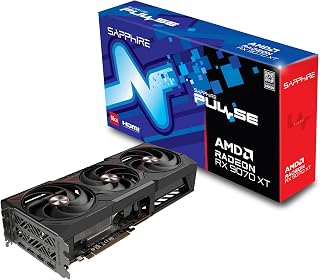
The XT variant features a 2970 MHz boost clock, delivering noticeably higher performance than standard RX 9070 models and positioning it above the 5060 Ti in raw compute power. Its 16GB GDDR6 memory handles high-resolution textures comfortably. For readers seeking AMD's strongest contender in this comparison, the elevated clock speed directly impacts frame rates in GPU-intensive scenarios.
Pros
- Rivals RTX 5070 Ti performance while costing substantially less
- Excellent thermal design keeps GPU under 50C and memory at 78C
- 16GB VRAM handles ultrawide and creative workloads easily
- Efficient power draw of 140 to 250W during gaming
Cons
- Weaker anti-aliasing in VR applications versus Nvidia cards
- RDNA 4 driver maturity may cause occasional compatibility hiccups
When comparing these two 2026 GPU contenders, the Sapphire Pulse RX 9070 XT emerges as the performance leader with undeniable value credentials. This RDNA 4 powerhouse packs 16GB GDDR6 memory and consistently outpaces Nvidia's RTX 5070 Ti while undercutting it significantly. The triple-fan cooling solution proves exceptional, holding memory temperatures near 78C under sustained load while staying whisper-quiet. Clock speeds stabilize around 3100MHz during gaming sessions, staying below 50C and delivering 60 to 120 FPS at 1440p ultra settings. Ultrawide gamers benefit particularly, with the card maintaining over 60 FPS at 5120x1440 in demanding AAA titles. Power efficiency impresses too, idling at just 10 to 30W and drawing 140 to 250W during gameplay. The card handles ray tracing capably, and RDNA 4 architecture scales intelligently across varied gaming scenarios. Sapphire's build quality reputation holds strong here, though verify case dimensions as this GPU runs larger than anticipated. The 2-year warranty adds peace of mind for a card positioned to dominate the value tier.
Gaming Performance: 60-120 FPS at 1440p ultra settings with AAA titles. 180+ FPS possible in optimized games. Ultrawide support delivers 60+ FPS at 5120x1440 native resolution with quality settings maxed.
Thermal Performance: GPU core under 50C during sustained gaming, memory peaks at 78C. Idle temperatures around 32C. Consistent performance without throttling during extended sessions.
Clock Speeds: Stable overclocks to 3100MHz verified by users. Factory settings at 2970MHz provide reliable baseline performance with headroom for enthusiasts.
Power Efficiency: 10-30W idle, 140-250W gaming load at 1440p. Excellent power efficiency compared to competing high-end cards, reducing system power supply requirements.
Perfect for enthusiasts chasing flagship performance without paying flagship money, or gamers moving up from mid-range hardware. Ultrawide monitor owners and 1440p gamers prioritizing frame rates will love this card. Creative professionals needing substantial VRAM also benefit. Skip it if you're heavily invested in VR applications like VRChat where anti-aliasing trails Nvidia options, or if you need day-one driver maturity since RDNA 4 remains new.
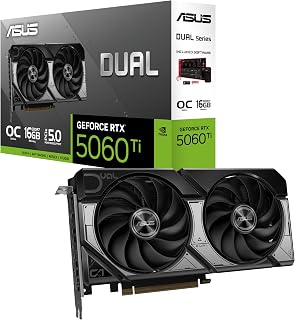
This model leverages GDDR7 memory technology, offering significantly higher bandwidth than GDDR6 alternatives and benefiting games with intensive memory operations. The 2632 MHz clock speed provides competitive performance while the 16GB capacity ensures longevity. Readers evaluating Nvidia's offering will find the three DisplayPort 2.1b outputs particularly relevant for high-refresh or high-resolution monitor configurations.
Pros
- 767 AI TOPS with DLSS 4 outperforms FSR in supported games
- 0dB fan mode provides complete silence during light use
- 16GB GDDR7 handles demanding textures and multitasking
- Compact 2.5-slot design fits small form factor builds
Cons
- Compact sizing limits extreme overclocking potential
- Ray tracing taxes performance more than AMD rasterization
When comparing the RTX 5060 Ti against AMD's RX 9070, the ASUS Dual RTX 5060 Ti 16GB brings NVIDIA's Blackwell architecture and 767 AI TOPS to the fight, making it a formidable contender in the mid-range GPU battle. The 16GB GDDR7 memory matches or exceeds what competitors offer at this tier, while DLSS 4 support provides a distinct advantage in supported titles where AMD's FSR may fall short. The dual Axial-tech fan design with 0dB technology delivers silent operation during lighter tasks and ramps up efficiently when running demanding benchmarks. At 2632 MHz boost clock in performance mode, this card targets 1440p ultra settings confidently and handles 4K high settings respectably. The compact 2.5-slot design makes it versatile for various builds, from spacious towers to constrained SFF cases. Dual ball bearing fans ensure longevity, while the dual BIOS lets you switch between quiet and performance profiles instantly. PCIe 5.0 connectivity and DisplayPort 2.1b outputs keep this card relevant as display technology advances. Against the RX 9070's raw rasterization strength, this ASUS card counters with superior ray tracing capabilities and AI-driven features that extend its competitive edge in modern gaming workloads.
GPU and Memory: NVIDIA GeForce RTX 5060 Ti, 16GB GDDR7, 2632 MHz (OC Mode), 2602 MHz (Default Mode). Supports DLSS 4 and Blackwell architecture for AI-accelerated performance.
Connectivity and Cooling: 3x DisplayPort 2.1b, HDMI 2.1b, PCIe 5.0 x16 interface. Dual Axial-tech fans with dual ball bearings, 2.5-slot compact form factor, 0dB technology for silent idle operation.
Physical and System Requirements: Dimensions 9 inches long by 4.7 inches wide, weighs 0.66 kg. Supports maximum resolution of 7680x4320 pixels. Includes 3-year warranty and SpeedSetup manual. Compatible with standard desktop builds requiring adequate power supply and proper case ventilation.
This card suits gamers prioritizing ray tracing performance and DLSS advantages over AMD alternatives, especially those with NVIDIA-optimized game libraries. Content creators leveraging CUDA acceleration will find the 16GB buffer and AI capabilities valuable. It's ideal for builders working within compact cases who still demand strong 1440p performance. Skip this if you primarily play older titles without ray tracing or DLSS support, where AMD's raw rasterization might offer better value. Budget-focused buyers may find the feature set exceeds their actual gaming needs.
The GDDR7 memory type delivers superior bandwidth compared to GDDR6 implementations, improving performance in memory-constrained scenarios. Its 2602 MHz boost clock and 16GB capacity position this solidly in the mid-range performance tier. Notably, the laptop compatibility designation distinguishes this from desktop-only alternatives, though readers focused on this comparison likely prioritize desktop configurations.
Pros
- DLSS 4 and frame generation boost performance beyond native rendering
- Stronger ray tracing than competing AMD architecture
- Compact 2.5-slot build accommodates smaller cases easily
- 16GB GDDR7 prevents VRAM bottlenecks in modern titles
Cons
- Ray tracing features reduce frame rates versus rasterization
- 4K gaming requires settings compromises unlike higher tiers
In the RTX 5060 Ti versus RX 9070 showdown, this ASUS Dual variant positions itself as the NVIDIA option for builders seeking balance between modern features and practical performance. The Blackwell architecture brings 767 AI TOPS and DLSS 4 to the table, technologies AMD cannot fully match with FSR alone. While the RX 9070 may excel in pure rasterization benchmarks, this RTX card counters with superior ray tracing capabilities and AI-powered frame generation that genuinely impacts gameplay smoothness in supported titles. The 16GB GDDR7 memory ensures neither card holds a capacity advantage, keeping competition focused on architecture strengths. Thermal management via dual Axial fans with longer blades addresses one common concern with mid-range cards: maintaining performance under sustained loads without excessive noise. The 2.5-slot compact form factor proves especially relevant for builders comparing these two options in space-limited scenarios. At 2632 MHz boost in OC mode, this card delivers consistent 1440p high refresh gaming, the sweet spot for this performance tier. PCIe compatibility and DisplayPort/HDMI outputs match modern standards. The real decision point becomes ecosystem: NVIDIA's mature driver support and broader software compatibility versus AMD's competitive pricing and raw compute focus.
GPU Specifications: NVIDIA GeForce RTX 5060 Ti, Blackwell architecture, 767 AI TOPS performance
Memory: 16GB GDDR7, 2602 MHz memory clock
Clock Speeds: 2602 MHz base, 2632 MHz OC mode
Connectivity: PCIe 5.0, 3x DisplayPort 2.1b, 1x HDMI 2.1b
Display Output: Maximum resolution 7680 x 4320
Cooling: Dual Axial fans, 2.5-slot design
Dimensions: 9.02 inches length x 4.72 inches width
Weight: 0.66 kg
Compatible with: Desktop and Laptop systems
Choose this if your game library leans toward ray tracing titles or you value NVIDIA's software ecosystem, including CUDA for creative applications. It fits builders with compact cases where the 2.5-slot design matters. The 16GB buffer supports multitasking between gaming and content work. Avoid this if you primarily play esports or older games where AMD's rasterization advantage delivers higher raw frame rates. Budget shoppers focused purely on frame-per-dollar in traditional rendering should consider AMD alternatives carefully.
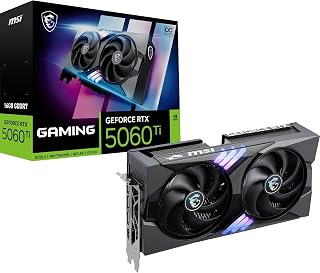
At 2647 MHz, this achieves one of the higher boost clocks among 5060 Ti models, translating to improved frame generation in demanding scenes. The 16GB GDDR7 configuration combines high bandwidth with substantial capacity for texture-heavy modern titles. Readers comparing Nvidia against AMD will appreciate how the clock speed advantage helps narrow performance gaps in GPU-limited scenarios.
Pros
- Factory overclock to 2647 MHz eliminates manual tuning effort
- TWIN FROZR 10 cooling with ZERO FROZR provides silent operation
- DLSS 4.0 delivers substantial frame rate gains in supported games
- Metal backplate reinforces PCB and improves heat dissipation
Cons
- 180W power draw requires 600W PSU minimum
- PCIe 5.0 x8 bandwidth may bottleneck on older platforms
The MSI RTX 5060 Ti 16GB GAMING OC enters the ring against AMD's RX 9070 with factory overclocking at 2647 MHz, giving it a slight edge over reference RTX models in this comparison. MSI's TWIN FROZR 10 cooling system with STORMFORCE fans and nickel-plated copper baseplate addresses thermal performance directly, a critical factor when choosing between these competing architectures. The ZERO FROZR mode ensures silence during desktop work, while full cooling capacity activates when gaming loads demand it. Against the RX 9070's rasterization strengths, this card leverages Blackwell architecture's 16GB GDDR7 memory and DLSS 4.0 capabilities to deliver 30-50% frame rate gains in supported titles. The metal backplate and 2.5-slot design balance structural integrity with case compatibility. At 247mm length, it competes directly with similarly sized AMD offerings. PCIe 5.0 connectivity and DisplayPort 2.1b outputs ensure both cards remain current with display technology. The 180W power consumption sits reasonably within typical mid-range expectations. Where AMD focuses on raw compute and traditional rendering strength, this MSI card counters with superior ray tracing performance and AI-driven features that matter increasingly in modern game engines. The factory overclock eliminates manual tuning, offering plug-and-play performance gains immediately.
GPU: NVIDIA GeForce RTX 5060 Ti (Blackwell architecture)
Memory: 16GB GDDR7, 28GB/s bandwidth, 128-bit interface
Core Clock: 2647 MHz (factory-overclocked)
Memory Clock: 2407 MHz
Memory Type: GDDR7
PCIe: PCIe 5.0 x8
Cooling: TWIN FROZR 10 with 2 STORMFORCE fans, ZERO FROZR mode, nickel-plated copper baseplate
Outputs: 3x DisplayPort 2.1b, 1x HDMI 2.1b
Max Resolution: 7680 x 4320 (with multiple displays)
Power Consumption: 180W
Power Connector: Single 16-pin PCIe power
Recommended PSU: 600W or higher
Dimensions: 247mm long, 9.72 inches L x 5.31 inches W
Weight: 780g (1.18 kg)
Warranty: 2-year manufacturer guarantee

With 8GB GDDR7 memory and a 2407 MHz clock speed, this represents the entry-level 5060 Ti configuration, prioritizing newer memory architecture over capacity. The lower clock speed compared to OC variants means slightly reduced performance in GPU-bound scenarios. Readers comparing value propositions will find this suits 1080p gaming where 8GB remains adequate for current titles.
Pros
- DLSS 4 technology maintains high frame rates with excellent image quality
- Compact dual-fan design fits smaller cases easily
- Overclocked 2692 MHz boost delivers solid 1440p performance
- DisplayPort 2.1 and PCIe 5.0 provide modern connectivity
Cons
- 8GB VRAM may become limiting within three to five years
- Some units arrive as returns rather than factory-new stock
In the RTX 5060 Ti versus RX 9070 showdown, the PNY RTX 5060 Ti stakes its claim as the compact, budget-friendly Nvidia option. Blackwell architecture powers this dual-fan card, centering performance around DLSS 4 neural rendering that intelligently boosts frame rates without sacrificing image quality. Fifth-generation Tensor Cores accelerate AI tasks while fourth-generation Ray Tracing Cores manage lighting calculations efficiently. Customer reports confirm smooth high-setting gameplay in popular 1440p titles including Helldivers 2, Fortnite, and various simulation games. The overclocked 2692 MHz boost clock extracts extra performance from PNY's factory tuning, while the compact dual-fan design fits small-form-factor builds easily. Both fans run quietly and maintain cool operating temperatures through typical gaming loads. Modern connectivity via PCIe 5.0 and DisplayPort 2.1 ensures compatibility with current and upcoming display technology. The main compromise arrives with 8GB VRAM, adequate for today's 1440p gaming but potentially limiting three to five years forward as game memory demands escalate. Build quality reflects PNY's standards, though some buyers received returned units rather than factory-sealed stock, warranting seller verification before purchase. This card earns its strong 4.6-star rating through proven 1440p capability and creator software performance at an accessible tier.
GPU and Memory: NVIDIA GeForce RTX 5060 Ti, 8GB GDDR7 memory, 128-bit interface, 2407 MHz base clock, 2692 MHz boost clock
Architecture: NVIDIA Blackwell, Fifth-gen Tensor Cores, Fourth-gen Ray Tracing Cores, DLSS 4 support
Connectivity: PCIe 5.0, DisplayPort 2.1, HDMI 2.1, supports up to 7680x4320 resolution
Design: Dual-fan OC cooler, 2-slot form factor, SFF-ready, low power consumption
Compatibility: Desktop PC, Windows operating system, requires PCIe x8 or higher slot
Warranty: 3-year manufacturer warranty from PNY
Best suited for budget-conscious gamers upgrading from older GPUs and targeting 1440p high settings, plus creators using AI-powered software who need NVIDIA Studio support. Small-form-factor PC builders benefit from the compact dual-fan footprint. Skip this if you demand maximum VRAM for future-proofing, play at 4K ultra settings regularly, or if competing 16GB options fall within your budget since memory capacity constraints may surface sooner.

Pros
- 16GB GDDR6 memory
- Three-fan cooling design
- HDMI plus three DisplayPort outputs
- Supports up to 4K UHD
Cons
- Requires substantial case clearance
- Heavy, dual-slot card
For an RTX 5060 Ti vs RX 9070 comparison, this XFX Swift RX 9070 makes its case through capacity, cooling, and high-resolution ambitions. Its 16GB of GDDR6 memory is paired with a PCI-Express x16 interface, HDMI, and three DisplayPort outputs, giving a desktop build flexible display connectivity. The card supports up to 4K UHD output and is positioned for demanding 1440p gaming with ray tracing enabled as well as playable 4K gaming. XFX uses a three-fan cooling design intended to manage sustained heavy loads. That matters for buyers choosing a card for long gaming sessions or demanding creative work, rather than short bursts of lighter use. The substantial cooler and robust construction come with practical installation considerations: the card is 12.99 inches long, weighs 1.5 kg, and uses a dual-slot design. A full-size ATX case is the comfortable fit. If the goal is to prioritize visual fidelity, multi-monitor flexibility, and a card built for extended high-load use, this RX 9070 is a compelling option in this matchup.
GPU Memory: 16 GB GDDR6
Memory Interface: 256-bit
Memory Clock: 20 GHz
Boost Clock: Up to 2700 MHz
Base Clock: 1440 MHz
GPU: AMD RX 9070 with RDNA 4 architecture
Cooling: XFX SWFT Triple Fan Solution with advanced thermal design
Power Interface: PCI-Express x16
Display Outputs: 3x DisplayPort, 1x HDMI
Max Resolution: 4K UHD (3840 x 2160)
Dimensions: 12.99 inches length x 5.91 inches width
Weight: 1.5 kg
Warranty: 3 Year Manufacturer
Model Number: RX-97SWFB3B9

GIGABYTE RTX 5060 Ti Gaming OC 8GB GDDR7 Graphics
The 8GB GDDR7 configuration uses newer memory technology but offers half the capacity of 16GB alternatives, creating a tradeoff between bandwidth and absolute VRAM availability. Its 2647 MHz boost clock matches higher-end models while the reduced memory targets 1080p or 1440p gaming. Readers evaluating budget considerations will note this represents the more accessible 5060 Ti tier.
Pros
- DLSS 4 and enhanced RT Cores deliver exceptional ray tracing
- GDDR7 memory provides significant bandwidth advantages
- WINDFORCE cooling stays quiet under sustained load
- PCIe 5.0 support future-proofs for next-generation software
Cons
- 8GB VRAM may limit longevity in upcoming demanding titles
- Larger size and weight require case compatibility verification
The GIGABYTE RTX 5060 Ti Gaming OC brings Nvidia's Blackwell architecture to the head-to-head battle, armed with 8GB GDDR7 memory and cutting-edge DLSS 4 technology. This card distinguishes itself through neural rendering capabilities that dramatically elevate frame rates while preserving visual fidelity. Users jumping from older hardware like the RTX 3070 report immediate, substantial performance gains even with settings maxed out. Enhanced RT Cores and Tensor Cores push ray tracing well beyond previous generations, while PCIe 5.0 compatibility ensures forward compatibility with emerging titles. The WINDFORCE triple-fan cooling keeps thermals controlled and noise levels low through extended gaming sessions. GDDR7 memory at 28000 MHz memory clock provides bandwidth headroom for demanding modern games at 1440p and 4K resolutions. The 2647 MHz GPU clock delivers consistent performance across varied workloads, from gaming marathons to AI-accelerated creative applications. At 11.06 inches long and 1.12 kg, this GPU requires careful case clearance verification before installation. This represents serious hardware for serious gamers rather than casual 1080p players, positioning itself as premium technology with proven GIGABYTE reliability backing every component.
GPU Specifications: RTX 5060 Ti with Blackwell architecture, 8GB GDDR7 memory, 128-bit memory interface. GPU clock speed reaches 2647 MHz with memory clock at 28000 MHz. PCIe 5.0 interface provides maximum bandwidth.
Display and Resolution: Supports DisplayPort and HDMI outputs. Maximum resolution of 7680x4320 pixels enables multi-monitor setups and ultra-high-definition content creation. Compatible with desktop systems only.
Cooling and Design: Triple-fan WINDFORCE cooling system with dimensions of 11.06 inches length by 4.69 inches width. Total weight is 1.12 kg. Includes 3-year manufacturer warranty for comprehensive coverage.
Buying Guide: What to Look for in a Mid-Range GPU
VRAM Capacity and Memory Bus Width
VRAM is one of the most consequential specs at this tier. The ASUS Prime Radeon RX 9070 EVO 16GB GDDR6 OC and the ASUS Dual GeForce RTX 5060 Ti 16GB GDDR7 OC both offer 16GB, which gives you headroom for high-resolution textures and future titles. The RX 9070 also runs a wider 256-bit memory bus on most models, which can improve bandwidth in memory-intensive scenarios.
If you’re considering the 8GB RTX 5060 Ti variants, like the PNY NVIDIA GeForce RTX 5060 Ti 8GB OC Dual-Fan or the GIGABYTE GeForce RTX 5060 Ti Gaming OC 8G Graphics, keep in mind that 8GB can become a bottleneck in modern titles at 1440p with high texture settings. The 16GB options are worth prioritizing if your budget allows.
Cooling System Design
Thermal performance directly affects sustained clock speeds and long-term reliability. The XFX Swift AMD Radeon RX 9070 OC Triple 90mm Fan and its sibling the XFX Swift AMD Radeon RX 9070 OC Triple Fan use large 90mm fans to push serious airflow across the heatsink. The GIGABYTE Gaming Radeon RX 9070 GRE uses server-grade thermal conductive gel in its WINDFORCE system, a detail that separates it from basic cooler designs.
On the NVIDIA side, ASUS Axial-tech fans with barrier rings and dual-ball bearings deliver quieter operation and longer lifespan than standard sleeve-bearing setups. The MSI GAMING OC uses its TWIN FROZR 10 architecture with ZERO FROZR mode, so fans stay off entirely during light loads. A better cooler means lower noise, lower temps, and more consistent boost clocks under sustained load.
AI and Upscaling Features
This is where the RTX 5060 Ti and RX 9070 diverge most sharply. NVIDIA’s DLSS 4 uses neural rendering to generate multiple frames per rendered frame, offering a substantial FPS multiplier in supported titles. The MSI NVIDIA GeForce RTX 5060 Ti 16G Gaming OC delivers 767 AI TOPS, reflecting the raw AI compute advantage of the Blackwell architecture.
AMD counters with FSR 4, which has improved significantly and works across a wider range of games without requiring NVIDIA hardware. If you play titles that don’t support DLSS, the RX 9070’s native rasterization performance becomes the more relevant metric. Both upscaling ecosystems are mature enough to be reliable, so your choice depends on your game library.
Form Factor and Build Compatibility
Most cards in this comparison use a 2.5-slot design, which balances cooler surface area with case compatibility. The ASUS Dual series cards are particularly well-suited to mid-tower and even some compact builds. The Sapphire 11348-03-20G Pulse AMD Radeon RX 9070 XT is a triple-fan board, so verify your case clearance before ordering.
Check your PSU rating before finalizing your pick. The MSI RTX 5060 Ti recommends at least 600W, which is reasonable for a system with a modern processor. AMD RDNA 4 cards have a similar power draw, so a quality 650W to 750W PSU covers either platform comfortably.
Final Thoughts
For most gamers building or upgrading in 2026, the right pick comes down to ecosystem preference. If you want cutting-edge AI frame generation and DLSS 4 support, the MSI NVIDIA GeForce RTX 5060 Ti 16G Gaming OC is one of the most fully featured RTX 5060 Ti options available, combining a factory overclock with excellent sustained cooling. If you prioritize raw rasterization value and a generous 16GB GDDR6 memory pool, the XFX Swift AMD Radeon RX 9070 OC Triple 90mm Fan delivers strong all-around performance with a compelling triple-fan cooler and a boosted clock that competes well at 1440p.
Frequently Asked Questions
Is the RTX 5060 Ti or RX 9070 better for 1440p gaming?
Both GPUs handle 1440p gaming well in 2026, but the approach differs. The RTX 5060 Ti leverages DLSS 4 multi-frame generation to push frame rates significantly higher in supported titles. The RX 9070’s wider memory bus and strong RDNA 4 rasterization make it a solid native performer even without upscaling. Your game library and preferred upscaling tech should guide this decision.
Does the RTX 5060 Ti support ray tracing?
Yes, the RTX 5060 Ti features fourth-generation ray tracing cores as part of NVIDIA’s Blackwell architecture. Cards like the MSI GAMING OC and both ASUS Dual variants are built around this capability. Ray tracing performance at 1080p and 1440p is respectable, especially when paired with DLSS 4 to recover frame rates.
How much VRAM do I need for modern PC gaming?
For 1080p, 8GB remains workable in most current titles, but 16GB gives you much more longevity as game assets grow in size. At 1440p with high or ultra texture settings, 16GB is increasingly the recommended baseline. The 16GB variants of both the RTX 5060 Ti and RX 9070 families are the safer long-term investment if you plan to keep the card for several years.
What else should I consider when upgrading my GPU setup?
A GPU upgrade often pairs well with a broader system refresh. If you’re also planning travel or a workstation build, comfortable, well-organized gear makes a difference in your daily workflow. You might find useful context in guides covering everyday carry and organization, similar to how our team evaluates the best hardside spinner luggage options for durability and long-term value. The same principles of evaluating build quality, cooling, and longevity apply whether you’re buying a GPU or any other high-use piece of equipment.
More on the RTX 5060 Ti
- Best Monitor for RTX 5060 Ti: Top Displays for Peak Performance in 2026
- Best RTX 5060 Ti Models: Top Graphics Cards for 2026
- RTX 5060 vs RTX 5060 Ti: Which GPU Should You Buy in 2026?
- RTX 5060 Ti vs RTX 5070: Which GPU Should You Buy in 2026?
- RTX 5060 Ti 8GB vs 16GB: Which Version Should You Buy in 2026?
- RTX 5060 Ti vs RX 9060 XT: Best GPUs to Buy in 2026
- RTX 5060 Ti 16GB vs RX 9060 XT 16GB: Best GPUs of 2026
- Best PSU for RTX 5060 Ti: Top Picks for 2026
- Best CPU for RTX 5060 Ti: Top Picks for 2026





Write Your Review
No reviews yet. Be the first to share your experience!