

When a close multiplayer match comes down to tracking a moving target or reacting to a sudden peek, refresh rate becomes more than a spec-sheet number. The 144hz vs 240hz decision is about whether your PC can supply enough frames, how seriously you play, and what visual detail you are willing to prioritize. If your graphics hardware needs an upgrade first, our guide to the right GPU for demanding games can help you plan the rest of the setup.
This guide explains the practical gap between these refresh rates and how seven 240Hz monitors approach it through different sizes, resolutions, panels, and stands. Whether you play competitive shooters, enjoy single-player games, or need one screen for work and play, these monitor options show where a higher refresh rate is genuinely useful.
Quick Comparison
| Model | Link | Rating | Screen Size | Resolution | Refresh Rate |
|---|---|---|---|---|---|
| 1 Dell SE2426HG 24 inch 240Hz Gaming Monitor - FHD IPS, AMD... | Check price | 4.6 of 5213 ratings | 24 inches | FHD 1080p | 240 hertz |
| 2 AOC 27" QHD 240Hz Gaming Monitor IPS 0.3ms G-Sync...Highest rated | Check price | 4.6 of 5573 ratings | 27 inches | QHD Ultra Wide 1440p | 240 hertz |
| 3 ASUS TUF Gaming VG259QM5A 25 Inch 1080p 240Hz G-SYNC... | Check price | 4.6 of 571 ratings | 25 inches | FHD 1080p | 240 hertz |
| 4 KTC 24.5" 240Hz Gaming Monitor FHD IPS 1ms Response Time | Check price | 4.5 of 52,427 ratings | 24.5 inches | FHD 1080p | 240 hertz |
| 5 SANSUI 24 Inch 240Hz Curved Gaming Monitor FHD 1080P...Most reviewed | Check price | 4.4 of 53,703 ratings | 24 | FHD 1080p | 240 hertz |
| 6 ASUS TUF VG279QM5A 27" 1080p 240Hz Gaming Monitor -... | Check price | 4.4 of 540 ratings | 27 inches | FHD 1080p | 240 hertz |
| 7 Acer Nitro XV272U 27" QHD 240Hz IPS Gaming Monitor with... | Check price | 4.2 of 5882 ratings | 27 inches | QHD Wide 1440p | 240 hertz |
Ratings reflect the most recent data pull. Check each listing for current price and availability.
Quick answer
This guide compares 7 picks, with Dell SE2426HG 24 inch 240Hz Gaming Monitor - FHD IPS ranked first. AOC 27" QHD 240Hz Gaming Monitor IPS 0.3ms G-Sync holds the highest customer rating among them. SANSUI 24 Inch 240Hz Curved Gaming Monitor FHD 1080P has the most customer reviews.

For readers moving up from 144Hz on a budget, this 23.8-inch FHD IPS panel hits 240Hz with AMD FreeSync Premium, smoothing out tearing during the fast camera pans and quick turns that make the refresh rate jump worthwhile. Its compact 1080p resolution also means your GPU can actually sustain that frame rate without heavy upscaling tricks.
Pros
- 240Hz refresh rate with 0.5ms response time
- AMD FreeSync Premium for tear-free gaming
- TUV Rheinland eye comfort certification
- 99% sRGB color coverage
Cons
- 1920x1080 resolution can look soft at 24 inches
- Contrast ratio is typical, not exceptional
If this comparison is about whether 240Hz is worth chasing at all, the SE2426HG makes the case from the budget-conscious side. It skips QHD entirely and puts every dollar into the refresh rate and response time that actually decide fast-paced matches. For readers debating 144Hz versus 240Hz, this monitor is the clearest demonstration of what 240Hz alone, on a smaller 1080p panel, feels like without extra frills. The IPS panel means you're not trading viewing angles or color for speed, and FreeSync Premium keeps the higher frame rate tear-free. It also throws in a TUV Rheinland eye comfort certification, useful if 240Hz sessions tend to run long. The tradeoff is resolution: at 24 inches and 1080p, this is a monitor for people who've already decided competitive smoothness matters more than pixel density, which is exactly the kind of decision this article is meant to help with.
Display: 24-inch FHD IPS, 1920x1080 native resolution, 16:9 aspect ratio, 93 pixel pitch, 1000:1 contrast ratio, 178-degree viewing angles, 300 nits brightness, 99% sRGB color gamut
Performance: 240Hz refresh rate, 0.5ms response time, AMD FreeSync Premium, HDMI VRR support, TÜV Rheinland 3-star blue light reduction
Connectivity: 2x HDMI 2.0, 1x DisplayPort 1.4, Power input
Physical: 21.21 inches wide, 16.23 inches tall, 7.04 inches deep, 7.4 pounds, black matte finish, desk mount with tilt adjustment
Power and Warranty: 14 watts typical consumption, 240V AC input, 1-year advanced exchange service, includes HDMI cable, stand, power cable, and documentation
Buy this if you play fast, competitive titles like Valorant or CS2 and want 240Hz at the lowest cost of entry, with resolution as a secondary concern. Skip it if you split time between gaming and content work, or want a sharper image for single-player or creative use, since 1080p on a 24-inch screen will look softer than QHD alternatives.

If you've decided 240Hz is your target refresh rate but don't want to give up resolution, this 27-inch QHD IPS panel actually runs an overclocked 260Hz, giving you headroom above the standard 240Hz tier while NVIDIA G-SYNC keeps frame pacing smooth. It's a solid pick for readers comparing 144Hz against 240Hz who also want sharper QHD detail during fast-paced competitive sessions.
Pros
- 240Hz at QHD resolution, not just 1080p
- 0.3ms MPRT for minimal ghosting
- G-Sync compatible plus Adaptive-Sync
- Frameless IPS design with wide viewing angles
Cons
- No built-in speakers
- Edges can look slightly darker off-angle
Deciding between 144Hz and 240Hz usually comes down to what you're giving up to get there, and the Q27G41ZE answers that cleanly: you get 240Hz without dropping below QHD. For readers weighing a jump past 144Hz, this is the model that proves you don't have to settle for 1080p to hit the higher number. The 0.3ms MPRT keeps motion clean at the top end, and G-Sync compatibility plus Adaptive-Sync means that extra refresh rate actually renders without tearing instead of just existing as a spec. The 27-inch IPS panel also means the step up from 144Hz doesn't come with a step down in sharpness or color, which is the usual tradeoff readers worry about. A frameless design and tilt-adjustable stand round out the package. If the question driving this comparison is whether 240Hz is worth it only at lower resolutions, this monitor is the counterexample.
Display: 27-inch IPS, 2560x1440 QHD, 16:9 aspect ratio, 300-nit brightness, 1000:1 contrast ratio, glossy finish
Performance: 240Hz refresh rate (via DisplayPort), 0.3ms MPRT response time, Adaptive-Sync, G-Sync compatible
Connectivity: 1x DisplayPort 1.4, 2x HDMI 2.0, audio output jack
Design: Three-sided frameless, tilt adjustment from minus 3 to plus 21 degrees, textured black and red finish
Dimensions: 24.17 inches wide, 7.46 inches deep, 17.7 inches tall, 6.15kg weight
Features: Blue Light Filter, Flicker-Free, Shadow Control, Game Mode presets, graphical OSD menu
Warranty: 3-year manufacturer coverage
Buy this if you're upgrading from a 144Hz 1080p or 1440p monitor and want the refresh rate bump without losing resolution or color quality. It suits competitive and single-player gamers alike. Skip it if you have a GPU that struggles to push 1440p at high frame rates, since you won't fully benefit from 240Hz, or if you need built-in speakers.

Players who want the 240Hz jump from 144Hz without a huge footprint on their desk will like this 25-inch panel, where G-SYNC and the smaller frame work together to minimize input lag and tearing in fast FPS titles. The tighter screen size also keeps the whole display within quick eye movement for competitive aiming.
Pros
- True 240Hz refresh rate with 0.3ms response time
- G-SYNC Compatible and FreeSync Premium for tear-free play
- ELMB SYNC combines blur reduction with adaptive sync
- Lightweight, compact design with glare-reducing matte finish
Cons
- Stand only tilts, no height or pivot adjustment
- 1080p resolution feels dated for non-gaming tasks
When the choice comes down to 144Hz or 240Hz, the VG259QM5A makes the case for going higher. This 25-inch 1080p panel runs at a true 240Hz, giving you a visibly smoother edge over 144Hz setups in fast shooters, fighting games, and esports titles where tracking fast motion matters more than pixel count. Pairing that refresh rate with G-SYNC Compatible and FreeSync Premium support means the extra frames stay tear-free no matter which graphics card is driving the panel. ASUS's ELMB SYNC adds motion blur reduction on top of adaptive sync, so the jump to 240Hz actually translates into cleaner, more legible fast motion rather than just a bigger number on a spec sheet. The matte finish keeps glare down during long sessions, and the compact, lightweight build fits easily into tight desk setups where a 240Hz upgrade shouldn't mean a bigger footprint. For anyone comparing refresh rates and trying to decide if 240Hz is worth it over 144Hz, this monitor is built specifically to answer yes.
Display: 24.5-inch Fast IPS, 1920x1080 (Full HD), 16:9 aspect ratio, 300 cd/m2 brightness, 1000:1 contrast ratio, 178-degree viewing angle
Performance: 240Hz refresh rate, 0.3ms (GTG) response time, 99% sRGB color gamut, FreeSync Premium, G-SYNC Compatible
Special Features: ELMB SYNC motion blur reduction, TUV Flicker-Free, TUV Low Blue Light, AI Visual, Dynamic Crosshair, Blue Light Filter, built-in 2W x 2W stereo speakers
Connectivity: DisplayPort 1.4, HDMI
Physical: 22"W x 15.8"H x 6.9"D, 7.5 pounds, tilt-adjustable stand, matte finish
Power: 18 watts typical consumption, 240V input
Warranty: 3-year manufacturer warranty with Advanced Replacement
Buy this if you're upgrading from 144Hz and want to feel the difference in competitive shooters or esports titles without paying for extra resolution. Skip it if you split time between gaming and resolution-dependent work like photo editing, or if a fully adjustable stand matters to your setup, since this one only tilts. Also skip it if 25 inches feels too small for your desk distance.

Pros
- Exceptional value for high-refresh competitive gaming at this price
- Fast 1ms response time and 240Hz refresh rate ideal for shooters and fast-paced titles
- Adaptive Sync compatible with both FreeSync and G-Sync systems
- Comprehensive connectivity with HDMI 2.0, DisplayPort 1.4, and multiple inputs
- Built-in eye-care technology and flicker-free display for comfortable long sessions
Cons
- FHD resolution at 24.5 inches may feel slightly less sharp compared to higher-resolution alternatives
- 350 nits brightness is moderate and may require adjustment in very bright rooms
- 24.5-inch size is on the smaller side for productivity work or content creation tasks
The KTC H25T7-A is a 24.5-inch gaming monitor built for competitive players who demand fast response times and smooth motion over cutting-edge resolution. With a 240Hz refresh rate and 1ms MPRT response time, this monitor is engineered for esports titles like CS:GO, Valorant, and Overwatch where every frame and millisecond matters. The adaptive sync technology eliminates screen tearing across both FreeSync and G-Sync systems, making it versatile for AMD and NVIDIA GPU owners alike.
Performance is the standout feature here. The combination of 240Hz refresh, 1ms response time, and adaptive sync creates genuinely fluid gameplay that makes a noticeable difference in fast-paced shooters. The FHD resolution keeps input lag minimal and GPU requirements low, allowing high frame rates on mid-range graphics cards. HDR 10 support and 114% sRGB color gamut provide surprisingly vibrant visuals for the price tier, making this monitor capable for both competitive gaming and casual entertainment.
The design is practical and gaming-focused. The matte finish reduces glare, while blue light filtering and flicker-free technology reduce eye strain during extended sessions. Tilt adjustment and VESA mounting compatibility offer ergonomic flexibility. Connectivity is comprehensive with dual HDMI 2.0, DisplayPort 1.4, and USB support, enabling use with PCs, gaming laptops, and consoles like Switch and PlayStation.
The main limitation is FHD resolution, which can feel less detailed than 1440p alternatives on a 24.5-inch panel. The 350 nits brightness is adequate but moderate, potentially requiring adjustment in very bright environments. This monitor prioritizes refresh rate and response time over pixel density, which is the right trade-off for competitive gaming but may disappoint productivity users.
The KTC H25T7-A is an excellent choice for budget-conscious esports and competitive gamers who value smoothness and responsiveness. With a three-year warranty and strong user ratings, it delivers proven performance and reliability at an accessible price point.
Display: 24.5-inch FHD LCD, 1920x1080 resolution, 16:9 aspect ratio, matte finish
Performance: 240Hz refresh rate, 1ms MPRT response time, 1000:1 contrast ratio, 350 nits brightness
Color & Imaging: 114% sRGB color gamut, HDR 10, 178-degree viewing angles, flicker-free, low blue light filter
Connectivity: 2x HDMI 2.0, 1x DisplayPort 1.4, 1x USB 2.0, Adaptive Sync (FreeSync and G-Sync compatible)
Design: Tilt range -5 to +15 degrees, VESA 100x100mm mounting, matte black finish
Dimensions: 21.96"W x 16.49"H x 7.24"D, 3.2kg weight
Warranty: 3-year manufacturer warranty with customer support
Ideal Users: Competitive esports players, first-person shooter enthusiasts, fast-paced gaming fans, budget-conscious gamers upgrading from 60Hz displays.
Games: CS:GO, Valorant, Overwatch, Apex Legends, Fortnite, Call of Duty, Rainbow Six Siege, and other high-speed competitive titles.
Not Ideal For: 4K content viewers, professional color grading or design work, cinematic single-player gaming where resolution takes priority over refresh rate.
GPU Recommendation: RTX 3060 Ti or equivalent and higher to consistently achieve 200+ fps at FHD with high settings.

For readers weighing immersion against raw speed in the 144Hz vs 240Hz debate, this 24-inch curved VA panel offers 240Hz with a 3000:1 contrast ratio, so dark scenes retain more depth than typical IPS options while the 1500R curve wraps the action into your peripheral vision for racing and action games.
Pros
- Exceptional value for 240Hz gaming performance at this price point
- Curved design and immersive visuals create a more engaging gaming experience
- VA panel with excellent contrast and color accuracy surpasses typical TN alternatives
- Simple setup takes under five minutes, perfect for first-time gaming monitor users
- FreeSync and 1ms response time eliminate tearing and ghosting for competitive play
Cons
- Height adjustment is not available, limiting ergonomic positioning options
- Some units report minor backlight bleed or clouding in dark scenes
- VA panel response time, while excellent, may trail fastest TN panels by milliseconds
The SANSUI ES-G24C1 PRO is a 24-inch curved gaming monitor designed for players who want high refresh rate performance without sacrificing visual quality or breaking their budget. This monitor appeals to competitive gamers and enthusiasts seeking the sweet spot between speed and immersion, offering 240Hz gameplay at 1080p resolution with a VA panel that punches well above its price category.
The standout features that make this monitor special are its 1500R curved panel and impressive color reproduction. The 240Hz refresh rate combined with FreeSync and a 1ms response time delivers buttery smooth gameplay with zero tearing and minimal ghosting in fast-paced shooters and racing games. The VA panel's 3000:1 contrast ratio and 124% sRGB color gamut produce vibrant, punchy visuals that rival monitors costing significantly more, while HDR support and anti-flicker technology reduce eye strain during extended gaming sessions.
Build quality is solid and thoughtfully designed. The curved screen wraps your field of view for better immersion, and the matte anti-glare finish minimizes reflections. Connectivity includes both DisplayPort and HDMI ports capable of 240Hz operation, plus dual display outputs for multi-monitor setups. Setup is refreshingly straightforward, taking most users less than five minutes from unboxing to gaming. The crosshair overlay and adjustable black level controls add useful gaming-focused features.
A few practical limitations exist. The monitor lacks height adjustment, so you'll need an external arm or stand for ergonomic positioning. Some users report minor backlight bleed or clouding in very dark scenes, though this is inconsistent across units. The 1080p resolution, while perfect for 240Hz gaming, shows less detail than 1440p alternatives, though the curved design and vivid colors offset this trade-off.
This monitor excels as a budget gaming solution that doesn't compromise on performance or visual quality. It's ideal for competitive players upgrading from older displays, console gamers transitioning to PC, or anyone wanting smooth, immersive gaming without overpaying. The 30-day money-back guarantee and lifetime technical support provide confidence in the purchase.
Display: 24-inch VA panel, 1920x1080 (FHD), 16:9 aspect ratio, 1500R curve
Performance: 240Hz refresh rate, 1ms response time (MPRT), 3000:1 contrast ratio
Color: 124% sRGB, 93% DCI-P3, 300 nits brightness, HDR support
Connectivity: DisplayPort 1.4 (supports 240Hz), HDMI 2.0 (supports 240Hz), 3.5mm audio jack
Sync Technology: AMD FreeSync adaptive sync
Adjustments: 5 to 15 degrees tilt adjustment, VESA 75x75mm compatible
Features: Game modes, crosshair overlay, shadow booster (black level adjustment), anti-flicker, anti-glare, low blue light
Dimensions: 23.78 inches deep, 4.45 inches wide, 15.55 inches high
Warranty: 30-day money-back guarantee, free replacement coverage, lifetime technical support
Best For: Competitive gamers, esports enthusiasts, budget-conscious players upgrading from 60Hz or 144Hz monitors, and anyone prioritizing smooth gameplay over maximum resolution. Ideal for fast-paced games like shooters, fighting games, and racing sims where high refresh rates directly impact performance.
Consider Alternatives If: You play story-driven single-player games where 144Hz is plenty and 1440p resolution is essential, or you need extensive height and pivot adjustments for a multi-monitor setup. If color accuracy is paramount for creative work, this gaming-focused panel, while impressive, isn't calibrated for professional production.
Setup Tips: Mount the monitor on an adjustable arm to overcome the lack of height adjustment and achieve proper ergonomic positioning. Use DisplayPort cables for full 240Hz performance when connecting graphics cards that support it. Adjust color temperature from the factory warmish setting to your preference using the monitor's menu controls. Enable the crosshair feature in games where it provides competitive advantage, and experiment with game mode presets to optimize visuals for different titles.
Warranty Coverage: You're protected by a 30-day money-back guarantee plus free replacement if defects appear within 30 days. Beyond that window, lifetime technical support is available through SANSUI customer service. This generous coverage reflects the manufacturer's confidence in quality control and provides peace of mind for your investment.
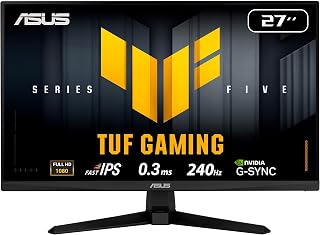
Competitive players chasing every frame advantage over 144Hz will appreciate this 27-inch Fast IPS panel's 240Hz refresh paired with G-SYNC, which keeps fast-moving targets crisp and tear-free in shooters. The larger 27-inch size over similar 25-inch options also gives a bit more screen real estate for tracking peripheral movement at speed.
Pros
- 240Hz Fast IPS panel beats typical 144Hz TN options on color and angles
- G-SYNC Compatible and FreeSync Premium for smooth, tear-free gameplay
- 99% sRGB gamut suits light creative work alongside gaming
- Built-in speakers and earphone jack for added convenience
Cons
- 1080p resolution on a 27-inch screen lowers pixel density
- Only one HDMI 2.0 and one DisplayPort 1.4 for connections
Deciding between 144Hz and 240Hz gets easier when the 240Hz option also upgrades the panel technology. The VG279QM5A pairs its 240Hz refresh rate with Fast IPS, so you get the extra speed over a 144Hz monitor along with viewing angles and color accuracy that many 144Hz TN panels can't match. At 27 inches, it gives competitive players more screen to track targets in games like Valorant or Counter-Strike while ELMB SYNC and dual adaptive sync (G-SYNC Compatible plus FreeSync Premium) keep motion clean at the higher frame rate. The 99% sRGB coverage means the jump to 240Hz doesn't force a tradeoff on color work, so this doubles as a usable screen for photo or video editing between gaming sessions. Built-in speakers and an earphone jack round out the practical side for streamers. If your 144Hz monitor feels like it's holding back your reflexes in fast titles, this is a straightforward step up that doesn't sacrifice image quality to get there.
Display: 27-inch Fast IPS LCD, 1920x1080 (16:9 aspect ratio), 240Hz refresh rate, 0.3ms response time (min). Brightness: 300 nits, Contrast: 1000:1, Viewing angles: 178 degrees.
Color and Visual Tech: 99% sRGB gamut coverage, matte anti-glare finish, TUV flicker-free, TUV low blue light, ASUS ELMB SYNC, Shadow Boost, GameVisual presets.
Adaptive Sync: AMD FreeSync Premium, NVIDIA G-SYNC compatible, VESA AdaptiveSync.
Connectivity: 1x DisplayPort 1.4, 1x HDMI 2.0, 1x 3.5mm audio jack. Built-in stereo speakers (2W+2W). Power consumption: 18 watts at 240V.
Physical Specs: Dimensions 24.21"W x 17.83"H x 7.6"D, weight 9.9 lbs. Includes DisplayPort cable, power cord, L-shaped screwdriver, quick start guide. 3-year manufacturer warranty with ARR.
Buy this if you want the jump from 144Hz to 240Hz without giving up IPS color and viewing angles, especially if you also do light creative work. Skip it if you need sharp pixel density for desk work, since 1080p on a 27-inch panel runs lower PPI, or if you need more than one HDMI and one DisplayPort for multiple devices.

Gamers debating whether 240Hz is worth it at QHD resolution will find this 27-inch IPS panel a middle ground, pairing the sharper 2560x1440 image with the full 240Hz refresh so motion stays fluid without sacrificing pixel density. It suits anyone who wants the visual upgrade from 144Hz without dropping back to 1080p.
Pros
- 240Hz at QHD with 1ms response time
- AMD FreeSync Premium support
- Fully adjustable stand (height, tilt, swivel, pivot)
- 99% color gamut for accurate visuals
Cons
- Full 240Hz requires DisplayPort; HDMI caps at 144Hz
- Some units show IPS backlight bleed at corners
This article is about choosing between two refresh rate tiers, and the XV272U is a good case study in what you gain moving from 144Hz to 240Hz without changing resolution tier. At 27 inches and QHD, it's aimed squarely at people stepping up from a 60Hz or 144Hz setup who want to feel the difference immediately. The 1ms response time and FreeSync Premium support mean that jump actually translates into smoother, tear-free gameplay rather than a number that doesn't do much. A 99% color gamut keeps the image accurate, so you're not sacrificing visual quality to get there, and a fully adjustable stand with height, tilt, swivel, and pivot makes it easy to dial in for extended sessions. Worth noting for anyone comparing refresh tiers: the full 240Hz only shows up over DisplayPort, with HDMI capping at 144Hz, a detail that matters if the connection setup is part of your decision.
Display: 27-inch QHD IPS, 2560 x 1440 resolution, 16:9 aspect ratio, 0.233mm pixel pitch
Performance: 240Hz refresh rate (DisplayPort), 144Hz (HDMI), 1ms response time (0.5ms GtG), 1000:1 contrast ratio, 400 nits brightness
Connectivity: 1x DisplayPort 1.4, 2x HDMI 2.0, 1x audio out, dual 2W speakers
Design: Fully adjustable ergostand with tilt -5 to +15 degrees, 4.7-inch height adjustment, 360-degree swivel, plus/minus 90-degree pivot, 100x100mm VESA mounting
Power and Warranty: 26W power consumption, 3-year manufacturer warranty covering parts and labor
Buy this if you're moving up from 60Hz or 144Hz and want to notice the difference at QHD resolution, especially if you also do some creative work needing accurate color. Skip it if you'll be connecting primarily over HDMI, since you will be capped at 144Hz, or if backlight bleed in corners would bother you.
Match Refresh Rate to Your Actual Frame Rate
At 144Hz, a new frame arrives about every 6.94 milliseconds. At 240Hz, that interval drops to roughly 4.17 milliseconds. The difference is most noticeable in games with rapid camera movement, where the extra updates can improve motion clarity and make aiming feel more immediate.
A 240Hz monitor remains responsive if your game runs below 240 frames per second, especially with adaptive sync enabled, but its full advantage comes from consistently high frame rates. The Dell 24 240Hz Gaming Monitor – SE2426HG and KTC 24.5 Inch 240Hz Gaming Monitor suit players pursuing that target at Full HD, while our graphics card buying resources can help you judge whether your system is ready.
Balance Resolution, Screen Size, and GPU Demand
Full HD is easier for a PC to drive at very high frame rates, which is why 23.8-inch to 24.5-inch displays remain a familiar choice for competitive gaming. The ASUS TUF Gaming VG259QM5A 25 Inch 1080p 240Hz keeps pixels compact at this size, while the ASUS TUF VG279QM5A 27 Inch 1080p 240Hz Fast IPS trades some pixel density for a more expansive image.
QHD adds noticeably more workspace and detail at 27 inches, but it asks far more of your graphics card. The AOC 27" Gaming Monitor QHD 260Hz Overclocked IPS and MONITOR Acer Nitro 27in QHD 2560×1440 IPS 240Hz are stronger fits if you want sharp visuals alongside high refresh capability. For mixed office and laptop use, compare your priorities with our MacBook Pro monitor recommendations before committing to a gaming-first screen.
Look Beyond the Response-Time Claim
Response-time figures can point to a monitor built for motion, but they are not all measured the same way. A 0.3ms MPRT claim, a 0.3ms GTG claim, and a 0.5ms response claim describe different measurement approaches, so they should not be treated as direct equivalents. Panel tuning, overdrive settings, and the game itself also affect perceived blur.
Variable refresh rate is often the more important everyday feature because it coordinates the display with changing game frame rates. Dell supports FreeSync Premium and HDMI VRR, while the ASUS models support FreeSync Premium and G-SYNC compatibility. The SANSUI 24 Inch Curved 240Hz Gaming Monitor FHD adds a 1500R curve, shadow adjustment, and high stated contrast for players who prefer a more enveloping image.
Confirm Ports and Ergonomics Before You Buy
High refresh capability depends on the connection as well as the panel. The Acer Nitro reaches 240Hz through DisplayPort but is limited to 144Hz through HDMI, so a DisplayPort-equipped PC is important for its full specification. Check your graphics card outputs, cable version, and console limits rather than assuming every port delivers the same ceiling.
Stand adjustment matters when you spend hours at the screen. The Acer offers height, swivel, and pivot adjustments, while the KTC includes VESA mounting support and tilt control. The AOC focuses on tilt adjustment, so a monitor arm may be worthwhile for a more flexible desk. If you need a compatible cable or adapter, browse our cables and adapters category before finalizing the setup.
Final Thoughts
If you want competitive Full HD play on a compact screen, the Dell 24 240Hz Gaming Monitor – SE2426HG is a clear, practical 240Hz choice. For a sharper 27-inch setup that pairs QHD detail with a high refresh rate, the AOC 27" Gaming Monitor QHD 260Hz Overclocked IPS makes more sense, provided your PC can deliver enough frames.
Frequently Asked Questions
Can you really see a difference between 144Hz and 240Hz?
Most players can notice the difference in fast shooters, racing games, and other titles with frequent camera movement. Moving from 144Hz to 240Hz is less dramatic than moving from 60Hz to 144Hz, but it can still make motion appear cleaner and input feel more closely connected. The benefit is strongest when your PC sustains high frame rates.
Is a 240Hz monitor worth it for casual gaming in 2026?
It can be worthwhile if you enjoy fluid motion and play games that run well above 144 frames per second. For slower strategy, turn-based, or cinematic games, resolution, contrast, and screen size may matter more than the jump to 240Hz. A balanced QHD monitor can be the better fit when image detail is your priority.
Should I choose 1080p 240Hz or 1440p 240Hz?
Choose 1080p 240Hz when maximizing frame rate for competitive games is the main goal and your desk favors a smaller screen. Choose 1440p 240Hz when you also value sharper text, detailed game worlds, and room for productivity, provided your PC is powerful enough. The latter combination is particularly appealing at 27 inches, where Full HD can look less crisp at close range.
Do I need DisplayPort for a 240Hz gaming monitor?
DisplayPort is usually the safest option for accessing a monitor’s highest PC refresh-rate mode, though some models also support 240Hz through HDMI. Always confirm the specific monitor, graphics card, cable, and device output because capabilities vary. For more choices with different feature mixes, explore our GIGABYTE gaming monitor alternatives alongside these models.






Write Your Review
No reviews yet. Be the first to share your experience!