

Your gaming experience lives or dies by your display. A sluggish refresh rate means missed shots in competitive matches, while poor color accuracy turns immersive worlds into washed-out disappointments. The 27 inch form factor hits the sweet spot for most setups, offering enough screen real estate without forcing excessive head movement during intense sessions.
This guide breaks down five monitors that excel across different gaming priorities, from buttery-smooth esports performance to vibrant single-player visuals. Whether you’re chasing competitive rankings or exploring expansive RPG landscapes, you’ll find a display that delivers.
Quick Comparison
| Model | Link | Rating | Screen Size | Resolution | Refresh Rate |
|---|---|---|---|---|---|
| 1 Samsung 27 Odyssey G5 QHD 1440P 180Hz Gaming Monitor with...Highest rated | Check price | 4.7 of 5589 ratings | 27 inches | QHD 1440p | 180 |
| 2 AOC 27" QHD 240Hz Gaming Monitor IPS 0.3ms G-Sync... | Check price | 4.6 of 5573 ratings | 27 inches | QHD Ultra Wide 1440p | 240 hertz |
| 3 Sceptre 27 inch Gaming Monitor 100Hz 1ms 100% sRGB...Most reviewed | Check price | 4.5 of 53,028 ratings | 27 inches | FHD 1080p | n/a |
| 4 Acer Nitro 27" QHD 180Hz Gaming Monitor - 1440p IPS AMD... | Check price | 4.4 of 51,155 ratings | 27 inches | QHD Wide 1440p | 180 hertz |
| 5 Dell 27 240Hz IPS Gaming Monitor SE2726HG - 1920x1080... | Check price | 4.4 of 5368 ratings | 27 inches | FHD 1080p | 240 hertz |
Ratings reflect the most recent data pull. Check each listing for current price and availability.
Quick answer
This guide compares 5 picks, with Samsung 27 Odyssey G5 QHD 1440P 180Hz Gaming Monitor ranked first. Sceptre 27 inch Gaming Monitor 100Hz 1ms 100% sRGB has the most customer reviews.
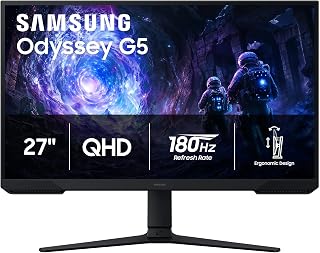
The Odyssey G5 brings QHD resolution to 27 inches, delivering sharper image quality than 1080p alternatives without the GPU demands of 4K. Its 180Hz refresh rate handles fast-paced titles smoothly, while the VA panel's 3000:1 contrast ratio produces deeper blacks and richer colors in dark scenes. This combination makes it well-suited for gamers who want visual fidelity and responsiveness in a mainstream package.
Pros
- 180Hz refresh rate and 1ms response time deliver competitive-level responsiveness
- QHD resolution provides sharp detail without the GPU load of 4K
- VA panel's 3000:1 contrast ratio outperforms typical IPS monitors
- Black Equalizer brightens dark areas without compromising overall image
Cons
- Requires capable GPU to fully utilize 180Hz at 1440p
- On-screen menu navigation less intuitive than premium competitors
For gamers building around a 27-inch QHD setup in 2026, the Samsung Odyssey G5 delivers the resolution and refresh rate combination that defines modern competitive play. The 2560x1440 panel gives you 1.7 times the pixel density of 1080p, sharpening every HUD element and texture without the GPU demands of 4K. That QHD clarity pairs with a 180Hz refresh rate and 1ms response time, creating the fluid, low-latency experience that separates reactive gameplay from sluggish motion. AMD FreeSync handles frame synchronization cleanly, eliminating tearing during variable frame rates. The VA panel pushes a 3000:1 contrast ratio, far deeper than typical IPS competitors, which adds punch to dark scenes and HDR10 content. Samsung's Black Equalizer brightens shadowy areas without washing out the entire image, a practical edge in competitive shooters. The matte finish cuts glare during marathon sessions, and the fully adjustable stand accommodates tilt, pivot, and height changes. Dual HDMI and DisplayPort inputs cover most setups. This is a straightforward, high-performance 27-inch gaming display that prioritizes speed and sharpness without unnecessary complexity.
Display: 27-inch QHD VA panel, 2560 x 1440 resolution, 16:9 aspect ratio, 178-degree viewing angles
Performance: 180Hz refresh rate, 1ms response time (MPRT), 300 cd/m brightness, 3000:1 contrast ratio
Features: HDR10, AMD FreeSync, Black Equalizer, matte screen finish
Connectivity: 2x HDMI, 1x DisplayPort, 1x power connector
Design: Adjustable stand with tilt, pivot, and height settings, desk mount, flat panel shape
Dimensions: 24.34 inches wide, 9.22 inches deep, 20.5 inches tall, 10.1 pounds
Power: 35 watts consumption, 240 volts
Warranty: 1-year manufacturer coverage

This AOC model pushes to 260Hz when overclocked, offering ultra-smooth motion in competitive shooters and esports titles. The QHD IPS panel pairs sharp 1440p detail with wide viewing angles, and NVIDIA G-SYNC eliminates screen tearing during variable frame rates. For gamers prioritizing lightning-fast response and fluid gameplay at 27 inches, the high refresh ceiling provides a competitive edge.
Pros
- 240Hz refresh rate paired with 0.3ms response time for elite-level smoothness
- QHD IPS panel balances sharp resolution with accurate color and wide viewing angles
- G-Sync and Adaptive-Sync support eliminate screen tearing effectively
- Three-sided frameless design and lightweight 6.15kg frame feel premium
Cons
- No built-in speakers, only audio output for external devices
- Stand offers tilt adjustment only, lacking height and pivot flexibility
AOC's Q27G41ZE targets gamers who refuse to choose between high refresh rates and sharp resolution. The 240Hz refresh rate on a 27-inch QHD IPS panel creates a rare combination at this size, delivering both the pixel density competitive players need and the smoothness esports demand. The 0.3ms MPRT response time keeps motion clear during rapid camera swings and fast-paced engagements, while G-Sync compatibility and Adaptive-Sync eliminate screen tearing across variable frame rates. The 2560x1440 IPS display offers accurate color reproduction and 178-degree viewing angles, maintaining image quality whether you're centered or off-axis. That IPS panel trades contrast depth for color consistency, making it better suited to brightly lit competitive titles than atmospheric single-player games. The three-sided frameless design feels premium and clean, and the adjustable tilt stand offers ergonomic flexibility within a compact 6.15kg frame. Connectivity includes DisplayPort 1.4 and dual HDMI 2.0 ports, covering modern GPUs and consoles. Shadow Control and Game Mode presets let you tune visuals quickly without technical menus. This is a high-performance 27-inch display built for players who prioritize frame rate and clarity in equal measure.
Display: 27-inch IPS, 2560x1440 QHD, 16:9 aspect ratio, 300-nit brightness, 1000:1 contrast ratio, glossy finish
Performance: 240Hz refresh rate (via DisplayPort), 0.3ms MPRT response time, Adaptive-Sync, G-Sync compatible
Connectivity: 1x DisplayPort 1.4, 2x HDMI 2.0, audio output jack
Design: Three-sided frameless, tilt adjustment from minus 3 to plus 21 degrees, textured black and red finish
Dimensions: 24.17 inches wide, 7.46 inches deep, 17.7 inches tall, 6.15kg weight
Features: Blue Light Filter, Flicker-Free, Shadow Control, Game Mode presets, graphical OSD menu
Warranty: 3-year manufacturer coverage
Ideal for competitive gamers who want 240Hz speed without sacrificing QHD sharpness on a 27-inch screen, especially those with high-end GPUs capable of pushing 1440p at ultra-high frame rates. The IPS panel suits players who value color accuracy and wide viewing angles over deep contrast. Skip this if you need built-in speakers, prefer premium stand adjustability beyond tilt, or primarily play darker, atmospheric games where VA contrast depth matters more than IPS color fidelity. The 240Hz ceiling also demands serious GPU horsepower.

The Sceptre offers an accessible entry point with FHD resolution and a 100Hz refresh rate, suitable for casual gamers or those on budget-conscious builds. Its 1ms response time minimizes ghosting, and AMD FreeSync keeps gameplay smooth when frame rates fluctuate. The 100% sRGB coverage also makes it versatile for light photo editing alongside gaming.
Pros
- 100Hz refresh rate with 1ms response time for fluid gameplay
- AMD FreeSync eliminates screen tearing
- 100% sRGB color coverage for accurate visuals
- Frameless design and built-in speakers add convenience
Cons
- Limited to 1080p resolution at 27 inches
- 100Hz refresh rate may not satisfy hardcore competitive players
The Sceptre E275W-FW100T delivers a frameless 27-inch FHD experience tailored for gamers who want immersive visuals without breaking into higher resolution territory. Its 100Hz refresh rate and 1ms response time create smooth motion handling in fast-paced titles, while AMD FreeSync eliminates screen tearing during variable frame rate scenarios. The matte screen surface reduces glare during extended sessions, and the 100% sRGB color coverage ensures accurate, vibrant visuals across different game genres. Built-in speakers provide convenience for casual gaming without requiring external audio hardware. The 16:9 aspect ratio fits standard gaming setups perfectly, and the DisplayPort plus dual HDMI inputs offer flexible connectivity for multi-platform gamers. Eye care features help reduce strain during marathon sessions. While it sticks to 1080p resolution, the combination of refresh rate, response time, and color accuracy makes it a practical choice for competitive and recreational gaming alike at this screen size.
Display: 27-inch FHD 1080p (1920x1080) 16:9 aspect ratio with matte screen surface
Performance: 100Hz refresh rate, 1ms response time, 100% sRGB color gamut, AMD FreeSync technology
Connectivity: 2 HDMI ports, 1 DisplayPort, audio in jack, headphone jack
Audio: Built-in speakers for audio output without external equipment
Special Features: Blue Light Shift eye care technology, FPS and RTS game modes, frameless design, VESA wall mountable (100x100mm)
Design: Machine black finish, frameless bezel, matte surface finish to reduce glare
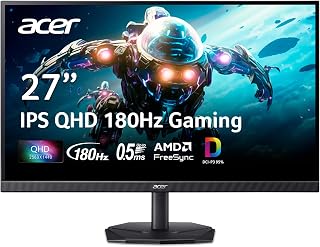
The Nitro balances QHD clarity with a 180Hz refresh rate, making it capable for both competitive gaming and immersive single-player experiences. Its IPS technology ensures consistent color accuracy across the screen, which benefits gamers who also create content or edit images. At 27 inches, the 1440p resolution hits the sweet spot between performance and visual sharpness.
Pros
- 180Hz refresh rate and 0.5ms response time deliver smooth, responsive gameplay
- DCI-P3 95% color accuracy and HDR 10 support extend utility to creative work
- Zero-frame bezel design enables clean multi-monitor setups
- Built-in speakers and matte finish add convenience for extended sessions
Cons
- Included stand feels less stable than premium competitors
- HDMI connections max out at 120Hz, requiring DisplayPort for full 180Hz
The Acer Nitro KG271U approaches the 27-inch gaming monitor category with a balanced spec sheet that prioritizes responsiveness and color accuracy over extreme refresh rates. Its 2560x1440 IPS panel paired with a 180Hz refresh rate creates a sweet spot for gamers who want sharp visuals and smooth motion without pushing their GPU to 240Hz extremes. The 0.5ms gray-to-gray response time keeps motion blur minimal during fast action, and AMD FreeSync handles variable frame rates cleanly to prevent tearing. Where this monitor differentiates itself is color performance: DCI-P3 95% coverage and HDR 10 support deliver vibrant, accurate color that extends its utility beyond gaming into creative work. The IPS panel maintains consistent image quality across 178-degree viewing angles, and the zero-frame bezel design allows clean multi-monitor setups without visual interruption. The matte finish eliminates glare during extended sessions, and built-in speakers provide basic audio without external devices. Connectivity includes DisplayPort and dual HDMI ports, though HDMI maxes out at 120Hz, so DisplayPort is required for the full 180Hz experience. This is a versatile 27-inch QHD display that balances gaming performance with color fidelity and multi-purpose utility.
Display: 27 inches, IPS LCD, 2560x1440 (QHD), 16:9 aspect ratio, matte finish
Performance: 180Hz refresh rate, 0.5ms response time (GTG), 1000:1 contrast ratio, 250 nits brightness
Color: DCI-P3 95%, HDR 10 support, 178-degree viewing angles
Connectivity: DisplayPort (1), HDMI (2), built-in speakers
Physical: 24.2" W x 18.14" H x 8.28" D, 5.5 kg, tilt adjustment, wall mount compatible
Power & Warranty: 26W power consumption, 3-year parts and labor warranty
Included: Display, DisplayPort cable, power cord, stand
Best for gamers who want a 27-inch QHD display that doubles as a creative workspace, especially those who value DCI-P3 95% color accuracy alongside 180Hz gaming performance. The IPS panel and HDR 10 support suit players who split time between competitive gaming and content creation or photo editing. Skip this if you need 240Hz or higher for elite esports play, or if you require a rock-solid premium stand rather than the functional but basic included mount. Also not ideal if you plan to use HDMI exclusively, as it caps at 120Hz.

This Dell monitor targets competitive gamers with a 240Hz refresh rate that keeps motion blur minimal in fast-paced matches. While it runs FHD resolution rather than QHD, the lower pixel count allows mid-range GPUs to hit those high frame rates more easily. IPS technology and AMD FreeSync Premium add smooth adaptive sync and color consistency for extended gaming sessions.
Pros
- Exceptional value: Premium 240Hz gaming performance at an entry-level price point
- Smooth gameplay: 240Hz refresh rate and 0.5ms response time eliminate stuttering and tearing
- Vibrant colors: 99% sRGB coverage and fast IPS technology ensure accurate, detailed imagery
- Eye comfort certification: TÜV-verified blue light reduction helps reduce strain during marathon sessions
- Flexible connectivity: Multiple HDMI and DisplayPort inputs accommodate different gaming devices
Cons
- Build quality concerns: Some users report the plastic stand and overall construction feels cheap despite solid performance
- No built-in speakers: Audio output requires external speakers or headphones for sound
- FHD resolution: 1920x1080 at 27 inches results in lower pixel density compared to 1440p alternatives
The Dell SE2726HG is a 27-inch gaming monitor designed for players prioritizing refresh rate and responsiveness over ultra-high resolution. It targets budget-conscious gamers and competitive esports enthusiasts who value smooth motion and low input lag over 4K visuals.
The standout features are the 240Hz refresh rate paired with a responsive 0.5ms IPS panel, delivering exceptionally fluid gameplay across competitive titles. AMD FreeSync Premium and HDMI VRR eliminate screen tearing, while the fast IPS technology maintains color accuracy across wide viewing angles, a rarity in budget gaming monitors. The 99% sRGB color gamut ensures vibrant, detailed imagery beyond typical gaming needs.
Design and usability are straightforward. The 27-inch matte display resists glare effectively, and tilt adjustment allows comfortable positioning. The OSD joystick control on the rear takes minimal adjustment. Connectivity includes two HDMI 2.0 ports and DisplayPort 1.4, supporting multi-device setups. The monitor arrives fully assembled and ready to use within minutes.
Real-world concerns include plastic construction that feels less durable than premium alternatives, though performance-focused users report the monitor holds up well functionally. The lack of built-in speakers necessitates external audio. At 27 inches with 1080p resolution, pixel density is noticeably lower than 1440p monitors, visible to eagle-eyed users during detailed work or non-gaming tasks.
Verdict: This monitor excels as a high-refresh gaming solution at an accessible price. Its 240Hz capability, fast response time, and FreeSync Premium support make it genuinely competitive for esports and fast-paced gaming. Build quality compromises are acceptable trade-offs for the performance-to-price ratio, though those prioritizing longevity should consider pricier alternatives.
Display: 27-inch IPS LCD panel, 1920x1080 FHD resolution, 16:9 aspect ratio, 240Hz refresh rate, 0.5ms response time, 1000:1 contrast ratio, 300 nits brightness, 178-degree viewing angles.
Color: 99% sRGB gamut with matte anti-glare finish. TÜV Rheinland 3-star eye care certification with blue light reduction.
Connectivity: 2x HDMI 2.0, 1x DisplayPort 1.4, 1x 3.5mm audio output. AMD FreeSync Premium and HDMI VRR support for tear-free gaming.
Physical: Dimensions 24.05in W x 17.83in H x 7.4in D. Weight 8.2 pounds. Tilt adjustment capability. Includes stand, power cable, HDMI 2.0 cable, and documentation. Power consumption 19.7 watts.
Warranty: 3-year limited warranty from Dell.
Best For: Competitive gamers seeking smooth, responsive gameplay at 240Hz. Esports players in fast-paced titles valuing low input lag. Budget-conscious users wanting high-refresh gaming without premium pricing. Multi-monitor desk setups requiring reliable performance at entry-level costs.
Consider Alternatives If: You prioritize 4K resolution or ultra-premium build quality. You need integrated speakers or curved displays. You use the monitor primarily for professional color work where 1080p resolution limits detailed pixel-level work.
Buying Guide: What to Look For
Refresh Rate and Response Time
Refresh rate determines how many frames your monitor displays per second. A 240Hz panel refreshes four times faster than a standard 60Hz display, translating to smoother motion and reduced input lag during fast-paced gameplay. Competitive shooters and racing games benefit most from high refresh rates.
Response time measures how quickly pixels change color. A 1ms or sub-1ms response time eliminates ghosting and motion blur, keeping fast-moving objects sharp. Pair this with a high refresh rate for the cleanest visual experience. If you’re building a competitive setup, consider pairing your display with a quality monitor arm for ergonomic positioning during extended sessions.
Resolution: FHD vs QHD
Full HD (1920×1080) delivers excellent performance on a 27 inch screen for competitive gaming where frame rates matter most. The lower pixel count means your GPU pushes more frames, crucial for maintaining high refresh rates in demanding titles.
QHD (2560×1440) offers 1.7 times more pixels than FHD, producing sharper textures and clearer text. Single-player games with detailed environments showcase the difference dramatically. Your GPU choice matters here, so match your resolution to your hardware capabilities. For modern GPUs like those in our graphics cards section, QHD provides an ideal balance.
Panel Technology
IPS panels deliver superior color accuracy and wide viewing angles, making them ideal for content creation alongside gaming. They reproduce vibrant, accurate colors across 95% or more of common color spaces. Response times have improved dramatically in recent IPS monitors, closing the gap with faster panel types.
VA panels offer deeper blacks and higher contrast ratios, enhancing dark scenes in atmospheric games. They sit between IPS and TN panels for response time and viewing angles. Consider your primary use case when choosing panel technology, especially if you plan to pair your monitor with a mid-range GPU.
Adaptive Sync Technology
AMD FreeSync and NVIDIA G-SYNC eliminate screen tearing by synchronizing your monitor’s refresh rate with your GPU’s frame output. This creates fluid gameplay without the stuttering caused by mismatched frame timing. Most modern monitors support FreeSync, which also works with compatible NVIDIA cards.
FreeSync Premium adds low framerate compensation and guarantees at least 120Hz refresh rates at FHD resolution. G-SYNC Compatible certification means NVIDIA has validated the monitor’s variable refresh rate performance. Both technologies provide similar benefits, so choose based on your GPU brand. If you’re considering an upgrade path, check out options for displays optimized for newer graphics cards.
Final Thoughts
The right 27 inch gaming monitor depends on whether you prioritize competitive performance or visual fidelity. For esports enthusiasts who need every frame, the AOC 27″ Gaming Monitor QHD 260Hz Overclocked IPS delivers exceptional speed without sacrificing image quality. If you’re seeking balanced performance with vivid color reproduction, the Samsung 27″ Odyssey G5 (G51F) Series QHD (1440P) combines immersive HDR visuals with a 180Hz refresh rate that handles most gaming scenarios beautifully.
Frequently Asked Questions
Is 27 inches too big for competitive gaming?
No, 27 inches works well for competitive gaming when positioned correctly. Most professional players sit 24-30 inches from their screens, allowing full peripheral vision without excessive eye movement. The key is maintaining proper viewing distance and ergonomic setup. Smaller displays like 24 inches were traditionally preferred, but modern 27 inch monitors offer similar pixel density at higher resolutions, making them viable for competitive play.
Do I need QHD for a 27 inch monitor in 2026?
QHD significantly improves visual clarity on 27 inch displays compared to FHD. At this screen size, FHD results in roughly 82 pixels per inch, while QHD delivers 109 PPI for noticeably sharper images and text. If your GPU can maintain your target frame rates at 1440p, QHD provides a better overall experience. For competitive shooters where maximum frame rates matter most, FHD remains a valid choice. Match your resolution to your GPU’s capabilities for optimal performance.
What refresh rate should I target for different game types?
Competitive shooters and fighting games benefit most from 240Hz or higher, providing the smoothest motion and lowest input lag. Action RPGs and adventure games work beautifully at 144-180Hz, offering fluid gameplay without requiring extreme GPU horsepower. Strategy games and turn-based titles remain perfectly playable at 100-120Hz. Your GPU’s frame output should ideally match or exceed your monitor’s refresh rate for the best experience. Higher refresh rates always feel smoother, but diminishing returns set in above 165Hz for most players.
Does HDR matter for gaming monitors?
HDR enhances contrast and color range in supported games, making bright highlights pop and dark shadows more detailed. Entry-level HDR400 certification provides modest improvements, while HDR600 and above deliver more dramatic visual enhancements. Many games in 2026 include HDR support, particularly single-player titles focused on atmosphere and exploration. The technology works best in darker environments where contrast differences become more apparent. Not all content supports HDR, so consider it a valuable bonus rather than an essential feature.






Write Your Review
No reviews yet. Be the first to share your experience!