

You need a display that keeps up with your GPU’s potential, but the 4K gaming monitor market has become a maze of competing specs. Refresh rates now reach 240Hz, OLED panels promise perfect blacks, and IPS screens deliver consistent color accuracy, yet picking the wrong combination can bottleneck your entire system.
This guide evaluates 8 monitors across OLED, IPS, and curved VA panel technologies. Whether you prioritize competitive frame rates, HDR performance, or ultrawide immersion, you’ll find a verified option that matches your gaming style and hardware. We’ve also covered key considerations for pairing monitors with modern GPUs to help you avoid common compatibility issues.
Quick Comparison
Ratings reflect the most recent data pull. Check each listing for current price and availability.
Quick answer
This guide compares 8 picks, with LG 27G810A-B 27-inch 4K Gaming Monitor 180Hz IPS ranked first. ASUS ROG PG32UCDM 32" 4K 240Hz QD-OLED Gaming Monitor holds the highest customer rating among them. Samsung 32" Odyssey G55C QHD 165Hz Curved Gaming has the most customer reviews.

Pros
- Exceptional value: premium 4K gaming and 360Hz competitive gaming in one monitor at a competitive price
- Versatile dual-mode switching lets you optimize for any game genre without buying multiple displays
- Vibrant IPS panel with 95% DCI-P3 delivers stunning color accuracy praised by reviewers
- Lightning-fast 1ms response time with Dynamic Action Sync reduces input lag for competitive advantage
- Excellent build quality and stability with fully adjustable stand that accommodates any setup
Cons
- Built-in cooling fan produces noticeable background noise in quiet environments, though not loud
- Requires high-end graphics card with DisplayPort 1.4 or HDMI 2.1 to achieve advertised refresh rates
- Stand height adjustment has less range compared to some competing 27-inch 4K monitors
The LG 27G810A-B is a premium 27-inch gaming monitor designed for players who refuse to compromise between visual quality and competitive performance. Whether you are a story-driven single-player gamer, competitive esports player, or creative professional, this monitor adapts to your needs with its innovative dual-mode technology.
What sets this monitor apart is its ability to deliver stunning 4K UHD visuals at 180Hz for immersive gameplay, or switch instantly to Full HD 360Hz for lightning-fast competitive play. The 1ms GtG response time, combined with Dynamic Action Sync and Black Stabilizer features, ensures every movement is crisp and responsive. The 95% DCI-P3 color gamut and VESA DisplayHDR 400 produce vibrant, lifelike visuals that make games look exceptional, a quality reviewers consistently praised.
Build quality is solid throughout. The slim-bezel IPS panel looks modern and professional, while the fully adjustable stand provides height, tilt, swivel, and pivot controls for customization. Connectivity is comprehensive with dual HDMI 2.1, DisplayPort 1.4, and USB ports. One trade-off: the internal cooling fan produces subtle but noticeable background noise in silent rooms, though it is not disruptive during actual gameplay.
The main limitation is that you need a high-end graphics card supporting DisplayPort 1.4 or HDMI 2.1 to reach the advertised refresh rates. Additionally, the stand does not adjust as high as some competing models, though most users find the range sufficient. These are minor compromises for the value delivered.
Verdict: The LG 27G810A-B is an outstanding choice for gamers wanting premium 4K visuals and competitive 360Hz performance without paying premium prices. Its dual-mode flexibility, accurate colors, fast response time, and solid build make it one of the best gaming monitors available at this price point.
Display: 27-inch IPS panel, 3840 x 2160 (4K UHD), 16:9 aspect ratio, 1000:1 contrast ratio, matte finish
Refresh Rate: Dual mode: up to 180Hz at 4K UHD or 360Hz at Full HD 1920 x 1080
Response Time: 1ms gray-to-gray (GtG)
Color & HDR: 95% DCI-P3 coverage, VESA DisplayHDR 400, HDR10 support
Brightness: 400 cd/m2
Adaptive Sync: AMD FreeSync Premium and NVIDIA G-Sync compatible
Connectivity: 2x HDMI 2.1, 1x DisplayPort 1.4, 3x USB 3.0 upstream/downstream, 4-pole headphone jack
Adjustability: Height, tilt, swivel, and pivot adjustments
Dimensions: 24.2 inches wide, 8.7 inches deep, 21 inches high, 16.3 pounds
Warranty: 1 year manufacturer

The 32GX850A-B features dual-mode functionality, switching between 4K at 165Hz and 1080p at 330Hz to adapt between visual fidelity and competitive performance. Its OLED panel achieves a 1,500,000:1 contrast ratio for exceptional shadow detail and HDR impact. The 0.03ms response time virtually eliminates ghosting in fast motion. Both G-SYNC and FreeSync Premium Pro support ensures compatibility across NVIDIA and AMD graphics cards.
Pros
- OLED panel delivers perfect blacks and 1.5M:1 contrast for stunning depth
- 0.03ms response time eliminates ghosting in fast motion
- Dual-mode 4K/165Hz or 1080p/330Hz adapts to game type
- 98.5% DCI-P3 color accuracy for vibrant, true-to-life visuals
Cons
- Glossy finish reflects ambient light heavily
- Input switching between devices is inconvenient
For 4K gaming at its absolute best, the LG 32GX850A-B sets the standard with OLED technology that transforms visual fidelity. The 32-inch panel delivers native 3840x2160 resolution at 165Hz, pairing pin-sharp clarity with competitive refresh rates that keep up with modern GPUs. What separates this display from conventional 4K monitors is the OLED advantage: a 1.5 million to one contrast ratio and 0.03ms response time produce instantaneous pixel transitions and perfect blacks that reveal shadow detail LCD panels simply cannot render. The dual-mode capability adds genuine versatility, letting you prioritize 4K clarity for immersive adventures or drop to 1080p at 330Hz when reaction time matters most. VESA DisplayHDR True Black 400 certification ensures HDR content displays with the depth and impact developers intended. The 98.5% DCI-P3 color gamut makes every frame pop with accurate, saturated tones. Both NVIDIA G-SYNC and AMD FreeSync Premium Pro support keeps gameplay smooth across hardware configurations. The fully adjustable stand and three UL certifications for flicker-free, low blue light, and anti-glare performance round out a monitor engineered for extended 4K sessions without compromise.
Display: 32-inch 4K UHD (3840 x 2160) glossy OLED, 16:9 aspect ratio, 0.18mm pixel pitch
Performance: 165Hz at 4K or 330Hz at Full HD, 0.03ms response time (GtG), 1500000:1 contrast ratio, 275 nits brightness
Color: VESA DisplayHDR True Black 400, 98.5% DCI-P3 gamut, HDR10 support
Connectivity: 1x DisplayPort, 2x HDMI 2.1, 3x USB 3.0, 2x audio outputs
Adaptive Sync: NVIDIA G-SYNC Compatible, AMD FreeSync Premium Pro
Stand: Height, tilt, swivel, and pivot adjustment. Dimensions: 28.1"W x 24.4"H x 9.8"D, 20.1 lbs
Certifications: UL Anti-Glare, UL Flicker-Free, UL Low Blue Light
Warranty: 2-year manufacturer coverage

The PG32UCDM combines 4K resolution with a 240Hz refresh rate, addressing both visual clarity and competitive gaming demands. Its QD-OLED technology provides a 1,500,000:1 contrast ratio, delivering true blacks and vivid HDR highlights that transform atmospheric titles. The 32-inch screen size balances immersion with usability, while the high refresh ceiling ensures future-proofing as GPUs continue advancing toward higher frame rates at 4K.
Pros
- 0.03ms response time with 240Hz refresh eliminates motion blur
- QD-OLED with 1500000:1 contrast produces perfect blacks
- 3-year warranty includes burn-in coverage
- Built-in KVM switch and thermal management system
Cons
- Premium price demands significant investment
- Requires high-end GPU to achieve full performance
The ASUS ROG PG32UCDM represents the peak of 4K gaming display technology with its 32-inch QD-OLED panel running at 240Hz. The 0.03ms response time obliterates motion blur in even the fastest competitive scenarios, while the native 4K resolution ensures every texture and detail renders with maximum clarity. What separates this display from LED alternatives is the QD-OLED technology delivering a 1500000:1 contrast ratio and VESA DisplayHDR 400 True Black certification, producing perfect blacks and explosive color vibrancy that transform both gameplay and HDR content into visual showcases. The 240Hz refresh rate future-proofs the display for high-end GPUs and ensures buttery-smooth motion in fast shooters and racing games. ASUS includes robust thermal management with graphene film and a custom heatsink to actively combat OLED burn-in risks, backed by a 3-year warranty covering burn-in. Build quality reflects the premium positioning with included cables, a built-in KVM switch, and solid construction throughout. Achieving full performance demands a top-tier GPU like an RTX 4090 or equivalent. OLED ownership requires awareness of burn-in prevention practices despite the protections built in.
Display: 32-inch QD-OLED, 4K UHD (3840x2160), 240Hz, 0.03ms response time, 178-degree viewing angle
Color & Brightness: 99% DCI-P3 gamut, true 10-bit, 1000 cd/m2 peak brightness, VESA DisplayHDR 400 True Black, Delta E less than 2
Connectivity: DisplayPort, HDMI, USB Type-C (90W power delivery), USB Type-A, G-Sync Compatible
Thermal Management: Custom heatsink, advanced airflow design, graphene film for heat dissipation
Dimensions & Weight: 38"W x 49"H x 21"D, 19.4 lbs, wall-mount compatible
Power & Warranty: 42W power consumption, 3-year warranty with burn-in coverage, includes DisplayPort and HDMI cables
Buy this if you're a serious enthusiast with a high-end GPU who wants the absolute best 4K gaming experience money can buy, or a content professional who needs both speed and perfect color reproduction. Esports competitors who demand zero motion blur at 4K will find the 0.03ms response time and 240Hz refresh unmatched. Skip it if your GPU can't push 4K at high refresh rates, if you're budget-conscious, or if you're uncomfortable with OLED maintenance practices and burn-in considerations despite warranty coverage.

This ultrawide delivers 3440x1440 resolution rather than 4K, placing it outside the article's scope despite its 240Hz capability. The 21:9 aspect ratio and 1500R curve cater to immersive gaming, but readers seeking 4K clarity will find the pixel count insufficient. While 100% sRGB coverage ensures vibrant color, the LED backlight technology and lower resolution density cannot compete with true 4K panels for detail-oriented gaming.
Pros
- 3440x1440 resolution delivers 4.9 million pixels across ultrawide canvas
- 240Hz refresh rate and 1ms response ensure competitive-grade performance
- 1500R curve creates natural peripheral immersion
- 100% sRGB color gamut produces vibrant, accurate visuals
Cons
- Built-in speakers provide modest volume requiring supplementary audio
- Brightness levels may need adjustment in well-lit rooms
While ultrawide monitors typically sacrifice vertical resolution for horizontal expansion, the Sceptre C345B-QU240T stakes its claim in the 4K gaming conversation through sheer pixel count and adaptive versatility. Its 3440x1440 resolution packs 4.9 million pixels across 34 inches of curved real estate, approaching the 8.3 million pixels of standard 4K while delivering the immersive wrap-around field of view that 21:9 aspect ratios provide. The 240Hz refresh rate and 1ms response time create a competitive-grade experience where motion stays razor-sharp through rapid turns and explosive action sequences. The 1500R curvature draws your peripheral vision into the frame naturally, enhancing spatial awareness in first-person titles and creating cinematic immersion in story-driven games. Full 100% sRGB color coverage ensures vibrant, accurate tones across the entire ultrawide canvas. Adaptive Sync technology keeps frame delivery smooth regardless of GPU output fluctuations. Dual DisplayPort and dual HDMI inputs support full 240Hz operation while accommodating multiple devices simultaneously. Blue-Light Shift technology reduces eye fatigue during extended gaming marathons. The matte finish minimizes reflections in well-lit spaces. Built-in speakers provide convenient audio without desk clutter. For gamers who value horizontal screen space and competitive refresh rates alongside high resolution, this ultrawide delivers genuine 4K-adjacent performance.
Display: 34-inch curved ultrawide LED panel with 21:9 aspect ratio and matte finish
Resolution: 3440 x 1440 pixels (QHD wide) native resolution
Refresh Rate: Up to 240Hz via DisplayPort
Response Time: 1 millisecond with blur reduction
Color Performance: 100% sRGB color gamut with Blue-Light Shift technology
Curvature: 1500R immersive curved design
Connectivity: 2x DisplayPort, 2x HDMI, audio out jack
Audio: Integrated stereo speakers
Mounting: VESA wall mount compatible, adjustable stand included
Physical: 31.8 inches wide, 18 inches tall, 8.5 inches deep, 14 pounds
Warranty: 1 year limited manufacturer warranty
This monitor suits competitive gamers and sim racing enthusiasts who prioritize ultrawide immersion and high refresh rates over standard 4K aspect ratios. The 21:9 format excels in first-person shooters, racing games, and flight simulators where peripheral vision matters. Choose it if you want near-4K pixel density with 240Hz smoothness at an accessible budget. Skip it if you require true 3840x2160 resolution for content creation or console gaming, as the ultrawide format does not match standard 4K specifications. Also avoid if you need powerful built-in audio, since the speakers deliver modest volume best supplemented with external equipment.

This display falls short for the article's focus, offering only QHD resolution rather than the 4K standard readers expect. While the 165Hz refresh rate provides smooth motion, the 2500:1 contrast ratio and LED technology cannot match the visual fidelity required for premium gaming experiences. The 1000R curve may appeal to immersive play, but the resolution mismatch disqualifies it from serious consideration for those seeking true 4K performance.
Pros
- 165Hz refresh rate with 1ms response time for smooth motion
- 32-inch 1000R curve provides immersive viewing
- HDR10 support adds color depth and contrast
- Solid panel construction with vibrant glossy output
Cons
- QHD resolution, not 4K as article requires
- Plastic stand lacks tilt adjustment
The Samsung Odyssey G55C misses the 4K requirement for this roundup entirely, delivering QHD (1440p) resolution instead of the Ultra HD pixel count serious gamers expect in 2026. While the 32-inch curved panel offers a 165Hz refresh rate and 1ms response time that handle fast-paced action smoothly, the 2560x1440 resolution falls short of true 4K's 3840x2160 standard. The aggressive 1000R curve wraps your peripheral vision into the scene, and HDR10 support adds color depth that makes games visually engaging. The panel itself performs well with solid construction and vibrant output thanks to its glossy finish, though that same finish can create reflections in brighter rooms. The 2500:1 contrast ratio produces respectable blacks for an LED panel. However, the plastic stand lacks tilt adjustment and feels less premium than the display quality suggests. Setup requires manual refresh rate configuration through the OSD rather than automatic detection. For gamers specifically hunting 4K gaming monitors, this display doesn't qualify despite its other strengths in size and refresh performance.
Display: 32-inch QHD (2560 x 1440), 16:9 aspect ratio, 1000R curvature, glossy finish, 178-degree viewing angle
Performance: 165Hz refresh rate, 1ms MPRT response time, 2500:1 contrast ratio, 300 cd/m2 brightness
Features: HDR10, AMD FreeSync adaptive sync, Eye Saver Mode (blue light reduction), flicker-free technology
Connectivity: 1x DisplayPort, 1x HDMI, 2x component outputs
Physical: 28" wide, 21.01" tall, 10.7" deep, 11.5 lbs. Includes DP cable, power cable, and stand. Wall mount compatible. 1-year manufacturer warranty.
Skip this monitor if you're specifically shopping for 4K gaming, as it only delivers QHD resolution. The G55C suits budget-conscious gamers who prioritize screen size and refresh rate over pixel density, or those stepping up from 1080p who find 1440p sufficient. Competitive players who value high refresh rates over resolution might consider it, but anyone following a 4K gaming monitor guide should look elsewhere. The lack of tilt adjustment and plastic stand also make this less appealing for users who need ergonomic flexibility or premium build quality.
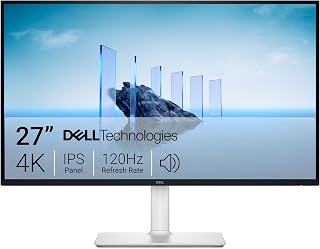
The S2725QS delivers native 4K resolution at 120Hz, making it capable of handling next-gen console output and midrange PC gaming without compromise. Its IPS panel ensures wide viewing angles and accurate color reproduction across the screen. FreeSync Premium eliminates screen tearing during variable frame rate scenarios. The 27-inch size keeps pixel density high at 163 PPI, ensuring sharp text and detailed textures in AAA titles.
Pros
- True 4K resolution with 99% sRGB color accuracy
- 120Hz with FreeSync Premium eliminates screen tearing
- Extensive stand adjustments: height, tilt, pivot, swivel
- ComfortView Plus reduces eye strain without color loss
Cons
- 4-8ms response time slower than competitive gaming monitors
- Default brightness too high, requires manual adjustment
The Dell S2725QS delivers authentic 4K Ultra HD resolution at 120Hz, making it a capable choice for gamers who want sharp visuals without chasing extreme refresh rates. The 27-inch IPS panel renders 3840x2160 pixels with 99% sRGB color coverage, producing accurate colors and crisp details that benefit both gaming and productivity work. The 120Hz refresh rate paired with AMD FreeSync Premium eliminates tearing and delivers smooth motion that feels noticeably more fluid than standard 60Hz displays, though competitive players may want higher refresh capabilities. The matte screen finish minimizes reflections in varied lighting. Build quality impresses with thin bezels, extensive stand adjustments including height, tilt, pivot, and swivel, and a sleek ash white design that feels premium. ComfortView Plus technology reduces blue light without sacrificing color accuracy during extended sessions. Built-in speakers offer improved bass and output compared to typical monitor audio. The 4-8ms response time handles most gaming scenarios competently but won't satisfy esports players seeking sub-1ms performance. Default brightness runs high and requires manual adjustment out of the box.
Display: 27-inch IPS LED panel, 4K UHD (3840x2160), 16:9 aspect ratio, matte anti-glare finish
Color: 99% sRGB color gamut, 1500:1 contrast ratio, 350 nits brightness
Refresh Rate: 120Hz with AMD FreeSync Premium adaptive sync technology
Response Time: 0.03ms, 4-8ms gray-to-gray
Viewing Angle: 178 degrees horizontal and vertical
Connectivity: DisplayPort, 2x HDMI 1.4, 3.5mm audio jack
Adjustments: Height, tilt, pivot, and swivel adjustments, VESA 100x100 compatible
Audio: Built-in 2W stereo speakers with enhanced audio quality
Features: ComfortView Plus blue light reduction, Energy Star certified, USB hub connectivity
Dimensions: 24.08 inches wide, 7.89 inches deep, 15.3 inches high (with stand)
Weight: 14.3 pounds
Power Consumption: 24.6 watts
Warranty: 1-year advanced exchange service and premium panel exchange
This monitor suits gamers who value 4K sharpness and color accuracy over extreme refresh rates, particularly those who split time between gaming and productivity tasks. Content creators, students, and casual gamers will appreciate the versatile feature set and solid build quality at a competitive price. Skip it if you're a competitive esports player who demands sub-1ms response times and 240Hz refresh rates, or if you only game and don't need the color accuracy and ergonomic adjustments that add value here.

Pros
- Exceptional HDR performance with true blacks and brilliant highlights that transform gaming and media experiences
- Stunning color accuracy and vibrancy make it ideal for both competitive gaming and creative work
- Blazing-fast 0.03ms response time eliminates motion blur in fast-paced competitive games
- Massive 32-inch 4K panel provides immersive gaming environment with excellent pixel density
- Versatile connectivity including USB-C with 90W power delivery, HDMI 2.1, and DisplayPort 1.4a
Cons
- Premium pricing reflects the cutting-edge QD-OLED technology, making it a significant investment
- Glossy screen finish may produce reflections in brightly lit rooms despite excellent daytime performance
- OLED panel requires proper care to prevent burn-in, though MSI's OLED Care 2.0 mitigates this concern
The MSI MPG 321URX is a flagship 32-inch gaming monitor built for players and professionals who refuse to compromise on visual quality or performance. With its QD-OLED panel, 4K resolution, and blistering 240Hz refresh rate, this monitor represents the cutting edge of display technology and is designed for competitive gamers, sim racers, and content creators who demand the absolute best.
The standout feature is the QD-OLED panel itself. Colors are dramatically more vibrant than traditional IPS or LED displays, blacks are impossibly deep, and the contrast ratio is truly extraordinary. Coupled with VESA DisplayHDR True Black 400 certification, this monitor transforms how games and movies look, especially in HDR-optimized content. The 0.03ms response time eliminates ghosting and motion blur, while the 240Hz refresh rate ensures buttery smooth gameplay. Real-world user feedback confirms the visual leap is genuinely transformative compared to older panel technologies.
Build quality is excellent, featuring a premium aluminum stand with full adjustability for height, tilt, and swivel. The 4-way ergonomic stand accommodates virtually any desk setup. Connectivity is robust with USB-C (90W power delivery), dual HDMI 2.1 ports, and DisplayPort 1.4a, plus KVM support for multi-device workflows. The Mystic Light ambient illumination system adds a nice personalization touch for gaming environments.
Potential drawbacks include the glossy screen finish, which can produce reflections in very bright rooms, though users report surprisingly good performance in daylight conditions. The premium price tag reflects the cutting-edge technology inside. OLED panels require some care to prevent burn-in, but MSI's OLED Care 2.0 technology and Gaming Intelligence AI help protect the display during heavy use.
Verdict: The MSI MPG 321URX is exceptional for gamers and professionals ready to invest in next-generation display technology. If you value stunning visuals, competitive performance, and premium build quality, this monitor delivers on all fronts. It represents one of the best gaming monitors currently available.
Display: 31.5-inch QD-OLED panel, 3840 x 2160 (4K UHD), 16:9 aspect ratio, glossy finish
Performance: 240Hz refresh rate, 0.03ms gray-to-gray response time, 178-degree viewing angles
Color & Brightness: 1.07 billion colors (10-bit), 99% DCI-P3 gamut, Delta E less than or equal to 2, 250 nits brightness, VESA DisplayHDR True Black 400
Connectivity: 2x HDMI 2.1, DisplayPort 1.4a, USB-C with 90W power delivery, KVM support, Picture-in-Picture, Picture-by-Picture
Physical: 28-inch depth, 9.5-inch width, 19-inch height, 27.2 pounds, fully adjustable stand, wall mount compatible
Warranty: 3-year manufacturer limited warranty
Best For: This monitor is ideal for competitive esports players, sim racing enthusiasts, content creators, and anyone who values pristine image quality and performance above all else. The combination of 4K clarity, 240Hz responsiveness, and OLED color accuracy makes it suitable for both intense gaming sessions and professional creative work.
Consider Alternatives If: You're on a tight budget or prefer matte screen finishes. Budget gamers may find excellent value in non-OLED 240Hz monitors. Those working primarily in bright environments without light control may struggle with the glossy finish.
Perfect For Multi-Setup Users: The KVM support, dual HDMI ports, and USB-C connectivity make this excellent for professionals managing multiple computers or console gaming setups, allowing quick switching between devices without unplugging cables.

The VG270K L1 achieves full 4K resolution at 144Hz, offering a balanced sweet spot for gamers with modern GPUs. Its IPS technology ensures consistent color across the 27-inch screen, while HDR10 support enhances contrast in compatible titles. AMD FreeSync prevents tearing during variable frame rates. The 72Hz default refresh rate with 144Hz dynamic mode provides flexibility for different gaming scenarios and GPU capabilities.
Pros
- Dynamic Refresh Rate switches between 4K/72Hz and 1080p/144Hz
- 95% DCI-P3 color gamut delivers vibrant, accurate visuals
- 0.5ms response time keeps motion crisp and clear
- Zero-frame bezels enable seamless multi-monitor arrangements
Cons
- HDR Ready implementation lacks full functionality
- VESA mounting screws not included with purchase
The Acer Nitro VG270K L1 brings 4K resolution to a 27-inch form factor with intelligent refresh rate flexibility that adapts to your gaming priorities. Dynamic Refresh Rate technology lets you choose between native 3840x2160 at 72Hz for visual clarity or downscale to 1920x1080 at 144Hz when smoothness takes priority. The IPS panel covers 95% of the DCI-P3 color space, delivering vibrant, accurate colors that make game worlds and 4K media look genuinely lifelike. Response time sits at 0.5ms, fast enough to keep motion crisp without trailing artifacts during rapid camera pans or intense firefights. AMD FreeSync eliminates screen tearing across variable frame rates, ensuring consistent visual fluidity. The ultra-thin zero-frame bezels maximize screen real estate and create seamless multi-monitor arrangements for panoramic setups. Ergonomic adjustments let you dial in the perfect viewing angle for marathon sessions. Connectivity includes DisplayPort 1.4 and dual HDMI 2.0 ports, accommodating PC and console simultaneously. The matte finish reduces glare in bright environments, and integrated speakers provide audio convenience without requiring external equipment. For 4K gaming where budget matters and adaptive resolution makes sense, this 27-inch display delivers reliable performance.
Display: 27-inch IPS LCD, 3840x2160 (4K UHD), 16:9 aspect ratio, matte finish
Refresh Rate: 72Hz native at 3840x2160, up to 144Hz at 1920x1080 with Dynamic Refresh Rate
Response Time: 0.5ms Gray-to-Gray
Color: DCI-P3 95% gamut, HDR 10 support
Sync Technology: AMD FreeSync
Ports: 1x DisplayPort 1.4, 2x HDMI 2.0 (cable included)
Adjustments: Height, tilt, swivel, pivot, VESA 100x100mm compatible
Dimensions: 24.18in W x 18.15in H x 7.84in D
Features: Built-in speakers, flicker-less technology, low dimming (ComfyView)
Warranty: 3-year parts and labor
This monitor fits gamers who want genuine 4K resolution for single-player campaigns and creative work but appreciate the flexibility to drop to 1080p/144Hz for competitive titles where frame rate matters more than pixel density. The 27-inch size keeps pixel density high while remaining desk-friendly. Choose it if you value color accuracy and adaptive sync on a budget. Skip it if you demand true HDR performance, as the HDR Ready implementation falls short of expectations and may not register properly with consoles. Also avoid if you need included VESA mounting hardware, since screws are not supplied.
Buying Guide
Panel Technology: OLED vs IPS vs VA
OLED panels like those in the ASUS ROG PG32UCDM deliver absolute blacks and instantaneous 0.03ms response times, making them ideal for HDR content and competitive shooters. Third-generation QD-OLED technology now includes improved heat management and burn-in protection, addressing earlier concerns about image retention.
IPS displays provide superior color accuracy and wider viewing angles without burn-in risk. The LG 27G810A-B demonstrates how modern IPS can achieve 95% DCI-P3 coverage with 1ms response times, making it suitable for color-critical work alongside gaming. VA panels offer the deepest contrast ratios at lower price points, though they typically sacrifice response time.
Refresh Rate and Dual-Mode Functionality
Native 4K at 240Hz represents the current performance ceiling, but several monitors now offer dual-mode operation. The LG 32GX850A-B switches between 4K at 165Hz and 1080p at 330Hz via hotkey, letting you prioritize visual fidelity for single-player games or maximum frame rates for competitive titles without changing monitors.
This flexibility matters when your game library spans genres. Story-driven adventures benefit from 4K clarity, while tactical shooters and MOBAs demand every available frame. Check whether your GPU can consistently drive your target refresh rate at native resolution before committing to 240Hz specs.
HDR Certification and Real-World Performance
VESA DisplayHDR ratings reveal a monitor’s actual HDR capability. DisplayHDR 400 represents the entry level, suitable for basic contrast enhancement. DisplayHDR True Black 400, found on OLED models, guarantees per-pixel dimming and true infinite contrast, transforming dark scenes in games like Cyberpunk 2077 or Alan Wake 2.
Budget options often claim HDR support without proper certification or local dimming zones. The Dell S2725QS offers HDR readiness rather than full certification, meaning it accepts HDR signals but cannot display the full dynamic range. For genuine HDR impact, prioritize models with at least 600 nits peak brightness and proper backlighting technology.
Connectivity and Future-Proofing
HDMI 2.1 bandwidth is mandatory for 4K at 120Hz or higher from consoles and modern GPUs. DisplayPort 1.4a handles 4K 240Hz with Display Stream Compression, while the newer DP 2.1 standard eliminates compression entirely. USB-C with power delivery lets you drive the display and charge a laptop through a single cable, particularly useful for hybrid work-gaming setups.
The MSI MPG 321URX includes 90W USB-C delivery and KVM functionality, allowing seamless switching between work and gaming PCs without cable swapping. Verify port configurations match your current devices and anticipated upgrades, especially if you plan to connect multiple systems or next-generation consoles.
Final Thoughts
Your ideal 4K gaming monitor depends on whether you value absolute image quality or maximum frame rates. For competitive gaming with HDR excellence, the ASUS ROG PG32UCDM delivers 240Hz OLED performance with comprehensive burn-in protection, while the LG 27G810A-B provides dual-mode flexibility at a more accessible entry point. Match your panel technology to your primary use case, confirm your GPU can sustain your target refresh rate, and prioritize proper HDR certification if you play visually demanding single-player titles.
Frequently Asked Questions
What GPU do I need to run 4K gaming at 144Hz or higher?
You’ll need at least an NVIDIA RTX 4070 Ti or AMD RX 7900 XT for consistent 4K gaming above 100fps in modern AAA titles at high settings. Competitive esports titles are far less demanding and can hit 144fps with mid-range cards like the RTX 4060 Ti. Our guide on matching monitors to specific GPUs provides detailed performance breakdowns for popular hardware combinations in 2026.
Is OLED burn-in still a concern for gaming monitors in 2026?
Modern QD-OLED monitors include pixel shift, logo dimming, and screen savers that significantly reduce burn-in risk compared to earlier generations. Manufacturers now offer three-year warranties covering burn-in, indicating improved confidence in panel longevity. Varied content usage and enabling built-in protection features make burn-in unlikely for typical gaming scenarios, though static HUD elements in a single game played for thousands of hours could still cause retention.
Should I choose 27-inch or 32-inch for 4K gaming?
A 27-inch display provides higher pixel density (163 PPI) for razor-sharp text and UI elements at typical desktop viewing distances of 24 to 30 inches. A 32-inch screen offers more immersive gaming and easier visibility of distant enemies without interface scaling, though pixel density drops to 138 PPI. Consider your desk depth and whether you primarily play competitive shooters that benefit from seeing the entire screen without head movement, or cinematic games where immersion takes priority.
Do I need G-SYNC or FreeSync for 4K gaming?
Adaptive sync technology eliminates screen tearing and stuttering when your frame rate fluctuates below your monitor’s refresh rate, which happens frequently in demanding 4K games. Both G-SYNC Compatible and FreeSync Premium work across NVIDIA and AMD GPUs in 2026, so the specific branding matters less than confirmed compatibility. Variable refresh rate becomes especially valuable at 4K where maintaining locked frame rates requires significant GPU horsepower.






Write Your Review
No reviews yet. Be the first to share your experience!