

Your desk may need more than a larger screen. When small type strains your eyes, app windows collide, or detailed creative files lose clarity, the best 5k monitor can provide either ultra-sharp 27-inch pixels or an expansive 40-inch canvas. Those are very different experiences, and a resolution label alone does not reveal which one fits your work.
This guide compares seven displays for creators, Mac users, multitaskers, and high-refresh gamers. It separates native 5K from 5K2K ultrawide and 4K alternatives, so you can focus on the specifications that matter at your viewing distance. For more screen-buying context, explore our monitor buying guides.
Quick Comparison
| Model | Link | Rating | Screen Size | Resolution | Refresh Rate |
|---|---|---|---|---|---|
| 1 LG 27UP850K-W 27in 4K UHD IPS Monitor with DisplayHDR 400...Highest rated | Check price | 4.5 of 5353 ratings | 27 inches | 4K UHD 2160p | 60 hertz |
| 2 Samsung 40" Odyssey G7 G75F 5120x2160 Curved Gaming... | Check price | 4.5 of 5159 ratings | 40 inches | WUHD 2160p | 180 hertz |
| 3 Dell UltraSharp U4025QW 40" 5K2K Curved Monitor - 21:9... | Check price | 4.5 of 5241 ratings | 39.7 inches | 5K2K WUHD | 120 hertz |
| 4 Dell S2725QS 27 inch 4K UHD 120Hz IPS Monitor with...Most reviewed | Check price | 4.4 of 51,031 ratings | 27 inches | 4K | 120 hertz |
| 5 LG 32UR500K-B 32-inch 4K UHD Monitor with HDR10 and... | Check price | 4.4 of 5511 ratings | 31.5 inches | 4K UHD 2160p | 60 hertz |
| 6 Samsung 27" Odyssey G8 5K Gaming Monitor 5120x2880 IPS...Fastest refresh | Check price | 4.2 of 533 ratings | 27 inches | 5K 2880p | 360 hertz |
| 7 BenQ PD2730S 27" 5K Mac Monitor, 218 PPI, Thunderbolt 4... | Check price | 3.8 of 536 ratings | 27 inches | 5K 5120 x 2880 | 60 hertz |
Ratings reflect the most recent data pull. Check each listing for current price and availability.
Quick answer
This guide compares 7 picks, with LG 27UP850K-W 27in 4K UHD IPS Monitor with DisplayHDR ranked first. Dell S2725QS 27 inch 4K UHD 120Hz IPS Monitor has the most customer reviews. Samsung 27" Odyssey G8 5K Gaming Monitor 5120x2880 IPS leads this list on refresh rate.

This 27-inch Ultrafine monitor combines 4K resolution with DisplayHDR 400 certification, giving creators accurate color preview and enhanced dynamic range for photo and video work. The IPS panel ensures wide viewing angles when collaborating, and the 60Hz refresh rate handles standard creative workflows reliably. Its compact footprint fits dual-monitor setups without overwhelming desk space, making it practical for multitasking professionals who edit and code simultaneously.
Pros
- 95% DCI-P3 color gamut with DisplayHDR 400 for accurate previews
- USB-C with 90W power delivery simplifies cable management
- Excellent ergonomic stand with height, tilt, and pivot
- 4K resolution renders sharp text for detailed work
Cons
- 60Hz refresh rate limits gaming and fast motion work
- Built-in speakers sound tinny for media playback
The LG 27UP850K-W prioritizes color fidelity and connectivity over frame rate, making it a strong fit for creative professionals who need accurate preview work and Mac users seeking a single-cable solution. The 95% DCI-P3 color gamut puts it ahead of standard sRGB displays for photo editing and video color grading, while DisplayHDR 400 support adds dynamic range to HDR content previews. The 4K resolution at 27 inches gives you enough real estate for timelines, palettes, and reference windows without scaling compromises. USB-C with 90W power delivery means you can drive the display and charge your laptop through one cable, cutting down on desk clutter. The ergonomic stand handles height, tilt, and pivot adjustments for portrait orientation when you need vertical space for code or documents. The matte finish reduces glare in bright offices, though it slightly softens vibrancy compared to glossy screens. The 60Hz refresh rate keeps this monitor firmly in the workstation category rather than gaming territory. Built-in speakers handle conferencing but lack depth for serious media playback. If your workflow revolves around accurate color and flexible connectivity rather than high frame rates, this display delivers.
Buy this if you're a content creator, photographer, or video editor who needs DCI-P3 color coverage and DisplayHDR 400 for accurate preview work. Mac users will appreciate the USB-C power delivery and seamless integration. Remote workers who prioritize sharp text and ergonomic flexibility benefit from the stand and port selection. Skip this if you game regularly or need refresh rates above 60Hz for smooth motion. Also pass if you want vibrant glossy screens or need deeper contrast ratios for dark room viewing.
Display: 27-inch 4K UHD IPS, 3840 x 2160 resolution, 178-degree viewing angle, 1200:1 contrast ratio, 5ms response time.
Color and HDR: 95% DCI-P3 color gamut, DisplayHDR 400, HDR10 support, 400 cd/m2 brightness.
Connectivity: USB Type-C with 90W power delivery, DisplayPort, 2x HDMI 2.0, 2x USB 3.0, headphone jack.
Ergonomics: Height, tilt, and pivot adjustable stand, 9.4 inches deep, 24.2 inches wide, 22.4 inches tall, 5.9kg weight.
Additional: Built-in stereo speakers with Waves MaxxAudio, FreeSync support, 60Hz refresh rate, 44W power consumption, 1-year parts and labor warranty.

The Odyssey G7's 180Hz refresh rate and 3000:1 contrast ratio make it a standout for gamers who also create content or code. Its 40-inch curved VA panel immerses players in fast-paced titles while providing ample workspace for editing streams or scripting mods. The high refresh eliminates motion blur in competitive shooters, and the ultrawide 21:9 format expands peripheral vision in racing and flight sims while accommodating side-by-side windows for productivity tasks.
Pros
- 5120x2160 ultrawide resolution provides expansive workspace
- 180Hz refresh with 1ms response and FreeSync Premium Pro
- 3000:1 contrast ratio with DisplayHDR 600 for deep blacks
- Full ergonomic adjustments and USB hub integration
Cons
- Aggressive 1000R curve and 40-inch size require desk space and adaptation
- Color accuracy needs calibration for professional creative work
The Samsung Odyssey G7 G75F stretches 40 inches across a 21:9 ultrawide format with a 1000R curve, delivering the kind of immersive real estate that benefits both competitive gaming and creative workflows that need horizontal space. The 5120x2160 resolution pushes more pixels than standard 4K, giving you room for multiple windows side by side or a wraparound field of view in games. The 180Hz refresh rate paired with 1ms response time and FreeSync Premium Pro keeps motion fluid and tear-free, critical for FPS players who need every advantage. The VA panel produces a 3000:1 contrast ratio that renders deep blacks and vivid highlights, enhanced by VESA DisplayHDR 600 for dynamic range. The aggressive curve wraps around your peripheral vision, though it takes time to adjust if you're coming from flat panels. The stand supports height, tilt, and swivel adjustments, and the USB hub adds practical connectivity. You'll need serious GPU power to drive this resolution at high frame rates; an RTX 4080 or better is recommended for demanding games. Color accuracy requires calibration for professional photo or video work, as the VA panel prioritizes contrast over precision out of the box.
Display: 40-inch 1000R curved VA panel, 5120x2160 native resolution, 21:9 aspect ratio, 178-degree viewing angles
Performance: 180Hz refresh rate, 1ms response time (GtG), 3000:1 contrast ratio, 350 cd/m2 brightness, VESA DisplayHDR 600
Connectivity: 2x HDMI 2.1, 1x DisplayPort 1.4, USB 3.0 hub upstream, audio jack, stand mount and VESA wall mount compatible
Design: Adjustable stand with height, tilt, and swivel, dimensions 36.56"W x 23.58"H x 11.96"D, 24.9 lbs, includes CoreSync RGB with 16.7 million color options
Warranty: 1-year manufacturer warranty, AMD FreeSync Premium Pro included
Ideal for gamers who want maximum immersion and creators who benefit from extra horizontal workspace for timelines, code editors, or reference panels. The 180Hz refresh and 1ms response suit competitive play, while the ultrawide format handles multitasking. You need a powerful GPU to drive the 5120x2160 resolution at high settings. Skip this if you lack desk space for 40 inches, prefer flat screens, or do color-critical work without calibration tools. Also pass if you don't have the GPU horsepower to push this resolution.

The UltraSharp U4025QW's 40-inch curved 5K2K display and 21:9 aspect ratio create an immersive workspace that replaces dual-monitor setups for coders and creators. Its 5120x2160 resolution delivers exceptional pixel density for detailed design work and clean typography in IDEs. The 120Hz refresh keeps animations smooth in creative software, while the 2000:1 contrast ratio provides depth for visual work without the gaming-focused aggression some professionals prefer to avoid.
Pros
- Exceptional screen real estate eliminates need for multiple monitors and boosts productivity
- Outstanding color accuracy and gamut coverage ideal for creative professionals
- Comprehensive connectivity with DisplayPort, HDMI, USB-C, and Ethernet options
- Curved design reduces eye strain and creates immersive viewing experience
- Excellent brightness and anti-glare screen technology perform well in various lighting conditions
Cons
- Premium price point makes it a significant investment for casual users or small businesses
- Requires substantial desk space due to 40-inch curved form factor
- Heavy at 41.9 pounds may require professional installation or cable management setup
The Dell UltraSharp U4025QW is a premium ultrawide curved monitor designed for professionals who demand maximum screen real estate and superior image quality. This 40-inch display is purpose-built for content creators, video editors, photographers, data analysts, and multitasking professionals who benefit from its expansive 21:9 aspect ratio and exceptional pixel density.
The standout feature is its 5K2K WUHD resolution (5120 x 2160 pixels) paired with a 99% color gamut, delivering stunning clarity and accurate color representation that professionals rely on. The 120Hz refresh rate and 5ms response time ensure smooth performance for dynamic content and gaming, while the 600 Nit brightness and anti-glare coating make the display readable in brightly lit offices. USB Type-C connectivity with integrated hub functionality streamlines workflow by reducing cable requirements.
Build quality is robust with a curved panel that reduces eye strain during extended use. The adjustable stand offers height, tilt, and swivel adjustments, accommodating diverse ergonomic needs. The matte screen finish effectively minimizes reflections, and the 178-degree viewing angles ensure consistent image quality from various positions. At 41.9 pounds, this is a substantial display that commands presence on any professional workspace.
The primary drawback is the premium price tag, which positions this monitor as an investment rather than a casual purchase. Additionally, the 40-inch footprint requires significant desk space, and the weight necessitates a sturdy, properly configured mounting solution. Power consumption at 39.5 watts is reasonable given the display size.
The Dell UltraSharp U4025QW delivers professional-grade performance and reliability with a 3-year manufacturer warranty. It is the ideal choice for professionals seeking maximum productivity through expanded screen real estate combined with exceptional color accuracy and connectivity options.
Display Specs: 40-inch curved LED monitor, 5K2K WUHD resolution (5120 x 2160 pixels), 21:9 aspect ratio, 120Hz refresh rate, 5ms response time, 2000:1 contrast ratio, 99% color gamut
Brightness & Viewing: 2055.6 Nit brightness, 600 Nit typical, anti-glare matte screen finish, 178-degree viewing angles, 7.1mm pixel pitch
Physical Dimensions: 37.3 inches wide, 16.5 inches tall, 4.3 inches deep, 41.9 pounds total weight. Curved panel design with adjustable stand supporting height, tilt, and swivel adjustments
Connectivity: 1 HDMI port, 1 DisplayPort, USB Type-C, Ethernet, 8 USB ports with hub functionality, 1 component output
Additional Features: Panel mount capability, 39.5 watts power consumption, 3-year manufacturer warranty. Model number U4025QW, manufactured by Dell Technologies
Best For: This monitor excels for video editors, photographers, graphic designers, data analysts, financial traders, and any professional who benefits from multiple side-by-side applications. The expansive 40-inch ultrawide display eliminates the need for dual monitors while providing superior color accuracy for content creation work.
Not Ideal For: Casual gamers and general users may find the premium price difficult to justify. Those with limited desk space or lightweight setups should consider the substantial 41.9-pound weight and significant width requirement before purchasing.
Setup Considerations: Ensure your desk can support the monitor's weight and width. Verify your graphics card supports the 5K2K resolution and desired refresh rate via DisplayPort or HDMI. Plan cable management around the 8 USB ports to maximize the hub functionality. Consider the ergonomic benefits of the adjustable stand for your typical viewing distance and work posture.
Value Assessment: This is a premium professional-grade monitor with features and performance that justify investment for power users and creative professionals. For casual office work or gaming, alternative ultrawide monitors at lower price points may better suit your needs. The 3-year warranty and Dell UltraSharp reputation provide peace of mind for this significant purchase.
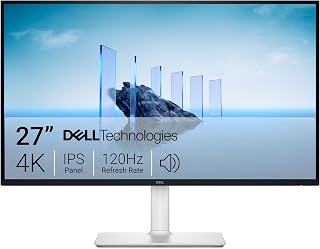
The S2725QS delivers sharp 4K clarity on a compact 27-inch panel, ideal for coders who want crisp text without excessive screen real estate. Its 120Hz refresh rate and FreeSync Premium support ensure smooth scrolling through long files and fluid transitions in creative apps. The matte finish reduces glare during extended sessions, while the 5ms response time keeps motion clean for casual gaming breaks between work sprints.
Pros
- 4K resolution with 99% sRGB delivers sharp text and accurate color
- 120Hz refresh rate smooths scrolling and light gaming
- Full ergonomic adjustments including pivot and swivel
- ComfortView Plus reduces eye strain during long sessions
Cons
- 4-8ms response time trails dedicated gaming monitors
- Default brightness requires manual adjustment out of the box
The Dell S2725QS brings 4K clarity to a 27-inch IPS panel, making it a practical choice for anyone splitting time between code, design work, and lighter gaming. The 120Hz refresh rate keeps scrolling smooth when you're moving through long files or browsing reference docs, and FreeSync Premium eliminates tearing when you switch to gaming sessions. The 99% sRGB coverage ensures colors look correct for web work and light photo editing, while the 4K resolution gives you enough pixel density for crisp text rendering at native scaling. The ergonomic stand adjusts in every direction, and ComfortView Plus filters blue light without washing out the color you need for accurate work. The matte finish handles office lighting well. Response time sits at 4-8ms, which works for most gaming but won't satisfy esports players chasing the fastest possible input lag. The ash white design keeps bezels minimal, and the improved speakers handle video calls without needing external audio. This monitor handles mixed workloads competently without forcing you to choose between productivity and entertainment.
Display: 27-inch IPS LED panel, 4K UHD (3840x2160), 16:9 aspect ratio, matte anti-glare finish
Color: 99% sRGB color gamut, 1500:1 contrast ratio, 350 nits brightness
Refresh Rate: 120Hz with AMD FreeSync Premium adaptive sync technology
Response Time: 0.03ms, 4-8ms gray-to-gray
Viewing Angle: 178 degrees horizontal and vertical
Connectivity: DisplayPort, 2x HDMI 1.4, 3.5mm audio jack
Adjustments: Height, tilt, pivot, and swivel adjustments, VESA 100x100 compatible
Audio: Built-in 2W stereo speakers with enhanced audio quality
Features: ComfortView Plus blue light reduction, Energy Star certified, USB hub connectivity
Dimensions: 24.08 inches wide, 7.89 inches deep, 15.3 inches high (with stand)
Weight: 14.3 pounds
Power Consumption: 24.6 watts
Warranty: 1-year advanced exchange service and premium panel exchange
Best for developers, content creators, and students who need one display that handles coding, design reviews, and casual gaming without compromise. The 120Hz refresh gives you smoother daily work than standard 60Hz office monitors, and the color accuracy supports creative tasks. Skip this if you play competitive shooters where every millisecond counts, or if you need deeper color gamuts like DCI-P3 for professional color grading. Also pass if you want higher refresh rates above 120Hz for fast-paced gaming.

The 32UR500K-B offers generous screen real estate at 32 inches with 4K resolution, giving coders more visible lines of code and creators ample canvas space. Built-in speakers eliminate the need for external audio, while OnScreen Control and Reader Mode reduce eye strain during long work sessions. The VA panel's decent contrast ratio helps maintain image depth, and dual HDMI plus DisplayPort inputs simplify multi-device workflows for professionals switching between systems.
Pros
- 90% DCI-P3 color gamut and HDR10 support for vibrant, accurate visuals
- 32-inch 4K panel provides ample workspace for multitasking
- Matte finish and flicker-free technology reduce eye fatigue
- Flexible connectivity with dual HDMI and DisplayPort
Cons
- 60Hz refresh rate limits competitive gaming performance
- Built-in speakers lack depth for serious audio work
The LG 32UR500K-B brings 4K resolution to a spacious 32-inch VA panel, making it a practical choice for creators working with detailed imagery and coders who benefit from readable text at native scaling. The 90% DCI-P3 color gamut coverage and HDR10 support deliver vibrant, lifelike visuals that help photographers and video editors evaluate color-critical work, while the 3840x2160 resolution provides enough pixel density for comfortable reading during long coding sessions. Dynamic Action Sync and a 4ms response time make this monitor equally capable for gaming breaks between project work. The matte finish and flicker-free technology support extended use without eye strain, and the borderless design maximizes visible screen area. Dual HDMI and DisplayPort inputs accommodate multi-device workflows, and VESA mounting adds flexibility for desk setups. The adjustable ergonomic stand and compact 8.8-inch depth fit well in crowded workspaces. Built-in stereo speakers with Waves MaxxAudio handle casual audio needs without requiring external equipment.
Display: 32-inch 4K UHD LED VA panel, 3840x2160 native resolution, 16:9 aspect ratio, 178-degree viewing angle
Color and Brightness: 90% DCI-P3 color gamut, 250 nits brightness, 1000:1 contrast ratio, HDR10 support
Performance: 4ms response time, 60Hz refresh rate, FreeSync adaptive sync, 0.18mm pixel pitch
Connectivity: 2x HDMI, 1x DisplayPort, 1x headphone jack
Audio: Dual stereo speakers with Waves MaxxAudio technology
Build: Matte screen finish, borderless design, adjustable ergonomic tilt stand, VESA wall mount compatible
Power and Warranty: 31.5W consumption, 1-year manufacturer warranty, includes monitor and power adapter

Pros
- Exceptional flexibility with dual-mode switching between high resolution and high refresh rate gaming
- Outstanding pixel density and IPS color accuracy make this excellent for creative work and gaming
- Advanced sync technologies ensure smooth gameplay across both NVIDIA and AMD systems
- Premium connectivity with DisplayPort 2.1 and HDMI 2.1 supports next-gen graphics cards
- Fully adjustable stand provides comfortable ergonomic positioning for extended gaming sessions
Cons
- Premium price point positions this as a high-end monitor, not budget-friendly for casual users
- 5K at 180Hz still requires top-tier graphics hardware to maximize the display's potential
- Limited to 27-inch size, which may feel compact for some users expecting larger immersive displays
The Samsung Odyssey G8 G80HF is a cutting-edge gaming monitor designed for enthusiasts who refuse to compromise between visual quality and responsiveness. This 27-inch display targets both competitive gamers and content creators seeking a versatile solution that adapts to their needs.
The standout feature is undoubtedly the dual-mode capability, allowing seamless toggling between 5K resolution at 180Hz for stunning visuals or QHD at 360Hz for action-packed gameplay. The 5K native resolution delivers an impressive 5120 x 2880 pixel density of 218 PPI, resulting in razor-sharp image clarity. Combined with the fast IPS panel, 1ms response time, and HDR10+ support, this monitor excels at rendering both beautiful scenes and competitive gaming scenarios without compromise.
Build quality reflects Samsung's premium positioning, featuring a matte finish that minimizes glare and a fully ergonomic stand with height, tilt, pivot, and swivel adjustments. The 178-degree wide viewing angles ensure consistent color accuracy across the entire screen. Connectivity is robust with DisplayPort 2.1, dual HDMI 2.1 inputs, and a USB hub, providing excellent future-proofing and desktop integration.
The primary consideration is that achieving 5K at high refresh rates demands top-tier graphics hardware. Additionally, the price premium reflects the advanced specifications, making this a significant investment. The 27-inch size, while generous for this resolution class, may feel limited compared to larger ultra-wide alternatives for some users.
The Samsung Odyssey G8 represents the pinnacle of adaptable gaming displays, delivering exceptional visual fidelity and responsive performance where it matters most. For gamers and creators with demanding workflows and compatible hardware, this monitor justifies its premium positioning through genuine technological innovation and versatility.
Display: 27-inch IPS LCD, 5120 x 2880 pixels (5K), 16:9 aspect ratio, 218 PPI, 350 cd/m2 brightness, 178-degree viewing angle.
Performance: Dual-mode support with 5K at 180Hz or QHD at 360Hz, 1ms response time, HDR10+ support, adaptive sync with NVIDIA G-SYNC and AMD FreeSync Premium Pro.
Connectivity: DisplayPort 2.1, dual HDMI 2.1, USB 3.0 hub, power cable included.
Design: Matte black finish, height-adjustable ergonomic stand with tilt, pivot, and swivel, VESA wall mount compatible.
Dimensions/Weight: 24.18W x 22.31H x 10.39D inches, 13.7 lbs. One-year manufacturer warranty.

Pros
- Extremely sharp 5K resolution with excellent pixel density for detailed design, photo, and video work.
- Wide 98% P3 color coverage and strong contrast support accurate-looking, vibrant imagery.
- Thunderbolt 4 provides convenient single-cable Mac connectivity, charging, and high-speed data transfer.
- KVM switching and daisy chaining can simplify complex multi-computer and multi-display workflows.
- Well-built, adjustable design with a comfortable matte viewing surface.
Cons
- The native 5K view can make text and interface elements appear small, so many users may prefer scaled macOS resolutions.
- It does not include a built-in camera or robust speakers, which may require separate accessories for calls and audio.
- Some customer feedback raises quality-control concerns, including reports of stuck pixels and early display failures.
The BenQ PD2730S is a professional 27-inch 5K monitor designed for Mac users, photographers, video editors, 3D artists, VFX animators, and game designers. Its 5120 x 2880 resolution and 218 PPI provide a highly detailed workspace for precise creative tasks.
Its strongest performance comes from the combination of 98% Display P3 coverage, a 2000:1 contrast ratio, and a Nano Matte panel. Images appear rich and detailed, while the low-reflection surface helps reduce distracting glare during long editing and design sessions.
Thunderbolt 4 adds practical workflow benefits by providing up to 90W of power delivery, 40Gbps data transfer, and support for compatible daisy-chained displays. The built-in KVM switch also lets users share one keyboard and mouse between two systems, making it useful for multi-device workstations.
The monitor has a sturdy, professional design with a height-adjustable stand and matte finish, but it lacks a built-in camera and strong speakers. Some user feedback also reports stuck pixels or early display failures, so buyers should check the panel carefully during the return or warranty period.
Overall, the PD2730S is a strong choice for Mac-based creative professionals who value 5K detail, accurate-looking color, and flexible connectivity. Its high pixel density may require display scaling, and its quality-control reports mean it is best purchased with attention to warranty coverage.
How to Choose a 5K Monitor
Know whether you need true 5K or 5K2K
Resolution terminology can be misleading. A native 5K panel has 5120 x 2880 pixels, and at 27 inches that delivers 218 PPI for remarkably crisp fonts, precise interface scaling, and close-up image work. The Samsung 27" Odyssey G8 (G80HF) Gaming Monitor and BenQ PD2730S 27" 5K 218 PPI Mac Monitor are the true 5K options in this group.
The Dell UltraSharp U4025QW 40" Class 5K2K WUHD and Samsung 40” Odyssey G7 (G75F) take the 21:9 ultrawide approach instead. Their broad format gives you generous side-by-side room for timelines, code, and several documents, but it does not provide the same 16:9 canvas with 2880 vertical pixels. The LG and Dell 4K models are useful alternatives, not native 5K choices.
Match color, contrast, and panel finish to your work
For illustration, VFX, and color-sensitive design, wide gamut coverage and panel consistency deserve as much attention as pixel count. The BenQ PD2730S combines 98% P3 coverage, a 2000:1 contrast ratio, uniformity-focused color management, and a nano matte surface that diffuses ambient reflections. Those attributes make it especially compelling for controlled creative workflows and bright rooms.
4K options can still offer appealing color for general content creation. The LG 27UP850K-W 27-inch Ultrafine 4K UHD IPS reaches up to 95% DCI-P3 and supports DisplayHDR 400, while the LG 32UR500K-B Ultrafine 32-inch 4K UHD (3840×2160) offers up to 90% DCI-P3 with HDR10. Dell 27 Monitor S2725QS, 4K UHD IPS, 120Hz, 5ms focuses on 99% sRGB, useful for everyday web and office work.
Prioritize refresh rate only when your hardware supports it
A high-resolution screen is demanding, so refresh rate should align with the games you play and the graphics performance you can sustain. The Samsung 27" Odyssey G8 (G80HF) Gaming Monitor offers dual mode operation: 5K at 180Hz for detailed play, or QHD at 360Hz for speed-focused competition. It also supports NVIDIA G-SYNC Compatibility and AMD FreeSync Premium to help reduce tearing.
The Samsung 40” Odyssey G7 (G75F) pairs its immersive 1000R curve with a 180Hz refresh rate, near-instant 1ms response time, and DisplayHDR 600. Meanwhile, the Dell 27 Monitor S2725QS reaches 120Hz with FreeSync Premium, a practical middle ground for mixed work and casual gaming. Compare your display goals with suitable graphics card options before making refresh rate your deciding factor.
Treat ports and ergonomics as everyday essentials
A clean single-cable desk can make a premium display far more convenient. The BenQ PD2730S provides Thunderbolt 4 with up to 90W power delivery, high-speed data transfer, daisy-chain capability, and a built-in KVM switch for controlling two systems. The LG 27UP850K-W also supplies up to 90W through USB-C, plus DisplayPort, two HDMI ports, USB ports, and a headphone jack.
Do not overlook stand adjustment when you spend long hours at your desk. The Samsung 27" Odyssey G8 (G80HF) Gaming Monitor can height-adjust, pivot, tilt, and swivel, while the LG 27UP850K-W includes height, tilt, and pivot adjustments. Confirm your laptop and cable support the required signal and charging modes, and browse compatible display cables and adapters before planning a streamlined setup.
Final Thoughts
The right choice should strengthen your daily workflow rather than force compromises around it. Choose the Samsung 27" Odyssey G8 (G80HF) Gaming Monitor for high-refresh versatility, or the BenQ PD2730S 27" 5K 218 PPI Mac Monitor for a color-conscious Thunderbolt workspace.
Frequently Asked Questions
Is a 5K monitor worth it over a 4K monitor?
At 27 inches, a native 5120 x 2880 display reaches 218 PPI, which makes text, interface elements, and fine image details look exceptionally sharp at close viewing distance. Native 5K also contains substantially more workspace than 4K, which helps when you need full-resolution media alongside editing controls. It is most worthwhile for detailed creative work, coding, text-heavy tasks, and operating systems that scale comfortably at this density. A larger 4K panel can be the better fit if you prefer bigger physical elements or sit farther back.
Which 5K monitor works well with a Mac in 2026?
The BenQ PD2730S is purpose-built for a Mac-centered creative desk, with 5K resolution, 98% P3 coverage, Thunderbolt 4, up to 90W power delivery, and a KVM switch. Its daisy-chain support can also simplify a multi-display workflow when paired with appropriate Thunderbolt-certified cables. Choose it when accurate color, reflection control, and single-cable convenience matter more than extreme refresh rates. The Samsung 27" Odyssey G8 (G80HF) Gaming Monitor is a stronger alternative when you want native 5K detail alongside much faster motion handling.
Can you play fast games on a 5K monitor?
Yes, although smooth 5K gaming requires considerable graphics performance. Samsung’s 27-inch Odyssey G8 reaches 180Hz at 5K, then lets you switch to QHD at 360Hz when competitive speed takes priority over maximum pixel density. Variable refresh support helps the display stay in step with changing frame rates. Consider your broader electronics setup, especially GPU capability, port availability, and the kinds of games you play most often.
Should I choose a 27-inch 5K display or a 40-inch ultrawide?
Choose a 27-inch native 5K display when sharp text, close-up detail, compact desk placement, and a familiar 16:9 layout are your priorities. Choose a 40-inch 21:9 ultrawide such as the Dell UltraSharp U4025QW or Samsung 40” Odyssey G7 when your work benefits from keeping several full-size windows visible without a bezel between them. Ultrawide models also feel more enveloping for simulations and cinematic games. Complete the arrangement with a comfortable keyboard and mouse setup that suits the added horizontal reach.






Write Your Review
No reviews yet. Be the first to share your experience!